key TOYOTA 86 2023 Service Manual
[x] Cancel search | Manufacturer: TOYOTA, Model Year: 2023, Model line: 86, Model: TOYOTA 86 2023Pages: 449, PDF Size: 8.5 MB
Page 329 of 449
3296-3. Do-it-yourself maintenance
6
Maintenance and care
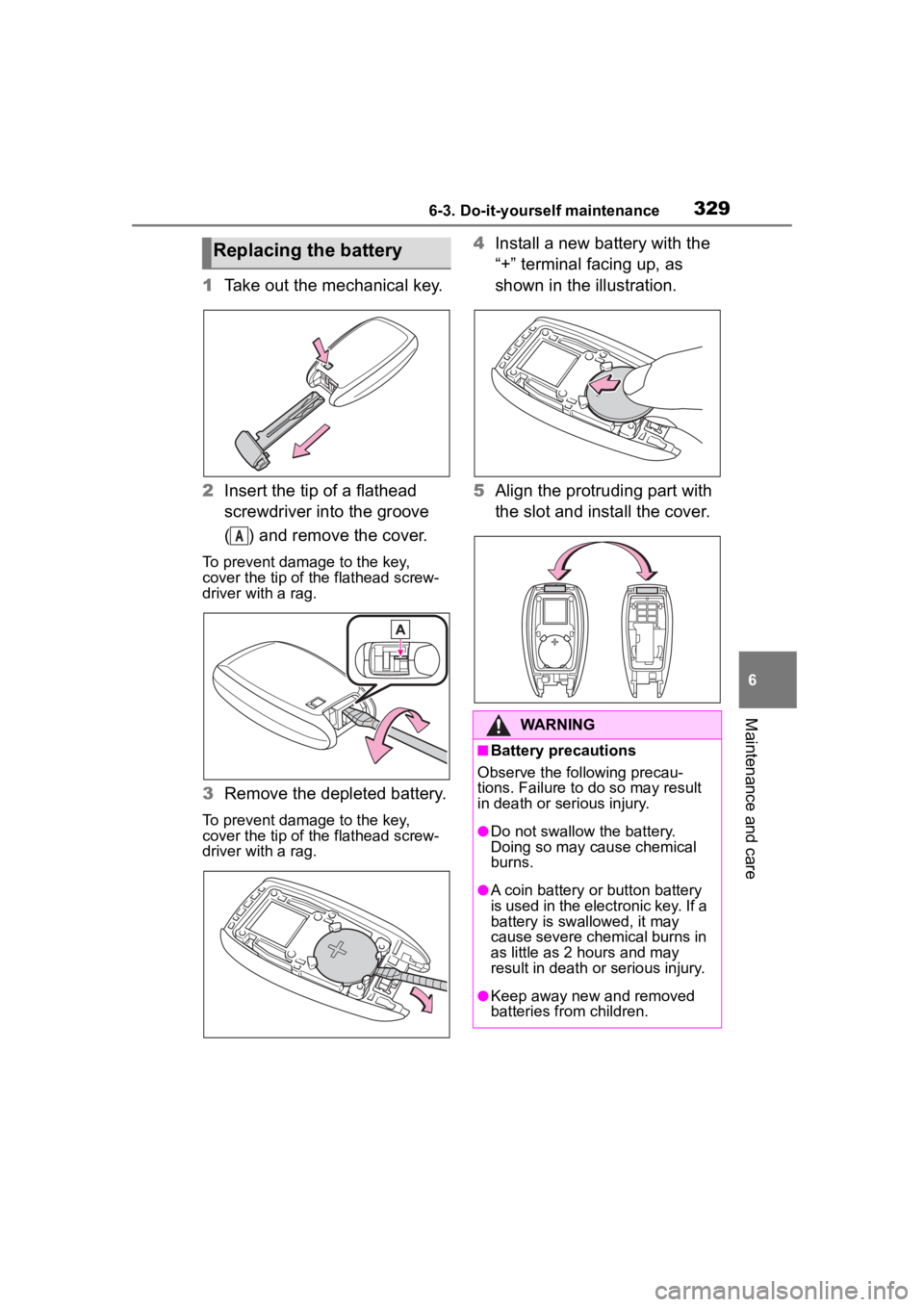
1Take out the mechanical key.
2 Insert the tip of a flathead
screwdriver into the groove
( ) and remove the cover.
To prevent damage to the key,
cover the tip of the flathead screw-
driver with a rag.
3Remove the depleted battery.
To prevent damage to the key,
cover the tip of the flathead screw-
driver with a rag.
4Install a new battery with the
“+” terminal facing up, as
shown in the illustration.
5 Align the protruding part with
the slot and install the cover.Replacing the battery
A
WARNING
■Battery precautions
Observe the following precau-
tions. Failure to do so may result
in death or serious injury.
●Do not swallow the battery.
Doing so may cause chemical
burns.
●A coin battery or button battery
is used in the electronic key. If a
battery is swa llowed, it may
cause severe chemical burns in
as little as 2 hours and may
result in death or serious injury.
●Keep away new and removed
batteries from children.
Page 330 of 449
3306-3. Do-it-yourself maintenance
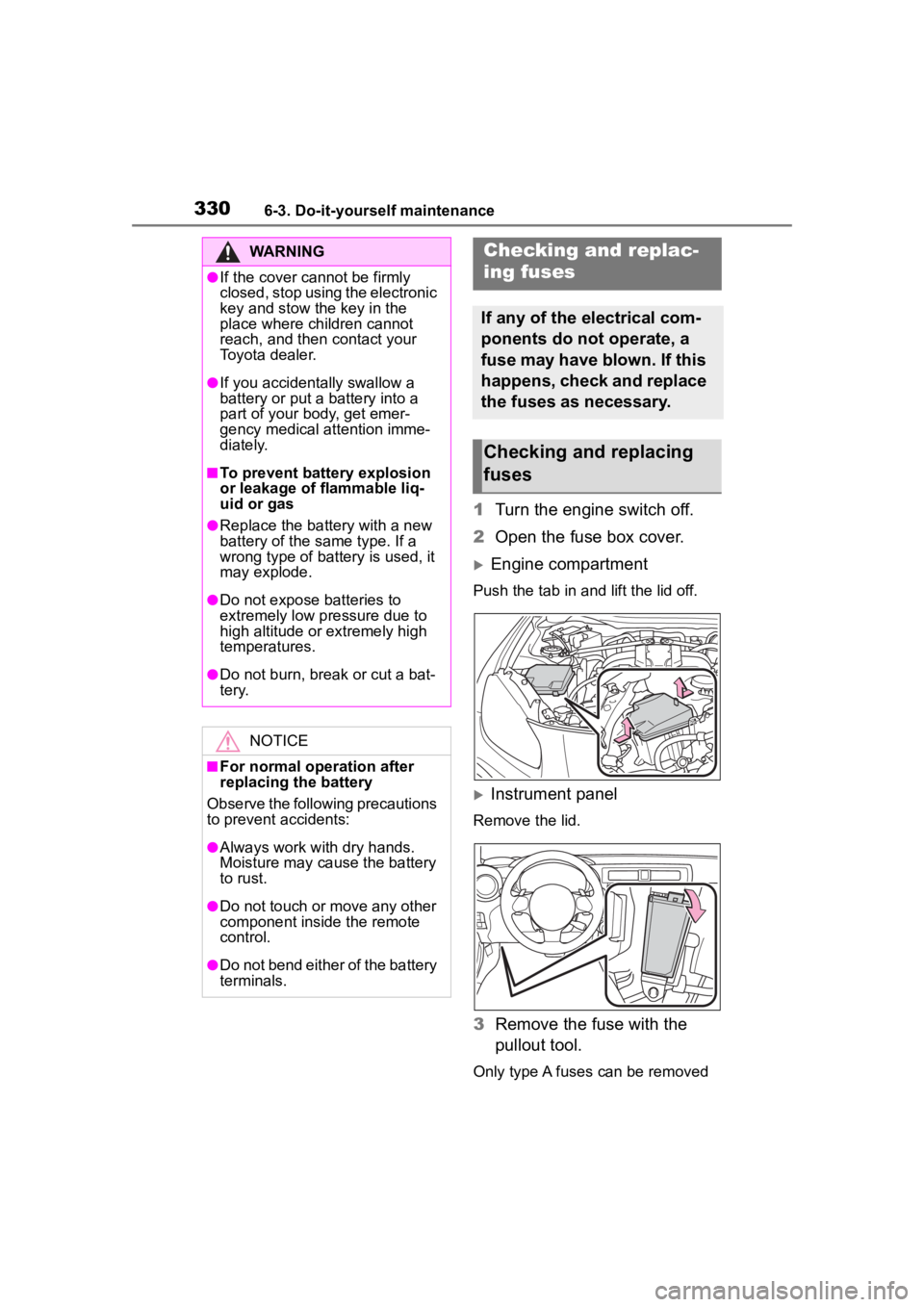
1Turn the engine switch off.
2 Open the fuse box cover.
Engine compartment
Push the tab in and lift the lid off.
Instrument panel
Remove the lid.
3Remove the fuse with the
pullout tool.
Only type A fuses can be removed
WARNING
●If the cover cannot be firmly
closed, stop using the electronic
key and stow the key in the
place where children cannot
reach, and then contact your
Toyota dealer.
●If you accidentally swallow a
battery or put a b attery into a
part of your body, get emer-
gency medical attention imme-
diately.
■To prevent battery explosion
or leakage of flammable liq-
uid or gas
●Replace the battery with a new
battery of the same type. If a
wrong type of battery is used, it
may explode.
●Do not expose batteries to
extremely low pressure due to
high altitude or extremely high
temperatures.
●Do not burn, bre ak or cut a bat-
tery.
NOTICE
■For normal operation after
replacing the battery
Observe the following precautions
to prevent accidents:
●Always work with dry hands.
Moisture may cau se the battery
to rust.
●Do not touch or move any other
component inside the remote
control.
●Do not bend either of the battery
terminals.
Checking a nd replac-
ing fuses
If any of the electrical com-
ponents do not operate, a
fuse may have blown. If this
happens, check and replace
the fuses as necessary.
Checking and replacing
fuses
Page 337 of 449
337
7
7
When trouble arises
When trouble arises
.7-1. Essential informationEmergency flashers .... 338
If your vehicle has to be stopped in an emergency.................................. 338
If the vehicle is submerged or water on the road is ris-
ing ............................. 339
7-2. Steps to take in an emer- gency
If your vehicle needs to be towed......................... 341
If you think something is wrong ........................ 346
Fuel pump shut off system .................................. 347
If a warning light turns on or a warning buzzer sounds.................................. 348
If a warning message is dis- played........................ 357
If you have a flat tire.... 358
If the engine will not start .................................. 367
If you lose your keys ... 369
If the fuel filler door cannot be opened ................. 369
If the electronic key does not operate properly .. 370
If the vehicle battery is dis- charged ..................... 372
If your vehicle overheats .................................. 375If the vehicle becomes stuck
.................................. 377
Page 357 of 449
3577-2. Steps to take in an emergency
7
When trouble arises
■Warning messages
The warning messages explained
below may differ from the actual
messages according to operation
conditions and vehicle specifica-
tions.
■Warning buzzer
In some cases, the buzzer may not
be heard due to being in a noisy
location or audio sound.
■If “Check Owner’s Manual” is
displayed
●If the following messages are
shown, following the instructions,
accordingly.
• “High Coolant Temperature” ( P.375)
• “Transmission Oil Temperature” ( P.149)
●If any of the following messages
are shown on the multi-informa-
tion display, it may indicate a mal-
function. Have the vehicle
inspected by your Toyota dealer
immediately.
• “EyeSight OFF”
• “Headlights Disabled”
• “ABS”
• “Steering System”
• “Vehicle Stability Control”
• “Transmission”
• “Low Tire Pressure”
• “RAB Disabled”
• “BSD/RCTA Disabled”
• “Keyless Access System Dis- abled”
• “Auto Headlight Leveler Disabled”
• “SRH Disabled”
●If any of the following messages
are shown on the multi-informa-
tion display, it may indicate a mal-
function. Immediately stop the
vehicle and contact your Toyota
dealer.
• “Brake System”
• “Check Engine”
• “SRS Airbag System”
If a war ning message
is displayed
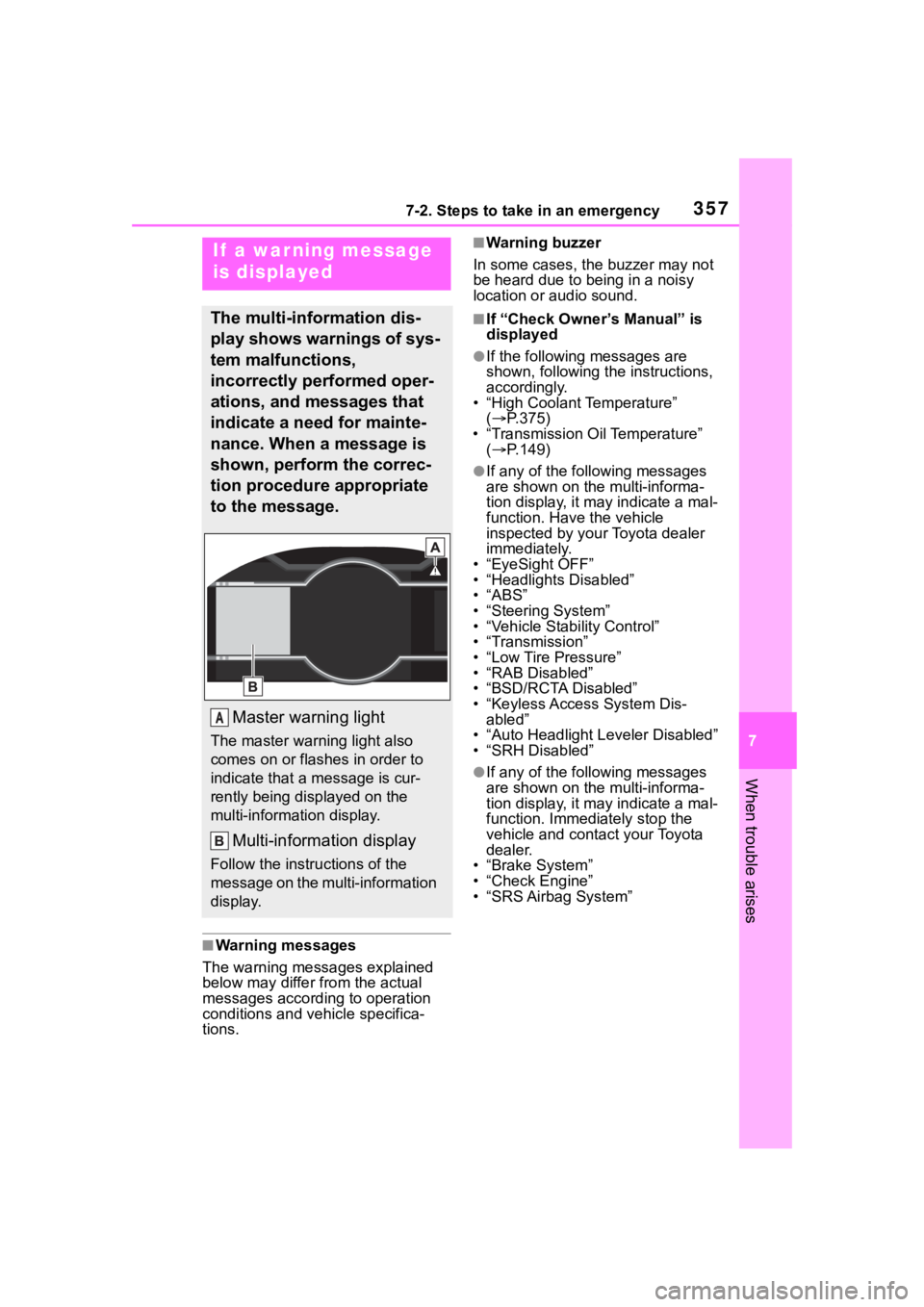
The multi-information dis-
play shows warnings of sys-
tem malfunctions,
incorrectly performed oper-
ations, and messages that
indicate a need for mainte-
nance. When a message is
shown, perform the correc-
tion procedure appropriate
to the message.
Master warning light
The master warning light also
comes on or flashes in order to
indicate that a message is cur-
rently being displayed on the
multi-information display.
Multi-information display
Follow the instru ctions of the
message on the multi-information
display.
A
Page 368 of 449
3687-2. Steps to take in an emergency
The battery terminal connec-
tions may be loose or cor-
roded. ( P.309)
The engine starting system may
be malfunctioning due to an
electrical problem such as elec-
tronic key battery depletion or a
blown fuse. However, an interim
measure is available to start the
engine. ( P.368)
One of the following may be the
cause of the problem:
One or both of the battery ter-
minals may be disconnected.
( P.309)
The battery may be dis-
charged. ( P.372)
There may be a malfunction
in the steering lock system.
Contact your Toyot a dealer if the
problem cannot be repaired, or if
repair procedures are unknown.
When the engine does not start,
the following steps can be used
as an interim measure to start the engine if the engine switch is
functioning normally:
1
Set the parking brake.
2 Shift the shift lever to P (auto-
matic transmission) or N
(manual transmission).
3 Turn the engine switch to
ACC.
4 Press and hold the engine
switch for about 10 seconds
while depressing the brake
pedal (automatic transmis-
sion) or clutch pedal (manual
transmission) firmly.
Even if the engine can be
started using the above steps,
the system may be malfunction-
ing. Have the vehicle inspected
by your Toyota dealer.
The starter motor does
not turn over
The starter motor does
not turn over, the interior
lights and headlights do
not turn on, or the horn
does not sound.
Emergency start function
Page 369 of 449
3697-2. Steps to take in an emergency
7
When trouble arises
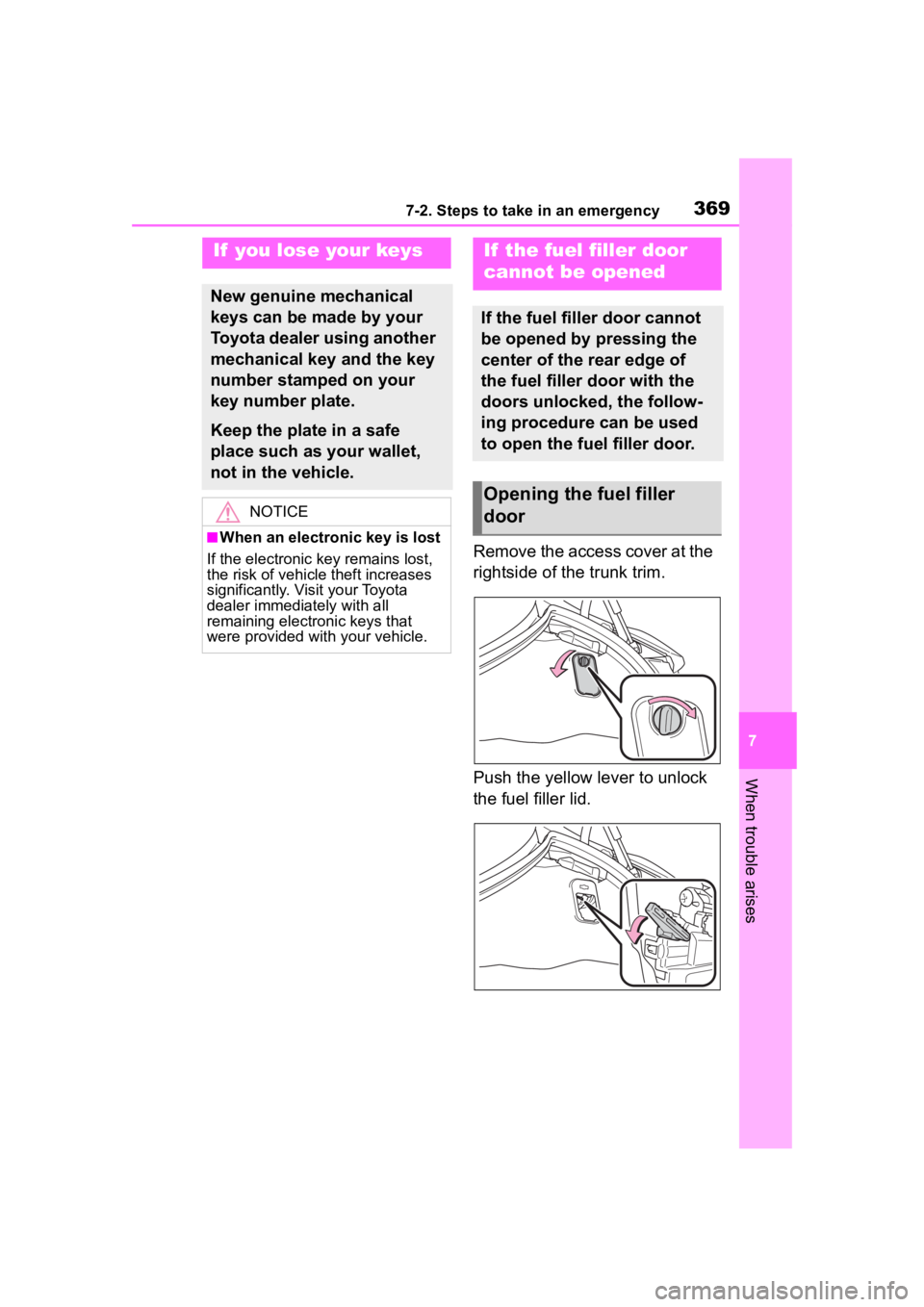
Remove the access cover at the
rightside of the trunk trim.
Push the yellow lever to unlock
the fuel filler lid.
If you lose your keys
New genuine mechanical
keys can be made by your
Toyota dealer using another
mechanical key and the key
number stamped on your
key number plate.
Keep the plate in a safe
place such as your wallet,
not in the vehicle.
NOTICE
■When an electronic key is lost
If the electronic key remains lost,
the risk of vehicle theft increases
significantly. Visit your Toyota
dealer immediately with all
remaining electronic keys that
were provided wit h your vehicle.
If the fuel filler door
cannot be opened
If the fuel filler door cannot
be opened by pressing the
center of the rear edge of
the fuel filler door with the
doors unlocked, the follow-
ing procedure can be used
to open the fuel filler door.
Opening the fuel filler
door
Page 370 of 449
3707-2. Steps to take in an emergency
■When the electronic key does
not work properly
●Make sure that the smart key sys-
tem has not been deactivated in
the customization setting. If it is
off, turn the function on.
●Check if battery-saving mode is
set. If it is set, cancel the function.
( P.112)
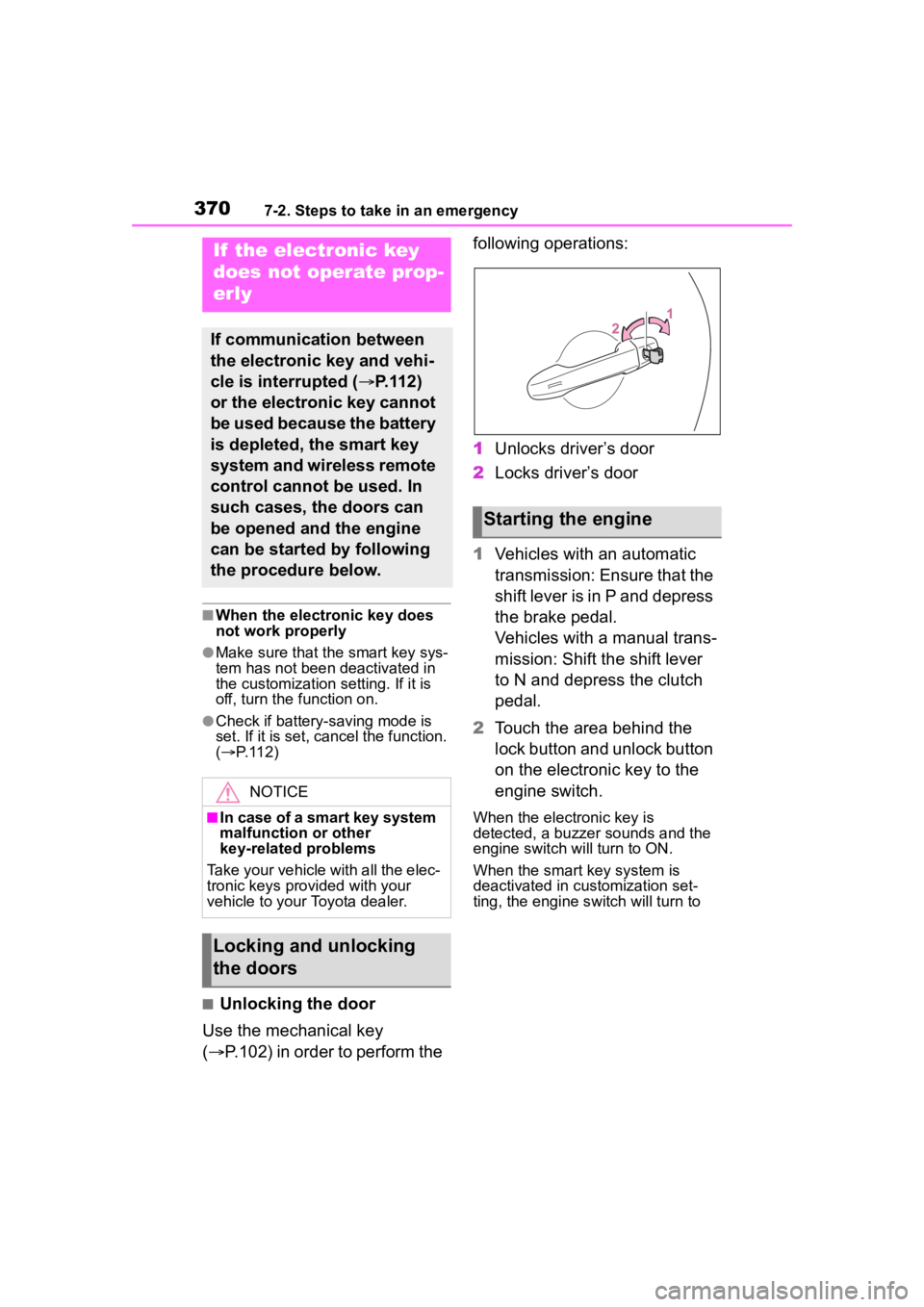
■Unlocking the door
Use the mechanical key
( P.102) in order to perform the following operations:
1
Unlocks driver’s door
2 Locks driver’s door
1 Vehicles with an automatic
transmission: Ensure that the
shift lever is in P and depress
the brake pedal.
Vehicles with a manual trans-
mission: Shift the shift lever
to N and depress the clutch
pedal.
2 Touch the area behind the
lock button and unlock button
on the electronic key to the
engine switch.
When the electronic key is
detected, a buzzer sounds and the
engine switch will turn to ON.
When the smart key system is
deactivated in customization set-
ting, the engine switch will turn to
If the electronic key
does not operate prop-
erly
If communication between
the electronic key and vehi-
cle is interrupted ( P.112)
or the electronic key cannot
be used because the battery
is depleted, the smart key
system and wireless remote
control cannot be used. In
such cases, the doors can
be opened and the engine
can be started by following
the procedure below.
NOTICE
■In case of a smart key system
malfunction or other
key-related problems
Take your vehicle with all the elec-
tronic keys provided with your
vehicle to your Toyota dealer.
Locking and unlocking
the doors
Starting the engine
Page 371 of 449
3717-2. Steps to take in an emergency
7
When trouble arises
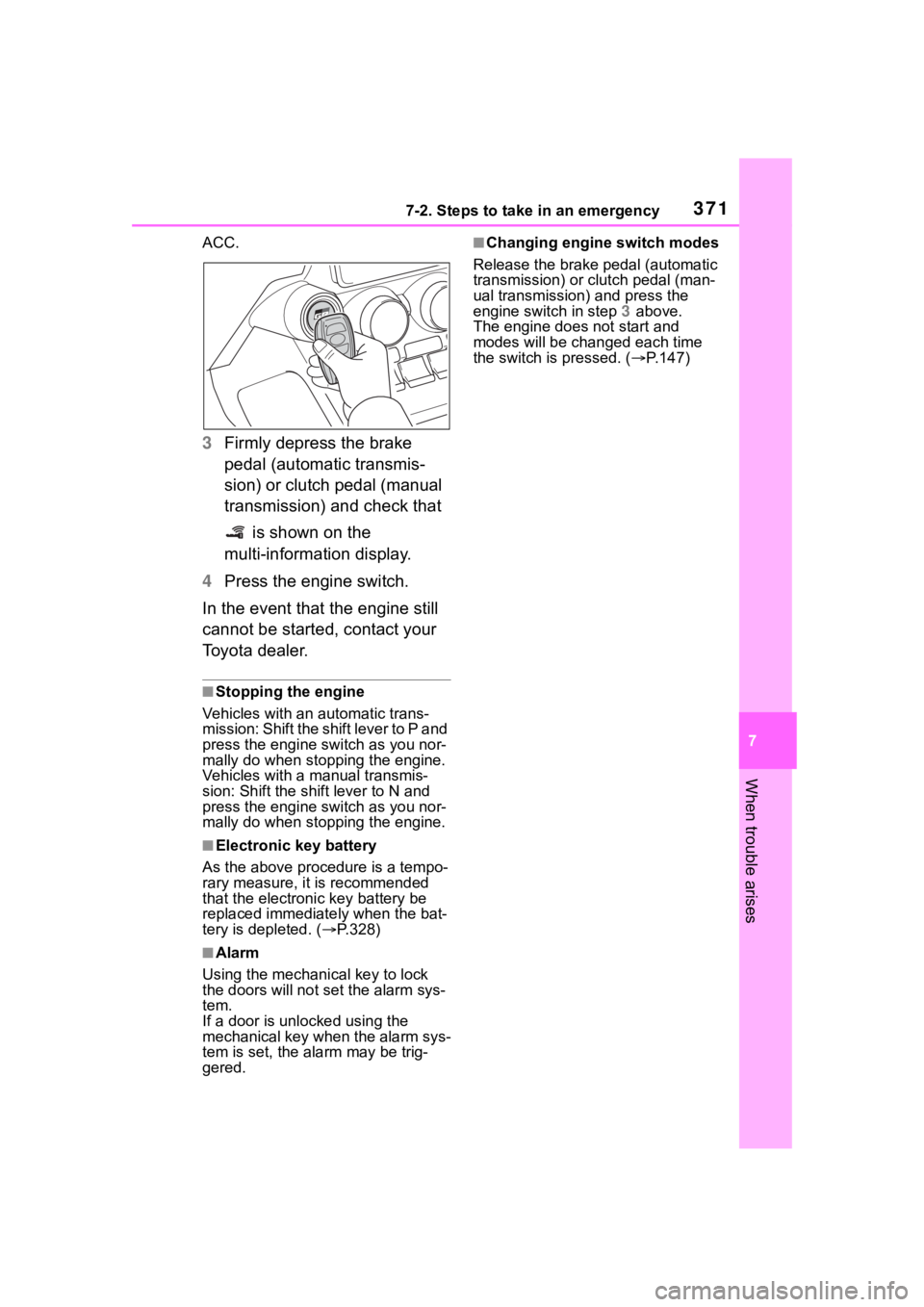
ACC.
3Firmly depress the brake
pedal (automatic transmis-
sion) or clutch pedal (manual
transmission) and check that
is shown on the
multi-information display.
4 Press the engine switch.
In the event that the engine still
cannot be started, contact your
Toyota dealer.
■Stopping the engine
Vehicles with an automatic trans-
mission: Shift the shift lever to P and
press the engine switch as you nor-
mally do when stopping the engine.
Vehicles with a manual transmis-
sion: Shift the shift lever to N and
press the engine switch as you nor-
mally do when stopping the engine.
■Electronic key battery
As the above proc edure is a tempo-
rary measure, it is recommended
that the electronic key battery be
replaced immediate ly when the bat-
tery is depleted. ( P.328)
■Alarm
Using the mechanical key to lock
the doors will not set the alarm sys-
tem.
If a door is unlocked using the
mechanical key when the alarm sys-
tem is set, the alarm may be trig-
gered.
■Changing engine switch modes
Release the brake pedal (automatic
transmission) or clutch pedal (man-
ual transmission) and press the
engine switch in step 3 above.
The engine does not start and
modes will be changed each time
the switch is pressed. ( P.147)
Page 372 of 449
3727-2. Steps to take in an emergency
If you have a set of jumper (or
booster) cables and a second
vehicle with a 12-volt battery,
you can jump start your vehicle by following the steps below.
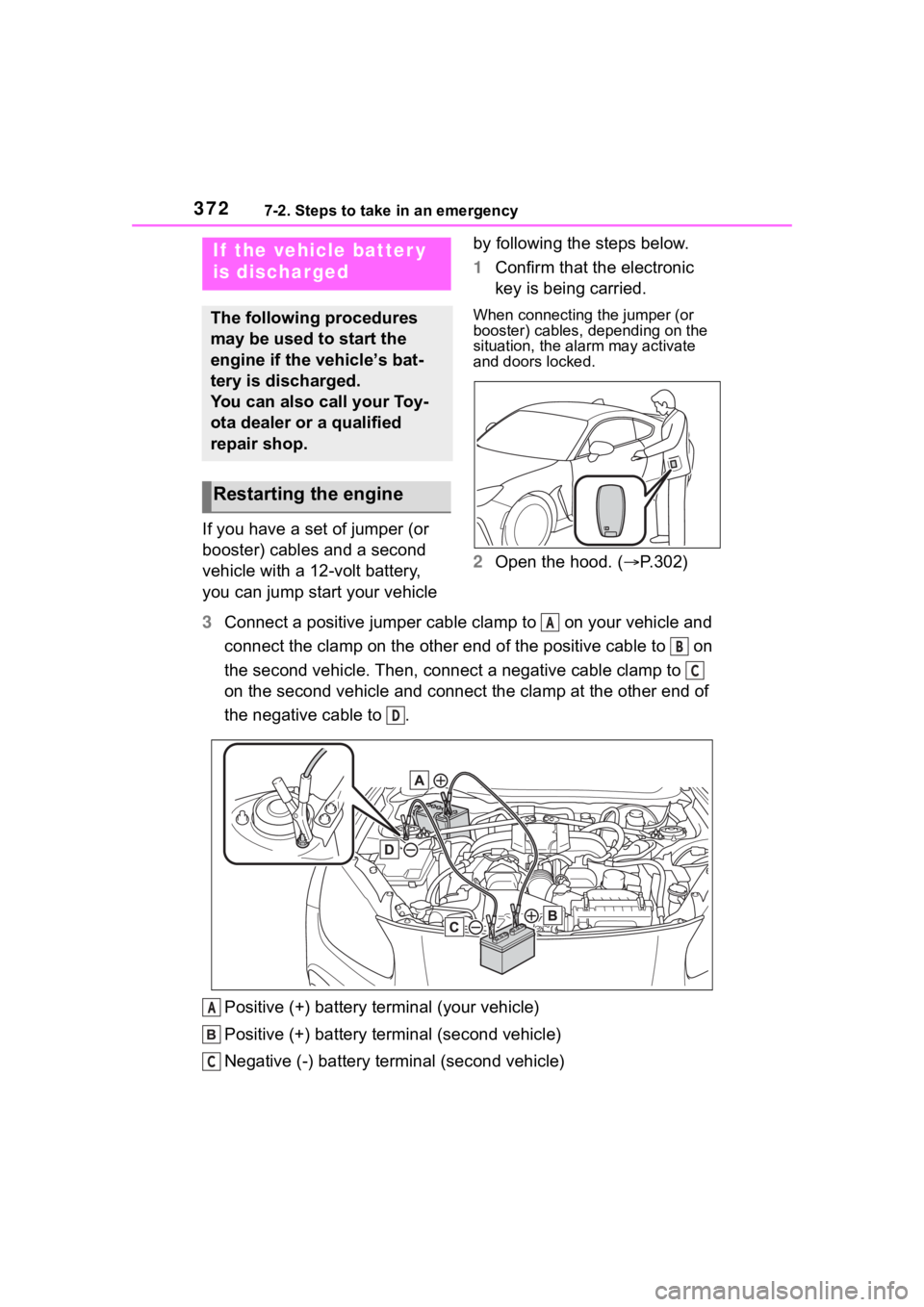
1
Confirm that the electronic
key is being carried.
When connecting the jumper (or
booster) cables, depending on the
situation, the alarm may activate
and doors locked.
2Open the hood. ( P.302)
3 Connect a positive jumper cable clamp to on your vehicle and
connect the clamp on the other end of the positive cable to on
the second vehicle. Then, connect a negative cable clamp to
on the second vehicle and connect the clamp at the other end of
the negative cable to .
Positive (+) battery terminal (your vehicle)
Positive (+) battery terminal (second vehicle)
Negative (-) battery term inal (second vehicle)
If the vehicle batter y
is discharged
The following procedures
may be used to start the
engine if the vehicle’s bat-
tery is discharged.
You can also call your Toy-
ota dealer or a qualified
repair shop.
Restarting the engine
A
B
C
D
A
C
Page 373 of 449
3737-2. Steps to take in an emergency
7
When trouble arises
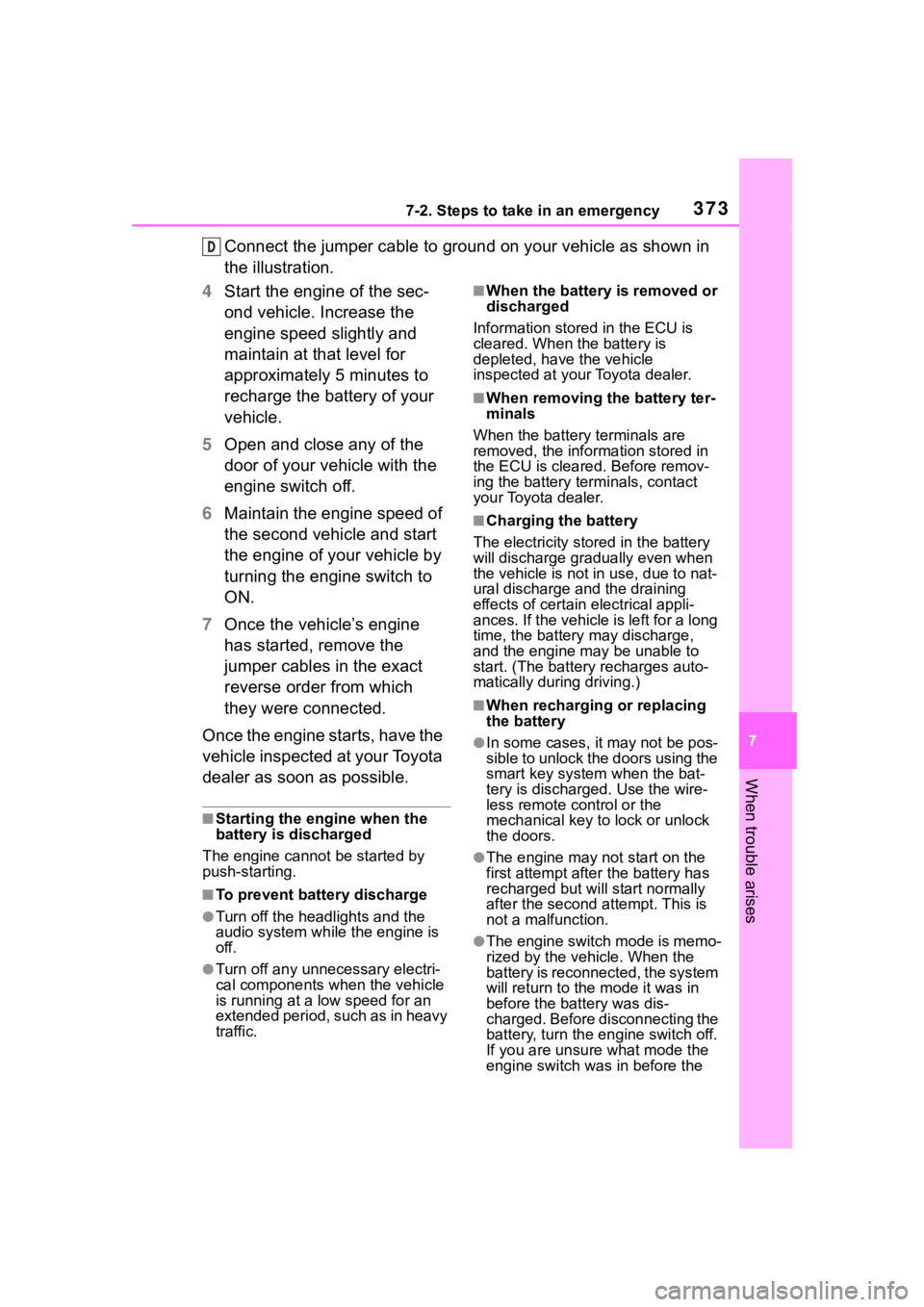
Connect the jumper cable to ground on your vehicle as shown in
the illustration.
4 Start the engine of the sec-
ond vehicle. Increase the
engine speed slightly and
maintain at that level for
approximately 5 minutes to
recharge the battery of your
vehicle.
5 Open and close any of the
door of your vehicle with the
engine switch off.
6 Maintain the engine speed of
the second vehicle and start
the engine of your vehicle by
turning the engine switch to
ON.
7 Once the vehicle’s engine
has started, remove the
jumper cables in the exact
reverse order from which
they were connected.
Once the engine starts, have the
vehicle inspected at your Toyota
dealer as soon as possible.
■Starting the engine when the
battery is discharged
The engine cannot be started by
push-starting.
■To prevent battery discharge
●Turn off the headlights and the
audio system while the engine is
off.
●Turn off any unnecessary electri-
cal components when the vehicle
is running at a low speed for an
extended period, such as in heavy
traffic.
■When the battery is removed or
discharged
Information stored in the ECU is
cleared. When the battery is
depleted, have the vehicle
inspected at your Toyota dealer.
■When removing the battery ter-
minals
When the battery terminals are
removed, the information stored in
the ECU is cleared. Before remov-
ing the battery term inals, contact
your Toyota dealer.
■Charging the battery
The electricity stored in the battery
will discharge grad ually even when
the vehicle is not in use, due to nat-
ural discharge and the draining
effects of certain electrical appli-
ances. If the vehicle is left for a long
time, the battery may discharge,
and the engine may be unable to
start. (The battery recharges auto-
matically during driving.)
■When recharging or replacing
the battery
●In some cases, it may not be pos-
sible to unlock the doors using the
smart key system when the bat-
tery is discharged. Use the wire-
less remote control or the
mechanical key to lock or unlock
the doors.
●The engine may not start on the
first attempt after the battery has
recharged but will start normally
after the second attempt. This is
not a malfunction.
●The engine switch mode is memo-
rized by the vehicle. When the
battery is reconnected, the system
will return to the mode it was in
before the bat tery was dis-
charged. Before disconnecting the
battery, turn the engine switch off.
If you are unsure what mode the
engine switch wa s in before the
D