remote control TOYOTA AURIS 2012 Owners Manual (in English)
[x] Cancel search | Manufacturer: TOYOTA, Model Year: 2012, Model line: AURIS, Model: TOYOTA AURIS 2012Pages: 750, PDF Size: 20.05 MB
Page 4 of 750
TABLE OF CONTENTS2
UK_AURIS/AURIS_HV_EE (OM12E33E)For your information .......................8
Reading this manual.....................12
How to search ..............................13
Pictorial index ...............................14
1-1. For safe use
Before driving.......................38
For safety drive ....................40
Seat belts .............................42
SRS airbags.........................46
Airbag manual on-off
system ...............................56
Safety information for
children ..............................58
Child restraint systems ........59
Installing child restraints ......68
Exhaust gas precautions .....78
1-2. Hybrid system
Hybrid system features ........80
Hybrid system
precautions ........................84
1-3. Theft deterrent system
Engine immobilizer
system ...............................91
Immobilizer system ..............99
Alarm .................................103
Double locking system .......1102. Instrument cluster
Warning lights and
indicators......................... 114
Meter (drive monitor
display)............................ 122
Meter (multi-information
display)............................ 126
ECO Driving Indicator ....... 138
Energy monitor/
consumption screen ........ 142
3-1. Key information
Keys .................................. 148
3-2. Opening, closing and
locking the doors
Smart entry & start
system............................. 151
Push button start ............... 176
Wireless remote control .... 191
Side doors ......................... 200
Back door .......................... 204
3-3. Adjusting the seats
Front seats ........................ 208
Rear seats ......................... 210
Head restraints .................. 212
3-4. Adjusting the steering
wheel and mirrors
Steering wheel .................. 214
Inside rear view mirror....... 215
Outside rear view
mirrors ............................. 217
1For safety and security
2Instrument cluster
3Operation of each compo-
nent
Page 7 of 750
5
1
8 7
6
5
4
3
2
UK_AURIS/AURIS_HV_EE (OM12E33E)6-1. Maintenance and care
Cleaning and protecting
the vehicle exterior ..........474
Cleaning and protecting
the vehicle interior ...........478
6-2. Maintenance
Maintenance
requirements....................481
6-3. Do-it-yourself
maintenance
Do-it-yourself service
precautions ......................484
Hood ..................................488
Positioning a floor jack .......490
Engine compartment..........492
12-volt battery ....................514
Tires ...................................519
Tire inflation pressure ........522
Wheels ...............................524
Air conditioning filter ..........526
Wireless remote control/
electronic key battery.......529
Checking and replacing
fuses ................................532
Light bulbs .........................5557-1. Essential information
Emergency flashers .......... 572
If your vehicle has to
be stopped in an
emergency ...................... 573
7-2. Steps to take in an
emergency
If your vehicle needs to
be towed ......................... 575
If you think something is
wrong .............................. 583
Fuel pump shut off
system............................. 584
If a warning light turns
on or a warning buzzer
sounds ............................ 585
If a warning message is
displayed ......................... 599
If you have a flat tire
(vehicles with a
spare tire) ........................ 626
If you have a flat tire
(vehicles with an
emergency tire puncture
repair kit) ......................... 638
If the engine will not
start ................................. 664
If the hybrid system will
not start ........................... 666
6Maintenance and care7When trouble arises
Page 23 of 750
21Pictorial index
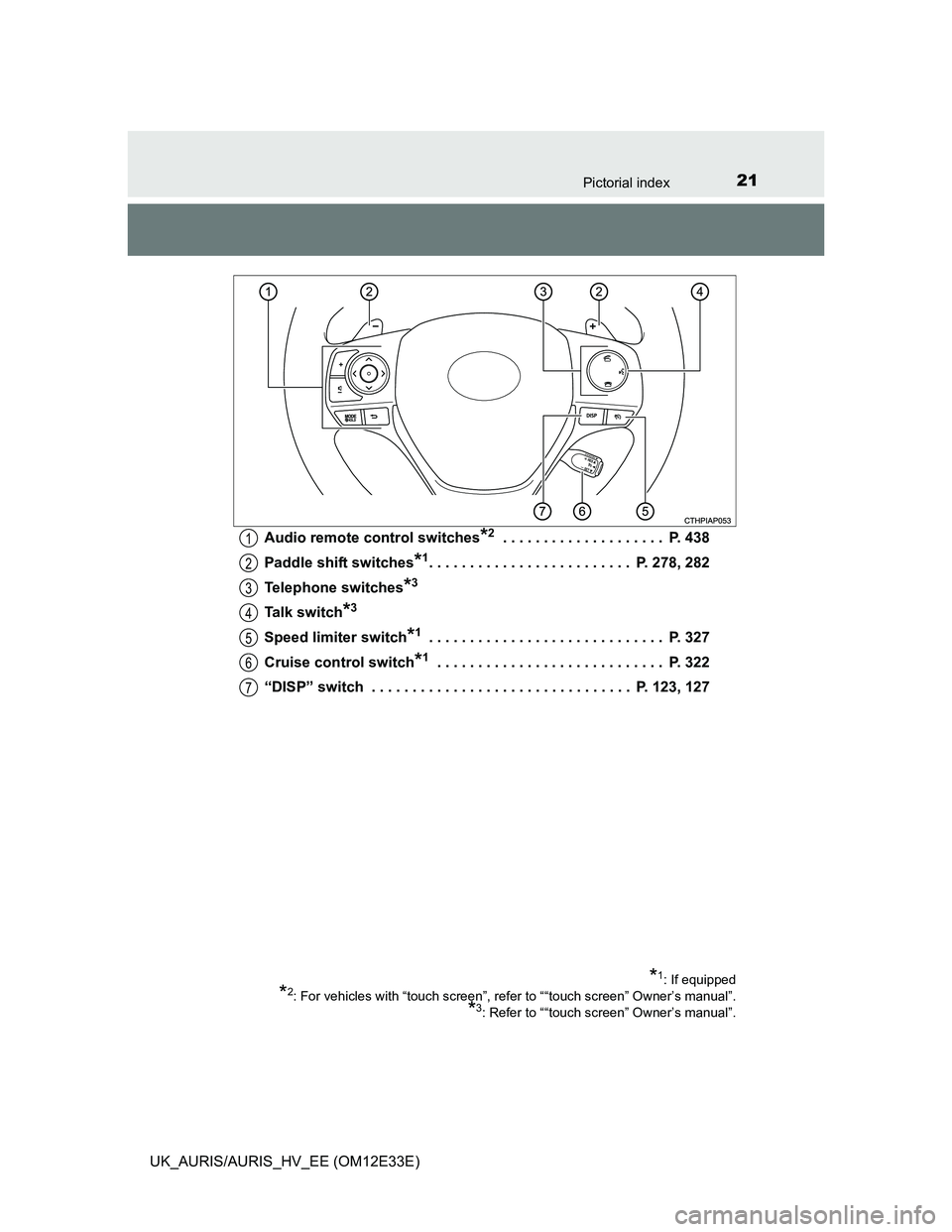
UK_AURIS/AURIS_HV_EE (OM12E33E)Audio remote control switches
*2 . . . . . . . . . . . . . . . . . . . . P. 438
Paddle shift switches
*1. . . . . . . . . . . . . . . . . . . . . . . . . P. 278, 282
Telephone switches
*3
Talk switch*3
Speed limiter switch*1 . . . . . . . . . . . . . . . . . . . . . . . . . . . . . P. 327
Cruise control switch
*1 . . . . . . . . . . . . . . . . . . . . . . . . . . . . P. 322
“DISP” switch . . . . . . . . . . . . . . . . . . . . . . . . . . . . . . . . P. 123, 127
*1: If equipped
*2: For vehicles with “touch screen”, refer to ““touch screen” Owner’s manual”.
*3: Refer to ““touch screen” Owner’s manual”.
1
2
3
4
5
6
7
Page 33 of 750
31Pictorial index
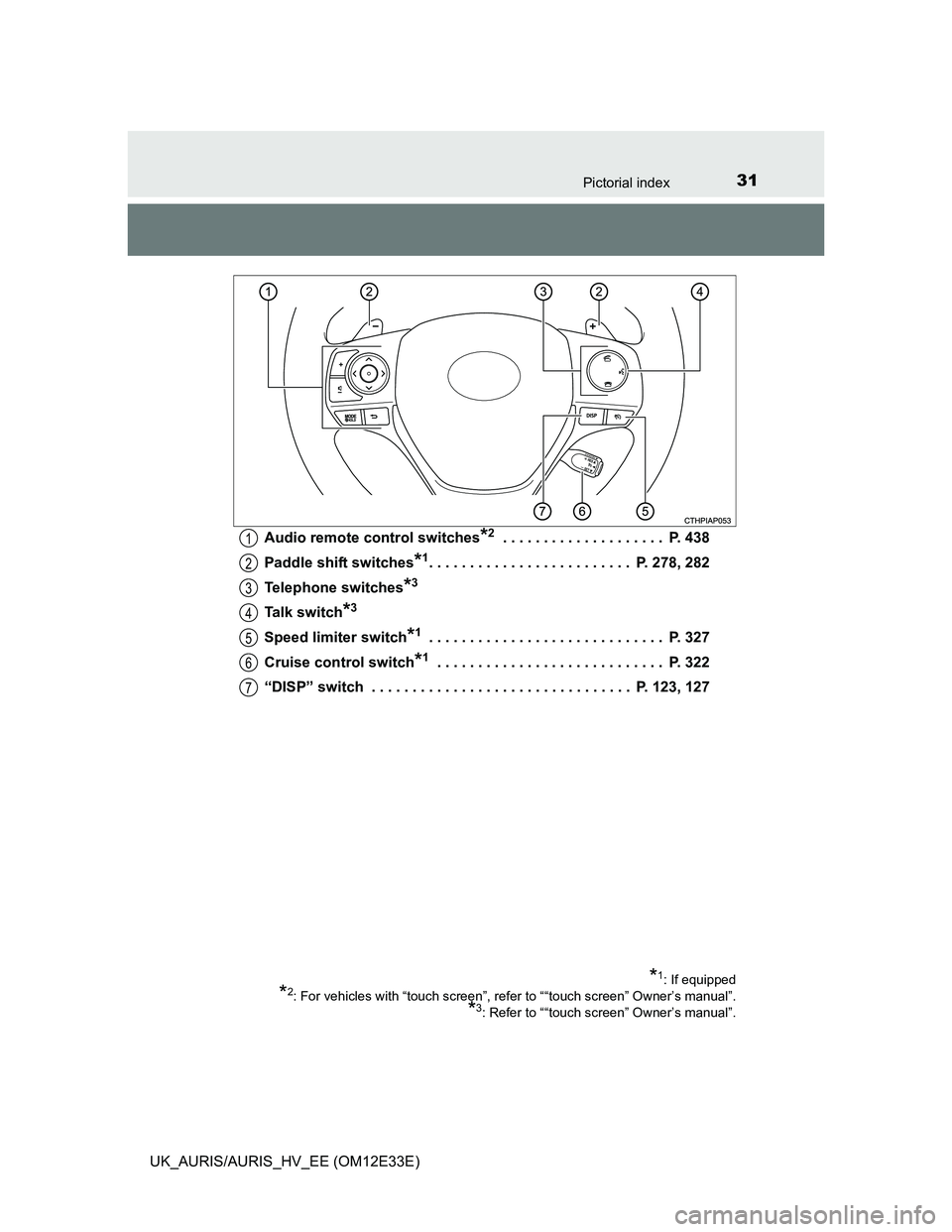
UK_AURIS/AURIS_HV_EE (OM12E33E)Audio remote control switches
*2 . . . . . . . . . . . . . . . . . . . . P. 438
Paddle shift switches
*1. . . . . . . . . . . . . . . . . . . . . . . . . P. 278, 282
Telephone switches
*3
Talk switch*3
Speed limiter switch*1 . . . . . . . . . . . . . . . . . . . . . . . . . . . . . P. 327
Cruise control switch
*1 . . . . . . . . . . . . . . . . . . . . . . . . . . . . P. 322
“DISP” switch . . . . . . . . . . . . . . . . . . . . . . . . . . . . . . . . P. 123, 127
*1: If equipped
*2: For vehicles with “touch screen”, refer to ““touch screen” Owner’s manual”.
*3: Refer to ““touch screen” Owner’s manual”.
1
2
3
4
5
6
7
Page 105 of 750
1031-3. Theft deterrent system
1
For safety and security
UK_AURIS/AURIS_HV_EE (OM12E33E)
The alarm uses light and sound to give an alert when an intrusion is
detected.
The alarm is triggered in the following situations when the alarm is
set:
A locked door is unlocked or opened in any way other than using
the entry function (if equipped) or wireless remote control. (The
doors will lock again automatically.)
The hood is opened.
Vehicles with a intrusion sensor: The intrusion sensor detects
something moving inside the vehicle. (An intruder gets in the vehi-
cle.)
Vehicles with a intrusion sensor: The back door window is tapped or
broken.
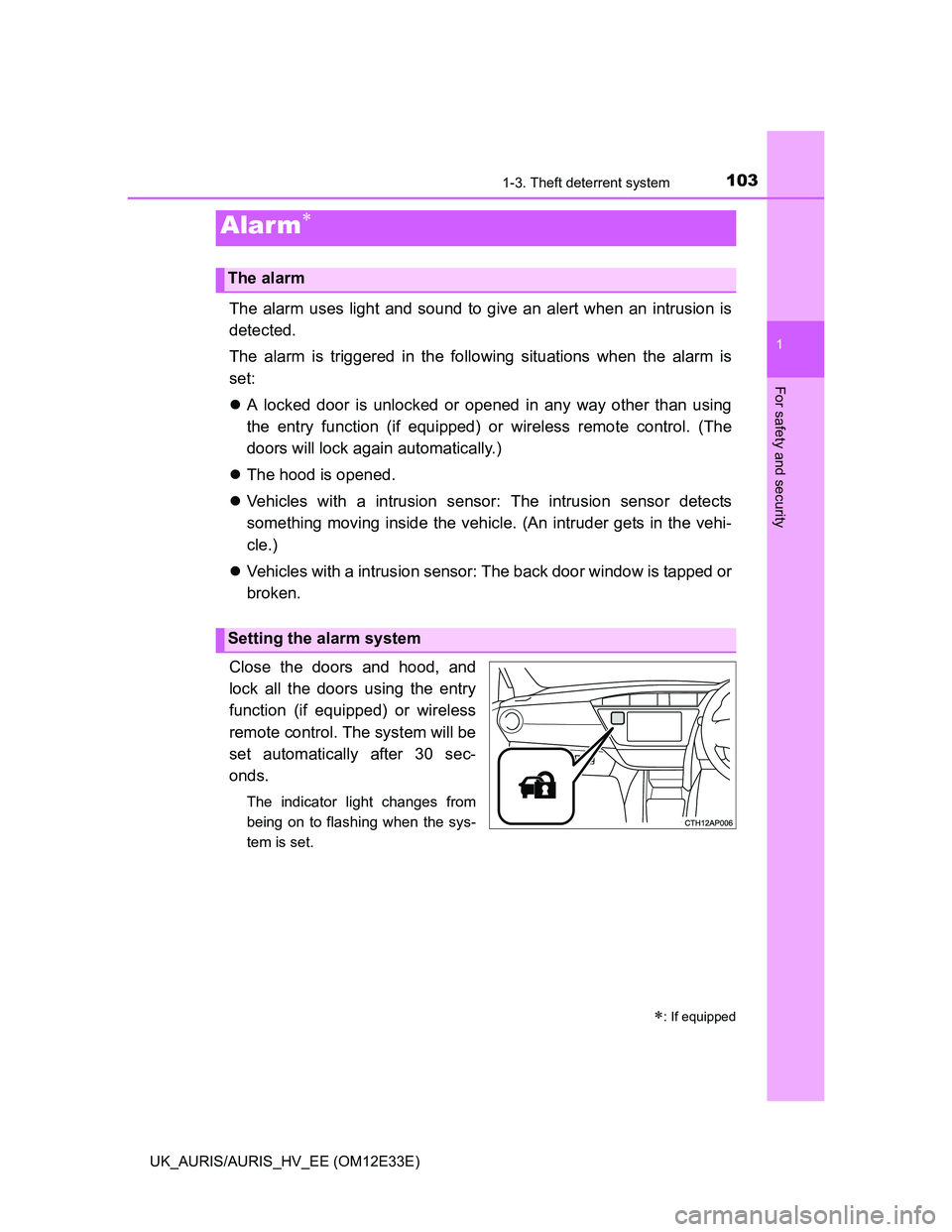
Close the doors and hood, and
lock all the doors using the entry
function (if equipped) or wireless
remote control. The system will be
set automatically after 30 sec-
onds.
The indicator light changes from
being on to flashing when the sys-
tem is set.
Alarm
: If equipped
The alarm
Setting the alarm system
Page 106 of 750
1041-3. Theft deterrent system
UK_AURIS/AURIS_HV_EE (OM12E33E)
Do one of the following to deactivate or stop the alarm:
Unlock the doors using the entry function (if equipped) or wireless
remote control.
Except hybrid model: Start the engine. (The alarm will be deacti-
vated or stopped after a few seconds.)
Hybrid model: Start the hybrid system. (The alarm will be deacti-
vated or stopped after a few seconds.)
System maintenance
The vehicle has a maintenance-free type alarm system.
Items to check before locking the vehicle
To prevent unexpected triggering of the alarm and vehicle theft, make sure of
the following:
Nobody is in the vehicle.
The windows are closed before the alarm is set.
No valuables or other personal items are left in the vehicle.
Deactivating or stopping the alarm
Page 112 of 750
1101-3. Theft deterrent system
UK_AURIS/AURIS_HV_EE (OM12E33E)
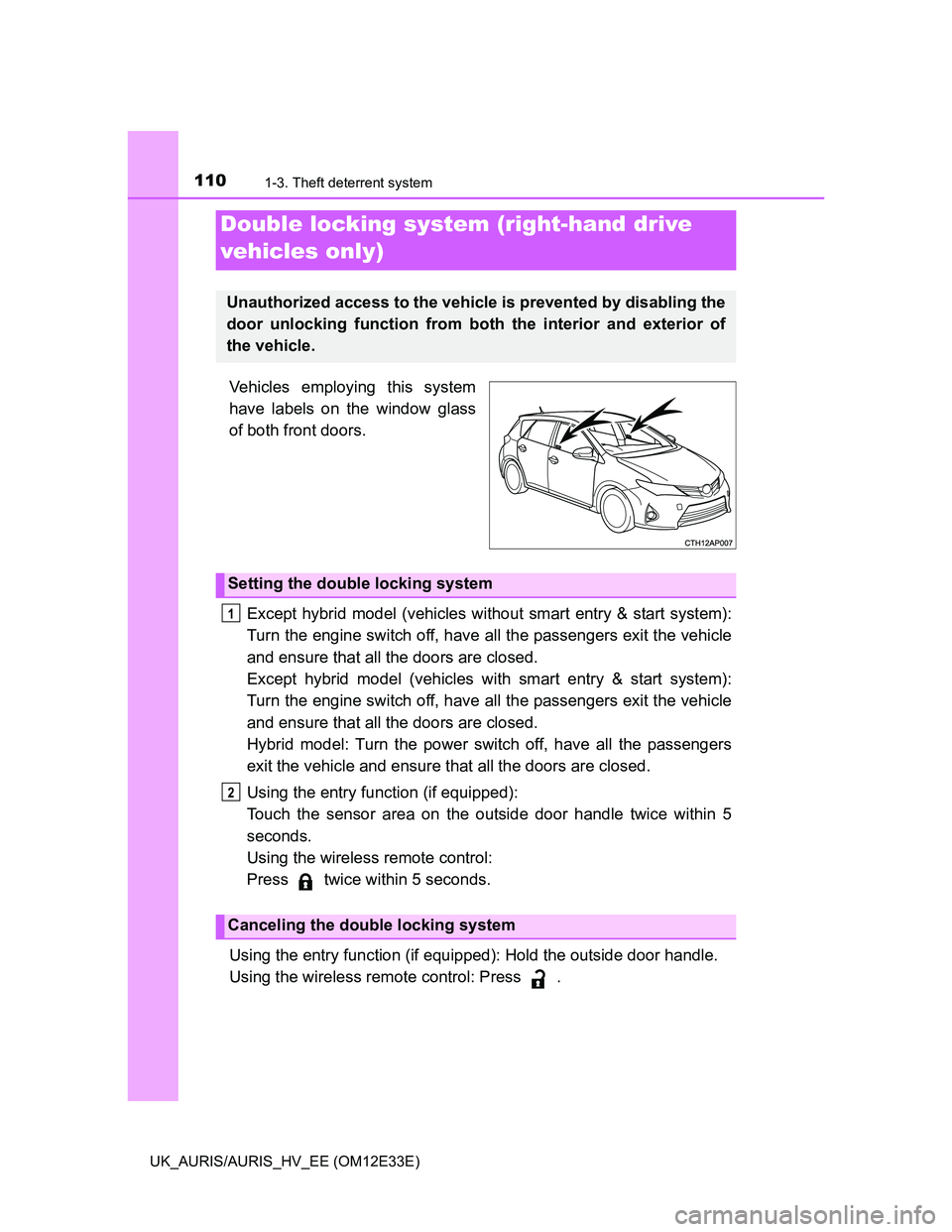
Vehicles employing this system
have labels on the window glass
of both front doors.
Except hybrid model (vehicles without smart entry & start system):
Turn the engine switch off, have all the passengers exit the vehicle
and ensure that all the doors are closed.
Except hybrid model (vehicles with smart entry & start system):
Turn the engine switch off, have all the passengers exit the vehicle
and ensure that all the doors are closed.
Hybrid model: Turn the power switch off, have all the passengers
exit the vehicle and ensure that all the doors are closed.
Using the entry function (if equipped):
Touch the sensor area on the outside door handle twice within 5
seconds.
Using the wireless remote control:
Press twice within 5 seconds.
Using the entry function (if equipped): Hold the outside door handle.
Using the wireless remote control: Press .
Double locking system (right-hand drive
vehicles only)
Unauthorized access to the vehicle is prevented by disabling the
door unlocking function from both the interior and exterior of
the vehicle.
Setting the double locking system
Canceling the double locking system
1
2
Page 149 of 750
147
3
Operation of
each component
UK_AURIS/AURIS_HV_EE (OM12E33E)3-1. Key information
Keys ................................... 148
3-2. Opening, closing and
locking the doors
Smart entry & start
system ............................. 151
Push button start................ 176
Wireless remote control ..... 191
Side doors.......................... 200
Back door........................... 204
3-3. Adjusting the seats
Front seats ......................... 208
Rear seats ......................... 210
Head restraints .................. 212
3-4. Adjusting the steering
wheel and mirrors
Steering wheel ................... 214
Inside rear view mirror ....... 215
Outside rear view
mirrors ............................. 217
3-5. Opening and closing the
windows
Power windows .................. 220
Page 150 of 750
148
UK_AURIS/AURIS_HV_EE (OM12E33E)
3-1. Key information
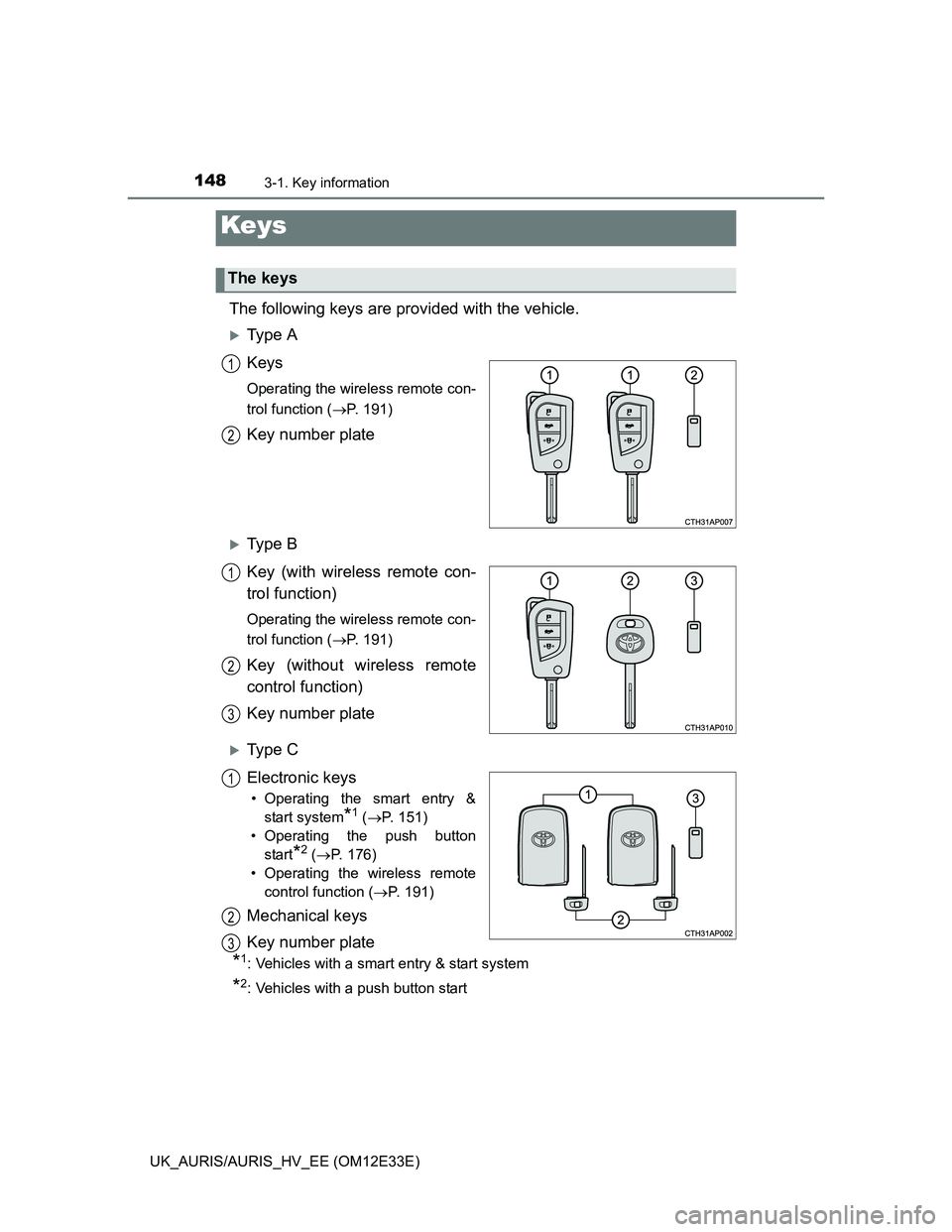
The following keys are provided with the vehicle.
Ty p e A
Keys
Operating the wireless remote con-
trol function (P. 191)
Key number plate
Ty p e B
Key (with wireless remote con-
trol function)
Operating the wireless remote con-
trol function (P. 191)
Key (without wireless remote
control function)
Key number plate
Ty p e C
Electronic keys
• Operating the smart entry &
start system
*1 (P. 151)
• Operating the push button
start
*2 (P. 176)
• Operating the wireless remote
control function (P. 191)
Mechanical keys
Key number plate
*1: Vehicles with a smart entry & start system
*2: Vehicles with a push button start
Keys
The keys
1
2
1
2
3
1
2
3
Page 152 of 750
1503-1. Key information
UK_AURIS/AURIS_HV_EE (OM12E33E)When riding in an aircraft
When bringing a key with wireless remote control function onto an aircraft,
make sure you do not press any buttons on the key while inside the aircraft
cabin. If you are carrying the key in your bag etc., ensure that the buttons are
not likely to be pressed accidentally. Pressing a button may cause the key to
emit radio waves that could interfere with the operation of the aircraft.
NOTICE
To prevent key damage
Do not drop the keys, subject them to strong shocks or bend them.
Do not expose the keys to high temperatures for long periods of time.
Do not get the keys wet or wash them in an ultrasonic washer etc.
Do not attach metallic or magnetic materials to the keys or place the keys
close to such materials.
Do not disassemble the keys.
Do not attach a sticker or anything else to the surface of the electronic key.
Type C: Do not place the keys near objects that produce magnetic fields,
such as TVs, audio systems and induction cookers, or medical electrical
equipment, such as low-frequency therapy equipment.
Carrying the electronic key on your person (type C)
Carry the electronic key 10 cm (3.9 in.) or more away from electric appli-
ances that are turned on. Radio waves emitted from electric appliances
within 10 cm (3.9 in.) of the electronic key may interfere with the key, caus-
ing the key to not function properly.
In case of a smart entry & start system malfunction or other key-related
problems (type C)
Take your vehicle with all the electronic keys provided with your vehicle to
any authorized Toyota dealer or repairer, or another duly qualified and
equipped professional.
When an electronic key is lost (type C)
If the electronic key remains lost, the risk of vehicle theft increases signifi-
cantly. Visit any authorized Toyota dealer or repairer, or another duly quali-
fied and equipped professional immediately with all remaining electronic
keys that was provided with your vehicle.