door lock TOYOTA AURIS 2013 (in English) User Guide
[x] Cancel search | Manufacturer: TOYOTA, Model Year: 2013, Model line: AURIS, Model: TOYOTA AURIS 2013Pages: 768, PDF Size: 21.22 MB
Page 108 of 768
1081-3. Theft deterrent system
UK_AURIS/AURIS_HV_EE (OM12F76E)
Canceling and automatic re-enabling of the intrusion sensor
The alarm will still be set even when the intrusion sensor is canceled.
After the intrusion sensor is canceled, pressing the power switch or unlock-
ing the doors using the entry function (if equipped) or wireless remote con-
trol will re-enable the intrusion sensor.
The intrusion sensor will automatically be re-enabled when the alarm sys-
tem is deactivated.
The intrusion sensor will automatically be re-enabled if the alarm system is
not set within 5 minutes after the intrusion sensor is canceled.
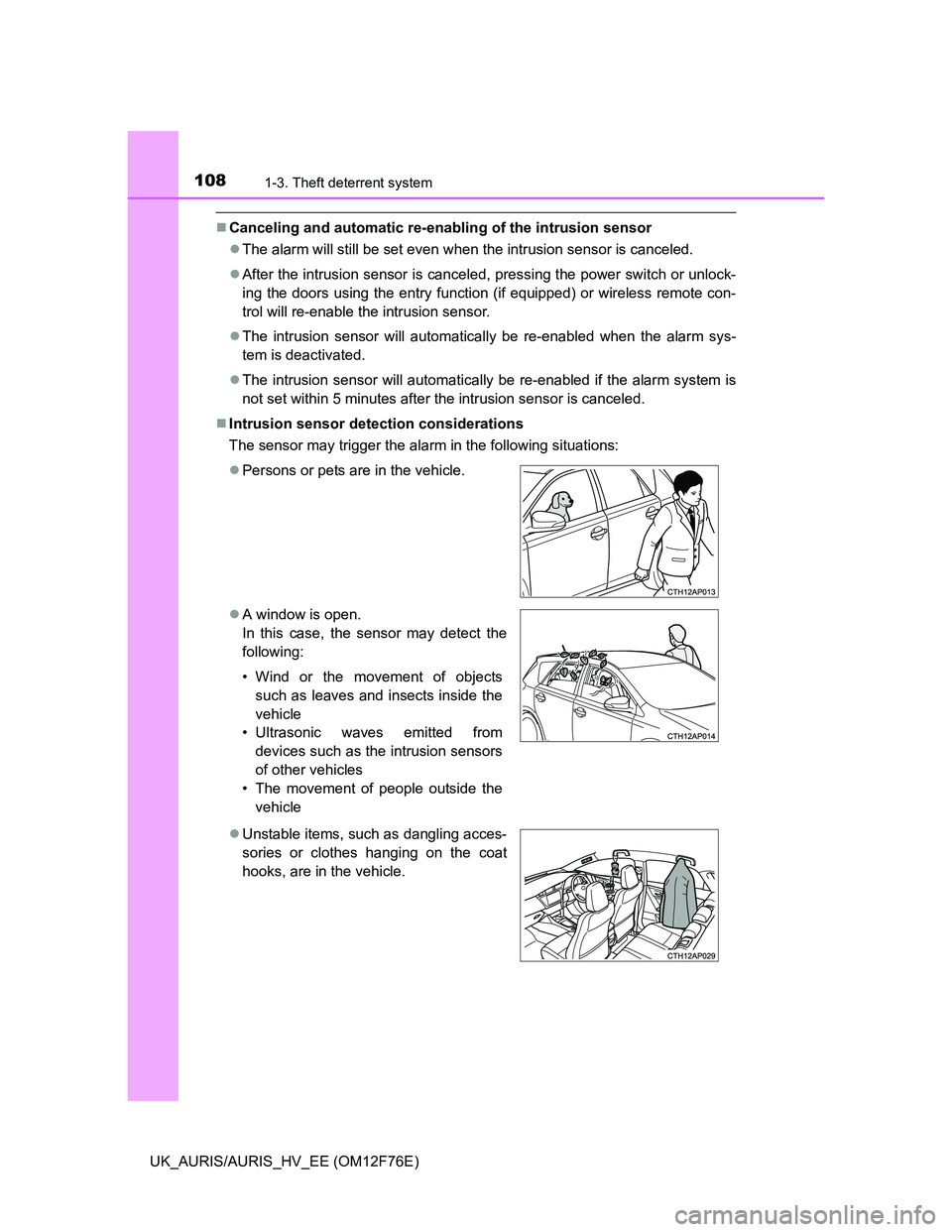
Intrusion sensor detection considerations
The sensor may trigger the alarm in the following situations:
Persons or pets are in the vehicle.
A window is open.
In this case, the sensor may detect the
following:
• Wind or the movement of objects
such as leaves and insects inside the
vehicle
• Ultrasonic waves emitted from
devices such as the intrusion sensors
of other vehicles
• The movement of people outside the
vehicle
Unstable items, such as dangling acces-
sories or clothes hanging on the coat
hooks, are in the vehicle.
Page 111 of 768
1111-3. Theft deterrent system
1
For safety and security
UK_AURIS/AURIS_HV_EE (OM12F76E)
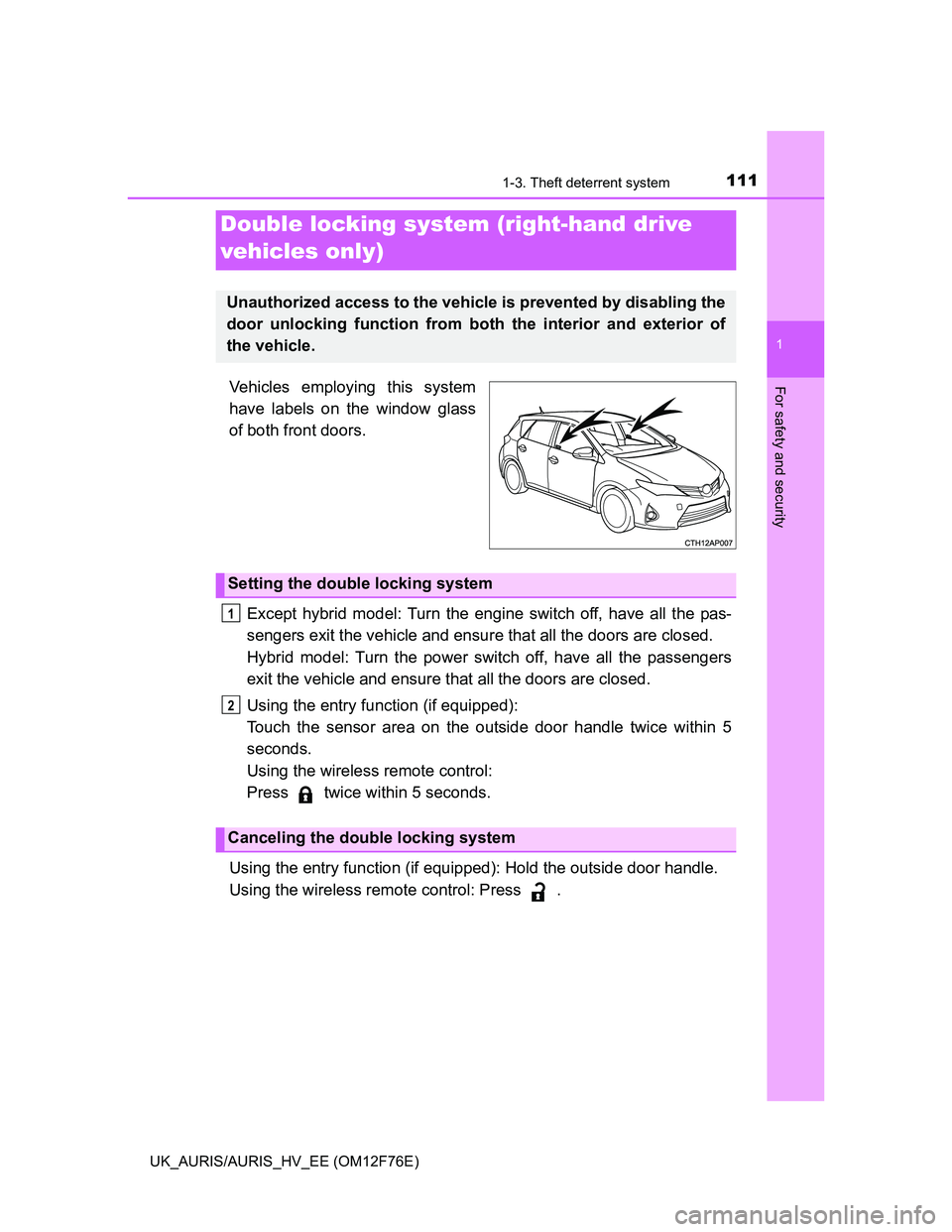
Vehicles employing this system
have labels on the window glass
of both front doors.
Except hybrid model: Turn the engine switch off, have all the pas-
sengers exit the vehicle and ensure that all the doors are closed.
Hybrid model: Turn the power switch off, have all the passengers
exit the vehicle and ensure that all the doors are closed.
Using the entry function (if equipped):
Touch the sensor area on the outside door handle twice within 5
seconds.
Using the wireless remote control:
Press twice within 5 seconds.
Using the entry function (if equipped): Hold the outside door handle.
Using the wireless remote control: Press .
Double locking system (right-hand drive
vehicles only)
Unauthorized access to the vehicle is prevented by disabling the
door unlocking function from both the interior and exterior of
the vehicle.
Setting the double locking system
Canceling the double locking system
1
2
Page 112 of 768
1121-3. Theft deterrent system
UK_AURIS/AURIS_HV_EE (OM12F76E)
CAUTION
Double locking system precaution
Never activate the double locking system when there are people in the vehi-
cle because all the doors cannot be opened from inside the vehicle.
Page 145 of 768
145
3
Operation of
each component
UK_AURIS/AURIS_HV_EE (OM12F76E)3-1. Key information
Keys ................................... 146
3-2. Opening, closing and
locking the doors
Smart entry & start
system ............................. 149
Push button start................ 174
Wireless remote control ..... 189
Side doors.......................... 198
Back door........................... 202
3-3. Adjusting the seats
Front seats ......................... 206
Rear seats ......................... 208
Head restraints .................. 211
3-4. Adjusting the steering
wheel and mirrors
Steering wheel ................... 213
Inside rear view mirror ....... 214
Outside rear view
mirrors ............................. 216
3-5. Opening and closing
the windows
Power windows .................. 219
Page 149 of 768
149
UK_AURIS/AURIS_HV_EE (OM12F76E)
3
Operation of each component
3-2. Opening, closing and locking the doors
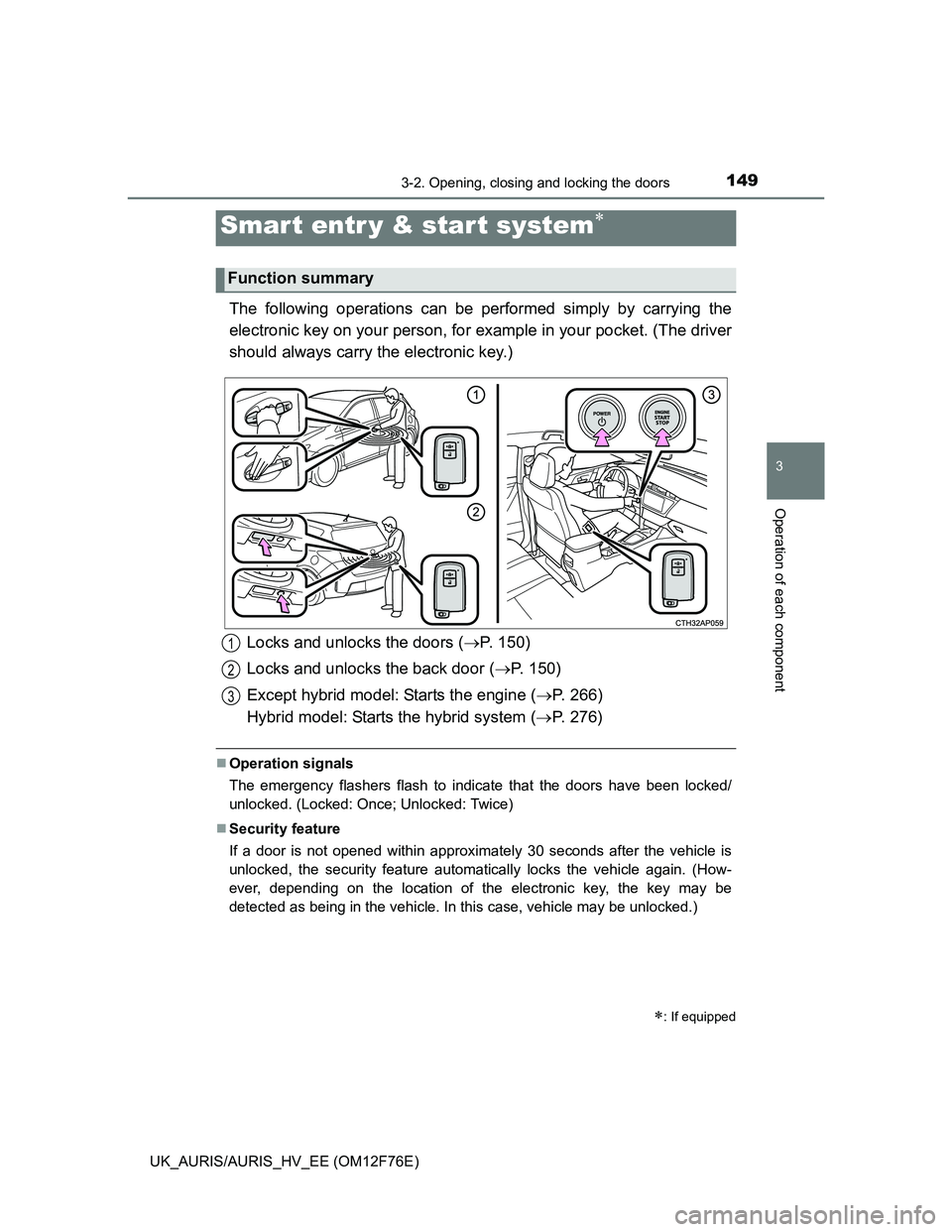
The following operations can be performed simply by carrying the
electronic key on your person, for example in your pocket. (The driver
should always carry the electronic key.)
Operation signals
The emergency flashers flash to indicate that the doors have been locked/
unlocked. (Locked: Once; Unlocked: Twice)
Security feature
If a door is not opened within approximately 30 seconds after the vehicle is
unlocked, the security feature automatically locks the vehicle again. (How-
ever, depending on the location of the electronic key, the key may be
detected as being in the vehicle. In this case, vehicle may be unlocked.)
Smar t entr y & star t system
: If equipped
Function summary
Locks and unlocks the doors (P. 150)
Locks and unlocks the back door (P. 150)
Except hybrid model: Starts the engine (P. 266)
Hybrid model: Starts the hybrid system (P. 276)1
2
3
Page 150 of 768
1503-2. Opening, closing and locking the doors
UK_AURIS/AURIS_HV_EE (OM12F76E)
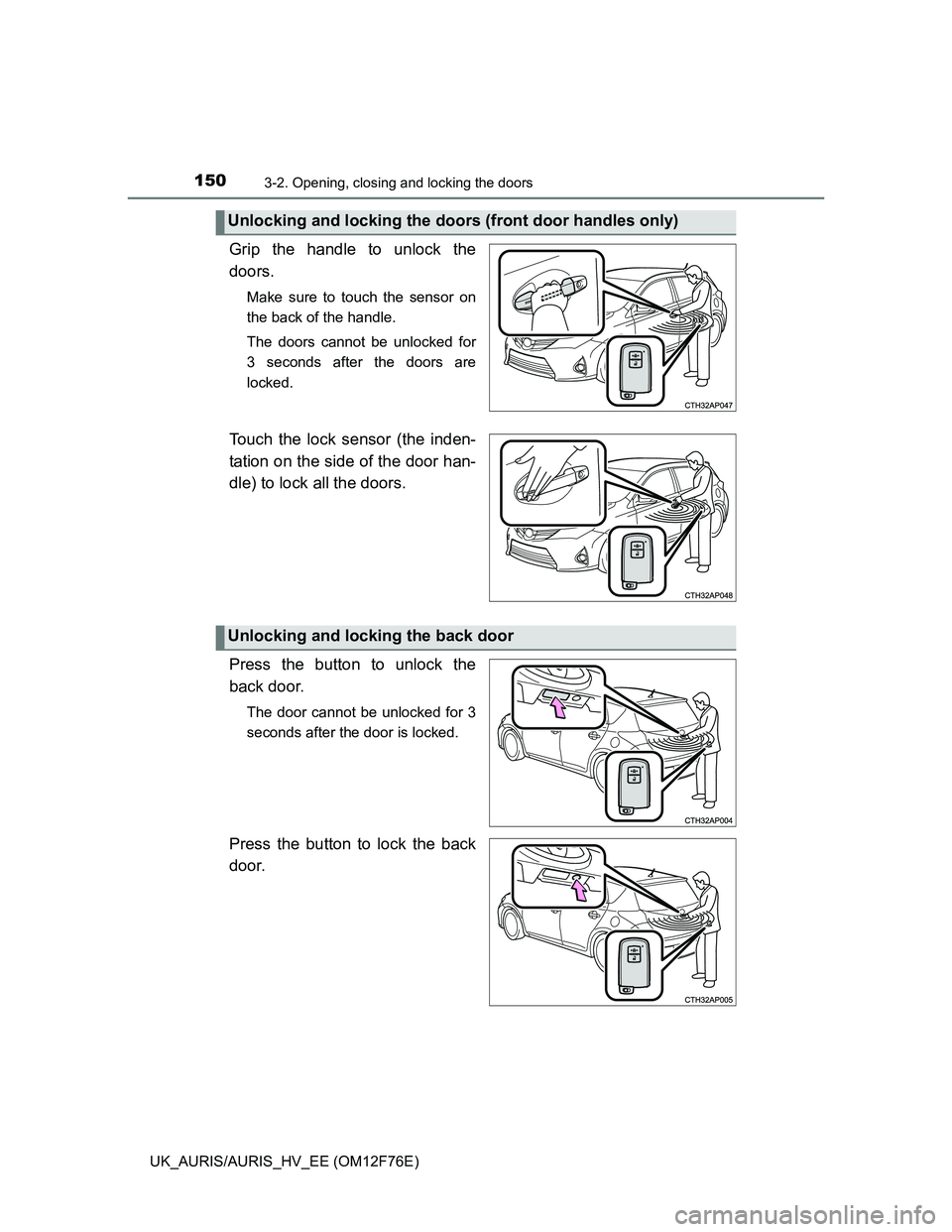
Grip the handle to unlock the
doors.
Make sure to touch the sensor on
the back of the handle.
The doors cannot be unlocked for
3 seconds after the doors are
locked.
Touch the lock sensor (the inden-
tation on the side of the door han-
dle) to lock all the doors.
Press the button to unlock the
back door.
The door cannot be unlocked for 3
seconds after the door is locked.
Press the button to lock the back
door.
Unlocking and locking the doors (front door handles only)
Unlocking and locking the back door
Page 151 of 768
1513-2. Opening, closing and locking the doors
UK_AURIS/AURIS_HV_EE (OM12F76E)
3
Operation of each component
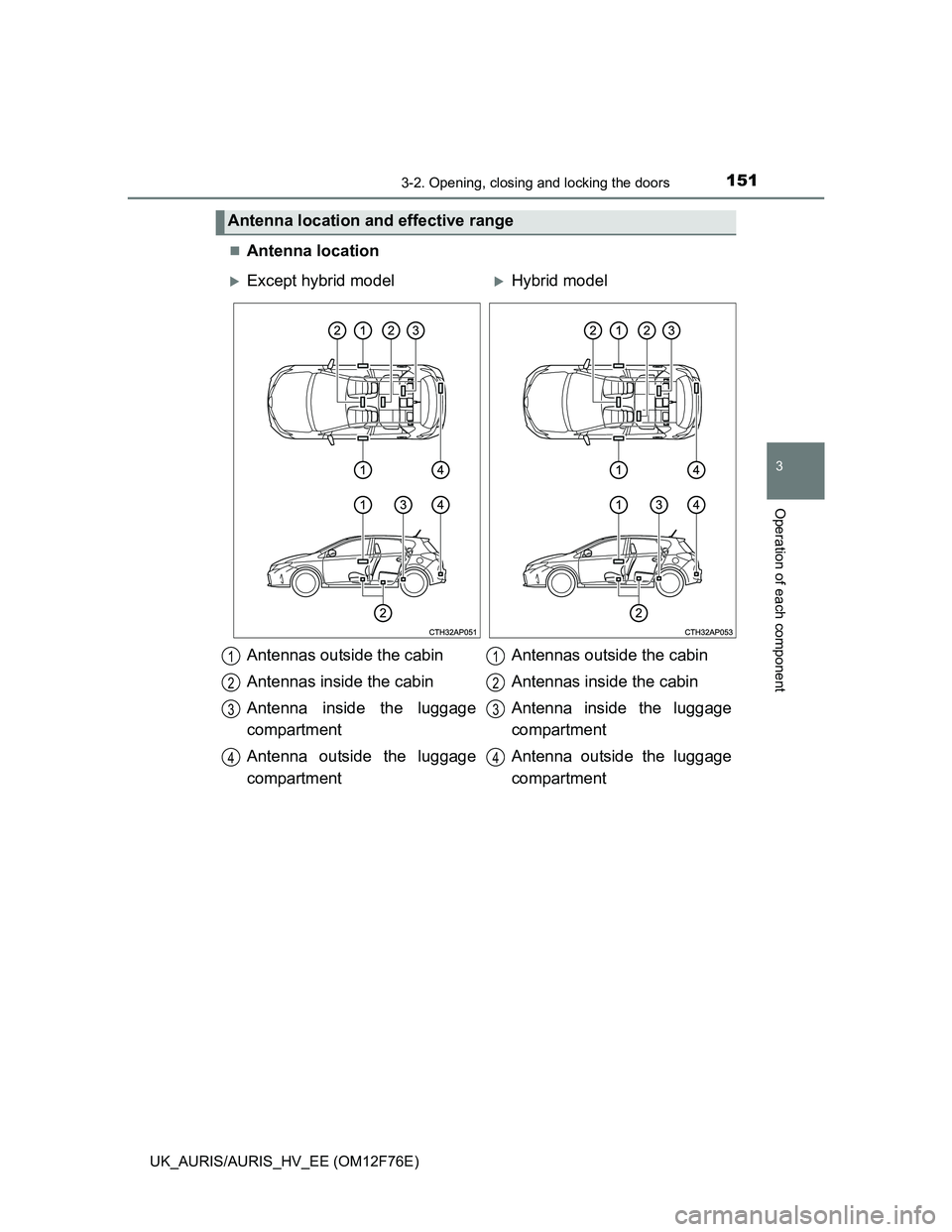
Antenna location
Antenna location and effective range
Except hybrid modelHybrid model
Antennas outside the cabin
Antennas inside the cabin
Antenna inside the luggage
compartment
Antenna outside the luggage
compartmentAntennas outside the cabin
Antennas inside the cabin
Antenna inside the luggage
compartment
Antenna outside the luggage
compartment
1
2
3
4
1
2
3
4
Page 152 of 768
1523-2. Opening, closing and locking the doors
UK_AURIS/AURIS_HV_EE (OM12F76E)
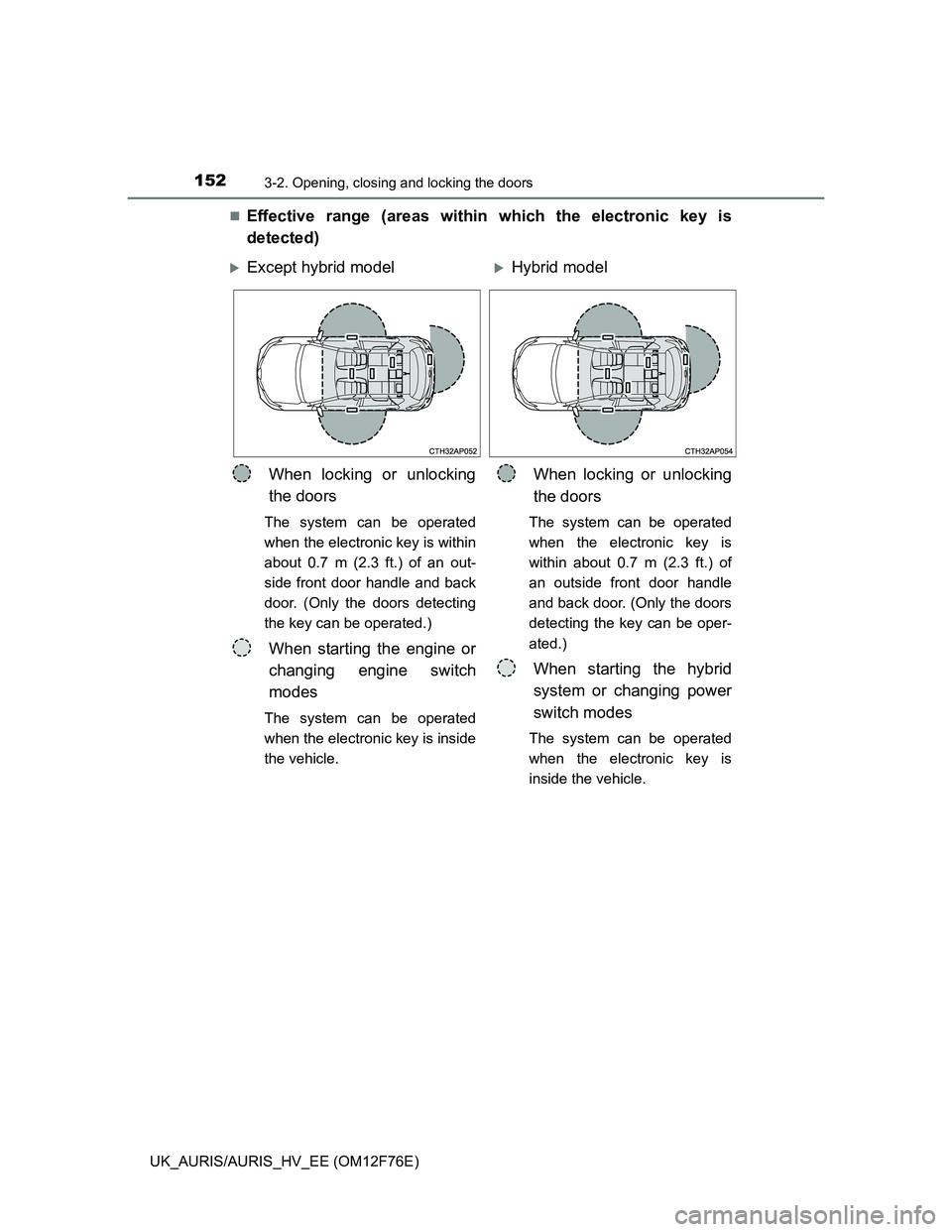
Effective range (areas within which the electronic key is
detected)
Except hybrid modelHybrid model
When locking or unlocking
the doors
The system can be operated
when the electronic key is within
about 0.7 m (2.3 ft.) of an out-
side front door handle and back
door. (Only the doors detecting
the key can be operated.)
When starting the engine or
changing engine switch
modes
The system can be operated
when the electronic key is inside
the vehicle.
When locking or unlocking
the doors
The system can be operated
when the electronic key is
within about 0.7 m (2.3 ft.) of
an outside front door handle
and back door. (Only the doors
detecting the key can be oper-
ated.)
When starting the hybrid
system or changing power
switch modes
The system can be operated
when the electronic key is
inside the vehicle.
Page 153 of 768
1533-2. Opening, closing and locking the doors
UK_AURIS/AURIS_HV_EE (OM12F76E)
3
Operation of each component
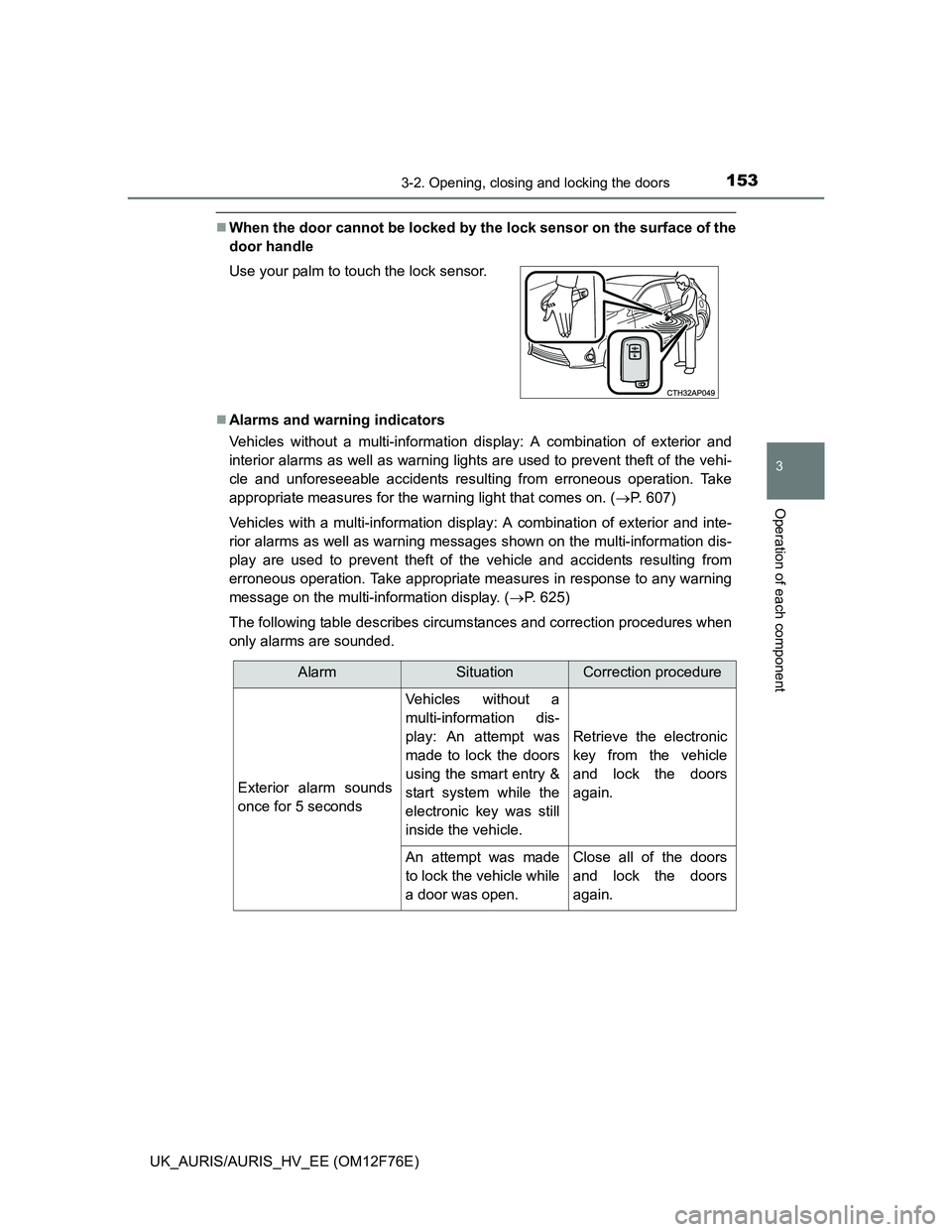
When the door cannot be locked by the lock sensor on the surface of the
door handle
Alarms and warning indicators
Vehicles without a multi-information display: A combination of exterior and
interior alarms as well as warning lights are used to prevent theft of the vehi-
cle and unforeseeable accidents resulting from erroneous operation. Take
appropriate measures for the warning light that comes on. (P. 607)
Vehicles with a multi-information display: A combination of exterior and inte-
rior alarms as well as warning messages shown on the multi-information dis-
play are used to prevent theft of the vehicle and accidents resulting from
erroneous operation. Take appropriate measures in response to any warning
message on the multi-information display. (P. 625)
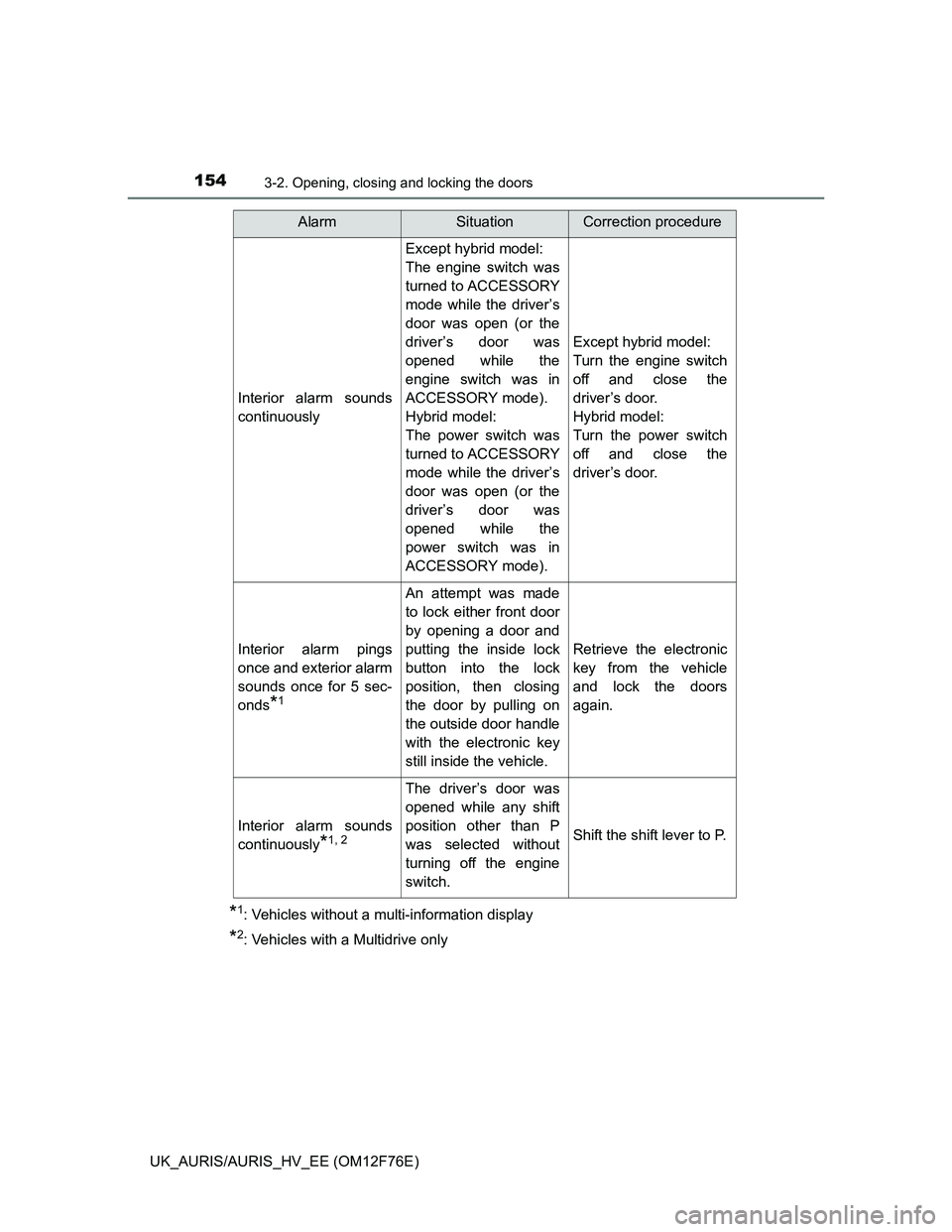
The following table describes circumstances and correction procedures when
only alarms are sounded. Use your palm to touch the lock sensor.
AlarmSituationCorrection procedure
Exterior alarm sounds
once for 5 seconds
Vehicles without a
multi-information dis-
play: An attempt was
made to lock the doors
using the smart entry &
start system while the
electronic key was still
inside the vehicle.
Retrieve the electronic
key from the vehicle
and lock the doors
again.
An attempt was made
to lock the vehicle while
a door was open.Close all of the doors
and lock the doors
again.
Page 154 of 768
1543-2. Opening, closing and locking the doors
UK_AURIS/AURIS_HV_EE (OM12F76E)
*1: Vehicles without a multi-information display
*2: Vehicles with a Multidrive only
Interior alarm sounds
continuously
Except hybrid model:
The engine switch was
turned to ACCESSORY
mode while the driver’s
door was open (or the
driver’s door was
opened while the
engine switch was in
ACCESSORY mode).
Hybrid model:
The power switch was
turned to ACCESSORY
mode while the driver’s
door was open (or the
driver’s door was
opened while the
power switch was in
ACCESSORY mode).
Except hybrid model:
Turn the engine switch
off and close the
driver’s door.
Hybrid model:
Turn the power switch
off and close the
driver’s door.
Interior alarm pings
once and exterior alarm
sounds once for 5 sec-
onds
*1
An attempt was made
to lock either front door
by opening a door and
putting the inside lock
button into the lock
position, then closing
the door by pulling on
the outside door handle
with the electronic key
still inside the vehicle.
Retrieve the electronic
key from the vehicle
and lock the doors
again.
Interior alarm sounds
continuously
*1, 2
The driver’s door was
opened while any shift
position other than P
was selected without
turning off the engine
switch.
Shift the shift lever to P.
AlarmSituationCorrection procedure