ESP TOYOTA AURIS 2015 (in English) User Guide
[x] Cancel search | Manufacturer: TOYOTA, Model Year: 2015, Model line: AURIS, Model: TOYOTA AURIS 2015Pages: 632, PDF Size: 17.65 MB
Page 174 of 632
1744-1. Before driving
Auris Touring Sports_EE (OM12G98E)
Multidrive
Make sure that the parking brake is set and shift the shift lever to D.
Gently depress the accelerator pedal.
Release the parking brake.
Manual transmission
With the parking brake firmly set and the clutch pedal fully
depressed, shift the shift lever to 1.
Lightly depress the accelerator pedal at the same time as gradually
releasing the clutch pedal.
Release the parking brake.
When starting off on an uphill
The hill-start assist control is available. (P. 281)
Driving in the rain
Drive carefully when it is raining, because visibility will be reduced, the win-
dows may become fogged-up, and the road will be slippery.
Drive carefully when it starts to rain, because the road surface will be espe-
cially slippery.
Refrain from high speeds when driving on an expressway in the rain,
because there may be a layer of water between the tires and the road sur-
face, preventing the steering and brakes from operating properly.
Engine speed while driving (vehicles with a Multidrive)
In the following conditions, the engine speed may become high while driving.
This is due to automatic up-shifting control or down-shifting implementation to
meet driving conditions. It does not indicate sudden acceleration.
The vehicle is judged to be driving uphill or downhill
When the accelerator pedal is released
When the brake pedal is depressed while sport mode is selected
Starting off on a steep uphill
1
2
3
1
2
3
Page 176 of 632
1764-1. Before driving
Auris Touring Sports_EE (OM12G98E)
CAUTION
Observe the following precautions.
Failure to do so may result in death or serious injury.
When starting the vehicle (vehicles with a Multidrive)
Always keep your foot on the brake pedal while stopped with the engine
running. This prevents the vehicle from creeping.
When driving the vehicle
Do not drive if you are unfamiliar with the location of the brake and accel-
erator pedals to avoid depressing the wrong pedal.
• Accidentally depressing the accelerator pedal instead of the brake
pedal will result in sudden acceleration that may lead to an accident.
• When backing up, you may twist your body around, leading to a diffi-
culty in operating the pedals. Make sure to operate the pedals properly.
• Make sure to keep a correct driving posture even when moving the
vehicle only slightly. This allows you to depress the brake and accelera-
tor pedals properly.
• Depress the brake pedal using your right foot. Depressing the brake
pedal using your left foot may delay response in an emergency, result-
ing in an accident.
Do not drive the vehicle over or stop the vehicle near flammable materials.
The exhaust system and exhaust gases can be extremely hot. These hot
parts may cause a fire if there is any flammable material nearby.
During normal driving, do not turn off the engine. Turning the engine off
while driving will not cause loss of steering or braking control, but the
power assist to these systems will be lost. This will make it more difficult to
steer and brake, so you should pull over and stop the vehicle as soon as it
is safe to do so.
However, in the event of an emergency, such as if it becomes impossible
to stop the vehicle in the normal way: P. 481
Use engine braking (downshift) to maintain a safe speed when driving
down a steep hill.
Using the brakes continuously may cause the brakes to overheat and lose
effectiveness. (P. 209, 214)
Do not adjust the positions of the steering wheel, the seat, or the inside or
outside rear view mirrors while driving.
Doing so may result in a loss of vehicle control.
Always check that all passengers’ arms, heads or other parts of their body
are not outside the vehicle.
Page 192 of 632
1924-1. Before driving
Auris Touring Sports_EE (OM12G98E)
Your vehicle will handle differently when towing a trailer. In order to
avoid accident, death or serious injury, keep the following in mind
when towing:
Checking connections between trailer and lights
Stop the vehicle and check the operation of the connection between
the trailer and lights after driving for a brief period as well as before
starting off.
Practicing driving with a coupled trailer
Get the feel for turning, stopping and reversing with the trailer
coupled by practicing in an area with no or light traffic.
When reversing with a coupled trailer, hold the section of the
steering wheel nearest to you and rotate clockwise to turn the
trailer left or counterclockwise to turn it right. Always rotate a little
at a time to prevent steering error. Have someone guide you
when reversing to lessen the risk of an accident.
Increasing vehicle-to-vehicle distance
At a speed of 10 km/h (6 mph), the distance to the vehicle running
ahead of you should be equivalent to or greater than the combined
length of your vehicle and trailer. Avoid sudden braking that may
cause skidding. Otherwise, the vehicle may spin out of control. This
is especially true when driving on wet or slippery road surfaces.
Sudden acceleration/steering input/cornering
Executing sharp turns when towing may result in the trailer colliding
with your vehicle. Decelerate well in advance when approaching
turns and take them slowly and carefully to avoid sudden braking.
Important points regarding turning
The wheels of the trailer will travel closer to the inside of the curve
than the wheels of the vehicle. To make allowance for this, take the
turns wider than you would normally do.
Guidance
Page 267 of 632
2674-5. Using the driving support systems
Auris Touring Sports_EE (OM12G98E)
4
Driving
When using Simple-IPA repeatedly
When Simple-IPA is used repeatedly, the power steering may overheat tem-
porarily. It may deactivate or cancel Simple-IPA operation. In this case, wait a
few minutes before using Simple-IPA again.
Toyota parking assist-sensor operation during Simple-IPA operation
Even if the Toyota parking assist-sensor switch is turned off while Simple-IPA
is activated, the Toyota parking assist-sensor will keep operating. In this case,
when Simple-IPA operation is complete or canceled, the Toyota parking
assist-sensor will be deactivated.
Stop & Start system operation during Simple-IPA operation (vehicles
with a Stop & Start system)
The Stop & Start system does not operate during Simple-IPA operation. If the
Simple-IPA switch is turned on during Stop & Start system operation, Stop &
Start system operation will be canceled.
When the cabin temperature is high
The sensors may not work properly when the cabin temperature is high due
to parking the vehicle in the sun. Use Simple-IPA after the cabin cools down.
Sensors used by Simple-IPA
P. 250
Initializing Simple-IPA
Within 15 seconds of turning the Simple-IPA switch on, turn the steering
wheel all the way to the left or right and then to the opposite side.
When the parking space detection screen is displayed, the initialization is
complete.
If pressing the Simple-IPA switch again still shows “IPA NOT AVAILABLE,
STOP THE VEHICLE, TURN WHEEL FROM LEFT END TO RIGHT END” on
the multi-information display, the initialization has failed. Have the vehicle
inspected at any authorized Toyota dealer or repairer, or another duly quali-
fied and equipped professional.
CAUTION
Cautions regarding the use of Simple-IPA
Never depend on the Simple-IPA entirely when parking. The driver is
responsible for safety. Use caution, just as you would when parking any
vehicle.
Back up slowly, using the brake pedal to control the vehicle's speed.
If it seems likely to hit nearby vehicles, obstacles, or people, depress the
brake pedal to stop the vehicle, and the disable the system.
Page 276 of 632
2764-5. Using the driving support systems
Auris Touring Sports_EE (OM12G98E)
ABS (Anti-lock Brake System)
Helps to prevent wheel lock when the brakes are applied suddenly,
or if the brakes are applied while driving on a slippery road surface
Brake assist
Generates an increased level of braking force after the brake pedal
is depressed when the system detects a panic stop situation
VSC (Vehicle Stability Control)
Helps the driver to control skidding when swerving suddenly or
turning on slippery road surfaces
TRC (Traction Control)
Helps to maintain drive power and prevent the drive wheels from
spinning when starting the vehicle or accelerating on slippery roads
Hill-start assist control
P. 2 8 1
EPS (Electric Power Steering)
Employs an electric motor to reduce the amount of effort needed to
turn the steering wheel
Emergency brake signal
When the brakes are applied suddenly, the emergency flashers
automatically flash to alert the vehicle behind.
Driving assist systems
To help enhance driving safety and performance, the following
systems operate automatically in response to various driving
situations. Be aware, however, that these systems are supple-
mentary and should not be relied upon too heavily when operat-
ing the vehicle.
Page 280 of 632
2804-5. Using the driving support systems
Auris Touring Sports_EE (OM12G98E)
CAUTION
Stopping distance when the ABS is operating may exceed that of nor-
mal conditions
The ABS is not designed to shorten the vehicle’s stopping distance. Always
maintain a safe distance from the vehicle in front of you, especially in the
following situations:
When driving on dirt, gravel or snow-covered roads
When driving with tire chains
When driving over bumps in the road
When driving over roads with potholes or uneven surfaces
TRC may not operate effectively when
Directional control and power may not be achievable while driving on slip-
pery road surfaces, even if the TRC system is operating.
Drive the vehicle carefully in conditions where stability and power may be
lost.
When the VSC is activated
The slip indicator light flashes. Always drive carefully. Reckless driving may
cause an accident. Exercise particular care when the indicator light flashes.
When the TRC/VSC systems are turned off
Be especially careful and drive at a speed appropriate to the road condi-
tions. As these are the systems to help ensure vehicle stability and driving
force, do not turn the TRC/VSC systems off unless necessary.
Replacing tires
Make sure that all tires are of the specified size, brand, tread pattern and
total load capacity. In addition, make sure that the tires are inflated to the
recommended tire inflation pressure level.
The ABS, TRC and VSC systems will not function correctly if different tires
are installed on the vehicle.
Contact any authorized Toyota dealer or repairer, or another duly qualified
and equipped professional for further information when replacing tires or
wheels.
Handling of tires and the suspension
Using tires with any kind of problem or modifying the suspension will affect
the driving assist systems, and may cause a system to malfunction.
Page 316 of 632
316
Auris Touring Sports_EE (OM12G98E)
5-2. Using the audio system
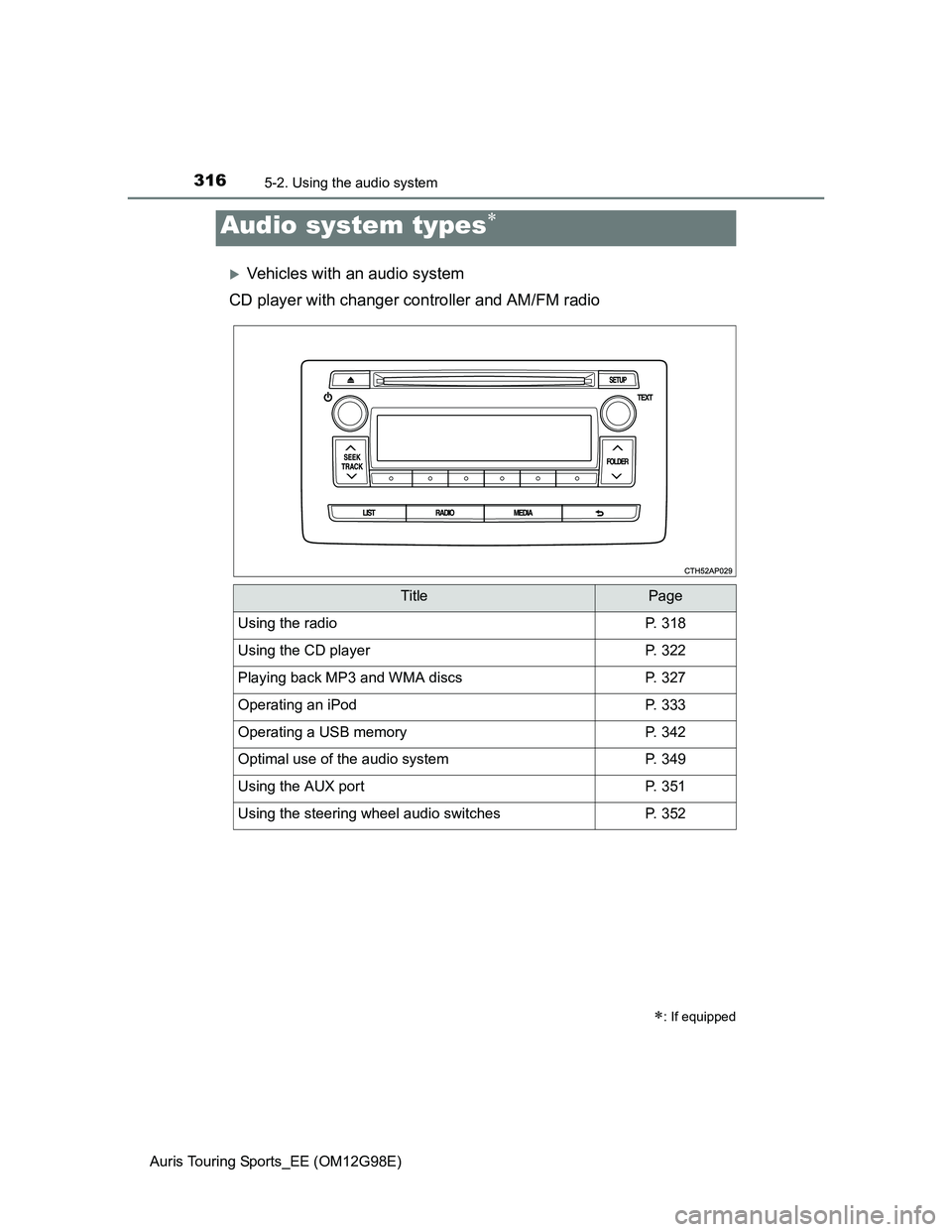
Vehicles with an audio system
CD player with changer controller and AM/FM radio
Audio system types
: If equipped
TitlePage
Using the radioP. 318
Using the CD playerP. 322
Playing back MP3 and WMA discsP. 327
Operating an iPodP. 333
Operating a USB memoryP. 342
Optimal use of the audio systemP. 349
Using the AUX portP. 351
Using the steering wheel audio switchesP. 352
Page 319 of 632
3195-2. Using the audio system
Auris Touring Sports_EE (OM12G98E)
5
Interior features
Updating the station list
Press .
The station list will be displayed.
Press (UPDATE) to update the list.
“Updating” is displayed while the searching is in process, and then avail-
able stations will be listed on the display.
To cancel the updating process, press .
Selecting a station from the station list
Press .
The station list will be displayed.
Turn to select a station.
Press to tune in the station.
To return to the previous display, press .
This feature allows your radio to receive RDS data.
Listening to stations of the same network
Press .
Turn to “RADIO” and press .
Turn as corresponds to the desired mode: “FM AF” or
“Region code”.
Using the station list
RDS (Radio Data System)
1
2
1
2
3
1
2
3
Page 338 of 632
3385-2. Using the audio system
Auris Touring Sports_EE (OM12G98E)
About iPod
“Made for iPod” and “Made for iPhone” mean that an electronic accessory
has been designed to connect specifically to iPod, or iPhone, respectively,
and has been certified by the developer to meet Apple performance stan-
dards.
Apple is not responsible for the operation of this device or its compliance
with safety and regulatory standards. Please note that the use of this acces-
sory with iPod or iPhone may affect wireless performance.
iPhone, iPod, iPod classic, iPod nano and iPod touch are trademarks of
Apple Inc., registered in the U.S. and other countries.
Page 346 of 632
3465-2. Using the audio system
Auris Touring Sports_EE (OM12G98E)USB memory
Compatible devices
USB memory that can be used for MP3 and WMA playback
Compatible device formats
The following device formats can be used:
• USB communication formats: USB2.0 FS (12 Mbps)
• File formats: FAT12/16/32 (Windows)
• Correspondence class: Mass storage class
MP3 and WMA files written in any format other than those listed above may
not play correctly, and their file names and folder names may not be dis-
played correctly.
Items related to standards and limitations are as follows:
• Maximum directory hierarchy: 8 levels
• Maximum number of folders in a device: 999 (including the root)
• Maximum number of files in a device: 9999
• Maximum number of files per folder: 255
MP3 and WMA files
MP3 (MPEG Audio LAYER 3) is a standard audio compression format.
Files can be compressed to approximately 1/10 of their original size using
MP3 compression.
WMA (Windows Media Audio) is a Microsoft audio compression format.
This format compresses audio data to a size smaller than that of the MP3
format.
There is a limit to the MP3 and WMA file standards that can be used and to
the media/formats on which the files are recorded.
MP3 file compatibility
• Compatible standards
MP3 (MPEG1 AUDIO LAYERIII, MPEG2 AUDIO LAYERIII, MPEG2.5)
• Compatible sampling frequencies
MPEG1 AUDIO LAYERIII: 32, 44.1, 48 (kHz)
MPEG2 AUDIO LAYERIII: 16, 22.05, 24 (kHz)
MPEG2.5: 8, 11.025, 12 (kHz)
• Compatible bit rates (compatible with VBR)
MPEG1 AUDIO LAYERII, III: 32-320 (kbps)
MPEG2 AUDIO LAYERII, III: 8-160 (kbps)
MPEG2.5: 8-160 (kbps)
• Compatible channel modes: stereo, joint stereo, dual channel and mon-
aural