engine TOYOTA AURIS 2015 (in English) Service Manual
[x] Cancel search | Manufacturer: TOYOTA, Model Year: 2015, Model line: AURIS, Model: TOYOTA AURIS 2015Pages: 632, PDF Size: 17.65 MB
Page 147 of 632
1473-2. Opening, closing and locking the doors
Auris Touring Sports_EE (OM12G98E)
3
Operation of each component
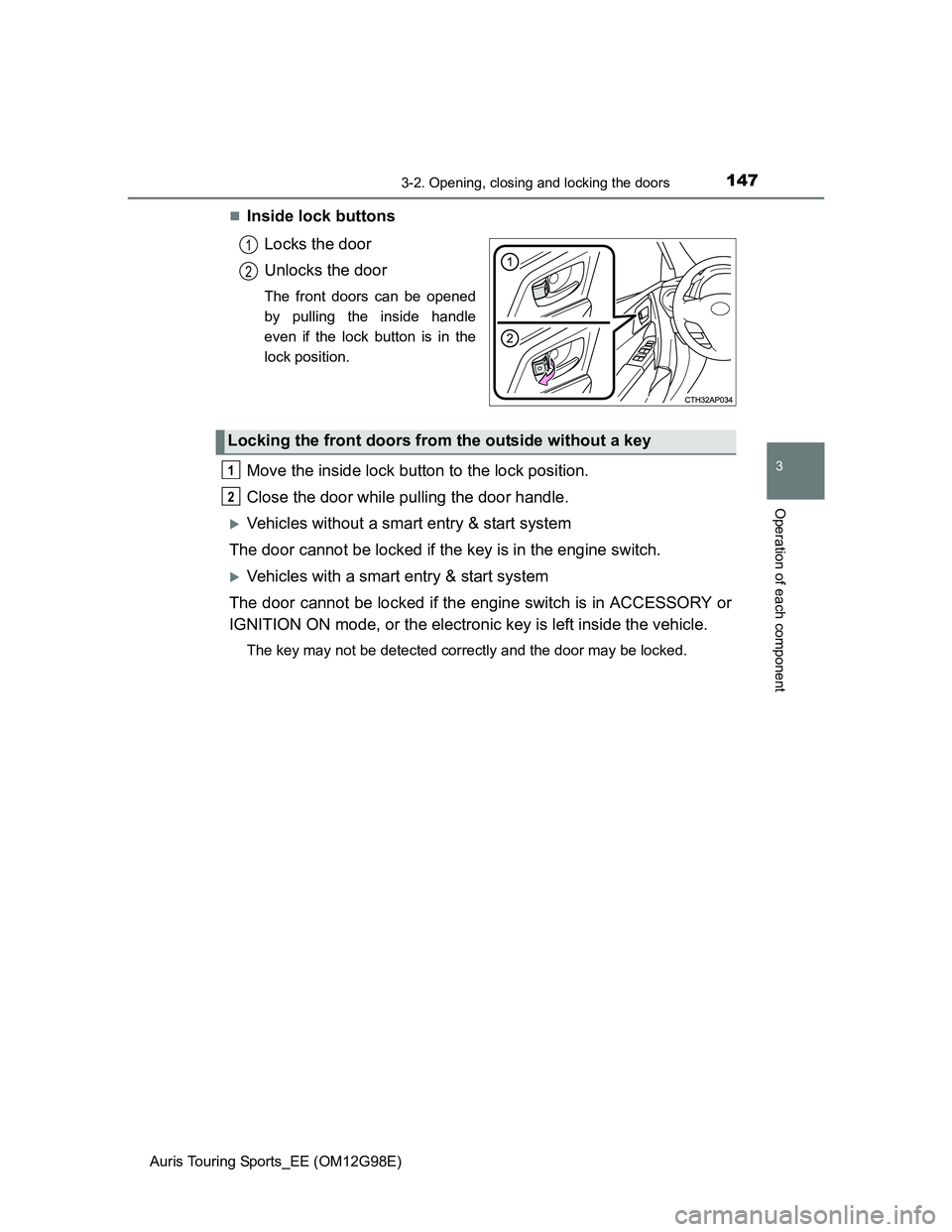
Inside lock buttons
Locks the door
Unlocks the door
The front doors can be opened
by pulling the inside handle
even if the lock button is in the
lock position.
Move the inside lock button to the lock position.
Close the door while pulling the door handle.
Vehicles without a smart entry & start system
The door cannot be locked if the key is in the engine switch.
Vehicles with a smart entry & start system
The door cannot be locked if the engine switch is in ACCESSORY or
IGNITION ON mode, or the electronic key is left inside the vehicle.
The key may not be detected correctly and the door may be locked.
1
2
Locking the front doors from the outside without a key
1
2
Page 162 of 632
1623-4. Adjusting the steering wheel and mirrors
Auris Touring Sports_EE (OM12G98E)
Auto anti-glare inside rear view mirror
Responding to the level of brightness of the headlights of vehicles
behind, the reflected light is automatically reduced.
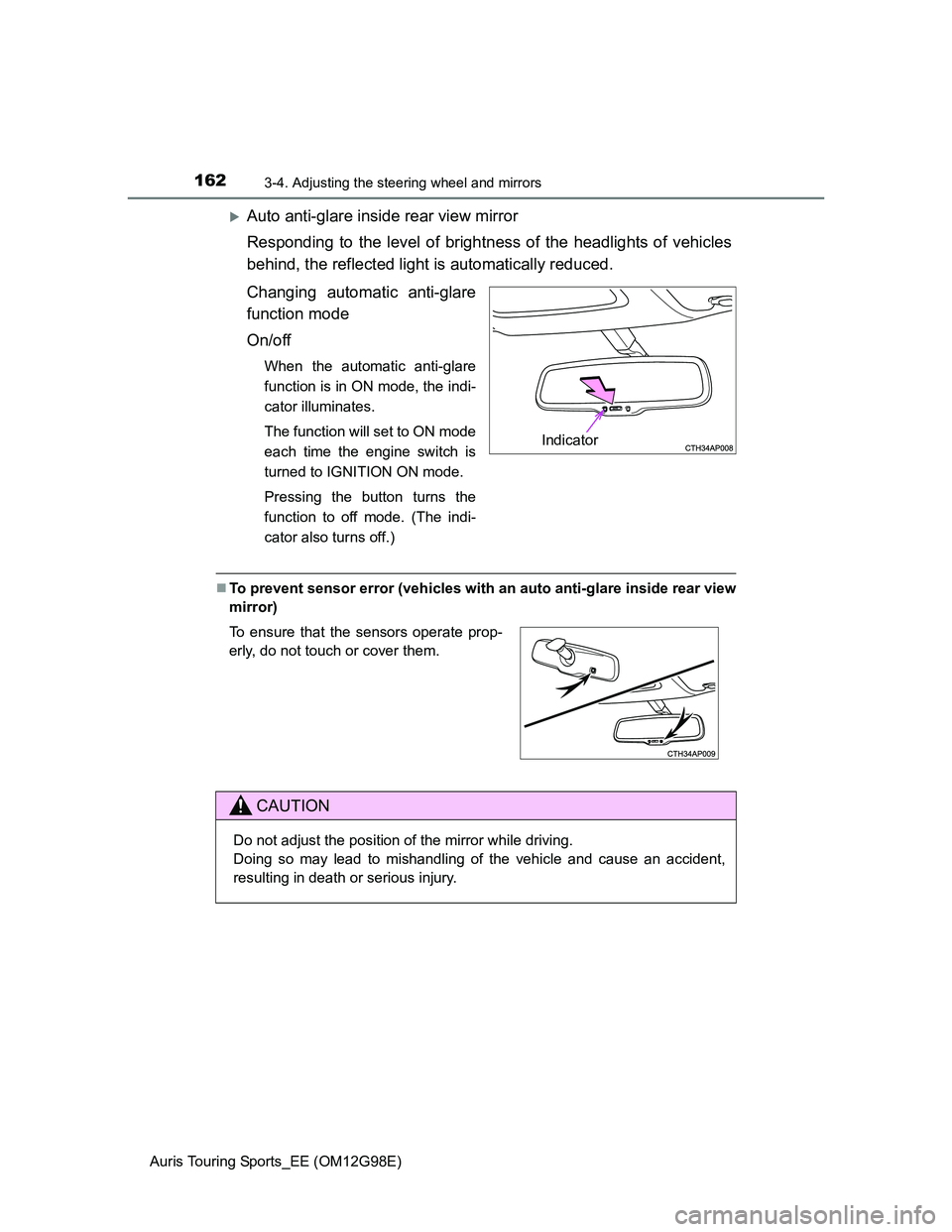
Changing automatic anti-glare
function mode
On/off
When the automatic anti-glare
function is in ON mode, the indi-
cator illuminates.
The function will set to ON mode
each time the engine switch is
turned to IGNITION ON mode.
Pressing the button turns the
function to off mode. (The indi-
cator also turns off.)
To prevent sensor error (vehicles with an auto anti-glare inside rear view
mirror)
Indicator
To ensure that the sensors operate prop-
erly, do not touch or cover them.
CAUTION
Do not adjust the position of the mirror while driving.
Doing so may lead to mishandling of the vehicle and cause an accident,
resulting in death or serious injury.
Page 164 of 632
1643-4. Adjusting the steering wheel and mirrors
Auris Touring Sports_EE (OM12G98E)
Automatic mode allows the folding or extending of the mirrors to be
linked to locking/unlocking of the doors.
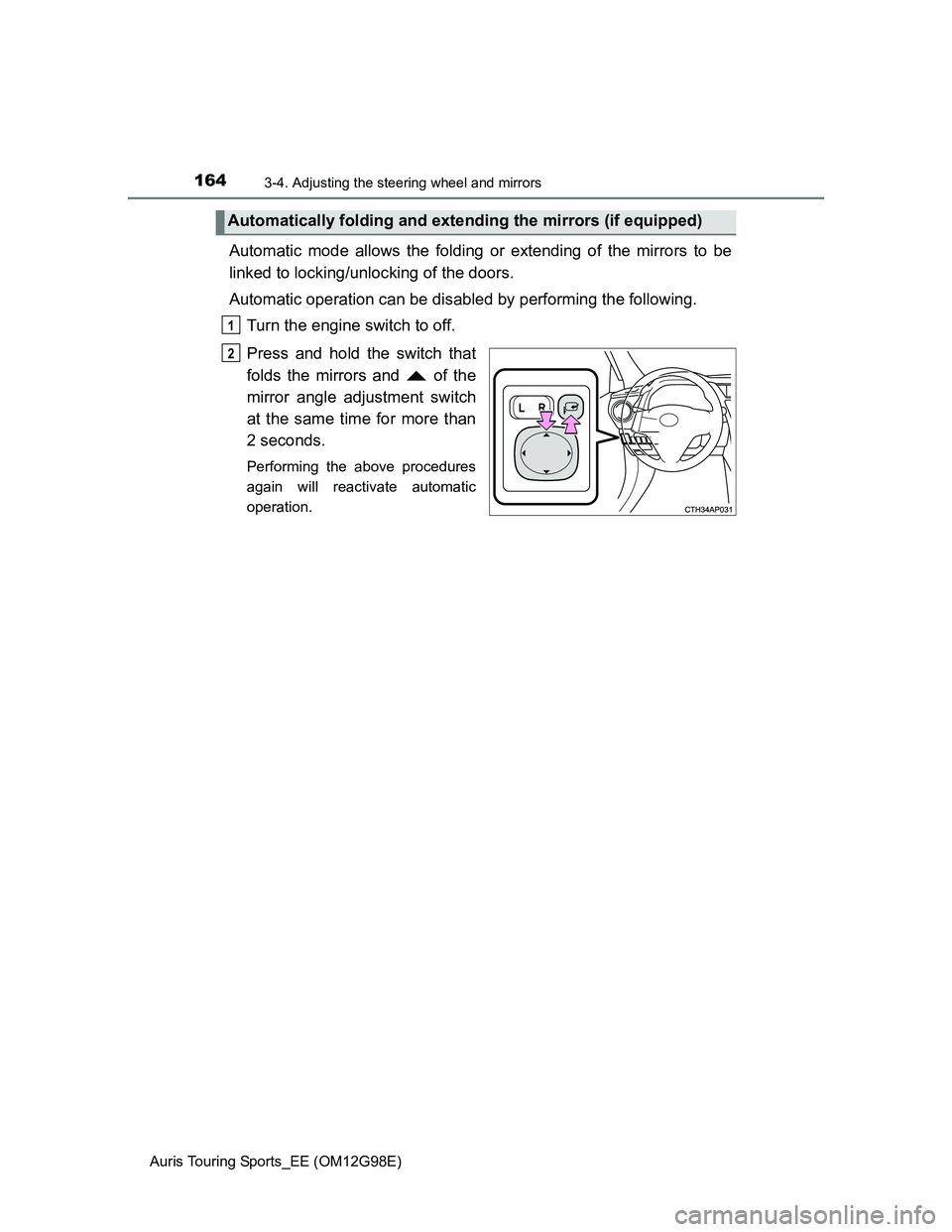
Automatic operation can be disabled by performing the following.
Turn the engine switch to off.
Press and hold the switch that
folds the mirrors and of the
mirror angle adjustment switch
at the same time for more than
2 seconds.
Performing the above procedures
again will reactivate automatic
operation.
Automatically folding and extending the mirrors (if equipped)
1
2
Page 165 of 632
1653-4. Adjusting the steering wheel and mirrors
Auris Touring Sports_EE (OM12G98E)
3
Operation of each component
Mirror angle can be adjusted when
Vehicles without a smart entry & start system
The engine switch is in the “ACC” or “ON” position.
Vehicles with a smart entry & start system
The engine switch is in ACCESSORY or IGNITION ON mode.
When the mirrors are fogged up
The outside rear view mirrors can be cleared using the mirror defoggers. Turn
on the rear window defogger to turn on the outside rear view mirror defog-
gers. (P. 314)
Using automatic mode in cold weather (if equipped)
When automatic mode is used in cold weather, the door mirror could freeze
up and automatic stowing and return may not be possible. In this event,
remove any ice and snow from the door mirror, then either operate the mirror
using manual mode or move the mirror by hand.
CAUTION
Important points while driving
Observe the following precautions while driving.
Failure to do so may result in loss of control of the vehicle and cause an
accident, resulting in death or serious injury.
Do not adjust the mirrors while driving.
Do not drive with the mirrors folded.
Both the driver and passenger side mirrors must be extended and properly
adjusted before driving.
When a mirror is moving
To avoid personal injury and mirror malfunction, be careful not to get your
hand caught by the moving mirror.
When the mirror defoggers are operating
Do not touch the rear view mirror surfaces, as they can become very hot
and burn you.
Page 167 of 632
1673-5. Opening and closing the windows
Auris Touring Sports_EE (OM12G98E)
3
Operation of each component
The power windows can be operated when
Vehicles without a smart entry & start system
The engine switch is in the “ON” position.
Vehicles with a smart entry & start system
The engine switch is in IGNITION ON mode.
Operating the power windows after turning the engine off
Vehicles without a smart entry & start system
The power windows can be operated for approximately 45 seconds even
after the engine switch is turned to the “ACC” or “LOCK” position. They can-
not, however, be operated once either front door is opened.
Vehicles with a smart entry & start system
The power windows can be operated for approximately 45 seconds even
after the engine switch is turned to ACCESSORY mode or turned off. They
cannot, however, be operated once either front door is opened.
Jam protection function (windows with one-touch closing function only)
If an object becomes caught between the window and the window frame, win-
dow travel is stopped and the window is opened slightly.
Page 168 of 632
1683-5. Opening and closing the windows
Auris Touring Sports_EE (OM12G98E)When the power window does not close normally (windows with one-
touch closing function only)
If the jam protection function is operating abnormally and a window cannot be
closed, perform the following operations using the power window switch on
the relevant door.
Vehicles without a smart entry & start system: After stopping the vehicle, the
window can be closed by holding the power window switch in the one-touch
closing position while the engine switch is turned to the “ON” position.
Vehicles with a smart entry & start system: After stopping the vehicle, the
window can be closed by holding the power window switch in the one-touch
closing position while the engine switch is turned to IGNITION ON mode.
If the window still cannot be closed even by carrying out the operation as
explained above, initialize the function by performing the following proce-
dure.
Hold the power window switch in the one-touch closing position. Continue
holding the switch for a further 6 seconds after the window has closed.
Hold the power window switch in the one-touch opening position. Con-
tinue holding the switch for a further 2 seconds after the window has
opened completely.
Hold the power window switch in the one-touch closing position once
again. Continue holding the switch for a further 2 seconds after the win-
dow has closed.
If you release the switch while the window is moving, start again from the
beginning.
If the window continues to close but then re-open slightly even after perform-
ing the above procedure correctly, have the vehicle inspected by any autho-
rized Toyota dealer or repairer, or another duly qualified and equipped
professional.
1
2
3
Page 171 of 632
171
4Driving
Auris Touring Sports_EE (OM12G98E)4-1. Before driving
Driving the vehicle ............. 172
Cargo and luggage ............ 183
Trailer towing ..................... 186
4-2. Driving procedures
Engine (ignition) switch
(vehicles without a
smart entry & start
system) ............................ 195
Engine (ignition) switch
(vehicles with a smart
entry & start system)........ 199
Multidrive ........................... 209
Manual transmission.......... 214
Turn signal lever ................ 217
Parking brake .................... 218
Horn ................................... 219
4-3. Operating the lights
and wipers
Headlight switch ................ 220
Automatic High Beam ........ 226
Fog light switch .................. 230
Windshield wipers and
washer ............................. 232
Rear window wiper and
washer ............................. 2364-4. Refueling
Opening the fuel tank
cap ................................... 238
4-5. Using the driving
support systems
Cruise control..................... 242
Speed limiter ...................... 247
Toyota parking
assist-sensor ................... 250
Simple-IPA
(Simple-Intelligent
Parking Assist)................. 256
Stop & Start system ........... 270
Driving assist systems ....... 276
Hill-start assist control........ 281
Diesel particulate filter
system ............................. 283
4-6. Driving tips
Winter driving tips .............. 285
Page 172 of 632
172
Auris Touring Sports_EE (OM12G98E)
4-1. Before driving
P. 195, 199
Multidrive
With the brake pedal depressed, shift the shift lever to D. (P. 209)
Release the parking brake. (P. 218)
Gradually release the brake pedal and gently depress the accelera-
tor pedal to accelerate the vehicle.
Manual transmission
While depressing the clutch pedal, shift the shift lever to 1.
(P. 214)
Release the parking brake. (P. 218)
Gradually release the clutch pedal. At the same time, gently
depress the accelerator pedal to accelerate the vehicle.
Driving the vehicle
The following procedures should be observed to ensure safe
driving:
Starting the engine
Driving
1
2
3
1
2
3
Page 173 of 632
1734-1. Before driving
Auris Touring Sports_EE (OM12G98E)
4
Driving
Multidrive
With the shift lever in D, depress the brake pedal.
If necessary, set the parking brake.
If the vehicle is to be stopped for an extended period of time, shift the shift
lever to P or N. (P. 209)
Manual transmission
While depressing the clutch pedal, depress the brake pedal.
If necessary, set the parking brake.
If the vehicle is to be stopped for an extended period of time, shift the shift
lever to N. (P. 214)
Vehicles with a Stop & Start system: If the Stop & Start system is enabled,
shifting the shift lever to N and releasing the clutch pedal will stop the
engine. (P. 214)
Multidrive
With the shift lever in D, depress the brake pedal.
Shift the shift lever to P. (P. 209)
Set the parking brake. (P. 218)
Turn the engine switch off to stop the engine.
Lock the door, making sure that you have the key on your person.
If parking on a hill, block the wheels as needed.
Manual transmission
While depressing the clutch pedal, depress the brake pedal.
Shift the shift lever to N. (P. 214)
If parking on a hill, shift the shift lever to 1 or R.
Set the parking brake. (P. 218)
Turn the engine switch off to stop the engine.
Lock the door, making sure that you have the key on your person.
If parking on a hill, block the wheels as needed.
Stopping
Parking the vehicle
1
2
1
2
1
2
3
4
5
1
2
3
4
5
Page 174 of 632
1744-1. Before driving
Auris Touring Sports_EE (OM12G98E)
Multidrive
Make sure that the parking brake is set and shift the shift lever to D.
Gently depress the accelerator pedal.
Release the parking brake.
Manual transmission
With the parking brake firmly set and the clutch pedal fully
depressed, shift the shift lever to 1.
Lightly depress the accelerator pedal at the same time as gradually
releasing the clutch pedal.
Release the parking brake.
When starting off on an uphill
The hill-start assist control is available. (P. 281)
Driving in the rain
Drive carefully when it is raining, because visibility will be reduced, the win-
dows may become fogged-up, and the road will be slippery.
Drive carefully when it starts to rain, because the road surface will be espe-
cially slippery.
Refrain from high speeds when driving on an expressway in the rain,
because there may be a layer of water between the tires and the road sur-
face, preventing the steering and brakes from operating properly.
Engine speed while driving (vehicles with a Multidrive)
In the following conditions, the engine speed may become high while driving.
This is due to automatic up-shifting control or down-shifting implementation to
meet driving conditions. It does not indicate sudden acceleration.
The vehicle is judged to be driving uphill or downhill
When the accelerator pedal is released
When the brake pedal is depressed while sport mode is selected
Starting off on a steep uphill
1
2
3
1
2
3