Battery TOYOTA AURIS 2015 (in English) Workshop Manual
[x] Cancel search | Manufacturer: TOYOTA, Model Year: 2015, Model line: AURIS, Model: TOYOTA AURIS 2015Pages: 632, PDF Size: 17.65 MB
Page 501 of 632
5017-2. Steps to take in an emergency
Auris Touring Sports_EE (OM12G98E)
7
When trouble arises
OnceContinuous
(5 seconds)
(Flashes
in yellow)
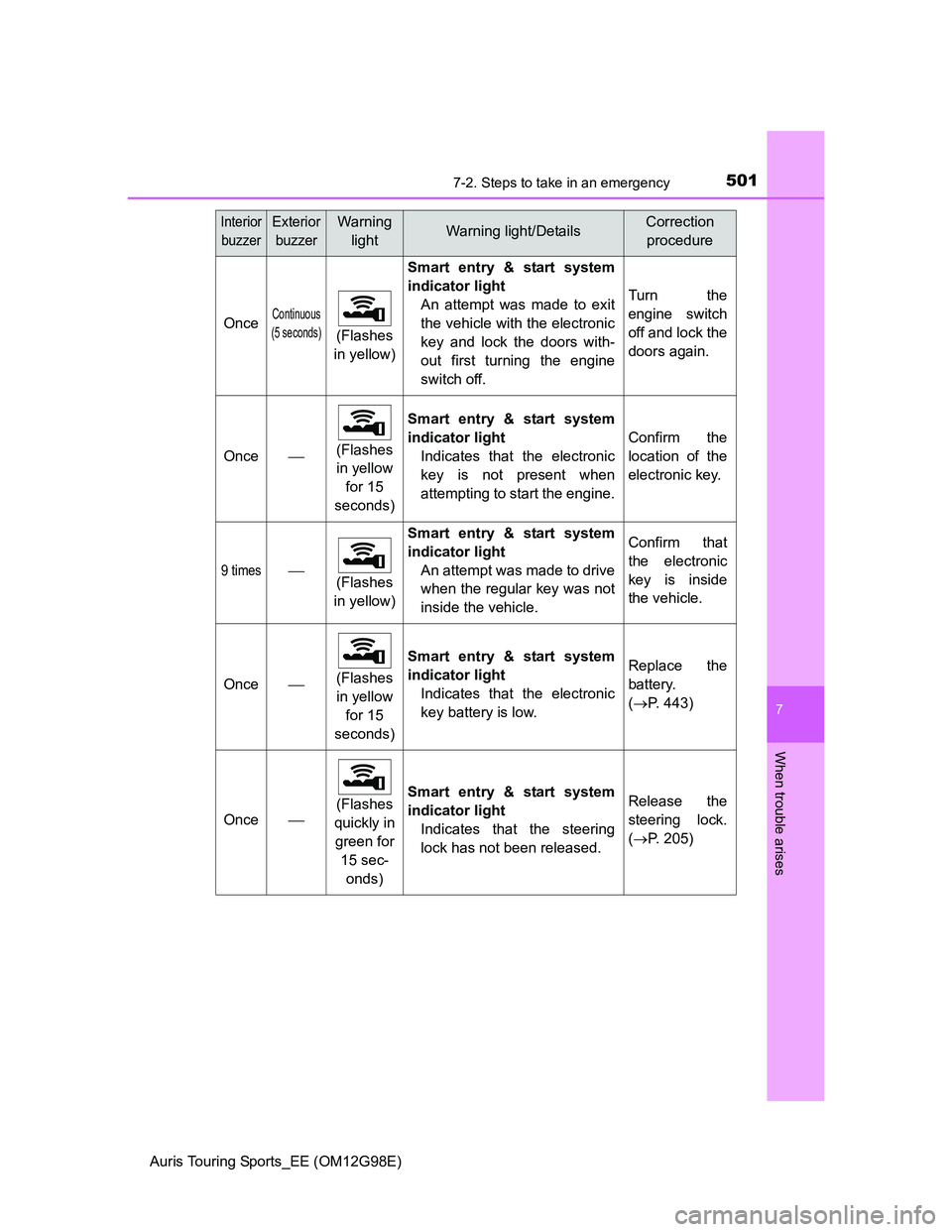
Smart entry & start system
indicator light
An attempt was made to exit
the vehicle with the electronic
key and lock the doors with-
out first turning the engine
switch off.
Turn the
engine switch
off and lock the
doors again.
Once(Flashes
in yellow
for 15
seconds)Smart entry & start system
indicator light
Indicates that the electronic
key is not present when
attempting to start the engine.Confirm the
location of the
electronic key.
9 times
(Flashes
in yellow)
Smart entry & start system
indicator light
An attempt was made to drive
when the regular key was not
inside the vehicle.Confirm that
the electronic
key is inside
the vehicle.
Once(Flashes
in yellow
for 15
seconds)
Smart entry & start system
indicator light
Indicates that the electronic
key battery is low.Replace the
battery.
(P. 443)
Once(Flashes
quickly in
green for
15 sec-
onds)
Smart entry & start system
indicator light
Indicates that the steering
lock has not been released.Release the
steering lock.
(P. 205)
Interior
buzzerExterior
buzzerWarning
lightWarning light/DetailsCorrection
procedure
Page 504 of 632
5047-2. Steps to take in an emergency
Auris Touring Sports_EE (OM12G98E)Warning buzzer
In some cases, the buzzer may not be heard because of noisy place or an
audio sound.
If the engine oil change reminder light flashes (if equipped)
Repeated short trips and/or low-speed driving may cause the oil to degrade
sooner than usual, regardless of the actual distance driven. If this happens,
the engine oil change reminder will flash.
Engine oil change reminder light comes on (if equipped)
1ND-TV engine:
Replace the engine oil filter when the engine oil change reminder light does
not come on even if you have driven over 15000 km (9300 miles) after the
engine oil was changed.
There is a possibility that the engine oil change reminder light has been illumi-
nated when you have driven less than 15000 km (9300 miles) based on a
usage or driving condition.
1AD-FTV engine:
Replace the engine oil filter when the engine oil change reminder light does
not come on even if you have driven over 30000 km (18000 miles) after the
engine oil was changed.
There is a possibility that the engine oil change reminder light has been illumi-
nated when you have driven less than 30000 km (18000 miles) based on a
usage or driving condition.
Electric power steering system warning light (warning buzzer)
When the battery charge becomes insufficient or the voltage temporarily
drops, the electric power steering system warning light may come on and the
warning buzzer may sound.
Page 521 of 632
5217-2. Steps to take in an emergency
Auris Touring Sports_EE (OM12G98E)
7
When trouble arises
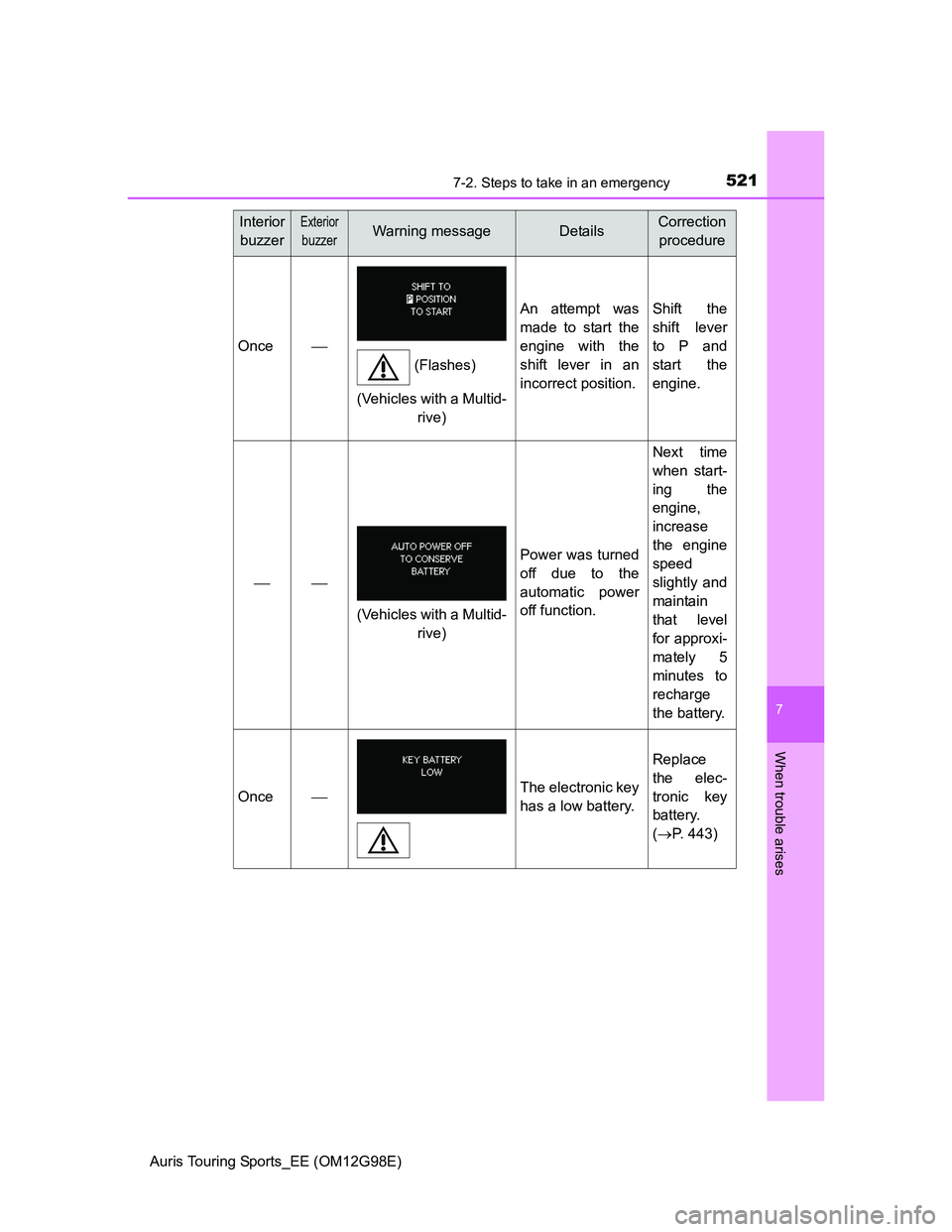
Once
An attempt was
made to start the
engine with the
shift lever in an
incorrect position.Shift the
shift lever
to P and
start the
engine.
Power was turned
off due to the
automatic power
off function.
Next time
when start-
ing the
engine,
increase
the engine
speed
slightly and
maintain
that level
for approxi-
mately 5
minutes to
recharge
the battery.
OnceThe electronic key
has a low battery.
Replace
the elec-
tronic key
battery.
(P. 443)
Interior
buzzerExterior
buzzerWarning messageDetailsCorrection
procedure
(Flashes)
(Vehicles with a Multid-
rive)
(Vehicles with a Multid-
rive)
Page 564 of 632
5647-2. Steps to take in an emergency
Auris Touring Sports_EE (OM12G98E)
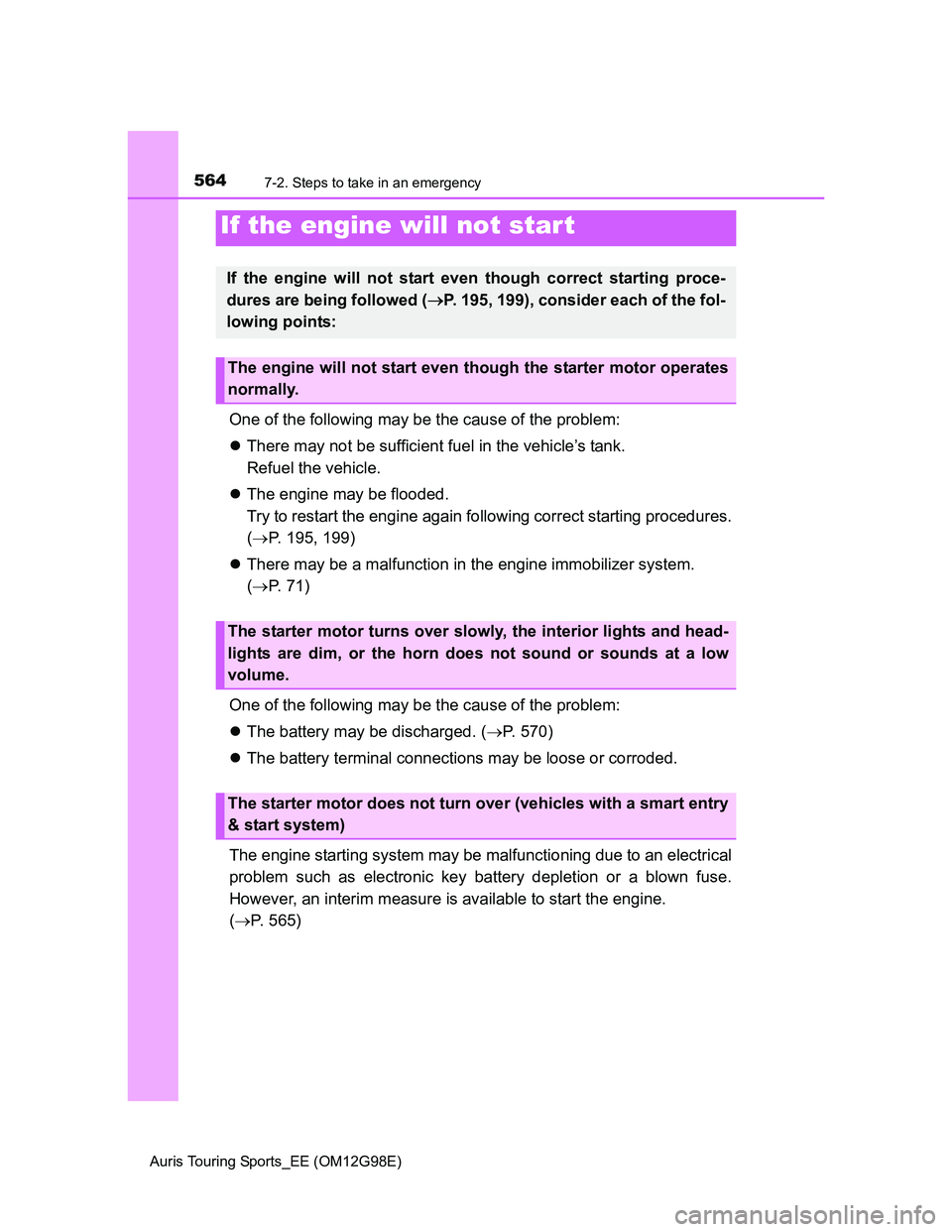
One of the following may be the cause of the problem:
There may not be sufficient fuel in the vehicle’s tank.
Refuel the vehicle.
The engine may be flooded.
Try to restart the engine again following correct starting procedures.
(P. 195, 199)
There may be a malfunction in the engine immobilizer system.
(P. 71)
One of the following may be the cause of the problem:
The battery may be discharged. (P. 570)
The battery terminal connections may be loose or corroded.
The engine starting system may be malfunctioning due to an electrical
problem such as electronic key battery depletion or a blown fuse.
However, an interim measure is available to start the engine.
(P. 565)
If the engine will not star t
If the engine will not start even though correct starting proce-
dures are being followed (P. 195, 199), consider each of the fol-
lowing points:
The engine will not start even though the starter motor operates
normally.
The starter motor turns over slowly, the interior lights and head-
lights are dim, or the horn does not sound or sounds at a low
volume.
The starter motor does not turn over (vehicles with a smart entry
& start system)
Page 565 of 632
5657-2. Steps to take in an emergency
Auris Touring Sports_EE (OM12G98E)
7
When trouble arises
One of the following may be the cause of the problem:
One or both of the battery terminals may be disconnected.
The battery may be discharged. (P. 570)
There may be a malfunction in the steering lock system.
Contact any authorized Toyota dealer or repairer, or another duly qualified
and equipped professional if the problem cannot be repaired, or if repair
procedures are unknown.
When the engine does not start, the following steps can be used as an
interim measure to start the engine if the engine switch is functioning
normally:
Shift the shift lever to P (Multidrive) or N (manual transmission).
Set the parking brake.
Turn the engine switch to ACCESSORY mode.
Press and hold the engine switch for about 15 seconds while
depressing the brake pedal (Multidrive) or clutch pedal (manual
transmission) firmly.
Even if the engine can be started using the above steps, the system
may be malfunctioning. Have the vehicle inspected by any authorized
Toyota dealer or repairer, or another duly qualified and equipped pro-
fessional.
The starter motor does not turn over, the interior lights and head-
lights do not turn on, or the horn does not sound.
Emergency start function (vehicles with a smart entry & start
system)
1
2
3
4
Page 567 of 632
5677-2. Steps to take in an emergency
Auris Touring Sports_EE (OM12G98E)
7
When trouble arises
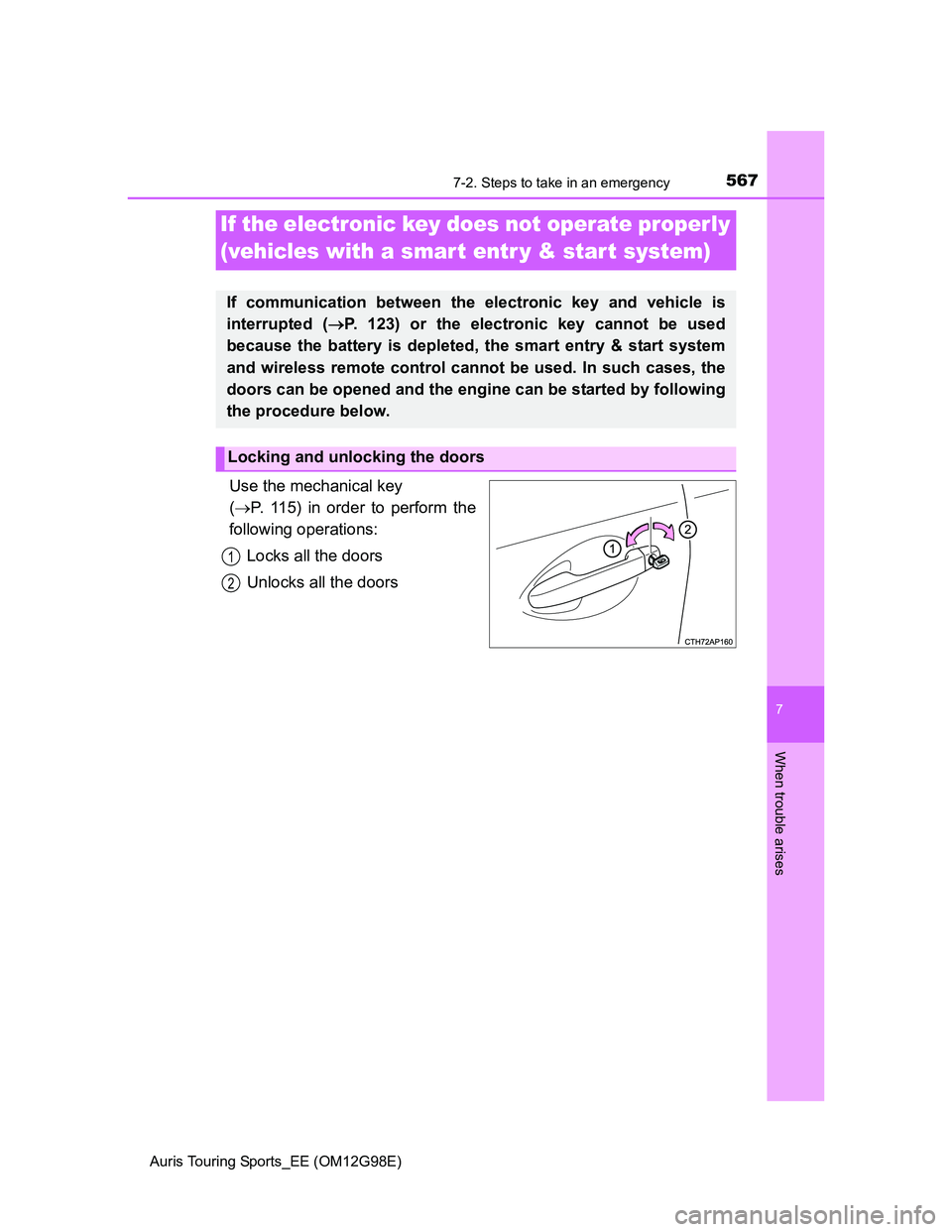
Use the mechanical key
(P. 115) in order to perform the
following operations:
Locks all the doors
Unlocks all the doors
If the electronic key does not operate properly
(vehicles with a smar t entr y & star t system)
If communication between the electronic key and vehicle is
interrupted (P. 123) or the electronic key cannot be used
because the battery is depleted, the smart entry & start system
and wireless remote control cannot be used. In such cases, the
doors can be opened and the engine can be started by following
the procedure below.
Locking and unlocking the doors
1
2
Page 569 of 632
5697-2. Steps to take in an emergency
Auris Touring Sports_EE (OM12G98E)
7
When trouble arises
Stopping the engine
Shift the shift lever to P (Multidrive) or N (manual transmission) and press the
engine switch as you normally do when stopping the engine.
Replacing the key battery
As the above procedure is a temporary measure, it is recommended that the
electronic key battery be replaced immediately when the battery is depleted.
(P. 443)
Alarm (if equipped)
Using the mechanical key to lock the doors will not set the alarm system.
If a door is unlocked using the mechanical key when the alarm system is set,
the alarm may be triggered.
Changing engine switch modes
Release the brake pedal (Multidrive) or clutch pedal (manual transmission)
and press the engine switch in step above.
The engine does not start and modes will be changed each time the switch is
pressed. (P. 202)
When the electronic key does not work properly
Make sure that the smart entry & start system has not been deactivated in
the customization setting. If it is off, turn the function on.
(Customizable features P. 604)
Check if battery-saving mode is set. If it is set, cancel the function.
(P. 122)
3
Page 570 of 632
5707-2. Steps to take in an emergency
Auris Touring Sports_EE (OM12G98E)
If you have a set of jumper (or booster) cables and a second vehicle
with a battery, you can jump start your vehicle by following the steps
below.
Open the hood. (P. 405)
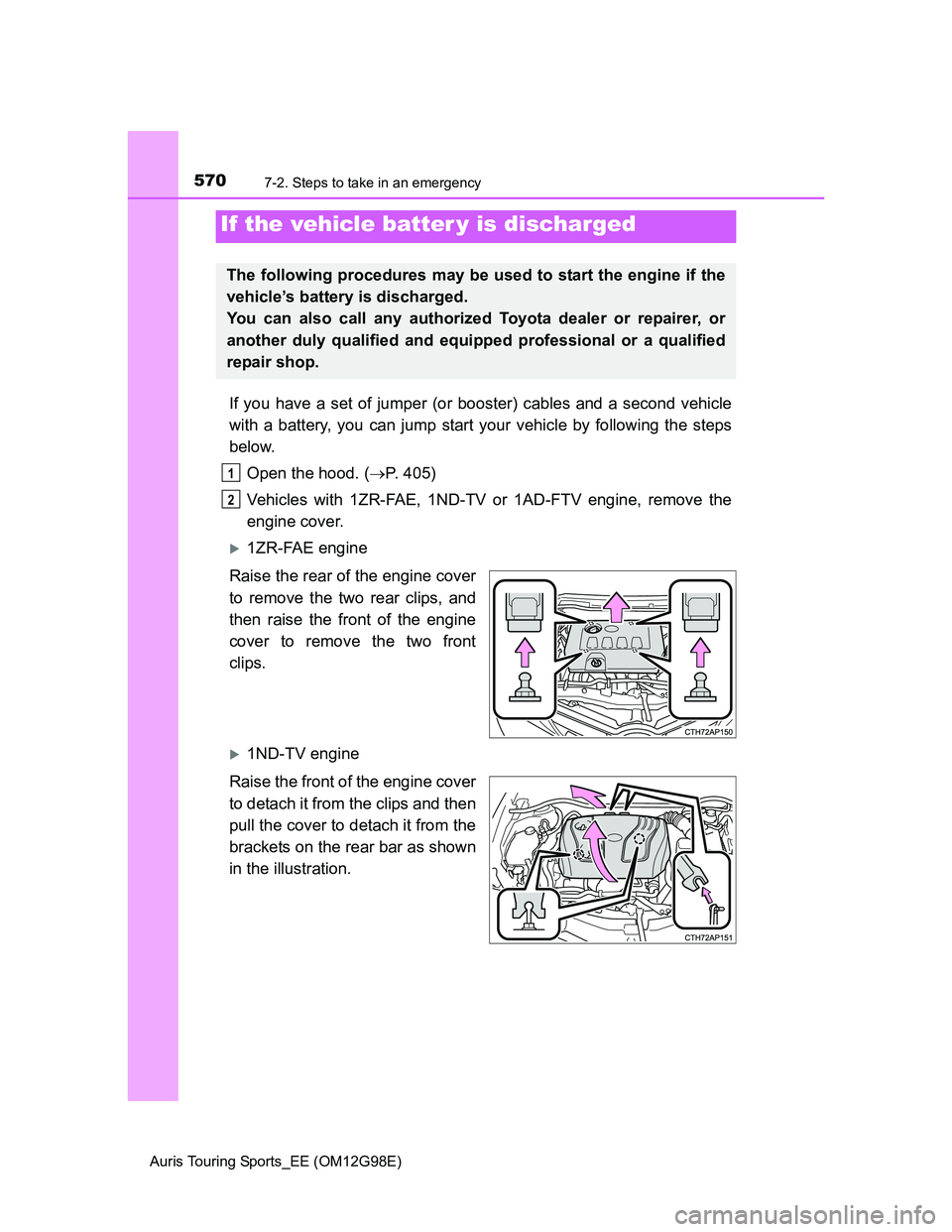
Vehicles with 1ZR-FAE, 1ND-TV or 1AD-FTV engine, remove the
engine cover.
1ZR-FAE engine
Raise the rear of the engine cover
to remove the two rear clips, and
then raise the front of the engine
cover to remove the two front
clips.
1ND-TV engine
Raise the front of the engine cover
to detach it from the clips and then
pull the cover to detach it from the
brackets on the rear bar as shown
in the illustration.
If the vehicle batter y is discharged
The following procedures may be used to start the engine if the
vehicle’s battery is discharged.
You can also call any authorized Toyota dealer or repairer, or
another duly qualified and equipped professional or a qualified
repair shop.
1
2
Page 571 of 632
5717-2. Steps to take in an emergency
Auris Touring Sports_EE (OM12G98E)
7
When trouble arises
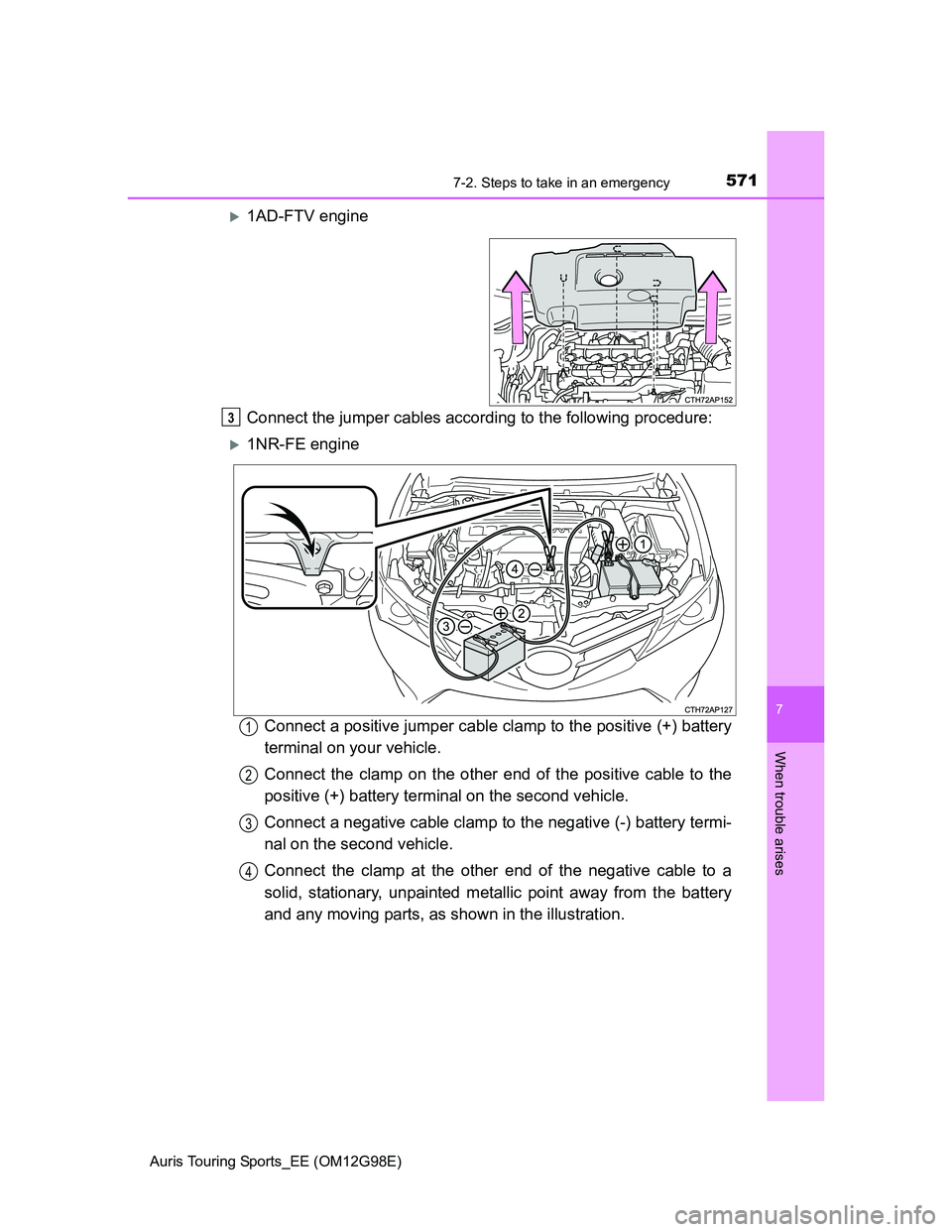
1AD-FTV engine
Connect the jumper cables according to the following procedure:
1NR-FE engine
Connect a positive jumper cable clamp to the positive (+) battery
terminal on your vehicle.
Connect the clamp on the other end of the positive cable to the
positive (+) battery terminal on the second vehicle.
Connect a negative cable clamp to the negative (-) battery termi-
nal on the second vehicle.
Connect the clamp at the other end of the negative cable to a
solid, stationary, unpainted metallic point away from the battery
and any moving parts, as shown in the illustration.
3
1
2
3
4
Page 572 of 632
5727-2. Steps to take in an emergency
Auris Touring Sports_EE (OM12G98E)
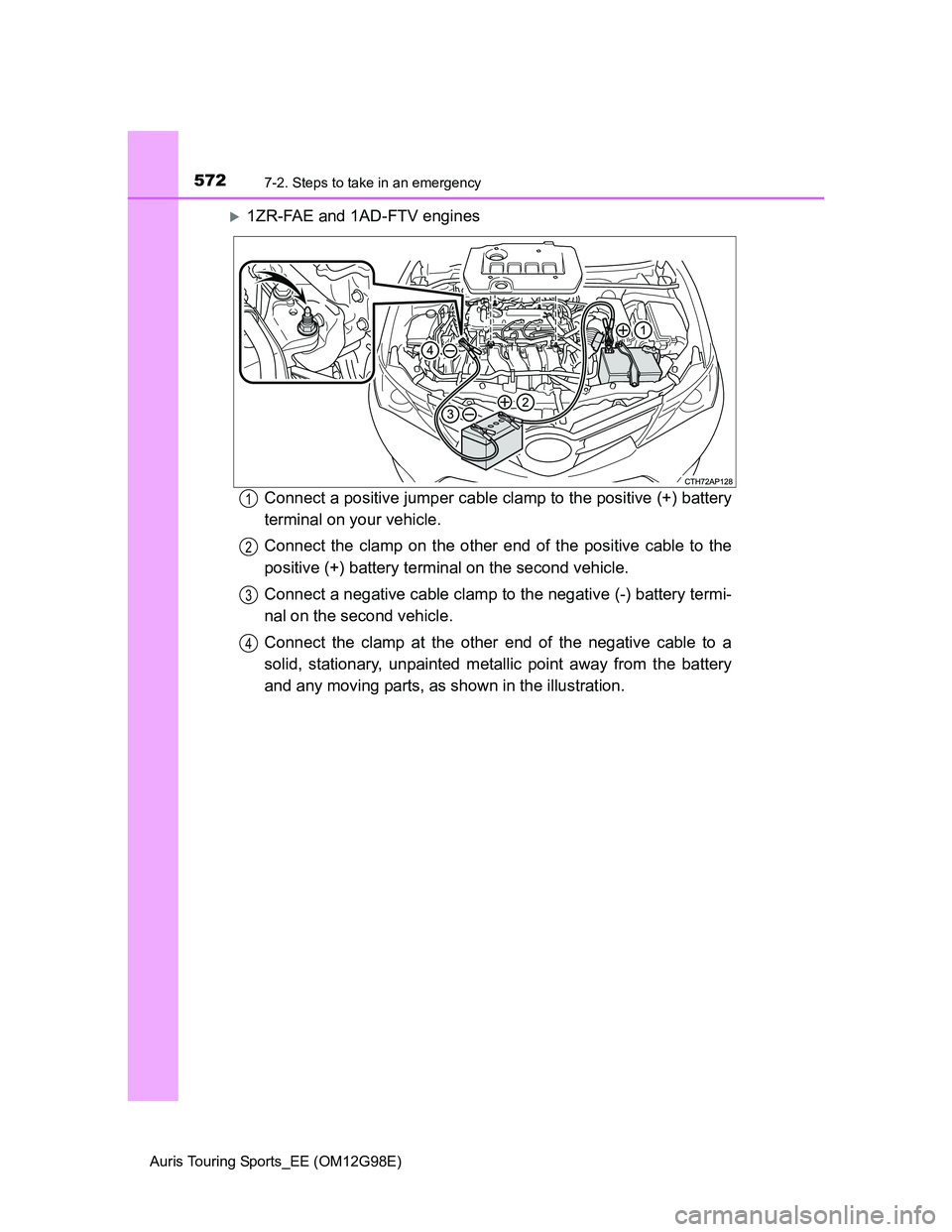
1ZR-FAE and 1AD-FTV engines
Connect a positive jumper cable clamp to the positive (+) battery
terminal on your vehicle.
Connect the clamp on the other end of the positive cable to the
positive (+) battery terminal on the second vehicle.
Connect a negative cable clamp to the negative (-) battery termi-
nal on the second vehicle.
Connect the clamp at the other end of the negative cable to a
solid, stationary, unpainted metallic point away from the battery
and any moving parts, as shown in the illustration.
1
2
3
4