key battery TOYOTA AURIS HYBRID 2013 User Guide
[x] Cancel search | Manufacturer: TOYOTA, Model Year: 2013, Model line: AURIS HYBRID, Model: TOYOTA AURIS HYBRID 2013Pages: 768, PDF Size: 21.22 MB
Page 177 of 768
1773-2. Opening, closing and locking the doors
UK_AURIS/AURIS_HV_EE (OM12F76E)
3
Operation of each component
Conditions affecting operation
The push button start uses weak radio waves. In the following situations, the
communication between the electronic key and the vehicle may be affected,
preventing the push button start, wireless remote control and immobilizer sys-
tem from operating properly: (Ways of coping: P. 684)
When the electronic key battery is depleted
Near a TV tower, electric power plant, gas station, radio station, large dis-
play, airport or other facility that generates strong radio waves or electrical
noise
When carrying a portable radio, cellular phone, cordless phone or other
wireless communication devices
When the electronic key is in contact with, or is covered by the following
metallic objects
• Cards to which aluminum foil is attached
• Cigarette boxes that have aluminum foil inside
• Metallic wallets or bags
• Coins
• Hand warmers made of metal
• Media such as CDs and DVDs
When other wireless keys (that emit radio waves) are being used nearby
When carrying the electronic key together with the following devices that
emit radio waves
• Another vehicle’s electronic key or a wireless key that emits radio waves
• Personal computers or personal digital assistants (PDAs)
• Digital audio players
• Portable game systems
If window tint with a metallic content or metallic objects are attached to the
rear window
When the electronic key is placed near a battery charger or electronic
devices
Page 178 of 768
1783-2. Opening, closing and locking the doors
UK_AURIS/AURIS_HV_EE (OM12F76E)Electronic key battery depletion
The standard battery life is 1 to 2 years.
If the battery becomes low, an alarm will sound in the cabin when the hybrid
system stops. (P. 625)
As the electronic key always receives radio waves, the battery will become
depleted even if the electronic key is not used. The following symptoms indi-
cate that the electronic key battery may be depleted. Replace the battery
when necessary. (P. 540)
• The push button start or the wireless remote control does not operate.
• The detection area becomes smaller.
• The LED indicator on the key surface does not turn on.
To avoid serious deterioration, do not leave the electronic key within 1 m (3
ft.) of the following electrical appliances that produce a magnetic field.
•TVs
• Personal computers
• Cellular phones, cordless phones and battery chargers
• Recharging cellular phones or cordless phones
• Table lamps
• Induction cookers
To operate the system properly
Make sure to carry the electronic key when operating the system.
Depending on the position and holding condition of the electronic key, the key
may not be detected correctly and the system may not operate properly.
Alarms and warning messages
P. 625
If the push button start does not operate properly
Starting the hybrid system: P. 276
When the electronic key battery is fully depleted
P. 540
Customization that can be configured at any authorized Toyota dealer or
repairer, or another duly qualified and equipped professional
It is possible to deactivate the push button start.
(Customizable features P. 737)
If the push button start has been deactivated in a customized setting
Starting the hybrid system and changing power switch modes: P. 6 8 6
Stopping the hybrid system: P. 277
Page 190 of 768
1903-2. Opening, closing and locking the doors
UK_AURIS/AURIS_HV_EE (OM12F76E)
Operation signals
The emergency flashers flash to indicate that the doors have been locked/
unlocked. (Locked: Once; Unlocked: Twice)
Door lock buzzer (type B)
If an attempt to lock the doors is made when a door is not fully closed, a
buzzer sounds continuously for 5 seconds. Fully close the door to stop the
buzzer, and lock the vehicle once more.
Security feature
Vehicles without a smart entry & start system
If a door is not opened within approximately 30 seconds after the vehicle is
unlocked, the security feature automatically locks the vehicle again.
Vehicles with a smart entry & start system
P. 149
Alarm (if equipped)
Using the wireless remote control to lock the doors will set the alarm system.
(P. 103)
Conditions affecting operation
Type A
The wireless remote control function may not operate normally in the follow-
ing situations:
When the wireless key battery is depleted
Near a TV tower, radio station, electric power plant, airport or other facility
that generates strong radio waves
When carrying a portable radio, cellular phone or other wireless communi-
cation devices
When multiple wireless keys are in the vicinity
When the wireless key is in contact with, or is covered by a metallic object
When a wireless key (that emits radio waves) is being used nearby
When the wireless key has been left near an electrical appliance such as a
personal computer
If window tint with a metallic content or metallic objects are attached to the
rear window
Type B
P. 156, 177
Page 191 of 768
1913-2. Opening, closing and locking the doors
UK_AURIS/AURIS_HV_EE (OM12F76E)
3
Operation of each component
If the wireless remote control does not operate properly (type B)
Locking and unlocking the doors: Use the mechanical key.
(P. 684)
Key battery depletion
Type A
If the wireless remote control function does not operate, the battery may be
depleted. Replace the battery when necessary. (P. 540)
Type B
P. 160, 178
When the key battery is fully depleted
P. 540
Confirmation of the registered key number (type B)
The number of keys already registered to the vehicle can be confirmed. Ask
any authorized Toyota dealer or repairer, or another duly qualified and
equipped professional for details.
Customization
Settings (e.g. wireless remote control system) can be changed.
(Customizable features: P. 737)
Page 272 of 768
2724-2. Driving procedures
UK_AURIS/AURIS_HV_EE (OM12F76E)
Auto power off function
Vehicles with a Multidrive
If the vehicle is left in ACCESSORY mode for more than 20 minutes or IGNI-
TION ON mode (the engine is not running) for more than an hour with the
shift lever in P, the engine switch will automatically turn off.
Vehicles with a multi-mode manual transmission or manual transmission
If the vehicle is left in ACCESSORY mode for more than 20 minutes or IGNI-
TION ON mode (the engine is not running) for more than an hour, the engine
switch will automatically turn off.
However, this function cannot entirely prevent 12-volt battery discharge. Do
not leave the vehicle with the engine switch in ACCESSORY or IGNITION
ON mode for long periods of time when the engine is not running.
Electronic key battery depletion
P. 160
Conditions affecting operation
P. 156
Notes for the entry function
P. 157
If the engine does not start
The engine immobilizer system may not have been deactivated. (P. 91)
Contact any authorized Toyota dealer or repairer, or another duly qualified
and equipped professional.
Vehicles with a Multidrive: Check that the shift lever is securely set in P. The
engine may not start if the shift lever is displaced out of P.
Vehicles without a multi-information display
The smart entry & start system indicator light (green) will flash quickly.
Vehicles with a multi-information display
“SHIFT TO P POSITION TO START” will be displayed on the multi-infor-
mation display.
Steering lock
After turning the engine switch off and opening and closing the doors, the
steering wheel will be locked due to the steering lock function. Operating the
engine switch again automatically cancels the steering lock.
Page 273 of 768
2734-2. Driving procedures
UK_AURIS/AURIS_HV_EE (OM12F76E)
4
Driving
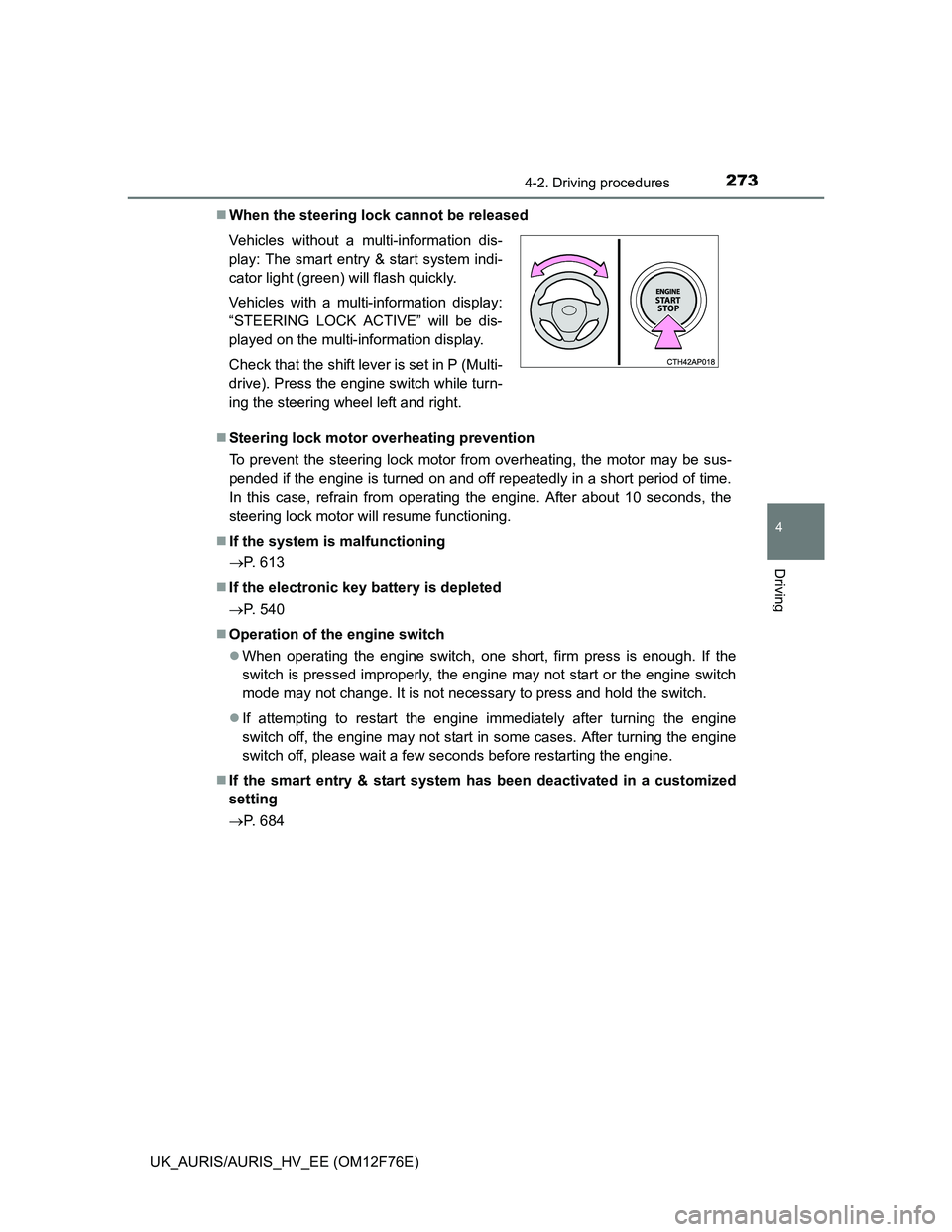
When the steering lock cannot be released
Steering lock motor overheating prevention
To prevent the steering lock motor from overheating, the motor may be sus-
pended if the engine is turned on and off repeatedly in a short period of time.
In this case, refrain from operating the engine. After about 10 seconds, the
steering lock motor will resume functioning.
If the system is malfunctioning
P. 613
If the electronic key battery is depleted
P. 540
Operation of the engine switch
When operating the engine switch, one short, firm press is enough. If the
switch is pressed improperly, the engine may not start or the engine switch
mode may not change. It is not necessary to press and hold the switch.
If attempting to restart the engine immediately after turning the engine
switch off, the engine may not start in some cases. After turning the engine
switch off, please wait a few seconds before restarting the engine.
If the smart entry & start system has been deactivated in a customized
setting
P. 684 Vehicles without a multi-information dis-
play: The smart entry & start system indi-
cator light (green) will flash quickly.
Vehicles with a multi-information display:
“STEERING LOCK ACTIVE” will be dis-
played on the multi-information display.
Check that the shift lever is set in P (Multi-
drive). Press the engine switch while turn-
ing the steering wheel left and right.
Page 279 of 768
2794-2. Driving procedures
UK_AURIS/AURIS_HV_EE (OM12F76E)
4
Driving
Auto power off function
If the vehicle is left in ACCESSORY mode for more than 20 minutes or ON
mode (the hybrid system is not operating) for more than an hour with the shift
position in P, the power switch will automatically turn off. However, this func-
tion cannot entirely prevent 12-volt battery discharge. Do not leave the vehi-
cle with the power switch in ACCESSORY or ON mode for long periods of
time when the hybrid system is not operating.
Sounds and vibrations specific to a hybrid vehicle
P. 8 3
Electronic key battery depletion
P. 160, 178
When the ambient temperature is low, such as during winter driving con-
ditions
It may take time until the “READY” indicator comes on.
Conditions affecting operation
P. 156, 177
Notes for the entry function
P. 157
If the hybrid system does not start
The immobilizer system may not have been deactivated. (P. 99)
Contact any authorized Toyota dealer or repairer, or another duly qualified
and equipped professional.
When “CHECK ENTRY & START SYSTEM” will be displayed on the multi-
information display
The system may be malfunctioning. Have the vehicle inspected by any autho-
rized Toyota dealer or repairer, or another duly qualified and equipped profes-
sional immediately.
If the “READY” indicator does not come on
If the “READY” indicator does not come on when you press the power switch
with the brake pedal depressed, contact any authorized Toyota dealer or
repairer, or another duly qualified and equipped professional immediately.
If the hybrid system is malfunctioning
P. 612
If the electronic key battery is depleted
P. 540
Page 456 of 768
4565-3. Using the interior lights
UK_AURIS/AURIS_HV_EE (OM12F76E)
Illuminated entry system
Vehicles without a smart entry & start system (except hybrid model)
When the interior light switch is in the “DOOR” position, the interior light auto-
matically turns on/off according to the engine switch position, whether the
doors are locked/unlocked and whether the doors are open/closed.
Vehicles with a smart entry & start system (except hybrid model)
When the interior light switch is in the “DOOR” position, the interior light and
engine switch light automatically turn on/off according to engine switch mode,
the presence of the electronic key, whether the doors are locked/unlocked
and whether the doors are open/closed.
Hybrid model
When the interior light switch is in the “DOOR” position, the interior light and
power switch light automatically turn on/off according to power switch mode,
the presence of the electronic key, whether the doors are locked/unlocked
and whether the doors are open/closed.
To prevent 12-volt battery discharge (except hybrid model)
The following lights will go off automatically after 20 minutes:
Personal/interior lights
Luggage compartment light
Vanity lights (if equipped)
To prevent 12-volt battery discharge (hybrid model)
The following lights will go off automatically after 20 minutes:
Personal/interior lights
Luggage compartment light
Vanity lights
Customization that can be configured at any authorized Toyota dealer or
repairer, or another duly qualified and equipped professional
Setting (e.g. the time elapsed before lights turn off) can be changed.
(Customizable features: P. 737)
Page 485 of 768
485
6Maintenance and care
UK_AURIS/AURIS_HV_EE (OM12F76E)6-1. Maintenance and care
Cleaning and protecting
the vehicle exterior .......... 486
Cleaning and protecting
the vehicle interior ........... 490
6-2. Maintenance
Maintenance
requirements.................... 493
6-3. Do-it-yourself
maintenance
Do-it-yourself service
precautions ...................... 496
Hood .................................. 500
Positioning a floor jack ....... 502
Engine compartment.......... 504
12-volt battery .................... 526
Tires ................................... 531
Tire inflation pressure ........ 534
Wheels ............................... 536
Air conditioning filter .......... 538
Wireless remote control/
electronic key battery....... 540
Checking and replacing
fuses ................................ 543
Light bulbs ......................... 567
Page 487 of 768
4876-1. Maintenance and care
UK_AURIS/AURIS_HV_EE (OM12F76E)
6
Maintenance and care
When using a car wash (vehicles with a smart entry & start system)
If the door handle becomes wet while the electronic key is within the effective
range, the door may lock and unlock repeatedly. In that case, follow the fol-
lowing correction procedures to wash the vehicle:
Place the key in a position 2 m (6 ft.) or more separate from the vehicle
while the vehicle is being washed. (Take care to ensure that the key is not
stolen.)
Set the electronic key to battery-saving mode to disable the smart entry &
start system. (P. 155)
Aluminum wheels (if equipped)
Remove any dirt immediately by using a neutral detergent. Do not use hard
brushes or abrasive cleaners. Do not use strong or harsh chemical clean-
ers.
Use the same mild detergent and wax as used on the paint.
Do not use detergent on the wheels when they are hot, for example after
driving for long distance in the hot weather.
Wash detergent from the wheels immediately after use.
Bumpers
Do not scrub with abrasive cleaners.
CAUTION
When washing the vehicle
Do not apply water to the inside of the engine compartment. Doing so may
cause the electrical components etc. to catch fire.