battery TOYOTA AURIS HYBRID 2013 Owner's Manual
[x] Cancel search | Manufacturer: TOYOTA, Model Year: 2013, Model line: AURIS HYBRID, Model: TOYOTA AURIS HYBRID 2013Pages: 768, PDF Size: 21.22 MB
Page 158 of 768
1583-2. Opening, closing and locking the doors
UK_AURIS/AURIS_HV_EE (OM12F76E)Note for locking the doors
Touching the door lock sensor while wearing gloves may delay or prevent
lock operation. Remove the gloves and touch the lock sensor again.
When the lock operation is performed using the lock sensor, recognition sig-
nals will be shown up to two consecutive times. After this, no recognition
signals will be given.
If the door handle becomes wet while the electronic key is within the effec-
tive range, the door may lock and unlock repeatedly. In that case, follow the
following correction procedures to wash the vehicle:
• Place the electronic key in a location 2 m (6 ft.) or more away from the
vehicle. (Take care to ensure that the key is not stolen.)
• Set the electronic key to battery-saving mode to disable the smart entry &
start system. (P. 155)
Vehicles without a multi-information display: If the electronic key is inside
the vehicle and a door handle becomes wet during a car wash, a buzzer will
sound outside the vehicle. To turn off the alarm, lock all the doors.
Vehicles with a multi-information display: If the electronic key is inside the
vehicle and a door handle becomes wet during a car wash, a message may
be shown on the multi-information display and a buzzer will sound outside
the vehicle. To turn off the alarm, lock all the doors.
The lock sensor may not work properly if it comes into contact with ice,
snow, mud, etc. Clean the lock sensor and attempt to operate it again.
Fingernails may scrape against the door during operation of the door han-
dle. Be careful not to injure fingernails or damage the surface of the door.
Note for the unlocking function
A sudden approach to the effective range or door handle may prevent the
doors from being unlocked. In this case, return the door handle to the origi-
nal position and check that the doors unlock before pulling the door handle
again.
Gripping the door handle when wearing a glove may not unlock the door.
If the door handle becomes wet while the electronic key is within the effec-
tive range, the door may lock and unlock repeatedly. In that case, follow the
following correction procedures to wash the vehicle:
• Place the electronic key in a location 2 m (6 ft.) or more away from the
vehicle. (Take care to ensure that the key is not stolen.)
• Set the electronic key to battery-saving mode to disable the smart entry &
start system. (P. 155)
If there is another electronic key in the detection area, it may take slightly
longer to unlock the doors after the door handle is gripped.
Page 160 of 768
1603-2. Opening, closing and locking the doors
UK_AURIS/AURIS_HV_EE (OM12F76E)Electronic key battery depletion
The standard battery life is 1 to 2 years.
Except hybrid model: If the battery becomes low, an alarm will sound in the
cabin when the engine stops. (P. 607, 625)
Hybrid model: If the battery becomes low, an alarm will sound in the cabin
when the hybrid system stops. (P. 625)
As the electronic key always receives radio waves, the battery will become
depleted even if the electronic key is not used. The following symptoms indi-
cate that the electronic key battery may be depleted. Replace the battery
when necessary. (P. 540)
• The smart entry & start system or the wireless remote control does not
operate.
• The detection area becomes smaller.
• The LED indicator on the key surface does not turn on.
To avoid serious deterioration, do not leave the electronic key within 1 m (3
ft.) of the following electrical appliances that produce a magnetic field:
•TVs
• Personal computers
• Cellular phones, cordless phones and battery chargers
• Recharging cellular phones or cordless phones
• Table lamps
• Induction cookers
When the electronic key battery is fully depleted
P. 540
Customization
Settings (e. g. smart entry & start system) can be changed.
(Customizable features: P. 737)
If the smart entry & start system has been deactivated in a customized
setting
Locking and unlocking the doors:
Use the wireless remote control or mechanical key. (P. 189, 684)
Except hybrid model: Starting the engine and changing engine switch
modes: P. 685
Hybrid model: Starting the hybrid system and changing power switch
modes: P. 686
Except hybrid model: Stopping the engine: P. 268
Hybrid model: Stopping the hybrid system: P. 277
Page 176 of 768
1763-2. Opening, closing and locking the doors
UK_AURIS/AURIS_HV_EE (OM12F76E)
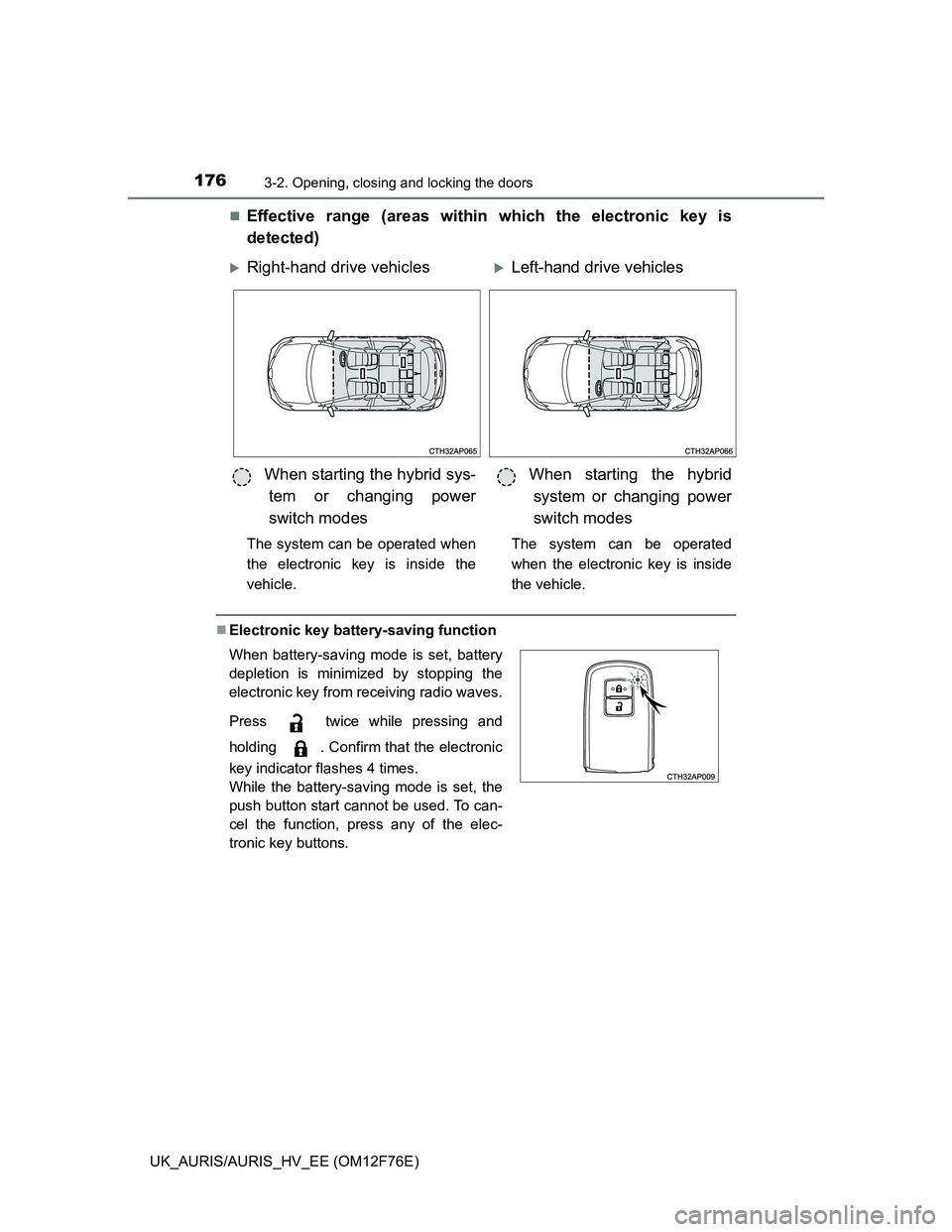
Effective range (areas within which the electronic key is
detected)
Electronic key battery-saving function
Right-hand drive vehiclesLeft-hand drive vehicles
When starting the hybrid sys-
tem or changing power
switch modes
The system can be operated when
the electronic key is inside the
vehicle.
When starting the hybrid
system or changing power
switch modes
The system can be operated
when the electronic key is inside
the vehicle.
When battery-saving mode is set, battery
depletion is minimized by stopping the
electronic key from receiving radio waves.
Press twice while pressing and
holding . Confirm that the electronic
key indicator flashes 4 times.
While the battery-saving mode is set, the
push button start cannot be used. To can-
cel the function, press any of the elec-
tronic key buttons.
Page 177 of 768
1773-2. Opening, closing and locking the doors
UK_AURIS/AURIS_HV_EE (OM12F76E)
3
Operation of each component
Conditions affecting operation
The push button start uses weak radio waves. In the following situations, the
communication between the electronic key and the vehicle may be affected,
preventing the push button start, wireless remote control and immobilizer sys-
tem from operating properly: (Ways of coping: P. 684)
When the electronic key battery is depleted
Near a TV tower, electric power plant, gas station, radio station, large dis-
play, airport or other facility that generates strong radio waves or electrical
noise
When carrying a portable radio, cellular phone, cordless phone or other
wireless communication devices
When the electronic key is in contact with, or is covered by the following
metallic objects
• Cards to which aluminum foil is attached
• Cigarette boxes that have aluminum foil inside
• Metallic wallets or bags
• Coins
• Hand warmers made of metal
• Media such as CDs and DVDs
When other wireless keys (that emit radio waves) are being used nearby
When carrying the electronic key together with the following devices that
emit radio waves
• Another vehicle’s electronic key or a wireless key that emits radio waves
• Personal computers or personal digital assistants (PDAs)
• Digital audio players
• Portable game systems
If window tint with a metallic content or metallic objects are attached to the
rear window
When the electronic key is placed near a battery charger or electronic
devices
Page 178 of 768
1783-2. Opening, closing and locking the doors
UK_AURIS/AURIS_HV_EE (OM12F76E)Electronic key battery depletion
The standard battery life is 1 to 2 years.
If the battery becomes low, an alarm will sound in the cabin when the hybrid
system stops. (P. 625)
As the electronic key always receives radio waves, the battery will become
depleted even if the electronic key is not used. The following symptoms indi-
cate that the electronic key battery may be depleted. Replace the battery
when necessary. (P. 540)
• The push button start or the wireless remote control does not operate.
• The detection area becomes smaller.
• The LED indicator on the key surface does not turn on.
To avoid serious deterioration, do not leave the electronic key within 1 m (3
ft.) of the following electrical appliances that produce a magnetic field.
•TVs
• Personal computers
• Cellular phones, cordless phones and battery chargers
• Recharging cellular phones or cordless phones
• Table lamps
• Induction cookers
To operate the system properly
Make sure to carry the electronic key when operating the system.
Depending on the position and holding condition of the electronic key, the key
may not be detected correctly and the system may not operate properly.
Alarms and warning messages
P. 625
If the push button start does not operate properly
Starting the hybrid system: P. 276
When the electronic key battery is fully depleted
P. 540
Customization that can be configured at any authorized Toyota dealer or
repairer, or another duly qualified and equipped professional
It is possible to deactivate the push button start.
(Customizable features P. 737)
If the push button start has been deactivated in a customized setting
Starting the hybrid system and changing power switch modes: P. 6 8 6
Stopping the hybrid system: P. 277
Page 190 of 768
1903-2. Opening, closing and locking the doors
UK_AURIS/AURIS_HV_EE (OM12F76E)
Operation signals
The emergency flashers flash to indicate that the doors have been locked/
unlocked. (Locked: Once; Unlocked: Twice)
Door lock buzzer (type B)
If an attempt to lock the doors is made when a door is not fully closed, a
buzzer sounds continuously for 5 seconds. Fully close the door to stop the
buzzer, and lock the vehicle once more.
Security feature
Vehicles without a smart entry & start system
If a door is not opened within approximately 30 seconds after the vehicle is
unlocked, the security feature automatically locks the vehicle again.
Vehicles with a smart entry & start system
P. 149
Alarm (if equipped)
Using the wireless remote control to lock the doors will set the alarm system.
(P. 103)
Conditions affecting operation
Type A
The wireless remote control function may not operate normally in the follow-
ing situations:
When the wireless key battery is depleted
Near a TV tower, radio station, electric power plant, airport or other facility
that generates strong radio waves
When carrying a portable radio, cellular phone or other wireless communi-
cation devices
When multiple wireless keys are in the vicinity
When the wireless key is in contact with, or is covered by a metallic object
When a wireless key (that emits radio waves) is being used nearby
When the wireless key has been left near an electrical appliance such as a
personal computer
If window tint with a metallic content or metallic objects are attached to the
rear window
Type B
P. 156, 177
Page 191 of 768
1913-2. Opening, closing and locking the doors
UK_AURIS/AURIS_HV_EE (OM12F76E)
3
Operation of each component
If the wireless remote control does not operate properly (type B)
Locking and unlocking the doors: Use the mechanical key.
(P. 684)
Key battery depletion
Type A
If the wireless remote control function does not operate, the battery may be
depleted. Replace the battery when necessary. (P. 540)
Type B
P. 160, 178
When the key battery is fully depleted
P. 540
Confirmation of the registered key number (type B)
The number of keys already registered to the vehicle can be confirmed. Ask
any authorized Toyota dealer or repairer, or another duly qualified and
equipped professional for details.
Customization
Settings (e.g. wireless remote control system) can be changed.
(Customizable features: P. 737)
Page 230 of 768
2304-1. Before driving
UK_AURIS/AURIS_HV_EE (OM12F76E)For efficient use (hybrid model)
Select the D position when driving.
In the N position, the gasoline engine operates but electricity cannot be gen-
erated.
The hybrid battery (traction battery) will be discharged requiring unneces-
sary engine power to recharge.
Drive your vehicle smoothly.
Avoid abrupt acceleration and deceleration. Gradual acceleration and decel-
eration will make more effective use of the traction motor without having to
use gasoline engine power.
Avoid repeated acceleration.
Repeated acceleration consumes hybrid battery (traction battery) power,
resulting in poor acceleration. Battery power can be restored by driving with
the accelerator pedal slightly released.
Push the P position switch when parking.
In the N position, the hybrid battery (traction battery) does not recharge.
Leaving the N position selected for an extended period of the time may dis-
charge the hybrid battery. The vehicle cannot run if the hybrid battery is dis-
charged.
Brake actuator (hybrid model)
The brake actuator uses brake fluid pressurized by the pump to power-assist
the brakes. If the brake actuator fails during driving, the brake system warn-
ing light comes on and the buzzer sounds intermittently. In this case, the
brakes may not work properly. If they do not work well, depress the brake
pedal firmly. If the brake system warning light comes on, immediately stop
your vehicle and contact any authorized Toyota dealer or repairer, or another
duly qualified and equipped professional.
In the following conditions, you may hear a sound in the engine compartment.
This is not a malfunction.
The driver’s door is opened with the hybrid system turned off.
The brake pedal is depressed with the hybrid system turned off.
After the hybrid system is turned on.
The brake pedal is depressed repeatedly with the hybrid system turned on.
After the hybrid system is turned off.
The brake pedal may be hard to depress or the brake pedal stroke may be
short before turning the hybrid system on. This is not a malfunction.
Page 265 of 768
2654-2. Driving procedures
UK_AURIS/AURIS_HV_EE (OM12F76E)
4
Driving
NOTICE
To prevent battery discharge
Do not leave the engine switch in the “ACC” or “ON” position for long peri-
ods of time without the engine running.
When starting the engine
Do not crank the engine for more than 30 seconds at a time. This may
overheat the starter and wiring system.
Do not race a cold engine.
If the engine becomes difficult to start or stalls frequently, have your vehi-
cle checked by any authorized Toyota dealer or repairer, or another duly
qualified and equipped professional immediately.
Page 272 of 768
2724-2. Driving procedures
UK_AURIS/AURIS_HV_EE (OM12F76E)
Auto power off function
Vehicles with a Multidrive
If the vehicle is left in ACCESSORY mode for more than 20 minutes or IGNI-
TION ON mode (the engine is not running) for more than an hour with the
shift lever in P, the engine switch will automatically turn off.
Vehicles with a multi-mode manual transmission or manual transmission
If the vehicle is left in ACCESSORY mode for more than 20 minutes or IGNI-
TION ON mode (the engine is not running) for more than an hour, the engine
switch will automatically turn off.
However, this function cannot entirely prevent 12-volt battery discharge. Do
not leave the vehicle with the engine switch in ACCESSORY or IGNITION
ON mode for long periods of time when the engine is not running.
Electronic key battery depletion
P. 160
Conditions affecting operation
P. 156
Notes for the entry function
P. 157
If the engine does not start
The engine immobilizer system may not have been deactivated. (P. 91)
Contact any authorized Toyota dealer or repairer, or another duly qualified
and equipped professional.
Vehicles with a Multidrive: Check that the shift lever is securely set in P. The
engine may not start if the shift lever is displaced out of P.
Vehicles without a multi-information display
The smart entry & start system indicator light (green) will flash quickly.
Vehicles with a multi-information display
“SHIFT TO P POSITION TO START” will be displayed on the multi-infor-
mation display.
Steering lock
After turning the engine switch off and opening and closing the doors, the
steering wheel will be locked due to the steering lock function. Operating the
engine switch again automatically cancels the steering lock.