warning TOYOTA AURIS HYBRID 2013 Owner's Manual
[x] Cancel search | Manufacturer: TOYOTA, Model Year: 2013, Model line: AURIS HYBRID, Model: TOYOTA AURIS HYBRID 2013Pages: 768, PDF Size: 21.22 MB
Page 120 of 768
1202. Instrument cluster
UK_AURIS/AURIS_HV_EE (OM12F76E)
CAUTION
If a safety system warning light does not come on
Except hybrid model
Should a safety system light such as the ABS and SRS warning light not
come on when you start the engine, this could mean that these systems are
not available to help protect you in an accident, which could result in death
or serious injury. Have the vehicle inspected by any authorized Toyota
dealer or repairer, or another duly qualified and equipped professional
immediately if this occurs.
Hybrid model
Should a safety system light such as the ABS and SRS warning light not
come on when you start the hybrid system, this could mean that these sys-
tems are not available to help protect you in an accident, which could result
in death or serious injury. Have the vehicle inspected by any authorized
Toyota dealer or repairer, or another duly qualified and equipped profes-
sional immediately if this occurs.
Page 126 of 768
1262. Instrument cluster
UK_AURIS/AURIS_HV_EE (OM12F76E)
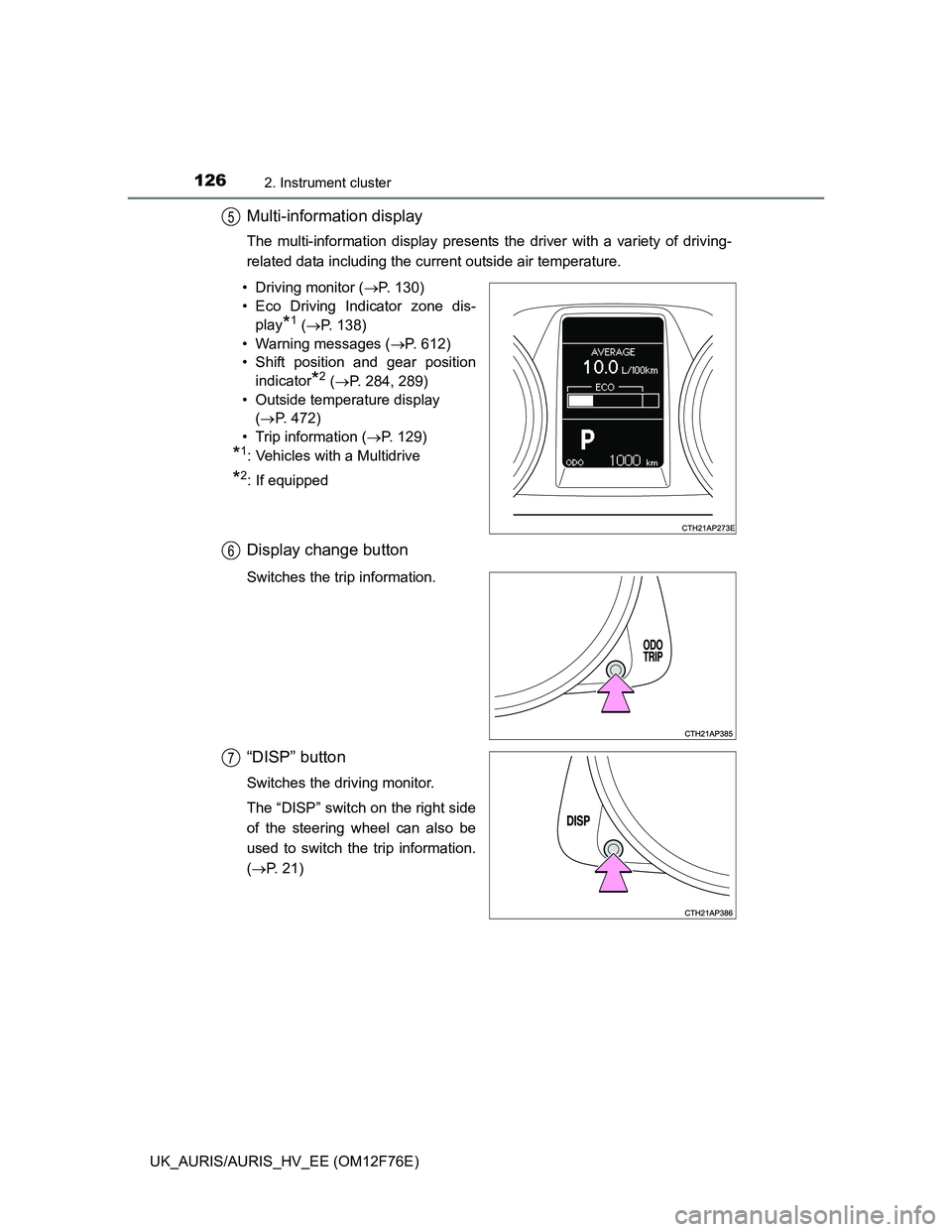
Multi-information display
The multi-information display presents the driver with a variety of driving-
related data including the current outside air temperature.
• Driving monitor (P. 130)
• Eco Driving Indicator zone dis-
play
*1 (P. 138)
• Warning messages (P. 612)
• Shift position and gear position
indicator
*2 (P. 284, 289)
• Outside temperature display
(P. 472)
• Trip information (P. 129)
*1: Vehicles with a Multidrive
*2: If equipped
Display change button
Switches the trip information.
“DISP” button
Switches the driving monitor.
The “DISP” switch on the right side
of the steering wheel can also be
used to switch the trip information.
(P. 21)
5
6
7
Page 128 of 768
1282. Instrument cluster
UK_AURIS/AURIS_HV_EE (OM12F76E)
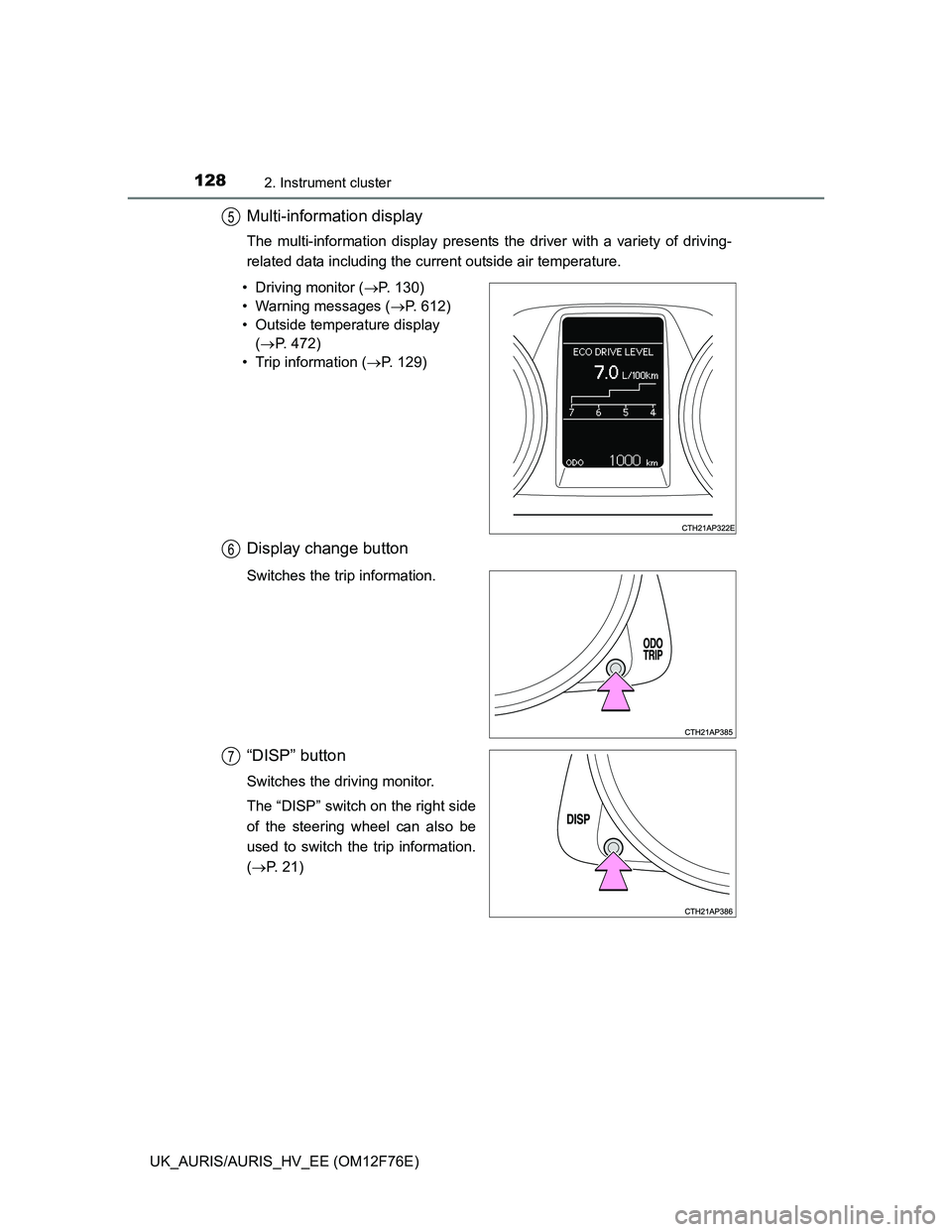
Multi-information display
The multi-information display presents the driver with a variety of driving-
related data including the current outside air temperature.
• Driving monitor (P. 130)
• Warning messages (P. 612)
• Outside temperature display
(P. 472)
• Trip information (P. 129)
Display change button
Switches the trip information.
“DISP” button
Switches the driving monitor.
The “DISP” switch on the right side
of the steering wheel can also be
used to switch the trip information.
(P. 21)
5
6
7
Page 140 of 768
1402. Instrument cluster
UK_AURIS/AURIS_HV_EE (OM12F76E)
CAUTION
The display at low temperatures
Allow the interior of the vehicle to warm up before using the display. At
extremely low temperatures, the display monitor may respond slowly, and
display changes may be delayed.
For example, there is a lag between the driver’s shifting and the new gear
number appearing on the display. This lag could cause the driver to down-
shift again, causing rapid and excessive engine braking and possibly an
accident resulting in death or injury.
Cautions during setting up the display
As the engine needs to be running during setting up the display, ensure that
the vehicle is parked in a place with adequate ventilation. In a closed area
such as a garage, exhaust gases including harmful carbon monoxide (CO)
may collect and enter the vehicle. This may lead to death or a serious
health hazard.
NOTICE
To prevent damage to the engine and its components
Do not let the indicator needle of the tachometer enter the red zone, which
indicates the maximum engine speed.
The engine may be overheating in the following situations. Immediately
stop the vehicle in a safe place, and check the engine after it has cooled
down completely. (P. 700, 703)
Drive monitor display: When the high engine coolant temperature warning
light comes on.
Multi-information display: When the indicator needle of the engine coolant
temperature gauge enters the red zone (except hybrid model), or the
engine coolant temperature warning message is shown on the multi-infor-
mation display (hybrid model).
Page 153 of 768
1533-2. Opening, closing and locking the doors
UK_AURIS/AURIS_HV_EE (OM12F76E)
3
Operation of each component
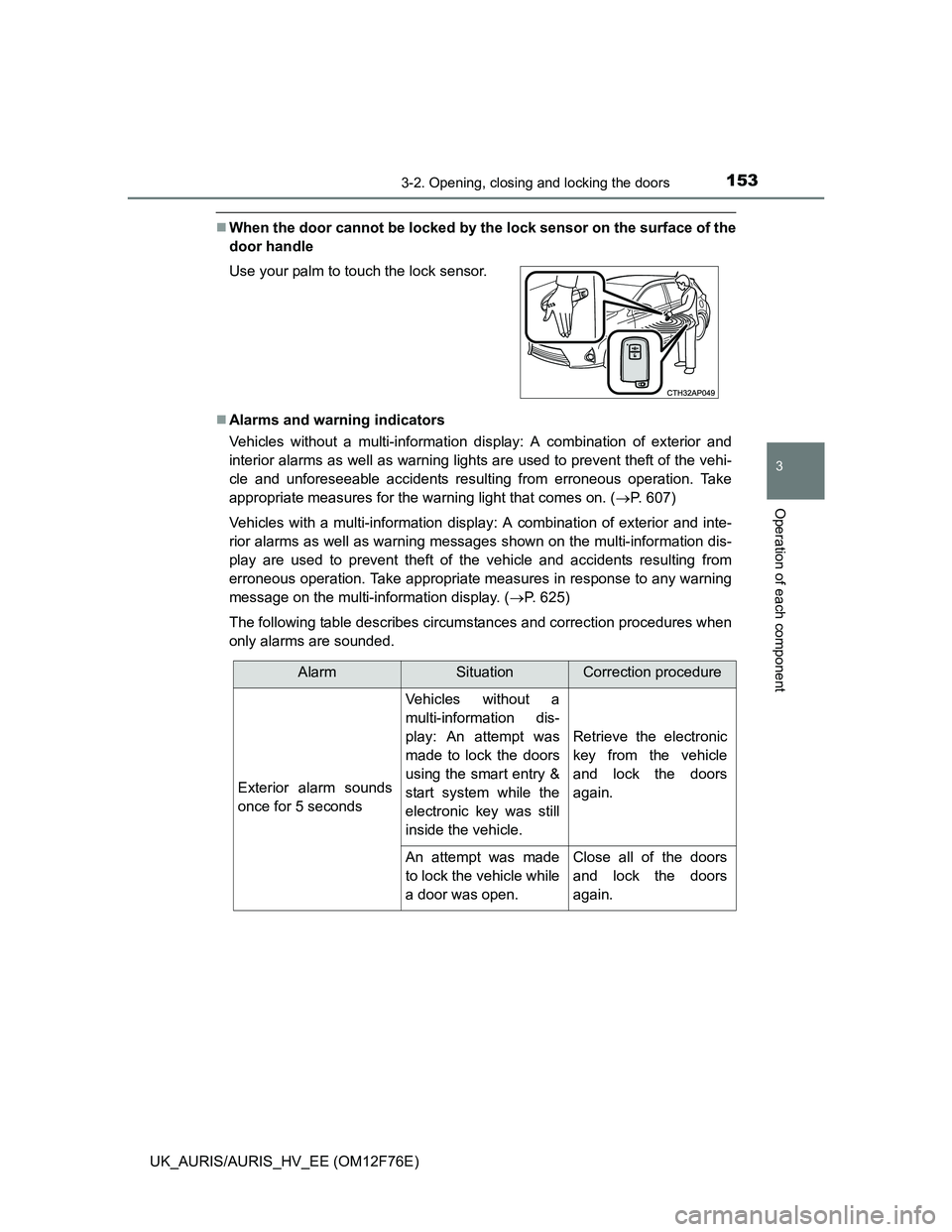
When the door cannot be locked by the lock sensor on the surface of the
door handle
Alarms and warning indicators
Vehicles without a multi-information display: A combination of exterior and
interior alarms as well as warning lights are used to prevent theft of the vehi-
cle and unforeseeable accidents resulting from erroneous operation. Take
appropriate measures for the warning light that comes on. (P. 607)
Vehicles with a multi-information display: A combination of exterior and inte-
rior alarms as well as warning messages shown on the multi-information dis-
play are used to prevent theft of the vehicle and accidents resulting from
erroneous operation. Take appropriate measures in response to any warning
message on the multi-information display. (P. 625)
The following table describes circumstances and correction procedures when
only alarms are sounded. Use your palm to touch the lock sensor.
AlarmSituationCorrection procedure
Exterior alarm sounds
once for 5 seconds
Vehicles without a
multi-information dis-
play: An attempt was
made to lock the doors
using the smart entry &
start system while the
electronic key was still
inside the vehicle.
Retrieve the electronic
key from the vehicle
and lock the doors
again.
An attempt was made
to lock the vehicle while
a door was open.Close all of the doors
and lock the doors
again.
Page 178 of 768
1783-2. Opening, closing and locking the doors
UK_AURIS/AURIS_HV_EE (OM12F76E)Electronic key battery depletion
The standard battery life is 1 to 2 years.
If the battery becomes low, an alarm will sound in the cabin when the hybrid
system stops. (P. 625)
As the electronic key always receives radio waves, the battery will become
depleted even if the electronic key is not used. The following symptoms indi-
cate that the electronic key battery may be depleted. Replace the battery
when necessary. (P. 540)
• The push button start or the wireless remote control does not operate.
• The detection area becomes smaller.
• The LED indicator on the key surface does not turn on.
To avoid serious deterioration, do not leave the electronic key within 1 m (3
ft.) of the following electrical appliances that produce a magnetic field.
•TVs
• Personal computers
• Cellular phones, cordless phones and battery chargers
• Recharging cellular phones or cordless phones
• Table lamps
• Induction cookers
To operate the system properly
Make sure to carry the electronic key when operating the system.
Depending on the position and holding condition of the electronic key, the key
may not be detected correctly and the system may not operate properly.
Alarms and warning messages
P. 625
If the push button start does not operate properly
Starting the hybrid system: P. 276
When the electronic key battery is fully depleted
P. 540
Customization that can be configured at any authorized Toyota dealer or
repairer, or another duly qualified and equipped professional
It is possible to deactivate the push button start.
(Customizable features P. 737)
If the push button start has been deactivated in a customized setting
Starting the hybrid system and changing power switch modes: P. 6 8 6
Stopping the hybrid system: P. 277
Page 230 of 768
2304-1. Before driving
UK_AURIS/AURIS_HV_EE (OM12F76E)For efficient use (hybrid model)
Select the D position when driving.
In the N position, the gasoline engine operates but electricity cannot be gen-
erated.
The hybrid battery (traction battery) will be discharged requiring unneces-
sary engine power to recharge.
Drive your vehicle smoothly.
Avoid abrupt acceleration and deceleration. Gradual acceleration and decel-
eration will make more effective use of the traction motor without having to
use gasoline engine power.
Avoid repeated acceleration.
Repeated acceleration consumes hybrid battery (traction battery) power,
resulting in poor acceleration. Battery power can be restored by driving with
the accelerator pedal slightly released.
Push the P position switch when parking.
In the N position, the hybrid battery (traction battery) does not recharge.
Leaving the N position selected for an extended period of the time may dis-
charge the hybrid battery. The vehicle cannot run if the hybrid battery is dis-
charged.
Brake actuator (hybrid model)
The brake actuator uses brake fluid pressurized by the pump to power-assist
the brakes. If the brake actuator fails during driving, the brake system warn-
ing light comes on and the buzzer sounds intermittently. In this case, the
brakes may not work properly. If they do not work well, depress the brake
pedal firmly. If the brake system warning light comes on, immediately stop
your vehicle and contact any authorized Toyota dealer or repairer, or another
duly qualified and equipped professional.
In the following conditions, you may hear a sound in the engine compartment.
This is not a malfunction.
The driver’s door is opened with the hybrid system turned off.
The brake pedal is depressed with the hybrid system turned off.
After the hybrid system is turned on.
The brake pedal is depressed repeatedly with the hybrid system turned on.
After the hybrid system is turned off.
The brake pedal may be hard to depress or the brake pedal stroke may be
short before turning the hybrid system on. This is not a malfunction.
Page 238 of 768
2384-1. Before driving
UK_AURIS/AURIS_HV_EE (OM12F76E)
CAUTION
Observe the following precautions.
Failure to do so may result in death or serious injury.
When braking
Except hybrid model: The brake system consists of 2 individual hydraulic
systems; if one of the systems fails, the other will still operate. In this case,
the brake pedal should be depressed more firmly than usual and the brak-
ing distance will increase.
If this happens, do not continue to drive the vehicle. Have your brakes
fixed immediately.
Hybrid model: The brake system consists of 3 individual hydraulic sys-
tems; if one of the systems fails, the others will still operate. In this case,
the brake pedal should be depressed more firmly than usual and the brak-
ing distance will increase. If this happens, do not continue to drive the
vehicle. If the brake system warning light (red indicator) comes on
together with the buzzer sound while driving, immediately stop the vehicle
in a safe place and contact any authorized Toyota dealer or repairer, or
another duly qualified and equipped professional.
NOTICE
When driving the vehicle (vehicles without a manual transmission)
Do not depress the accelerator and brake pedals at the same time during
driving, as this may restrain driving torque.
Vehicles without a multi-mode manual transmission: Do not use the accel-
erator pedal or depress the accelerator and brake pedals at the same time
to hold the vehicle on a hill.
Vehicles with a multi-mode manual transmission: Do not use the acceler-
ator pedal or starting assist system to hold the vehicle on a hill.
Doing so may damage the clutch.
Page 288 of 768
2884-2. Driving procedures
UK_AURIS/AURIS_HV_EE (OM12F76E)Automatic deactivation of gear step selection in the D position (vehicles
with a paddle shift switch)
Temporary gear steps selection mode in the D position will be deactivated in
the following situations:
When the vehicle comes to a stop
If the accelerator pedal is depressed for more than a certain period of time in
one gear step
When the shift lever is shifted to other than D
When the “+” paddle shift switch is held down for a period of time
When driving with cruise control activated (if equipped)
Even when performing the following actions with the intent of enabling engine
braking, engine braking will not activate because cruise control will not be
canceled.
While driving in D or 7-speed sport sequential shiftmatic mode, downshifting
to 6, 5 or 4. (P. 286, 287)
When switching the driving mode to sport mode while driving in D position.
(P. 285)
Downshifting restrictions warning buzzer
To help ensure safety and driving performance, downshifting operation may
sometimes be restricted. In some circumstances, downshifting may not be
possible even when the shift lever or paddle shift switch (if equipped) is oper-
ated. (A buzzer will sound twice.)
Sport mode automatic deactivation
Sport mode is automatically deactivated if the engine switch is turned off after
driving in sport mode.
If the shift lever cannot be shifted from P
P. 682
CAUTION
When driving on slippery road surfaces
Be careful of downshifting and sudden acceleration, as this could result in
the vehicle skidding to the side or spinning.
Page 292 of 768
2924-2. Driving procedures
UK_AURIS/AURIS_HV_EE (OM12F76E)
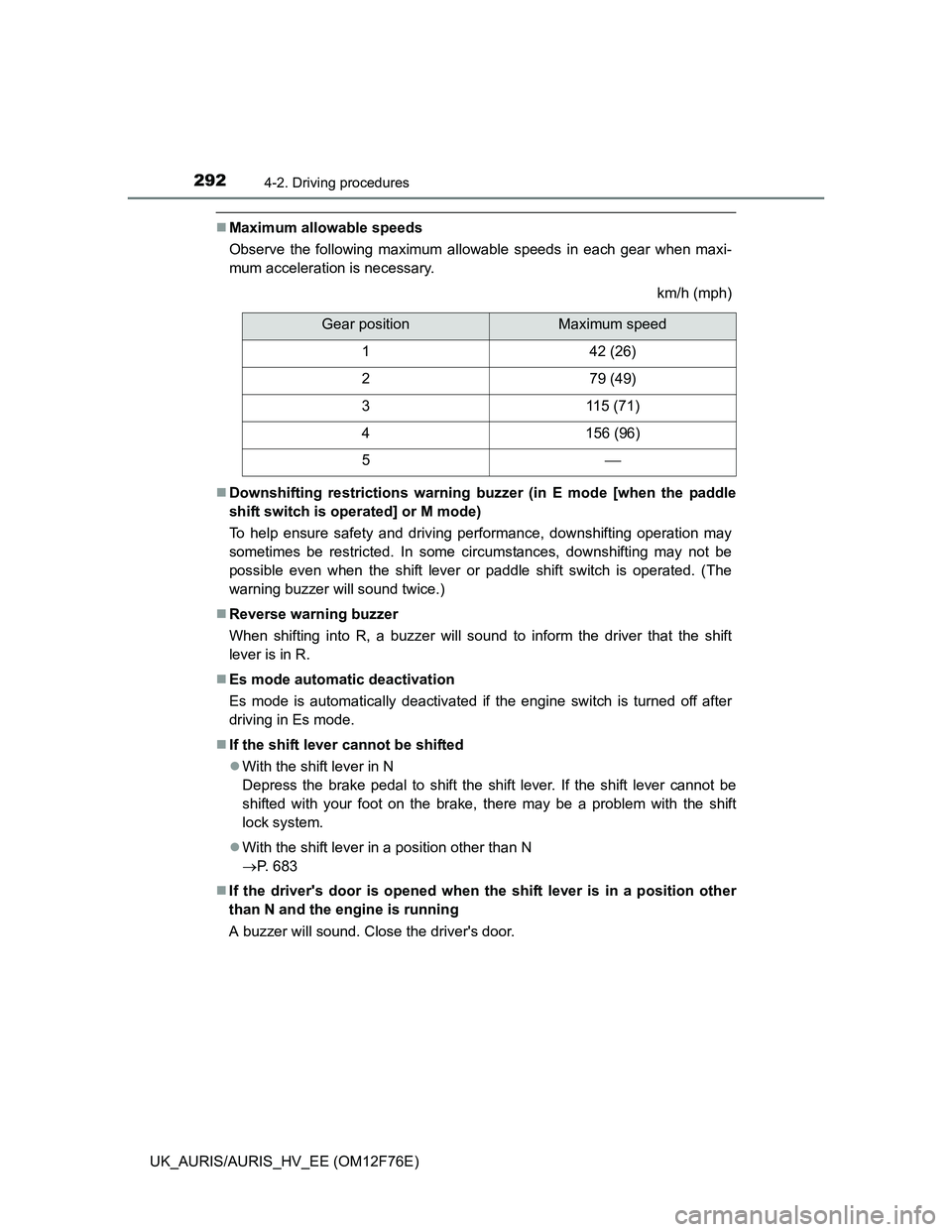
Maximum allowable speeds
Observe the following maximum allowable speeds in each gear when maxi-
mum acceleration is necessary.
km/h (mph)
Downshifting restrictions warning buzzer (in E mode [when the paddle
shift switch is operated] or M mode)
To help ensure safety and driving performance, downshifting operation may
sometimes be restricted. In some circumstances, downshifting may not be
possible even when the shift lever or paddle shift switch is operated. (The
warning buzzer will sound twice.)
Reverse warning buzzer
When shifting into R, a buzzer will sound to inform the driver that the shift
lever is in R.
Es mode automatic deactivation
Es mode is automatically deactivated if the engine switch is turned off after
driving in Es mode.
If the shift lever cannot be shifted
With the shift lever in N
Depress the brake pedal to shift the shift lever. If the shift lever cannot be
shifted with your foot on the brake, there may be a problem with the shift
lock system.
With the shift lever in a position other than N
P. 683
If the driver's door is opened when the shift lever is in a position other
than N and the engine is running
A buzzer will sound. Close the driver's door.
Gear positionMaximum speed
142 (26)
279 (49)
3115 (71)
4156 (96)
5