alarm TOYOTA AURIS HYBRID 2014 User Guide
[x] Cancel search | Manufacturer: TOYOTA, Model Year: 2014, Model line: AURIS HYBRID, Model: TOYOTA AURIS HYBRID 2014Pages: 788, PDF Size: 21.16 MB
Page 166 of 788
1663-2. Opening, closing and locking the doors
UK_AURIS/AURIS_HV_EE (OM12G88E)Note for locking the doors
Touching the door lock sensor while wearing gloves may delay or prevent
lock operation. Remove the gloves and touch the lock sensor again.
When the lock operation is performed using the lock sensor, recognition sig-
nals will be shown up to two consecutive times. After this, no recognition
signals will be given.
If the door handle becomes wet while the electronic key is within the effec-
tive range, the door may lock and unlock repeatedly. In that case, follow the
following correction procedures to wash the vehicle:
• Place the electronic key in a location 2 m (6 ft.) or more away from the
vehicle. (Take care to ensure that the key is not stolen.)
• Set the electronic key to battery-saving mode to disable the smart entry &
start system. (P. 163)
Vehicles without a multi-information display: If the electronic key is inside
the vehicle and a door handle becomes wet during a car wash, a buzzer will
sound outside the vehicle. To turn off the alarm, lock all the doors.
Vehicles with a multi-information display: If the electronic key is inside the
vehicle and a door handle becomes wet during a car wash, a message may
be shown on the multi-information display and a buzzer will sound outside
the vehicle. To turn off the alarm, lock all the doors.
The lock sensor may not work properly if it comes into contact with ice,
snow, mud, etc. Clean the lock sensor and attempt to operate it again.
Fingernails may scrape against the door during operation of the door han-
dle. Be careful not to injure fingernails or damage the surface of the door.
Note for the unlocking function
A sudden approach to the effective range or door handle may prevent the
doors from being unlocked. In this case, return the door handle to the origi-
nal position and check that the doors unlock before pulling the door handle
again.
Gripping the door handle when wearing a glove may not unlock the door.
If the door handle becomes wet while the electronic key is within the effec-
tive range, the door may lock and unlock repeatedly. In that case, follow the
following correction procedures to wash the vehicle:
• Place the electronic key in a location 2 m (6 ft.) or more away from the
vehicle. (Take care to ensure that the key is not stolen.)
• Set the electronic key to battery-saving mode to disable the smart entry &
start system. (P. 163)
If there is another electronic key in the detection area, it may take slightly
longer to unlock the doors after the door handle is gripped.
Page 167 of 788
1673-2. Opening, closing and locking the doors
UK_AURIS/AURIS_HV_EE (OM12G88E)
3
Operation of each component
Fingernails may scrape against the door during operation of the door han-
dle. Be careful not to injure fingernails or damage the surface of the door.
When the vehicle is not driven for extended periods
To prevent theft of the vehicle, do not leave the electronic key within 2 m
(6 ft.) of the vehicle.
The smart entry & start system can be deactivated in advance. (P. 757)
Alarm (if equipped)
Using the smart entry & start system to lock the doors will set the alarm sys-
tem. (P. 104)
To operate the system properly
Make sure to carry the electronic key when operating the system. Do not get
the electronic key too close to the vehicle when operating the system from the
outside of the vehicle.
Depending on the position and holding condition of the electronic key, the key
may not be detected correctly and the system may not operate properly. (The
alarm may go off accidentally, or the door lock prevention function may not
operate.)
If the smart entry & start system does not operate properly
Locking and unlocking the doors: Use the mechanical key. (P. 704)
Except hybrid model: Starting the engine: P. 705
Hybrid model: Starting the hybrid system: P. 706
Page 168 of 788
1683-2. Opening, closing and locking the doors
UK_AURIS/AURIS_HV_EE (OM12G88E)Electronic key battery depletion
The standard battery life is 1 to 2 years.
Except hybrid model: If the battery becomes low, an alarm will sound in the
cabin when the engine stops. (P. 624, 644)
Hybrid model: If the battery becomes low, an alarm will sound in the cabin
when the hybrid system stops. (P. 644)
As the electronic key always receives radio waves, the battery will become
depleted even if the electronic key is not used. The following symptoms indi-
cate that the electronic key battery may be depleted. Replace the battery
when necessary. (P. 555)
• The smart entry & start system or the wireless remote control does not
operate.
• The detection area becomes smaller.
• The LED indicator on the key surface does not turn on.
To avoid serious deterioration, do not leave the electronic key within 1 m (3
ft.) of the following electrical appliances that produce a magnetic field:
•TVs
• Personal computers
• Cellular phones, cordless phones and battery chargers
• Recharging cellular phones or cordless phones
• Table lamps
• Induction cookers
When the electronic key battery is fully depleted
P. 555
Customization
Settings (e. g. smart entry & start system) can be changed.
(Customizable features: P. 757)
If the smart entry & start system has been deactivated in a customized
setting
Locking and unlocking the doors:
Use the wireless remote control or mechanical key. (P. 194, 704)
Except hybrid model: Starting the engine and changing engine switch
modes: P. 705
Hybrid model: Starting the hybrid system and changing power switch
modes: P. 706
Except hybrid model: Stopping the engine: P. 274
Hybrid model: Stopping the hybrid system: P. 283
Page 185 of 788
1853-2. Opening, closing and locking the doors
UK_AURIS/AURIS_HV_EE (OM12G88E)
3
Operation of each component
Electronic key battery depletion
The standard battery life is 1 to 2 years.
If the battery becomes low, an alarm will sound in the cabin when the hybrid
system stops. (P. 644)
As the electronic key always receives radio waves, the battery will become
depleted even if the electronic key is not used. The following symptoms indi-
cate that the electronic key battery may be depleted. Replace the battery
when necessary. (P. 555)
• The push button start or the wireless remote control does not operate.
• The detection area becomes smaller.
• The LED indicator on the key surface does not turn on.
To avoid serious deterioration, do not leave the electronic key within 1 m (3
ft.) of the following electrical appliances that produce a magnetic field.
•TVs
• Personal computers
• Cellular phones, cordless phones and battery chargers
• Recharging cellular phones or cordless phones
• Table lamps
• Induction cookers
To operate the system properly
Make sure to carry the electronic key when operating the system.
Depending on the position and holding condition of the electronic key, the key
may not be detected correctly and the system may not operate properly.
Alarms and warning messages
P. 644
If the push button start does not operate properly
Starting the hybrid system: P. 282
When the electronic key battery is fully depleted
P. 555
Customization that can be configured at any authorized Toyota dealer or
repairer, or another duly qualified and equipped professional
It is possible to deactivate the push button start.
(Customizable features P. 757)
If the push button start has been deactivated in a customized setting
Starting the hybrid system and changing power switch modes: P. 7 0 6
Stopping the hybrid system: P. 283
Page 195 of 788
1953-2. Opening, closing and locking the doors
UK_AURIS/AURIS_HV_EE (OM12G88E)
3
Operation of each component
Operation signals
The emergency flashers flash to indicate that the doors have been locked/
unlocked. (Locked: Once; Unlocked: Twice)
Door lock buzzer (type B)
If an attempt to lock the doors is made when a door is not fully closed, a
buzzer sounds continuously for 5 seconds. Fully close the door to stop the
buzzer, and lock the vehicle once more.
Security feature
Vehicles without a smart entry & start system
If a door is not opened within approximately 30 seconds after the vehicle is
unlocked, the security feature automatically locks the vehicle again.
Vehicles with a smart entry & start system
P. 157
Alarm (if equipped)
Using the wireless remote control to lock the doors will set the alarm system.
(P. 104)
Conditions affecting operation
Type A
The wireless remote control function may not operate normally in the follow-
ing situations:
When the wireless key battery is depleted
Near a TV tower, radio station, electric power plant, airport or other facility
that generates strong radio waves
When carrying a portable radio, cellular phone or other wireless communi-
cation devices
When multiple wireless keys are in the vicinity
When the wireless key is in contact with, or is covered by a metallic object
When a wireless key (that emits radio waves) is being used nearby
When the wireless key has been left near an electrical appliance such as a
personal computer
If window tint with a metallic content or metallic objects are attached to the
rear window
Type B
P. 164, 184
Page 308 of 788
3084-2. Driving procedures
UK_AURIS/AURIS_HV_EE (OM12G88E)Alarms
If an attempt is made to change the shift position by moving the shift lever or
by pressing the P position switch in any of the following situations, a buzzer
will sound and the shifting operation will be disabled or the shift position will
automatically change to N. When this happens, select an appropriate shift
position.
Situations where the shifting operation will be disabled:
• When an attempt is made to change the shift position from P to another
position by moving the shift lever without depressing the brake pedal.
• When an attempt is made to change the shift position from P or N to B
by moving the shift lever.
Situations where the shift position will automatically change to N:
• When the P position switch is pressed while the vehicle is running.
*1
• When an attempt is made to select the R position by moving the shift
lever when the vehicle is moving forward.
*2
• When an attempt is made to select the D position by moving the shift
lever when the vehicle is moving in reverse.
*3
• When an attempt is made to change the shift position from R to B by
moving the shift lever.
*1: Shift position may be changed to P when driving at extremely low speeds.
*2: Shift position may be changed to R when driving at low speeds.
*3: Shift position may be changed to D when driving at low speeds.
When driving with cruise control activated (if equipped)
Even if switching the driving mode to power mode with the intent of enabling
engine braking, engine braking will not activate because cruise control will not
be canceled. (P. 338)
Customization
Settings (e. g. Reverse warning buzzer) can be changed.
(Customizable feature P. 757)
Page 706 of 788
7067-2. Steps to take in an emergency
UK_AURIS/AURIS_HV_EE (OM12G88E)
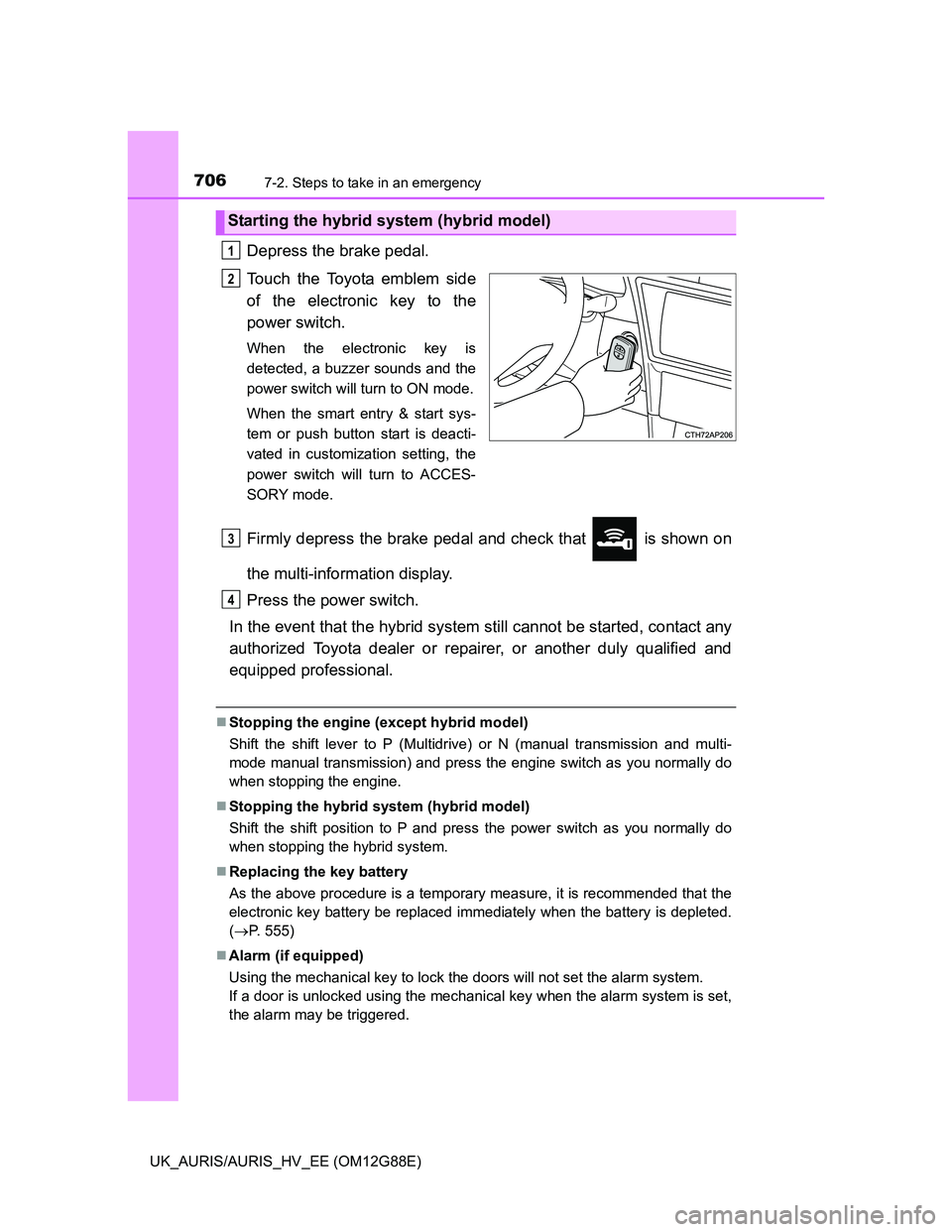
Depress the brake pedal.
Touch the Toyota emblem side
of the electronic key to the
power switch.
When the electronic key is
detected, a buzzer sounds and the
power switch will turn to ON mode.
When the smart entry & start sys-
tem or push button start is deacti-
vated in customization setting, the
power switch will turn to ACCES-
SORY mode.
Firmly depress the brake pedal and check that is shown on
the multi-information display.
Press the power switch.
In the event that the hybrid system still cannot be started, contact any
authorized Toyota dealer or repairer, or another duly qualified and
equipped professional.
Stopping the engine (except hybrid model)
Shift the shift lever to P (Multidrive) or N (manual transmission and multi-
mode manual transmission) and press the engine switch as you normally do
when stopping the engine.
Stopping the hybrid system (hybrid model)
Shift the shift position to P and press the power switch as you normally do
when stopping the hybrid system.
Replacing the key battery
As the above procedure is a temporary measure, it is recommended that the
electronic key battery be replaced immediately when the battery is depleted.
(P. 555)
Alarm (if equipped)
Using the mechanical key to lock the doors will not set the alarm system.
If a door is unlocked using the mechanical key when the alarm system is set,
the alarm may be triggered.
Starting the hybrid system (hybrid model)
1
2
3
4
Page 712 of 788
7127-2. Steps to take in an emergency
UK_AURIS/AURIS_HV_EE (OM12G88E)
Once the vehicle’s engine has started, remove the jumper cables in
the exact reverse order from which they were connected.
Once the engine starts, have the vehicle inspected at any authorized
Toyota dealer or repairer, or another duly qualified and equipped pro-
fessional as soon as possible.
Starting the engine when the 12-volt battery is discharged
The engine cannot be started by push-starting.
To prevent 12-volt battery discharge
Turn off the headlights and the audio system while the engine is off.
Turn off any unnecessary electrical components when the vehicle is running
at a low speed for an extended period, such as in heavy traffic.
When the 12-volt battery is removed or discharged (vehicles with an
alarm)
Make sure that the key is not inside the vehicle when recharging or replacing
the battery. The key may be locked in the vehicle if the alarm is activated.
(P. 106)
Charging the 12-volt battery
The electricity stored in the 12-volt battery will discharge gradually even when
the vehicle is not in use, due to natural discharge and the draining effects of
certain electrical appliances. If the vehicle is left for a long time, the 12-volt
battery may discharge, and the engine may be unable to start. (The 12-volt
battery recharges automatically during driving.)
7
Page 717 of 788
7177-2. Steps to take in an emergency
UK_AURIS/AURIS_HV_EE (OM12G88E)
7
When trouble arises
Once the hybrid system has started, remove the jumper cables in
the exact reverse order from which they were connected.
Close the exclusive jump starting terminal cover, and reinstall the
fuse box cover to its original position.
When installing, first hook the fuse box cover onto the two rear tabs.
Once the hybrid system starts, have the vehicle inspected at any
authorized Toyota dealer or repairer, or another duly qualified and
equipped professional as soon as possible.
Starting the hybrid system when the 12-volt battery is discharged
The hybrid system cannot be started by push-starting.
To prevent 12-volt battery discharge
Turn off the headlights and the audio system while the hybrid system is off.
Turn off any unnecessary electrical components when the vehicle is running
at a low speed for an extended period, such as in heavy traffic.
When the 12-volt battery is removed or discharged
The hybrid system may not start. (P. 532)
If the 12-volt battery is depleted with the shift position in P, it will not be pos-
sible to shift the shift position other than P. In this case, the vehicle cannot
be towed without lifting both front wheels because the front wheels are
locked by the parking lock. (P. 604)
When the 12-volt battery is reconnected, start the hybrid system, depress
the brake pedal, and confirm that it is possible to shift into each shift posi-
tion.
Vehicles with an alarm: Make sure that the key is not inside the vehicle
when recharging or replacing the 12-volt battery. The key may be locked in
the vehicle if the alarm is activated. (P. 106)
Charging the 12-volt battery
The electricity stored in the 12-volt battery will discharge gradually even when
the vehicle is not in use, due to natural discharge and the draining effects of
certain electrical appliances. If the vehicle is left for a long time, the 12-volt
battery may discharge, and the hybrid system may be unable to start. (The
12-volt battery recharges automatically while the hybrid system is operating.)
8
9
Page 758 of 788
7588-2. Customization
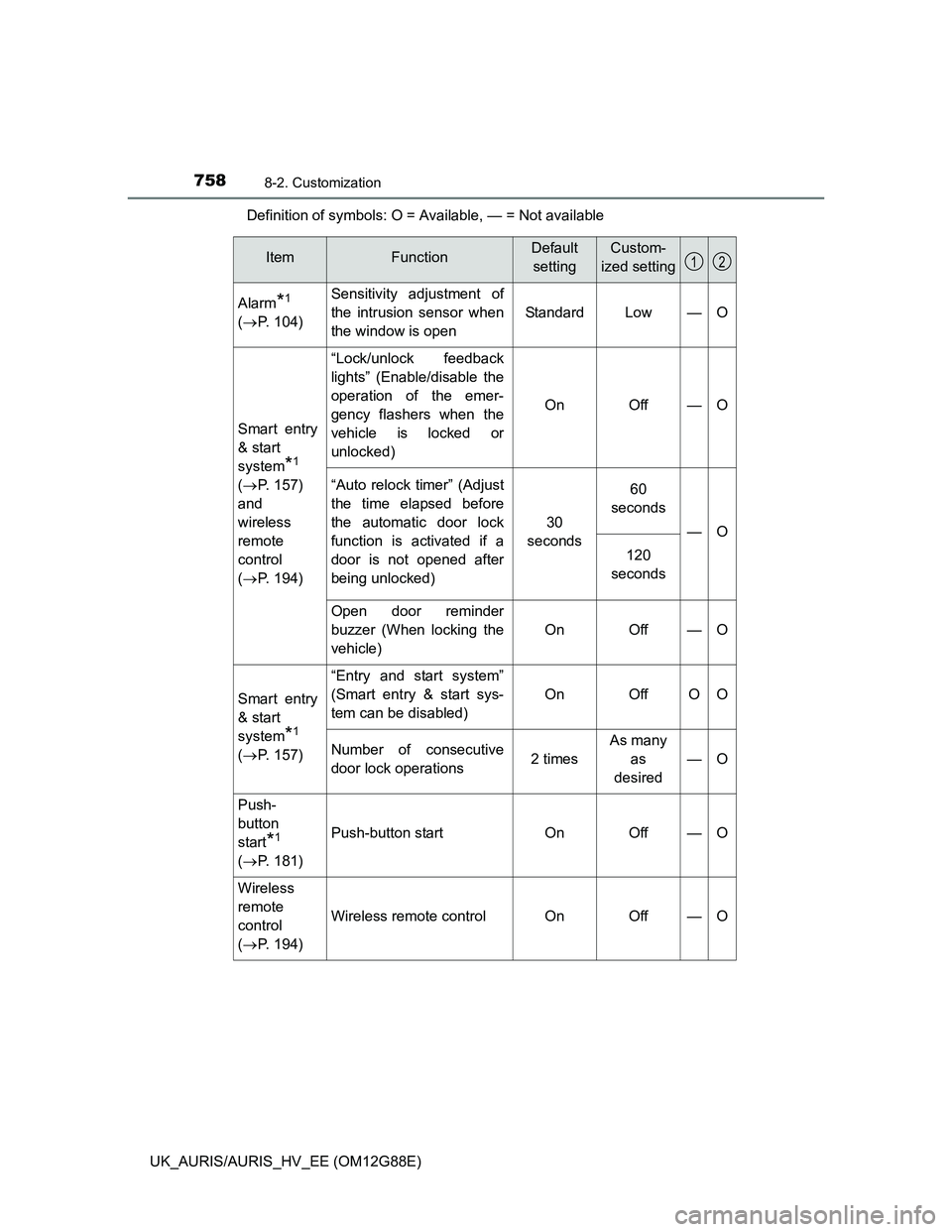
UK_AURIS/AURIS_HV_EE (OM12G88E)Definition of symbols: O = Available, — = Not available
ItemFunctionDefault
settingCustom-
ized setting
Alarm*1
(P. 104)Sensitivity adjustment of
the intrusion sensor when
the window is open
StandardLow—O
Smart entry
& start
system
*1
(P. 157)
and
wireless
remote
control
(P. 194)
“Lock/unlock feedback
lights” (Enable/disable the
operation of the emer-
gency flashers when the
vehicle is locked or
unlocked)
OnOff—O
“Auto relock timer” (Adjust
the time elapsed before
the automatic door lock
function is activated if a
door is not opened after
being unlocked)
30
seconds
60
seconds
—O
120
seconds
Open door reminder
buzzer (When locking the
vehicle)
OnOff—O
Smart entry
& start
system
*1
(P. 157)
“Entry and start system”
(Smart entry & start sys-
tem can be disabled)
OnOffOO
Number of consecutive
door lock operations2 times
As many
as
desired
—O
Push-
button
start
*1
(P. 181)Push-button startOnOff—O
Wireless
remote
control
(P. 194)
Wireless remote controlOnOff—O
12