reset TOYOTA AURIS HYBRID 2014 User Guide
[x] Cancel search | Manufacturer: TOYOTA, Model Year: 2014, Model line: AURIS HYBRID, Model: TOYOTA AURIS HYBRID 2014Pages: 788, PDF Size: 21.16 MB
Page 144 of 788
1442. Instrument cluster
UK_AURIS/AURIS_HV_EE (OM12G88E)
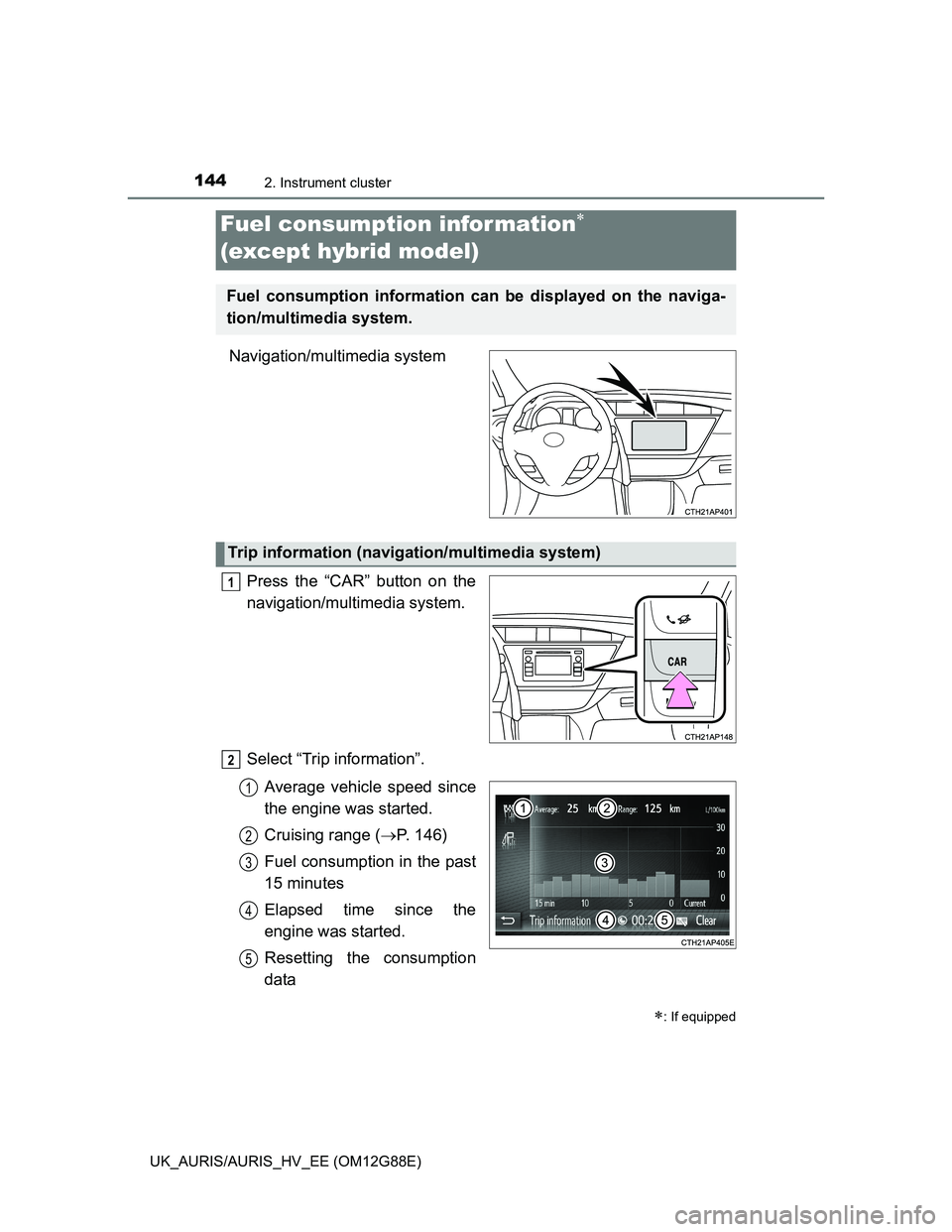
Navigation/multimedia system
Press the “CAR” button on the
navigation/multimedia system.
Select “Trip information”.
Average vehicle speed since
the engine was started.
Cruising range (P. 146)
Fuel consumption in the past
15 minutes
Elapsed time since the
engine was started.
Resetting the consumption
data
Fuel consumption information
(except hybrid model)
: If equipped
Fuel consumption information can be displayed on the naviga-
tion/multimedia system.
Trip information (navigation/multimedia system)
1
2
1
2
3
4
5
Page 145 of 788
1452. Instrument cluster
UK_AURIS/AURIS_HV_EE (OM12G88E)
2
Instrument cluster
Vehicles without a smart entry & start system:
Average fuel consumption for the past 15 minutes is divided by color
into past averages and averages attained since the engine switch was
last turned to the “ON” position. Use the displayed average fuel con-
sumption as a reference.
Vehicles with a smart entry & start system:
Average fuel consumption for the past 15 minutes is divided by color
into past averages and averages attained since the engine switch was
last turned to IGNITION ON mode. Use the displayed average fuel
consumption as a reference.
The image is an example only.
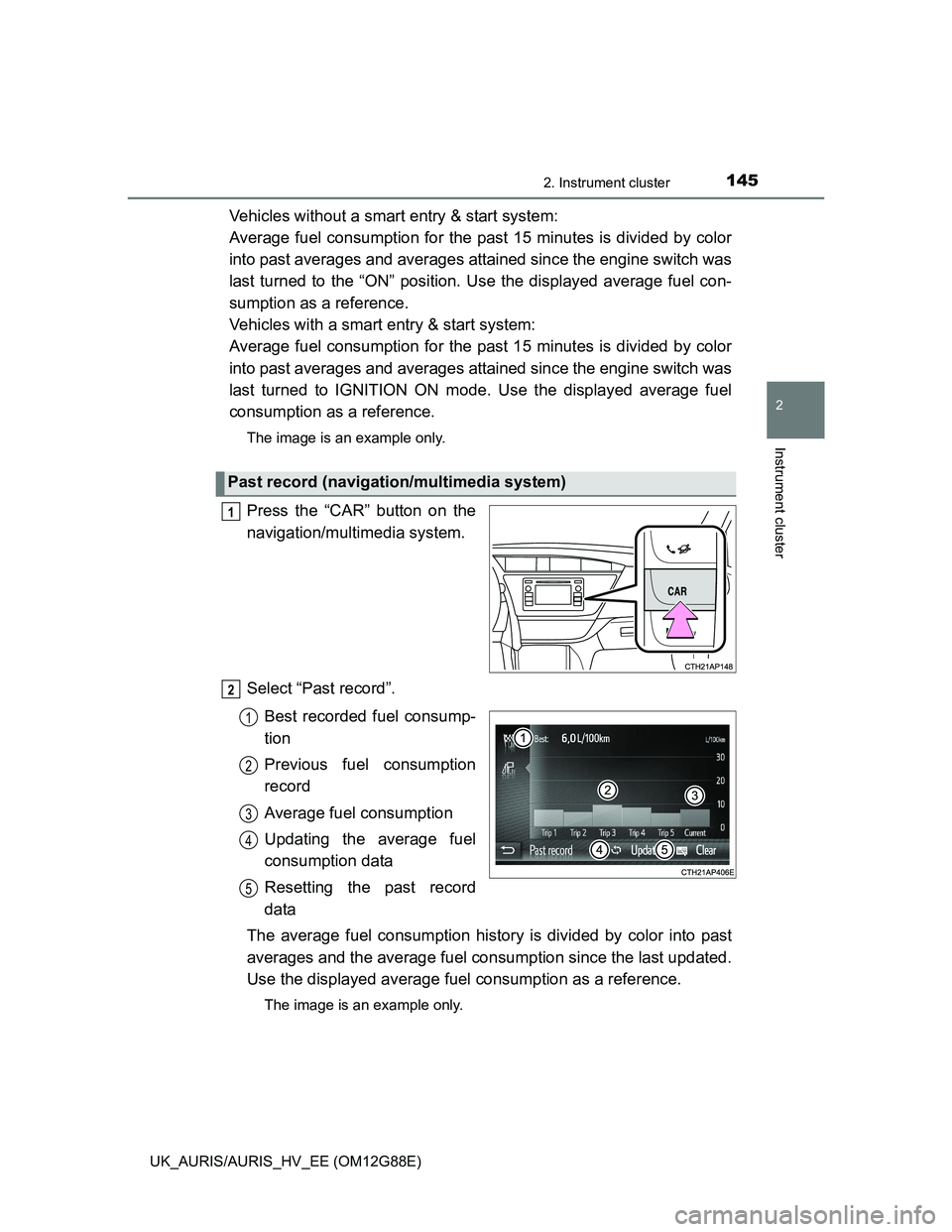
Press the “CAR” button on the
navigation/multimedia system.
Select “Past record”.
Best recorded fuel consump-
tion
Previous fuel consumption
record
Average fuel consumption
Updating the average fuel
consumption data
Resetting the past record
data
The average fuel consumption history is divided by color into past
averages and the average fuel consumption since the last updated.
Use the displayed average fuel consumption as a reference.
The image is an example only.
Past record (navigation/multimedia system)
1
2
1
2
3
4
5
Page 146 of 788
1462. Instrument cluster
UK_AURIS/AURIS_HV_EE (OM12G88E)
Updating the past record data
Update the average fuel consumption by selecting “Update” to measure the
current fuel consumption again.
Resetting the data
The fuel consumption data can be deleted by selecting “Clear”.
Cruising range
Displays the estimated maximum distance that can be driven with the quan-
tity of fuel remaining.
This distance is computed based on your average fuel consumption.
As a result, the actual distance that can be driven may differ from that dis-
played.
Page 149 of 788
1492. Instrument cluster
UK_AURIS/AURIS_HV_EE (OM12G88E)
2
Instrument cluster
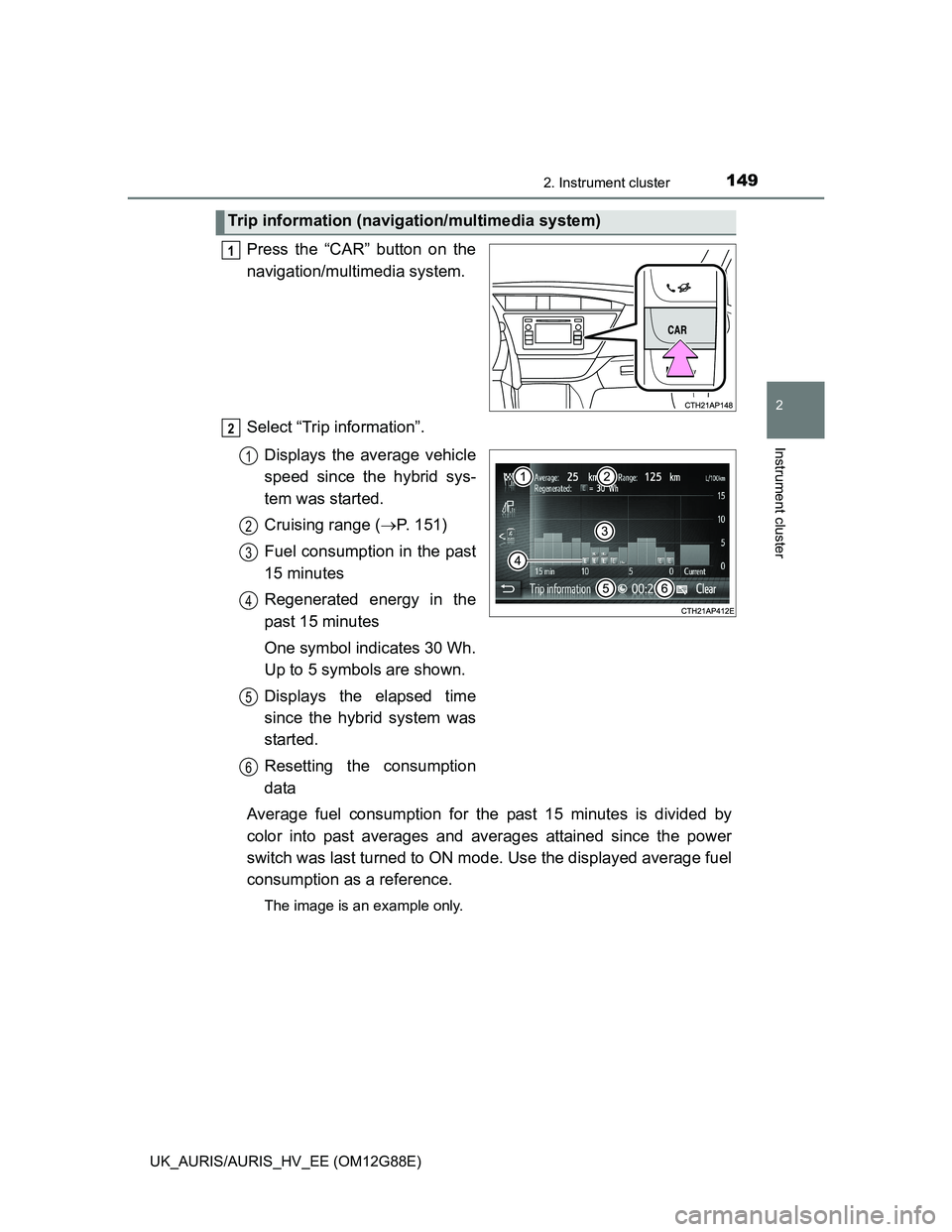
Press the “CAR” button on the
navigation/multimedia system.
Select “Trip information”.
Displays the average vehicle
speed since the hybrid sys-
tem was started.
Cruising range (P. 151)
Fuel consumption in the past
15 minutes
Regenerated energy in the
past 15 minutes
One symbol indicates 30 Wh.
Up to 5 symbols are shown.
Displays the elapsed time
since the hybrid system was
started.
Resetting the consumption
data
Average fuel consumption for the past 15 minutes is divided by
color into past averages and averages attained since the power
switch was last turned to ON mode. Use the displayed average fuel
consumption as a reference.
The image is an example only.
Trip information (navigation/multimedia system)
1
2
1
2
3
4
5
6
Page 150 of 788
1502. Instrument cluster
UK_AURIS/AURIS_HV_EE (OM12G88E)
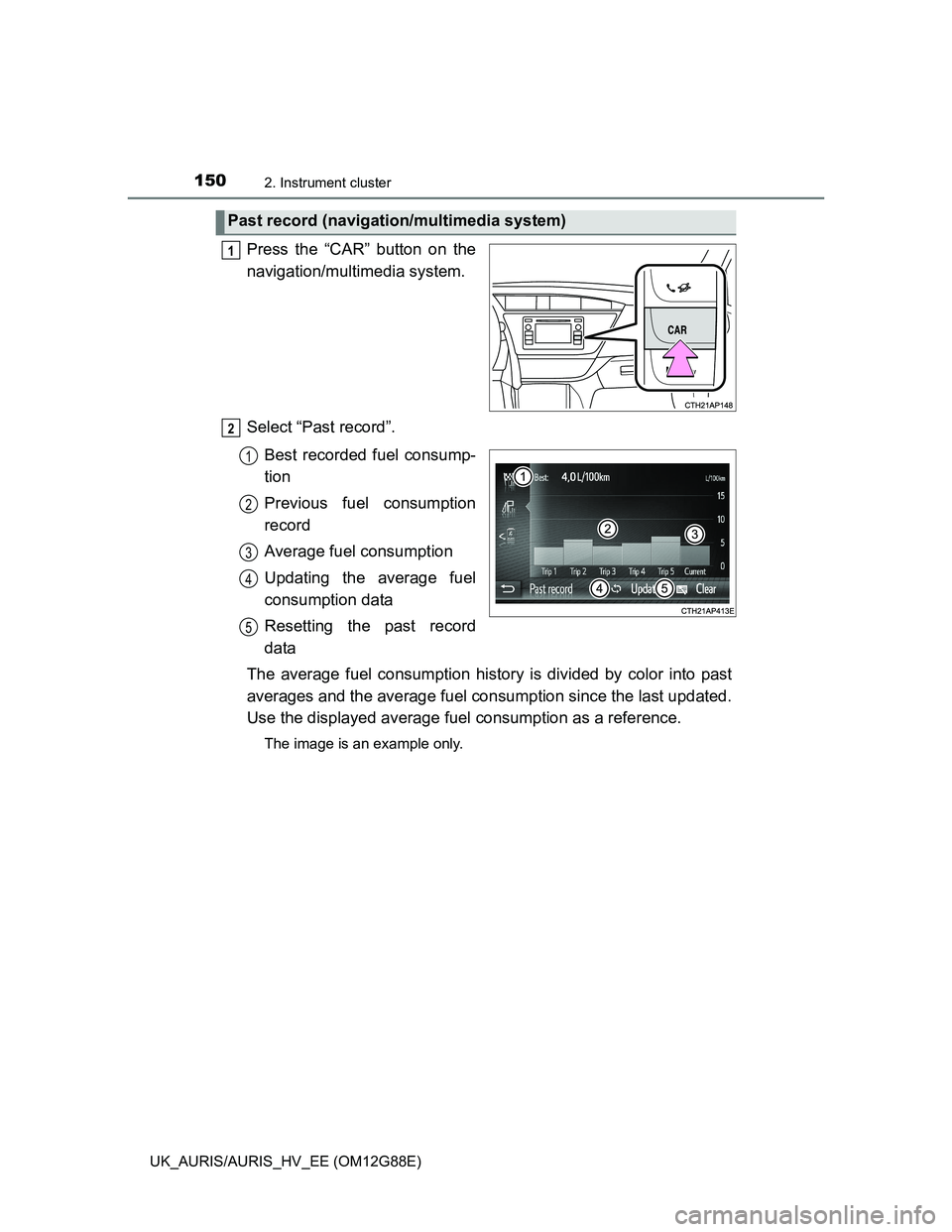
Press the “CAR” button on the
navigation/multimedia system.
Select “Past record”.
Best recorded fuel consump-
tion
Previous fuel consumption
record
Average fuel consumption
Updating the average fuel
consumption data
Resetting the past record
data
The average fuel consumption history is divided by color into past
averages and the average fuel consumption since the last updated.
Use the displayed average fuel consumption as a reference.
The image is an example only.
Past record (navigation/multimedia system)
1
2
1
2
3
4
5
Page 151 of 788
1512. Instrument cluster
UK_AURIS/AURIS_HV_EE (OM12G88E)
2
Instrument cluster
Updating the past record data
Update the average fuel consumption by selecting “Update” to measure the
current fuel consumption again.
Resetting the data
The fuel consumption data can be deleted by selecting “Clear”.
Cruising range
Displays the estimated maximum distance that can be driven with the quan-
tity of fuel remaining.
This distance is computed based on your average fuel consumption.
As a result, the actual distance that can be driven may differ from that dis-
played.
Page 341 of 788
3414-5. Using the driving support systems
UK_AURIS/AURIS_HV_EE (OM12G88E)
4
Driving
Cruise control can be set when
The shift lever is in D. (Multidrive)
The shift position is in D. (Hybrid transmission)
Gear step 4 or higher of M has been selected. (Multidrive)
Gear step 4 or higher of D has been selected by using the paddle shift.
(vehicles with a paddle shift switch)
Vehicle speed is above approximately 40 km/h (25 mph).
Accelerating after setting the vehicle speed
The vehicle can be accelerated normally. After acceleration, the set speed
resumes.
Even without canceling the cruise control, the set speed can be increased
by first accelerating the vehicle to the desired speed and then pushing the
lever down to set the new speed.
Automatic cruise control cancelation
Cruise control will stop maintaining the vehicle speed in any of the following
situations.
Actual vehicle speed falls more than approximately 16 km/h (10 mph) below
the preset vehicle speed.
At this time, the memorized set speed is not retained.
Actual vehicle speed is below approximately 40 km/h (25 mph).
VSC is activated. (if equipped)
VSC+ is activated. (if equipped)
Speed limiter is activated (if equipped)
If the cruise control indicator light comes on in yellow (vehicles without
a multi-information display) or warning message for the cruise control is
shown on the multi-information display (vehicles with a multi-informa-
tion display)
Press the “ON-OFF” button once to deactivate the system, and then press
the button again to reactivate the system.
If the cruise control speed cannot be set or if the cruise control cancels imme-
diately after being activated, there may be a malfunction in the cruise control
system. Have the vehicle inspected by any authorized Toyota dealer or
repairer, or another duly qualified and equipped professional.
Page 420 of 788
4205-2. Using the audio system
UK_AURIS/AURIS_HV_EE (OM12G88E)
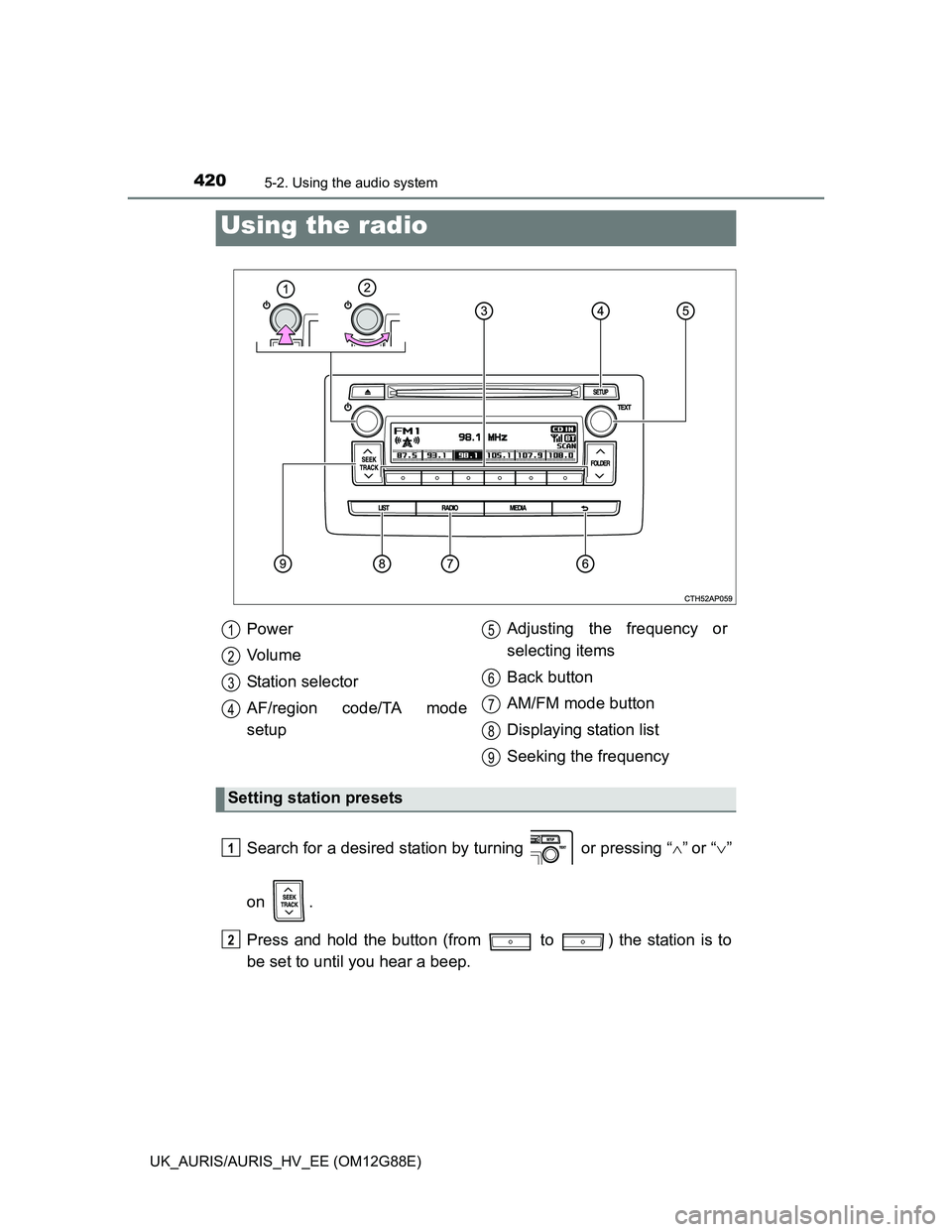
Search for a desired station by turning or pressing “”or “”
on .
Press and hold the button (from to ) the station is to
be set to until you hear a beep.
Using the radio
Power
Vo l u m e
Station selector
AF/region code/TA mode
setupAdjusting the frequency or
selecting items
Back button
AM/FM mode button
Displaying station list
Seeking the frequency
Setting station presets
1
2
3
4
5
6
7
8
9
1
2
Page 423 of 788
4235-2. Using the audio system
UK_AURIS/AURIS_HV_EE (OM12G88E)
5
Interior features
EON (Enhanced Other Network) system (for traffic announcement func-
tion)
If the RDS station (with EON data) you are listening to is not broadcasting a
traffic information program and the audio system is in the TA (traffic
announcement) mode, the radio will be switched automatically to a station
broadcasting a traffic information program in the EON AF list when traffic
information begins.
When the 12-volt battery is disconnected (except hybrid model)
Stations presets are erased.
When the 12-volt battery is disconnected (hybrid model)
Stations presets are erased.
Reception sensitivity
Maintaining perfect radio reception at all times is difficult due to the continu-
ally changing position of the antenna, differences in signal strength and sur-
rounding objects, such as trains, transmitters, etc.
The radio antenna is mounted on the rear roof. The antenna can be
removed from the base by turning it.
NOTICE
To prevent damage, remove the antenna in the following cases.
The antenna will touch the ceiling of a garage.
A cover will be put on the roof.
Page 441 of 788
4415-2. Using the audio system
UK_AURIS/AURIS_HV_EE (OM12G88E)
5
Interior features
iPod functions
When an iPod is connected and the audio source is changed to iPod mode,
the iPod will resume play from the same point in which it was last used.
Depending on the iPod that is connected to the system, certain functions
may not be available. If a function is unavailable due to a malfunction (as
opposed to a system specification), disconnecting the device and recon-
necting it once again may resolve the problem.
While connected to the system, the iPod cannot be operated with its own
controls. It is necessary to use the controls of the vehicle’s audio system
instead.
When the battery level of an iPod is very low, the iPod may not operate. If
so, charge the iPod before use.
Supported models (P. 442)
iPod problems
To resolve most problems encountered when using your iPod, disconnect
your iPod from the vehicle iPod connection and reset it.
For instructions on how to reset your iPod, refer to your iPod Owner’s Man-
ual.
Display
P. 426
Error messages
“iPod ERROR”: This indicates that the data in the iPod cannot be read.
“ERROR 3”: This indicates that the iPod may be malfunctioning.
“ERROR 4”: This indicates that an over current error has occurred.
“ERROR 5”: This indicates that an iPod communication error has
occurred.
“ERROR 6”: This indicates that an authentication error has occurred.
“NO SONGS”: This indicates that there is no music data in the iPod.
“NO PLAYLIST”: This indicates that some available songs are not found in a
selected playlist.
“UPDATE YOUR iPod”: This indicates that the version of the iPod is not com-
patible. Upgrade your iPod software to the latest ver-
sion.