steering TOYOTA AURIS HYBRID 2014 User Guide
[x] Cancel search | Manufacturer: TOYOTA, Model Year: 2014, Model line: AURIS HYBRID, Model: TOYOTA AURIS HYBRID 2014Pages: 788, PDF Size: 21.16 MB
Page 52 of 788
521-1. For safe use
UK_AURIS/AURIS_HV_EE (OM12G88E)
If the SRS airbags deploy (inflate)
Bruising and slight abrasions may result from contact with a deploying
(inflating) SRS airbag.
A loud noise and white powder will be emitted.
Parts of the airbag module (steering wheel hub, airbag cover and inflator) as
well as the front seats, parts of the front and rear pillars, and roof side rails
may be hot for several minutes. The airbag itself may also be hot.
The windshield may crack.
SRS airbag deployment conditions (SRS front airbags)
The SRS front airbags will deploy in the event of an impact that exceeds the
set threshold level (the level of force corresponding to an approximately 20 -
30 km/h [12 - 18 mph] frontal collision with a fixed wall that does not move or
deform).
However, this threshold velocity will be considerably higher in the following
situations:
• If the vehicle strikes an object, such as a parked vehicle or sign pole,
which can move or deform on impact
• If the vehicle is involved in an underride collision, such as a collision in
which the front of the vehicle “underrides”, or goes under, the bed of a
truck
Depending on the type of collision, it is possible that only the seat belt pre-
tensioners will activate.
SRS airbag deployment conditions (SRS side and curtain shield airbags)
The SRS side and curtain shield airbags will deploy in the event of an
impact that exceeds the set threshold level (the level of force corresponding
to the impact force produced by an approximately 1500 kg [3300 lb.] vehicle
colliding with the vehicle cabin from a direction perpendicular to the vehicle
orientation at an approximate speed of 20 - 30 km/h [12 - 18 mph]).
The SRS curtain shield airbags may also deploy in the event of a severe
frontal collision.
Page 55 of 788
551-1. For safe use
1
For safety and security
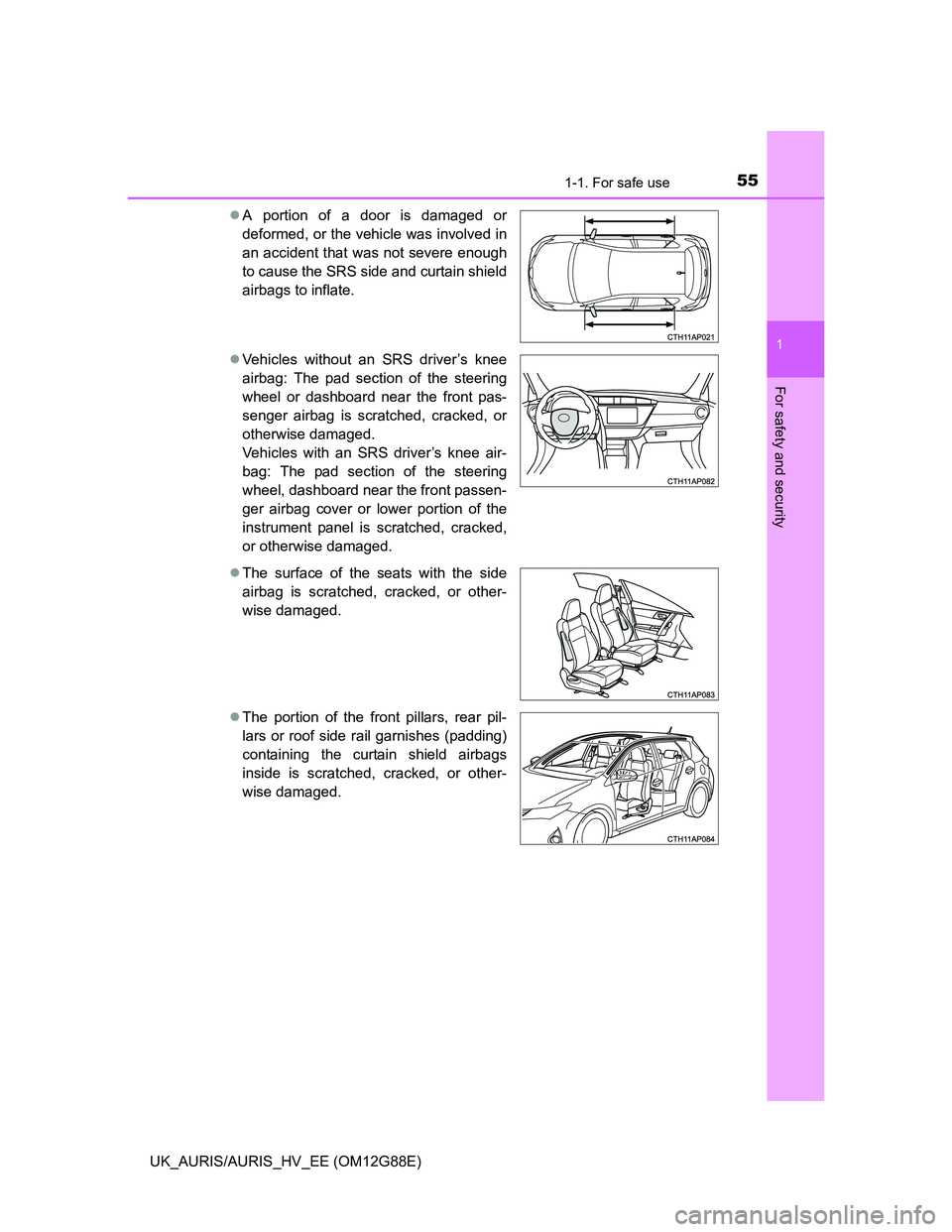
UK_AURIS/AURIS_HV_EE (OM12G88E)A portion of a door is damaged or
deformed, or the vehicle was involved in
an accident that was not severe enough
to cause the SRS side and curtain shield
airbags to inflate.
Vehicles without an SRS driver’s knee
airbag: The pad section of the steering
wheel or dashboard near the front pas-
senger airbag is scratched, cracked, or
otherwise damaged.
Vehicles with an SRS driver’s knee air-
bag: The pad section of the steering
wheel, dashboard near the front passen-
ger airbag cover or lower portion of the
instrument panel is scratched, cracked,
or otherwise damaged.
The surface of the seats with the side
airbag is scratched, cracked, or other-
wise damaged.
The portion of the front pillars, rear pil-
lars or roof side rail garnishes (padding)
containing the curtain shield airbags
inside is scratched, cracked, or other-
wise damaged.
Page 119 of 788
1192. Instrument cluster
UK_AURIS/AURIS_HV_EE (OM12G88E)
2
Instrument cluster
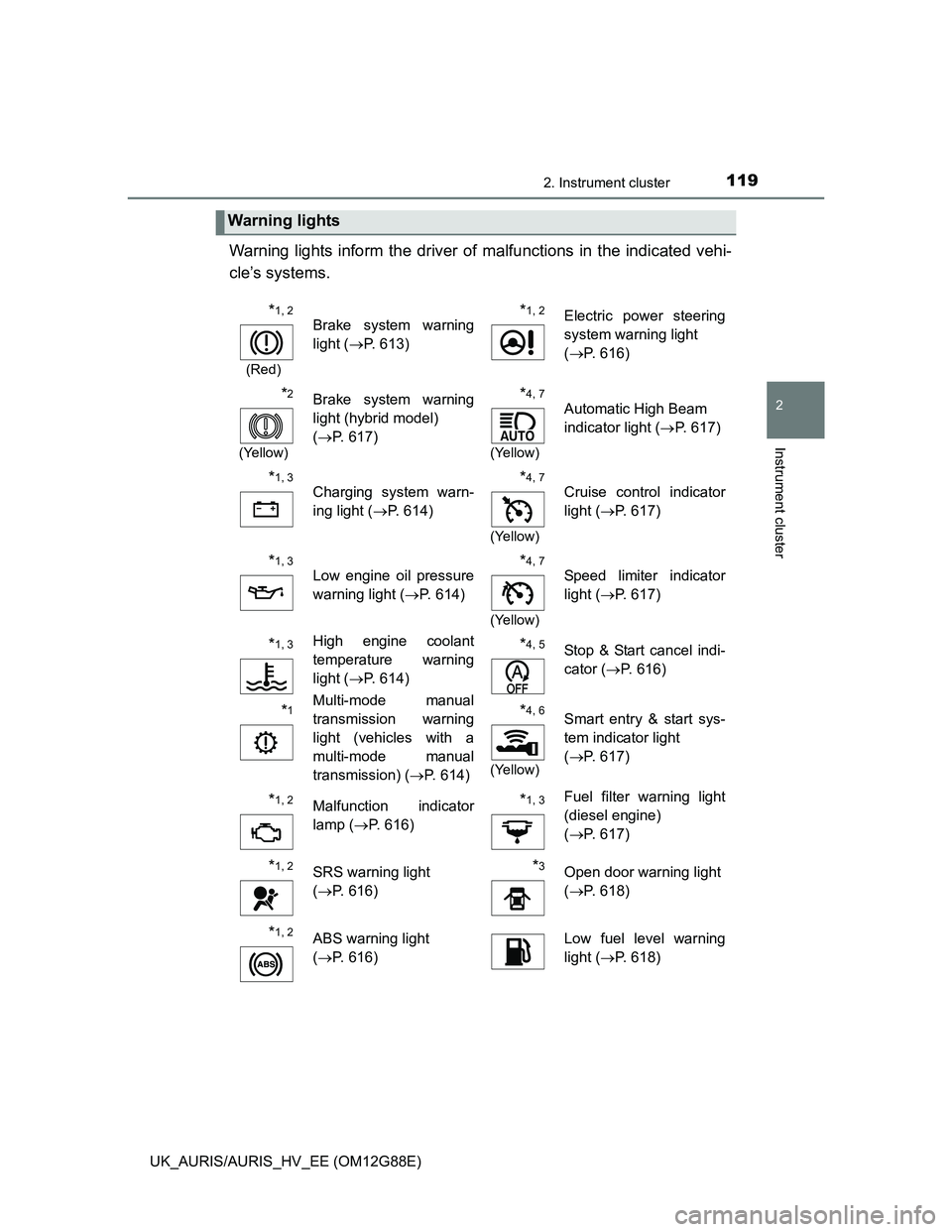
Warning lights inform the driver of malfunctions in the indicated vehi-
cle’s systems.
Warning lights
*1, 2
(Red)
Brake system warning
light (P. 613)*1, 2Electric power steering
system warning light
(P. 616)
*2
(Yellow)
Brake system warning
light (hybrid model)
(P. 617)*4, 7
(Yellow)
Automatic High Beam
indicator light (P. 617)
*1, 3
Charging system warn-
ing light (P. 614)*4, 7
(Yellow)
Cruise control indicator
light (P. 617)
*1, 3
Low engine oil pressure
warning light (P. 614)*4, 7
(Yellow)
Speed limiter indicator
light (P. 617)
*1, 3High engine coolant
temperature warning
light (P. 614)*4, 5Stop & Start cancel indi-
cator (P. 616)
*1Multi-mode manual
transmission warning
light (vehicles with a
multi-mode manual
transmission) (P. 614)*4, 6
(Yellow)
Smart entry & start sys-
tem indicator light
(P. 617)
*1, 2Malfunction indicator
lamp (P. 616)*1, 3Fuel filter warning light
(diesel engine)
(P. 617)
*1, 2SRS warning light
(P. 616)*3Open door warning light
(P. 618)
*1, 2ABS warning light
(P. 616)Low fuel level warning
light (P. 618)
Page 120 of 788
1202. Instrument cluster
UK_AURIS/AURIS_HV_EE (OM12G88E)
*1: Except hybrid model: These lights turn on when the engine switch is turned
to the “ON” position (vehicles without a smart entry & start system) or the
engine switch is turned to IGNITION ON mode (vehicles with a smart entry
& start system) to indicate that a system check is being performed. They
will turn off after the engine is on, or after a few seconds. There may be a
malfunction in a system if the lights do not come on, or turn off. Have the
vehicle inspected by any authorized Toyota dealer or repairer, or another
duly qualified and equipped professional.
*2: Hybrid model: These lights turn on when the power switch is turned to ON
mode to indicate that a system check is being performed. They will turn off
after the hybrid system is on, or after a few seconds. There may be a mal-
function in a system if a light does not come on, or if the lights do not turn
off. Have the vehicle inspected by any authorized Toyota dealer or repairer,
or another duly qualified and equipped professional.
*3: Vehicles with a drive monitor display
*4: If equipped
*5: The light flashes to indicate a malfunction.
*6: The light flashes in yellow to indicate a malfunction. The light flashes
quickly in green to indicate that the steering lock has not been released.
*7: The light comes on in yellow to indicate a malfunction.
*8: Vehicles with a multi-information display
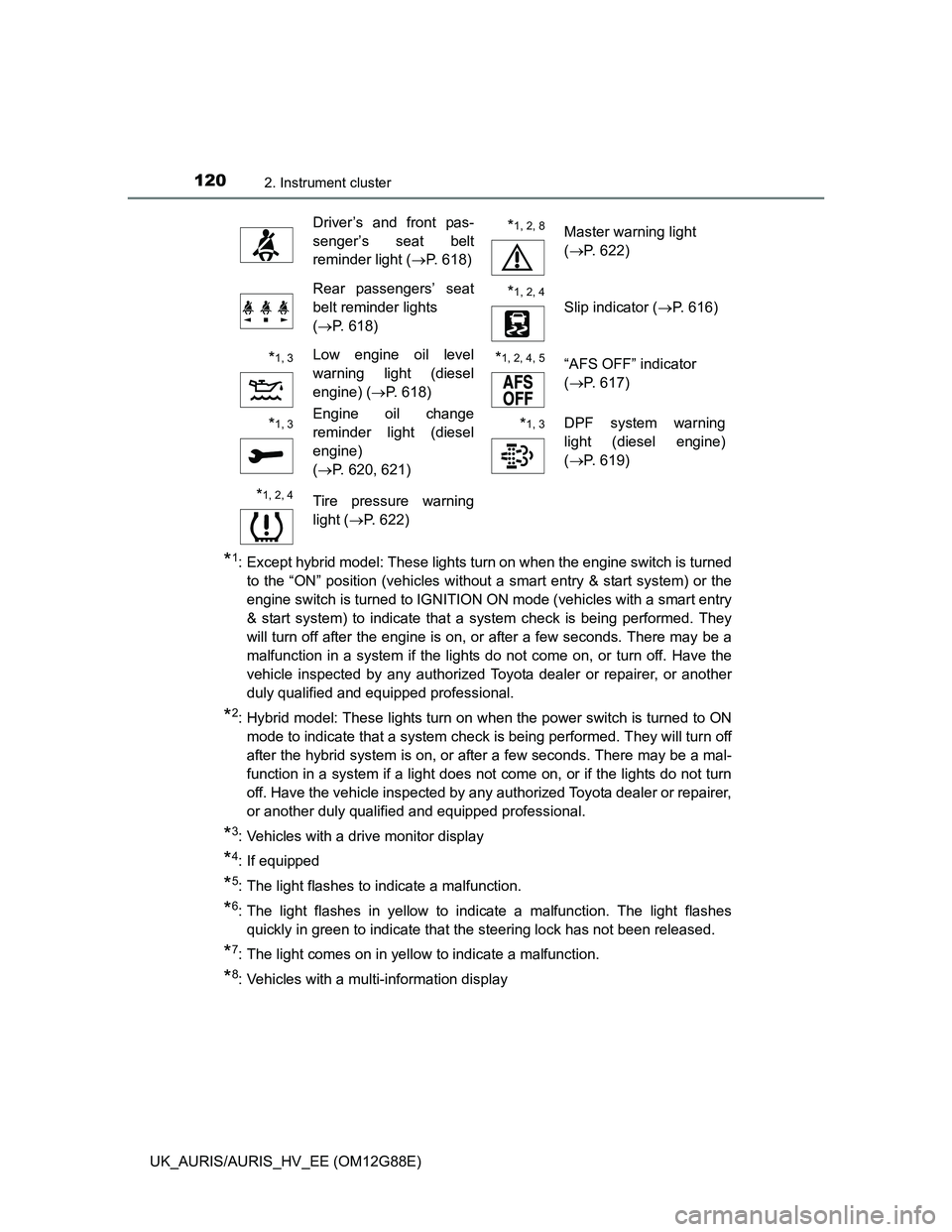
Driver’s and front pas-
senger’s seat belt
reminder light (P. 618)*1, 2, 8Master warning light
(P. 622)
Rear passengers’ seat
belt reminder lights
(P. 618)*1, 2, 4
Slip indicator (P. 616)
*1, 3Low engine oil level
warning light (diesel
engine) (P. 618)*1, 2, 4, 5 “AFS OFF” indicator
(P. 617)
*1, 3Engine oil change
reminder light (diesel
engine)
(P. 620, 621)*1, 3DPF system warning
light (diesel engine)
(P. 619)
*1, 2, 4 Tire pressure warning
light (P. 622)
Page 125 of 788
1252. Instrument cluster
UK_AURIS/AURIS_HV_EE (OM12G88E)
2
Instrument cluster
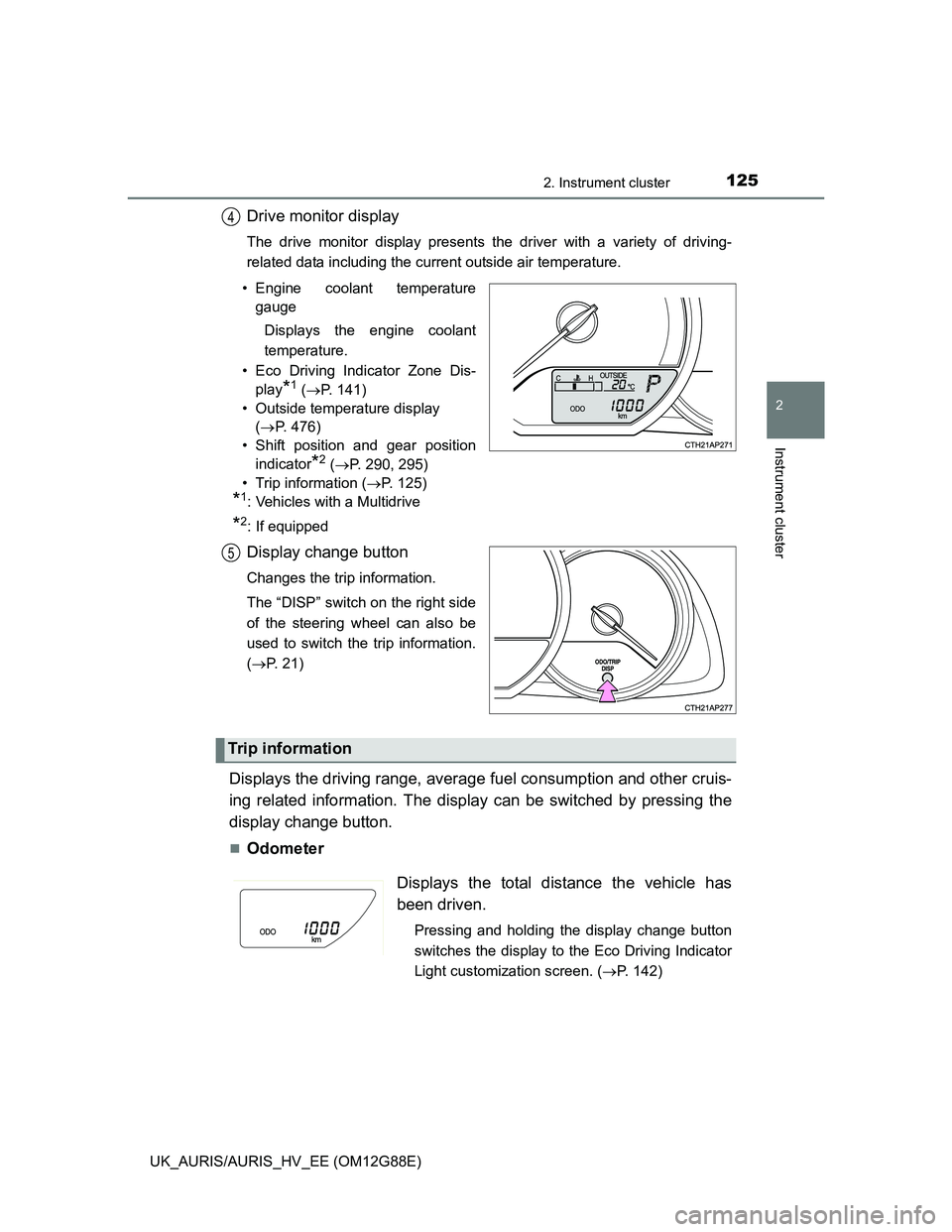
Drive monitor display
The drive monitor display presents the driver with a variety of driving-
related data including the current outside air temperature.
• Engine coolant temperature
gauge
Displays the engine coolant
temperature.
• Eco Driving Indicator Zone Dis-
play
*1 (P. 141)
• Outside temperature display
(P. 476)
• Shift position and gear position
indicator
*2 (P. 290, 295)
• Trip information (P. 125)
*1: Vehicles with a Multidrive
*2: If equipped
Display change button
Changes the trip information.
The “DISP” switch on the right side
of the steering wheel can also be
used to switch the trip information.
(P. 21)
Displays the driving range, average fuel consumption and other cruis-
ing related information. The display can be switched by pressing the
display change button.
Odometer
4
5
Trip information
Displays the total distance the vehicle has
been driven.
Pressing and holding the display change button
switches the display to the Eco Driving Indicator
Light customization screen. (P. 142)
Page 129 of 788
1292. Instrument cluster
UK_AURIS/AURIS_HV_EE (OM12G88E)
2
Instrument cluster
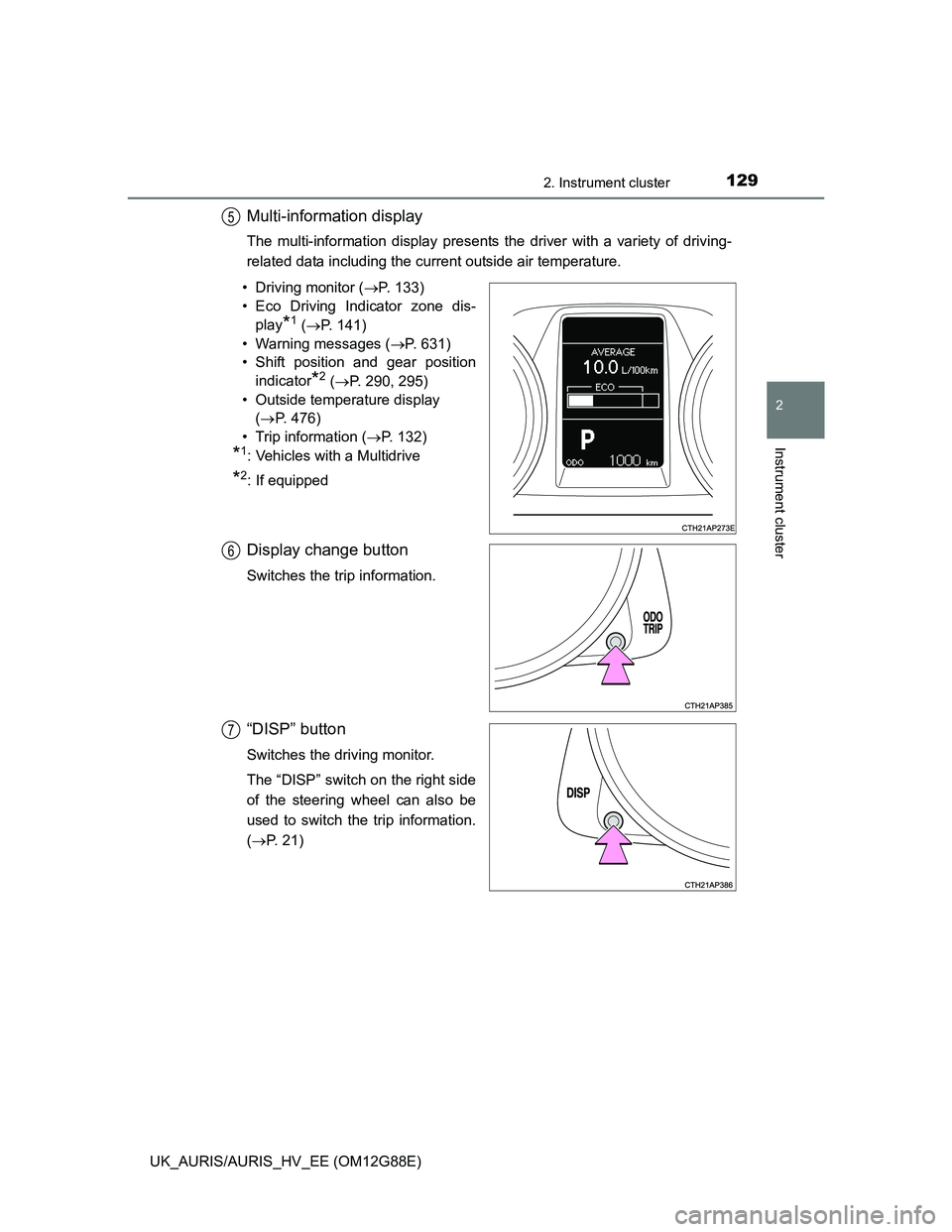
Multi-information display
The multi-information display presents the driver with a variety of driving-
related data including the current outside air temperature.
• Driving monitor (P. 133)
• Eco Driving Indicator zone dis-
play
*1 (P. 141)
• Warning messages (P. 631)
• Shift position and gear position
indicator
*2 (P. 290, 295)
• Outside temperature display
(P. 476)
• Trip information (P. 132)
*1: Vehicles with a Multidrive
*2: If equipped
Display change button
Switches the trip information.
“DISP” button
Switches the driving monitor.
The “DISP” switch on the right side
of the steering wheel can also be
used to switch the trip information.
(P. 21)
5
6
7
Page 131 of 788
1312. Instrument cluster
UK_AURIS/AURIS_HV_EE (OM12G88E)
2
Instrument cluster
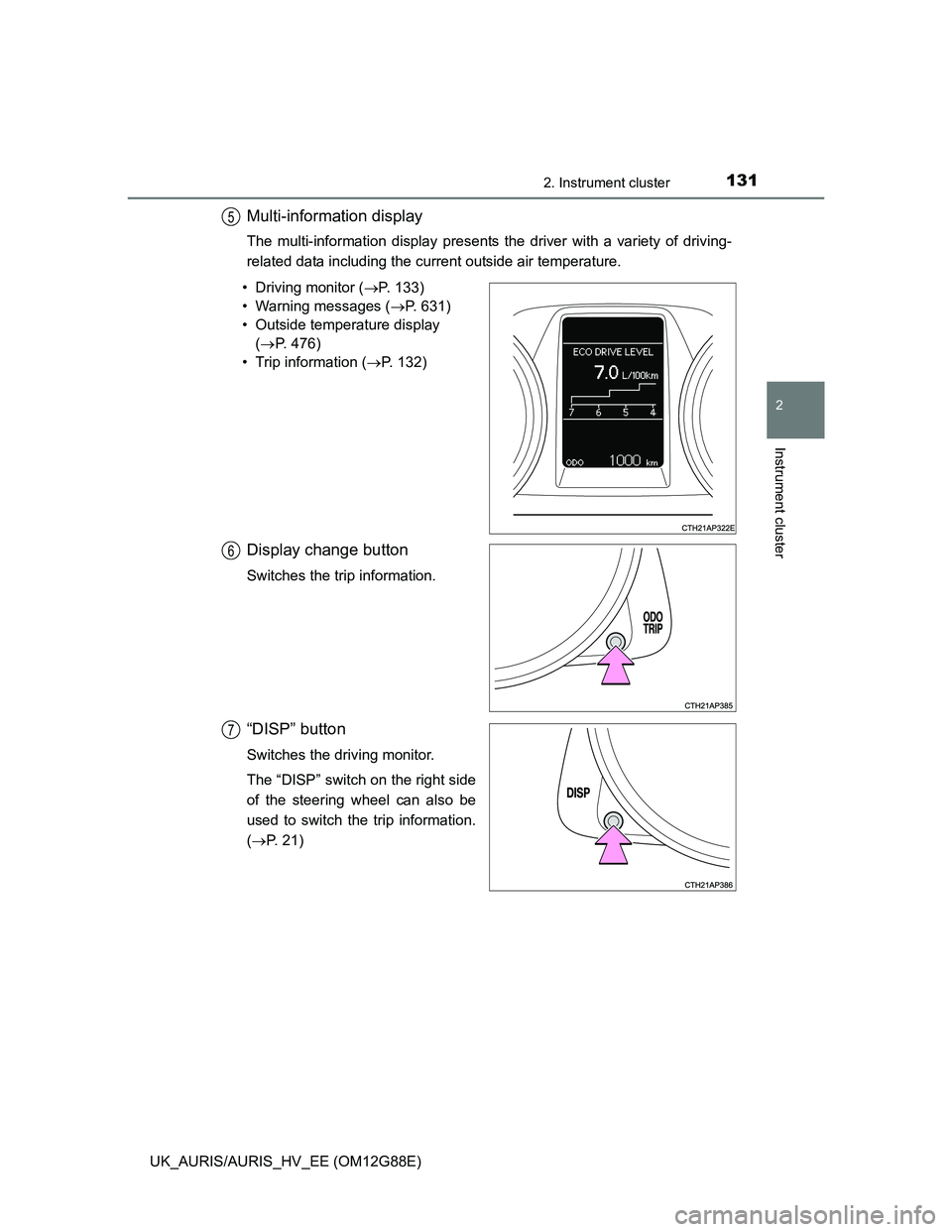
Multi-information display
The multi-information display presents the driver with a variety of driving-
related data including the current outside air temperature.
• Driving monitor (P. 133)
• Warning messages (P. 631)
• Outside temperature display
(P. 476)
• Trip information (P. 132)
Display change button
Switches the trip information.
“DISP” button
Switches the driving monitor.
The “DISP” switch on the right side
of the steering wheel can also be
used to switch the trip information.
(P. 21)
5
6
7
Page 147 of 788
1472. Instrument cluster
UK_AURIS/AURIS_HV_EE (OM12G88E)
2
Instrument cluster
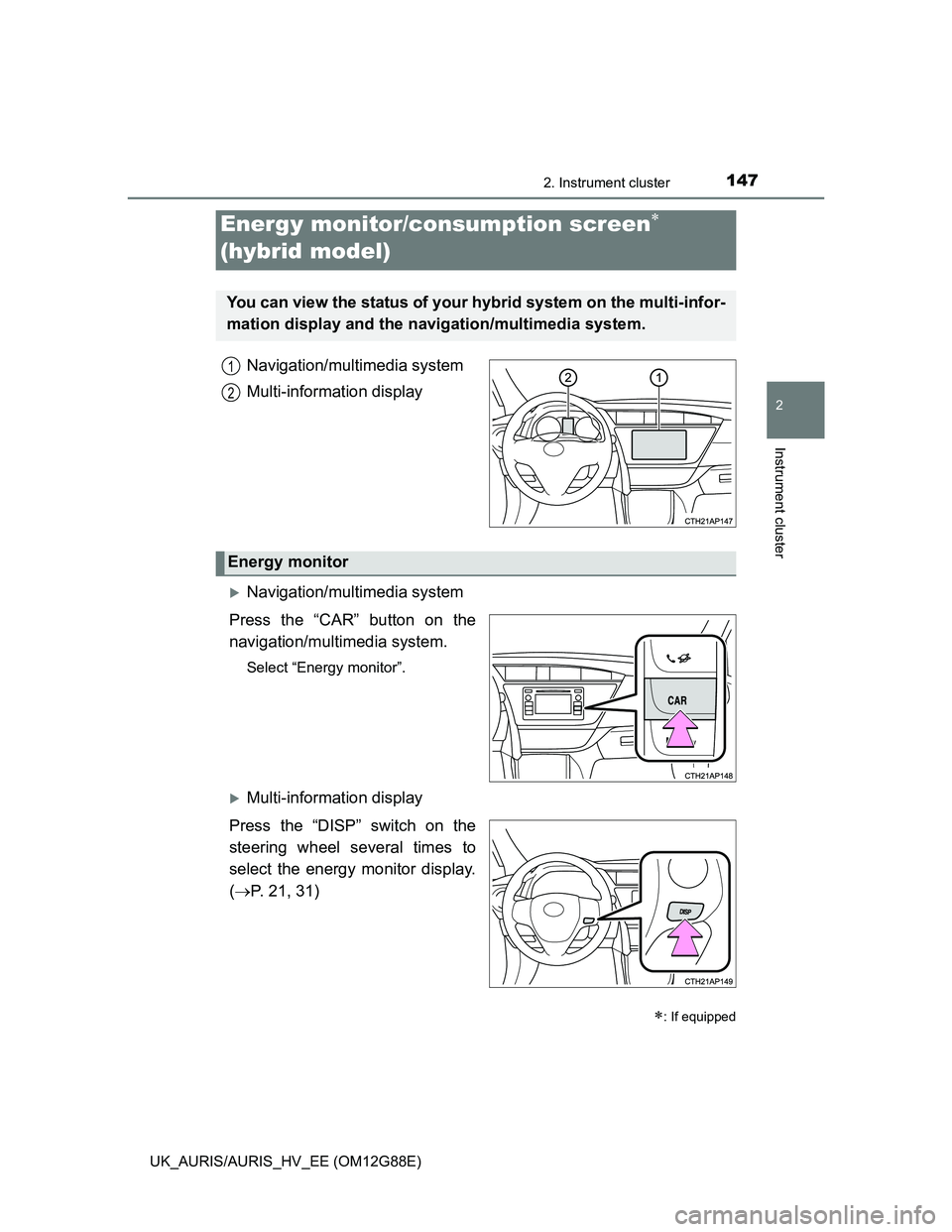
Navigation/multimedia system
Multi-information display
Navigation/multimedia system
Press the “CAR” button on the
navigation/multimedia system.
Select “Energy monitor”.
Multi-information display
Press the “DISP” switch on the
steering wheel several times to
select the energy monitor display.
(P. 21, 31)
Energy monitor/consumption screen
(hybrid model)
: If equipped
You can view the status of your hybrid system on the multi-infor-
mation display and the navigation/multimedia system.
1
2
Energy monitor
Page 153 of 788
153
3
Operation of
each component
UK_AURIS/AURIS_HV_EE (OM12G88E)3-1. Key information
Keys ................................... 154
3-2. Opening, closing and
locking the doors
Smart entry & start
system ............................. 157
Push button start................ 181
Wireless remote control ..... 194
Side doors.......................... 203
Back door........................... 207
3-3. Adjusting the seats
Front seats ......................... 211
Rear seats ......................... 213
Head restraints .................. 216
3-4. Adjusting the steering
wheel and mirrors
Steering wheel ................... 218
Inside rear view mirror ....... 219
Outside rear view
mirrors ............................. 221
3-5. Opening and closing
the windows
Power windows .................. 224
Page 218 of 788
218
UK_AURIS/AURIS_HV_EE (OM12G88E)
3-4. Adjusting the steering wheel and mirrors
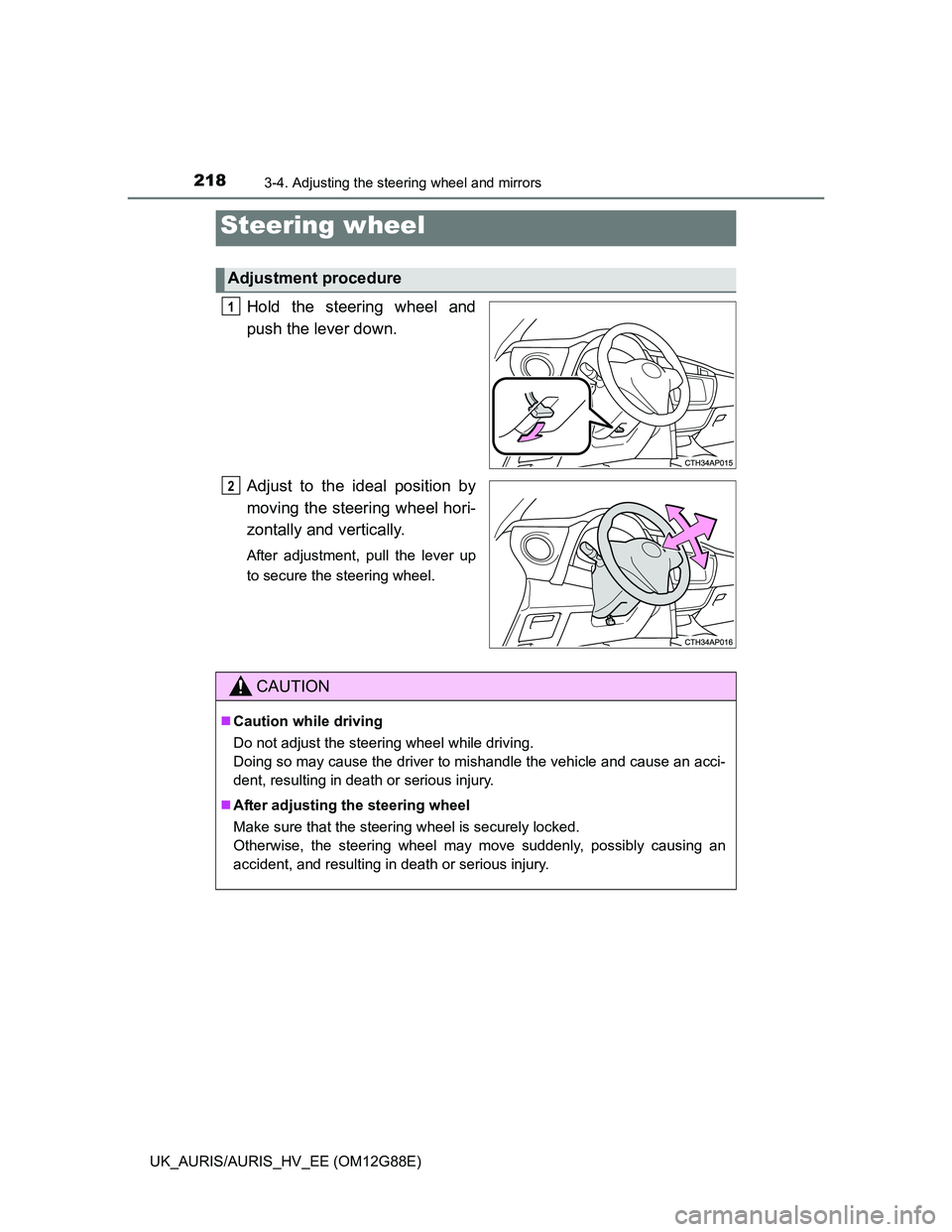
Hold the steering wheel and
push the lever down.
Adjust to the ideal position by
moving the steering wheel hori-
zontally and vertically.
After adjustment, pull the lever up
to secure the steering wheel.
Steering wheel
Adjustment procedure
1
2
CAUTION
Caution while driving
Do not adjust the steering wheel while driving.
Doing so may cause the driver to mishandle the vehicle and cause an acci-
dent, resulting in death or serious injury.
After adjusting the steering wheel
Make sure that the steering wheel is securely locked.
Otherwise, the steering wheel may move suddenly, possibly causing an
accident, and resulting in death or serious injury.