air condition TOYOTA AURIS HYBRID 2014 Owner's Manual
[x] Cancel search | Manufacturer: TOYOTA, Model Year: 2014, Model line: AURIS HYBRID, Model: TOYOTA AURIS HYBRID 2014Pages: 788, PDF Size: 21.16 MB
Page 285 of 788
2854-2. Driving procedures
UK_AURIS/AURIS_HV_EE (OM12G88E)
4
Driving
Auto power off function
If the vehicle is left in ACCESSORY mode for more than 20 minutes or ON
mode (the hybrid system is not operating) for more than an hour with the shift
position in P, the power switch will automatically turn off. However, this func-
tion cannot entirely prevent 12-volt battery discharge. Do not leave the vehi-
cle with the power switch in ACCESSORY or ON mode for long periods of
time when the hybrid system is not operating.
Sounds and vibrations specific to a hybrid vehicle
P. 8 3
Electronic key battery depletion
P. 168, 185
When the ambient temperature is low, such as during winter driving con-
ditions
It may take time until the “READY” indicator comes on.
Conditions affecting operation
P. 164, 184
Notes for the entry function
P. 165
If the hybrid system does not start
The immobilizer system may not have been deactivated. (P. 99)
Contact any authorized Toyota dealer or repairer, or another duly qualified
and equipped professional.
When “CHECK ENTRY & START SYSTEM” will be displayed on the multi-
information display
The system may be malfunctioning. Have the vehicle inspected by any autho-
rized Toyota dealer or repairer, or another duly qualified and equipped profes-
sional immediately.
If the “READY” indicator does not come on
If the “READY” indicator does not come on when you press the power switch
with the brake pedal depressed, contact any authorized Toyota dealer or
repairer, or another duly qualified and equipped professional immediately.
If the hybrid system is malfunctioning
P. 631
If the electronic key battery is depleted
P. 555
Page 299 of 788
2994-2. Driving procedures
UK_AURIS/AURIS_HV_EE (OM12G88E)
4
Driving
If the parking brake is set when the shift lever is in a position other than
N with engine running
When the driver’s door is opened
A buzzer will sound and the gear position will automatically change to N in
10 seconds.
When the driver’s door is closed
A buzzer will sound and the gear position will automatically change to N in
90 seconds.
If the M indicator does not come on even after shifting the shift lever to M
This may indicate a malfunction in the multi-mode manual transmission sys-
tem. Have the vehicle inspected by any authorized Toyota dealer or repairer,
or another duly qualified and equipped professional immediately.
(In this situation, the vehicle will operate as if the shift lever is in E.)
If the N indicator is flashing
When shifting the shift lever:
Shift the shift lever to N. Wait a few seconds and shift the shift lever to the
desired position.
When the engine is turned off:
Vehicles without a smart entry & start system:
Turn the engine switch to the “ON” position and shift the shift lever to N, and
then to the desired position.
Vehicles with a smart entry & start system:
Turn the engine switch to IGNITION ON mode and shift the shift lever to N,
and then to the desired position.
If the indicator still blinks after the above operations, shift the shift lever to N
and start the engine. Then, shift the shift lever to the desired position.
If the N indicator is flashing and the warning buzzer is beeping
Shift the shift lever to N, and then to E, M or R.
CAUTION
Gear Shift Indicator display
For safety, the driver should not look only at the display. Refer to the display
when it is safe to do so while considering actual traffic and road conditions.
Failure to do so may lead to an accident.
Page 306 of 788
3064-2. Driving procedures
UK_AURIS/AURIS_HV_EE (OM12G88E)
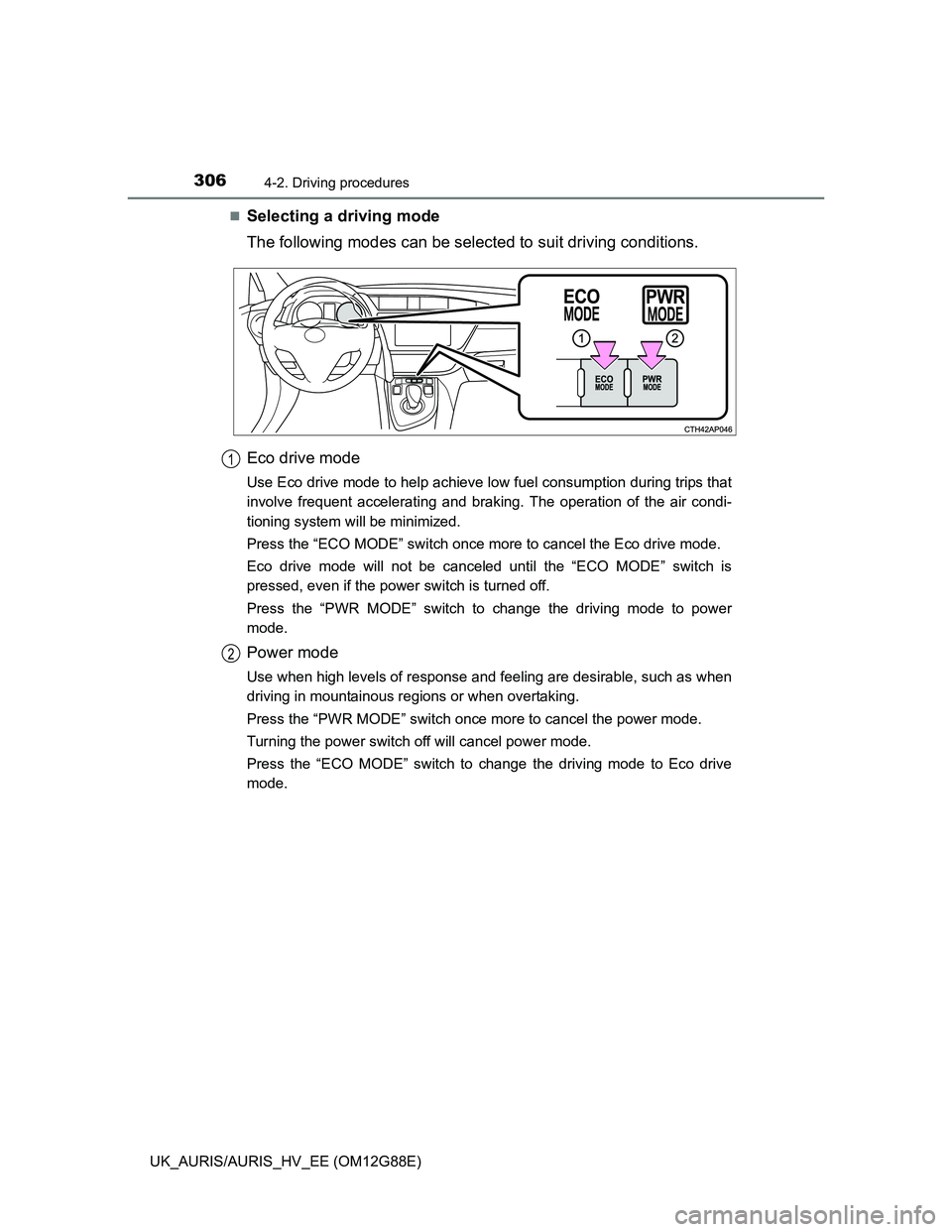
Selecting a driving mode
The following modes can be selected to suit driving conditions.
Eco drive mode
Use Eco drive mode to help achieve low fuel consumption during trips that
involve frequent accelerating and braking. The operation of the air condi-
tioning system will be minimized.
Press the “ECO MODE” switch once more to cancel the Eco drive mode.
Eco drive mode will not be canceled until the “ECO MODE” switch is
pressed, even if the power switch is turned off.
Press the “PWR MODE” switch to change the driving mode to power
mode.
Power mode
Use when high levels of response and feeling are desirable, such as when
driving in mountainous regions or when overtaking.
Press the “PWR MODE” switch once more to cancel the power mode.
Turning the power switch off will cancel power mode.
Press the “ECO MODE” switch to change the driving mode to Eco drive
mode.
1
2
Page 320 of 788
3204-3. Operating the lights and wipers
UK_AURIS/AURIS_HV_EE (OM12G88E)
Hybrid model
When the light switch is in or : The headlights and front fog lights
turn off automatically if the power switch is turned off.
When the light switch is in : All lights turn off automatically if the power
switch is turned off.
To turn the lights on again, turn the power switch to ON mode, or turn the light
switch off once and then back to or .
Light reminder buzzer
Except hybrid model (vehicles without a smart entry & start system)
A buzzer sounds when the engine switch is turned off or turned to the “ACC”
position and the driver's door is opened while the lights are turned on.
Except hybrid model (vehicles with a smart entry & start system)
A buzzer sounds when the engine switch is turned off or turned to ACCES-
SORY mode and the driver's door is opened while the lights are turned on.
Hybrid model
A buzzer sounds when the power switch is turned off or turned to ACCES-
SORY mode and the driver's door is opened while the lights are turned on.
Automatic headlight leveling system (vehicles with discharge head-
lights)
The level of the headlights is automatically adjusted according to the number
of passengers and the loading condition of the vehicle to ensure that the
headlights do not interfere with other road users.
If the “AFS OFF” indicator flashes (if equipped)
It may indicate a malfunction in the system. Contact any authorized Toyota
dealer or repairer, or another duly qualified and equipped professional.
Page 350 of 788
3504-5. Using the driving support systems
UK_AURIS/AURIS_HV_EE (OM12G88E)
Sensor detection information
Certain vehicle conditions and the surrounding environment may affect the
ability of the sensor to correctly detect obstacles. Particular instances where
this may occur are listed below.
• There is dirt, snow or ice on the sensor.
• A sensor is frozen.
• A sensor is covered in any way.
• The vehicle is leaning considerably to one side.
• On an extremely bumpy road, on an incline, on gravel, or on grass.
• The vicinity of the vehicle is noisy due to vehicle horns, motorcycle
engines, air brakes of large vehicles, or other loud noises producing ultra-
sonic waves.
• There is another vehicle equipped with parking assist sensors in the
vicinity.
• A sensor is coated with a sheet of spray or heavy rain.
• The vehicle is equipped with a fender pole or wireless antenna.
• Towing eyelet is installed.
• A bumper or sensor receives a strong impact.
• The vehicle is approaching a tall or curved curb.
• In harsh sunlight or intense cold weather.
• A non-genuine Toyota suspension (lowered suspension etc.) is installed.
In addition to the examples above, there are instances in which, because of
their shapes, signs and other objects may be judged by the sensor to be
closer than they are.
The shape of the obstacle may prevent the sensor from detecting it. Pay
particular attention to the following obstacles:
• Wires, fences, ropes, etc.
• Cotton, snow and other materials that absorb sound waves
• Sharply-angled objects
• Low obstacles
• Tall obstacles with upper sections projecting outwards in the direction of
your vehicle
If a message is displayed
P. 631
Page 359 of 788
3594-5. Using the driving support systems
UK_AURIS/AURIS_HV_EE (OM12G88E)
4
Driving
“IPA CANCELED, TAKE
OVER”
The steering wheel
could not be turned suf-
ficiently due to reasons
such as low tire pres-
sure, tire wear, the influ-
ence of road conditions,
being on a slope, etc.,
therefore the vehicle
could not be parked in
the desired space.
• Check tires for wear
and pressure.
• If this message is dis-
played when the vehi-
cle is parked in other
spaces, have the vehi-
cle inspected by any
authorized Toyota
dealer or repairer, or
another duly qualified
and equipped profes-
sional.
The power steering tem-
porarily overheated.Attempt to use Simple-
IPA after waiting a little
while.
Possible system mal-
function.
Have the vehicle
inspected by any autho-
rized Toyota dealer or
repairer, or another duly
qualified and equipped
professional.
“IPA CANCELED, TAKE
OVER, DRIVER INTER-
VENED”The steering wheel was
manually operated
during automatic steer-
ing.Park the vehicle manu-
ally or detect another
parking space.
“IPA CANCELED, TAKE
OVER, SPEED TOO
HIGH”
The vehicle speed
exceeded 50 km/h (31
mph) during detection of
a parking space.Reduce vehicle speed
to 30 km/h (18 mph) or
less and turn the Sim-
ple-IPA switch on.
The vehicle speed
exceeded 6 km/h (3
mph) during automatic
steering.Park the vehicle manu-
ally or detect another
parking space.
MessageCauseWhat to do
Page 365 of 788
3654-5. Using the driving support systems
UK_AURIS/AURIS_HV_EE (OM12G88E)
4
Driving
Initializing Simple-IPA
Within 15 seconds of turning the Simple-IPA switch on, turn the steering
wheel all the way to the left or right and then to the opposite side.
When the parking space detection screen is displayed, the initialization is
complete.
If pressing the Simple-IPA switch again still shows “IPA NOT AVAILABLE,
STOP THE VEHICLE, TURN WHEEL FROM LEFT END TO RIGHT END” on
the multi-information display, the initialization has failed. Have the vehicle
inspected at any authorized Toyota dealer or repairer, or another duly quali-
fied and equipped professional.
CAUTION
Cautions regarding the use of Simple-IPA
Never depend on the Simple-IPA entirely when parking. The driver is
responsible for safety. Use caution, just as you would when parking any
vehicle.
Back up slowly, using the brake pedal to control the vehicle's speed.
If it seems likely to hit nearby vehicles, obstacles, or people, depress the
brake pedal to stop the vehicle, and the disable the system.
Conditions in which the use of Simple-IPA is prohibited
Do not use Simple-IPA under the following conditions.
Doing so may cause improper operation and lead to an unexpected acci-
dent.
On sharp bends or slopes.
On slippery or icy roads, or in snow.
On uneven road surfaces such as gravel.
During bad weather such as heavy rain, fog, snow, or a sandstorm.
When the tires are extremely worn or tire pressure is low.
When the vehicle has improper wheel alignment due to tires having
received a strong impact such as bumping against a curb.
When the compact spare tire (if equipped) or snow chains are installed.
When the tires slid while attempting to park.
When fallen leaves or snow is in a parking space.
Models that can tow a trailer: When items such as a towing bracket, trailer,
bicycle carrier, etc. are installed on the rear of the vehicle.
Page 370 of 788
3704-5. Using the driving support systems
UK_AURIS/AURIS_HV_EE (OM12G88E)
Operating conditions
The Stop & Start system is operational when all of the following conditions
are met:
• The engine is adequately warmed up.
• The 12-volt battery is sufficiently charged.
• The driver's door is closed.
• The driver's seat belt is fastened.
• The hood is closed.
• The clutch pedal is not being depressed.
• The shift lever is in N.
In the following circumstances the engine may not be stopped by the Stop &
Start system. This is not a malfunction of the Stop & Start system.
• Engine coolant temperature is too low or too high.
• Diesel engine: The outside temperature is too low.
• Vehicles with an automatic air conditioning system: The air conditioning
system is being used when the vehicle interior temperature is extremely
high such as after the vehicle was parked under the hot sun.
• Vehicles with an automatic air conditioning system only: The windshield
defogger is being used.
• Vehicles with a power heater: The power heater is being used.
• The 12-volt battery is not sufficiently charged, or is undergoing a peri-
odic recharge.
• Due to traffic or other circumstances the vehicle is stopped repeatedly,
resulting in the amount of time the engine is stopped by the Stop & Start
system to become excessively high.
• The brake booster vacuum is low.
• A large amount of electricity is being used.
• At high altitude
When the above conditions improve, the Stop & Start system will stop and
restart the engine from the next time the vehicle is stopped.
In the following situations, it may take longer than normal for the Stop & Start
system to activate.
• The 12-volt battery is discharged.
• After the 12-volt battery terminals have been disconnected and recon-
nected after a 12-volt battery replacement, etc.
• The engine coolant temperature is low.
Page 371 of 788
3714-5. Using the driving support systems
UK_AURIS/AURIS_HV_EE (OM12G88E)
4
Driving
Automatic engine start function
In the following situations, the engine may start even without the clutch pedal
being depressed.
• The brake pedal is pumped or strongly depressed.
• Vehicles with an automatic air conditioning system: The air conditioning
system is being used or turned on.
• Vehicles with an automatic air conditioning system only: The windshield
defogger is turned on.
• The 12-volt battery is not sufficiently charged.
• The vehicle starts to roll on an incline.
• A large amount of electricity is being used.
• The driver’s door is opened.
• The driver’s seat belt is unfastened.
Automatic reactivation of the Stop & Start system
Vehicles without a smart entry & start system: Even if the Stop & Start system
is disabled by the Stop & Start cancel switch, it will be automatically re-
enabled once the engine switch is turned to the “LOCK” position then to the
“START” position.
Vehicles with a smart entry & start system: Even if the Stop & Start system is
disabled by the Stop & Start cancel switch, it will be automatically re-enabled
once the engine switch is turned off then the engine is started.
The Stop & Start system protection feature
Vehicles without a smart entry & start system: When an excessively loud
sound is being projected by the audio system, the audio system may be auto-
matically cut off in order to maintain power for the Stop & Start system func-
tion.
If this occurs, turning the engine switch to the “LOCK” position then to the
“ACC” or “ON” position re-enables the audio system.
Vehicles with a smart entry & start system: When an excessively loud sound
is being projected by the audio system, the audio system may be automati-
cally cut off in order to maintain power for the Stop & Start system function.
If this occurs, turning the engine switch off then to ACCESSORY mode or
IGNITION ON mode re-enables the audio system.
Steering wheel operation
When the engine is stopped by the Stop & Start system, the steering wheel
may become heavier than when driving.
Hood
If the hood is opened while the engine is stopped by the Stop & Start system,
the engine cannot be restarted by the Stop & Start system or by the automatic
engine start function. Restart the engine with the engine switch operation.
(P. 268, 272)
Page 379 of 788
3794-5. Using the driving support systems
UK_AURIS/AURIS_HV_EE (OM12G88E)
4
Driving
CAUTION
Stopping distance when the ABS is operating may exceed that of nor-
mal conditions
The ABS is not designed to shorten the vehicle’s stopping distance. Always
maintain a safe distance from the vehicle in front of you, especially in the
following situations:
When driving on dirt, gravel or snow-covered roads
When driving with tire chains
When driving over bumps in the road
When driving over roads with potholes or uneven surfaces
TRC may not operate effectively when
Directional control and power may not be achievable while driving on slip-
pery road surfaces, even if the TRC system is operating.
Drive the vehicle carefully in conditions where stability and power may be
lost.
When the VSC is activated
The slip indicator light flashes. Always drive carefully. Reckless driving may
cause an accident. Exercise particular care when the indicator light flashes.
When the TRC/VSC systems are turned off (except hybrid model)
Be especially careful and drive at a speed appropriate to the road condi-
tions. As these are the systems to help ensure vehicle stability and driving
force, do not turn the TRC/VSC systems off unless necessary.
Replacing tires
Make sure that all tires are of the specified size, brand, tread pattern and
total load capacity. In addition, make sure that the tires are inflated to the
recommended tire inflation pressure level.
The ABS, TRC and VSC systems will not function correctly if different tires
are installed on the vehicle.
Contact any authorized Toyota dealer or repairer, or another duly qualified
and equipped professional for further information when replacing tires or
wheels.
Handling of tires and the suspension
Using tires with any kind of problem or modifying the suspension will affect
the driving assist systems, and may cause a system to malfunction.