steering wheel TOYOTA AURIS HYBRID 2014 Owner's Manual
[x] Cancel search | Manufacturer: TOYOTA, Model Year: 2014, Model line: AURIS HYBRID, Model: TOYOTA AURIS HYBRID 2014Pages: 788, PDF Size: 21.16 MB
Page 245 of 788
2454-1. Before driving
UK_AURIS/AURIS_HV_EE (OM12G88E)
4
Driving
NOTICE
When driving the vehicle (vehicles with a manual transmission)
Do not depress the accelerator and brake pedals at the same time during
driving, as this may restrain driving torque.
Do not shift gears unless the clutch pedal is fully depressed. After shifting,
do not release the clutch pedal abruptly. Doing so may damage the clutch,
transmission and gears.
Observe the following to prevent the clutch from being damaged.
• Do not rest your foot on the clutch pedal while driving.
Doing so may cause clutch trouble.
• Do not use any gear other than the 1st gear when starting off and mov-
ing forward.
Doing so may damage the clutch.
• Do not use the clutch to hold the vehicle when stopping on an uphill
grade.
Doing so may damage the clutch.
Do not shift the shift lever to R when the vehicle is still moving. Doing so
may damage the clutch, transmission and gears.
When parking the vehicle (vehicles with a Multidrive)
Always shift the shift lever to P. Failure to do so may cause the vehicle to
move or the vehicle may accelerate suddenly if the accelerator pedal is
accidentally depressed.
Avoiding damage to vehicle parts
Do not turn the steering wheel fully in either direction and hold it there for
an extended period of time.
Doing so may damage the power steering motor.
When driving over bumps in the road, drive as slowly as possible to avoid
damaging the wheels, underside of the vehicle, etc.
Diesel model: Make sure to idle the engine immediately after high-speed
driving or hill climbing. Stop the engine only after the turbocharger has
cooled down.
Failure to do so may cause damage to the turbocharger.
Page 246 of 788
2464-1. Before driving
UK_AURIS/AURIS_HV_EE (OM12G88E)
NOTICE
If you get a flat tire while driving
A flat or damaged tire may cause the following situations. Hold the steering
wheel firmly and gradually depress the brake pedal to slow down the vehi-
cle.
It may be difficult to control your vehicle.
The vehicle will make abnormal sounds or vibrations.
The vehicle will lean abnormally.
Information on what to do in case of a flat tire (P. 659, 673)
When encountering flooded roads
Do not drive on a road that has flooded after heavy rain etc. Doing so may
cause the following serious damage to the vehicle:
Engine stalling
Short in electrical components
Engine damage caused by water immersion
In the event that you drive on a flooded road and the vehicle is flooded, be
sure to have any authorized Toyota dealer or repairer, or another duly quali-
fied and equipped professional check the following:
Brake function
Except hybrid model: Changes in quantity and quality of engine oil, trans-
mission fluid, etc.
Hybrid model: Changes in quantity and quality of engine oil, hybrid trans-
mission fluid, etc.
Lubricant condition for the bearings and suspension joints (where possi-
ble), and the function of all joints, bearings, etc.
Hybrid model: If the P position control system is damaged by flooding, it
may not be possible to shift the shift position to P, or from P to other posi-
tions. When the shift position cannot be changed from P to any other posi-
tion, the front wheels will lock, and you will be unable to tow the vehicle with
the front wheels on the ground, as the front wheels may be locked. In this
case, transport the vehicle with both front wheels or all four wheels lifted.
Page 255 of 788
2554-1. Before driving
UK_AURIS/AURIS_HV_EE (OM12G88E)
4
Driving
Your vehicle will handle differently when towing a trailer. In order to
avoid accident, death or serious injury, keep the following in mind
when towing:
Checking connections between trailer and lights
Stop the vehicle and check the operation of the connection between
the trailer and lights after driving for a brief period as well as before
starting off.
Practicing driving with a coupled trailer
Get the feel for turning, stopping and reversing with the trailer
coupled by practicing in an area with no or light traffic.
When reversing with a coupled trailer, hold the section of the
steering wheel nearest to you and rotate clockwise to turn the
trailer left or counterclockwise to turn it right. Always rotate a little
at a time to prevent steering error. Have someone guide you
when reversing to lessen the risk of an accident.
Increasing vehicle-to-vehicle distance
At a speed of 10 km/h (6 mph), the distance to the vehicle running
ahead of you should be equivalent to or greater than the combined
length of your vehicle and trailer. Avoid sudden braking that may
cause skidding. Otherwise, the vehicle may spin out of control. This
is especially true when driving on wet or slippery road surfaces.
Sudden acceleration/steering input/cornering
Executing sharp turns when towing may result in the trailer colliding
with your vehicle. Decelerate well in advance when approaching
turns and take them slowly and carefully to avoid sudden braking.
Important points regarding turning
The wheels of the trailer will travel closer to the inside of the curve
than the wheels of the vehicle. To make allowance for this, take the
turns wider than you would normally do.
Guidance
Page 265 of 788
2654-1. Before driving
UK_AURIS/AURIS_HV_EE (OM12G88E)
4
Driving
Your vehicle will handle differently when towing a trailer. In order to
avoid accident, death or serious injury, keep the following in mind
when towing:
Checking connections between trailer and lights
Stop the vehicle and check the operation of the connection between
the trailer and lights after driving for a brief period as well as before
starting off.
Practicing driving with a coupled trailer
Get the feel for turning, stopping and reversing with the trailer
coupled by practicing in an area with no or light traffic.
When reversing with a coupled trailer, hold the section of the
steering wheel nearest to you and rotate clockwise to turn the
trailer left or counterclockwise to turn it right. Always rotate a little
at a time to prevent steering error. Have someone guide you
when reversing to lessen the risk of an accident.
Increasing vehicle-to-vehicle distance
At a speed of 10 km/h (6 mph), the distance to the vehicle running
ahead of you should be equivalent to or greater than the combined
length of your vehicle and trailer. Avoid sudden braking that may
cause skidding. Otherwise, the vehicle may spin out of control. This
is especially true when driving on wet or slippery road surfaces.
NOTICE
When the rear bumper strengthening material is aluminum
Ensure the steel bracket part does not come directly in contact with that
area.
When steel and aluminum come into contact, there is a reaction similar to
corrosion, which will weaken the section concerned and may result in dam-
age. Apply a rust inhibitor to parts that will come in contact when attaching a
steel bracket.
Guidance
Page 266 of 788
2664-1. Before driving
UK_AURIS/AURIS_HV_EE (OM12G88E)
Sudden acceleration/steering input/cornering
Executing sharp turns when towing may result in the trailer colliding
with your vehicle. Decelerate well in advance when approaching
turns and take them slowly and carefully to avoid sudden braking.
Important points regarding turning
The wheels of the trailer will travel closer to the inside of the curve
than the wheels of the vehicle. To make allowance for this, take the
turns wider than you would normally do.
Important points regarding stability
Vehicle movement resulting from uneven road surfaces and strong
crosswinds will affect handling. The vehicle may also be rocked by
passing buses or large trucks. Frequently check behind when mov-
ing alongside such vehicles. As soon as such vehicle movement
occurs, immediately start to decelerate smoothly by slowly applying
the brakes. Always steer the vehicle straight ahead while braking.
Passing other vehicles
Consider the total combined length of your vehicle and trailer and
ensure that the vehicle-to-vehicle distance is sufficient before exe-
cuting lane changes.
Transmission information
To maintain engine braking efficiency and charging system perfor-
mance when using engine braking, do not use the transmission in
D. Shift the shift position to B.
If the engine overheats
Towing a loaded trailer up a long, steep incline in temperatures
exceeding 30C (85F) may result in the engine overheating. If the
engine coolant temperature gauge indicates that the engine is over-
heating, turn the air conditioning off immediately, leave the road and
stop the vehicle in a safe place. (P. 700)
When parking the vehicle
Always place wheel chocks under the wheels of both the vehicle
and trailer. Firmly set the parking brake and shift the shift position to
P.
Page 269 of 788
2694-2. Driving procedures
UK_AURIS/AURIS_HV_EE (OM12G88E)
4
Driving
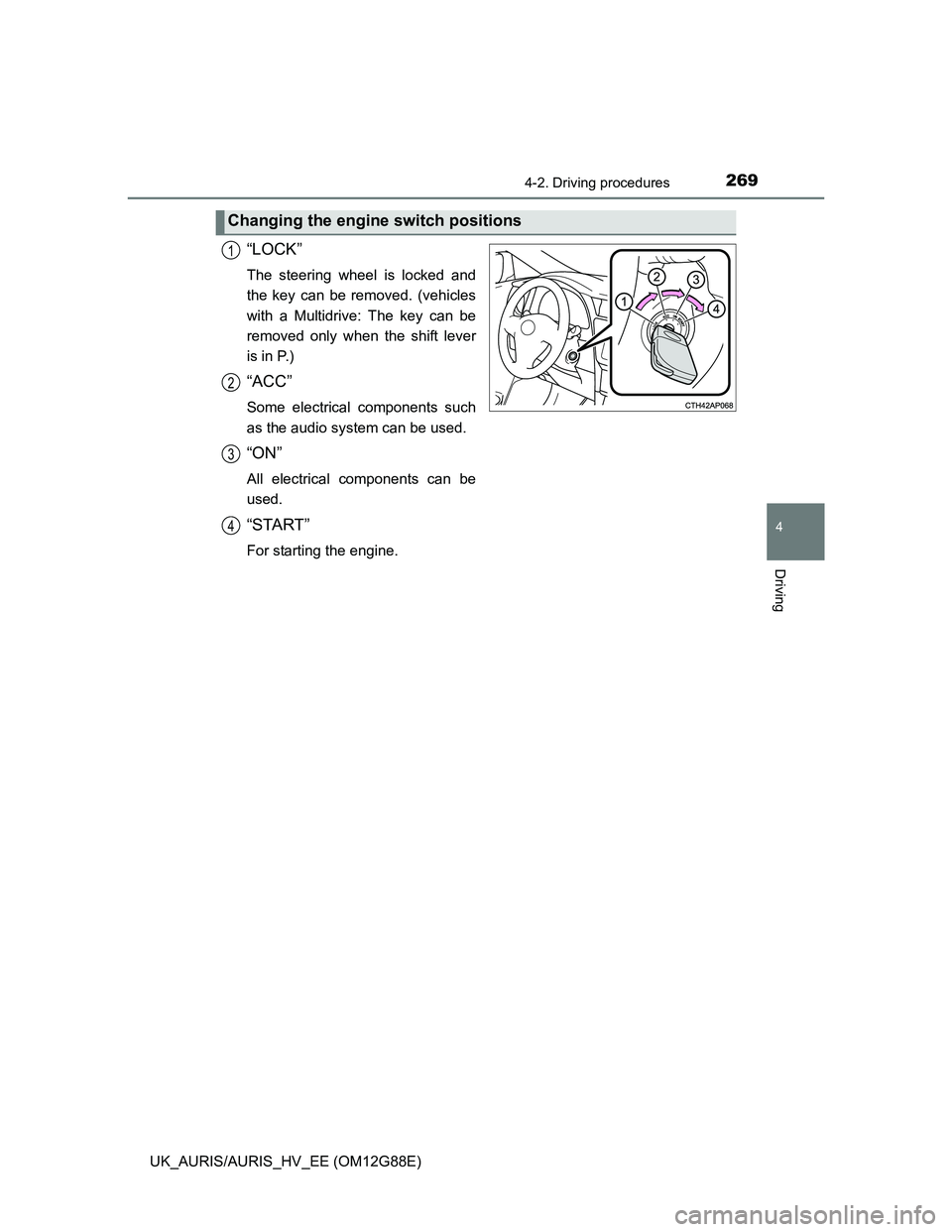
“LOCK”
The steering wheel is locked and
the key can be removed. (vehicles
with a Multidrive: The key can be
removed only when the shift lever
is in P.)
“ACC”
Some electrical components such
as the audio system can be used.
“ON”
All electrical components can be
used.
“START”
For starting the engine.
Changing the engine switch positions
1
2
3
4
Page 270 of 788
2704-2. Driving procedures
UK_AURIS/AURIS_HV_EE (OM12G88E)
If the engine does not start
The engine immobilizer system may not have been deactivated. (P. 91)
Contact any authorized Toyota dealer or repairer, or another duly qualified
and equipped professional.
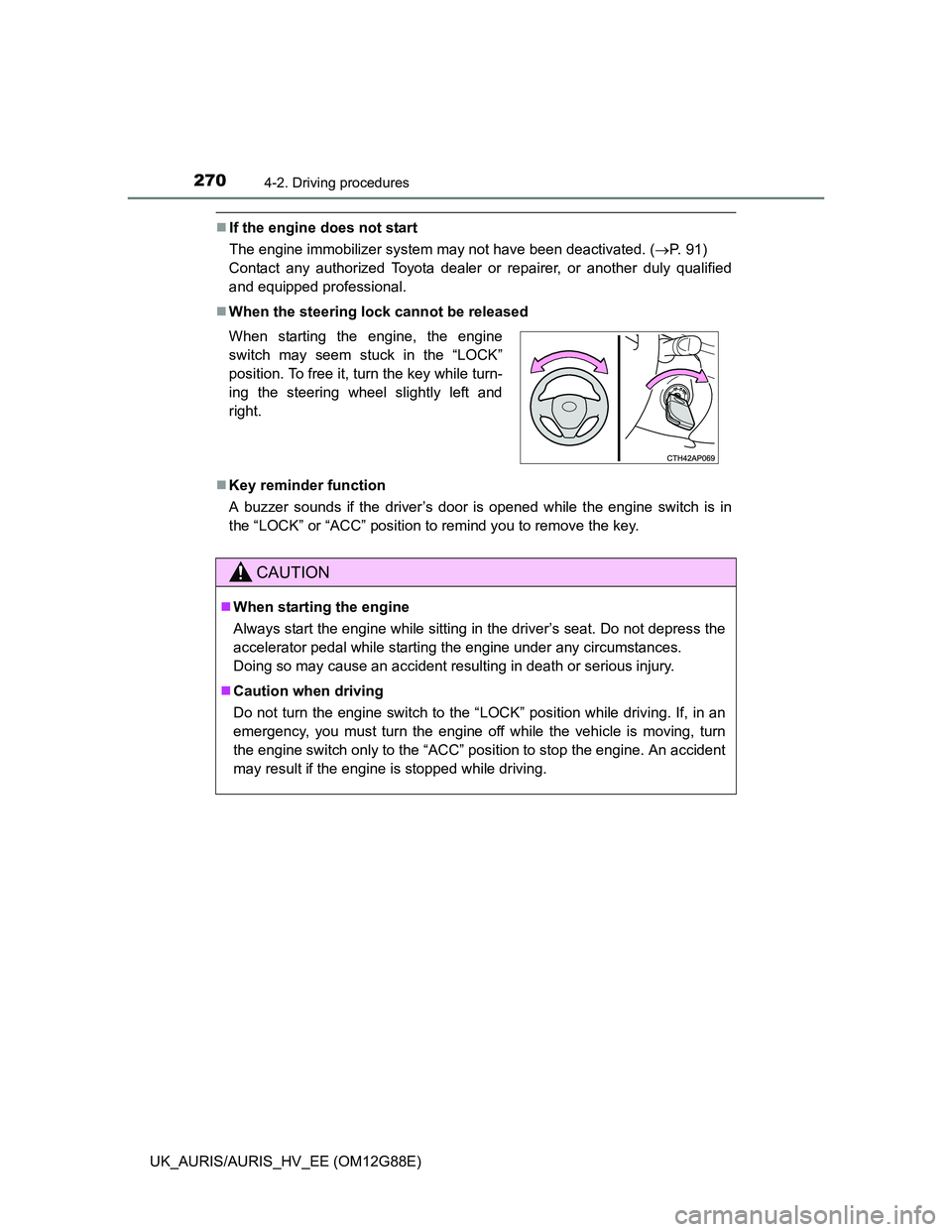
When the steering lock cannot be released
Key reminder function
A buzzer sounds if the driver’s door is opened while the engine switch is in
the “LOCK” or “ACC” position to remind you to remove the key. When starting the engine, the engine
switch may seem stuck in the “LOCK”
position. To free it, turn the key while turn-
ing the steering wheel slightly left and
right.
CAUTION
When starting the engine
Always start the engine while sitting in the driver’s seat. Do not depress the
accelerator pedal while starting the engine under any circumstances.
Doing so may cause an accident resulting in death or serious injury.
Caution when driving
Do not turn the engine switch to the “LOCK” position while driving. If, in an
emergency, you must turn the engine off while the vehicle is moving, turn
the engine switch only to the “ACC” position to stop the engine. An accident
may result if the engine is stopped while driving.
Page 278 of 788
2784-2. Driving procedures
UK_AURIS/AURIS_HV_EE (OM12G88E)
Auto power off function
Vehicles with a Multidrive
If the vehicle is left in ACCESSORY mode for more than 20 minutes or IGNI-
TION ON mode (the engine is not running) for more than an hour with the
shift lever in P, the engine switch will automatically turn off.
Vehicles with a multi-mode manual transmission or manual transmission
If the vehicle is left in ACCESSORY mode for more than 20 minutes or IGNI-
TION ON mode (the engine is not running) for more than an hour, the engine
switch will automatically turn off.
However, this function cannot entirely prevent 12-volt battery discharge. Do
not leave the vehicle with the engine switch in ACCESSORY or IGNITION
ON mode for long periods of time when the engine is not running.
Electronic key battery depletion
P. 168
Conditions affecting operation
P. 164
Notes for the entry function
P. 165
If the engine does not start
The engine immobilizer system may not have been deactivated. (P. 91)
Contact any authorized Toyota dealer or repairer, or another duly qualified
and equipped professional.
Vehicles with a Multidrive: Check that the shift lever is securely set in P. The
engine may not start if the shift lever is displaced out of P.
Vehicles without a multi-information display
The smart entry & start system indicator light (green) will flash quickly.
Vehicles with a multi-information display
“SHIFT TO P POSITION TO START” will be displayed on the multi-infor-
mation display.
Steering lock
After turning the engine switch off and opening and closing the doors, the
steering wheel will be locked due to the steering lock function. Operating the
engine switch again automatically cancels the steering lock.
Page 279 of 788
2794-2. Driving procedures
UK_AURIS/AURIS_HV_EE (OM12G88E)
4
Driving
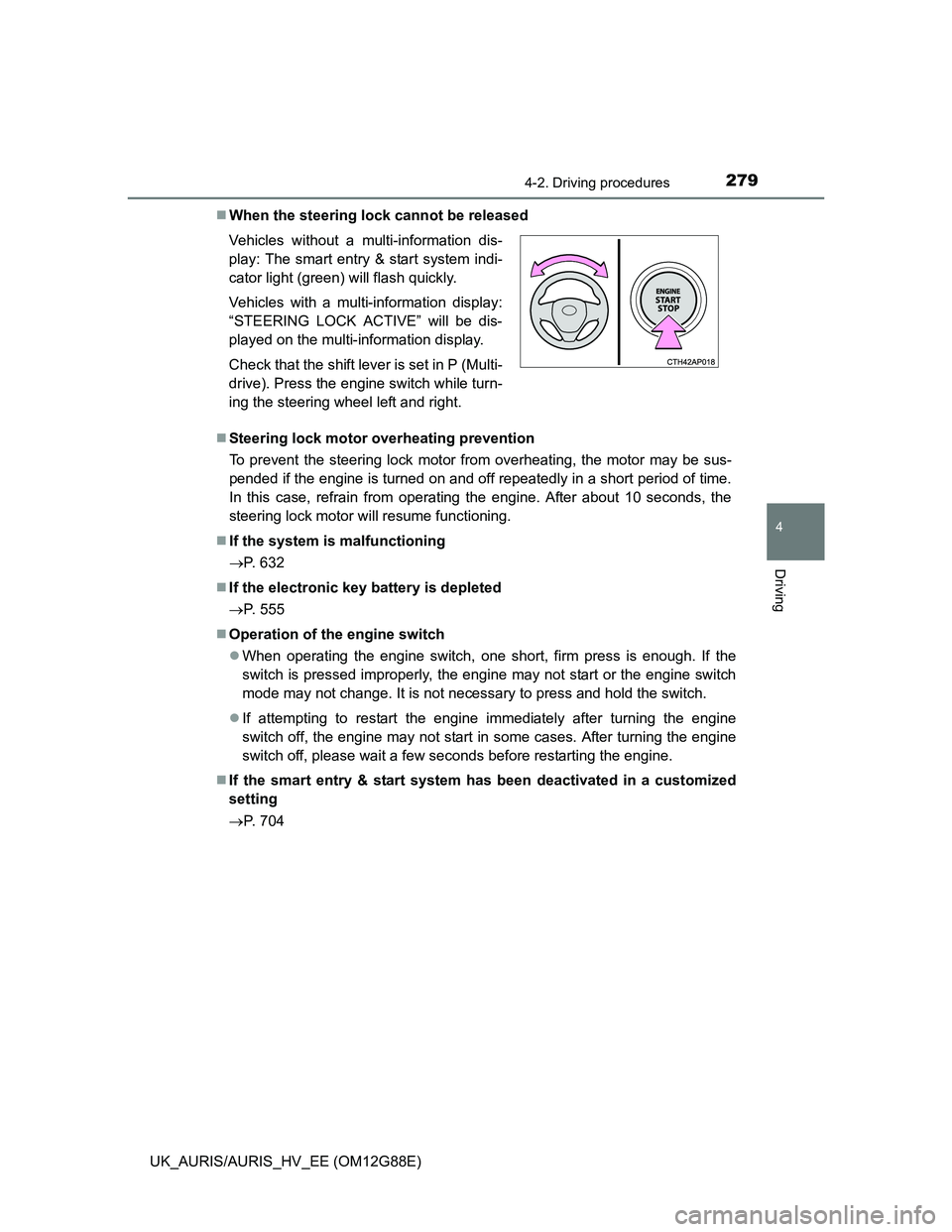
When the steering lock cannot be released
Steering lock motor overheating prevention
To prevent the steering lock motor from overheating, the motor may be sus-
pended if the engine is turned on and off repeatedly in a short period of time.
In this case, refrain from operating the engine. After about 10 seconds, the
steering lock motor will resume functioning.
If the system is malfunctioning
P. 632
If the electronic key battery is depleted
P. 555
Operation of the engine switch
When operating the engine switch, one short, firm press is enough. If the
switch is pressed improperly, the engine may not start or the engine switch
mode may not change. It is not necessary to press and hold the switch.
If attempting to restart the engine immediately after turning the engine
switch off, the engine may not start in some cases. After turning the engine
switch off, please wait a few seconds before restarting the engine.
If the smart entry & start system has been deactivated in a customized
setting
P. 704 Vehicles without a multi-information dis-
play: The smart entry & start system indi-
cator light (green) will flash quickly.
Vehicles with a multi-information display:
“STEERING LOCK ACTIVE” will be dis-
played on the multi-information display.
Check that the shift lever is set in P (Multi-
drive). Press the engine switch while turn-
ing the steering wheel left and right.
Page 313 of 788
3134-2. Driving procedures
UK_AURIS/AURIS_HV_EE (OM12G88E)
4
Driving
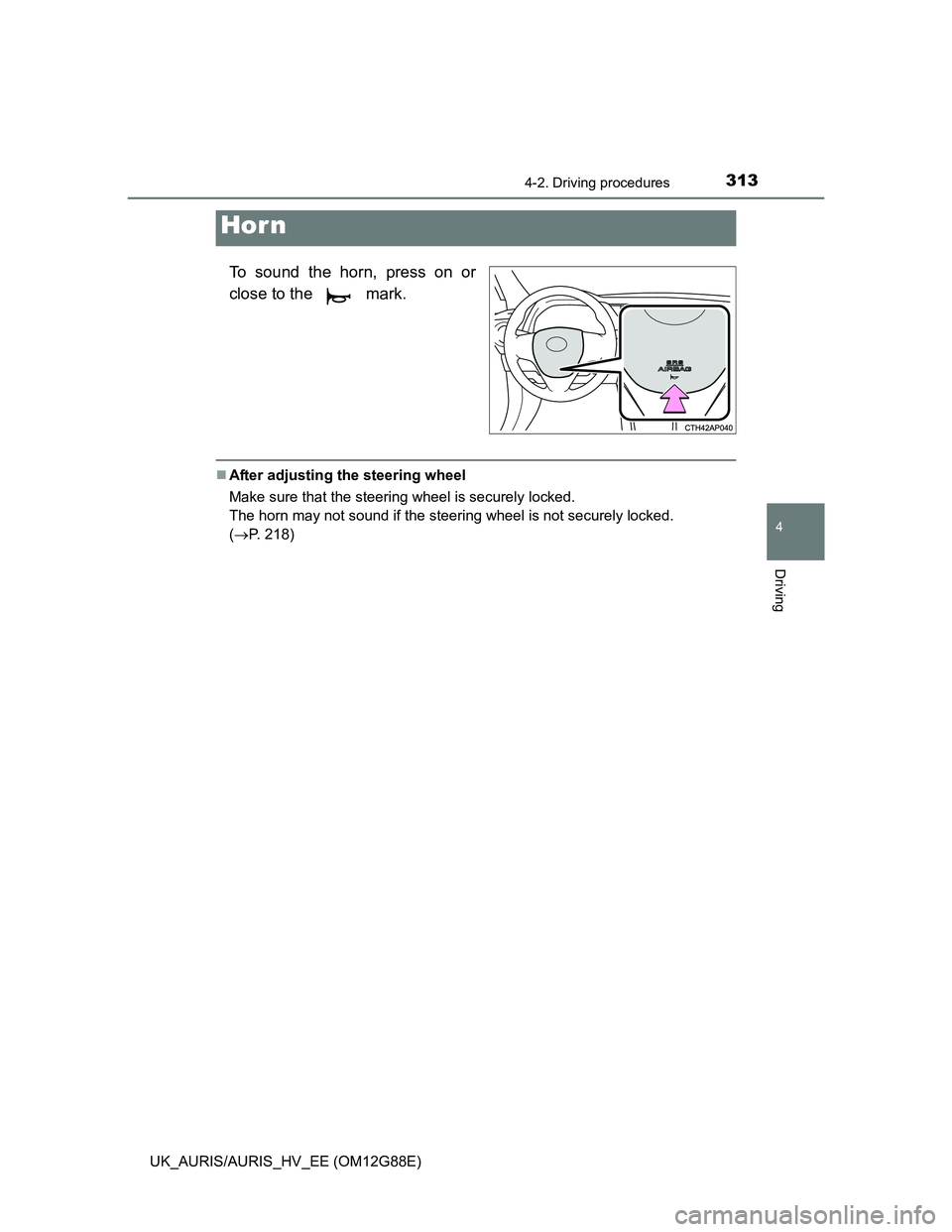
To sound the horn, press on or
close to the mark.
After adjusting the steering wheel
Make sure that the steering wheel is securely locked.
The horn may not sound if the steering wheel is not securely locked.
(P. 218)
Hor n