transmission TOYOTA AURIS HYBRID 2014 Owner's Manual
[x] Cancel search | Manufacturer: TOYOTA, Model Year: 2014, Model line: AURIS HYBRID, Model: TOYOTA AURIS HYBRID 2014Pages: 788, PDF Size: 21.16 MB
Page 256 of 788
2564-1. Before driving
UK_AURIS/AURIS_HV_EE (OM12G88E)
Important points regarding stability
Vehicle movement resulting from uneven road surfaces and strong
crosswinds will affect handling. The vehicle may also be rocked by
passing buses or large trucks. Frequently check behind when mov-
ing alongside such vehicles. As soon as such vehicle movement
occurs, immediately start to decelerate smoothly by slowly applying
the brakes. Always steer the vehicle straight ahead while braking.
Passing other vehicles
Consider the total combined length of your vehicle and trailer and
ensure that the vehicle-to-vehicle distance is sufficient before exe-
cuting lane changes.
Transmission information
Multidrive:
To maintain engine braking efficiency and charging system perfor-
mance when using engine braking, do not use the transmission in
D, must be in M and select gear step 4 or lower. (P. 293)
Multi-mode manual transmission:
Select an appropriate gear in M position to maintain the effective-
ness of engine braking and to maintain charging system perfor-
mance.
Manual transmission:
Refrain from driving in 6th gear to maintain the effectiveness of
engine braking and to maintain charging system performance.
If the engine overheats
Towing a loaded trailer up a long, steep incline in temperatures
exceeding 30C (85F) may result in the engine overheating. If the
engine coolant temperature gauge indicates that the engine is over-
heating, turn the air conditioning off immediately, leave the road and
stop the vehicle in a safe place. (P. 720)
Page 257 of 788
2574-1. Before driving
UK_AURIS/AURIS_HV_EE (OM12G88E)
4
Driving
When parking the vehicle
Always place wheel chocks under the wheels of both the vehicle
and trailer. Firmly set the parking brake and shift the shift lever to P
(Multidrive), E, M or R (multi-mode manual transmission) and 1 or R
(manual transmission).
CAUTION
Follow all the instructions described in this section. Failure to do so could
cause an accident resulting in death or serious injury.
Trailer towing precautions
When towing, make sure that none of the weight limits are exceeded.
(P. 249)
Vehicle speed in towing
Observe the legal maximum speeds for trailer towing.
Before descending hills or long declines
Reduce speed and downshift. However, never downshift suddenly while
descending steep or long downhill grades.
Operation of the brake pedal
Do not hold the brake pedal depressed often or for long periods of time.
Doing so may result in the brake overheating or reduce braking effects.
To avoid accident or injury
Vehicles with a cruise control: Do not use cruise control when you are tow-
ing.
Vehicles with a compact spare tire: Do not tow a trailer when the compact
spare tire is installed on your vehicle.
Vehicles with an emergency tire puncture repair kit: Do not tow the vehicle
when the tire installed is repaired with the emergency tire puncture repair
kit.
NOTICE
Do not directly splice trailer lights
Directly splicing trailer lights may damage your vehicle's electrical system
and cause a malfunction.
Page 266 of 788
2664-1. Before driving
UK_AURIS/AURIS_HV_EE (OM12G88E)
Sudden acceleration/steering input/cornering
Executing sharp turns when towing may result in the trailer colliding
with your vehicle. Decelerate well in advance when approaching
turns and take them slowly and carefully to avoid sudden braking.
Important points regarding turning
The wheels of the trailer will travel closer to the inside of the curve
than the wheels of the vehicle. To make allowance for this, take the
turns wider than you would normally do.
Important points regarding stability
Vehicle movement resulting from uneven road surfaces and strong
crosswinds will affect handling. The vehicle may also be rocked by
passing buses or large trucks. Frequently check behind when mov-
ing alongside such vehicles. As soon as such vehicle movement
occurs, immediately start to decelerate smoothly by slowly applying
the brakes. Always steer the vehicle straight ahead while braking.
Passing other vehicles
Consider the total combined length of your vehicle and trailer and
ensure that the vehicle-to-vehicle distance is sufficient before exe-
cuting lane changes.
Transmission information
To maintain engine braking efficiency and charging system perfor-
mance when using engine braking, do not use the transmission in
D. Shift the shift position to B.
If the engine overheats
Towing a loaded trailer up a long, steep incline in temperatures
exceeding 30C (85F) may result in the engine overheating. If the
engine coolant temperature gauge indicates that the engine is over-
heating, turn the air conditioning off immediately, leave the road and
stop the vehicle in a safe place. (P. 700)
When parking the vehicle
Always place wheel chocks under the wheels of both the vehicle
and trailer. Firmly set the parking brake and shift the shift position to
P.
Page 268 of 788
268
UK_AURIS/AURIS_HV_EE (OM12G88E)
4-2. Driving procedures
Multidrive
Check that the parking brake is set.
Check that the shift lever is set in P.
Sit in the driver’s seat and firmly depress the brake pedal.
Turn the engine switch to the “START” position and start the
engine.
Multi-mode manual transmission
Check that the parking brake is set.
Firmly depress the brake pedal, turn the engine switch to the “ON”
position and shift the shift lever to N.
After goes out, turn the engine switch to the “START” position
and start the engine.
Manual transmission (gasoline engine)
Check that the parking brake is set.
Check that the shift lever is set in N.
Firmly depress the clutch pedal.
Turn the engine switch to the “START” position and start the
engine.
Manual transmission (diesel engine)
Check that the parking brake is set.
Check that the shift lever is set in N.
Firmly depress the clutch pedal.
Turn the engine switch to the “ON” position.
turns on.
After goes out, turn the engine switch to the “START” position
and start the engine.
Engine (ignition) switch (except hybrid model
[vehicles without a smar t entr y & start system])
Starting the engine
1
2
3
4
1
2
3
1
2
3
4
1
2
3
4
5
Page 272 of 788
2724-2. Driving procedures
UK_AURIS/AURIS_HV_EE (OM12G88E)
Check that the parking brake is set.
Check that the shift lever is set in P (Multidrive) or N (manual trans-
mission).
Vehicles without a multi-information display
Multidrive: Firmly depress the brake pedal.
Multi-mode manual transmission: Firmly depress the brake pedal,
press the engine switch at once and shift the shift lever to N.
Manual transmission: Firmly depress the clutch pedal.
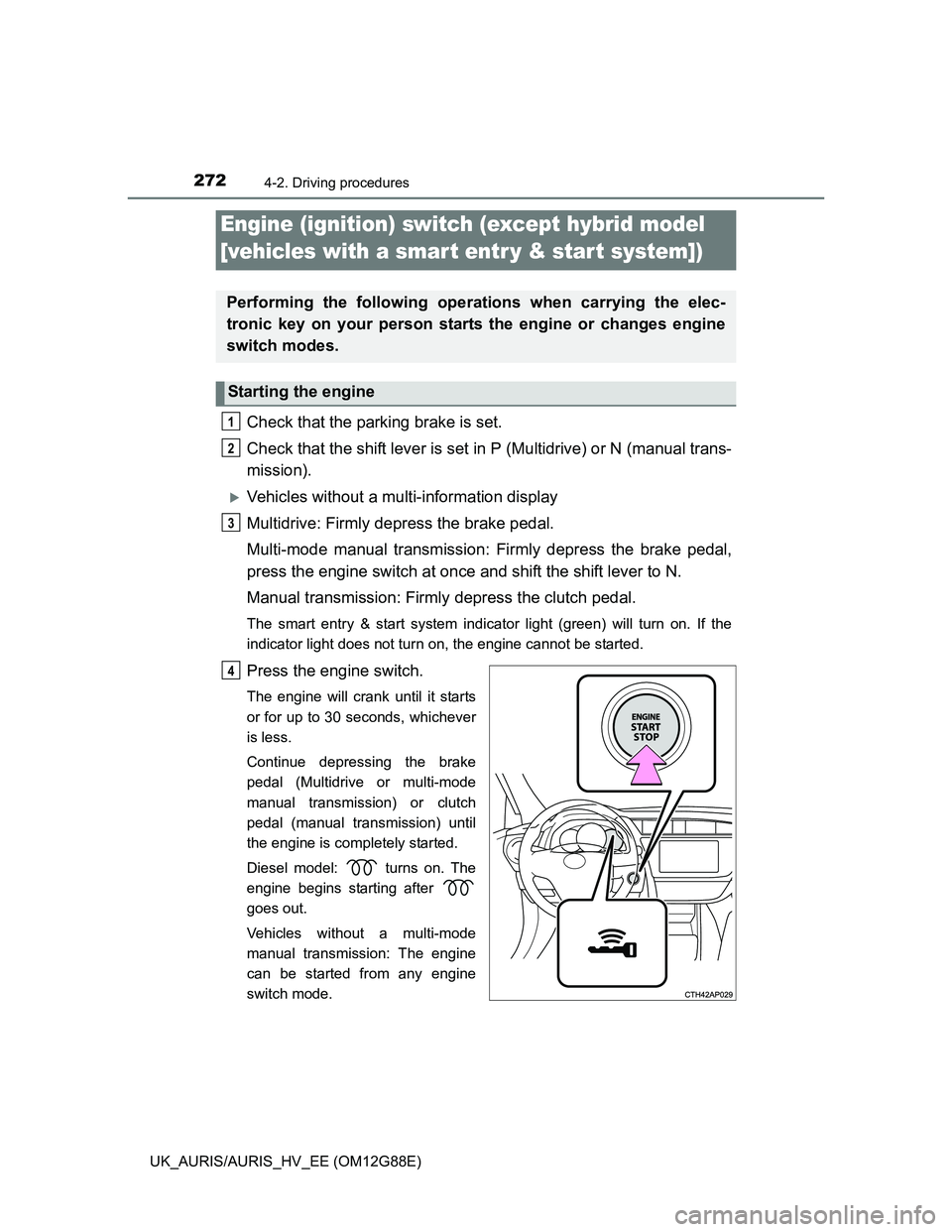
The smart entry & start system indicator light (green) will turn on. If the
indicator light does not turn on, the engine cannot be started.
Press the engine switch.
The engine will crank until it starts
or for up to 30 seconds, whichever
is less.
Continue depressing the brake
pedal (Multidrive or multi-mode
manual transmission) or clutch
pedal (manual transmission) until
the engine is completely started.
Diesel model: turns on. The
engine begins starting after
goes out.
Vehicles without a multi-mode
manual transmission: The engine
can be started from any engine
switch mode.
Engine (ignition) switch (except hybrid model
[vehicles with a smar t entr y & start system])
Performing the following operations when carrying the elec-
tronic key on your person starts the engine or changes engine
switch modes.
Starting the engine
1
2
3
4
Page 273 of 788
2734-2. Driving procedures
UK_AURIS/AURIS_HV_EE (OM12G88E)
4
Driving
Vehicles with a multi-information display
Multidrive: Firmly depress the brake pedal.
Multi-mode manual transmission: Firmly depress the brake pedal,
press the engine switch at once and shift the shift lever to N.
Manual transmission: Firmly depress the clutch pedal.
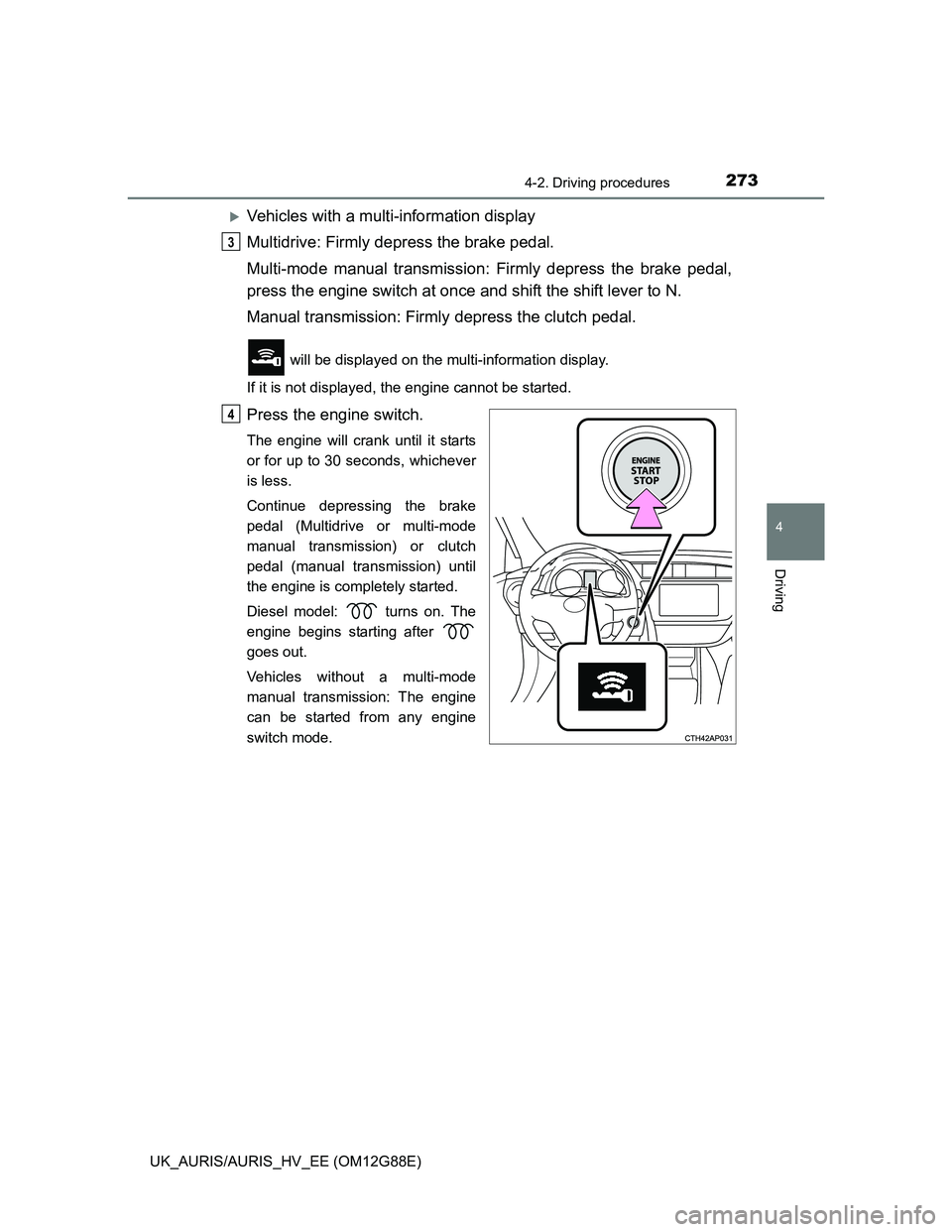
will be displayed on the multi-information display.
If it is not displayed, the engine cannot be started.
Press the engine switch.
The engine will crank until it starts
or for up to 30 seconds, whichever
is less.
Continue depressing the brake
pedal (Multidrive or multi-mode
manual transmission) or clutch
pedal (manual transmission) until
the engine is completely started.
Diesel model: turns on. The
engine begins starting after
goes out.
Vehicles without a multi-mode
manual transmission: The engine
can be started from any engine
switch mode.
3
4
Page 274 of 788
2744-2. Driving procedures
UK_AURIS/AURIS_HV_EE (OM12G88E)
Multidrive and multi-mode manual transmission: Stop the vehicle.
Manual transmission: While depressing the clutch pedal, stop the
vehicle.
Multidrive: Shift the shift lever to P.
Multi-mode manual transmission: Shift the shift lever to E, M or R.
Manual transmission: Shift the shift lever to N.
Set the parking brake. (P. 312)
Press the engine switch.
Vehicles without a multi-information display: Release the brake
pedal (Multidrive and multi-mode manual transmission) or clutch
pedal (manual transmission) and check that the smart entry & start
system indicator light (green) is off.
Vehicles with a multi-information display: Release the brake pedal
(Multidrive and multi-mode manual transmission) or clutch pedal
(manual transmission) and check that “POWER ON” on the multi-
information display is off.
Stopping the engine
1
2
3
4
5
Page 275 of 788
2754-2. Driving procedures
UK_AURIS/AURIS_HV_EE (OM12G88E)
4
Driving
Modes can be changed by pressing the engine switch with brake
pedal (Multidrive and multi-mode manual transmission) or clutch
pedal (manual transmission) released. (The mode changes each time
the switch is pressed.)
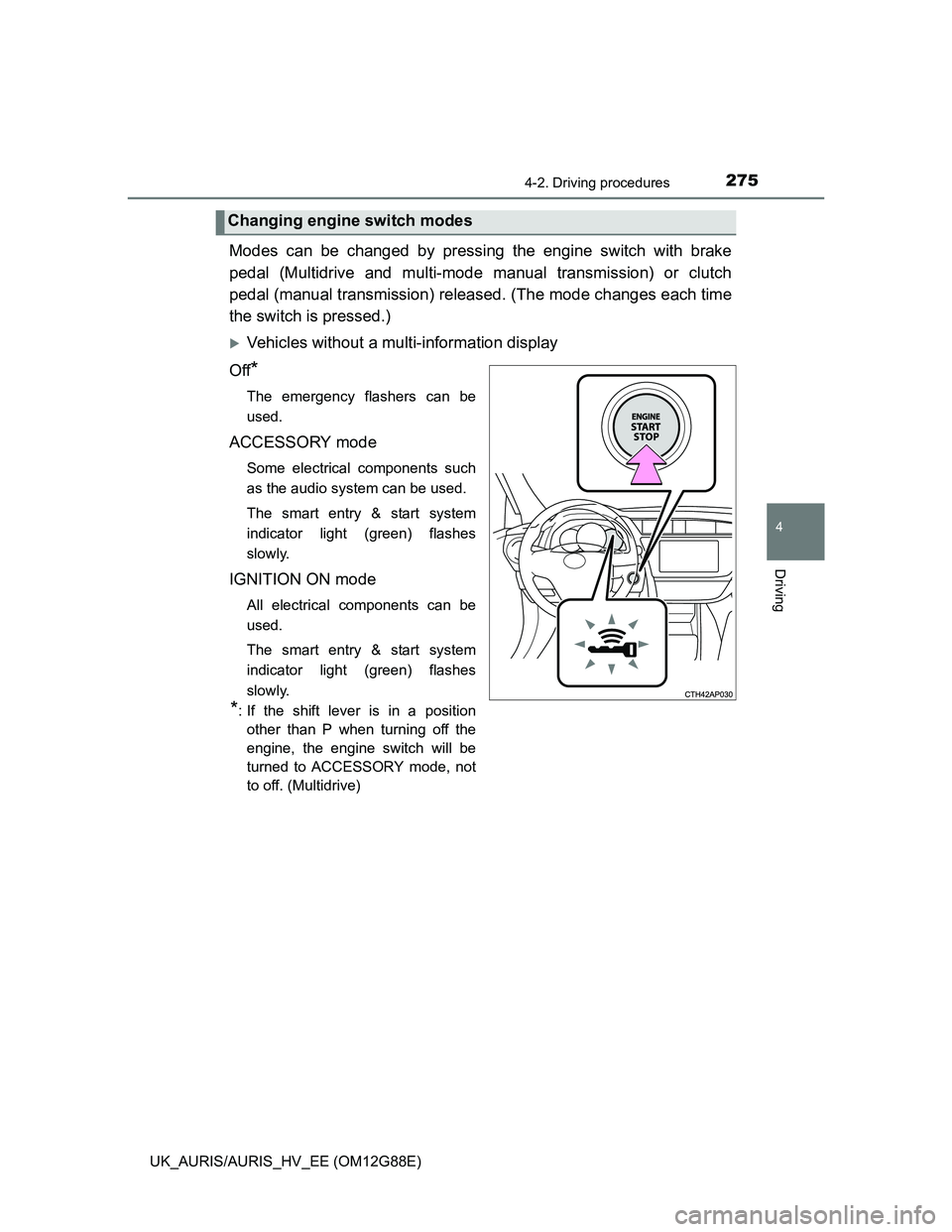
Vehicles without a multi-information display
Off
*
The emergency flashers can be
used.
ACCESSORY mode
Some electrical components such
as the audio system can be used.
The smart entry & start system
indicator light (green) flashes
slowly.
IGNITION ON mode
All electrical components can be
used.
The smart entry & start system
indicator light (green) flashes
slowly.
*: If the shift lever is in a position
other than P when turning off the
engine, the engine switch will be
turned to ACCESSORY mode, not
to off. (Multidrive)
Changing engine switch modes
Page 278 of 788
2784-2. Driving procedures
UK_AURIS/AURIS_HV_EE (OM12G88E)
Auto power off function
Vehicles with a Multidrive
If the vehicle is left in ACCESSORY mode for more than 20 minutes or IGNI-
TION ON mode (the engine is not running) for more than an hour with the
shift lever in P, the engine switch will automatically turn off.
Vehicles with a multi-mode manual transmission or manual transmission
If the vehicle is left in ACCESSORY mode for more than 20 minutes or IGNI-
TION ON mode (the engine is not running) for more than an hour, the engine
switch will automatically turn off.
However, this function cannot entirely prevent 12-volt battery discharge. Do
not leave the vehicle with the engine switch in ACCESSORY or IGNITION
ON mode for long periods of time when the engine is not running.
Electronic key battery depletion
P. 168
Conditions affecting operation
P. 164
Notes for the entry function
P. 165
If the engine does not start
The engine immobilizer system may not have been deactivated. (P. 91)
Contact any authorized Toyota dealer or repairer, or another duly qualified
and equipped professional.
Vehicles with a Multidrive: Check that the shift lever is securely set in P. The
engine may not start if the shift lever is displaced out of P.
Vehicles without a multi-information display
The smart entry & start system indicator light (green) will flash quickly.
Vehicles with a multi-information display
“SHIFT TO P POSITION TO START” will be displayed on the multi-infor-
mation display.
Steering lock
After turning the engine switch off and opening and closing the doors, the
steering wheel will be locked due to the steering lock function. Operating the
engine switch again automatically cancels the steering lock.
Page 293 of 788
2934-2. Driving procedures
UK_AURIS/AURIS_HV_EE (OM12G88E)
4
Driving
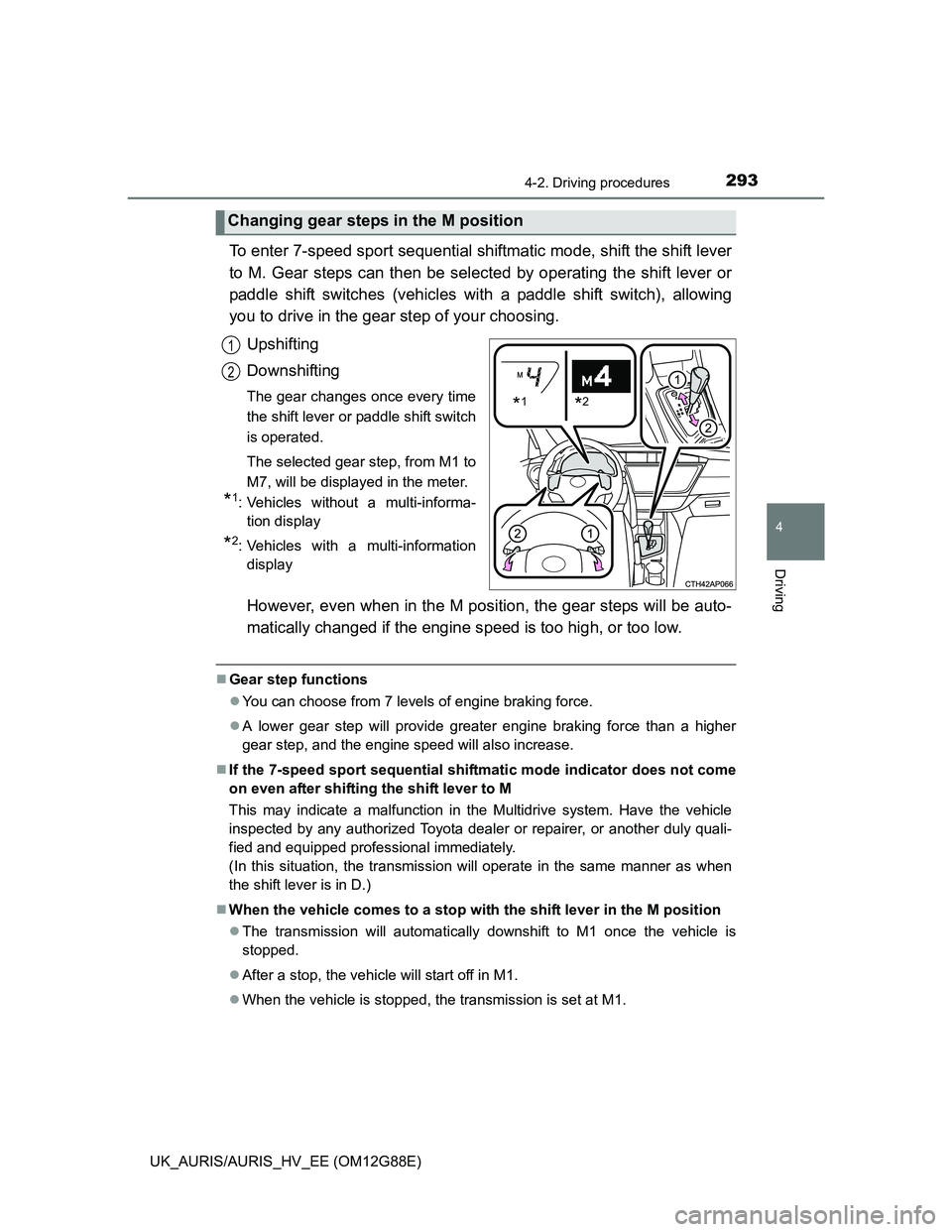
To enter 7-speed sport sequential shiftmatic mode, shift the shift lever
to M. Gear steps can then be selected by operating the shift lever or
paddle shift switches (vehicles with a paddle shift switch), allowing
you to drive in the gear step of your choosing.
Upshifting
Downshifting
The gear changes once every time
the shift lever or paddle shift switch
is operated.
The selected gear step, from M1 to
M7, will be displayed in the meter.
*1: Vehicles without a multi-informa-
tion display
*2: Vehicles with a multi-information
display
However, even when in the M position, the gear steps will be auto-
matically changed if the engine speed is too high, or too low.
Gear step functions
You can choose from 7 levels of engine braking force.
A lower gear step will provide greater engine braking force than a higher
gear step, and the engine speed will also increase.
If the 7-speed sport sequential shiftmatic mode indicator does not come
on even after shifting the shift lever to M
This may indicate a malfunction in the Multidrive system. Have the vehicle
inspected by any authorized Toyota dealer or repairer, or another duly quali-
fied and equipped professional immediately.
(In this situation, the transmission will operate in the same manner as when
the shift lever is in D.)
When the vehicle comes to a stop with the shift lever in the M position
The transmission will automatically downshift to M1 once the vehicle is
stopped.
After a stop, the vehicle will start off in M1.
When the vehicle is stopped, the transmission is set at M1.
Changing gear steps in the M position
*1*2
1
2