display TOYOTA AURIS HYBRID 2014 Service Manual
[x] Cancel search | Manufacturer: TOYOTA, Model Year: 2014, Model line: AURIS HYBRID, Model: TOYOTA AURIS HYBRID 2014Pages: 788, PDF Size: 21.16 MB
Page 149 of 788
1492. Instrument cluster
UK_AURIS/AURIS_HV_EE (OM12G88E)
2
Instrument cluster
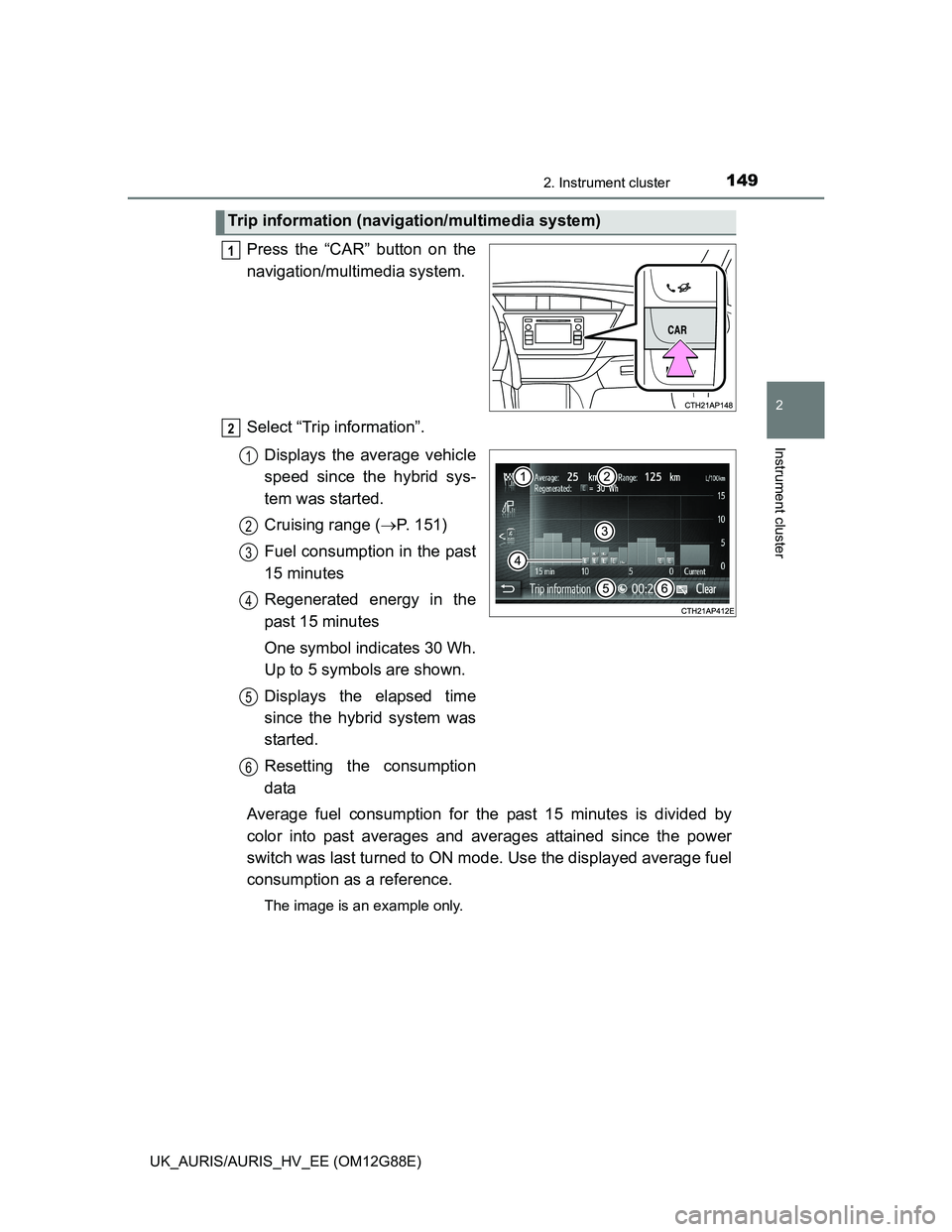
Press the “CAR” button on the
navigation/multimedia system.
Select “Trip information”.
Displays the average vehicle
speed since the hybrid sys-
tem was started.
Cruising range (P. 151)
Fuel consumption in the past
15 minutes
Regenerated energy in the
past 15 minutes
One symbol indicates 30 Wh.
Up to 5 symbols are shown.
Displays the elapsed time
since the hybrid system was
started.
Resetting the consumption
data
Average fuel consumption for the past 15 minutes is divided by
color into past averages and averages attained since the power
switch was last turned to ON mode. Use the displayed average fuel
consumption as a reference.
The image is an example only.
Trip information (navigation/multimedia system)
1
2
1
2
3
4
5
6
Page 150 of 788
1502. Instrument cluster
UK_AURIS/AURIS_HV_EE (OM12G88E)
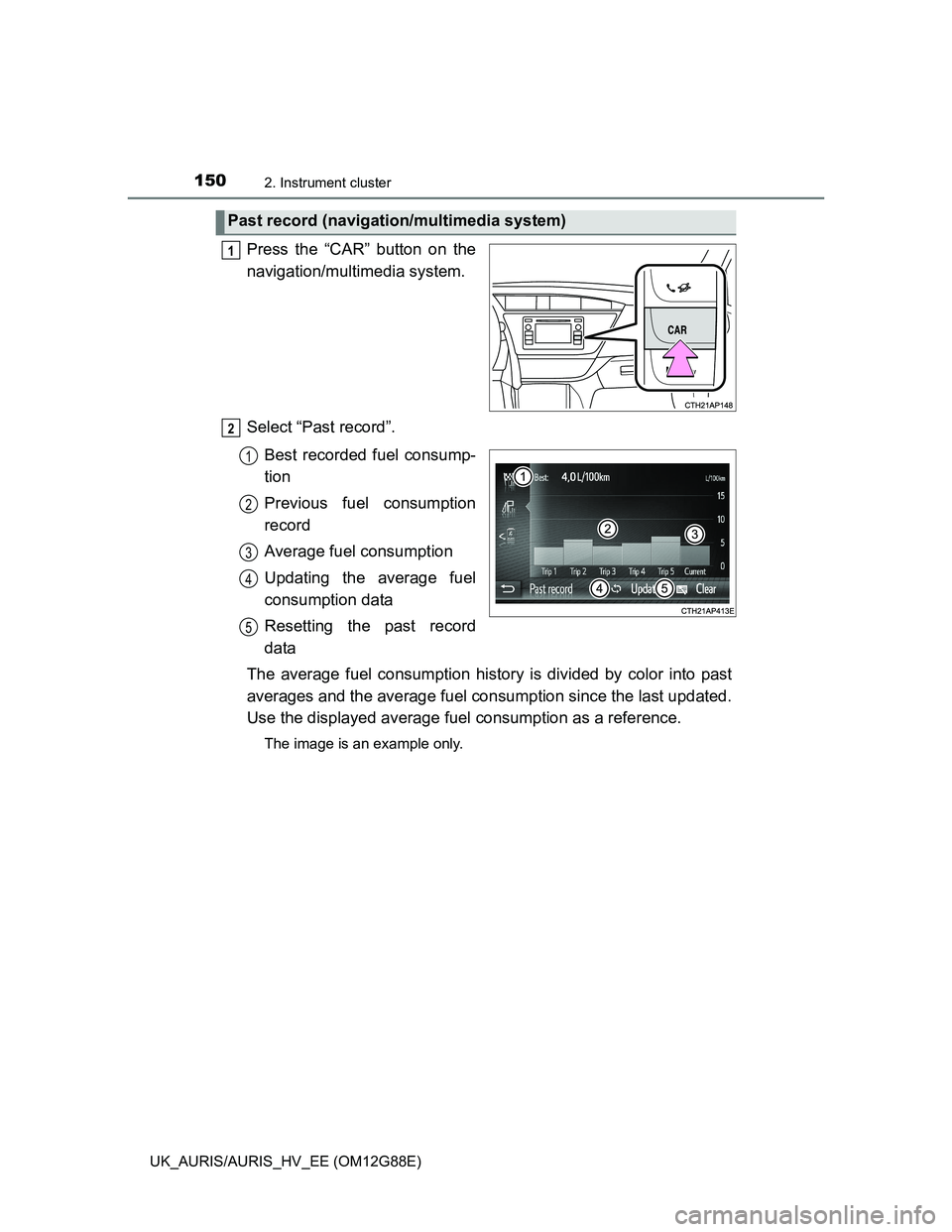
Press the “CAR” button on the
navigation/multimedia system.
Select “Past record”.
Best recorded fuel consump-
tion
Previous fuel consumption
record
Average fuel consumption
Updating the average fuel
consumption data
Resetting the past record
data
The average fuel consumption history is divided by color into past
averages and the average fuel consumption since the last updated.
Use the displayed average fuel consumption as a reference.
The image is an example only.
Past record (navigation/multimedia system)
1
2
1
2
3
4
5
Page 151 of 788
1512. Instrument cluster
UK_AURIS/AURIS_HV_EE (OM12G88E)
2
Instrument cluster
Updating the past record data
Update the average fuel consumption by selecting “Update” to measure the
current fuel consumption again.
Resetting the data
The fuel consumption data can be deleted by selecting “Clear”.
Cruising range
Displays the estimated maximum distance that can be driven with the quan-
tity of fuel remaining.
This distance is computed based on your average fuel consumption.
As a result, the actual distance that can be driven may differ from that dis-
played.
Page 161 of 788
1613-2. Opening, closing and locking the doors
UK_AURIS/AURIS_HV_EE (OM12G88E)
3
Operation of each component
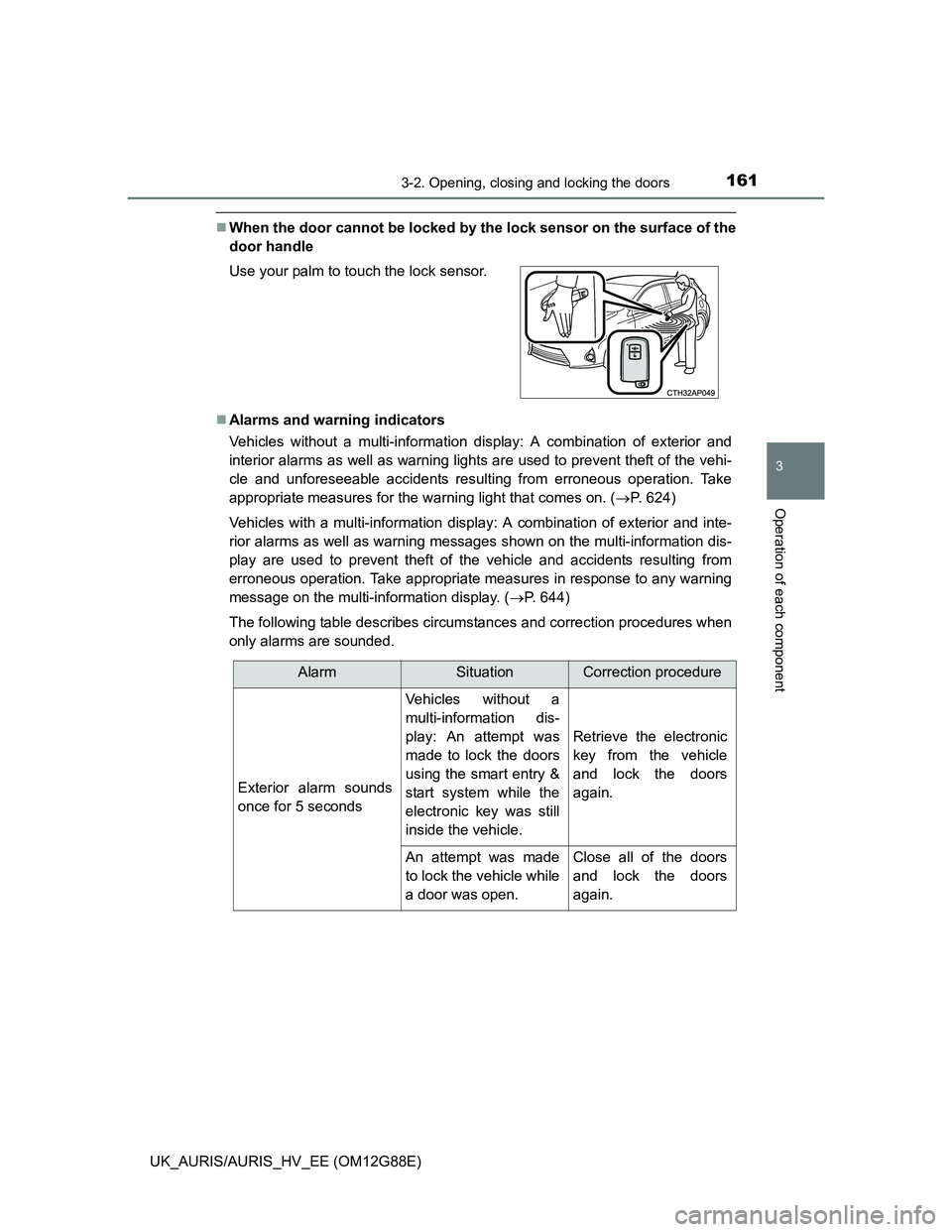
When the door cannot be locked by the lock sensor on the surface of the
door handle
Alarms and warning indicators
Vehicles without a multi-information display: A combination of exterior and
interior alarms as well as warning lights are used to prevent theft of the vehi-
cle and unforeseeable accidents resulting from erroneous operation. Take
appropriate measures for the warning light that comes on. (P. 624)
Vehicles with a multi-information display: A combination of exterior and inte-
rior alarms as well as warning messages shown on the multi-information dis-
play are used to prevent theft of the vehicle and accidents resulting from
erroneous operation. Take appropriate measures in response to any warning
message on the multi-information display. (P. 644)
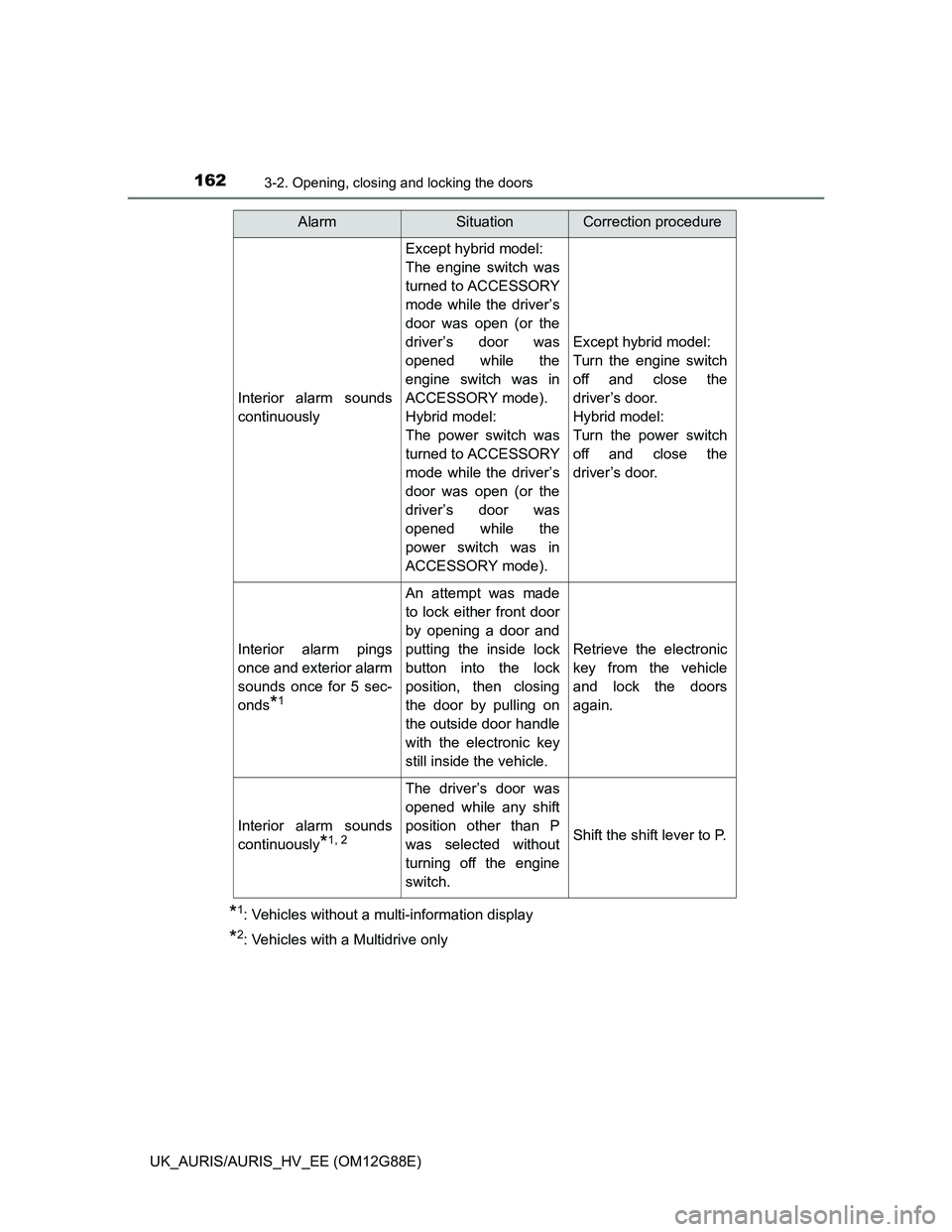
The following table describes circumstances and correction procedures when
only alarms are sounded. Use your palm to touch the lock sensor.
AlarmSituationCorrection procedure
Exterior alarm sounds
once for 5 seconds
Vehicles without a
multi-information dis-
play: An attempt was
made to lock the doors
using the smart entry &
start system while the
electronic key was still
inside the vehicle.
Retrieve the electronic
key from the vehicle
and lock the doors
again.
An attempt was made
to lock the vehicle while
a door was open.Close all of the doors
and lock the doors
again.
Page 162 of 788
1623-2. Opening, closing and locking the doors
UK_AURIS/AURIS_HV_EE (OM12G88E)
*1: Vehicles without a multi-information display
*2: Vehicles with a Multidrive only
Interior alarm sounds
continuously
Except hybrid model:
The engine switch was
turned to ACCESSORY
mode while the driver’s
door was open (or the
driver’s door was
opened while the
engine switch was in
ACCESSORY mode).
Hybrid model:
The power switch was
turned to ACCESSORY
mode while the driver’s
door was open (or the
driver’s door was
opened while the
power switch was in
ACCESSORY mode).
Except hybrid model:
Turn the engine switch
off and close the
driver’s door.
Hybrid model:
Turn the power switch
off and close the
driver’s door.
Interior alarm pings
once and exterior alarm
sounds once for 5 sec-
onds
*1
An attempt was made
to lock either front door
by opening a door and
putting the inside lock
button into the lock
position, then closing
the door by pulling on
the outside door handle
with the electronic key
still inside the vehicle.
Retrieve the electronic
key from the vehicle
and lock the doors
again.
Interior alarm sounds
continuously
*1, 2
The driver’s door was
opened while any shift
position other than P
was selected without
turning off the engine
switch.
Shift the shift lever to P.
AlarmSituationCorrection procedure
Page 166 of 788
1663-2. Opening, closing and locking the doors
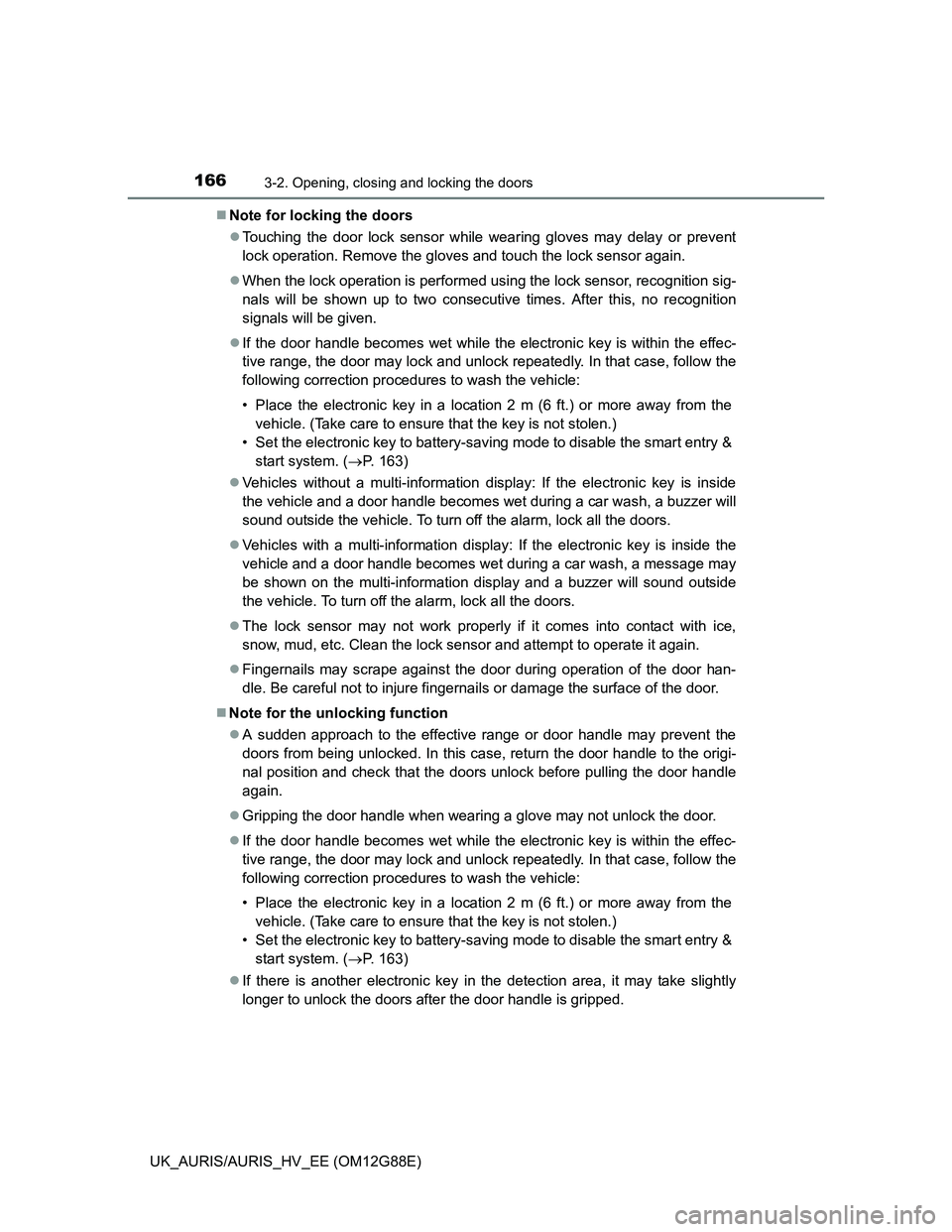
UK_AURIS/AURIS_HV_EE (OM12G88E)Note for locking the doors
Touching the door lock sensor while wearing gloves may delay or prevent
lock operation. Remove the gloves and touch the lock sensor again.
When the lock operation is performed using the lock sensor, recognition sig-
nals will be shown up to two consecutive times. After this, no recognition
signals will be given.
If the door handle becomes wet while the electronic key is within the effec-
tive range, the door may lock and unlock repeatedly. In that case, follow the
following correction procedures to wash the vehicle:
• Place the electronic key in a location 2 m (6 ft.) or more away from the
vehicle. (Take care to ensure that the key is not stolen.)
• Set the electronic key to battery-saving mode to disable the smart entry &
start system. (P. 163)
Vehicles without a multi-information display: If the electronic key is inside
the vehicle and a door handle becomes wet during a car wash, a buzzer will
sound outside the vehicle. To turn off the alarm, lock all the doors.
Vehicles with a multi-information display: If the electronic key is inside the
vehicle and a door handle becomes wet during a car wash, a message may
be shown on the multi-information display and a buzzer will sound outside
the vehicle. To turn off the alarm, lock all the doors.
The lock sensor may not work properly if it comes into contact with ice,
snow, mud, etc. Clean the lock sensor and attempt to operate it again.
Fingernails may scrape against the door during operation of the door han-
dle. Be careful not to injure fingernails or damage the surface of the door.
Note for the unlocking function
A sudden approach to the effective range or door handle may prevent the
doors from being unlocked. In this case, return the door handle to the origi-
nal position and check that the doors unlock before pulling the door handle
again.
Gripping the door handle when wearing a glove may not unlock the door.
If the door handle becomes wet while the electronic key is within the effec-
tive range, the door may lock and unlock repeatedly. In that case, follow the
following correction procedures to wash the vehicle:
• Place the electronic key in a location 2 m (6 ft.) or more away from the
vehicle. (Take care to ensure that the key is not stolen.)
• Set the electronic key to battery-saving mode to disable the smart entry &
start system. (P. 163)
If there is another electronic key in the detection area, it may take slightly
longer to unlock the doors after the door handle is gripped.
Page 230 of 788
230
UK_AURIS/AURIS_HV_EE (OM12G88E)
4-1. Before driving
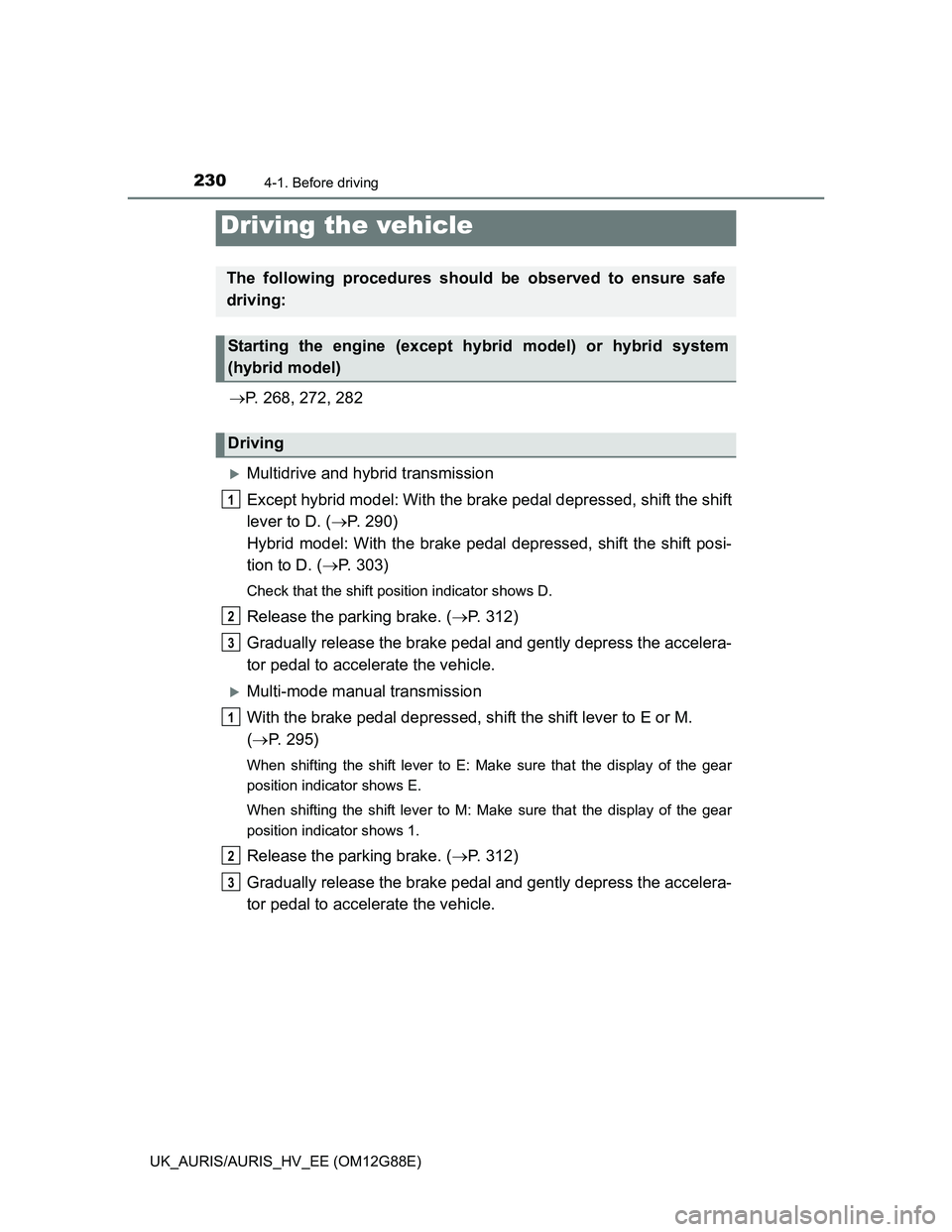
P. 268, 272, 282
Multidrive and hybrid transmission
Except hybrid model: With the brake pedal depressed, shift the shift
lever to D. (P. 290)
Hybrid model: With the brake pedal depressed, shift the shift posi-
tion to D. (P. 303)
Check that the shift position indicator shows D.
Release the parking brake. (P. 312)
Gradually release the brake pedal and gently depress the accelera-
tor pedal to accelerate the vehicle.
Multi-mode manual transmission
With the brake pedal depressed, shift the shift lever to E or M.
(P. 295)
When shifting the shift lever to E: Make sure that the display of the gear
position indicator shows E.
When shifting the shift lever to M: Make sure that the display of the gear
position indicator shows 1.
Release the parking brake. (P. 312)
Gradually release the brake pedal and gently depress the accelera-
tor pedal to accelerate the vehicle.
Driving the vehicle
The following procedures should be observed to ensure safe
driving:
Starting the engine (except hybrid model) or hybrid system
(hybrid model)
Driving
1
2
3
1
2
3
Page 232 of 788
2324-1. Before driving
UK_AURIS/AURIS_HV_EE (OM12G88E)
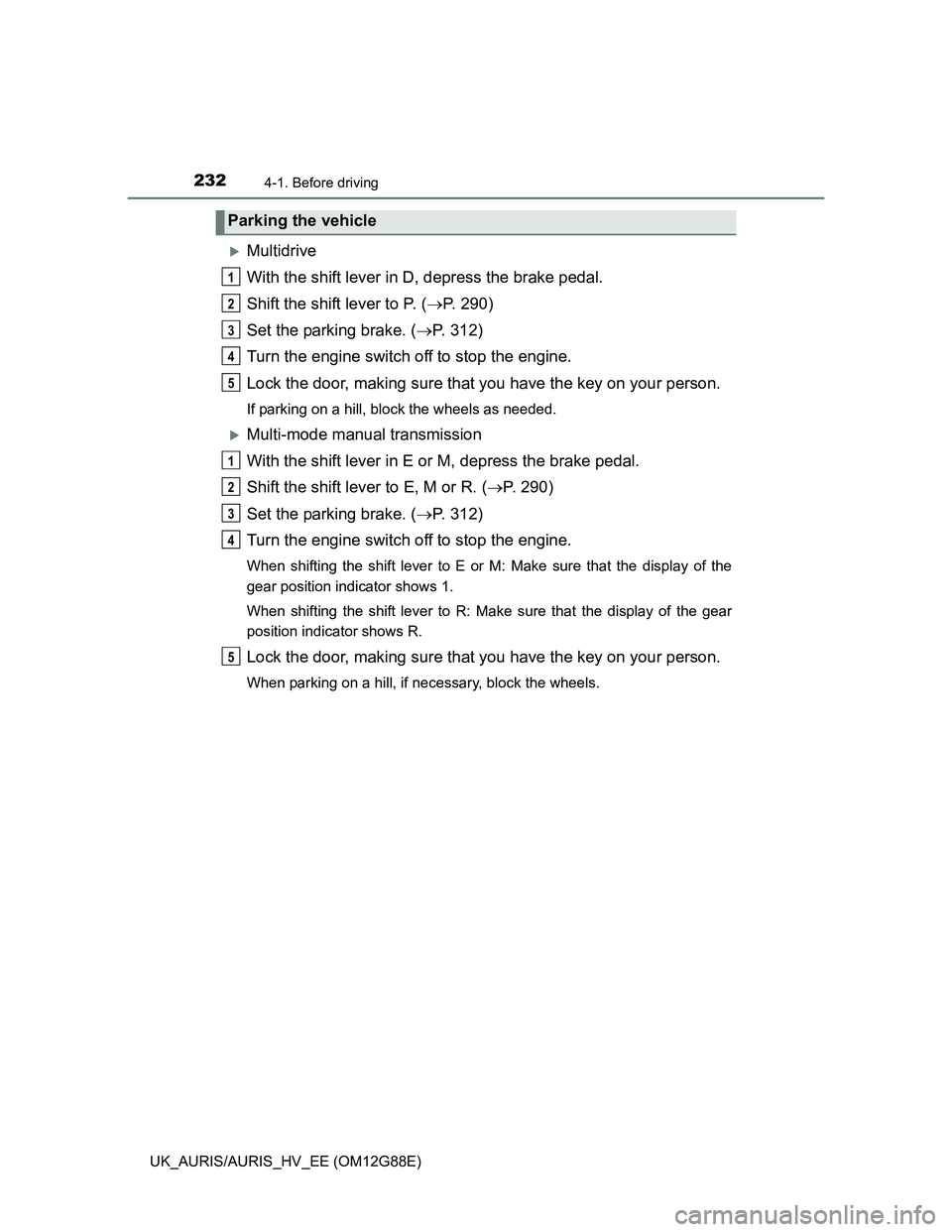
Multidrive
With the shift lever in D, depress the brake pedal.
Shift the shift lever to P. (P. 290)
Set the parking brake. (P. 312)
Turn the engine switch off to stop the engine.
Lock the door, making sure that you have the key on your person.
If parking on a hill, block the wheels as needed.
Multi-mode manual transmission
With the shift lever in E or M, depress the brake pedal.
Shift the shift lever to E, M or R. (P. 290)
Set the parking brake. (P. 312)
Turn the engine switch off to stop the engine.
When shifting the shift lever to E or M: Make sure that the display of the
gear position indicator shows 1.
When shifting the shift lever to R: Make sure that the display of the gear
position indicator shows R.
Lock the door, making sure that you have the key on your person.
When parking on a hill, if necessary, block the wheels.
Parking the vehicle
1
2
3
4
5
1
2
3
4
5
Page 234 of 788
2344-1. Before driving
UK_AURIS/AURIS_HV_EE (OM12G88E)
Multi-mode manual transmission
With the brake pedal depressed, firmly set the parking brake and
shift the shift lever to E or M.
When shifting the shift lever to E: Make sure that the display of the gear
position indicator shows E.
When shifting the shift lever to M: Make sure that the display of the gear
position indicator shows 1.
Gently depress the accelerator pedal.
Release the parking brake.
Manual transmission
With the parking brake firmly set and the clutch pedal fully
depressed, shift the shift lever to 1.
Lightly depress the accelerator pedal at the same time as gradually
releasing the clutch pedal.
Release the parking brake.
When starting off on an uphill (vehicles with a hill-start assist control)
The hill-start assist control is available. (P. 380)
Driving in the rain
Drive carefully when it is raining, because visibility will be reduced, the win-
dows may become fogged-up, and the road will be slippery.
Drive carefully when it starts to rain, because the road surface will be espe-
cially slippery.
Refrain from high speeds when driving on an expressway in the rain,
because there may be a layer of water between the tires and the road sur-
face, preventing the steering and brakes from operating properly.
Engine speed while driving (vehicles with a Multidrive)
In the following conditions, the engine speed may become high while driving.
This is due to automatic up-shifting control or down-shifting implementation to
meet driving conditions. It does not indicate sudden acceleration.
The vehicle is judged to be driving uphill or downhill
When the accelerator pedal is released
When the brake pedal is depressed while sport mode is selected
1
2
3
1
2
3
Page 272 of 788
2724-2. Driving procedures
UK_AURIS/AURIS_HV_EE (OM12G88E)
Check that the parking brake is set.
Check that the shift lever is set in P (Multidrive) or N (manual trans-
mission).
Vehicles without a multi-information display
Multidrive: Firmly depress the brake pedal.
Multi-mode manual transmission: Firmly depress the brake pedal,
press the engine switch at once and shift the shift lever to N.
Manual transmission: Firmly depress the clutch pedal.
The smart entry & start system indicator light (green) will turn on. If the
indicator light does not turn on, the engine cannot be started.
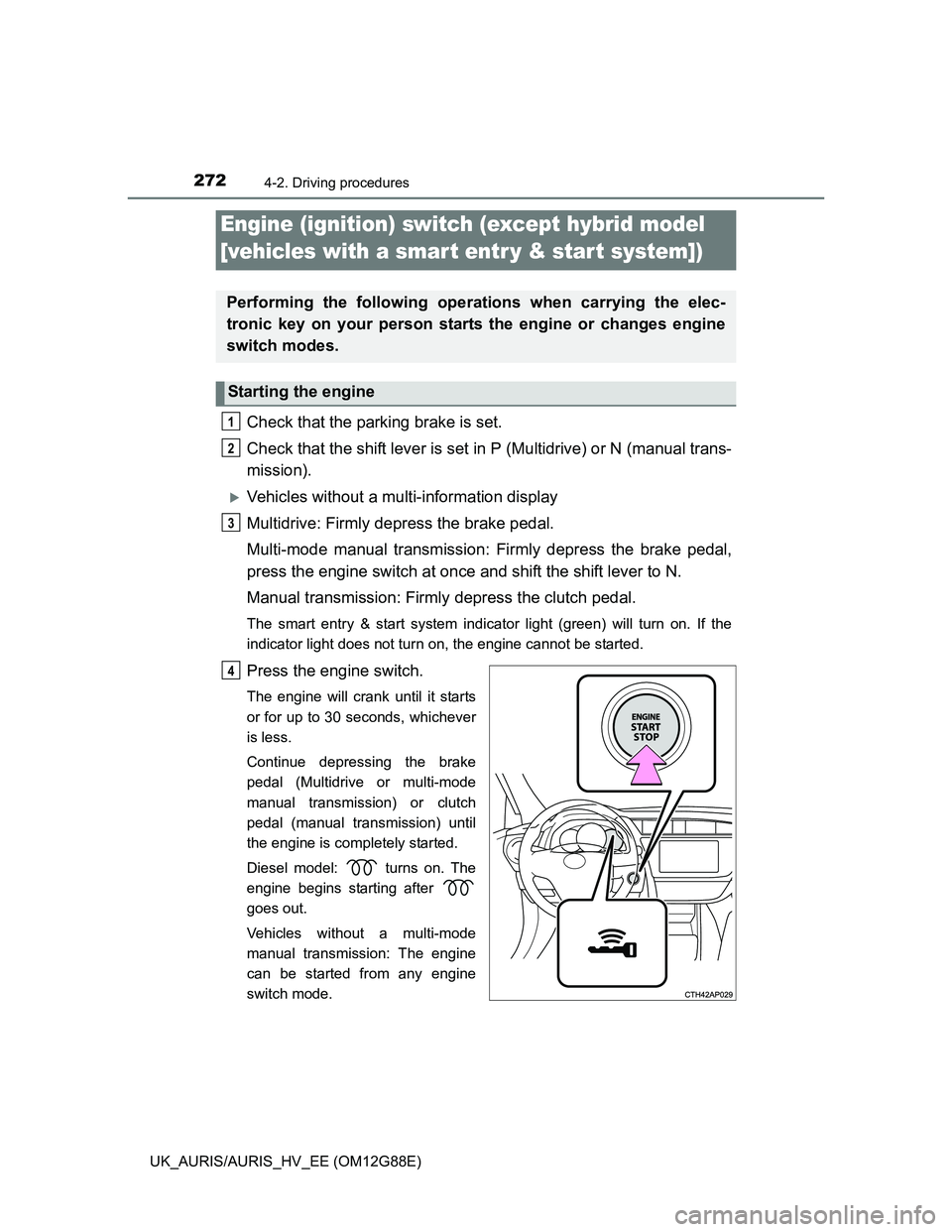
Press the engine switch.
The engine will crank until it starts
or for up to 30 seconds, whichever
is less.
Continue depressing the brake
pedal (Multidrive or multi-mode
manual transmission) or clutch
pedal (manual transmission) until
the engine is completely started.
Diesel model: turns on. The
engine begins starting after
goes out.
Vehicles without a multi-mode
manual transmission: The engine
can be started from any engine
switch mode.
Engine (ignition) switch (except hybrid model
[vehicles with a smar t entr y & start system])
Performing the following operations when carrying the elec-
tronic key on your person starts the engine or changes engine
switch modes.
Starting the engine
1
2
3
4