wheel TOYOTA AURIS HYBRID 2014 Workshop Manual
[x] Cancel search | Manufacturer: TOYOTA, Model Year: 2014, Model line: AURIS HYBRID, Model: TOYOTA AURIS HYBRID 2014Pages: 788, PDF Size: 21.16 MB
Page 376 of 788
3764-5. Using the driving support systems
UK_AURIS/AURIS_HV_EE (OM12G88E)
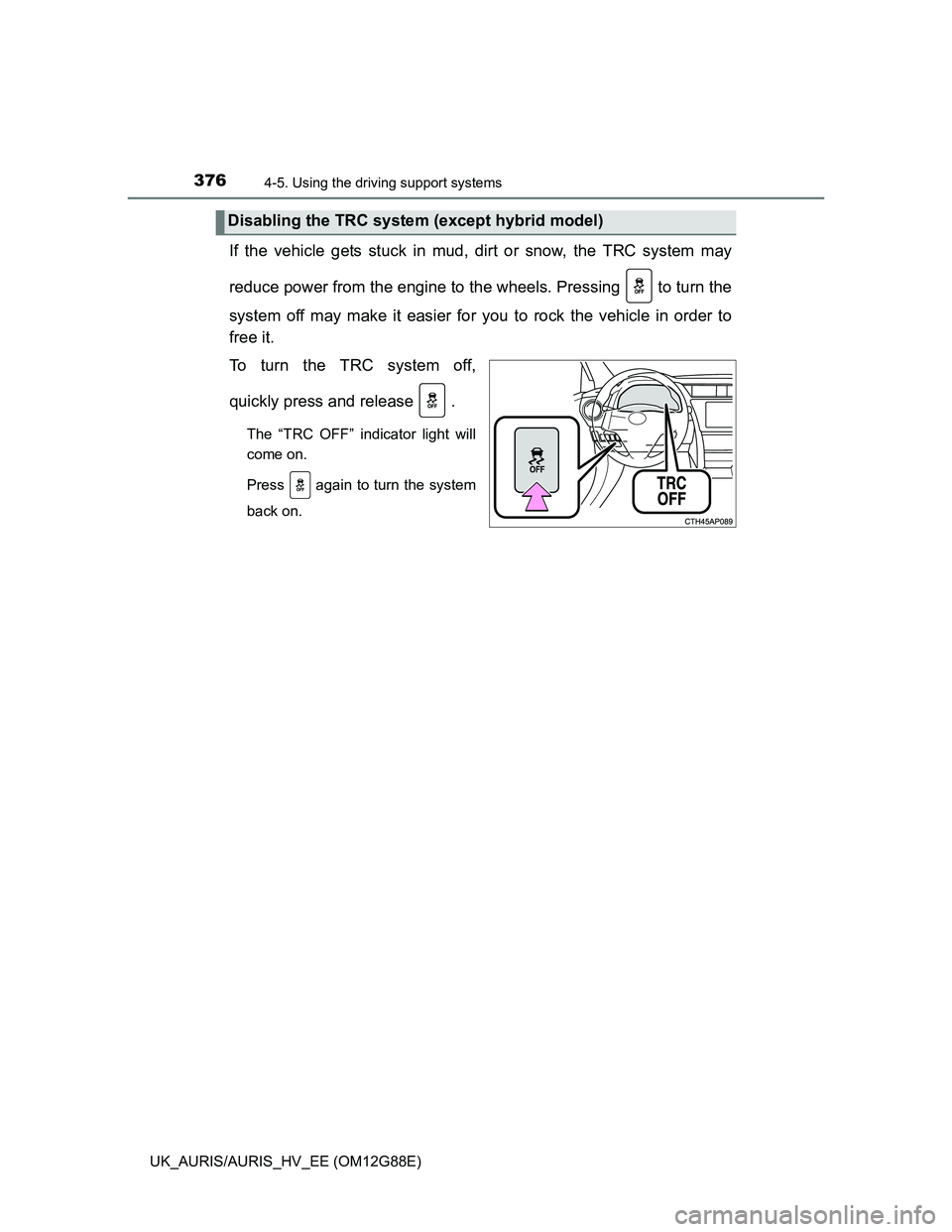
If the vehicle gets stuck in mud, dirt or snow, the TRC system may
reduce power from the engine to the wheels. Pressing to turn the
system off may make it easier for you to rock the vehicle in order to
free it.
To turn the TRC system off,
quickly press and release .
The “TRC OFF” indicator light will
come on.
Press again to turn the system
back on.
Disabling the TRC system (except hybrid model)
Page 377 of 788
3774-5. Using the driving support systems
UK_AURIS/AURIS_HV_EE (OM12G88E)
4
Driving
Turning off both TRC and VSC systems (except hybrid model)
To turn the TRC and VSC systems off, press and hold for more than 3
seconds while the vehicle is stopped.
The “TRC OFF” indicator light and VSC OFF indicator light will come on.
Press again to turn the systems back on.
Sounds and vibrations caused by the ABS, brake assist, VSC and TRC
systems
Except hybrid model: A sound may be heard from the engine compartment
when the engine is started or just after the vehicle begins to move. This
sound does not indicate that a malfunction has occurred in any of these sys-
tems.
Hybrid model: A sound may be heard from the engine compartment when
the brake pedal is depressed repeatedly, when the hybrid system is started
or just after the vehicle begins to move. This sound does not indicate that a
malfunction has occurred in any of these systems.
Any of the following conditions may occur when the above systems are
operating. None of these indicates that a malfunction has occurred.
• Vibrations may be felt through the vehicle body and steering.
• A motor sound may be heard after the vehicle comes to a stop.
• The brake pedal may pulsate slightly after the ABS is activated.
• The brake pedal may move down slightly after the ABS is activated.
EPS operation sound
When the steering wheel is operated, a motor sound (whirring sound) may be
heard. This does not indicate a malfunction.
Automatic reactivation of TRC and VSC systems (except hybrid model)
After turning the TRC and VSC systems off, the systems will be automatically
re-enabled in the following situations:
Vehicles without a smart entry & start system: When the engine switch is
turned to the “LOCK” position
Vehicles with a smart entry & start system: When the engine switch is turned
off
If only the TRC system is turned off, the TRC will turn on when vehicle
speed increases
If both the TRC and VSC systems are turned off, automatic re-enabling will
not occur when vehicle speed increases.
Page 378 of 788
3784-5. Using the driving support systems
UK_AURIS/AURIS_HV_EE (OM12G88E)Reduced effectiveness of the EPS system
Except hybrid model: The effectiveness of the EPS system is reduced to pre-
vent the system from overheating when there is frequent steering input over
an extended period of time. The steering wheel may feel heavy as a result.
Should this occur, refrain from excessive steering input or stop the vehicle
and turn the engine off. The EPS system should return to normal within 10
minutes.
Hybrid model: The effectiveness of the EPS system is reduced to prevent the
system from overheating when there is frequent steering input over an
extended period of time. The steering wheel may feel heavy as a result.
Should this occur, refrain from excessive steering input or stop the vehicle
and turn the hybrid system off. The EPS system should return to normal
within 10 minutes.
Operating conditions of emergency brake signal
When the following three conditions are met, the emergency brake signal will
operate:
The emergency flashers are off.
Actual vehicle speed is over 55 km/h (35 mph).
The brake pedal is depressed in a manner that cause the system to judge
from the vehicle deceleration that this is a sudden braking operation.
Automatic system cancelation of emergency brake signal
The emergency brake signal will turn off in any of the following situations:
The emergency flashers are turned on.
The brake pedal is released.
The system judges from the vehicle deceleration that is not a sudden brak-
ing operation.
CAUTION
The ABS does not operate effectively when
The limits of tire gripping performance have been exceeded (such as
excessively worn tires on a snow covered road).
The vehicle hydroplanes while driving at high speed on wet or slick roads.
Page 379 of 788
3794-5. Using the driving support systems
UK_AURIS/AURIS_HV_EE (OM12G88E)
4
Driving
CAUTION
Stopping distance when the ABS is operating may exceed that of nor-
mal conditions
The ABS is not designed to shorten the vehicle’s stopping distance. Always
maintain a safe distance from the vehicle in front of you, especially in the
following situations:
When driving on dirt, gravel or snow-covered roads
When driving with tire chains
When driving over bumps in the road
When driving over roads with potholes or uneven surfaces
TRC may not operate effectively when
Directional control and power may not be achievable while driving on slip-
pery road surfaces, even if the TRC system is operating.
Drive the vehicle carefully in conditions where stability and power may be
lost.
When the VSC is activated
The slip indicator light flashes. Always drive carefully. Reckless driving may
cause an accident. Exercise particular care when the indicator light flashes.
When the TRC/VSC systems are turned off (except hybrid model)
Be especially careful and drive at a speed appropriate to the road condi-
tions. As these are the systems to help ensure vehicle stability and driving
force, do not turn the TRC/VSC systems off unless necessary.
Replacing tires
Make sure that all tires are of the specified size, brand, tread pattern and
total load capacity. In addition, make sure that the tires are inflated to the
recommended tire inflation pressure level.
The ABS, TRC and VSC systems will not function correctly if different tires
are installed on the vehicle.
Contact any authorized Toyota dealer or repairer, or another duly qualified
and equipped professional for further information when replacing tires or
wheels.
Handling of tires and the suspension
Using tires with any kind of problem or modifying the suspension will affect
the driving assist systems, and may cause a system to malfunction.
Page 387 of 788
3874-6. Driving tips
UK_AURIS/AURIS_HV_EE (OM12G88E)
4
Driving
Perform the following according to the driving conditions:
Do not try to forcibly open a window or move a wiper that is frozen.
Pour warm water over the frozen area to melt the ice. Wipe away
the water immediately to prevent it from freezing.
To ensure proper operation of the climate control system fan,
remove any snow that has accumulated on the air inlet vents in
front of the windshield.
Check for and remove any excess ice or snow that may have accu-
mulated on the exterior lights, vehicle’s roof, chassis, around the
tires or on the brakes.
Remove any snow or mud from the bottom of your shoes before
getting in the vehicle.
Accelerate the vehicle slowly, keep a safe distance between you and
the vehicle ahead, and drive at a reduced speed suitable to road con-
ditions.
Park the vehicle and move the shift lever to P (Multidrive), R (multi-
mode manual transmission or manual transmission) or shift position to
P (hybrid transmission) without setting the parking brake. The parking
brake may freeze up, preventing it from being released. If necessary,
block the wheels to prevent inadvertent sliding or creeping.
Before driving the vehicle
When driving the vehicle
When parking the vehicle
Page 389 of 788
3894-6. Driving tips
UK_AURIS/AURIS_HV_EE (OM12G88E)
4
Driving
CAUTION
Driving with snow tires
Observe the following precautions to reduce the risk of accidents.
Failure to do so may result in a loss of vehicle control and cause death or
serious injury.
Use tires of the specified size.
Maintain the recommended level of air pressure.
Do not drive at speeds in excess of the speed limit or the speed limit spec-
ified for the snow tires being used.
Use snow tires on all, not just some wheels.
Driving with tire chains
Observe the following precautions to reduce the risk of accidents.
Failure to do so may result in the vehicle being unable to be driven safely,
and may cause death or serious injury.
Do not drive in excess of the speed limit specified for the tire chains being
used, or 50 km/h (30 mph), whichever is lower.
Avoid driving on bumpy road surfaces or over potholes.
Avoid sudden acceleration, abrupt steering, sudden braking and shifting
operations that cause sudden engine braking.
Slow down sufficiently before entering a curve to ensure that vehicle con-
trol is maintained.
NOTICE
Repairing or replacing snow tires (vehicles with a tire pressure warn-
ing system)
Request repairs or replacement of snow tires from Toyota dealers or legiti-
mate tire retailers.
This is because the removal and attachment of snow tires affects the opera-
tion of the tire pressure warning valves and transmitters.
Fitting tire chains (vehicles with a tire pressure warning system)
The tire pressure warning valves and transmitters may not function correctly
when tire chains are fitted.
Page 391 of 788
391
5Interior features
UK_AURIS/AURIS_HV_EE (OM12G88E)5-1. Using the air conditioning
system and defogger
Heater system ................... 392
Automatic air conditioning
system (without dual
operation) ........................ 397
Automatic air conditioning
system (with dual
operation) ........................ 406
Power heater ..................... 414
Rear window and
outside rear view
mirror defoggers .............. 416
5-2. Using the audio system
Audio system types ........... 418
Using the radio .................. 420
Using the CD player .......... 424
Playing back MP3 and
WMA discs....................... 429
Operating an iPod.............. 435
Operating a USB
memory............................ 444
Optimal use of the audio
system ............................. 451
Using the AUX port ............ 453
Using the steering wheel
audio switches ................. 4545-3. Using the interior lights
Interior lights list ................. 457
• Interior lights .................. 458
• Vanity lights ................... 458
• Personal lights ............... 459
5-4. Using the storage
features
List of storage features ...... 461
• Glove box ...................... 462
• Console box .................. 462
• Bottle holders ................ 463
• Cup holders ................... 464
• Auxiliary boxes .............. 465
Luggage compartment
features............................ 467
5-5. Other interior features
Sun visors and vanity
mirrors ............................. 474
Clock .................................. 475
Outside temperature
display ............................. 476
Portable ashtray................. 478
Power outlets ..................... 479
Seat heaters ...................... 481
Armrest .............................. 484
Coat hooks......................... 485
Assist grips ........................ 486
Panoramic roof shade........ 487
Page 418 of 788
418
UK_AURIS/AURIS_HV_EE (OM12G88E)
5-2. Using the audio system
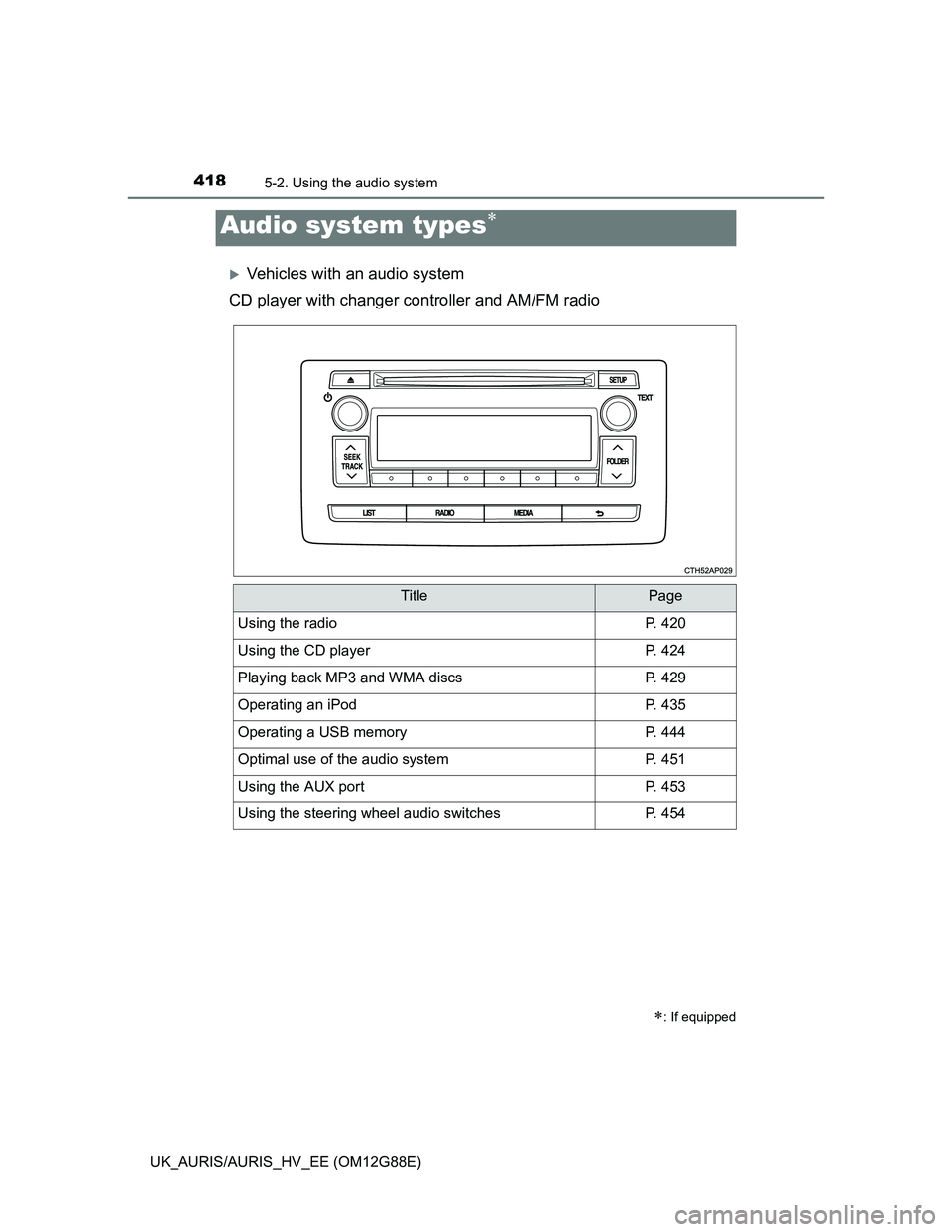
Vehicles with an audio system
CD player with changer controller and AM/FM radio
Audio system types
: If equipped
TitlePage
Using the radioP. 420
Using the CD playerP. 424
Playing back MP3 and WMA discsP. 429
Operating an iPodP. 435
Operating a USB memoryP. 444
Optimal use of the audio systemP. 451
Using the AUX portP. 453
Using the steering wheel audio switchesP. 454
Page 454 of 788
4545-2. Using the audio system
UK_AURIS/AURIS_HV_EE (OM12G88E)
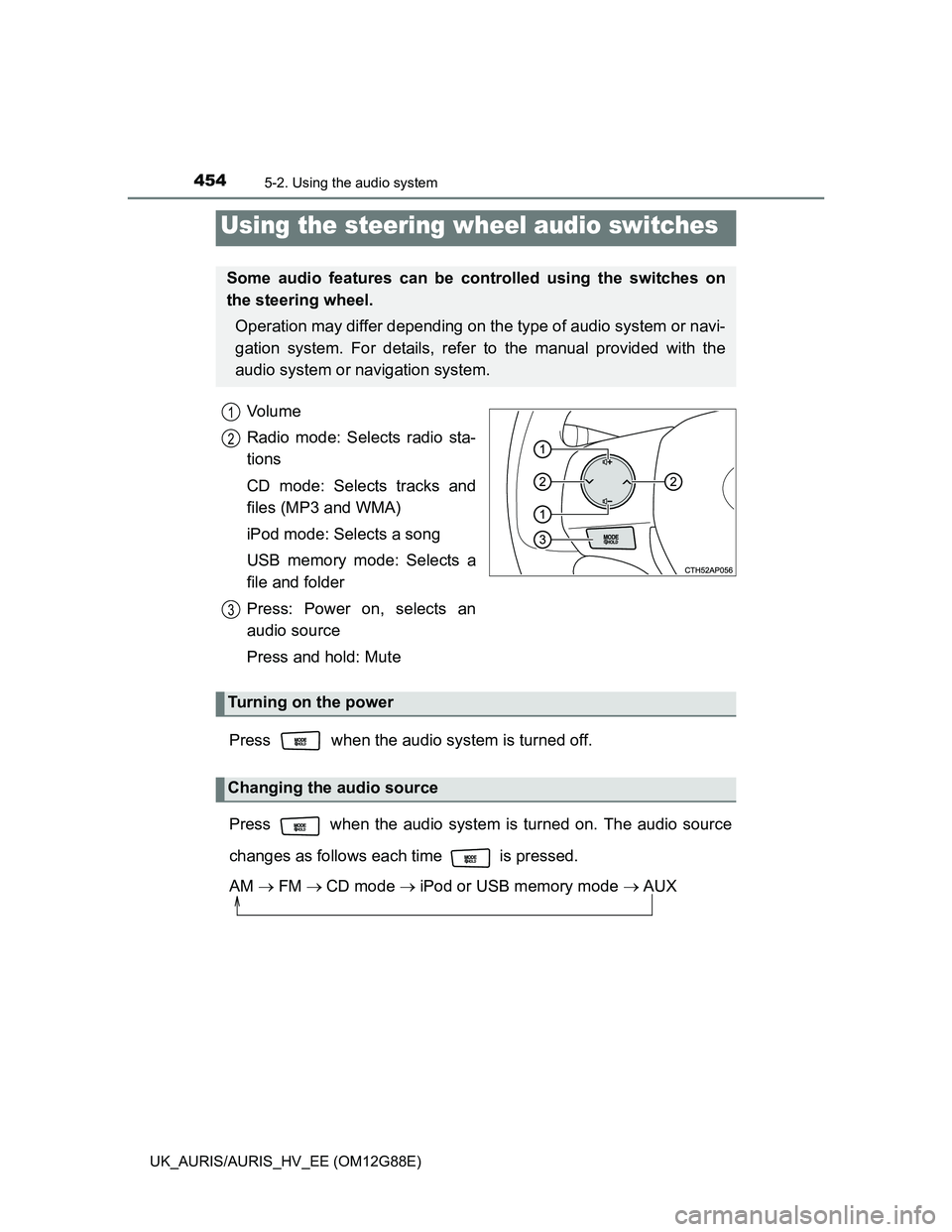
Vo l u m e
Radio mode: Selects radio sta-
tions
CD mode: Selects tracks and
files (MP3 and WMA)
iPod mode: Selects a song
USB memory mode: Selects a
file and folder
Press: Power on, selects an
audio source
Press and hold: Mute
Press when the audio system is turned off.
Press when the audio system is turned on. The audio source
changes as follows each time is pressed.
AM FMCD mode iPod or USB memory mode AUX
Using the steering wheel audio switches
Some audio features can be controlled using the switches on
the steering wheel.
Operation may differ depending on the type of audio system or navi-
gation system. For details, refer to the manual provided with the
audio system or navigation system.
1
2
3
Turning on the power
Changing the audio source
Page 456 of 788
4565-2. Using the audio system
UK_AURIS/AURIS_HV_EE (OM12G88E)
Press to select CD or USB memory mode.
Press and hold until you hear a beep.
Selecting a folder (MP3 and WMA or USB memory)
CAUTION
To reduce the risk of an accident
Exercise care when operating the audio switches on the steering wheel.
1
2