ignition TOYOTA AURIS HYBRID 2014 Owners Manual
[x] Cancel search | Manufacturer: TOYOTA, Model Year: 2014, Model line: AURIS HYBRID, Model: TOYOTA AURIS HYBRID 2014Pages: 788, PDF Size: 21.16 MB
Page 3 of 788
3
1
8 7
6
5
4
3
2
UK_AURIS/AURIS_HV_EE (OM12G88E)3-4. Adjusting the steering
wheel and mirrors
Steering wheel ...................218
Inside rear view mirror .......219
Outside rear view
mirrors .............................221
3-5. Opening and closing
the windows
Power windows ..................224
4-1. Before driving
Driving the vehicle .............230
Cargo and luggage ............247
Trailer towing
(except hybrid model) ......248
Trailer towing
(hybrid model)..................258
4-2. Driving procedures
Engine (ignition) switch
(except hybrid model
[vehicles without a smart
entry & start system]).......268
Engine (ignition) switch
(except hybrid model
[vehicles with a smart
entry & start system]).......272
Power (ignition) switch .......282
EV drive mode ...................288
Multidrive ...........................290
Multi-mode manual
transmission ....................295
Manual transmission ..........300Hybrid transmission........... 303
Turn signal lever................ 311
Parking brake .................... 312
Horn .................................. 313
4-3. Operating the lights and
wipers
Headlight switch ................ 314
Automatic High Beam ....... 322
Fog light switch ................. 326
Windshield wipers and
washer ............................ 328
Rear window wiper and
washer ............................ 332
4-4. Refueling
Opening the fuel tank
cap .................................. 334
4-5. Using the driving support
systems
Cruise control .................... 338
Speed limiter ..................... 343
Toyota parking
assist-sensor ................... 346
Simple-IPA
(Simple-Intelligent
Parking Assist) ................ 352
Stop & Start system .......... 368
Driving assist systems....... 374
Hill-start assist control ....... 380
Diesel particulate filter
system............................. 382
4-6. Driving tips
Hybrid vehicle driving
tips .................................. 384
Winter driving tips.............. 386
4Driving
Page 56 of 788
561-1. For safe use
UK_AURIS/AURIS_HV_EE (OM12G88E)
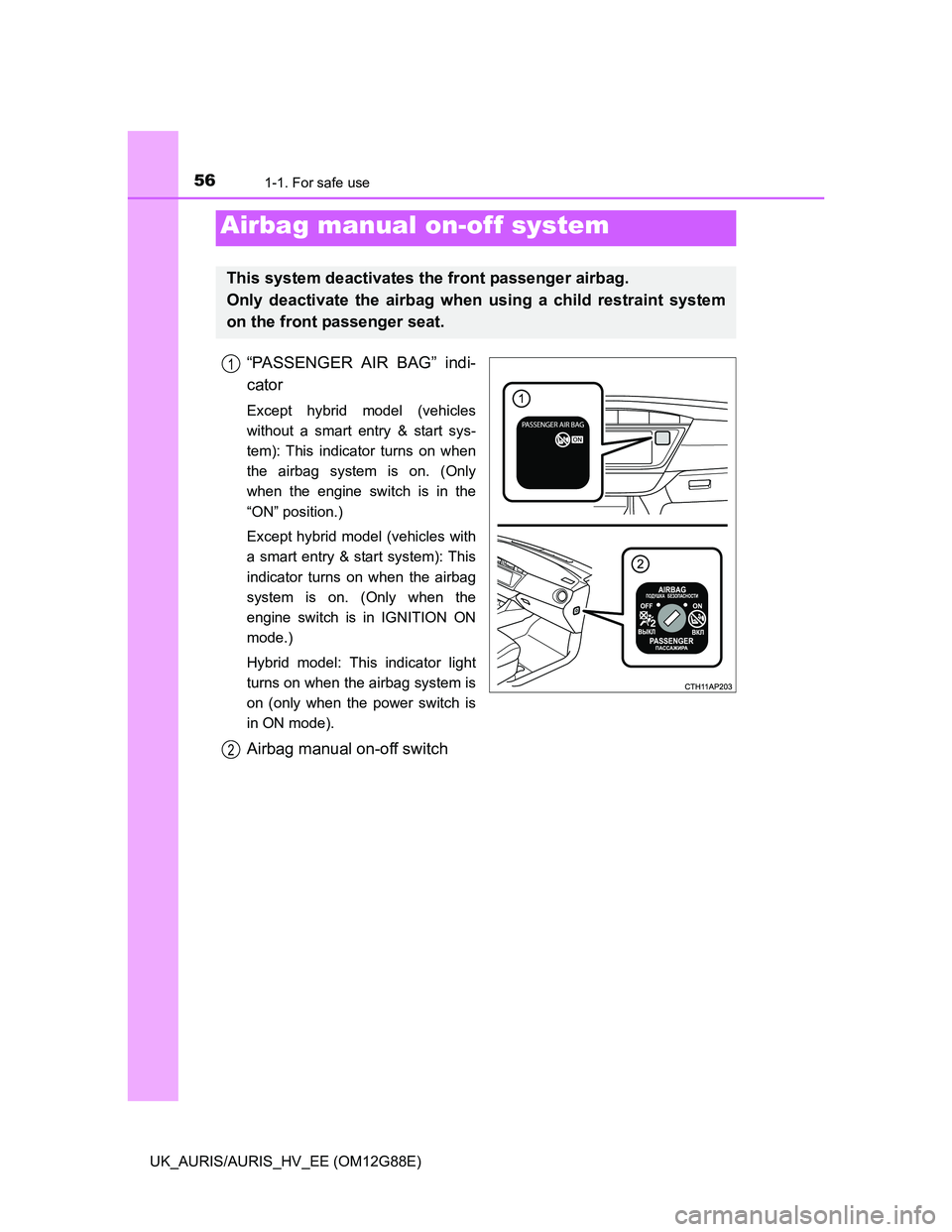
“PASSENGER AIR BAG” indi-
cator
Except hybrid model (vehicles
without a smart entry & start sys-
tem): This indicator turns on when
the airbag system is on. (Only
when the engine switch is in the
“ON” position.)
Except hybrid model (vehicles with
a smart entry & start system): This
indicator turns on when the airbag
system is on. (Only when the
engine switch is in IGNITION ON
mode.)
Hybrid model: This indicator light
turns on when the airbag system is
on (only when the power switch is
in ON mode).
Airbag manual on-off switch
Airbag manual on-off system
This system deactivates the front passenger airbag.
Only deactivate the airbag when using a child restraint system
on the front passenger seat.
1
2
Page 120 of 788
1202. Instrument cluster
UK_AURIS/AURIS_HV_EE (OM12G88E)
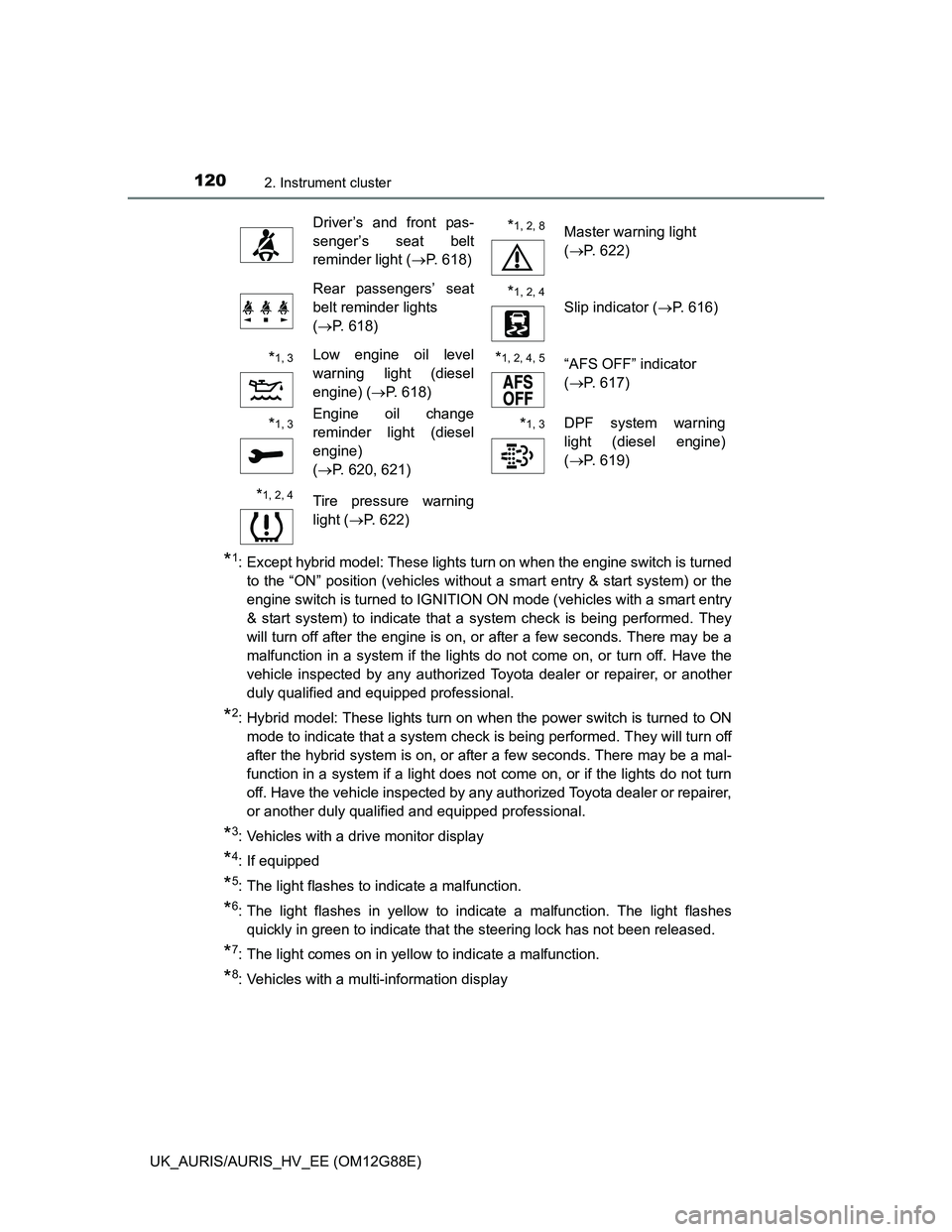
*1: Except hybrid model: These lights turn on when the engine switch is turned
to the “ON” position (vehicles without a smart entry & start system) or the
engine switch is turned to IGNITION ON mode (vehicles with a smart entry
& start system) to indicate that a system check is being performed. They
will turn off after the engine is on, or after a few seconds. There may be a
malfunction in a system if the lights do not come on, or turn off. Have the
vehicle inspected by any authorized Toyota dealer or repairer, or another
duly qualified and equipped professional.
*2: Hybrid model: These lights turn on when the power switch is turned to ON
mode to indicate that a system check is being performed. They will turn off
after the hybrid system is on, or after a few seconds. There may be a mal-
function in a system if a light does not come on, or if the lights do not turn
off. Have the vehicle inspected by any authorized Toyota dealer or repairer,
or another duly qualified and equipped professional.
*3: Vehicles with a drive monitor display
*4: If equipped
*5: The light flashes to indicate a malfunction.
*6: The light flashes in yellow to indicate a malfunction. The light flashes
quickly in green to indicate that the steering lock has not been released.
*7: The light comes on in yellow to indicate a malfunction.
*8: Vehicles with a multi-information display
Driver’s and front pas-
senger’s seat belt
reminder light (P. 618)*1, 2, 8Master warning light
(P. 622)
Rear passengers’ seat
belt reminder lights
(P. 618)*1, 2, 4
Slip indicator (P. 616)
*1, 3Low engine oil level
warning light (diesel
engine) (P. 618)*1, 2, 4, 5 “AFS OFF” indicator
(P. 617)
*1, 3Engine oil change
reminder light (diesel
engine)
(P. 620, 621)*1, 3DPF system warning
light (diesel engine)
(P. 619)
*1, 2, 4 Tire pressure warning
light (P. 622)
Page 122 of 788
1222. Instrument cluster
UK_AURIS/AURIS_HV_EE (OM12G88E)
*1: If equipped
*2: Except hybrid model: These lights turn on when the engine switch is turned
to the “ON” position (vehicles without a smart entry & start system) or the
engine switch is turned to IGNITION ON mode (vehicles with a smart entry
& start system) to indicate that a system check is being performed. They
will turn off after the engine is on, or after a few seconds. There may be a
malfunction in a system if the lights do not come on, or turn off. Have the
vehicle inspected by any authorized Toyota dealer or repairer, or another
duly qualified and equipped professional.
*3: Hybrid model: These lights turn on when the power switch is turned to ON
mode to indicate that a system check is being performed. They will turn off
after the hybrid system is on, or after a few seconds. There may be a mal-
function in a system if a light does not come on, or if the lights do not turn
off. Have the vehicle inspected by any authorized Toyota dealer or repairer,
or another duly qualified and equipped professional.
*4: The light flashes to indicate that the system is operating.
*5: The light does not turn on when the system is disabled.
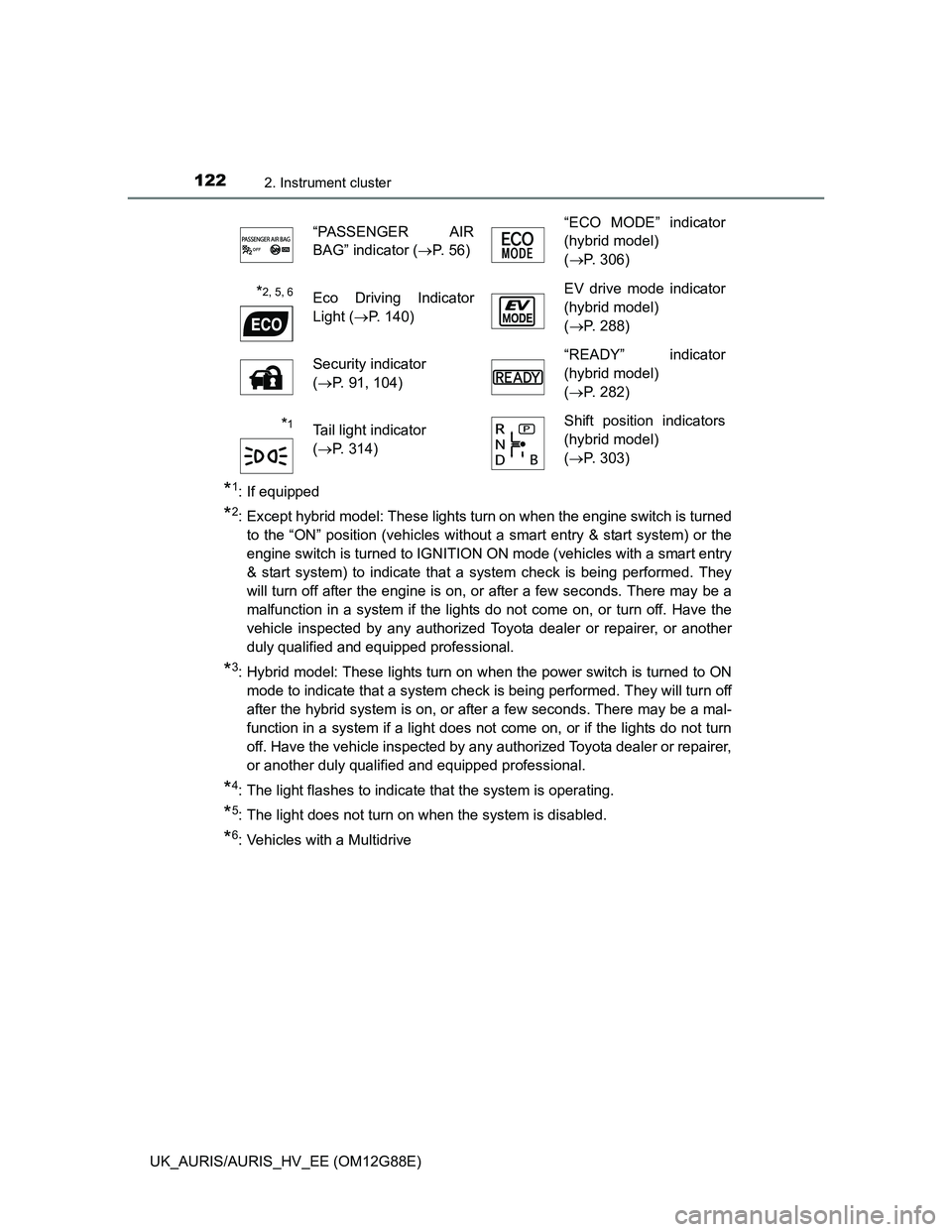
*6: Vehicles with a Multidrive“PASSENGER AIR
BAG” indicator (P. 56)“ECO MODE” indicator
(hybrid model)
(P. 306)
*2, 5, 6Eco Driving Indicator
Light (P. 140)EV drive mode indicator
(hybrid model)
(P. 288)
Security indicator
(P. 91, 104)“READY” indicator
(hybrid model)
(P. 282)
*1Tail light indicator
(P. 314)Shift position indicators
(hybrid model)
(P. 303)
Page 127 of 788
1272. Instrument cluster
UK_AURIS/AURIS_HV_EE (OM12G88E)
2
Instrument cluster
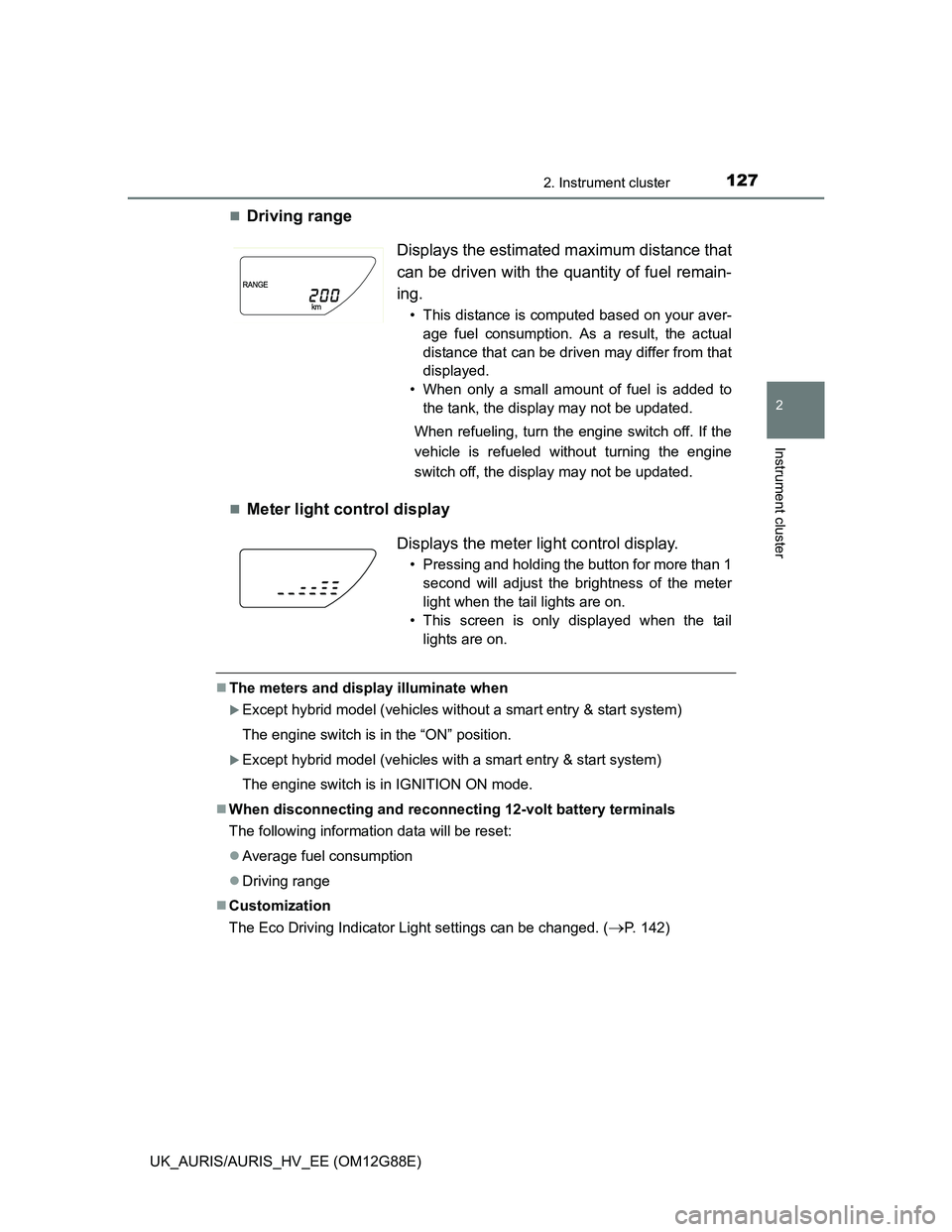
Driving range
Meter light control display
The meters and display illuminate when
Except hybrid model (vehicles without a smart entry & start system)
The engine switch is in the “ON” position.
Except hybrid model (vehicles with a smart entry & start system)
The engine switch is in IGNITION ON mode.
When disconnecting and reconnecting 12-volt battery terminals
The following information data will be reset:
Average fuel consumption
Driving range
Customization
The Eco Driving Indicator Light settings can be changed. (
P. 142)
Displays the estimated maximum distance that
can be driven with the quantity of fuel remain-
ing.
• This distance is computed based on your aver-
age fuel consumption. As a result, the actual
distance that can be driven may differ from that
displayed.
• When only a small amount of fuel is added to
the tank, the display may not be updated.
When refueling, turn the engine switch off. If the
vehicle is refueled without turning the engine
switch off, the display may not be updated.
Displays the meter light control display.
• Pressing and holding the button for more than 1
second will adjust the brightness of the meter
light when the tail lights are on.
• This screen is only displayed when the tail
lights are on.
Page 138 of 788
1382. Instrument cluster
UK_AURIS/AURIS_HV_EE (OM12G88E)
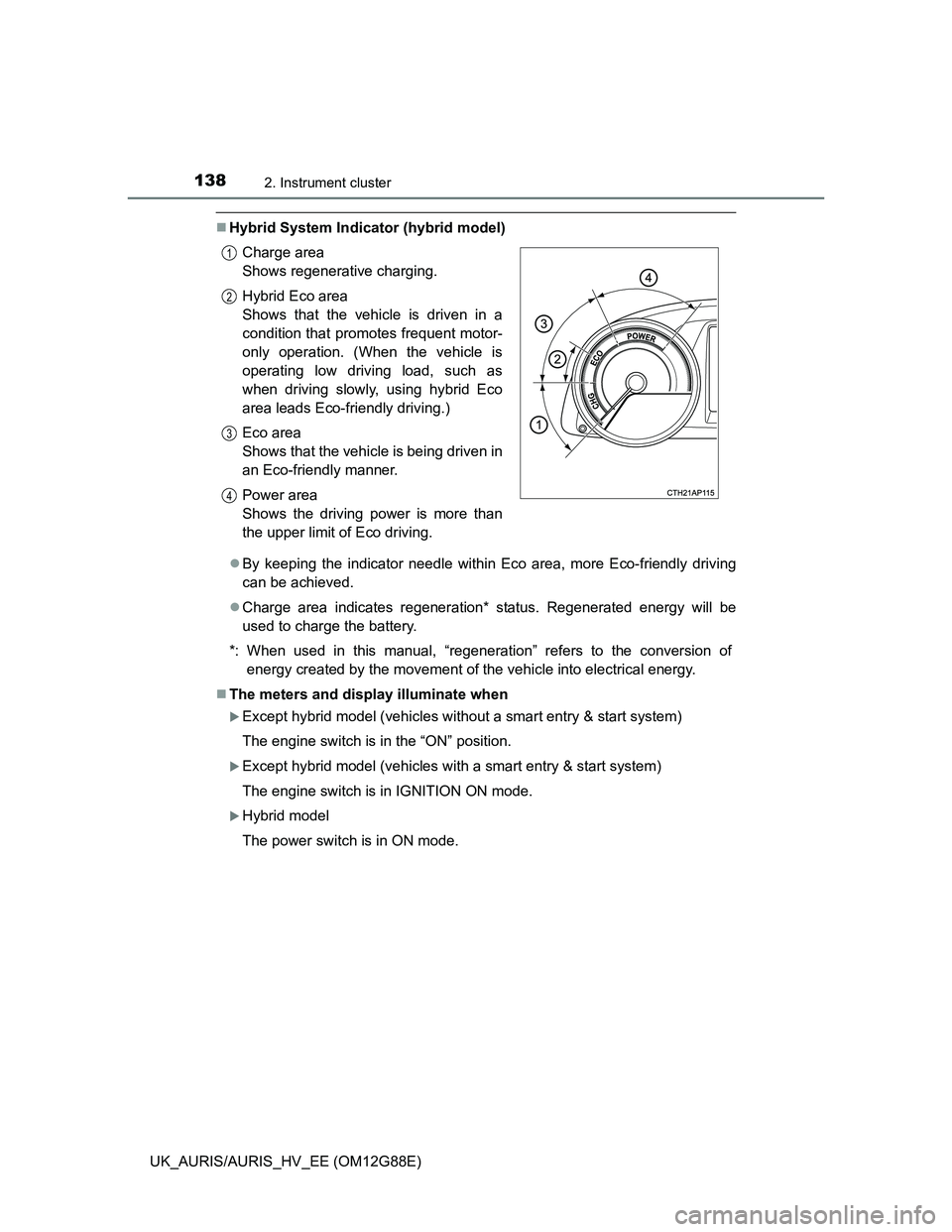
Hybrid System Indicator (hybrid model)
By keeping the indicator needle within Eco area, more Eco-friendly driving
can be achieved.
Charge area indicates regeneration* status. Regenerated energy will be
used to charge the battery.
*: When used in this manual, “regeneration” refers to the conversion of
energy created by the movement of the vehicle into electrical energy.
The meters and display illuminate when
Except hybrid model (vehicles without a smart entry & start system)
The engine switch is in the “ON” position.
Except hybrid model (vehicles with a smart entry & start system)
The engine switch is in IGNITION ON mode.
Hybrid model
The power switch is in ON mode. Charge area
Shows regenerative charging.
Hybrid Eco area
Shows that the vehicle is driven in a
condition that promotes frequent motor-
only operation. (When the vehicle is
operating low driving load, such as
when driving slowly, using hybrid Eco
area leads Eco-friendly driving.)
Eco area
Shows that the vehicle is being driven in
an Eco-friendly manner.
Power area
Shows the driving power is more than
the upper limit of Eco driving.
1
2
3
4
Page 145 of 788
1452. Instrument cluster
UK_AURIS/AURIS_HV_EE (OM12G88E)
2
Instrument cluster
Vehicles without a smart entry & start system:
Average fuel consumption for the past 15 minutes is divided by color
into past averages and averages attained since the engine switch was
last turned to the “ON” position. Use the displayed average fuel con-
sumption as a reference.
Vehicles with a smart entry & start system:
Average fuel consumption for the past 15 minutes is divided by color
into past averages and averages attained since the engine switch was
last turned to IGNITION ON mode. Use the displayed average fuel
consumption as a reference.
The image is an example only.
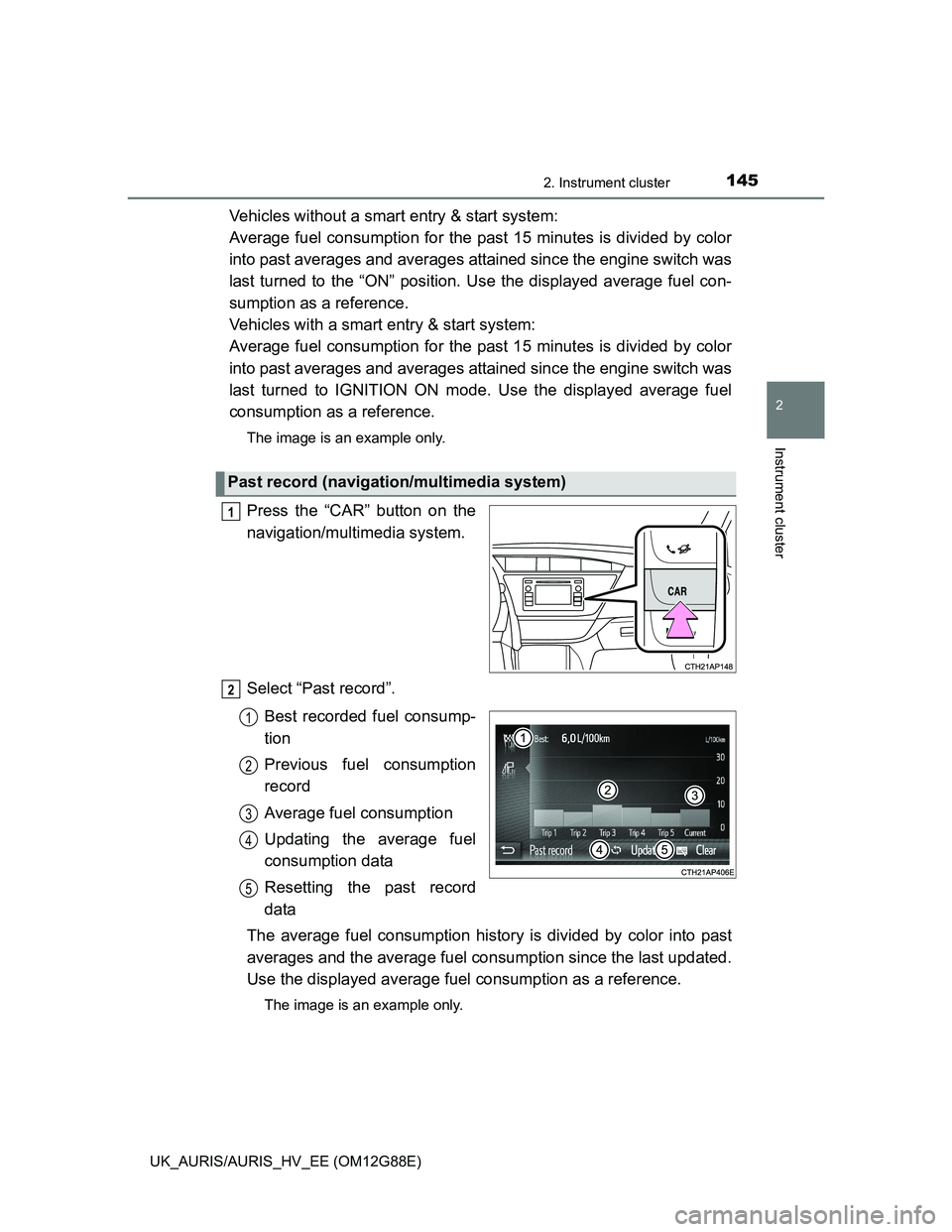
Press the “CAR” button on the
navigation/multimedia system.
Select “Past record”.
Best recorded fuel consump-
tion
Previous fuel consumption
record
Average fuel consumption
Updating the average fuel
consumption data
Resetting the past record
data
The average fuel consumption history is divided by color into past
averages and the average fuel consumption since the last updated.
Use the displayed average fuel consumption as a reference.
The image is an example only.
Past record (navigation/multimedia system)
1
2
1
2
3
4
5
Page 204 of 788
2043-2. Opening, closing and locking the doors
UK_AURIS/AURIS_HV_EE (OM12G88E)
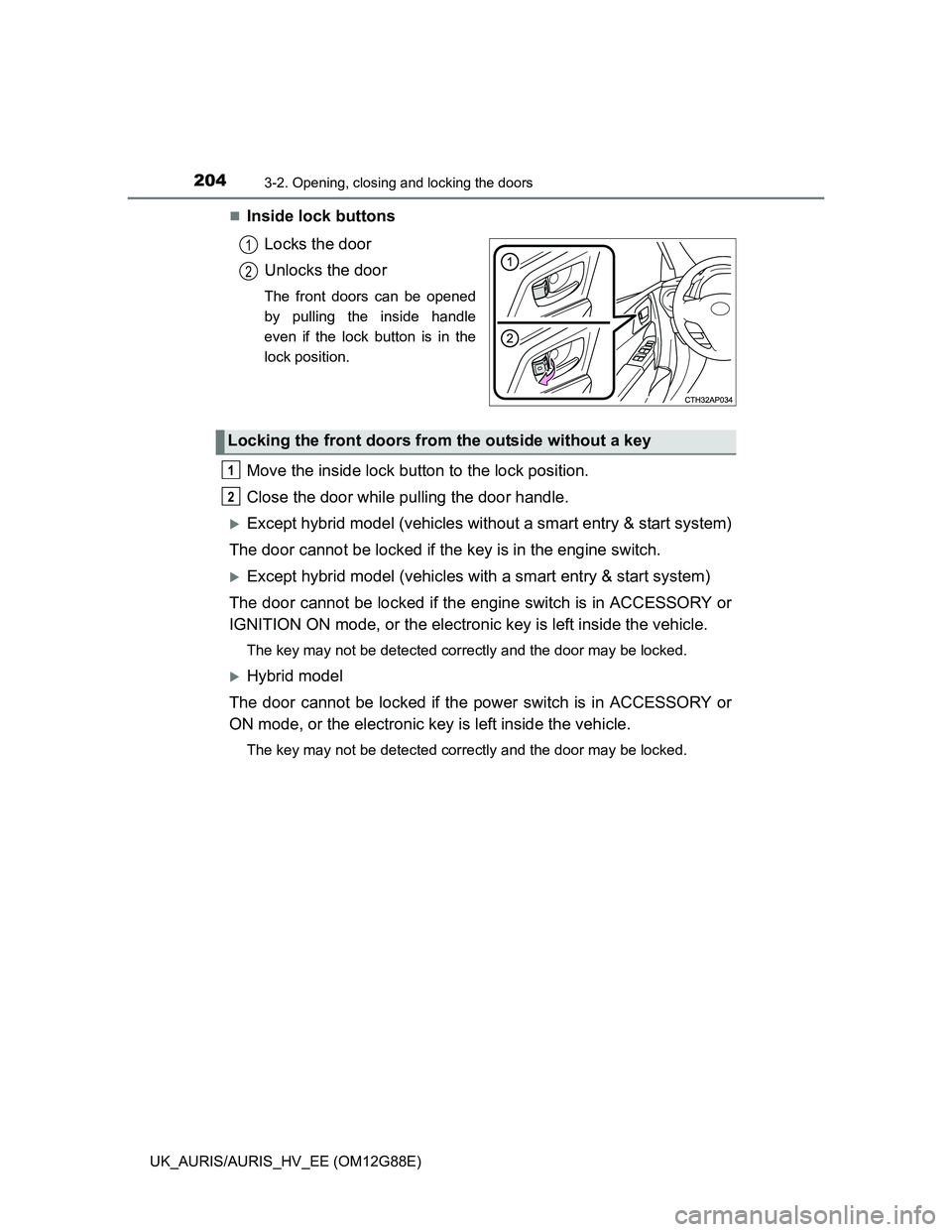
Inside lock buttons
Locks the door
Unlocks the door
The front doors can be opened
by pulling the inside handle
even if the lock button is in the
lock position.
Move the inside lock button to the lock position.
Close the door while pulling the door handle.
Except hybrid model (vehicles without a smart entry & start system)
The door cannot be locked if the key is in the engine switch.
Except hybrid model (vehicles with a smart entry & start system)
The door cannot be locked if the engine switch is in ACCESSORY or
IGNITION ON mode, or the electronic key is left inside the vehicle.
The key may not be detected correctly and the door may be locked.
Hybrid model
The door cannot be locked if the power switch is in ACCESSORY or
ON mode, or the electronic key is left inside the vehicle.
The key may not be detected correctly and the door may be locked.
1
2
Locking the front doors from the outside without a key
1
2
Page 223 of 788
2233-4. Adjusting the steering wheel and mirrors
UK_AURIS/AURIS_HV_EE (OM12G88E)
3
Operation of each component
Mirror angle can be adjusted when
Except hybrid model (vehicles without a smart entry & start system):
The engine switch is in the “ACC” or “ON” position.
Except hybrid model (vehicles with a smart entry & start system):
The engine switch is in ACCESSORY or IGNITION ON mode.
Hybrid model:
The power switch is in ACCESSORY or ON mode.
When the mirrors are fogged up
The outside rear view mirrors can be cleared using the mirror defoggers. Turn
on the rear window defogger to turn on the outside rear view mirror defog-
gers. (P. 416)
Using automatic mode in cold weather (if equipped)
When automatic mode is used in cold weather, the door mirror could freeze
up and automatic stowing and return may not be possible. In this event,
remove any ice and snow from the door mirror, then either operate the mirror
using manual mode or move the mirror by hand.
CAUTION
Important points while driving
Observe the following precautions while driving.
Failure to do so may result in loss of control of the vehicle and cause an
accident, resulting in death or serious injury.
Do not adjust the mirrors while driving.
Do not drive with the mirrors folded.
Both the driver and passenger side mirrors must be extended and properly
adjusted before driving.
When a mirror is moving
To avoid personal injury and mirror malfunction, be careful not to get your
hand caught by the moving mirror.
When the mirror defoggers are operating
Do not touch the rear view mirror surfaces, as they can become very hot
and burn you.
Page 225 of 788
2253-5. Opening and closing the windows
UK_AURIS/AURIS_HV_EE (OM12G88E)
3
Operation of each component
The power windows can be operated when
Except hybrid model (vehicles without a smart entry & start system):
The engine switch is in the “ON” position.
Except hybrid model (vehicles with a smart entry & start system):
The engine switch is in IGNITION ON mode.
Hybrid model: The power switch is in ON mode.
Operating the power windows after turning the engine off (except hybrid
model)
Vehicles without a smart entry & start system:
The power windows can be operated for approximately 45 seconds even
after the engine switch is turned to the “ACC” or “LOCK” position. They can-
not, however, be operated once either front door is opened.
Vehicles with a smart entry & start system:
The power windows can be operated for approximately 45 seconds even
after the engine switch is turned to ACCESSORY mode or turned off. They
cannot, however, be operated once either front door is opened.
Operating the power windows after turning the hybrid system off (hybrid
model)
The power windows can be operated for approximately 45 seconds even
after the power switch is turned to ACCESSORY mode or turned off. They
cannot, however, be operated once either front door is opened.
Jam protection function (windows with one-touch closing function only)
If an object becomes caught between the window and the window frame, win-
dow travel is stopped and the window is opened slightly.