ECO mode TOYOTA AURIS HYBRID 2016 User Guide
[x] Cancel search | Manufacturer: TOYOTA, Model Year: 2016, Model line: AURIS HYBRID, Model: TOYOTA AURIS HYBRID 2016Pages: 592, PDF Size: 16.67 MB
Page 138 of 592
1383-2. Opening, closing and locking the doors
UK AURIS_HV_HB_EE (OM12K47E)■
Note for the entry function
●Even when the electronic key is within the effective range (detection areas),
the system may not operate properly in the following cases:
• The electronic key is too close to the window or outside door handle, near
the ground, or in a high place w hen the doors are locked or unlocked.
• The electronic key is near the ground or in a high place, or too close to the rear bumper center when the back door is opened.
• The electronic key is on the instrument panel, luggage cover or floor, or in
the door pockets or glove box when the hybrid system is started or power
switch modes are changed.
● Do not leave the electronic key on top of the instrument panel or near the
door pockets when exiting the vehicle. Depending on the radio wave recep-
tion conditions, it may be detected by the antenna outside the cabin and the
door will become lockable from the outside, possibly trapping the electronic
key inside the vehicle.
● As long as the electronic key is within the effective range, the doors may be
locked or unlocked by anyone. However, only the doors detecting the elec-
tronic key can be used to unlock the vehicle.
● Even if the electronic key is not inside the vehicle, it may be possible to start
the hybrid system if the electronic key is near the window.
● The doors may unlock or lock if a large amount of water splashes on the
door handle, such as in the rain or in a car wash when the electronic key is
within the effective range. (The doors will automatically be locked after
approximately 30 seconds if the doors are not opened and closed.)
● If the wireless remote control is used to lock the doors when the electronic
key is near the vehicle, there is a possibility that the door may not be
unlocked by the entry function. (Use the wireless remote control to unlock
the doors.)
● Touching the door lock or unlock sens or while wearing gloves may prevent
lock or unlock operation.
● When the lock operation is performed using the lock sensor, recognition sig-
nals will be shown up to two consecutive times. After this, no recognition
signals will be given.
● If the door handle becomes wet while the electronic key is within the effec-
tive range, the door may lock and unlock repeatedly. In that case, follow the
following correction procedures to wash the vehicle:
• Place the electronic key in a location 2 m (6 ft.) or more away from the
vehicle. (Take care to ensure that the key is not stolen.)
• Set the electronic key to battery-saving mode to disable the smart entry &
start system. ( →P. 136)
Page 139 of 592
1393-2. Opening, closing and locking the doors
UK AURIS_HV_HB_EE (OM12K47E)
3
Operation of each component
●If the electronic key is inside the vehicle and a door handle becomes wet
during a car wash, a message may be shown on the multi-information dis-
play and a buzzer will sound outside the vehicle. To turn off the alarm, lock
all the doors.
● The lock sensor may not work properly if it comes into contact with ice,
snow, mud, etc. Clean the lock sensor and attempt to operate it again.
● A sudden handle operation or a handle operation immediately after entering
the effective range may prevent the doors from being unlocked. Touch the
door unlock sensor and check that the doors are unlocked before pulling the
door handle again.
● If there is another electronic key in the detection area, it may take slightly
longer to unlock the doors after the door handle is gripped.
■ When the vehicle is not driven for extended periods
●To prevent theft of the vehicle, do not leave the electronic key within 2 m
(6 ft.) of the vehicle.
● The smart entry & start system can be deactivated in advance. ( →P. 566)
■ To operate the system properly
Make sure to carry the electronic key when operating the system. Do not get
the electronic key too close to the vehicle when operating the system from the
outside of the vehicle.
Depending on the position and holding condition of the electronic key, the key
may not be detected correctly and the system may not operate properly. (The
alarm may go off accidentally, or the door lock prevention function may not
operate.)
■ If the smart entry & start system does not operate properly
●Locking and unlocking the doors: Use the mechanical key. ( →P. 536)
● Starting the hybrid system: →P. 537
■ Customization
Settings (e. g. smart entry & start system) can be changed.
(Customizable features: →P. 566)
■ If the smart entry & start system h as been deactivated in a customized
setting
● Locking and unlocking the doors:
Use the wireless remote control or mechanical key. ( →P. 124, 536)
● Starting the hybrid system and changing power switch modes: →P. 537
● Stopping the hybrid system: →P. 212
Page 184 of 592
1843-4. Adjusting the steering wheel and mirrors
UK AURIS_HV_HB_EE (OM12K47E)
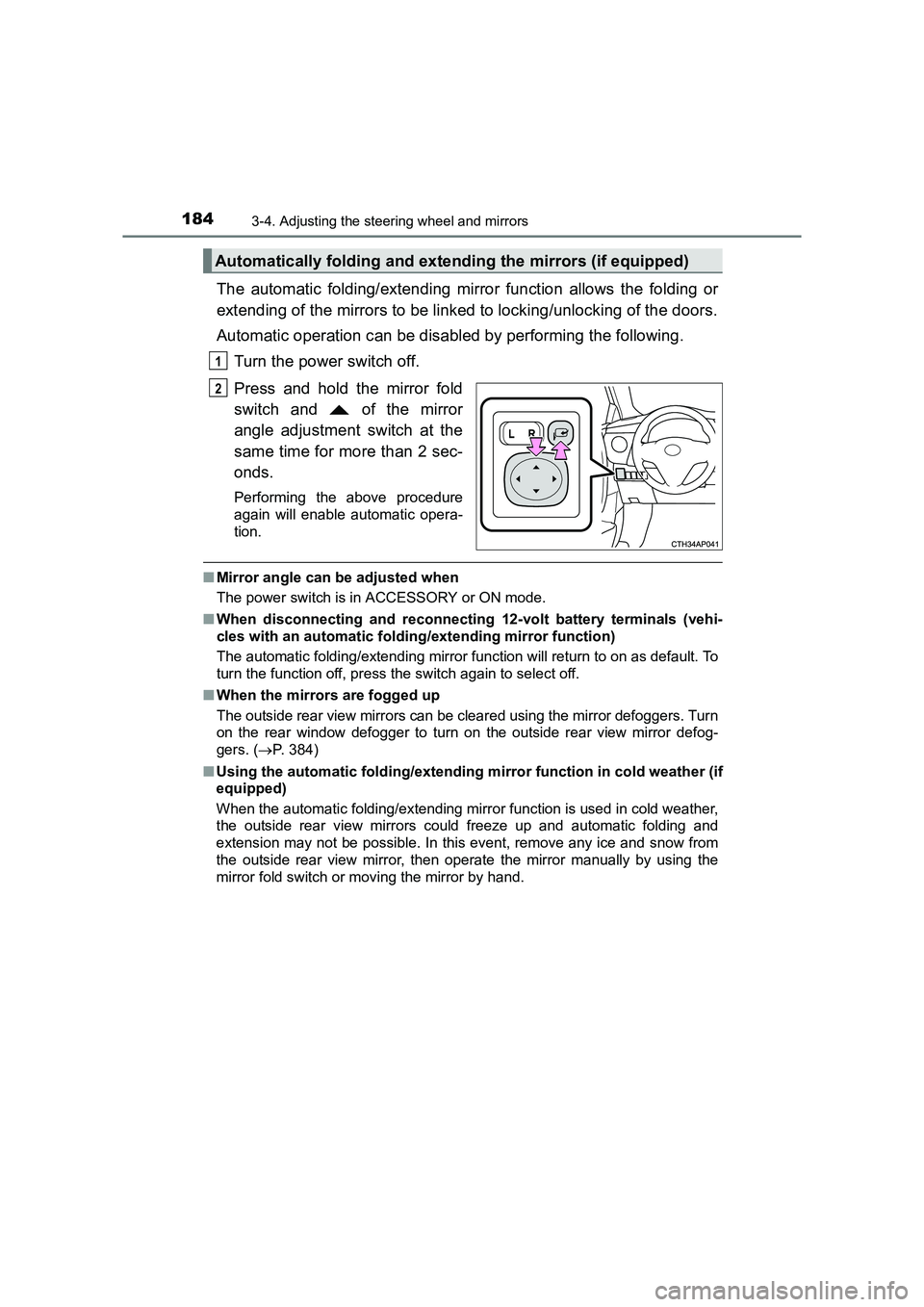
The automatic folding/extending mirror function allows the folding or
extending of the mirrors to be linked to locking/unlocking of the doors.
Automatic operation can be disabled by performing the following.Turn the power switch off.
Press and hold the mirror fold
switch and of the mirror
angle adjustment switch at the
same time for more than 2 sec-
onds.
Performing the above procedure
again will enable automatic opera-
tion.
■Mirror angle can be adjusted when
The power switch is in ACCESSORY or ON mode.
■ When disconnecting and reconnecting 12-volt battery terminals (vehi-
cles with an automatic folding/extending mirror function)
The automatic folding/extending mirror function will return to on as default. To
turn the function off, press the switch again to select off.
■ When the mirrors are fogged up
The outside rear view mirrors can be cleared using the mirror defoggers. Turn
on the rear window defogger to turn on the outside rear view mirror defog-
gers. ( →P. 384)
■ Using the automatic folding/extending mirror function in cold weather (if
equipped)
When the automatic folding/extending mirr or function is used in cold weather,
the outside rear view mirrors could freeze up and automatic folding and
extension may not be possible. In this event, remove any ice and snow from
the outside rear view mirror, then operate the mirror manually by using the
mirror fold switch or moving the mirror by hand.
Automatically folding and extending the mirrors (if equipped)
1
2
Page 187 of 592
1873-5. Opening and closing the windows
UK AURIS_HV_HB_EE (OM12K47E)
3
Operation of each component
■The power windows can be operated when
The power switch is in ON mode.
■ Operating the power windows afte r turning the hybrid system off
The power windows can be operated for approximately 45 seconds after the
power switch is turned to ACCESSORY mode or turned off. They cannot,
however, be operated once either front door is opened.
■ Jam protection function (windows with one-touch closing function only)
If an object becomes caught between the window and the window frame, win-
dow travel is stopped and the window is opened slightly.
■ When the power window does not close normally (windows with one-
touch closing function only)
If the jam protection function is operating abnormally and a window cannot be
closed, perform the following operations using the power window switch on
the relevant door.
●After stopping the vehicle, the window can be closed by holding the power
window switch in the one-touch closing position while the power switch is
turned to ON mode.
● If the window still cannot be closed even by carrying out the operation as
explained above, initialize the function by performing the following proce-
dure.
Hold the power window switch in the one-touch closing position. Continue
holding the switch for a further 6 seconds after the window has closed.
Hold the power window switch in the one-touch opening position. Con-
tinue holding the switch for a further 2 seconds after the window has
opened completely.
Hold the power window switch in the one-touch closing position once
again. Continue holding the switch for a further 2 seconds after the win-
dow has closed.
If you release the switch while the window is moving, start again from the
beginning.
If the window continues to close but then re-open slightly even after perform-
ing the above procedure correctly, have the vehicle inspected by any autho-
rized Toyota dealer or repairer, or another duly qualified and equipped
professional.
1
2
3
Page 201 of 592
2014-1. Before driving
UK AURIS_HV_HB_EE (OM12K47E)
4
Driving
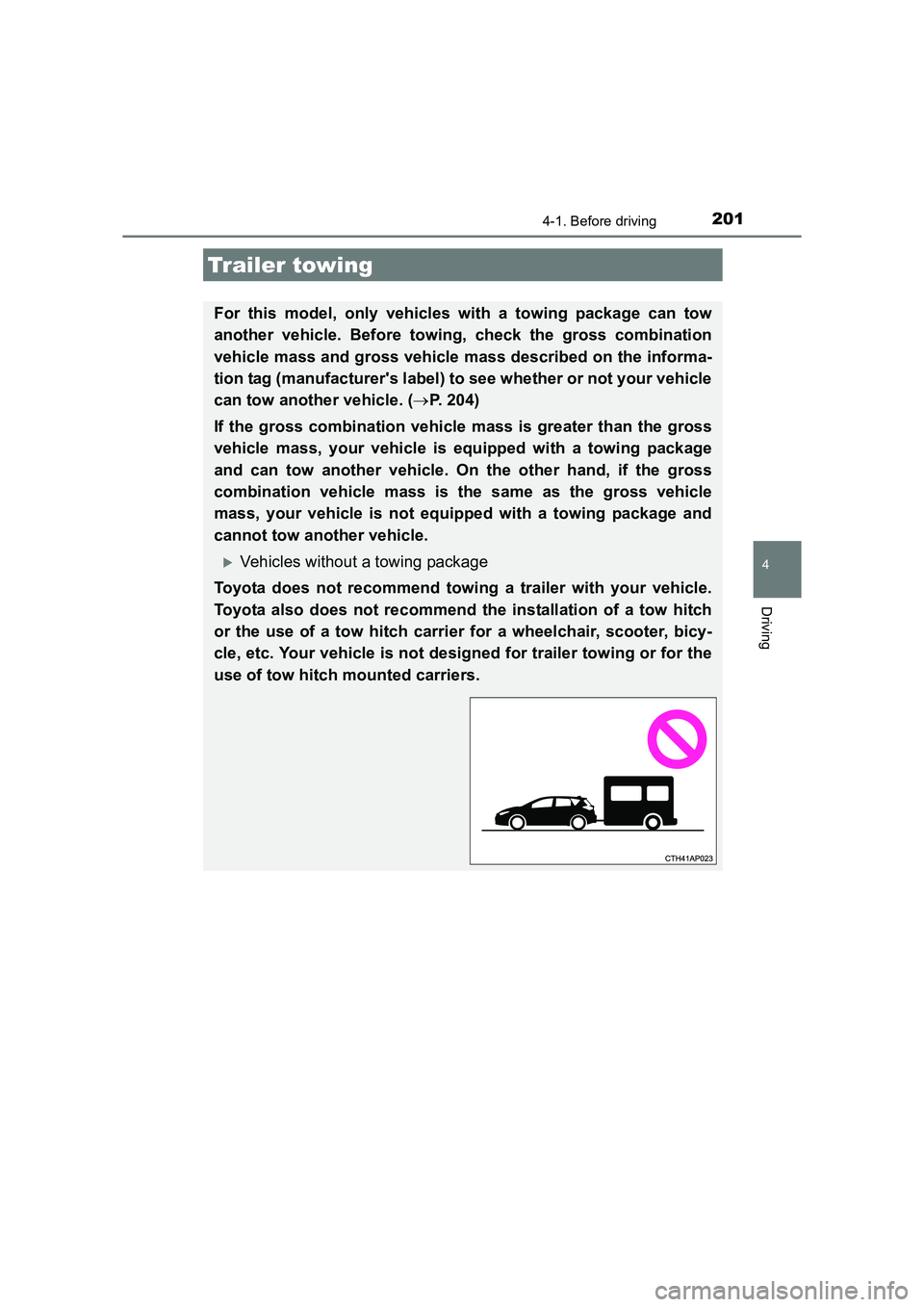
Trailer towing
For this model, only vehicles with a towing package can tow
another vehicle. Before towing, check the gross combination
vehicle mass and gross vehicle mass described on the informa-
tion tag (manufacturer's label) to see whether or not your vehicle
can tow another vehicle. (→P. 204)
If the gross combination vehicle mass is greater than the gross
vehicle mass, your vehicle is equipped with a towing package
and can tow another vehicle. On the other hand, if the gross
combination vehicle mass is the same as the gross vehicle
mass, your vehicle is not equipped with a towing package and
cannot tow another vehicle.
XVehicles without a towing package
Toyota does not recommend towing a trailer with your vehicle.
Toyota also does not recommend the installation of a tow hitch
or the use of a tow hitch carrier for a wheelchair, scooter, bicy-
cle, etc. Your vehicle is not designed for trailer towing or for the
use of tow hitch mounted carriers.
Page 215 of 592
2154-2. Driving procedures
UK AURIS_HV_HB_EE (OM12K47E)
4
Driving
■Operation of the power switch
●When operating the power switch, one s hort, firm press is enough. If the
switch is pressed improperly, the hybr id system may not start or the power
switch mode may not change. It is not necessary to press and hold the
switch.
● If attempting to restart the hybrid system immediately after turning the power
switch off, the hybrid system may not start in some cases. After turning the
power switch off, please wait a few seconds before restarting the hybrid sys-
tem.
■ Automatic P position selection function
●When the shift position is other than P, pressing the power switch with the
vehicle stopped completely will cause the shift position to change to P auto-
matically, and then the power switch will turn off.
● When turning the power switch off from a position other than P, firmly
depress the brake pedal and confirm that the shift position* has changed to
P before slowly releasing the brake pedal.
*: Even after the instrument panel display has been turned off, the shift posi- tion indicator will continue to be displayed for several seconds.
■ When the P position control system malfunctions
The power switch will not be able to be turned off. In such a case, the switch
can be turned off by applying the parking brake.
When the system malfunctions, immedi ately have your vehicle serviced by
any authorized Toyota dealer or re pairer, or another duly qualified and
equipped professional immediately.
■ If the smart entry & start system or push button start has been deacti-
vated in a customized setting
→ P. 536
Page 216 of 592
2164-2. Driving procedures
UK AURIS_HV_HB_EE (OM12K47E)
WARNING
■ When starting the hybrid system
Always start the hybrid system while sitting in the driver’s seat. Do not
depress the accelerator pedal while starting the hybrid system under any
circumstances.
Doing so may cause an accident resulting in death or serious injury.
■ Stopping the hybrid system in an emergency
If you want to stop the hybrid system in an emergency while driving the
vehicle, press and hold the power switch for more than 2 seconds, or press
it briefly 3 times or more in succession. ( →P. 483)
However, do not touch the power switch while driving except in an emer-
gency. Turning the hybrid system off while driving will not cause loss of
steering or braking control, however, power assist to the steering will be
lost. This will make it more difficult to steer smoothly, so you should pull over
and stop the vehicle as soon as it is safe to do so.
NOTICE
■To prevent 12-volt battery discharge
●Do not leave the power switch in ACCESSORY or ON mode for long peri-
ods if the hybrid system is not operating.
● If the hybrid system is off, but the indicator on the power switch is illumi-
nated, this indicates that the power switch is still turned on. When exiting
the vehicle, always check that the power switch is off.
■ When starting the hybrid system
●Do not depress the accelerator pedal unnecessarily.
● If the hybrid system becomes difficult to start, have your vehicle checked
by any authorized Toyota dealer or repairer, or another duly qualified and
equipped professional immediately.
■ Symptoms indicating a malfunction with the power switch
If the power switch seems to be operating somewhat differently than usual,
such as the switch sticking slightly, there may be a malfunction. Contact any
authorized Toyota dealer or repairer, or another duly qualified and equipped
professional immediately.
Page 218 of 592
2184-2. Driving procedures
UK AURIS_HV_HB_EE (OM12K47E)■
Switching to EV drive mode when the gasoline engine is cold
If the hybrid system is started while the gasoline engine is cold, the gasoline
engine will start automatically in order to warm up. In this case, you will
become unable to switch to EV drive mode.
After the hybrid system has started and the “READY” indicator has illumi-
nated, press the EV drive mode switch before the gasoline engine starts to
switch to EV drive mode.
■ Automatic cancelation of EV drive mode
When driving in EV drive mode, the gasoline engine may automatically restart
in the following situations. When EV drive mode is canceled, a buzzer will
sound, the EV drive mode indicator will flash and then turn off, and a mes-
sage will be displayed on the multi-information display.
●The hybrid battery (traction battery) becomes low.
● Vehicle speed is high.
● The accelerator pedal is depressed firmly or the vehicle is on a hill etc.
■ Possible driving distance when driving in EV drive mode
EV drive mode’s possible driving distance ranges from a few hundred meters
to approximately 2 km (1.3 miles). However, depending on vehicle conditions,
there are situations when EV drive mode cannot be used.
(The distance that is possible depends on the hybrid battery [traction battery]
level and driving conditions.)
■ Changing a driving mode when in EV drive mode
EV drive mode can be used in conjunction with Eco drive mode and power
mode.
However, EV drive mode may be automatically canceled when used in con-
junction with power mode.
■ Fuel economy
The hybrid system is designed to achieve the best possible fuel economy
during normal driving (using the gasoline engine and electric motor [traction
motor]). Driving in EV drive mode more than necessary may lower fuel econ-
omy.
WARNING
■ Caution while driving
When driving in EV drive mode, pay s pecial attention to the area around the
vehicle. Because there is no engine noise, pedestrians, people riding bicy-
cles or other people and vehicles in the area may not be aware of the vehi-
cle starting off or approaching them, so take extra care while driving.
Page 222 of 592
2224-2. Driving procedures
UK AURIS_HV_HB_EE (OM12K47E)
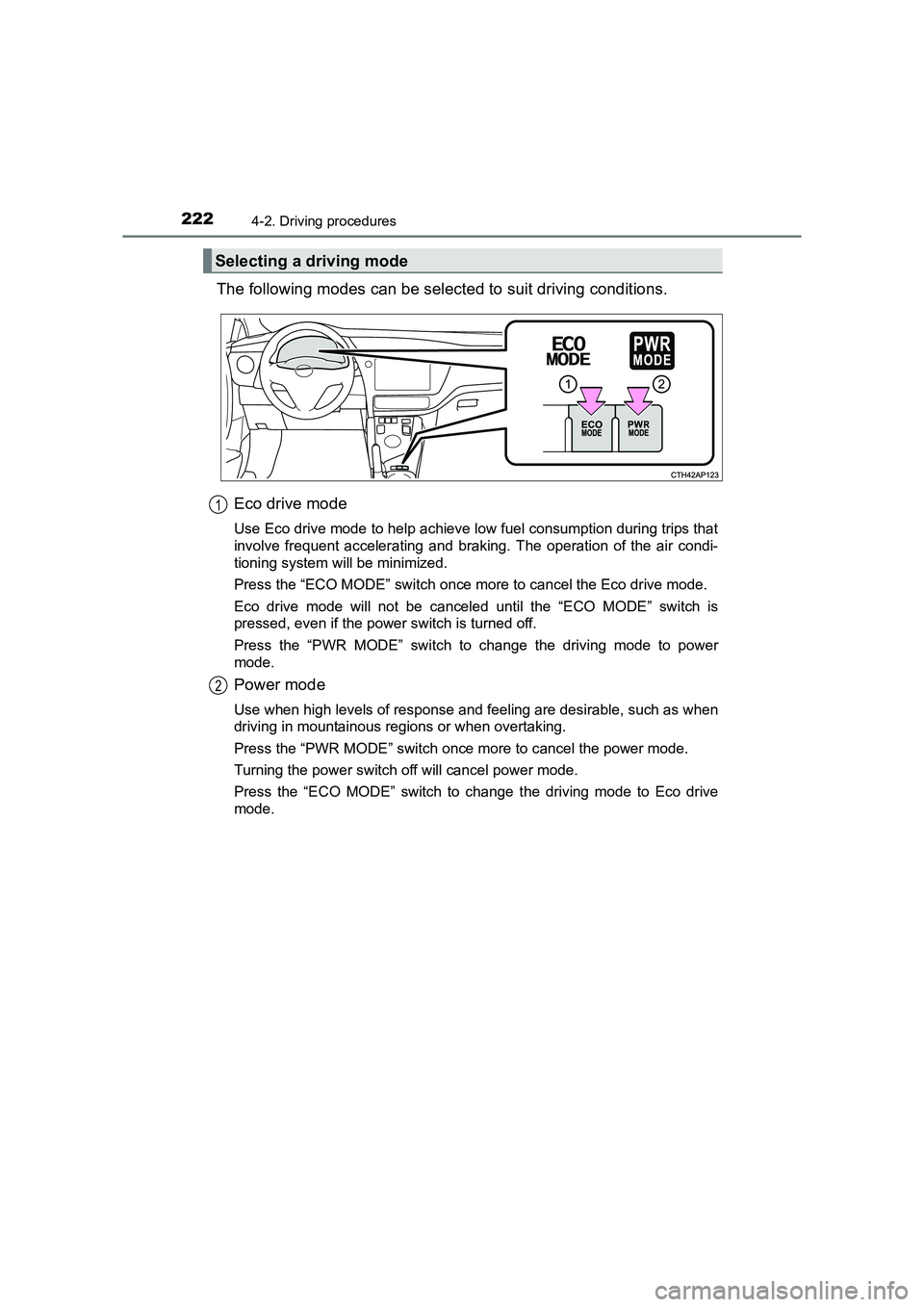
The following modes can be selected to suit driving conditions.Eco drive mode
Use Eco drive mode to help achieve low fuel consumption during trips that
involve frequent accelerating and braking. The operation of the air condi-
tioning system will be minimized.
Press the “ECO MODE” switch once more to cancel the Eco drive mode.
Eco drive mode will not be canceled until the “ECO MODE” switch is
pressed, even if the power switch is turned off.
Press the “PWR MODE” switch to change the driving mode to power
mode.
Power mode
Use when high levels of response and feeling are desirable, such as when
driving in mountainous regions or when overtaking.
Press the “PWR MODE” switch once more to cancel the power mode.
Turning the power switch off will cancel power mode.
Press the “ECO MODE” switch to change the driving mode to Eco drive
mode.
Selecting a driving mode
1
2
Page 223 of 592
2234-2. Driving procedures
UK AURIS_HV_HB_EE (OM12K47E)
4
Driving
■Using engine braking
To use engine braking, select the B position.
●During high speed driving, you may feel that deceleration by engine braking
is less than that of a conventional vehicle.
● Do not continue normal driving with the transmission in B for a long time.
This may cause decreased fuel economy. To prevent this, use D for normal
driving.
■ Reverse warning buzzer
When shifting into R, a buzzer will sound to inform the driver that the shift
position is in R.
■ When the accelerator pedal is depressed while the shift position is in N
A buzzer will sound to inform the driver that the shift position is in N.
■ Eco drive mode
When the accelerator pedal is depressed in Eco drive mode, it may take more
time to accelerate than usual. This is normal operation.
■ For the shift positions
●When the power switch is off, the shift position cannot be changed.
● When the power switch is in ON mode (the hybrid system is not operating),
the shift position can only be changed to N. The shift position will be
changed to N even if the shift position is shifted to D or R and held in that
position.
● When the “READY” indicator is on, the shift position can be changed from P
to D, N or R.
● When the “READY” indicator is flashing, the shift position cannot be
changed from P to other position even if the shift lever is operated.
Wait until the “READY” indicator changes from a flashing to a solid light, and
then operate the shift lever again.
● The shift position can only be changed to B directly from D.