change time TOYOTA AURIS HYBRID 2016 User Guide
[x] Cancel search | Manufacturer: TOYOTA, Model Year: 2016, Model line: AURIS HYBRID, Model: TOYOTA AURIS HYBRID 2016Pages: 592, PDF Size: 16.67 MB
Page 254 of 592
2544-5. Toyota Safety Sense
UK AURIS_HV_HB_EE (OM12K47E)■
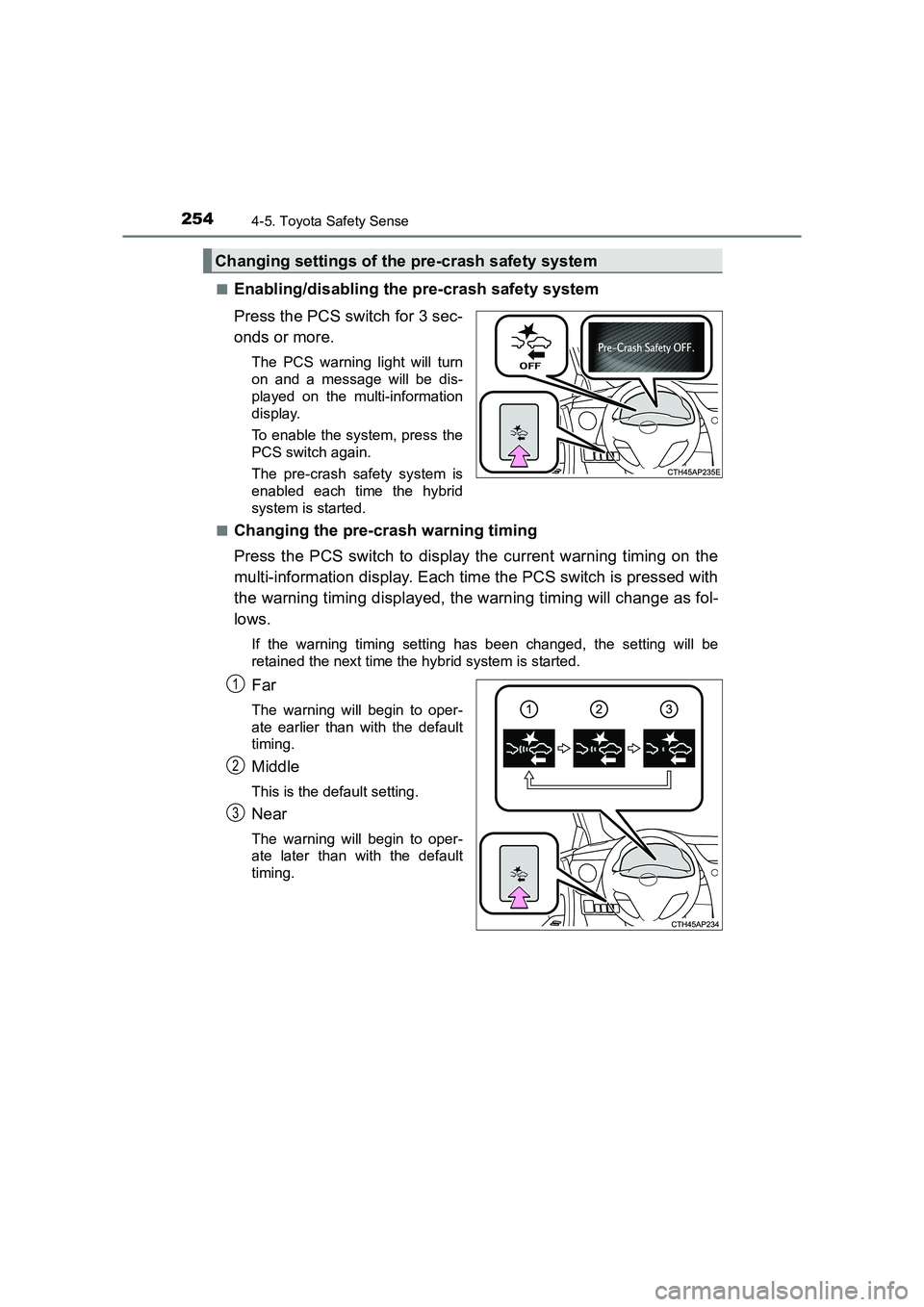
Enabling/disabling the pre-crash safety system
Press the PCS switch for 3 sec-
onds or more.
The PCS warning light will turn
on and a message will be dis-
played on the multi-information
display.
To enable the system, press the
PCS switch again.
The pre-crash safety system is
enabled each time the hybrid
system is started.
■
Changing the pre-crash warning timing
Press the PCS switch to display the current warning timing on the
multi-information display. Each time the PCS switch is pressed with
the warning timing displayed, the warning timing will change as fol-
lows.
If the warning timing setting has been changed, the setting will be
retained the next time the hybrid system is started.
Far
The warning will begin to oper-
ate earlier than with the default
timing.
Middle
This is the default setting.
Near
The warning will begin to oper-
ate later than with the default
timing.
Changing settings of the pre-crash safety system
1
2
3
Page 261 of 592
2614-5. Toyota Safety Sense
UK AURIS_HV_HB_EE (OM12K47E)
4
Driving
• When the vehicle is hit by water, snow, dust, etc. from a vehicle ahead
• When driving through steam or smoke that may obscure vehicles ahead
• When driving in a place where the surrounding brightness changes sud-denly, such as at the entrance or exit of a tunnel
• While driving on a curve and for a certain amount of time after driving on a curve
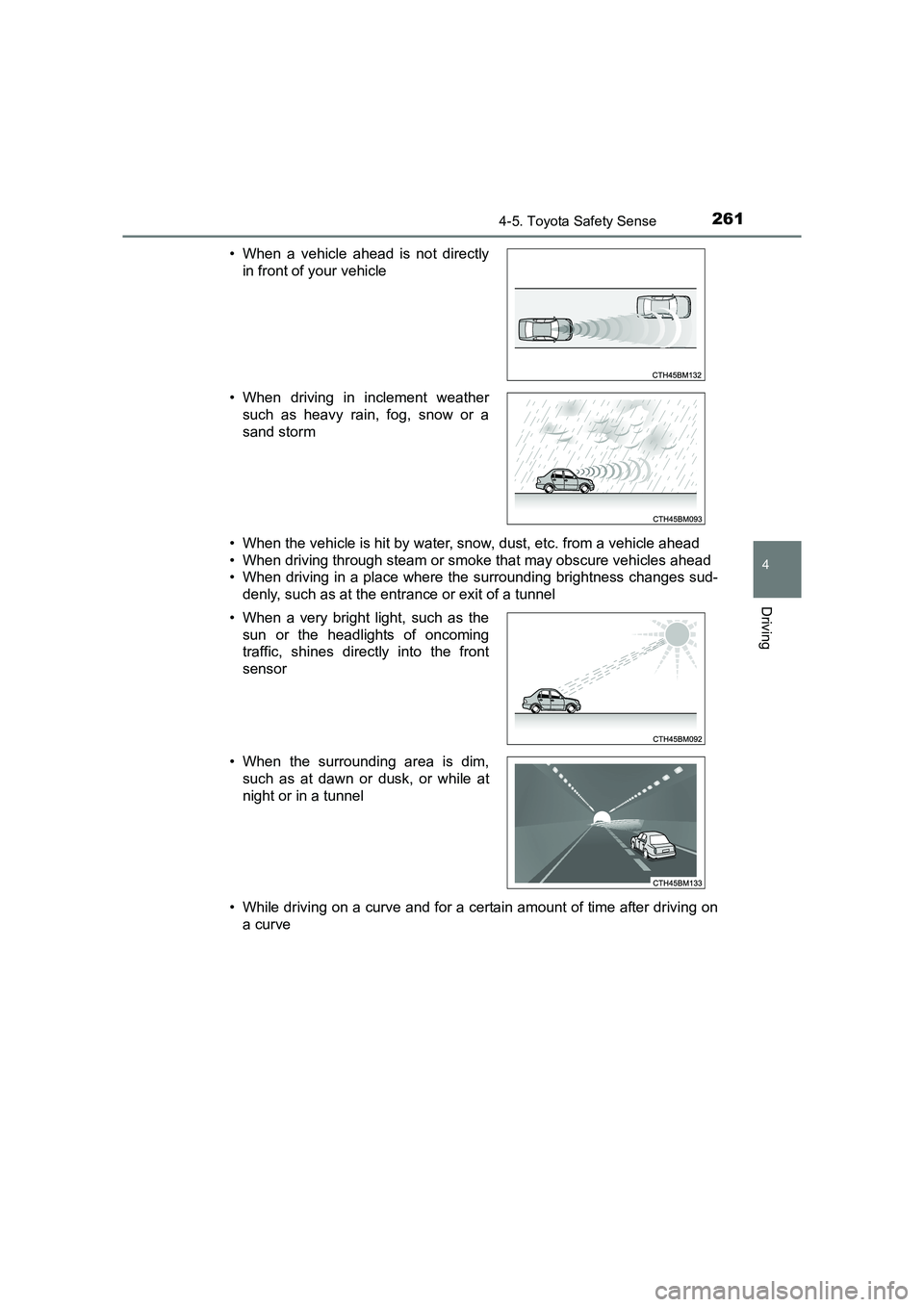
• When a vehicle ahead is not directly
in front of your vehicle
• When driving in inclement weather such as heavy rain, fog, snow or a
sand storm
• When a very bright light, such as the sun or the headlights of oncoming
traffic, shines directly into the front
sensor
• When the surrounding area is dim, such as at dawn or dusk, or while at
night or in a tunnel
Page 277 of 592
2774-5. Toyota Safety Sense
UK AURIS_HV_HB_EE (OM12K47E)
4
Driving
■Conditions in which the function may not operate or detect correctly
In the following situations, RSA does not operate normally and may not rec-
ognize signs, display the incorrect sign, etc. However, this does not indicate a
malfunction.
● The front sensor is misaligned due to a strong impact being applied to the
sensor, etc.
● Dirt, snow, stickers, etc., are on the windshield near the front sensor.
● In inclement weather such as heavy rain, fog, snow or sand storms
● Light from an oncoming vehicle, the sun, etc., enters the front sensor.
● The sign is small, dirty, faded, tilted or bent, and if an electronic sign, the
contrast is poor.
● All or part of the sign is hidden by the leaves of a tree, a pole, etc.
● The sign is only visible to the front sensor for a short amount of time.
● The driving scene (turning, lane change, etc.) is judged incorrectly.
● Even if it is a sign not appropriate for the currently traveled lane, such a sign
exists directly after a freeway branches, or in an adjacent lane just before
merging.
● Stickers are attached to the rear of the preceding vehicle.
● A sign resembling a system compatible sign is recognized.
● The vehicle is driven in a country with a different direction of traffic.
● Side road speed signs may be detected and displayed (if positioned in sight
of the front sensor) while the vehicle is traveling on the main road.
● Roundabout exit road speed signs may be detected and displayed (if posi-
tioned in sight of the front sensor) while traveling on a roundabout.
● The speed information displayed on the meter and that displayed on the
Navigation system (if equipped) may be different due to the Navigation sys-
tem using map data.
Page 281 of 592
2814-6. Using the driving support systems
UK AURIS_HV_HB_EE (OM12K47E)
4
Driving
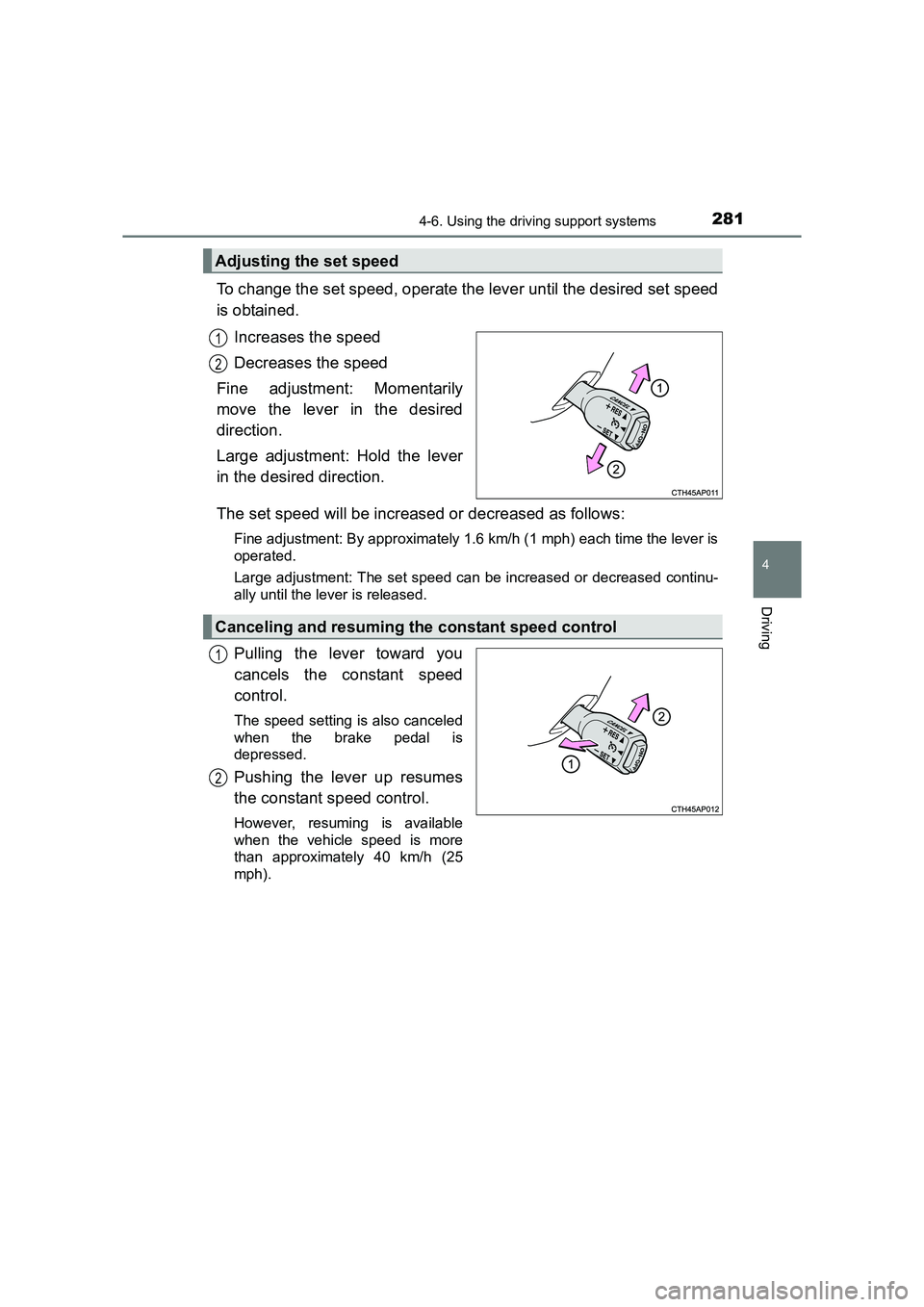
To change the set speed, operate the lever until the desired set speed
is obtained.Increases the speed
Decreases the speed
Fine adjustment: Momentarily
move the lever in the desired
direction.
Large adjustment: Hold the lever
in the desired direction.
The set speed will be increased or decreased as follows:
Fine adjustment: By approximately 1.6 km/h (1 mph) each time the lever is
operated.
Large adjustment: The set speed can be increased or decreased continu-
ally until the lever is released.
Pulling the lever toward you
cancels the constant speed
control.
The speed setting is also canceled
when the brake pedal is
depressed.
Pushing the lever up resumes
the constant speed control.
However, resuming is available
when the vehicle speed is more
than approximately 40 km/h (25
mph).
Adjusting the set speed
1
2
Canceling and resuming the constant speed control
1
2
Page 382 of 592
3826-1. Using the air conditioning system and defogger
UK AURIS_HV_HB_EE (OM12K47E)■
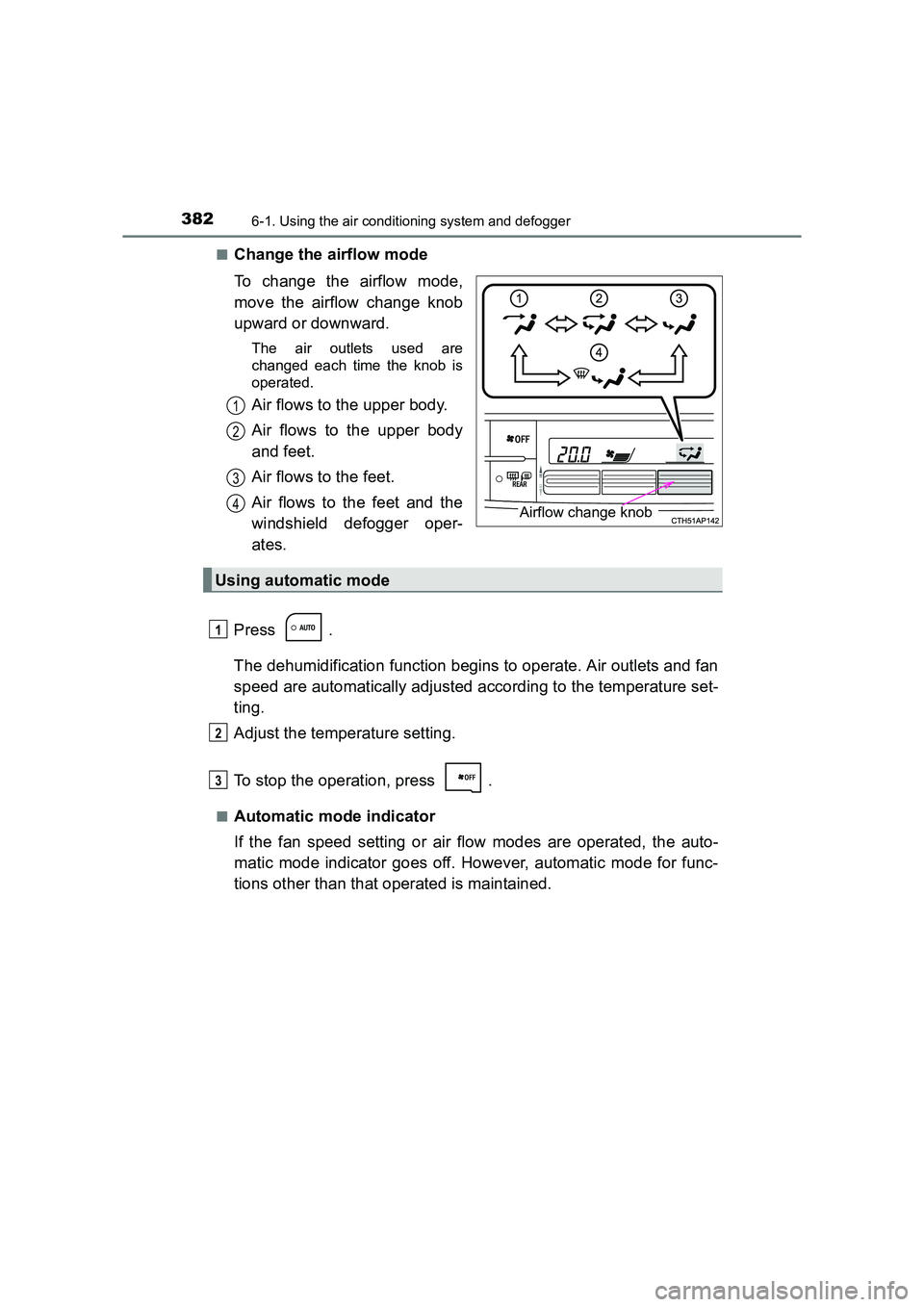
Change the airflow mode
To change the airflow mode,
move the airflow change knob
upward or downward.
The air outlets used are
changed each time the knob is
operated.
Air flows to the upper body.
Air flows to the upper body
and feet.
Air flows to the feet.
Air flows to the feet and the
windshield defogger oper-
ates.
Press .
The dehumidification function begins to operate. Air outlets and fan
speed are automatically adjusted according to the temperature set-
ting.
Adjust the temperature setting.
To stop the operation, press .
■Automatic mode indicator
If the fan speed setting or air flow modes are operated, the auto-
matic mode indicator goes off. However, automatic mode for func-
tions other than that operated is maintained.
Airflow change knob
1
2
3
4
Using automatic mode
1
2
3
Page 383 of 592
3836-1. Using the air conditioning system and defogger
UK AURIS_HV_HB_EE (OM12K47E)
6
Interior features
■Adjusting the temperature for driver and passenger seats sep-
arately (vehicles with dual control mode)
To turn on the dual control mode, perform any of the following pro-
cedures:
●Press .
● Adjust the passenger’s side temperature setting.
The indicator comes on when the dual control mode is on.
■
Switching between outside air and recirculated air modes
XVehicles without dual control mode
Press to change to recirculated air mode.
Press to change to outside air mode.
When recirculated air mode is selected, the indicator on illu-
minates.
When outside air mode is selected, the indicator on illumi-
nates.
XVehicles with dual control mode
Press .
The mode switches between outside air mode (indicator off) and recir-
culated air mode (indicator on) each time is pressed.
Other functions
Page 384 of 592
3846-1. Using the air conditioning system and defogger
UK AURIS_HV_HB_EE (OM12K47E)■
Defogging the windshield
Defoggers are used to defog the windshield and front side win-
dows.
Press .
The dehumidification function operates and fan speed increases.
Set the outside/recirculated air mode button to the outside air mode if
the recirculated air mode is used. (It may switch automatically.)
To defog the windshield and the front side windows early, turn the air
flow and temperature up.
To return to the previous mode, press again when the windshield
is defogged.
■
Defogging the rear window and outside rear view mirrors
Defoggers are used to defog the rear window, and to remove rain-
drops, dew and frost from the outside rear view mirrors.
Press .
The defoggers will automatically turn off after a period of time.
■
Blower customization
Fan speed settings can be changed.
Press .
Press .
Each time is pressed, the fan speed changes as follows.
“MEDIUM” →“SOFT” →“FAST”
1
2
3
Page 387 of 592
3876-1. Using the air conditioning system and defogger
UK AURIS_HV_HB_EE (OM12K47E)
6
Interior features
■Outside/recirculated air mode
●When driving on dusty roads such as tunnels or in heavy traffic, set the out-
side/recirculated air mode button to the recirculated air mode. This is effec-
tive in preventing outside air from entering the vehicle interior. During
cooling operation, setting the recirculat ed air mode will also cool the vehicle
interior effectively.
● Outside/recirculated air mode may automatically switch depending on the
temperature setting or the inside temperature.
■ When the outside temperature is low
The dehumidification function may not operate even when is pressed.
■ Ventilation and air conditioning odors
●To let fresh air in, set the air conditioning system to the outside air mode.
● During use, various odors from inside and outside the vehicle may enter into
and accumulate in the air conditioning system. This may then cause odor to
be emitted from the vents.
● To reduce potential odors from occurring:
• It is recommended that the air condi tioning system be set to outside air
mode prior to turning the vehicle off.
• The start timing of the blower may be delayed for a short period of time immediately after the air conditioning system is started in automatic
mode.
■ Air conditioning filter
→ P. 457
■ Customization
Settings (e.g. air conditioni ng setting) can be changed.
(Customizable features →P. 566)
Page 393 of 592
3936-2. Using the interior lights
UK AURIS_HV_HB_EE (OM12K47E)
6
Interior features
■Illuminated entry system
When the interior light switch is in the door position, the interior lights and
power switch light automatically turn on/off according to power switch mode,
the presence of the electronic key, whether the doors are locked/unlocked
and whether the doors are open/closed.
■ To prevent 12-volt battery discharge
The following lights will turn off automatically after 20 minutes:
●Personal/interior lights
● Luggage compartment light
● Vanity lights (if equipped)
■ Customization that can be configured at any authorized Toyota dealer or
repairer, or another duly quali fied and equipped professional
Settings (e.g. the time elapsed before lights turn off) can be changed.
(Customizable features: →P. 566)
Page 444 of 592
4447-3. Do-it-yourself maintenance
UK AURIS_HV_HB_EE (OM12K47E)■
The initialization operation (vehic les with a tire pressure warning sys-
tem)
● Make sure to carry out initialization after adjusting the tire inflation pressure.
Also, make sure the tires are cold before carrying out initialization or tire
inflation pressure adjustment.
● If you have accidentally turned the power switch off during initialization, it is
not necessary to press the reset switch again as initialization will restart
automatically when the power switch has been turned to ON mode for the
next time.
● If you accidentally press the reset switch when initialization is not necessary,
adjust the tire inflation pressure to the specified level when the tires are
cold, and conduct initialization again.
■ Warning performance of the tire pr essure warning system (vehicles with
a tire pressure warning system)
The warning of the tire pressure warning system will change in accordance
with driving conditions. For this reason, the system may give a warning even
if the tire pressure does not reach a low enough level, or if the pressure is
higher than the pressure that was adjusted to when the system was initial-
ized.
■ When initialization of the tire pr essure warning system has failed (vehi-
cles with a tire pressure warning system)
Initialization can be completed in a few minutes. However, in the following
cases, the settings have not been recorded and the system will not operate
properly. If repeated attempts to record tire inflation pressure settings are
unsuccessful, have the vehicle inspected by any authorized Toyota dealer or
repairer, or another duly qualified and equipped professional as soon as pos-
sible.
● When operating the tire pressure warning reset switch, the tire pressure
warning light does not blink 3 times.
● After driving for a certain period of time since the initialization has been
completed, the warning light comes on after blinking for 1 minute.
■ Registering ID codes (vehicles with a tire pressure warning system)
The ID codes of the tire pressure wa rning valve and transmitters for two sets
of wheels can be registered.
It is not necessary to register the ID codes when replacing normal tires with
snow tires, if the ID codes for the wheels of both normal tires and snow tires
are registered beforehand.
For information about changing ID codes, ask any authorized Toyota dealer
or repairer, or another duly qualified and equipped professional.