ECU TOYOTA AURIS HYBRID 2016 Service Manual
[x] Cancel search | Manufacturer: TOYOTA, Model Year: 2016, Model line: AURIS HYBRID, Model: TOYOTA AURIS HYBRID 2016Pages: 592, PDF Size: 16.67 MB
Page 91 of 592
911-3. Theft deterrent system
1
For safety and security
UK AURIS_HV_HB_EE (OM12K47E)■
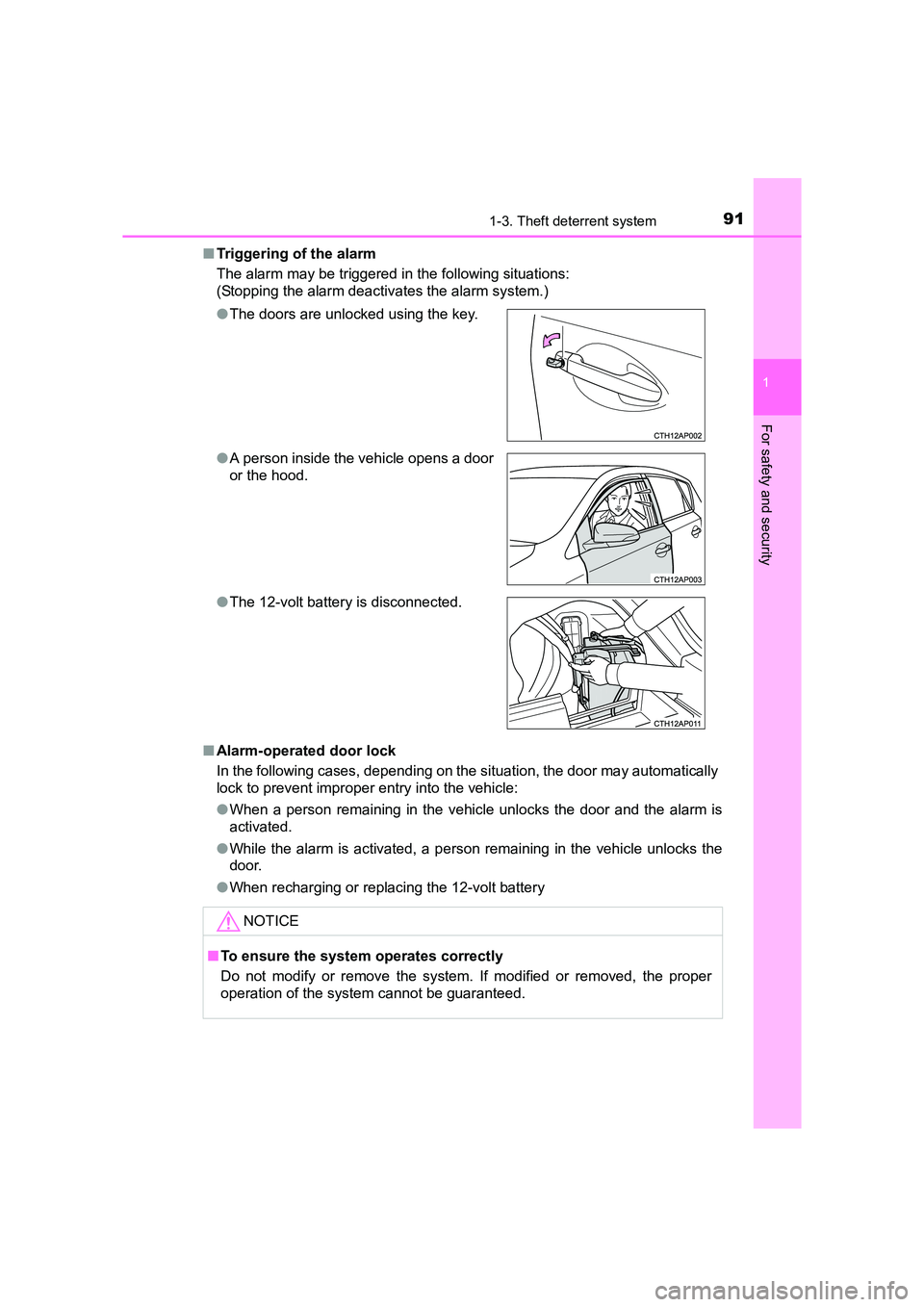
Triggering of the alarm
The alarm may be triggered in the following situations:
(Stopping the alarm deactivates the alarm system.)
■ Alarm-operated door lock
In the following cases, depending on the situation, the door may automatically
lock to prevent improper entry into the vehicle:
●When a person remaining in the vehicle unlocks the door and the alarm is
activated.
● While the alarm is activated, a person remaining in the vehicle unlocks the
door.
● When recharging or replacing the 12-volt battery
●
The doors are unlocked using the key.
● A person inside the vehicle opens a door
or the hood.
● The 12-volt battery is disconnected.
NOTICE
■To ensure the system operates correctly
Do not modify or remove the system. If modified or removed, the proper
operation of the system cannot be guaranteed.
Page 92 of 592
921-3. Theft deterrent system
UK AURIS_HV_HB_EE (OM12K47E)
The intrusion sensor detects intruders or movement in the vehicle.
When an intruder or movement is detected, the alarm will be trig-
gered.
This system is designed to deter and prevent vehicle theft but does
not guarantee absolute security against all intrusions.
■Setting the intrusion sensor
The intrusion sensor will be set automatically when the alarm is set.
(→ P. 8 9 )
■Canceling the intrusion sensor
If you are leaving pets or other moving things inside the vehicle,
make sure to stop the intrusion sensor before setting the alarm, as
they will respond to movement inside the vehicle.
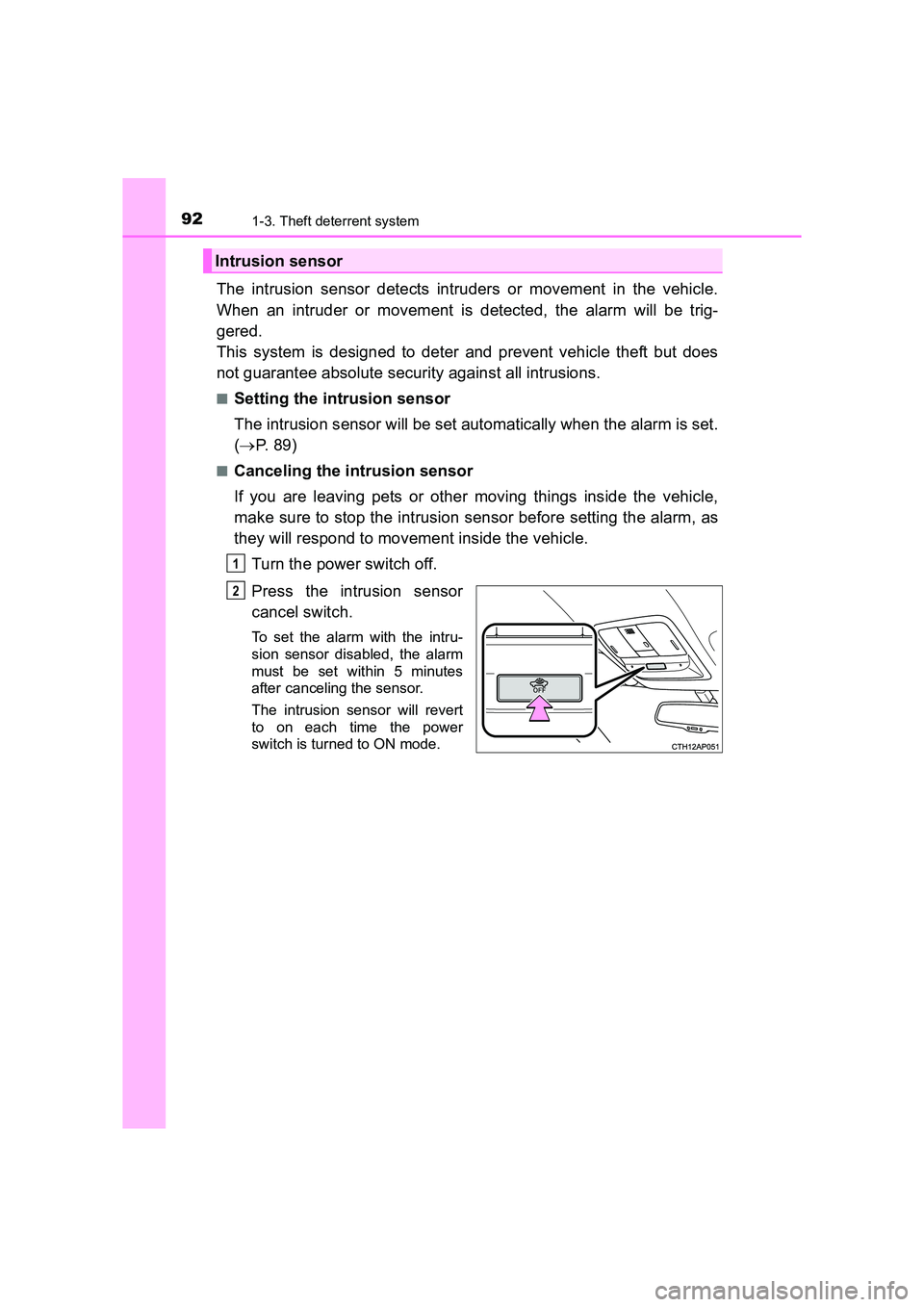
Turn the power switch off.
Press the intrusion sensor
cancel switch.
To set the alarm with the intru-
sion sensor disabled, the alarm
must be set within 5 minutes
after canceling the sensor.
The intrusion sensor will revert
to on each time the power
switch is turned to ON mode.
Intrusion sensor
1
2
Page 93 of 592
931-3. Theft deterrent system
1
For safety and security
UK AURIS_HV_HB_EE (OM12K47E)
■Canceling and automatic re-enabling of the intrusion sensor
●The alarm will still be set even when the intrusion sensor is canceled.
● After the intrusion sensor is canceled, pressing the power switch or unlock-
ing the doors using the entry function or wireless remote control will re-
enable the intrusion sensor.
● The intrusion sensor will automatic ally be re-enabled when the alarm sys-
tem is deactivated.
● The intrusion sensor will automatically be re-enabled if the alarm system is
not set within 5 minutes after the intrusion sensor is canceled.
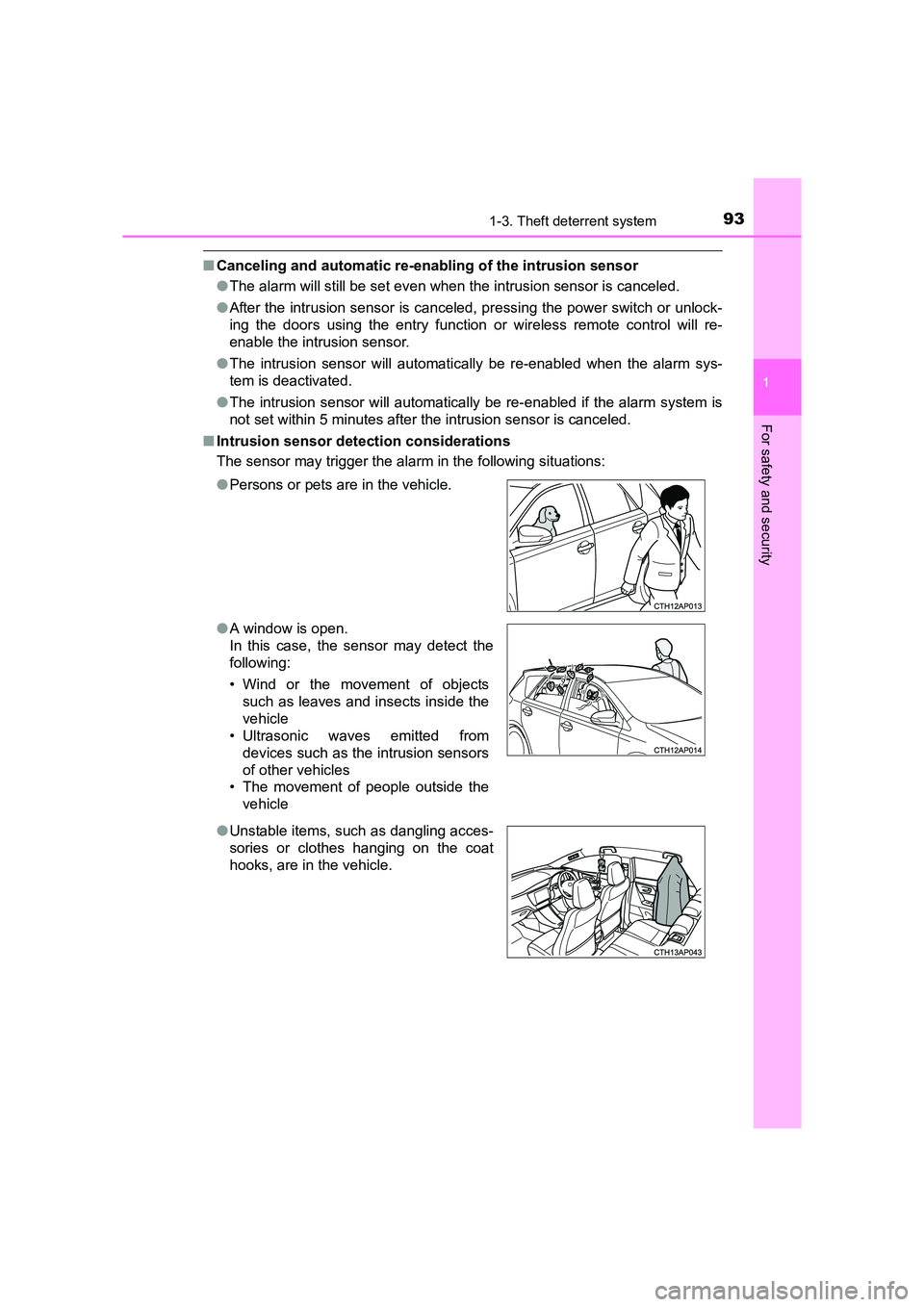
■ Intrusion sensor detection considerations
The sensor may trigger the alar m in the following situations:
● Persons or pets are in the vehicle.
● A window is open.
In this case, the sensor may detect the
following:
• Wind or the movement of objects
such as leaves and insects inside the
vehicle
• Ultrasonic waves emitted from
devices such as the intrusion sensors
of other vehicles
• The movement of people outside the
vehicle
● Unstable items, such as dangling acces-
sories or clothes hanging on the coat
hooks, are in the vehicle.
Page 95 of 592
951-3. Theft deterrent system
1
For safety and security
UK AURIS_HV_HB_EE (OM12K47E)
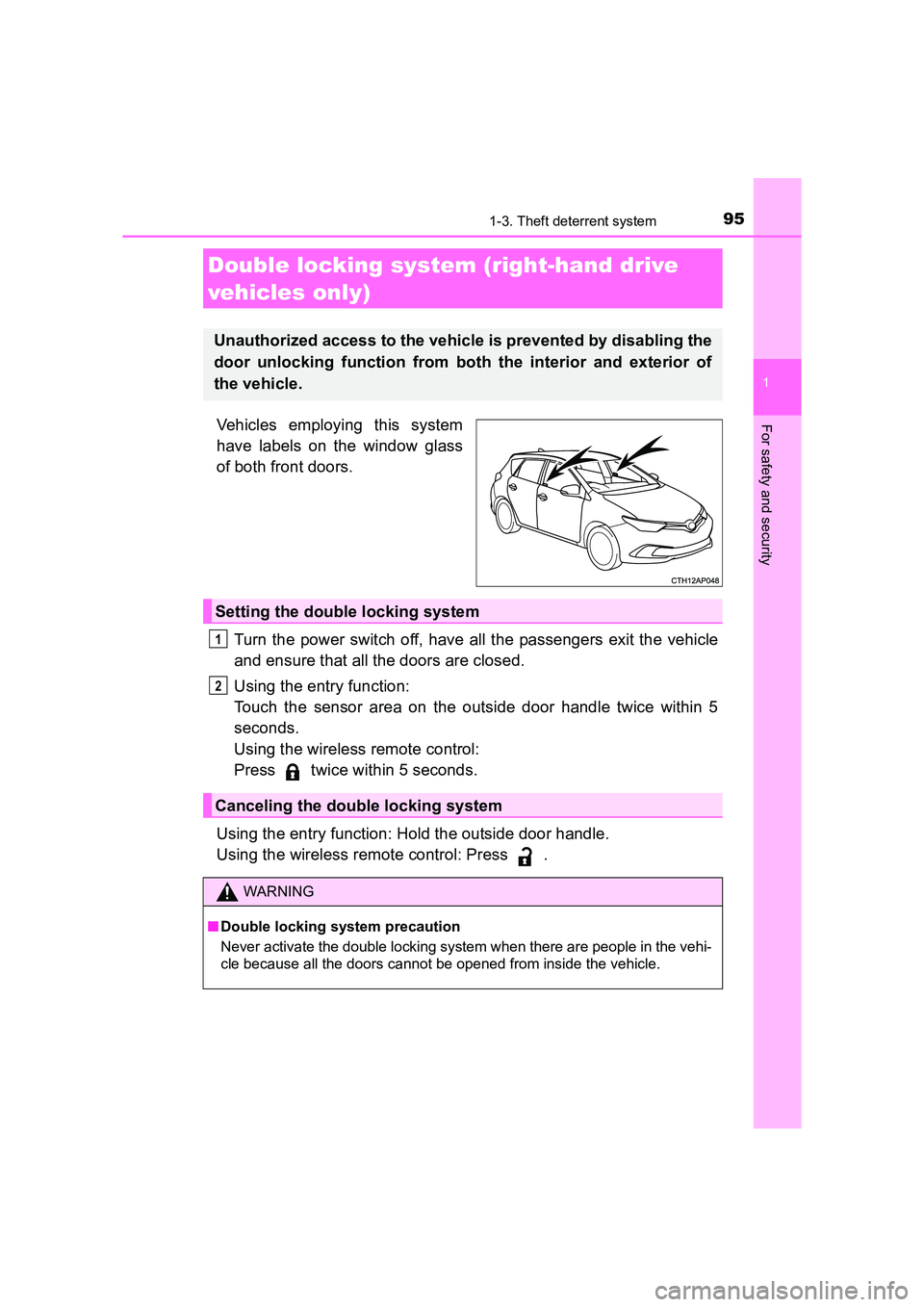
Vehicles employing this system
have labels on the window glass
of both front doors.Turn the power switch off, have all the passengers exit the vehicle
and ensure that all the doors are closed.
Using the entry function:
Touch the sensor area on the outside door handle twice within 5
seconds.
Using the wireless remote control:
Press twice within 5 seconds.
Using the entry function: Hold the outside door handle.
Using the wireless remote control: Press .
Double locking system (right-hand drive
vehicles only)
Unauthorized access to the vehicle is prevented by disabling the
door unlocking function from both the interior and exterior of
the vehicle.
Setting the double locking system
Canceling the double locking system
WARNING
■ Double locking system precaution
Never activate the double locking system when there are people in the vehi-
cle because all the doors cannot be opened from inside the vehicle.
1
2
Page 101 of 592
1012. Instrument cluster
UK AURIS_HV_HB_EE (OM12K47E)
2
Instrument cluster
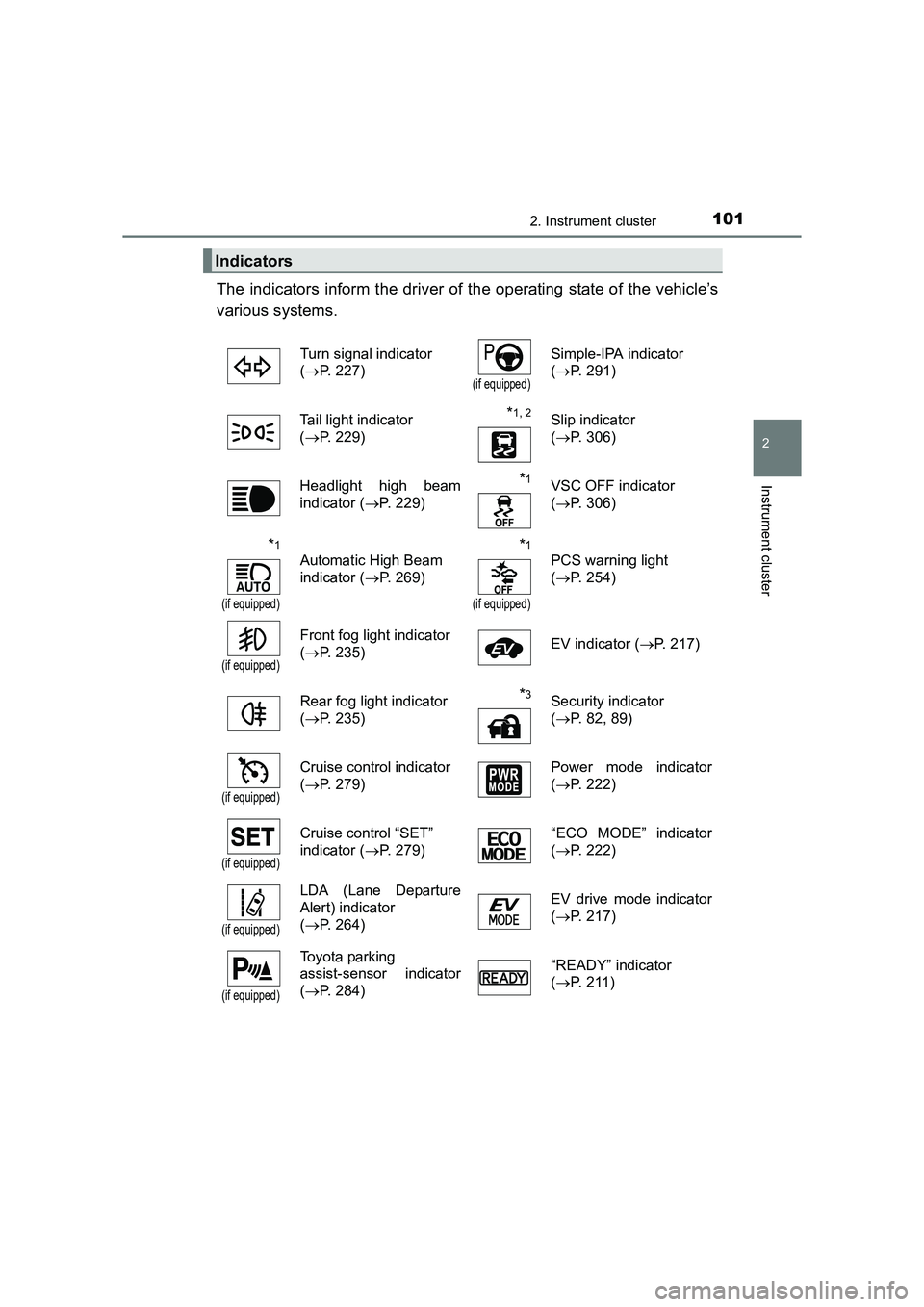
The indicators inform the driver of the operating state of the vehicle’s
various systems.
Indicators
Turn signal indicator
(→ P. 227)
(if equipped)
Simple-IPA indicator
(→ P. 291)
Tail light indicator
( → P. 229)
*1, 2Slip indicator
(→ P. 306)
Headlight high beam
indicator ( →P. 229)
*1VSC OFF indicator
(→ P. 306)
*1
(if equipped)
Automatic High Beam
indicator ( →P. 269)*1
(if equipped)
PCS warning light
(→ P. 254)
(if equipped)
Front fog light indicator
(→ P. 235) EV indicator (
→P. 217)
Rear fog light indicator
( → P. 235)
*3Security indicator
(→ P. 82, 89)
(if equipped)
Cruise control indicator
(→ P. 279) Power mode indicator
(
→ P. 222)
(if equipped)
Cruise control “SET”
indicator ( →P. 279) “ECO MODE” indicator
(
→ P. 222)
(if equipped)
LDA (Lane Departure
Alert) indicator
(→ P. 264) EV drive mode indicator
(
→ P. 217)
(if equipped)
Toyota parking
assist-sensor indicator
(→ P. 284) “READY” indicator
(
→ P. 211)
Page 124 of 592
124
UK AURIS_HV_HB_EE (OM12K47E)
3-2. Opening, closing and locking the doors
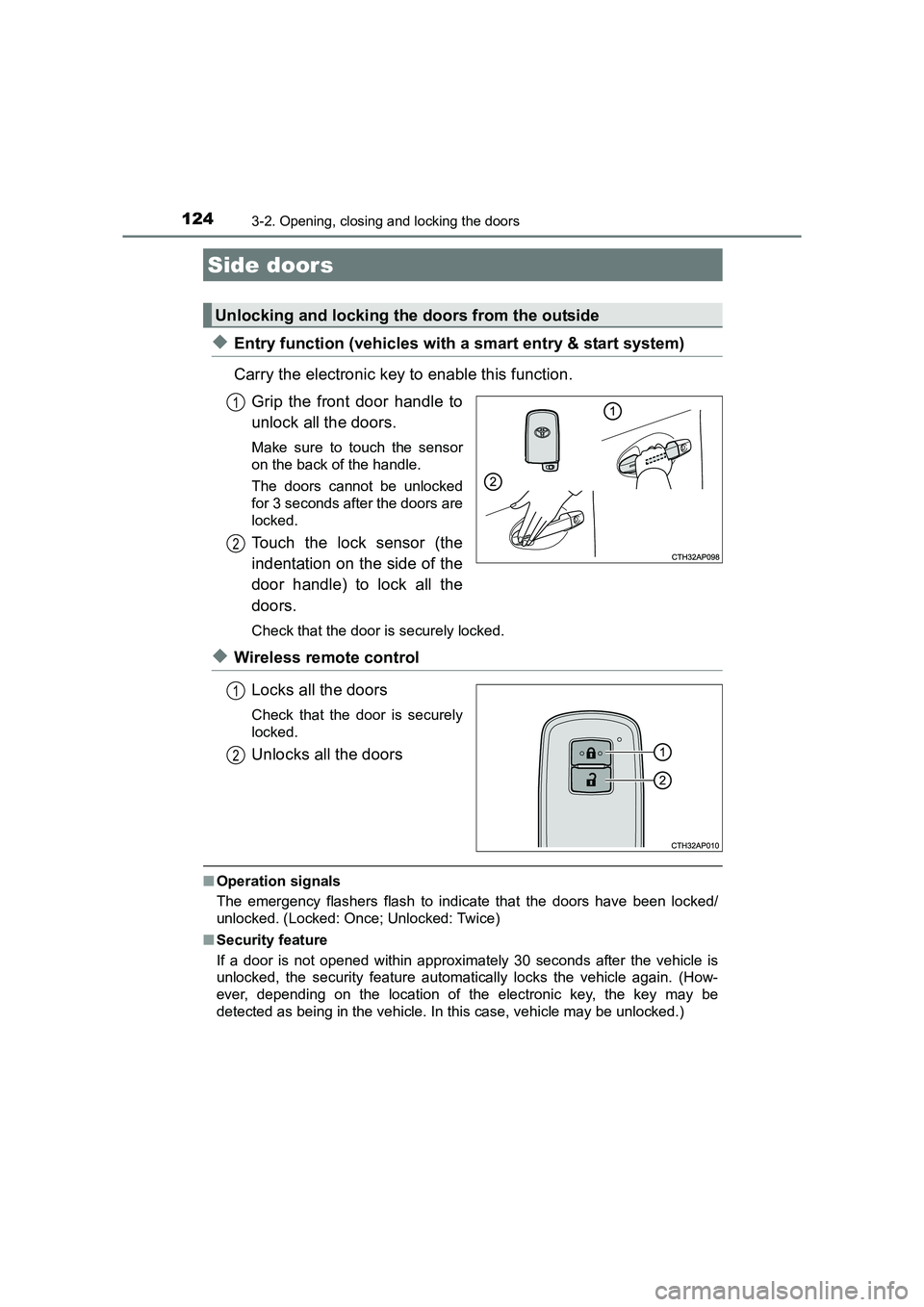
◆Entry function (vehicles with a smart entry & start system)
Carry the electronic key to enable this function.Grip the front door handle to
unlock all the doors.
Make sure to touch the sensor
on the back of the handle.
The doors cannot be unlocked
for 3 seconds after the doors are
locked.
Touch the lock sensor (the
indentation on the side of the
door handle) to lock all the
doors.
Check that the door is securely locked.
◆Wireless remote control
Locks all the doors
Check that the door is securely
locked.
Unlocks all the doors
■Operation signals
The emergency flashers flash to indicate that the doors have been locked/
unlocked. (Locked: Once; Unlocked: Twice)
■ Security feature
If a door is not opened within approximately 30 seconds after the vehicle is
unlocked, the security feature automatically locks the vehicle again. (How-
ever, depending on the location of the electronic key, the key may be
detected as being in the vehicle. In this case, vehicle may be unlocked.)
Side doors
Unlocking and locking the doors from the outside
1
2
1
2
Page 129 of 592
1293-2. Opening, closing and locking the doors
UK AURIS_HV_HB_EE (OM12K47E)
3
Operation of each component
■Door lock switch
→P. 1 2 6
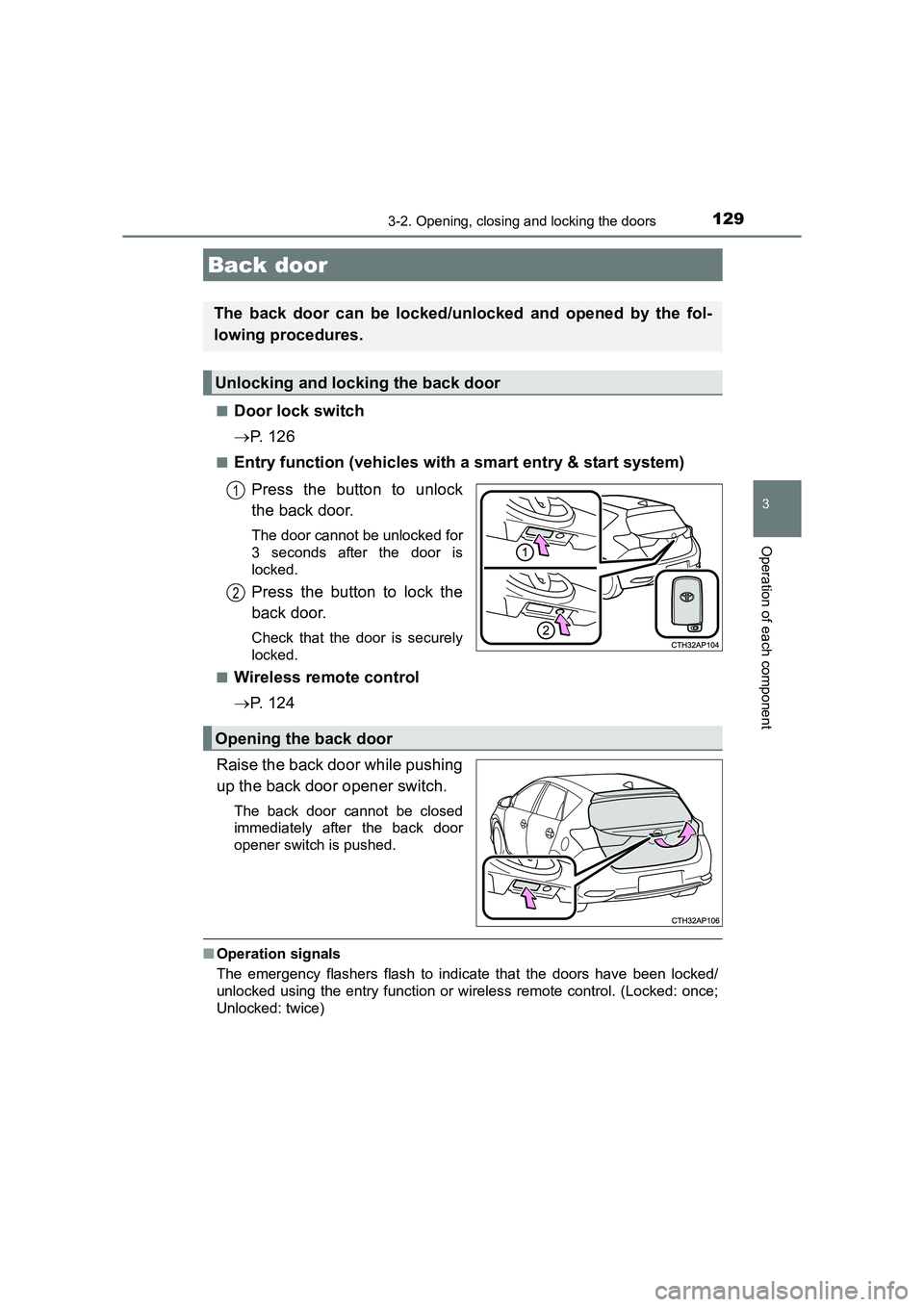
■Entry function (vehicles with a smart entry & start system)
Press the button to unlock
the back door.
The door cannot be unlocked for
3 seconds after the door is
locked.
Press the button to lock the
back door.
Check that the door is securely
locked.
■
Wireless remote control
→ P. 1 2 4
Raise the back door while pushing
up the back door opener switch.
The back door cannot be closed
immediately after the back door
opener switch is pushed.
■ Operation signals
The emergency flashers flash to indicate that the doors have been locked/
unlocked using the entry function or wireless remote control. (Locked: once;
Unlocked: twice)
Back door
The back door can be locked/unlocked and opened by the fol-
lowing procedures.
Unlocking and locking the back door
1
2
Opening the back door
Page 132 of 592
1323-2. Opening, closing and locking the doors
UK AURIS_HV_HB_EE (OM12K47E)
WARNING
■ Operating the back door
Observe the following precautions.
Failure to do so may cause parts of the body to be caught, resulting in death
or serious injury.
●Remove any heavy loads, such as snow and ice, from the back door
before opening it. Failure to do so may cause the back door to suddenly
shut again after it is opened.
● When opening or closing the back door, thoroughly check to make sure
the surrounding area is safe.
● If anyone is in the vicinity, make sure they are safe and let them know that
the back door is about to open or close.
● Use caution when opening or closing the back door in windy weather as it
may move abruptly in strong wind.
● Do not pull on the back door damper stay to close the back door, and do
not hang on the back door damper stay.
Doing so may cause hands to be caught or the back door damper stay to
break, causing an accident.
● If a bicycle carrier or similar heavy object is attached to the back door, it
may suddenly shut again after being opened, causing someone’s hands,
head or neck to be caught and injured. When installing an accessory part
to the back door, using a genuine Toyota part is recommended.
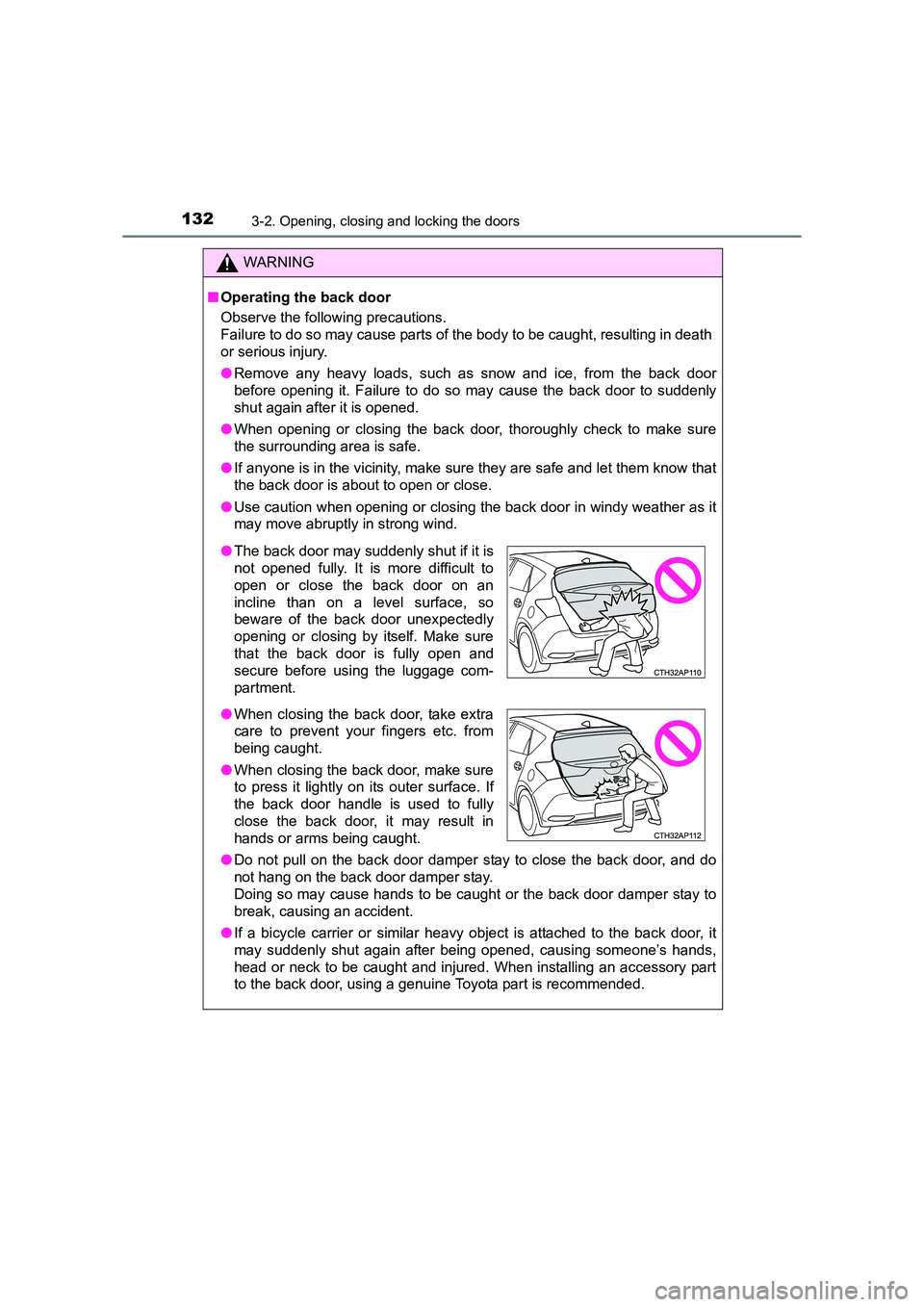
●The back door may suddenly shut if it is
not opened fully. It is more difficult to
open or close the back door on an
incline than on a level surface, so
beware of the back door unexpectedly
opening or closing by itself. Make sure
that the back door is fully open and
secure before using the luggage com-
partment.
● When closing the back door, take extra
care to prevent your fingers etc. from
being caught.
● When closing the back door, make sure
to press it lightly on its outer surface. If
the back door handle is used to fully
close the back door, it may result in
hands or arms being caught.
Page 138 of 592
1383-2. Opening, closing and locking the doors
UK AURIS_HV_HB_EE (OM12K47E)■
Note for the entry function
●Even when the electronic key is within the effective range (detection areas),
the system may not operate properly in the following cases:
• The electronic key is too close to the window or outside door handle, near
the ground, or in a high place w hen the doors are locked or unlocked.
• The electronic key is near the ground or in a high place, or too close to the rear bumper center when the back door is opened.
• The electronic key is on the instrument panel, luggage cover or floor, or in
the door pockets or glove box when the hybrid system is started or power
switch modes are changed.
● Do not leave the electronic key on top of the instrument panel or near the
door pockets when exiting the vehicle. Depending on the radio wave recep-
tion conditions, it may be detected by the antenna outside the cabin and the
door will become lockable from the outside, possibly trapping the electronic
key inside the vehicle.
● As long as the electronic key is within the effective range, the doors may be
locked or unlocked by anyone. However, only the doors detecting the elec-
tronic key can be used to unlock the vehicle.
● Even if the electronic key is not inside the vehicle, it may be possible to start
the hybrid system if the electronic key is near the window.
● The doors may unlock or lock if a large amount of water splashes on the
door handle, such as in the rain or in a car wash when the electronic key is
within the effective range. (The doors will automatically be locked after
approximately 30 seconds if the doors are not opened and closed.)
● If the wireless remote control is used to lock the doors when the electronic
key is near the vehicle, there is a possibility that the door may not be
unlocked by the entry function. (Use the wireless remote control to unlock
the doors.)
● Touching the door lock or unlock sens or while wearing gloves may prevent
lock or unlock operation.
● When the lock operation is performed using the lock sensor, recognition sig-
nals will be shown up to two consecutive times. After this, no recognition
signals will be given.
● If the door handle becomes wet while the electronic key is within the effec-
tive range, the door may lock and unlock repeatedly. In that case, follow the
following correction procedures to wash the vehicle:
• Place the electronic key in a location 2 m (6 ft.) or more away from the
vehicle. (Take care to ensure that the key is not stolen.)
• Set the electronic key to battery-saving mode to disable the smart entry &
start system. ( →P. 136)
Page 176 of 592
1763-3. Adjusting the seats
UK AURIS_HV_HB_EE (OM12K47E)
WARNING
Observe the following precautions. Failure to do so may result in death or
serious injury.
■ When folding the rear seatbacks down
●Do not fold the seatbacks down while driving.
● Stop the vehicle on level ground, set the parking brake and set the shift
position to P.
● Do not allow anyone to sit on a folded seatback or in the luggage compart-
ment while driving.
● Do not allow children to enter the luggage compartment.
● Do not allow anyone to sit on the rear center seat if the rear right seat is
folded down, as the seat belt buckle for the rear center seat belt is then
concealed under the folded seat and cannot be used.
● Be careful not to get your hand caught when folding the rear seatbacks.
● Adjust the position of the front seats before folding down the rear seat-
backs so that the front seats do not interfere with the rear seatbacks when
folding down the rear seatbacks.
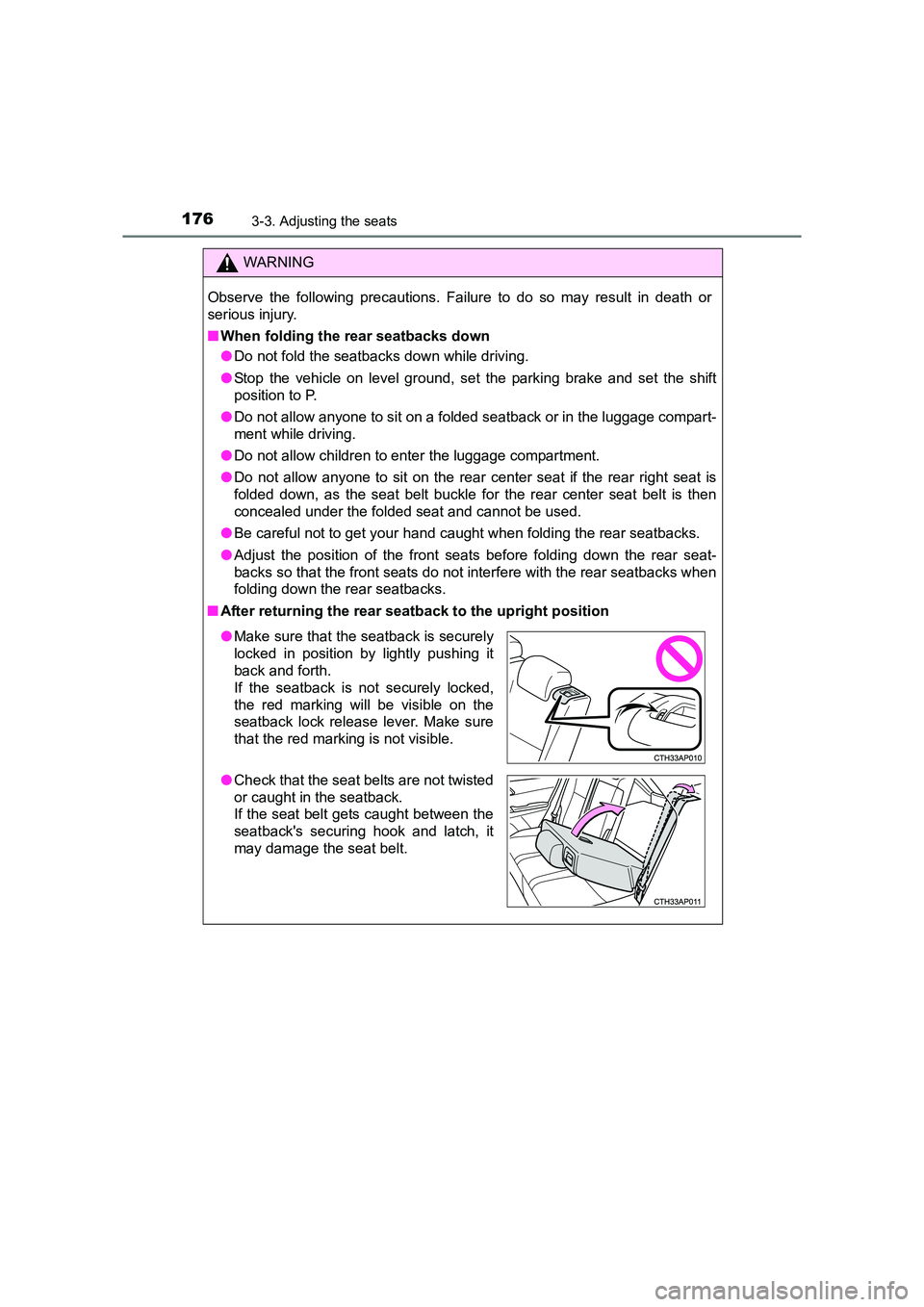
■ After returning the rear seatback to the upright position
●Make sure that the seatback is securely
locked in position by lightly pushing it
back and forth.
If the seatback is not securely locked,
the red marking will be visible on the
seatback lock release lever. Make sure
that the red marking is not visible.
● Check that the seat belts are not twisted
or caught in the seatback.
If the seat belt gets caught between the
seatback's securing hook and latch, it
may damage the seat belt.