ECO mode TOYOTA AURIS HYBRID 2017 User Guide
[x] Cancel search | Manufacturer: TOYOTA, Model Year: 2017, Model line: AURIS HYBRID, Model: TOYOTA AURIS HYBRID 2017Pages: 664, PDF Size: 27.42 MB
Page 146 of 664
1463-2. Opening, closing and locking the doors
AURIS Touring Sports_EE (12L13E)■Alarms and warning indicators
Vehicles with a 3-ring meter
A combination of exterior and interior buzzers as well as warning lights are
used to prevent theft of the vehicle and unforeseeable accidents resulting
from erroneous operation. Take appropriate measures for the warning light
that comes on. (P. 551)
Vehicles with a 2-ring meter
A combination of exterior and interior buzzers as well as warning messages
shown on the multi-information display are used to prevent theft of the vehicle
and accidents resulting from erroneous operation. Take appropriate mea-
sures based on the displayed message. (P. 557)
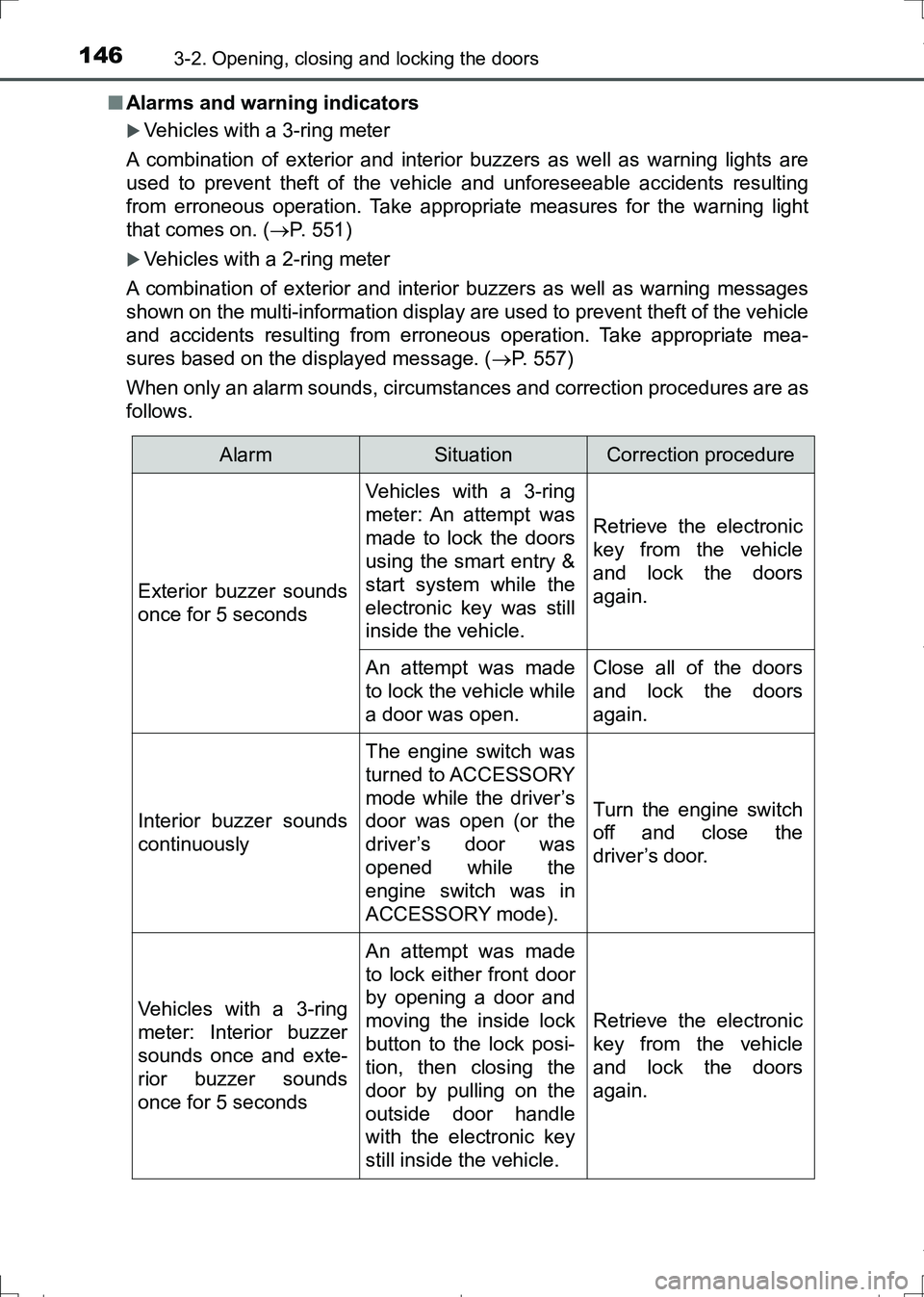
When only an alarm sounds, circumstances and correction procedures are as
follows.
AlarmSituationCorrection procedure
Exterior buzzer sounds
once for 5 seconds
Vehicles with a 3-ring
meter: An attempt was
made to lock the doors
using the smart entry &
start system while the
electronic key was still
inside the vehicle.
Retrieve the electronic
key from the vehicle
and lock the doors
again.
An attempt was made
to lock the vehicle while
a door was open.Close all of the doors
and lock the doors
again.
Interior buzzer sounds
continuously
The engine switch was
turned to ACCESSORY
mode while the driver’s
door was open (or the
driver’s door was
opened while the
engine switch was in
ACCESSORY mode).
Turn the engine switch
off and close the
driver’s door.
Vehicles with a 3-ring
meter: Interior buzzer
sounds once and exte-
rior buzzer sounds
once for 5 seconds
An attempt was made
to lock either front door
by opening a door and
moving the inside lock
button to the lock posi-
tion, then closing the
door by pulling on the
outside door handle
with the electronic key
still inside the vehicle.
Retrieve the electronic
key from the vehicle
and lock the doors
again.
AURIS Touring Sports_OM_Europe_OM12L13E.book 146 ページ 2016年6月27日 月曜日 午後5時21分
Page 149 of 664
1493-2. Opening, closing and locking the doors
AURIS Touring Sports_EE (12L13E)
3
Operation of each component
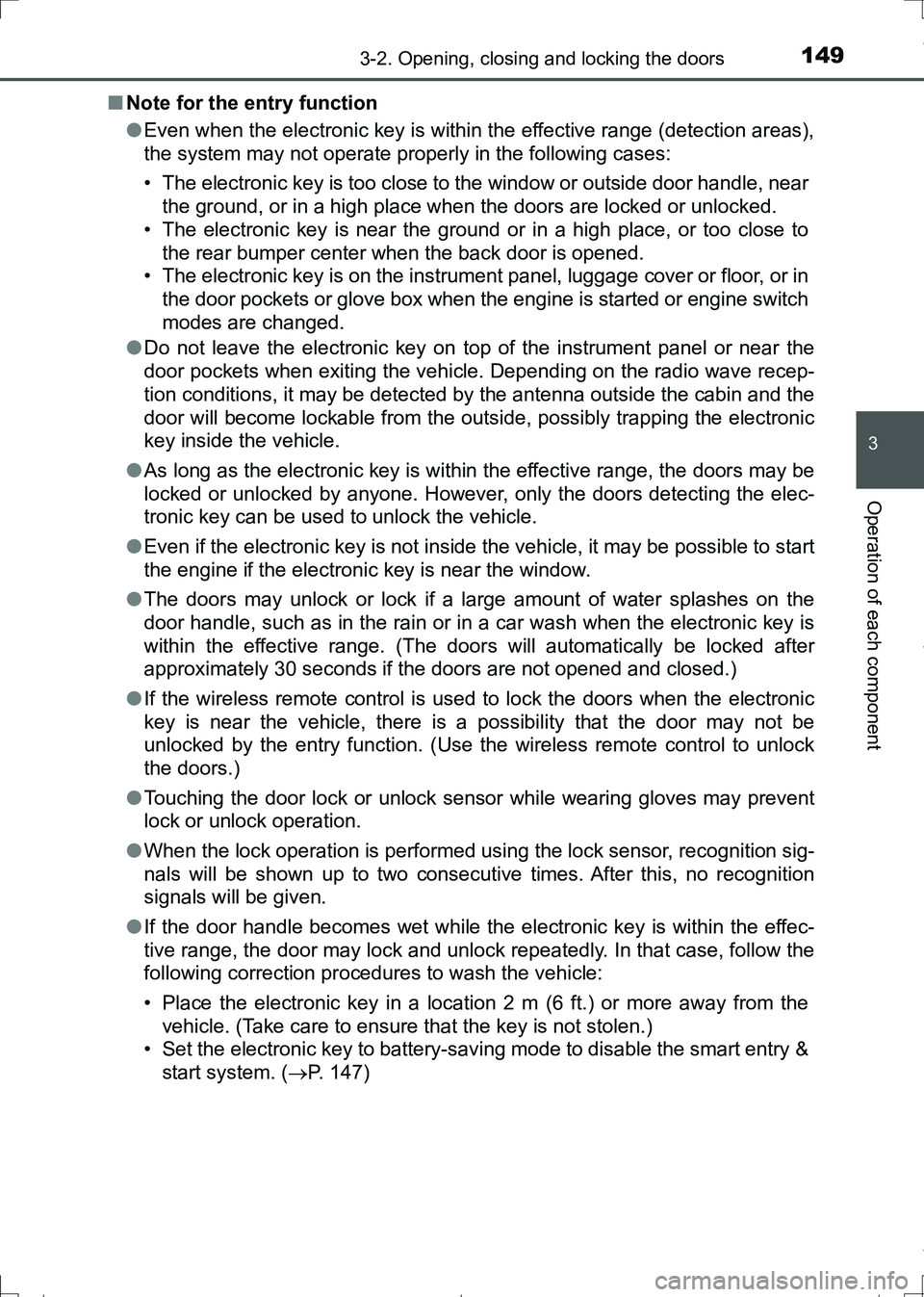
■Note for the entry function
●Even when the electronic key is within the effective range (detection areas),
the system may not operate properly in the following cases:
• The electronic key is too close to the window or outside door handle, near
the ground, or in a high place when the doors are locked or unlocked.
• The electronic key is near the ground or in a high place, or too close to
the rear bumper center when the back door is opened.
• The electronic key is on the instrument panel, luggage cover or floor, or in
the door pockets or glove box when the engine is started or engine switch
modes are changed.
●Do not leave the electronic key on top of the instrument panel or near the
door pockets when exiting the vehicle. Depending on the radio wave recep-
tion conditions, it may be detected by the antenna outside the cabin and the
door will become lockable from the outside, possibly trapping the electronic
key inside the vehicle.
●As long as the electronic key is within the effective range, the doors may be
locked or unlocked by anyone. However, only the doors detecting the elec-
tronic key can be used to unlock the vehicle.
●Even if the electronic key is not inside the vehicle, it may be possible to start
the engine if the electronic key is near the window.
●The doors may unlock or lock if a large amount of water splashes on the
door handle, such as in the rain or in a car wash when the electronic key is
within the effective range. (The doors will automatically be locked after
approximately 30 seconds if the doors are not opened and closed.)
●If the wireless remote control is used to lock the doors when the electronic
key is near the vehicle, there is a possibility that the door may not be
unlocked by the entry function. (Use the wireless remote control to unlock
the doors.)
●Touching the door lock or unlock sensor while wearing gloves may prevent
lock or unlock operation.
●When the lock operation is performed using the lock sensor, recognition sig-
nals will be shown up to two consecutive times. After this, no recognition
signals will be given.
●If the door handle becomes wet while the electronic key is within the effec-
tive range, the door may lock and unlock repeatedly. In that case, follow the
following correction procedures to wash the vehicle:
• Place the electronic key in a location 2 m (6 ft.) or more away from the
vehicle. (Take care to ensure that the key is not stolen.)
• Set the electronic key to battery-saving mode to disable the smart entry &
start system. (P. 147)
AURIS Touring Sports_OM_Europe_OM12L13E.book 149 ページ 2016年6月27日 月曜日 午後5時21分
Page 150 of 664
1503-2. Opening, closing and locking the doors
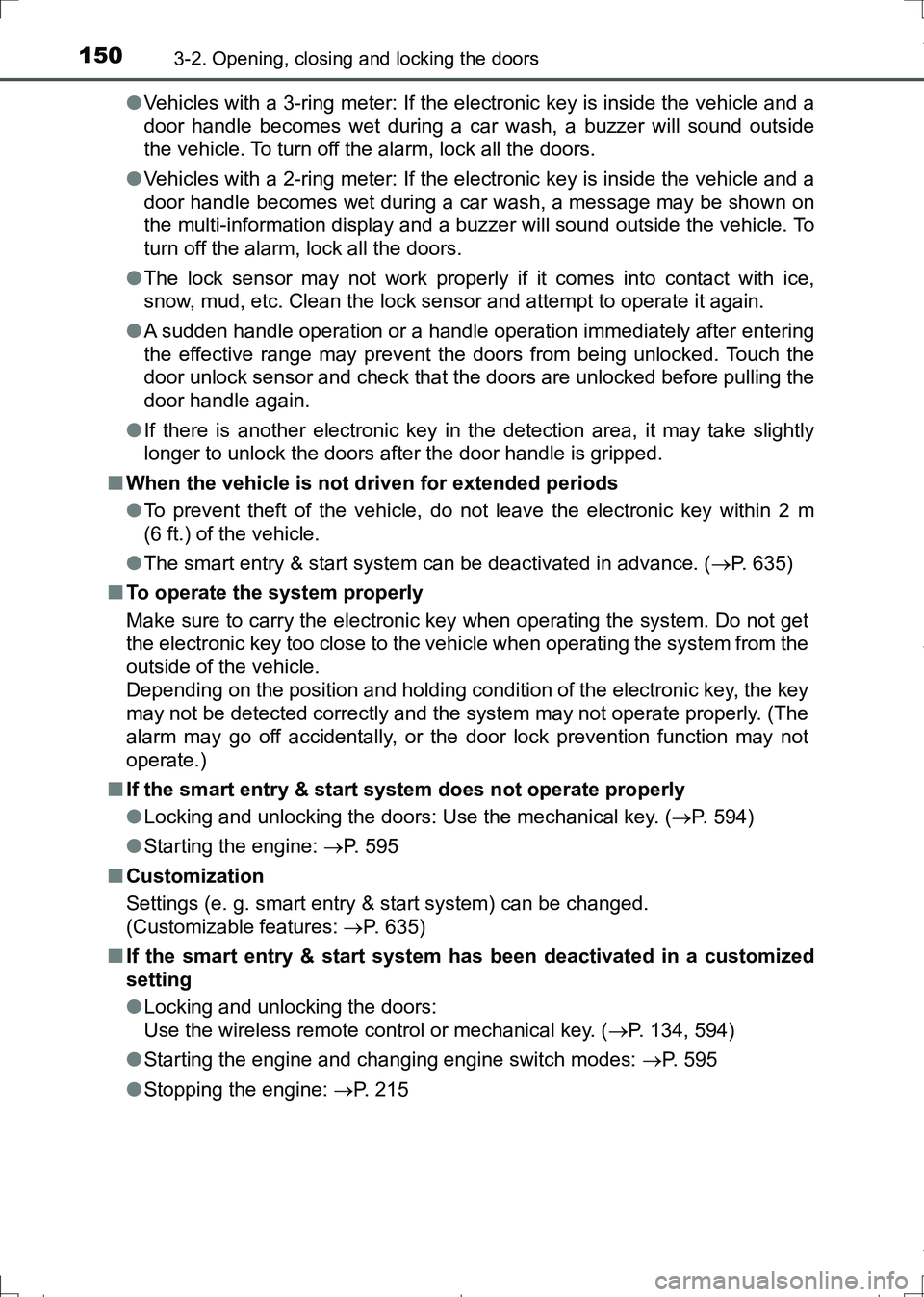
AURIS Touring Sports_EE (12L13E)●Vehicles with a 3-ring meter: If the electronic key is inside the vehicle and a
door handle becomes wet during a car wash, a buzzer will sound outside
the vehicle. To turn off the alarm, lock all the doors.
●Vehicles with a 2-ring meter: If the electronic key is inside the vehicle and a
door handle becomes wet during a car wash, a message may be shown on
the multi-information display and a buzzer will sound outside the vehicle. To
turn off the alarm, lock all the doors.
●The lock sensor may not work properly if it comes into contact with ice,
snow, mud, etc. Clean the lock sensor and attempt to operate it again.
●A sudden handle operation or a handle operation immediately after entering
the effective range may prevent the doors from being unlocked. Touch the
door unlock sensor and check that the doors are unlocked before pulling the
door handle again.
●If there is another electronic key in the detection area, it may take slightly
longer to unlock the doors after the door handle is gripped.
■When the vehicle is not driven for extended periods
●To prevent theft of the vehicle, do not leave the electronic key within 2 m
(6 ft.) of the vehicle.
●The smart entry & start system can be deactivated in advance. (P. 635)
■To operate the system properly
Make sure to carry the electronic key when operating the system. Do not get
the electronic key too close to the vehicle when operating the system from the
outside of the vehicle.
Depending on the position and holding condition of the electronic key, the key
may not be detected correctly and the system may not operate properly. (The
alarm may go off accidentally, or the door lock prevention function may not
operate.)
■If the smart entry & start system does not operate properly
●Locking and unlocking the doors: Use the mechanical key. (P. 594)
●Starting the engine: P. 595
■Customization
Settings (e. g. smart entry & start system) can be changed.
(Customizable features: P. 635)
■If the smart entry & start system has been deactivated in a customized
setting
●Locking and unlocking the doors:
Use the wireless remote control or mechanical key. (P. 134, 594)
●Starting the engine and changing engine switch modes: P. 595
●Stopping the engine: P. 215
AURIS Touring Sports_OM_Europe_OM12L13E.book 150 ページ 2016年6月27日 月曜日 午後5時21分
Page 179 of 664
1793-4. Adjusting the steering wheel and mirrors
AURIS Touring Sports_EE (12L13E)
3
Operation of each component
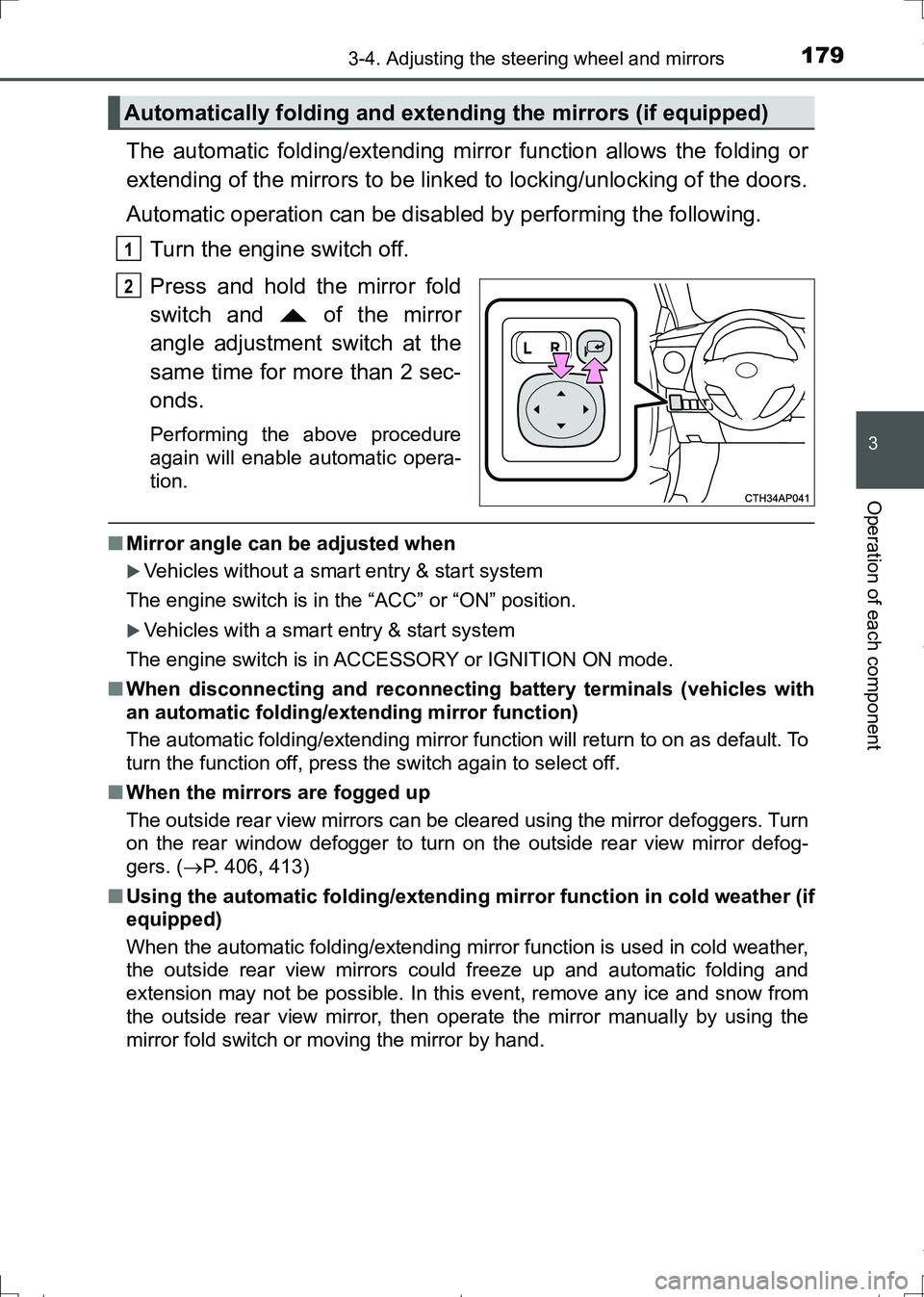
The automatic folding/extending mirror function allows the folding or
extending of the mirrors to be linked to locking/unlocking of the doors.
Automatic operation can be disabled by performing the following.
Turn the engine switch off.
Press and hold the mirror fold
switch and of the mirror
angle adjustment switch at the
same time for more than 2 sec-
onds.
Performing the above procedure
again will enable automatic opera-
tion.
■Mirror angle can be adjusted when
Vehicles without a smart entry & start system
The engine switch is in the “ACC” or “ON” position.
Vehicles with a smart entry & start system
The engine switch is in ACCESSORY or IGNITION ON mode.
■When disconnecting and reconnecting battery terminals (vehicles with
an automatic folding/extending mirror function)
The automatic folding/extending mirror function will return to on as default. To
turn the function off, press the switch again to select off.
■When the mirrors are fogged up
The outside rear view mirrors can be cleared using the mirror defoggers. Turn
on the rear window defogger to turn on the outside rear view mirror defog-
gers. (P. 406, 413)
■Using the automatic folding/extending mirror function in cold weather (if
equipped)
When the automatic folding/extending mirror function is used in cold weather,
the outside rear view mirrors could freeze up and automatic folding and
extension may not be possible. In this event, remove any ice and snow from
the outside rear view mirror, then operate the mirror manually by using the
mirror fold switch or moving the mirror by hand.
Automatically folding and extending the mirrors (if equipped)
1
2
AURIS Touring Sports_OM_Europe_OM12L13E.book 179 ページ 2016年6月27日 月曜日 午後5時21分
Page 182 of 664
1823-5. Opening and closing the windows
AURIS Touring Sports_EE (12L13E)
■The power windows can be operated when
Vehicles without a smart entry & start system
The engine switch is in the “ON” position.
Vehicles with a smart entry & start system
The engine switch is in IGNITION ON mode.
■Operating the power windows after turning the engine off
Vehicles without a smart entry & start system
The power windows can be operated for approximately 45 seconds after the
engine switch is turned to the “ACC” or “LOCK” position. They cannot, how-
ever, be operated once either front door is opened.
Vehicles with a smart entry & start system
The power windows can be operated for approximately 45 seconds after the
engine switch is turned to ACCESSORY mode or turned off. They cannot,
however, be operated once either front door is opened.
■Jam protection function (windows with one-touch closing function only)
If an object becomes caught between the window and the window frame, win-
dow travel is stopped and the window is opened slightly.
AURIS Touring Sports_OM_Europe_OM12L13E.book 182 ページ 2016年6月27日 月曜日 午後5時21分
Page 183 of 664
1833-5. Opening and closing the windows
AURIS Touring Sports_EE (12L13E)
3
Operation of each component
■When the power window does not close normally (windows with one-
touch closing function only)
If the jam protection function is operating abnormally and a window cannot be
closed, perform the following operations using the power window switch on
the relevant door.
●Vehicles without a smart entry & start system: After stopping the vehicle, the
window can be closed by holding the power window switch in the one-touch
closing position while the engine switch is turned to the “ON” position.
Vehicles with a smart entry & start system: After stopping the vehicle, the
window can be closed by holding the power window switch in the one-touch
closing position while the engine switch is turned to IGNITION ON mode.
●If the window still cannot be closed even by carrying out the operation as
explained above, initialize the function by performing the following proce-
dure.
Hold the power window switch in the one-touch closing position. Continue
holding the switch for a further 6 seconds after the window has closed.
Hold the power window switch in the one-touch opening position. Con-
tinue holding the switch for a further 2 seconds after the window has
opened completely.
Hold the power window switch in the one-touch closing position once
again. Continue holding the switch for a further 2 seconds after the win-
dow has closed.
If you release the switch while the window is moving, start again from the
beginning.
If the window continues to close but then re-open slightly even after perform-
ing the above procedure correctly, have the vehicle inspected by any autho-
rized Toyota dealer or repairer, or another duly qualified and equipped
professional.
1
2
3
AURIS Touring Sports_OM_Europe_OM12L13E.book 183 ページ 2016年6月27日 月曜日 午後5時21分
Page 188 of 664
1884-1. Before driving
AURIS Touring Sports_EE (12L13E)
Vehicles without a smart entry & start system: Turn the engine
switch to the “LOCK” position to stop the engine.
Vehicles with a smart entry & start system: Press the engine switch
to stop the engine.
Lock the door, making sure that you have the key on your person.
Multidrive
Make sure that the parking brake is set and shift the shift lever to D.
Gently depress the accelerator pedal.
Release the parking brake.
Manual transmission
With the parking brake firmly set and the clutch pedal fully
depressed, shift the shift lever to 1.
Lightly depress the accelerator pedal at the same time as gradually
releasing the clutch pedal.
Release the parking brake.
■When starting off on an uphill
The hill-start assist control will activate. (P. 331)
■Driving in the rain
●Drive carefully when it is raining, because visibility will be reduced, the win-
dows may become fogged-up, and the road will be slippery.
●Drive carefully when it starts to rain, because the road surface will be espe-
cially slippery.
●Refrain from high speeds when driving on an expressway in the rain,
because there may be a layer of water between the tires and the road sur-
face, preventing the steering and brakes from operating properly.
■Engine speed while driving (vehicles with a Multidrive)
In the following conditions, the engine speed may become high while driving.
This is due to automatic up-shifting control or down-shifting implementation to
meet driving conditions. It does not indicate sudden acceleration.
●The vehicle is judged to be driving uphill or downhill
●When the accelerator pedal is released
●When the brake pedal is depressed while sport mode is selected
Starting off on a steep uphill
4
5
1
2
3
1
2
3
AURIS Touring Sports_OM_Europe_OM12L13E.book 188 ページ 2016年6月27日 月曜日 午後5時21分
Page 213 of 664
2134-2. Driving procedures
AURIS Touring Sports_EE (12L13E)
4
Driving
Check that the parking brake is set.
Check that the shift lever is set in P (Multidrive) or N (manual trans-
mission).
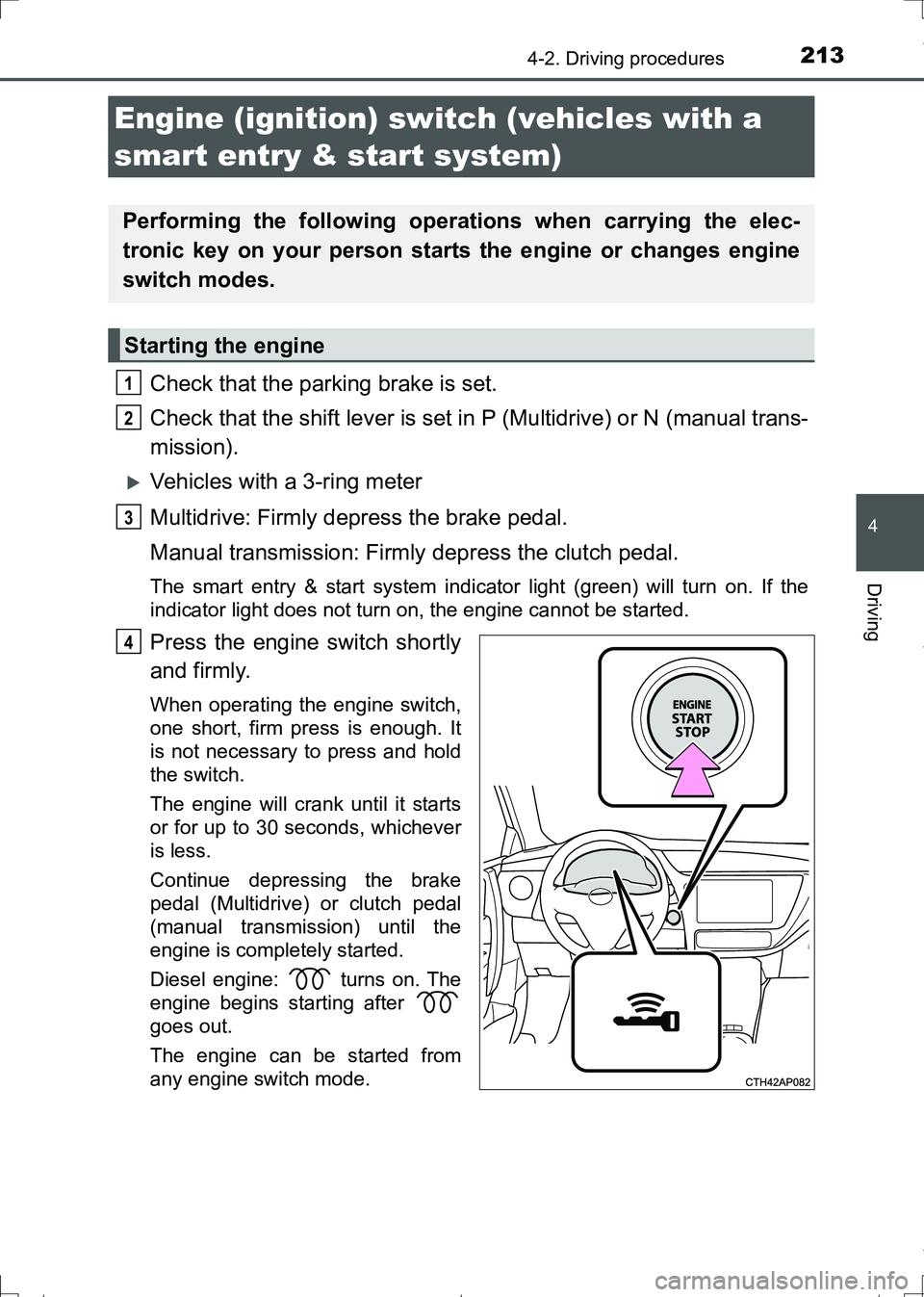
Vehicles with a 3-ring meter
Multidrive: Firmly depress the brake pedal.
Manual transmission: Firmly depress the clutch pedal.
The smart entry & start system indicator light (green) will turn on. If the
indicator light does not turn on, the engine cannot be started.
Press the engine switch shortly
and firmly.
When operating the engine switch,
one short, firm press is enough. It
is not necessary to press and hold
the switch.
The engine will crank until it starts
or for up to 30 seconds, whichever
is less.
Continue depressing the brake
pedal (Multidrive) or clutch pedal
(manual transmission) until the
engine is completely started.
Diesel engine: turns on. The
engine begins starting after
goes out.
The engine can be started from
any engine switch mode.
Engine (ignition) switch (vehicles with a
smart entry & start system)
Performing the following operations when carrying the elec-
tronic key on your person starts the engine or changes engine
switch modes.
Starting the engine
1
2
3
4
AURIS Touring Sports_OM_Europe_OM12L13E.book 213 ページ 2016年6月27日 月曜日 午後5時21分
Page 214 of 664
2144-2. Driving procedures
AURIS Touring Sports_EE (12L13E)
Vehicles with a 2-ring meter
Multidrive: Firmly depress the brake pedal.
Manual transmission: Firmly depress the clutch pedal.
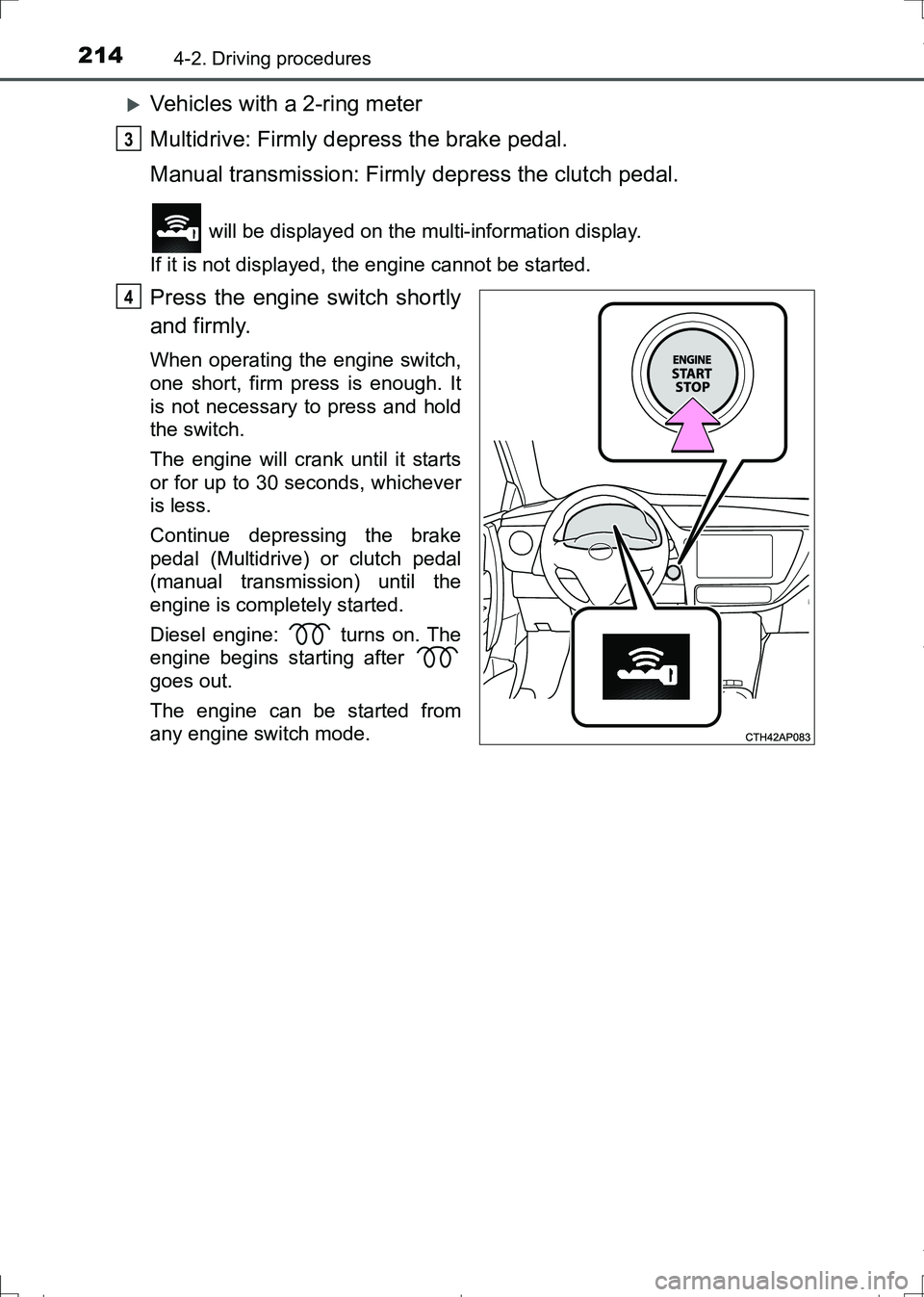
will be displayed on the multi-information display.
If it is not displayed, the engine cannot be started.
Press the engine switch shortly
and firmly.
When operating the engine switch,
one short, firm press is enough. It
is not necessary to press and hold
the switch.
The engine will crank until it starts
or for up to 30 seconds, whichever
is less.
Continue depressing the brake
pedal (Multidrive) or clutch pedal
(manual transmission) until the
engine is completely started.
Diesel engine: turns on. The
engine begins starting after
goes out.
The engine can be started from
any engine switch mode.
3
4
AURIS Touring Sports_OM_Europe_OM12L13E.book 214 ページ 2016年6月27日 月曜日 午後5時21分
Page 220 of 664
2204-2. Driving procedures
AURIS Touring Sports_EE (12L13E)■When the steering lock cannot be released
■Steering lock motor overheating prevention
To prevent the steering lock motor from overheating, the motor may be sus-
pended if the engine is turned on and off repeatedly in a short period of time.
In this case, refrain from operating the engine. After about 10 seconds, the
steering lock motor will resume functioning.
■When the smart entry & start system indicator flashes in yellow (vehicles
with a 3-ring meter) or “Check entry & start system.” is displayed on the
multi-information display (vehicles with a 2-ring meter)
The system may be malfunctioning. Have the vehicle inspected by any autho-
rized Toyota dealer or repairer, or another duly qualified and equipped profes-
sional immediately.
■If the key battery is depleted
P. 511
■Operation of the engine switch
●If the switch is not pressed shortly and firmly, the engine switch mode may
not change or the engine may not start.
●If attempting to restart the engine immediately after turning the engine
switch off, the engine may not start in some cases. After turning the engine
switch off, please wait a few seconds before restarting the engine.
■If the smart entry & start system has been deactivated in a customized
setting
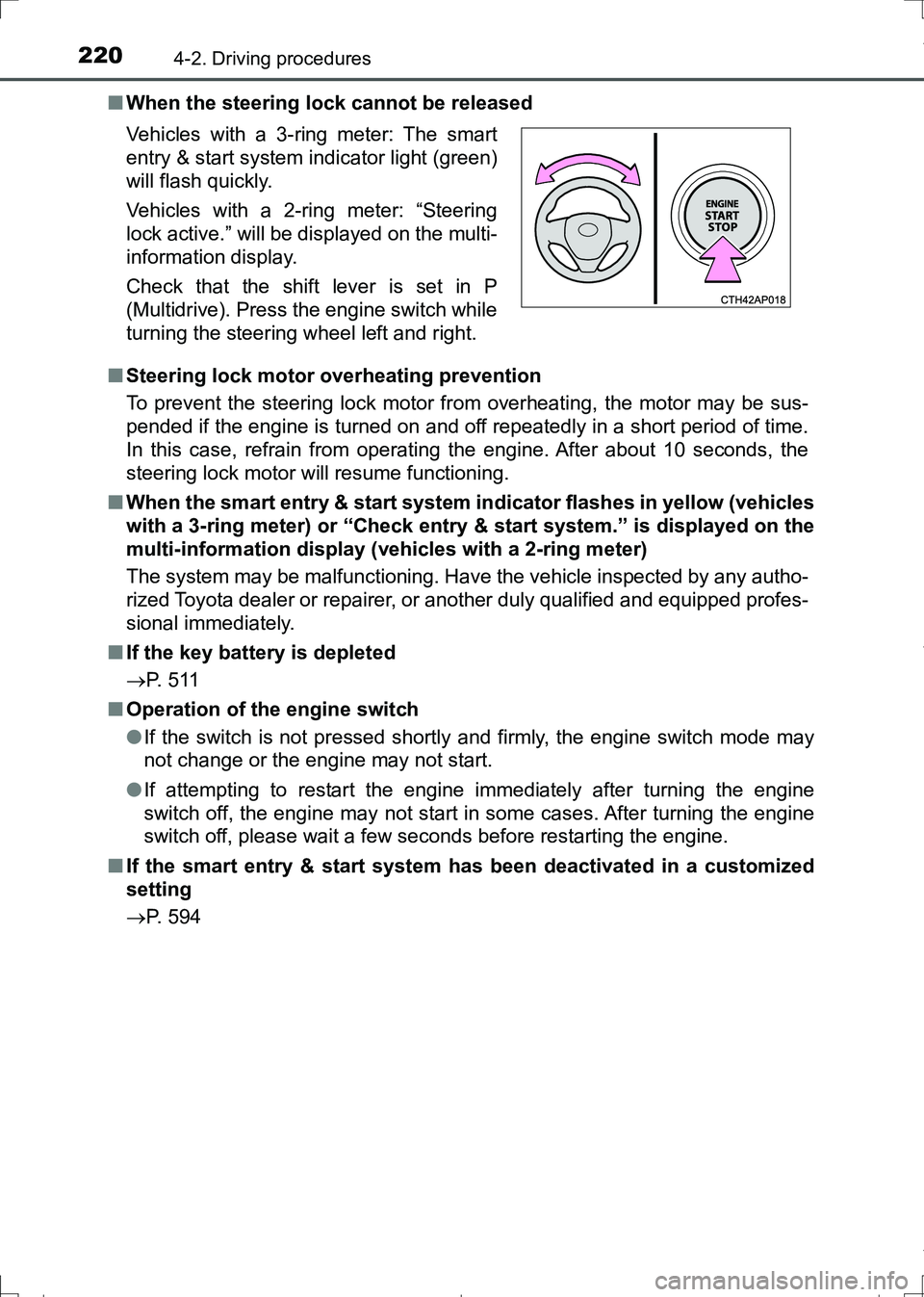
P. 594 Vehicles with a 3-ring meter: The smart
entry & start system indicator light (green)
will flash quickly.
Vehicles with a 2-ring meter: “Steering
lock active.” will be displayed on the multi-
information display.
Check that the shift lever is set in P
(Multidrive). Press the engine switch while
turning the steering wheel left and right.
AURIS Touring Sports_OM_Europe_OM12L13E.book 220 ページ 2016年6月27日 月曜日 午後5時21分