remote control TOYOTA AURIS HYBRID 2017 Owner's Manual
[x] Cancel search | Manufacturer: TOYOTA, Model Year: 2017, Model line: AURIS HYBRID, Model: TOYOTA AURIS HYBRID 2017Pages: 664, PDF Size: 27.42 MB
Page 149 of 664
1493-2. Opening, closing and locking the doors
AURIS Touring Sports_EE (12L13E)
3
Operation of each component
■Note for the entry function
●Even when the electronic key is within the effective range (detection areas),
the system may not operate properly in the following cases:
• The electronic key is too close to the window or outside door handle, near
the ground, or in a high place when the doors are locked or unlocked.
• The electronic key is near the ground or in a high place, or too close to
the rear bumper center when the back door is opened.
• The electronic key is on the instrument panel, luggage cover or floor, or in
the door pockets or glove box when the engine is started or engine switch
modes are changed.
●Do not leave the electronic key on top of the instrument panel or near the
door pockets when exiting the vehicle. Depending on the radio wave recep-
tion conditions, it may be detected by the antenna outside the cabin and the
door will become lockable from the outside, possibly trapping the electronic
key inside the vehicle.
●As long as the electronic key is within the effective range, the doors may be
locked or unlocked by anyone. However, only the doors detecting the elec-
tronic key can be used to unlock the vehicle.
●Even if the electronic key is not inside the vehicle, it may be possible to start
the engine if the electronic key is near the window.
●The doors may unlock or lock if a large amount of water splashes on the
door handle, such as in the rain or in a car wash when the electronic key is
within the effective range. (The doors will automatically be locked after
approximately 30 seconds if the doors are not opened and closed.)
●If the wireless remote control is used to lock the doors when the electronic
key is near the vehicle, there is a possibility that the door may not be
unlocked by the entry function. (Use the wireless remote control to unlock
the doors.)
●Touching the door lock or unlock sensor while wearing gloves may prevent
lock or unlock operation.
●When the lock operation is performed using the lock sensor, recognition sig-
nals will be shown up to two consecutive times. After this, no recognition
signals will be given.
●If the door handle becomes wet while the electronic key is within the effec-
tive range, the door may lock and unlock repeatedly. In that case, follow the
following correction procedures to wash the vehicle:
• Place the electronic key in a location 2 m (6 ft.) or more away from the
vehicle. (Take care to ensure that the key is not stolen.)
• Set the electronic key to battery-saving mode to disable the smart entry &
start system. (P. 147)
AURIS Touring Sports_OM_Europe_OM12L13E.book 149 ページ 2016年6月27日 月曜日 午後5時21分
Page 150 of 664
1503-2. Opening, closing and locking the doors
AURIS Touring Sports_EE (12L13E)●Vehicles with a 3-ring meter: If the electronic key is inside the vehicle and a
door handle becomes wet during a car wash, a buzzer will sound outside
the vehicle. To turn off the alarm, lock all the doors.
●Vehicles with a 2-ring meter: If the electronic key is inside the vehicle and a
door handle becomes wet during a car wash, a message may be shown on
the multi-information display and a buzzer will sound outside the vehicle. To
turn off the alarm, lock all the doors.
●The lock sensor may not work properly if it comes into contact with ice,
snow, mud, etc. Clean the lock sensor and attempt to operate it again.
●A sudden handle operation or a handle operation immediately after entering
the effective range may prevent the doors from being unlocked. Touch the
door unlock sensor and check that the doors are unlocked before pulling the
door handle again.
●If there is another electronic key in the detection area, it may take slightly
longer to unlock the doors after the door handle is gripped.
■When the vehicle is not driven for extended periods
●To prevent theft of the vehicle, do not leave the electronic key within 2 m
(6 ft.) of the vehicle.
●The smart entry & start system can be deactivated in advance. (P. 635)
■To operate the system properly
Make sure to carry the electronic key when operating the system. Do not get
the electronic key too close to the vehicle when operating the system from the
outside of the vehicle.
Depending on the position and holding condition of the electronic key, the key
may not be detected correctly and the system may not operate properly. (The
alarm may go off accidentally, or the door lock prevention function may not
operate.)
■If the smart entry & start system does not operate properly
●Locking and unlocking the doors: Use the mechanical key. (P. 594)
●Starting the engine: P. 595
■Customization
Settings (e. g. smart entry & start system) can be changed.
(Customizable features: P. 635)
■If the smart entry & start system has been deactivated in a customized
setting
●Locking and unlocking the doors:
Use the wireless remote control or mechanical key. (P. 134, 594)
●Starting the engine and changing engine switch modes: P. 595
●Stopping the engine: P. 215
AURIS Touring Sports_OM_Europe_OM12L13E.book 150 ページ 2016年6月27日 月曜日 午後5時21分
Page 399 of 664
399
AURIS Touring Sports_EE (12L13E)
5
Audio system
5-10. Bluetooth®
■When using the Bluetooth® audio/Phone
●In the following situations, the system may not function.
• The portable player does not support Bluetooth
®
• The cellular phone is located outside the service area
• The Bluetooth® device is switched off
• The Bluetooth® device has a low battery
• The Bluetooth® device is not connected to the system
• The Bluetooth® device is behind the seat or in the glove box or console
box, or is touching or covered by metal objects
●There may be a delay if a cellular phone connection is made during
Bluetooth
® audio playback.
●Depending on the type of portable audio player that is connected to the sys-
tem, operation may differ slightly and certain functions may not be available.
■When transferring ownership of the vehicle
Be sure to initialize the system to prevent personal data from being improp-
erly accessed. (P. 385)
■About Bluetooth
®
■Compatible models
●Bluetooth® specifications:
Ver. 1.1, or higher (recommended: Ver. 2.1 + EDR or higher)
●Following Profiles:
• A2DP (Advanced Audio Distribution Profile) Ver. 1.0, or higher (recom-
mended: Ver. 1.2 or higher)
• AVRCP (Audio/Video Remote Control Profile) Ver. 1.0 or higher (recom-
mended: Ver. 1.3 or higher)
Portable players must correspond to the above specifications in order to be
connected to the Bluetooth
® audio system. However, please note that some
functions may be limited depending on the type of portable player.
●Cellular phone
• HFP (Hands Free Profile) Ver. 1.0 or higher (recommended: Ver. 1.5)
• OPP (Object Push Profile) Ver. 1.1
• PBAP (Phone Book Access Profile) Ver. 1.0
Bluetooth®
Bluetooth is a registered trademark of
Bluetooth SIG, Inc.
AURIS Touring Sports_OM_Europe_OM12L13E.book 399 ページ 2016年6月27日 月曜日 午後5時21分
Page 451 of 664
451
7Maintenance and care
AURIS Touring Sports_EE (12L13E)7-1. Maintenance and care
Cleaning and protecting
the vehicle exterior .......... 452
Cleaning and protecting
the vehicle interior ........... 456
7-2. Maintenance
Maintenance
requirements.................... 459
7-3. Do-it-yourself
maintenance
Do-it-yourself service
precautions ...................... 462
Hood .................................. 465
Positioning a floor jack ....... 467
Engine compartment.......... 468
Tires ................................... 490
Tire inflation pressure ........ 504
Wheels ............................... 506
Air conditioning filter .......... 509
Wireless remote control/
electronic key battery....... 511
Checking and replacing
fuses ................................ 514
Light bulbs ......................... 519
AURIS Touring Sports_OM_Europe_OM12L13E.book 451 ページ 2016年6月27日 月曜日 午後5時21分
Page 485 of 664
4857-3. Do-it-yourself maintenance
AURIS Touring Sports_EE (12L13E)
7
Maintenance and care
■After recharging/reconnecting the battery (vehicles with a smart entry &
start system)
●Unlocking the doors using the smart entry & start system may not be possi-
ble immediately after reconnecting the battery. If this happens, use the wire-
less remote control or the mechanical key to lock/unlock the doors.
●Start the engine with the engine switch in ACCESSORY mode. The engine
may not start with the engine switch turned off. However, the engine will
operate normally from the second attempt.
●The engine switch mode is recorded by the vehicle. If the battery is recon-
nected, the vehicle will return the engine switch mode to the status it was in
before the battery was disconnected. Make sure to turn off the engine
before disconnecting the battery. Take extra care when connecting the bat-
tery if the engine switch mode prior to discharge is unknown.
If the system will not start even after multiple attempts, contact any authorized
Toyota dealer or repairer, or another duly qualified and equipped professional.
WARNING
■Chemicals in the battery
Batteries contain poisonous and corrosive sulfuric acid and may produce
hydrogen gas which is flammable and explosive. To reduce the risk of death
or serious injury, take the following precautions while working on or near the
battery:
●Do not cause sparks by touching the battery terminals with tools.
●Do not smoke or light a match near the battery.
●Avoid contact with eyes, skin and clothes.
●Never inhale or swallow electrolyte.
●Wear protective safety glasses when working near the battery.
●Keep children away from the battery.
AURIS Touring Sports_OM_Europe_OM12L13E.book 485 ページ 2016年6月27日 月曜日 午後5時21分
Page 511 of 664
5117-3. Do-it-yourself maintenance
AURIS Touring Sports_EE (12L13E)
7
Maintenance and care
●Flathead screwdriver
●Small flathead screwdriver
●Lithium battery CR2016 (vehicles without a smart entry & start sys-
tem), or CR2032 (vehicles with a smart entry & start system)
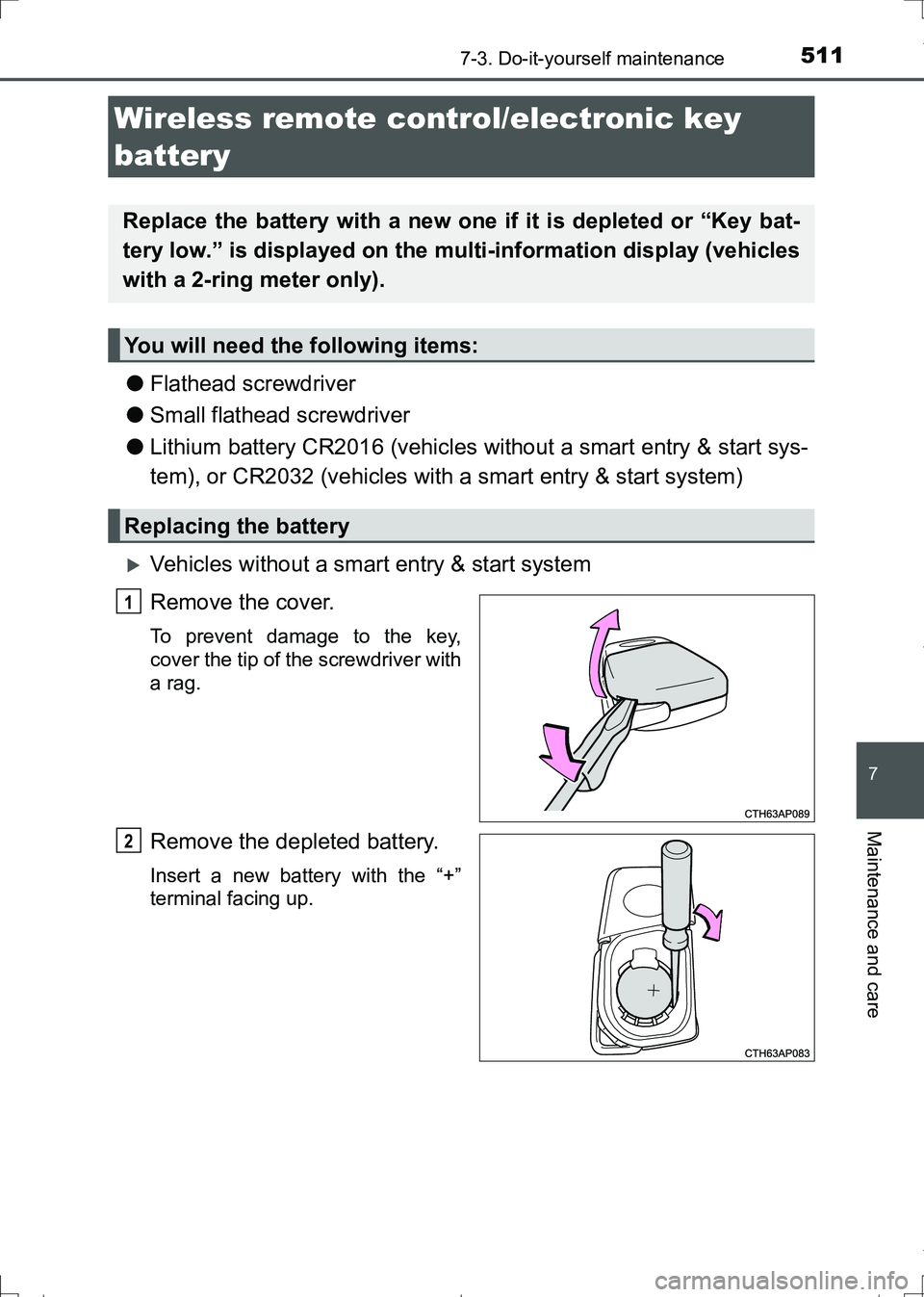
Vehicles without a smart entry & start system
Remove the cover.
To prevent damage to the key,
cover the tip of the screwdriver with
a rag.
Remove the depleted battery.
Insert a new battery with the “+”
terminal facing up.
Wireless remote control/electronic key
battery
Replace the battery with a new one if it is depleted or “Key bat-
tery low.” is displayed on the multi-information display (vehicles
with a 2-ring meter only).
You will need the following items:
Replacing the battery
1
2
AURIS Touring Sports_OM_Europe_OM12L13E.book 511 ページ 2016年6月27日 月曜日 午後5時21分
Page 513 of 664
5137-3. Do-it-yourself maintenance
AURIS Touring Sports_EE (12L13E)
7
Maintenance and care
■Use a CR2016 (vehicles without a smart entry & start system) or CR2032
(vehicles with a smart entry & start system) lithium battery
●Batteries can be purchased at any authorized Toyota dealer or repairer, or
another duly qualified and equipped professional, local electrical appliance
shops or camera stores.
●Replace only with the same or equivalent type recommended by the manu-
facturer.
●Dispose of used batteries according to local laws.
■If the key battery is depleted
The following symptoms may occur:
●The smart entry & start system (if equipped) and wireless remote control will
not function properly.
●The operational range will be reduced.
WARNING
■Removed battery and other parts
These parts are small and if swallowed by a child, they can cause choking.
Keep away from children. Failure to do so could result in death or serious
injury.
■Certification for the lithium battery
CAUTION:
RISK OF EXPLOSION IF BATTERY IS REPLACED BY AN INCORRECT
TYPE. DISPOSE OF USED BATTERIES ACCORDING TO THE INSTRUC-
TIONS
NOTICE
■For normal operation after replacing the battery
Observe the following precautions to prevent accidents:
●Always work with dry hands.
Moisture may cause the battery to rust.
●Do not touch or move any other component inside the remote control.
●Do not bend either of the battery terminals.
AURIS Touring Sports_OM_Europe_OM12L13E.book 513 ページ 2016年6月27日 月曜日 午後5時21分
Page 594 of 664
5948-2. Steps to take in an emergency
AURIS Touring Sports_EE (12L13E)
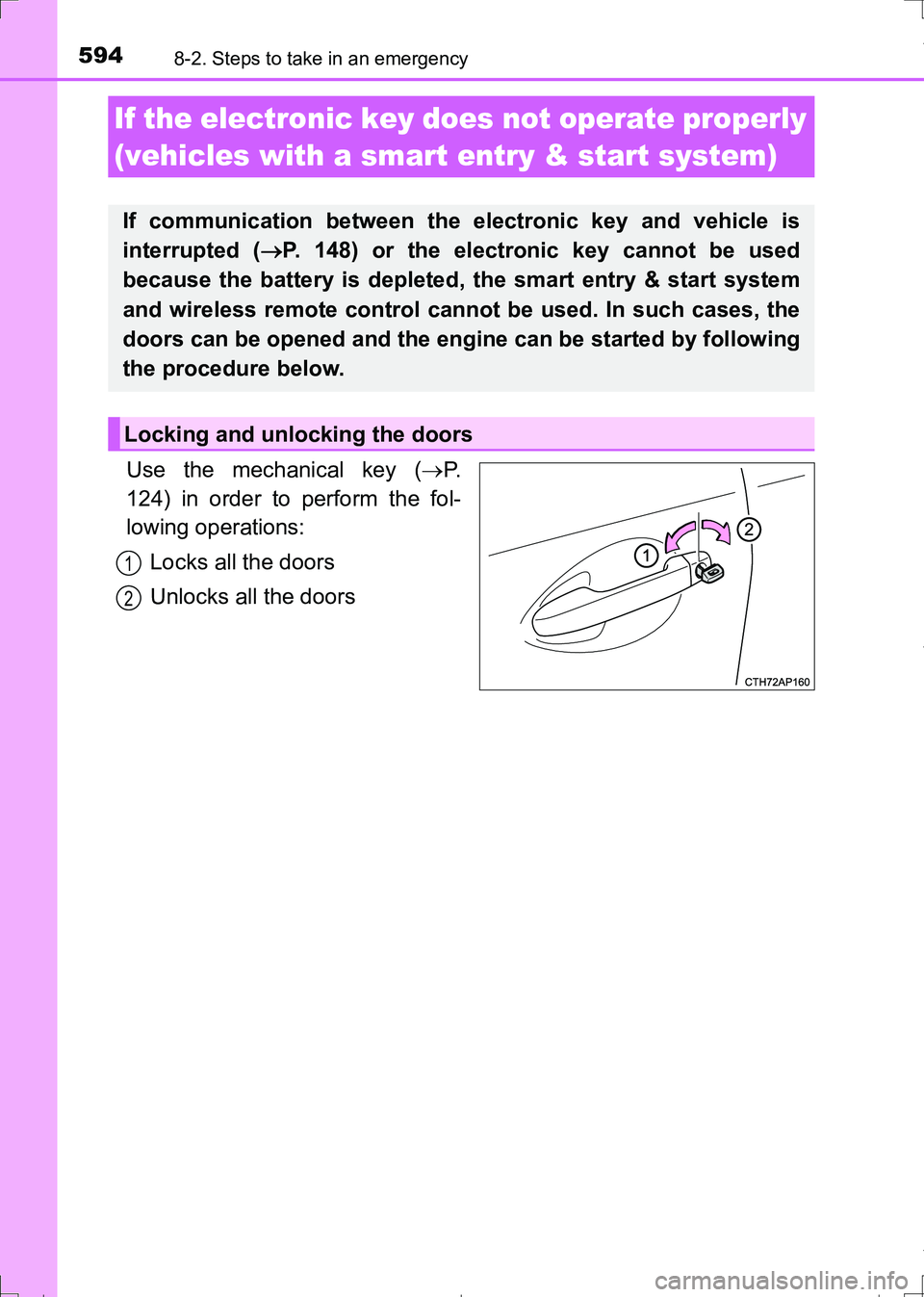
Use the mechanical key (P.
124) in order to perform the fol-
lowing operations:
Locks all the doors
Unlocks all the doors
If the electronic key does not operate properly
(vehicles with a smart entry & start system)
If communication between the electronic key and vehicle is
interrupted (P. 148) or the electronic key cannot be used
because the battery is depleted, the smart entry & start system
and wireless remote control cannot be used. In such cases, the
doors can be opened and the engine can be started by following
the procedure below.
Locking and unlocking the doors
1
2
AURIS Touring Sports_OM_Europe_OM12L13E.book 594 ページ 2016年6月27日 月曜日 午後5時21分
Page 601 of 664
6018-2. Steps to take in an emergency
AURIS Touring Sports_EE (12L13E)
8
When trouble arises
■When recharging or replacing the battery
●Vehicles with a smart entry & start system: In some cases, it may not be
possible to unlock the doors using the smart entry & start system when the
battery is discharged. Use the wireless remote control or the mechanical
key to lock or unlock the doors.
●Vehicles with a smart entry & start system: The engine may not start on the
first attempt after the battery has recharged but will start normally after the
second attempt. This is not a malfunction.
●Vehicles with a smart entry & start system: The engine switch mode is mem-
orized by the vehicle. When the battery is reconnected, the system will
return to the mode it was in before the battery was discharged. Before dis-
connecting the battery, turn the engine switch off.
If you are unsure what mode the engine switch was in before the battery dis-
charged, be especially careful when reconnecting the battery.
●Vehicles with Stop & Start system: After charging the battery or reconnecting
the battery terminals, the Stop & Start system may not automatically stop
the engine for approximately 5 to 40 minutes.
■When exchanging the battery (vehicles with Stop & Start system)
Use a battery specified for use with the Stop & Start system and equivalent to
a genuine battery. If an unsupported battery is used, Stop & Start system
functions may be restricted to protect the battery.
Also, battery performance may decrease and the engine may not be able to
restart. Contact any authorized Toyota dealer or repairer, or another duly
qualified and equipped professional for details.
WARNING
■Avoiding battery fires or explosions
Observe the following precautions to prevent accidentally igniting the flam-
mable gas that may be emitted from the battery:
●Make sure each jumper cable is connected to the correct terminal and that
it is not unintentionally in contact with any other than the intended terminal.
●Do not allow the other end of the jumper cable connected to the “+” termi-
nal to come into contact with any other parts or metal surfaces in the area,
such as brackets or unpainted metal.
●Do not allow the + and - clamps of the jumper cables to come into contact
with each other.
●Do not smoke, use matches, cigarette lighters or allow open flame near
the battery.
AURIS Touring Sports_OM_Europe_OM12L13E.book 601 ページ 2016年6月27日 月曜日 午後5時21分
Page 637 of 664
6379-2. Customization
AURIS Touring Sports_EE (12L13E)
9
Vehicle specifications
*1: Vehicles with a 2-ring meter
*2: For details about each function: P. 1 1 3
*3: The default setting varies according to country.
*4: German, French, Spanish, Italian, Portuguese, Dutch, Swedish, Norwe-
gian, Danish, Russian, Finnish, Greek, Polish, Ukrainian, Turkish, Hungar-
ian, Czech, Slovak, Romanian
*5: If equipped
*6: 2 of the following items: current fuel consumption (gauge display), current
fuel consumption (numerical display), average fuel economy (after reset),
average fuel economy (after start), average fuel economy (after refuel),
Stop & Start system operation time (after reset)
*5, Stop & Start system
operation time (after start)
*5, average vehicle speed (after reset), average
vehicle speed (after start), elapsed time (after reset), elapsed time (after
start), distance (driving range), distance (after start), blank.
■
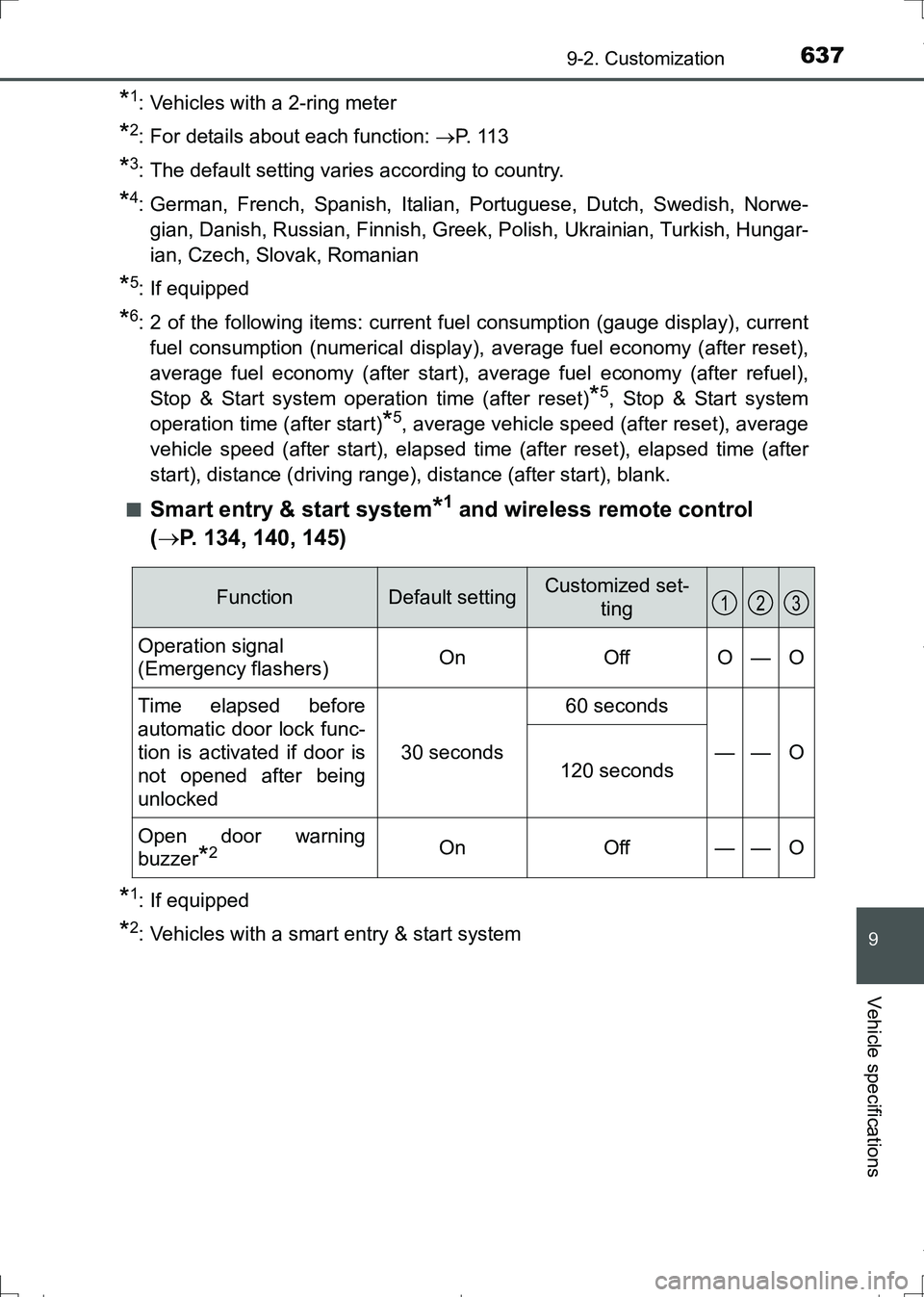
Smart entry & start system*1 and wireless remote control
(P. 134, 140, 145)
*1: If equipped
*2: Vehicles with a smart entry & start system
FunctionDefault settingCustomized set-
ting
Operation signal
(Emergency flashers)OnOffO—O
Time elapsed before
automatic door lock func-
tion is activated if door is
not opened after being
unlocked
30 seconds
60 seconds
——O120 seconds
Open door warning
buzzer
*2OnOff——O
123
AURIS Touring Sports_OM_Europe_OM12L13E.book 637 ページ 2016年6月27日 月曜日 午後5時21分