reset TOYOTA AURIS TOURING SPORTS 2014 User Guide
[x] Cancel search | Manufacturer: TOYOTA, Model Year: 2014, Model line: AURIS TOURING SPORTS, Model: TOYOTA AURIS TOURING SPORTS 2014Pages: 632, PDF Size: 17.65 MB
Page 110 of 632
1102. Instrument cluster
Auris Touring Sports_EE (OM12G98E)
Vehicles without a smart entry & start system:
Average fuel consumption for the past 15 minutes is divided by color
into past averages and averages attained since the engine switch was
last turned to the “ON” position. Use the displayed average fuel con-
sumption as a reference.
Vehicles with a smart entry & start system:
Average fuel consumption for the past 15 minutes is divided by color
into past averages and averages attained since the engine switch was
last turned to IGNITION ON mode. Use the displayed average fuel
consumption as a reference.
The image is an example only.
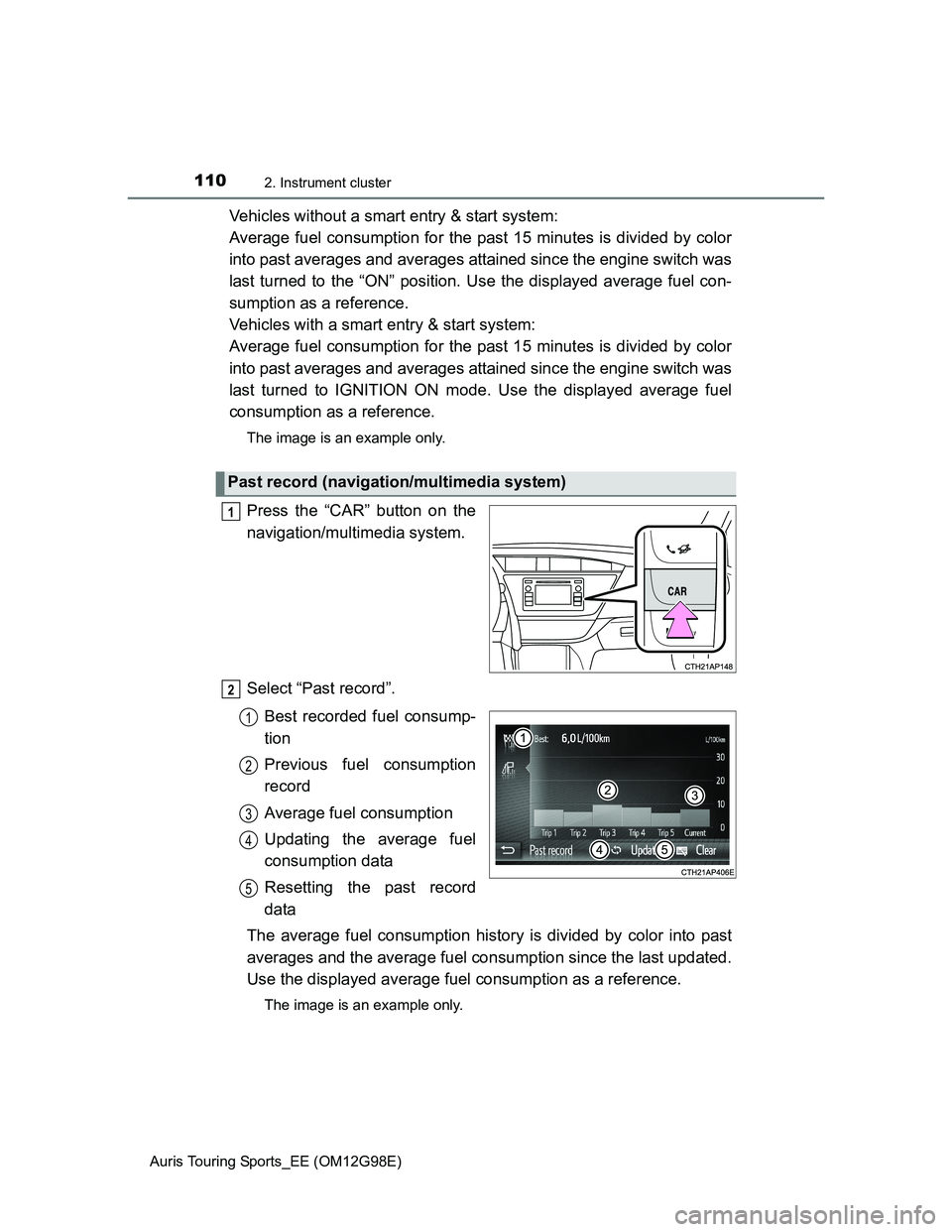
Press the “CAR” button on the
navigation/multimedia system.
Select “Past record”.
Best recorded fuel consump-
tion
Previous fuel consumption
record
Average fuel consumption
Updating the average fuel
consumption data
Resetting the past record
data
The average fuel consumption history is divided by color into past
averages and the average fuel consumption since the last updated.
Use the displayed average fuel consumption as a reference.
The image is an example only.
Past record (navigation/multimedia system)
1
2
1
2
3
4
5
Page 111 of 632
1112. Instrument cluster
Auris Touring Sports_EE (OM12G98E)
2
Instrument cluster
Updating the past record data
Update the average fuel consumption by selecting “Update” to measure the
current fuel consumption again.
Resetting the data
The fuel consumption data can be deleted by selecting “Clear”.
Cruising range
Displays the estimated maximum distance that can be driven with the quan-
tity of fuel remaining.
This distance is computed based on your average fuel consumption.
As a result, the actual distance that can be driven may differ from that dis-
played.
Page 245 of 632
2454-5. Using the driving support systems
Auris Touring Sports_EE (OM12G98E)
4
Driving
Cruise control can be set when
The shift lever is in the D or gear step 4 or higher of M has been selected.
(Multidrive)
Gear step 4 or higher of D has been selected by using the paddle shift.
(vehicles with a paddle shift switch)
Vehicle speed is above approximately 40 km/h (25 mph).
Accelerating after setting the vehicle speed
The vehicle can be accelerated normally. After acceleration, the set speed
resumes.
Even without canceling the cruise control, the set speed can be increased
by first accelerating the vehicle to the desired speed and then pushing the
lever down to set the new speed.
Automatic cruise control cancelation
Cruise control will stop maintaining the vehicle speed in any of the following
situations.
Actual vehicle speed falls more than approximately 16 km/h (10 mph) below
the preset vehicle speed.
At this time, the memorized set speed is not retained.
Actual vehicle speed is below approximately 40 km/h (25 mph).
VSC is activated.
Speed limiter is activated. (if equipped)
If the cruise control indicator light comes on in yellow (vehicles without
a multi-information display) or warning message for the cruise control is
shown on the multi-information display (vehicles with a multi-informa-
tion display)
Press the “ON-OFF” button once to deactivate the system, and then press
the button again to reactivate the system.
If the cruise control speed cannot be set or if the cruise control cancels imme-
diately after being activated, there may be a malfunction in the cruise control
system. Have the vehicle inspected by any authorized Toyota dealer or
repairer, or another duly qualified and equipped professional.
Page 318 of 632
3185-2. Using the audio system
Auris Touring Sports_EE (OM12G98E)
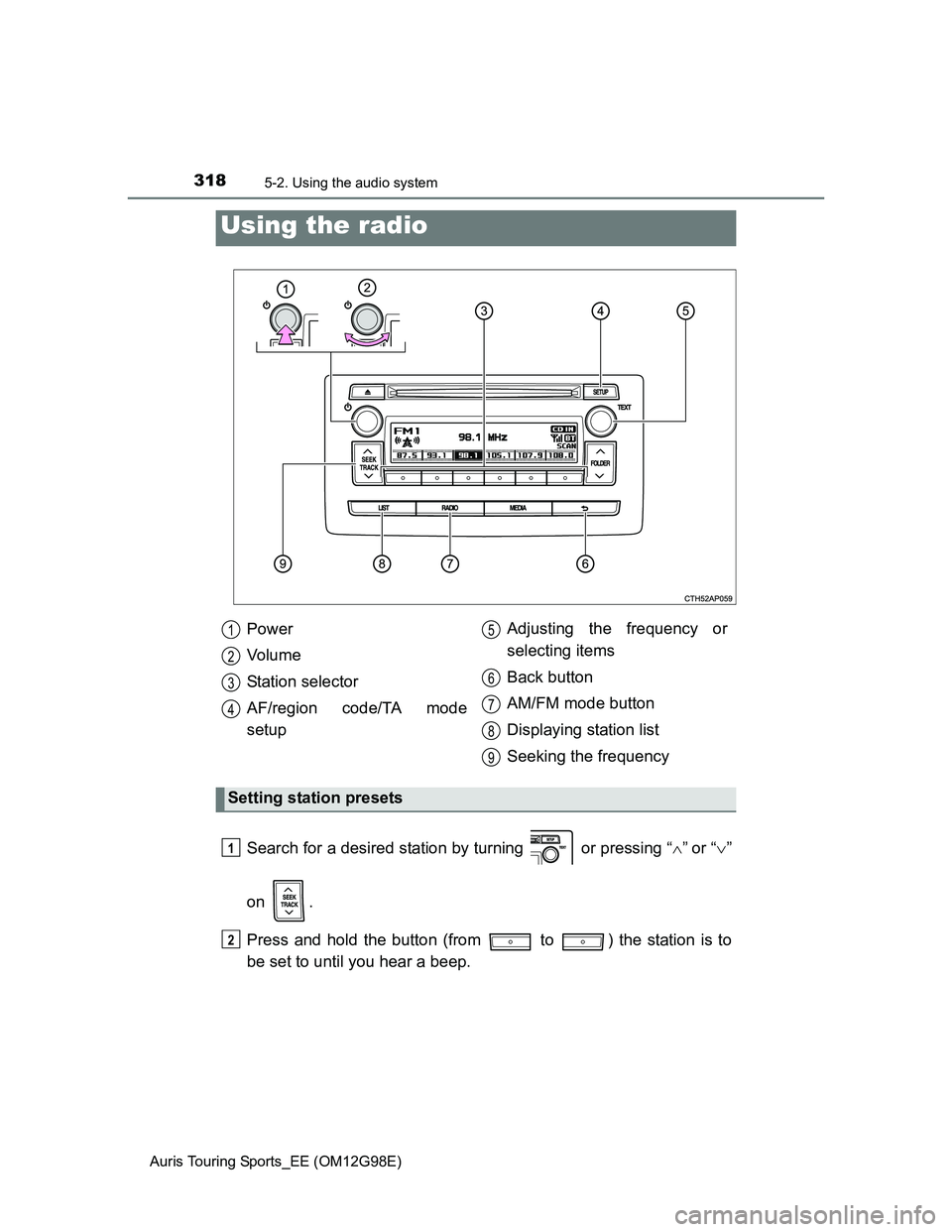
Search for a desired station by turning or pressing “”or “”
on .
Press and hold the button (from to ) the station is to
be set to until you hear a beep.
Using the radio
Power
Vo l u m e
Station selector
AF/region code/TA mode
setupAdjusting the frequency or
selecting items
Back button
AM/FM mode button
Displaying station list
Seeking the frequency
Setting station presets
1
2
3
4
5
6
7
8
9
1
2
Page 321 of 632
3215-2. Using the audio system
Auris Touring Sports_EE (OM12G98E)
5
Interior features
EON (Enhanced Other Network) system (for traffic announcement func-
tion)
If the RDS station (with EON data) you are listening to is not broadcasting a
traffic information program and the audio system is in the TA (traffic
announcement) mode, the radio will be switched automatically to a station
broadcasting a traffic information program in the EON AF list when traffic
information begins.
When the battery is disconnected
Stations presets are erased.
Reception sensitivity
Maintaining perfect radio reception at all times is difficult due to the continu-
ally changing position of the antenna, differences in signal strength and sur-
rounding objects, such as trains, transmitters, etc.
The radio antenna is mounted on the rear roof. The antenna can be
removed from the base by turning it.
NOTICE
To prevent damage, remove the antenna in the following cases.
The antenna will touch the ceiling of a garage.
A cover will be put on the roof.
Page 339 of 632
3395-2. Using the audio system
Auris Touring Sports_EE (OM12G98E)
5
Interior features
iPod functions
When an iPod is connected and the audio source is changed to iPod mode,
the iPod will resume play from the same point in which it was last used.
Depending on the iPod that is connected to the system, certain functions
may not be available. If a function is unavailable due to a malfunction (as
opposed to a system specification), disconnecting the device and recon-
necting it once again may resolve the problem.
While connected to the system, the iPod cannot be operated with its own
controls. It is necessary to use the controls of the vehicle’s audio system
instead.
When the battery level of an iPod is very low, the iPod may not operate. If
so, charge the iPod before use.
Supported models (P. 340)
iPod problems
To resolve most problems encountered when using your iPod, disconnect
your iPod from the vehicle iPod connection and reset it.
For instructions on how to reset your iPod, refer to your iPod Owner’s Man-
ual.
Display
P. 324
Error messages
“iPod ERROR”: This indicates that the data in the iPod cannot be read.
“ERROR 3”: This indicates that the iPod may be malfunctioning.
“ERROR 4”: This indicates that an over current error has occurred.
“ERROR 5”: This indicates that an iPod communication error has
occurred.
“ERROR 6”: This indicates that an authentication error has occurred.
“NO SONGS”: This indicates that there is no music data in the iPod.
“NO PLAYLIST”: This indicates that some available songs are not found in a
selected playlist.
“UPDATE YOUR iPod”: This indicates that the version of the iPod is not com-
patible. Upgrade your iPod software to the latest ver-
sions.
Page 353 of 632
3535-2. Using the audio system
Auris Touring Sports_EE (OM12G98E)
5
Interior features
Press “+” on to increase the volume and “-” to decrease the vol-
ume.
Hold down “+” or “-” on to continue increasing or decreasing the vol-
ume.
Press and hold .
To cancel, press and hold again.
Press to select the radio mode.
Press to select a preset station.
To scan for receivable stations, press and hold until you hear a
beep.
Press to select CD, iPod or USB memory mode.
Press to select the desired track/file or song.
Adjusting the volume
Silencing a sound
Selecting a radio station
Selecting a track/file or song
1
2
1
2
Page 416 of 632
4166-3. Do-it-yourself maintenance
Auris Touring Sports_EE (OM12G98E)
When adding engine oil (1ND-TV engine only)
Do not overfill the engine. Use the dipstick to ensure that the oil level does not
exceed the full mark. If exceeded, the oil level will have to be adjusted to
below the full mark.
Engine oil consumption
A certain amount of engine oil will be consumed while driving. In the following
situations, oil consumption may increase, and engine oil may need to be
refilled in between oil maintenance intervals.
When the engine is new, for example directly after purchasing the vehicle or
after replacing the engine
If low quality oil or oil of an inappropriate viscosity is used
When driving at high engine speeds or with a heavy load, when towing, or
when driving while accelerating or decelerating frequently
When leaving the engine idling for a long time, or when driving frequently
through heavy traffic
After changing the engine oil (diesel engine only)
The engine oil maintenance data should be reset. Perform the following pro-
cedures:
Switch the display to the trip meter “A” when the engine is running.
(P. 90, 95)
Turn the engine switch off.
Vehicles without a smart entry & start system:
While pressing the display change button (P. 90, 95), turn the engine
switch to the “ON” position (do not start the engine because reset mode will
be canceled). Continue to press and hold the button until the trip meter dis-
plays “000000”.
Vehicles with a smart entry & start system:
While pressing the display change button (P. 90, 95), turn the engine
switch to the IGNITION ON mode (do not start the engine because other-
wise the reset mode will be canceled). Continue to press and hold the but-
ton until the trip meter displays “000000”.
1
2
3
Page 428 of 632
4286-3. Do-it-yourself maintenance
Auris Touring Sports_EE (OM12G98E)
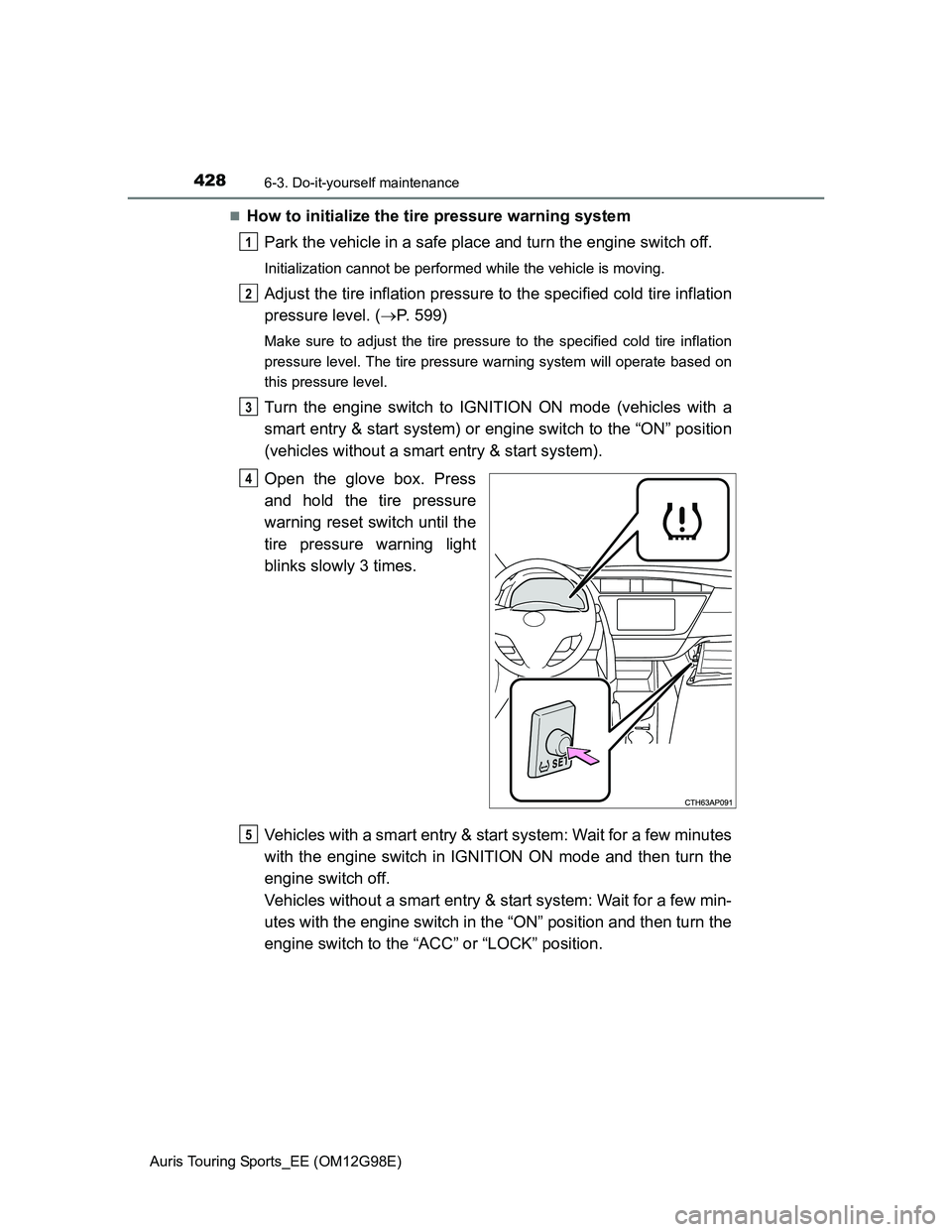
How to initialize the tire pressure warning system
Park the vehicle in a safe place and turn the engine switch off.
Initialization cannot be performed while the vehicle is moving.
Adjust the tire inflation pressure to the specified cold tire inflation
pressure level. (P. 599)
Make sure to adjust the tire pressure to the specified cold tire inflation
pressure level. The tire pressure warning system will operate based on
this pressure level.
Turn the engine switch to IGNITION ON mode (vehicles with a
smart entry & start system) or engine switch to the “ON” position
(vehicles without a smart entry & start system).
Open the glove box. Press
and hold the tire pressure
warning reset switch until the
tire pressure warning light
blinks slowly 3 times.
Vehicles with a smart entry & start system: Wait for a few minutes
with the engine switch in IGNITION ON mode and then turn the
engine switch off.
Vehicles without a smart entry & start system: Wait for a few min-
utes with the engine switch in the “ON” position and then turn the
engine switch to the “ACC” or “LOCK” position.
1
2
3
4
5
Page 431 of 632
4316-3. Do-it-yourself maintenance
Auris Touring Sports_EE (OM12G98E)
6
Maintenance and care
The initialization operation (vehicles with a tire pressure warning sys-
tem)
Make sure to carry out initialization after adjusting the tire inflation pressure.
Also, make sure the tires are cold before carrying out initialization or tire
inflation pressure adjustment.
If you have accidentally turned the engine switch off during initialization, it is
not necessary to press the reset switch again as initialization will restart
automatically when the engine switch has been turned to IGNITION ON
mode (vehicles with a smart entry & start system) or engine switch to the
“ON” position (vehicles without a smart entry & start system) for the next
time.
If you accidentally press the reset switch when initialization is not necessary,
adjust the tire inflation pressure to the specified level when the tires are
cold, and conduct initialization again.
Warning performance of the tire pressure warning system (vehicles with
a tire pressure warning system)
The warning of the tire pressure warning system will change in accordance
with driving conditions. For this reason, the system may give a warning even
if the tire pressure does not reach a low enough level, or if the pressure is
higher than the pressure that was adjusted to when the system was initial-
ized.
When initialization of the tire pressure warning system has failed (vehi-
cles with a tire pressure warning system)
Initialization can be completed in a few minutes. However, in the following
cases, the settings have not been recorded and the system will not operate
properly. If repeated attempts to record tire inflation pressure settings are
unsuccessful, have the vehicle inspected by any authorized Toyota dealer or
repairer, or another duly qualified and equipped professional as soon as pos-
sible.
When operating the tire pressure warning reset switch, the tire pressure
warning light does not blink 3 times.
After driving for a certain period of time since the initialization has been
completed, the warning light comes on after blinking for 1 minute.