phone TOYOTA AVALON 2005 XX30 / 3.G Navigation Manual
[x] Cancel search | Manufacturer: TOYOTA, Model Year: 2005, Model line: AVALON, Model: TOYOTA AVALON 2005 XX30 / 3.GPages: 135, PDF Size: 4.67 MB
Page 22 of 135
AVALON_Navi_U (L/O 0501)
14
2005 AVALON Navigation from Nov. ’04 Prod. (OM41410U)
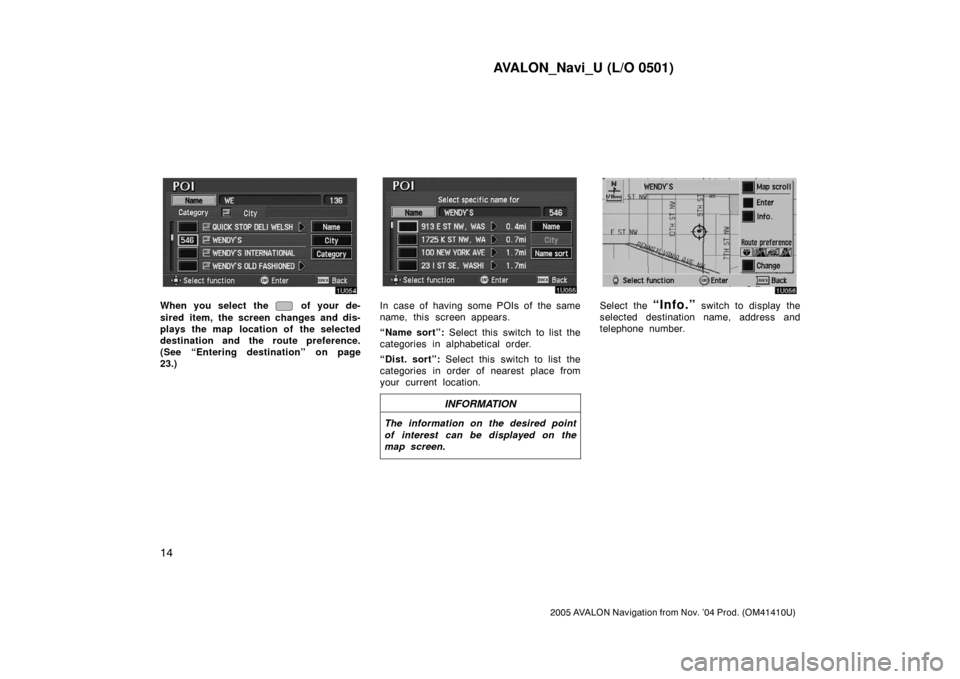
When you select the of your de-
sired item, the screen changes and dis-
plays the map location of the selected
destination and the route preference.
(See “Entering destination” on page
23.)In case of having some POIs of the same
name, this screen appears.
“Name sort”: Select this switch to list the
categories in alphabetical order.
“Dist. sort”: Select this switch to list the
categories in order of nearest place from
your current location.
INFORMATION
The information on the desired point
of interest can be displayed on the
map screen.
Select the “Info.” switch to display the
selected destination name, address and
telephone number.
Page 26 of 135
AVALON_Navi_U (L/O 0501)
18
2005 AVALON Navigation from Nov. ’04 Prod. (OM41410U)
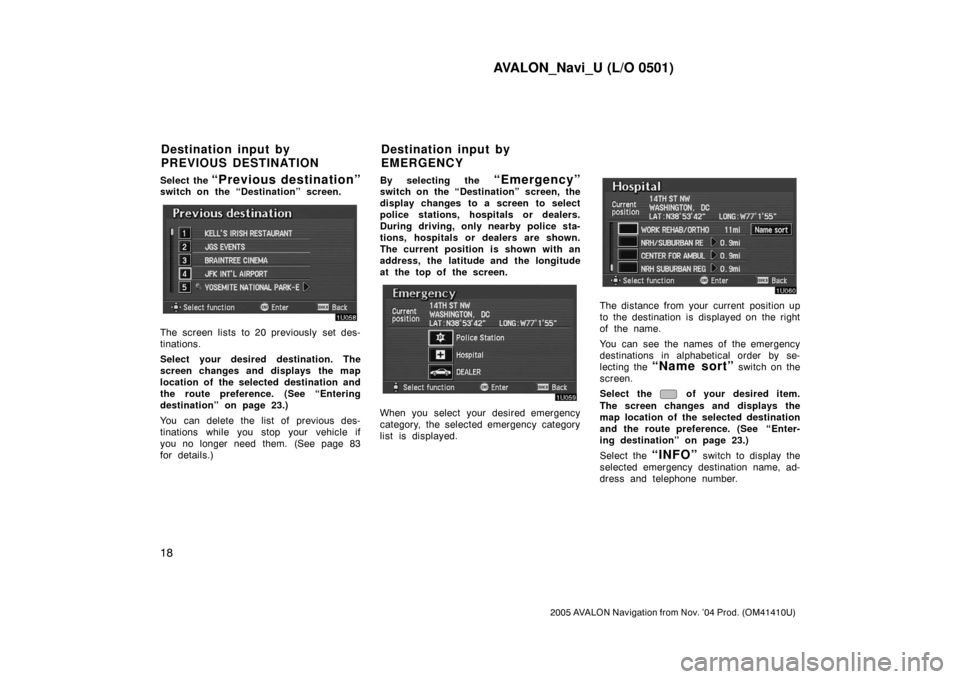
Select the “Previous destination”switch on the “Destination” screen.
The screen lists to 20 previously set des-
tinations.
Select your desired destination. The
screen changes and displays the map
location of the selected destination and
the route preference. (See “Entering
destination” on page 23.)
You can delete the list of previous des-
tinations while you stop your vehicle if
you no longer need them. (See page 83
for details.)By selecting the
“Emergency”switch on the “Destination” screen, the
display changes to a screen to select
police stations, hospitals or dealers.
During driving, only nearby police sta-
tions, hospitals or dealers are shown.
The current position is shown with an
address, the latitude and the longitude
at the top of the screen.
When you select your desired emergency
category, the selected emergency category
list is displayed.
The distance from your current position up
to the destination is displayed on the right
of the name.
You can see the names of the emergency
destinations in alphabetical order by se-
lecting the
“Name sort” switch on the
screen.
Select the
of your desired item.
The screen changes and displays the
map location of the selected destination
and the route preference. (See
“Enter-
ing destination” on page 23.)
Select the
“INFO” switch to display the
selected emergency destination name, ad-
dress and telephone number.
Destination input by
PREVIOUS DESTINATIONDestination input by
EMERGENCY
Page 34 of 135
AVALON_Navi_U (L/O 0501)
26
2005 AVALON Navigation from Nov. ’04 Prod. (OM41410U)
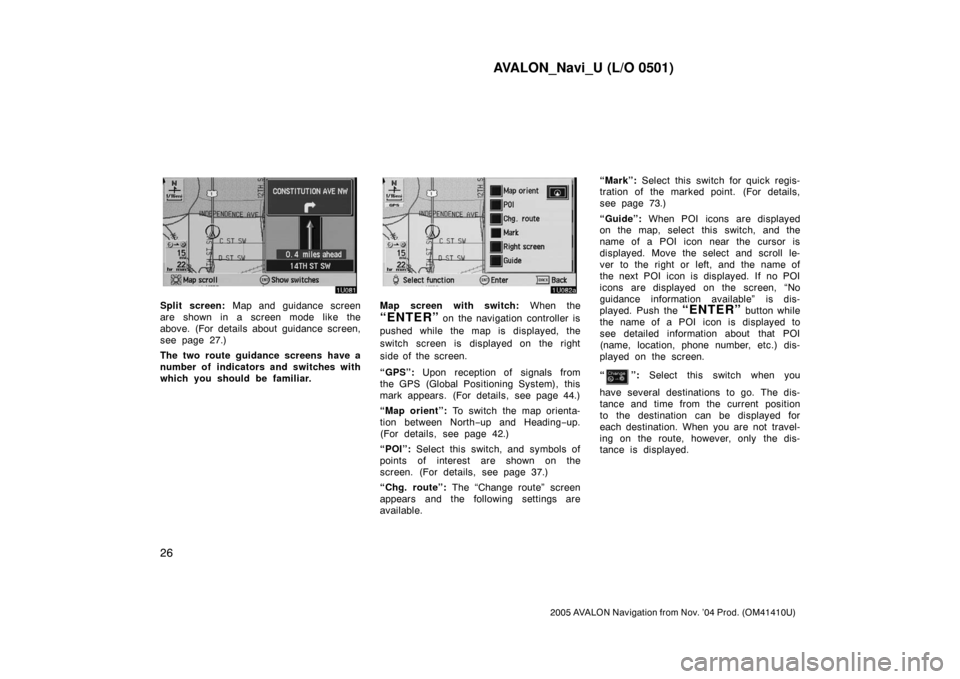
Split screen: Map and guidance screen
are shown in a screen mode like the
above. (For details about guidance screen,
see page 27.)
The two route guidance screens have a
number of indicators and switches with
which you should be familiar.Map screen with switch: When the
“ENTER” on the navigation controller is
pushed while the map is displayed, the
switch screen is displayed on the right
side of the screen.
“GPS”: Upon reception of signals from
the GPS (Global Positioning System), this
mark appears. (For details, see page 44.)
“Map orient”: To switch the map orienta-
tion between North−up and Heading−up.
(For details, see page 42.)
“POI”: Select this switch, and symbols of
points of interest are shown on the
screen. (For details, see page 37.)
“Chg. route”: The “Change route” screen
appears and the following settings are
available.“Mark”: Select this switch for quick regis-
tration of the marked point. (For details,
see page 73.)
“Guide”: When POI icons are displayed
on the map, select this switch, and the
name of a POI icon near the cursor is
displayed. Move the select and scroll le-
ver to the right or left, and the name of
the next POI icon is displayed. If no POI
icons are displayed on the screen, “No
guidance information available” is dis-
played. Push the “ENTER” button while
the name of a POI icon is displayed to
see detailed information about that POI
(name, location, phone number, etc.) dis-
played on the screen.
“
”: Select this switch when you
have several destinations to go. The dis-
tance and time from the current position
to the destination can be displayed for
each destination. When you are not travel-
ing on the route, however, only the dis-
tance is displayed.
Page 56 of 135

AVALON_Navi_U (L/O 0501)
48
2005 AVALON Navigation from Nov. ’04 Prod. (OM41410U)
TERMS AND CONDITIONS
Personal Use Only. You agree to use
this Data together with the navigation
system for the solely personal, non−
commercial purposes for which you
were licensed, and not for service bu-
reau, time−sharing or other similar
purposes. Accordingly, but subject to
the restrictions set forth in the follow-
ing paragraphs, you may copy this
Data only as necessary for your per-
sonal use to (i) view it, and (ii) save
it, provided that you do not remove
any copyright notices that appear and
do not modify the Data in any way.
You agree not to otherwise reproduce,
copy, modify, decompile, disassemble
or reverse engineer any portion of this
Data, and may not transfer or distrib-
ute it in any form, for any purpose,
except to the extent permitted by
mandatory laws.
Restrictions. Except where you have
been specifically licensed to do so by
DENSO, and without limiting the pre-
ceding paragraph, you may not (a)
use this Data with any products, sys-
tems, or applications installed or
otherwise connected to or in commu-
nication with vehicles, capable of ve-
hicle navigation, positioning, dispatch,
real time route guidance, fleet man-
agement or similar applications; or (b)
with or in communication with any
positioning devices or any mobile or
wireless−connected electronic or com-
puter devices, including without limita-
tion cellular phones, palmtop and
handheld computers, pagers, and per-
sonal digital assistants or PDAs.No Warranty. This Data is provided to
you “as is,” and you agree to use it
at your own risk. DENSO and its li-
censors (and their licensors and sup-
pliers) make no guarantees, represen-
tations or warranties of any kind, ex-
press or implied, arising by law or
otherwise, including but not limited to,
content, quality, accuracy, complete-
ness, effectiveness, reliability, fitness
for a particular purpose, usefulness,
use or results to be obtained from
this Data, or that the Data or server
will be uninterrupted or error−free.
Disclaimer of Warranty
: DENSO AND
ITS LICENSORS (INCLUDING THEIR
LICENSORS AND SUPPLIERS) DIS-
CLAIM ANY WARRANTIES, EXPRESS
OR IMPLIED, OF QUALITY, PER-
FORMANCE, MERCHANTABILITY, FIT-
NESS FOR A PARTICULAR PUR-
POSE OR NON−INFRINGEMENT.
Some States, Territories and Countries
do not allow certain warranty exclu-
sions, so to that extent the above
exclusion may not apply to you.
Page 78 of 135
AVALON_Navi_U (L/O 0501)
70
2005 AVALON Navigation from Nov. ’04 Prod. (OM41410U)
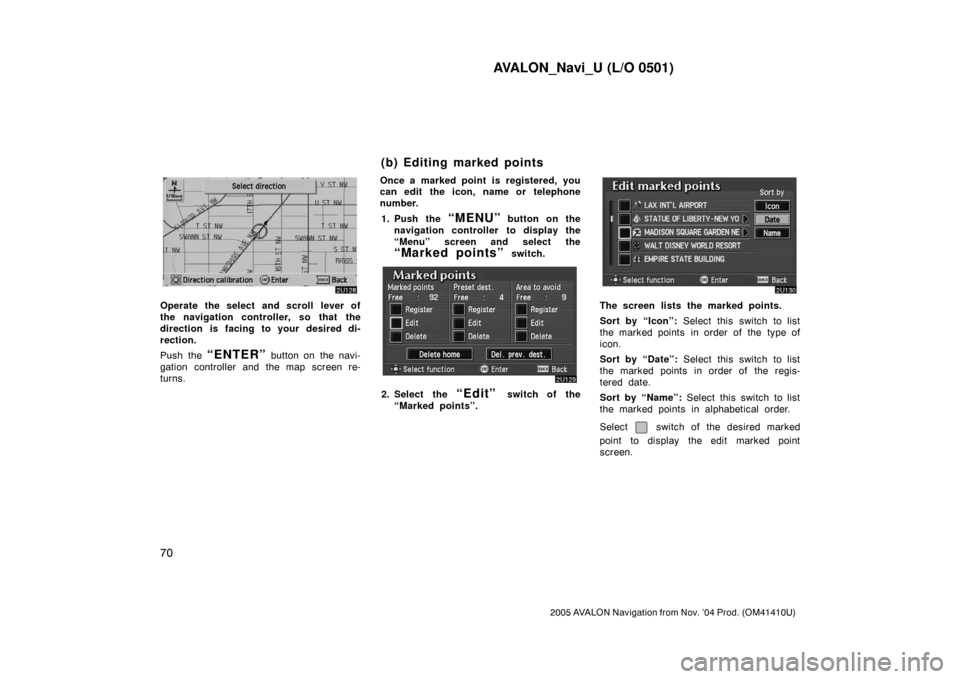
Operate the select and scroll lever of
the navigation controller, so that the
direction is facing to your desired di-
rection.
Push the
“ENTER” button on the navi-
gation controller and the map screen re-
turns.Once a marked point is registered, you
can edit the icon, name or telephone
number.
1. Push the
“MENU” button on the
navigation controller to display the
“Menu” screen and select the
“Marked points” switch.
2. Select the “Edit” switch of the
“Marked points”.
The screen lists the marked points.
Sort by “Icon”: Select this switch to list
the marked points in order of the type of
icon.
Sort by “Date”: Select this switch to list
the marked points in order of the regis-
tered date.
Sort by “Name”: Select this switch to list
the marked points in alphabetical order.
Select
switch of the desired marked
point to display the edit marked point
screen.
(b) Editing marked points
Page 80 of 135
AVALON_Navi_U (L/O 0501)
72
2005 AVALON Navigation from Nov. ’04 Prod. (OM41410U)
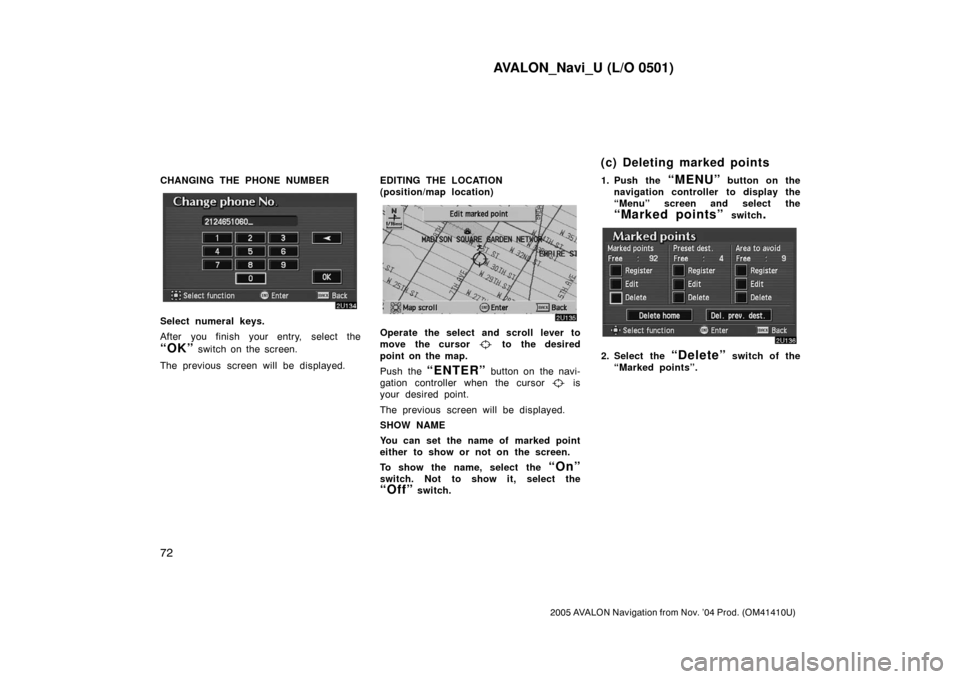
CHANGING THE PHONE NUMBER
Select numeral keys.
After you finish your entry, select the
“OK” switch on the screen.
The previous screen will be displayed.EDITING THE LOCATION
(position/map location)
Operate the select and scroll lever to
move the cursor
to the desired
point on the map.
Push the
“ENTER” button on the navi-
gation controller when the cursor
is
your desired point.
The previous screen will be displayed.
SHOW NAME
You can set the name of marked point
either to show or not on the screen.
To show the name, select the
“On”
switch. Not to show it, select the
“Off” switch.1. Push the
“MENU” button on the
navigation controller to display the
“Menu” screen and select the
“Marked points” switch.
2. Select the “Delete” switch of the
“Marked points”.
(c) Deleting marked points
Page 83 of 135
AVALON_Navi_U (L/O 0501)
75
2005 AVALON Navigation from Nov. ’04 Prod. (OM41410U)
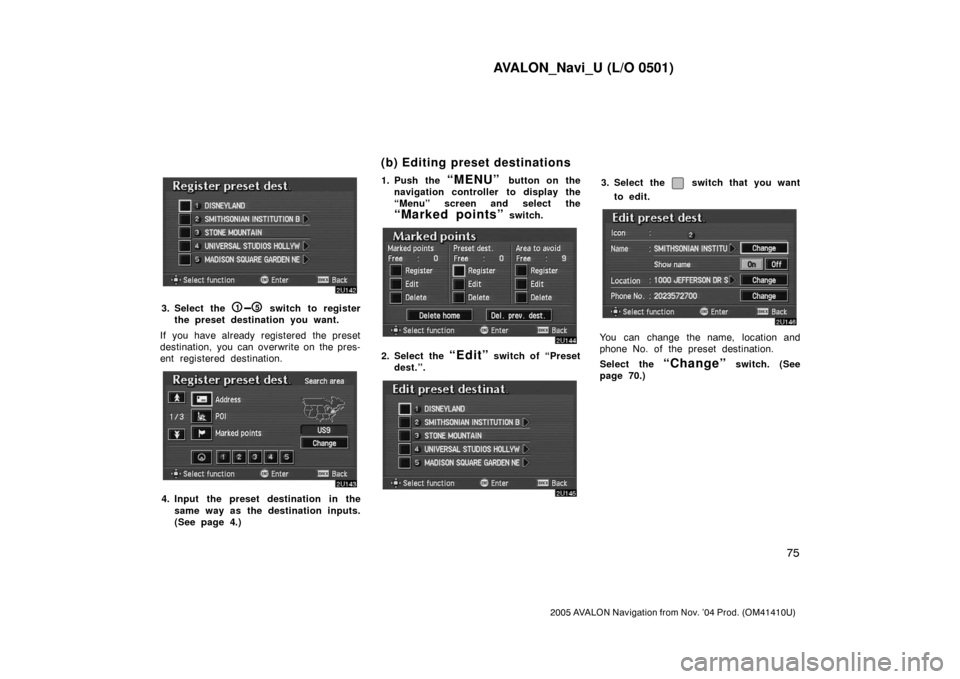
3. Select the 15 switch to register
the preset destination you want.
If you have already registered the preset
destination, you can overwrite on the pres-
ent registered destination.
4. Input the preset destination in the
same way as the destination inputs.
(See page 4.)1. Push the
“MENU” button on the
navigation controller to display the
“Menu” screen and select the
“Marked points” switch.
2. Select the “Edit” switch of “Preset
dest.”.
3. Select the switch that you want
to edit.
You can change the name, location and
phone No. of the preset destination.
Select the
“Change” switch. (See
page 70.)
(b) Editing preset destinations
Page 110 of 135
AVALON_Navi_U (L/O 0501)
102
2005 AVALON Navigation from Nov. ’04 Prod. (OM41410U)
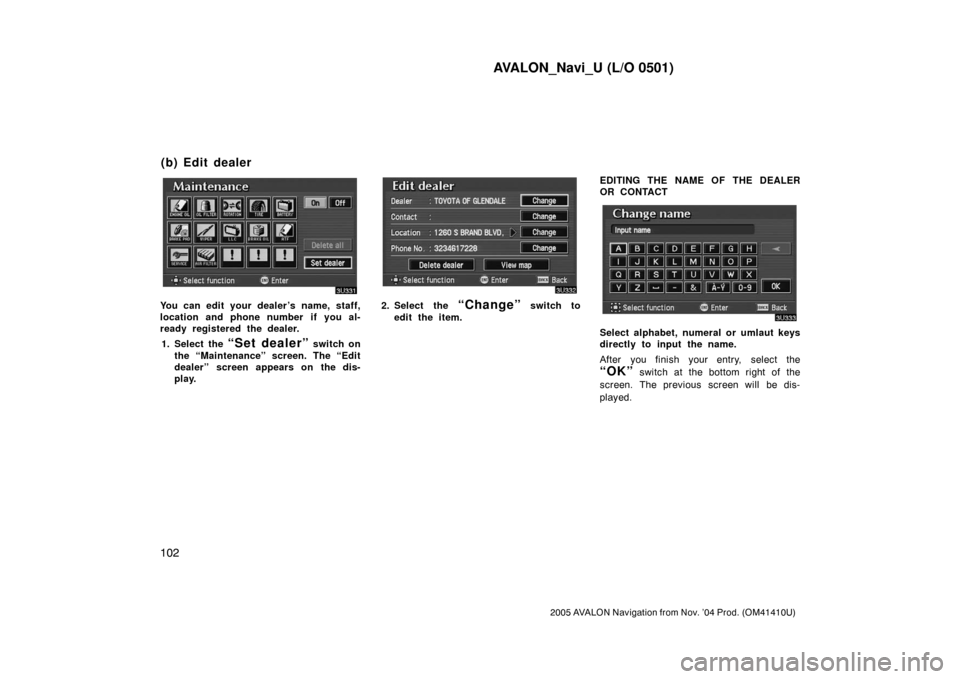
You can edit your dealer’s name, staff,
location and phone number if you al-
ready registered the dealer.
1. Select the
“Set dealer” switch on
the “Maintenance” screen. The “Edit
dealer” screen appears on the dis-
play.
2. Select the “Change” switch to
edit the item.EDITING THE NAME OF THE DEALER
OR CONTACT
Select alphabet, numeral or umlaut keys
directly to input the name.
After you finish your entry, select the
“OK” switch at the bottom right of the
screen. The previous screen will be dis-
played.
(b) Edit dealer
Page 111 of 135
AVALON_Navi_U (L/O 0501)
103
2005 AVALON Navigation from Nov. ’04 Prod. (OM41410U)
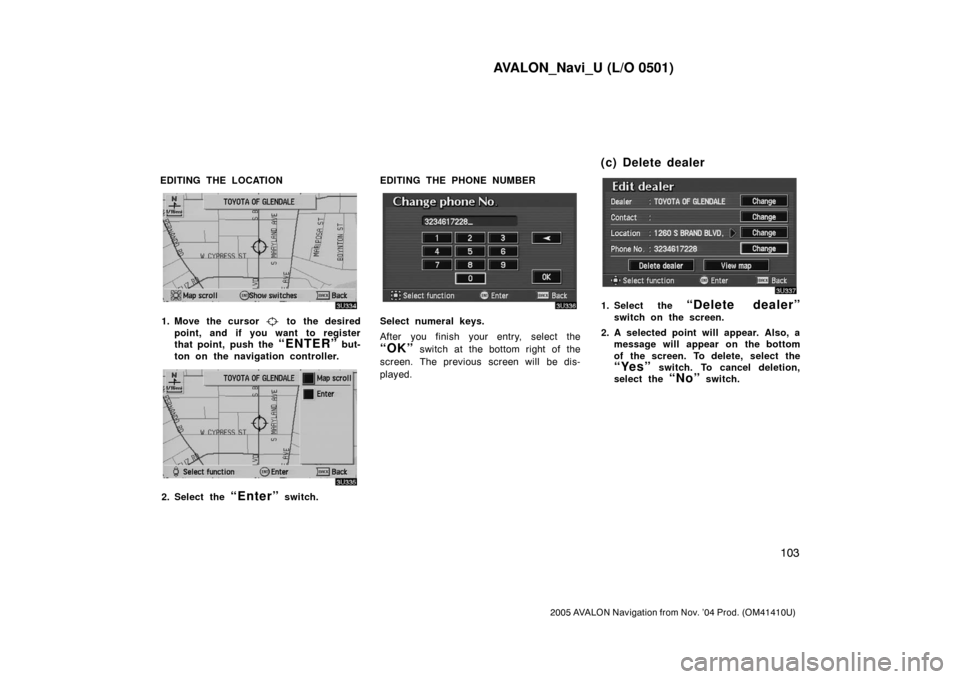
EDITING THE LOCATION
1. Move the cursor to the desired
point, and if you want to register
that point, push the
“ENTER” but-
ton on the navigation controller.
2. Select the “Enter” switch.EDITING THE PHONE NUMBER
Select numeral keys.
After you finish your entry, select the
“OK” switch at the bottom right of the
screen. The previous screen will be dis-
played.
1. Select the “Delete dealer”
switch on the screen.
2. A selected point will appear. Also, a
message will appear on the bottom
of the screen. To delete, select the
“Yes” switch. To cancel deletion,
select the
“No” switch.
(c) Delete dealer
Page 124 of 135
AVALON_Navi_U (L/O 0501)
11 6
2005 AVALON Navigation from Nov. ’04 Prod. (OM41410U)
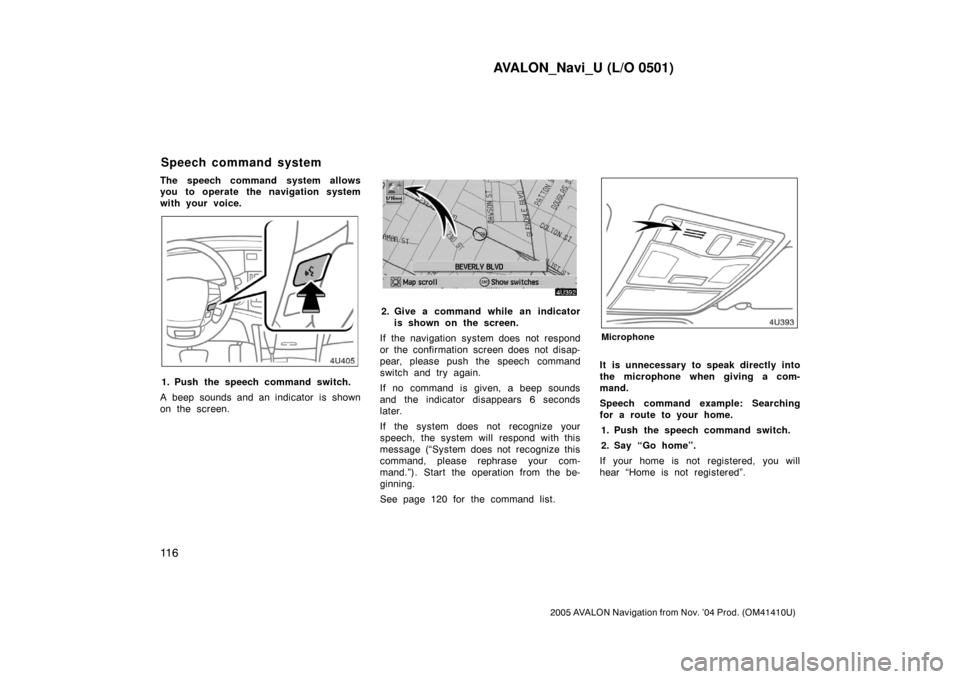
The speech command system allows
you to operate the navigation system
with your voice.
1. Push the speech command switch.
A beep sounds and an indicator is shown
on the screen.
2. Give a command while an indicator
is shown on the screen.
If the navigation system does not respond
or the confirmation screen does not disap-
pear, please push the speech command
switch and try again.
If no command is given, a beep sounds
and the indicator disappears 6 seconds
later.
If the system does not recognize your
speech, the system will respond with this
message (“System does not recognize this
command, please rephrase your com-
mand.”). Start the operation from the be-
ginning.
See page 120 for the command list.
Microphone
It is unnecessary to speak directly into
the microphone when giving a com-
mand.
Speech command example: Searching
for a route to your home.
1. Push the speech command switch.
2. Say “Go home”.
If your home is not registered, you will
hear “Home is not registered”.
Speech command system