cruise control TOYOTA AVALON 2008 XX30 / 3.G Owners Manual
[x] Cancel search | Manufacturer: TOYOTA, Model Year: 2008, Model line: AVALON, Model: TOYOTA AVALON 2008 XX30 / 3.GPages: 452, PDF Size: 7.59 MB
Page 3 of 452
1
2
3
4
5
6
7
3
AVALON_U_(L/O_0802)
2-3. Operating the lights and
windshield wipers ........... 143
Headlight switch .................. 143
Fog light switch ................... 145
Windshield wipers and
washer .............................. 146
2-4. Using other driving
systems ........................... 149
Cruise control ...................... 149
Dynamic laser cruise
control ............................... 152
Driving assist systems ........ 163
2-5. Driving information ........... 166 Cargo and luggage ............. 166
Vehicle load limits ............... 169
Winter driving tips ............... 170
Trailer towing ...................... 175
Dinghy towing ..................... 176
3-1. Using the air conditioning
system and defogger...... 178
Automatic air conditioning
system .............................. 178
Using the steering wheel climate control switches .... 185
Rear window and outside
rear view mirror
defoggers .......................... 187 3-2. Using the audio system ... 188
Audio system type .............. 188
Audio cover ........................ 190
Using the radio ................... 191
Using the CD player ........... 198
Playing MP3 and WMA
discs ................................. 206
Optimal use of the audio
system .............................. 214
Using the AUX adapter....... 216
Using the steering wheel
audio switches.................. 217
3-3. Using the hands-free
system ............................. 220
Hands-free system
(for cellular phone) ........... 220
Using the hands-free
system .............................. 223
Making a phone call ........... 231
Setting a cellular phone ...... 236
Security and system
setup ................................ 241
Using the phone book ........ 244
3-4. Using the interior lights ... 252 Interior lights list ................. 252
3-5. Using the storage
features ........................... 255
List of storage features ....... 255
3Interior features
Page 13 of 452
13
AVALON_U_(L/O_0802)
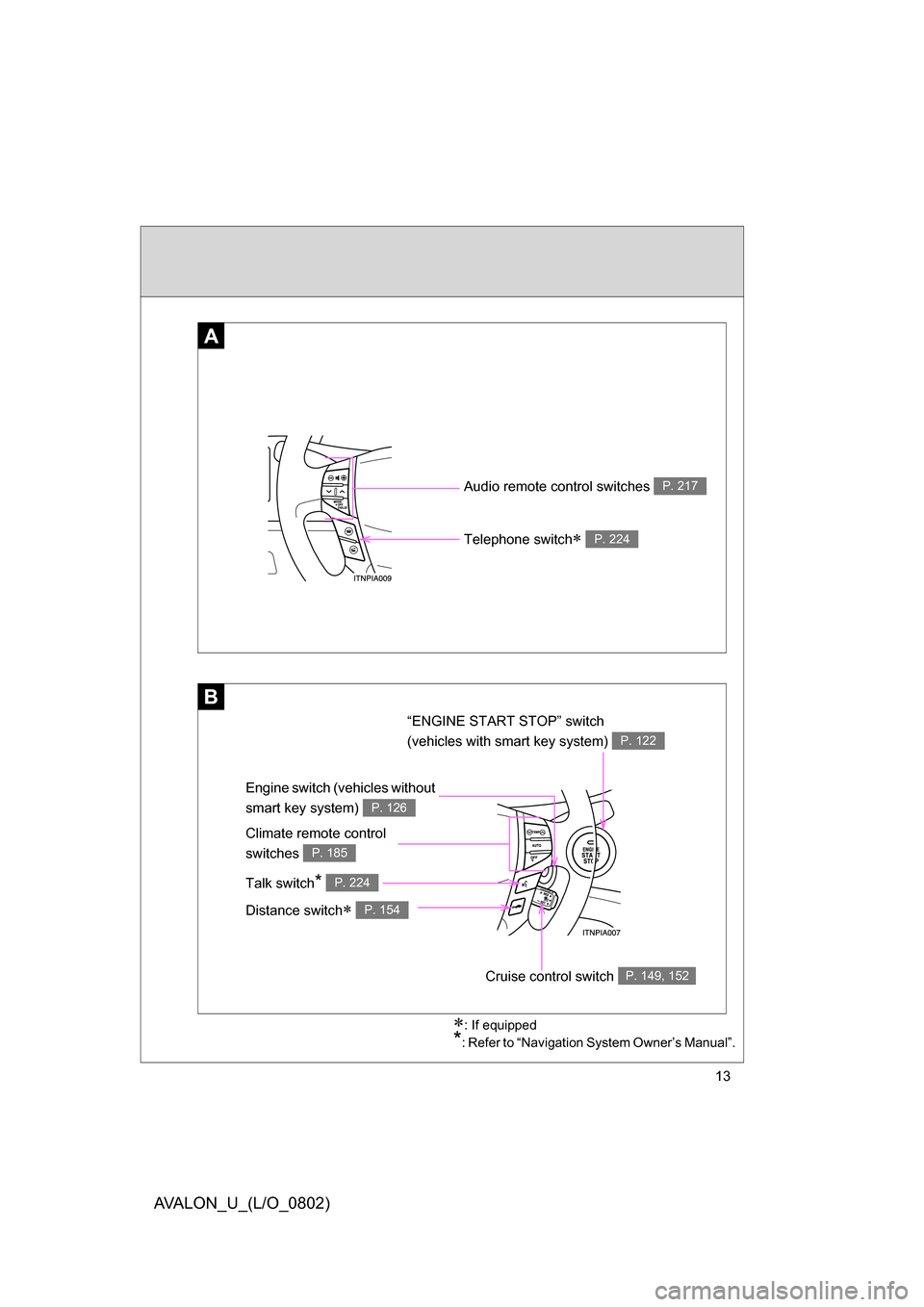
Audio remote control switches P. 217
Engine switch (vehicles without
smart key system)
P. 126
: If equipped
*: Refer to “Navigation System Owner’s Manual”.
A
B
Telephone switch P. 224
“ENGINE START STOP” switch
(vehicles with smart key system)
P. 122
Climate remote control
switches
P. 185
Talk switch* P. 224
Distance switch P. 154
Cruise control switch P. 149, 152
Page 17 of 452
17
AVALON_U_(L/O_0802)
Installation of a mobile two-way radio system
As the installation of a mobile two-way radio system in your vehicle could
affect electronic systems such as the multiport fuel injection system/sequen-
tial multiport fuel injection system, electronic throttle control system, cruise
control system, dynamic laser cruise control system, vehicle stability control
system, SRS airbag system and seat belt pretensioner system, be sure to
check with your Toyota dealer for precautionary measures or special instruc-
tions regarding installation.
Scrapping of your Toyota
The SRS airbag and seat belt pretensioner devices in your Toyota contain
explosive chemicals. If the vehicle is scrapped with the airbags and seat belt
pretensioners left as they are, this may cause an accident such as fire. Be
sure to have the systems of the SRS airbag and seat belt pretensioner
removed and disposed of by a qualified service shop or by your Toyota
dealer before you scrap your vehicle.
Perchlorate Material
Special handling may apply,
See www.dtsc.ca.gov/hazardouswaste/perchlorate.
Your vehicle has components that may contain perchlorate. These compo-
nents may include airbag, seat belt pretensioners, and wireless remote con-
trol batteries.
Page 113 of 452
When driving2
113
AVALON_U_(L/O_0802)
2-1. Driving procedures ........ 114Driving the vehicle............ 114
Engine (ignition) switch
(with smart key
system) .......................... 122
Engine (ignition) switch
(without smart key
system) .......................... 126
Automatic transmission .... 129
Turn signal lever .............. 133
Parking brake ................... 134 2-2. Instrument cluster.......... 135
Gauges and meters ......... 135
Indicators and warning
lights .............................. 138
Center display .................. 141
2-3. Operating the lights and
windshield wipers ........ 143
Headlight switch ............... 143
Fog light switch ................ 145
Windshield wipers and
washer ........................... 146
2-4. Using other driving
systems ........................ 149
Cruise control ................... 149
Dynamic laser cruise
control ............................ 152
Driving assist systems ..... 163
2-5. Driving information ........ 166 Cargo and luggage .......... 166
Vehicle load limits ............ 169
Winter driving tips ............ 170
Trailer towing ................... 175
Dinghy towing .................. 176
Page 132 of 452
132 2-1. Driving procedures
AVALON_U_(L/O_0802)
■Down shifting restrictions wa rning buzzer (in the “S” mode)
To help ensure safety and driving performance, downshifting operation may
sometimes be restricted. In some circumstances, downshifting may not be
possible even when the shift lever is operated. (The warning buzzer will
sound twice.)
■ When driving with the cruise contro l system (or dynamic laser cruise
control system)
The engine brake will not operate in t he “S” mode, even when downshifting
to “5” or “4”. ( P. 149, 152)
■ If the shift lever cannot be shifted from “P”
P. 393
■ If the “S” indicator does not come on even after shifting the shift lever
to “S” mode driving position
This may indicate a malfunction in the automatic transmission system. Have
the vehicle inspected by your Toyota dealer immediately.
(In this situation, the vehicle will operate as if the shift lever is in “D”.)
■ AI-SHIFT
The AI-SHIFT automatically shifts the gear to the optimal position according
to the driver’s input and driving conditions.
The AI-SHIFT automatically operates when the shift lever is in the “D” posi-
tion. (Shifting the shift lever to the “S” mode driving position cancels the func-
tion.)
Page 136 of 452
136 2-2. Instrument cluster
AVALON_U_(L/O_0802)
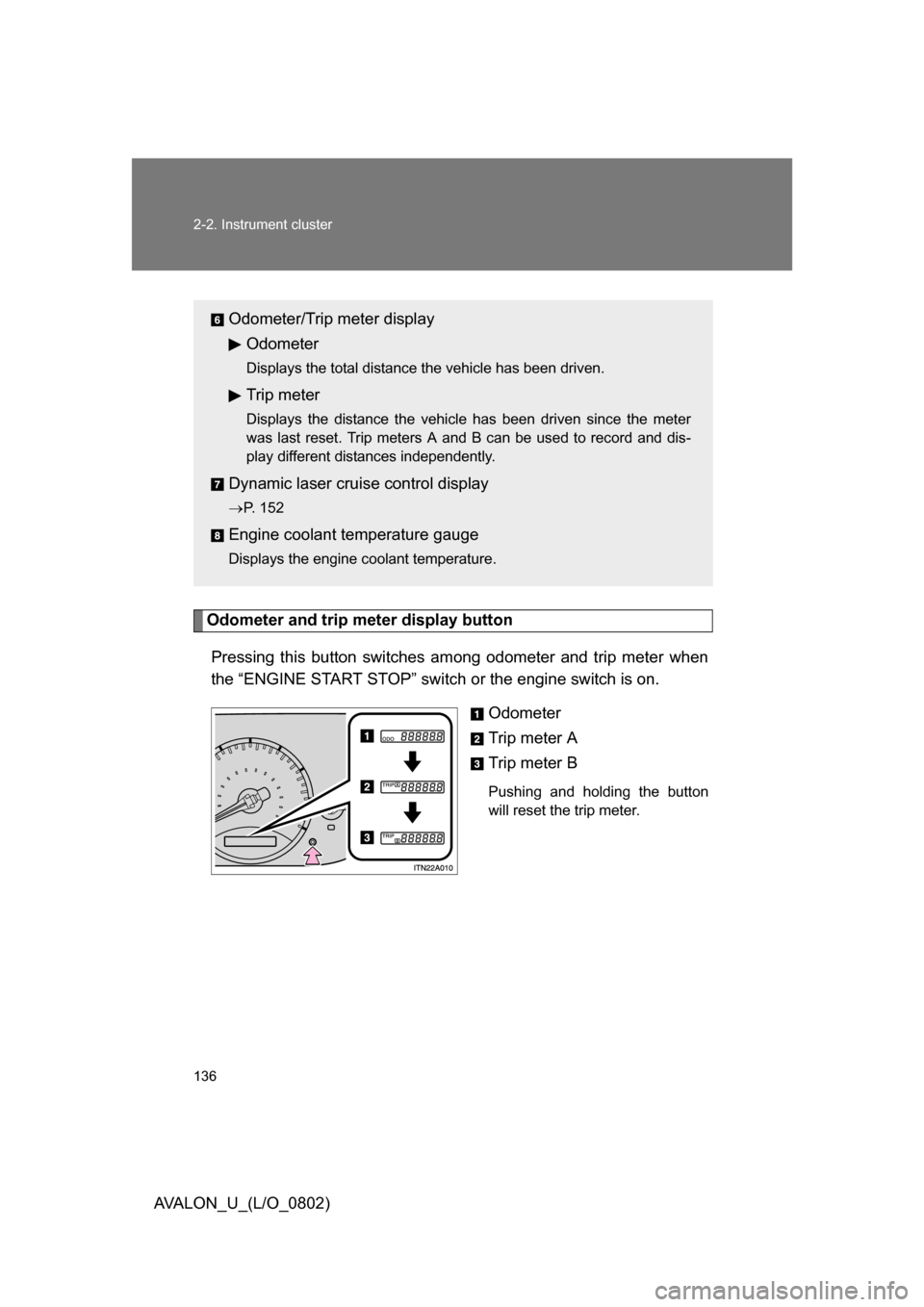
Odometer and trip meter display buttonPressing this button switches am ong odometer and trip meter when
the “ENGINE START STOP” switch or the engine switch is on.
Odometer
Trip meter A
Trip meter B
Pushing and holding the button
will reset the trip meter.
Odometer/Trip meter displayOdometer
Displays the total distance the vehicle has been driven.
Trip meter
Displays the distance the vehicle has been driven since the meter
was last reset. Trip meters A and B can be used to record and dis-
play different distances independently.
Dynamic laser cruise control display
P. 152
Engine coolant temperature gauge
Displays the engine coolant temperature.
Page 139 of 452
139
2-2. Instrument cluster
2
When driving
AVALON_U_(L/O_0802)
■
Indicators
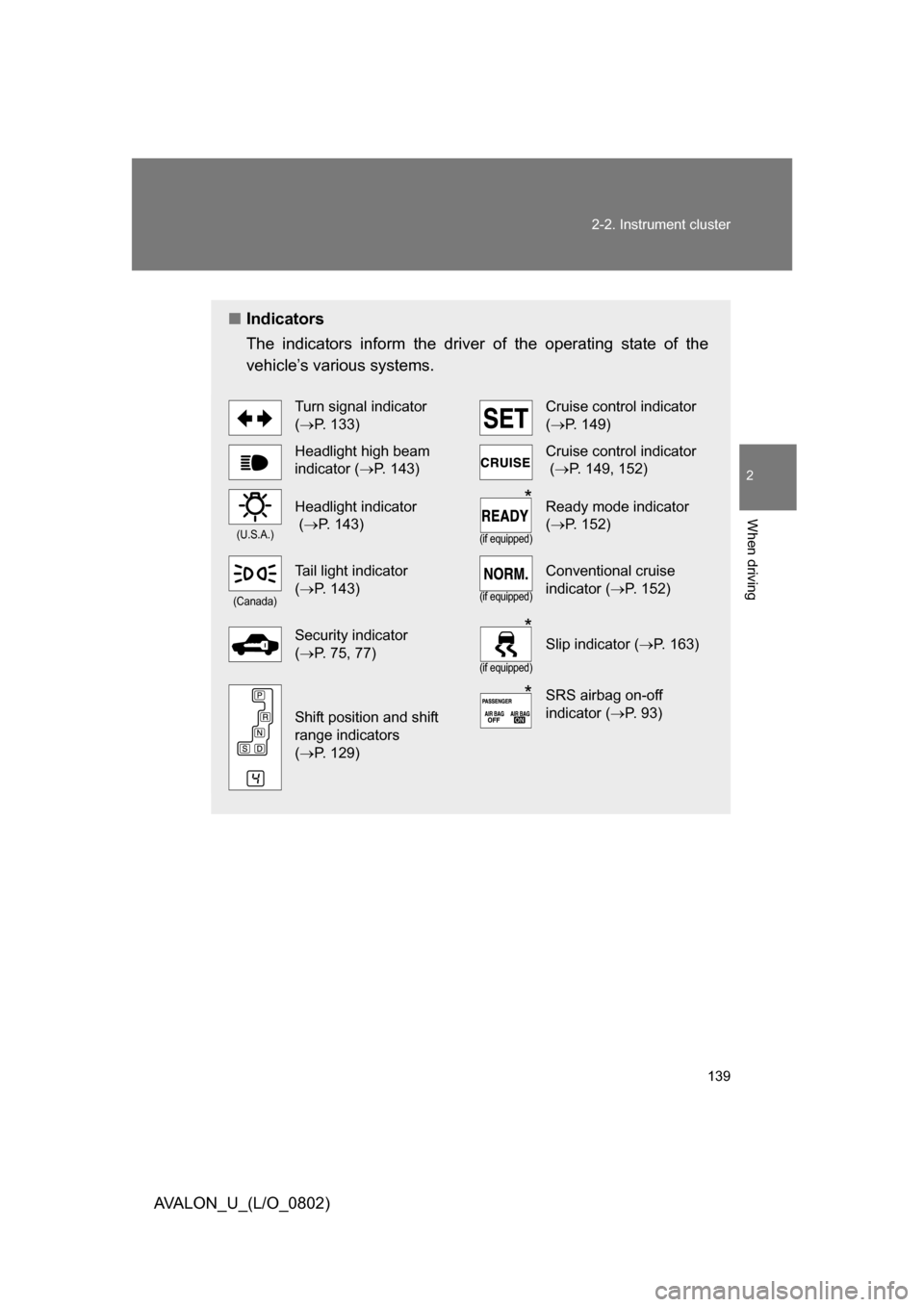
The indicators inform the driver of the operating state of the
vehicle’s various systems.
Turn signal indicator
( P. 133)Cruise control indicator
(P. 149)
Headlight high beam
indicator ( P. 143)Cruise control indicator
( P. 149, 152)
(U.S.A.)
Headlight indicator
( P. 143)
(if equipped)
Ready mode indicator
( P. 152)
(Canada)
Tail light indicator
( P. 143)
(if equipped)
Conventional cruise
indicator ( P. 152)
Security indicator
( P. 75, 77)
(if equipped)
Slip indicator ( P. 163)
Shift position and shift
range indicators
( P. 129)
SRS airbag on-off
indicator ( P. 93)
*
*
*
Page 149 of 452
149
2
When driving
AVALON_U_(L/O_0802)
2-4. Using other driving systems
Cruise control
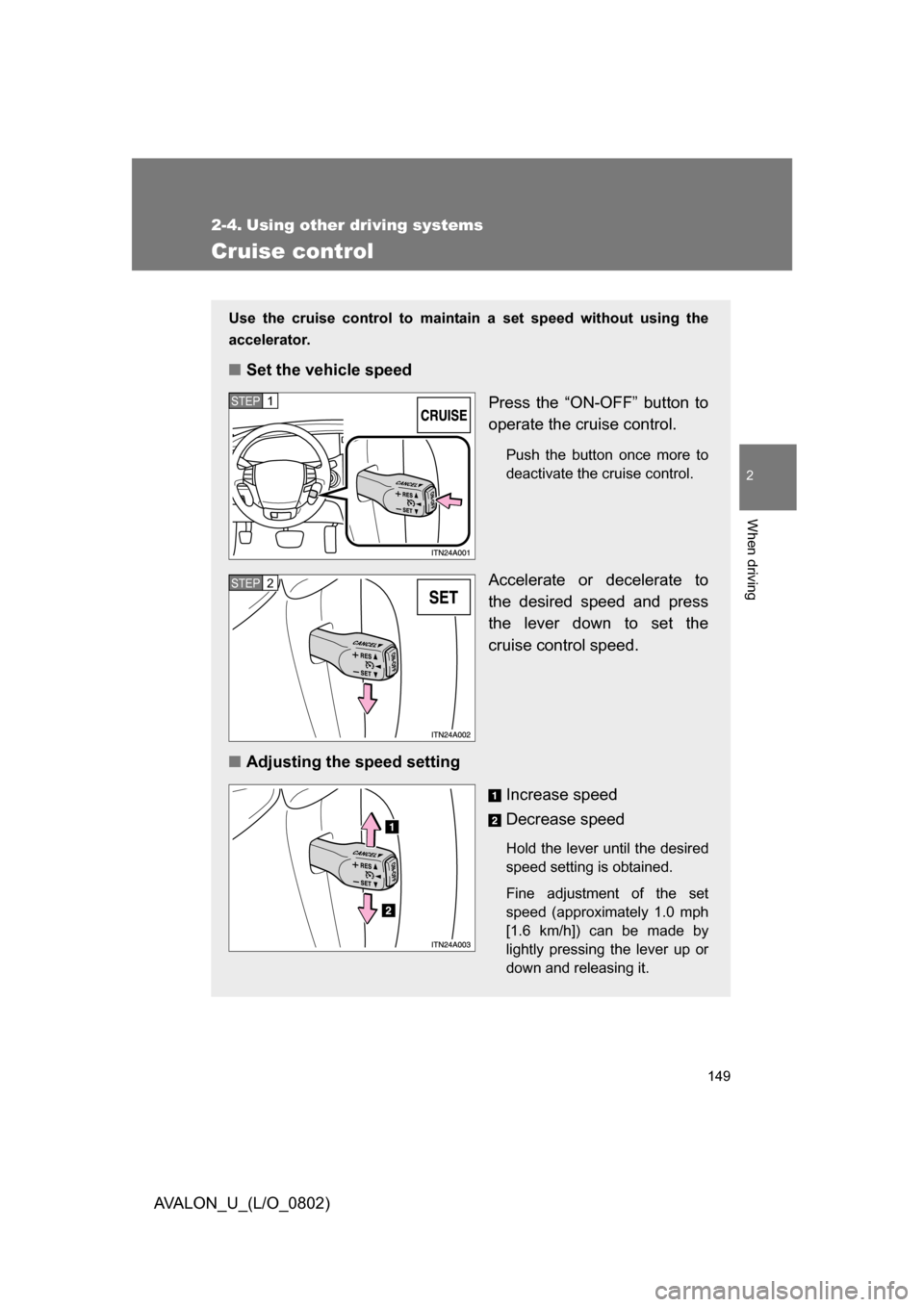
Use the cruise control to maintain a set speed without using the
accelerator.
■ Set the vehicle speed
Press the “ON-OFF” button to
operate the cruise control.
Push the button once more to
deactivate the cruise control.
Accelerate or decelerate to
the desired speed and press
the lever down to set the
cruise control speed.
■ Adjusting the speed setting
Increase speed
Decrease speed
Hold the lever until the desired
speed setting is obtained.
Fine adjustment of the set
speed (approximately 1.0 mph
[1.6 km/h]) can be made by
lightly pressing the lever up or
down and releasing it.
STEP1
STEP2
Page 150 of 452
150 2-4. Using other driving systems
AVALON_U_(L/O_0802)
■Cruise control can be set when
● The shift lever is in the “D” or “4”, “5”, or “6” range of “S” mode.
● Vehicle speed is between approximately 25 mph (40 km/h) and 125 mph
(200 km/h).
■ Accelerating
The vehicle can be accelerated normally. After acceleration, the set speed
resumes.
■ Automatic cruise control cancelation
The set speed is automatically canceled in any of the following situations.
● Actual vehicle speed falls more than 10 mph (16 km/h) below the preset
vehicle speed
At this time, the memorized set speed is not retained.
● Actual vehicle speed is below 25 mph (40 km/h)
● VSC is activated
■ If the cruise control indicator light flashes
Turn the “ON-OFF” button off once, and then reactivate the system.
If the cruise control speed cannot be set or if the cruise control cancels
immediately after being activated, there may be a malfunction in the cruise
control system. Have the vehicle inspected by your Toyota dealer.
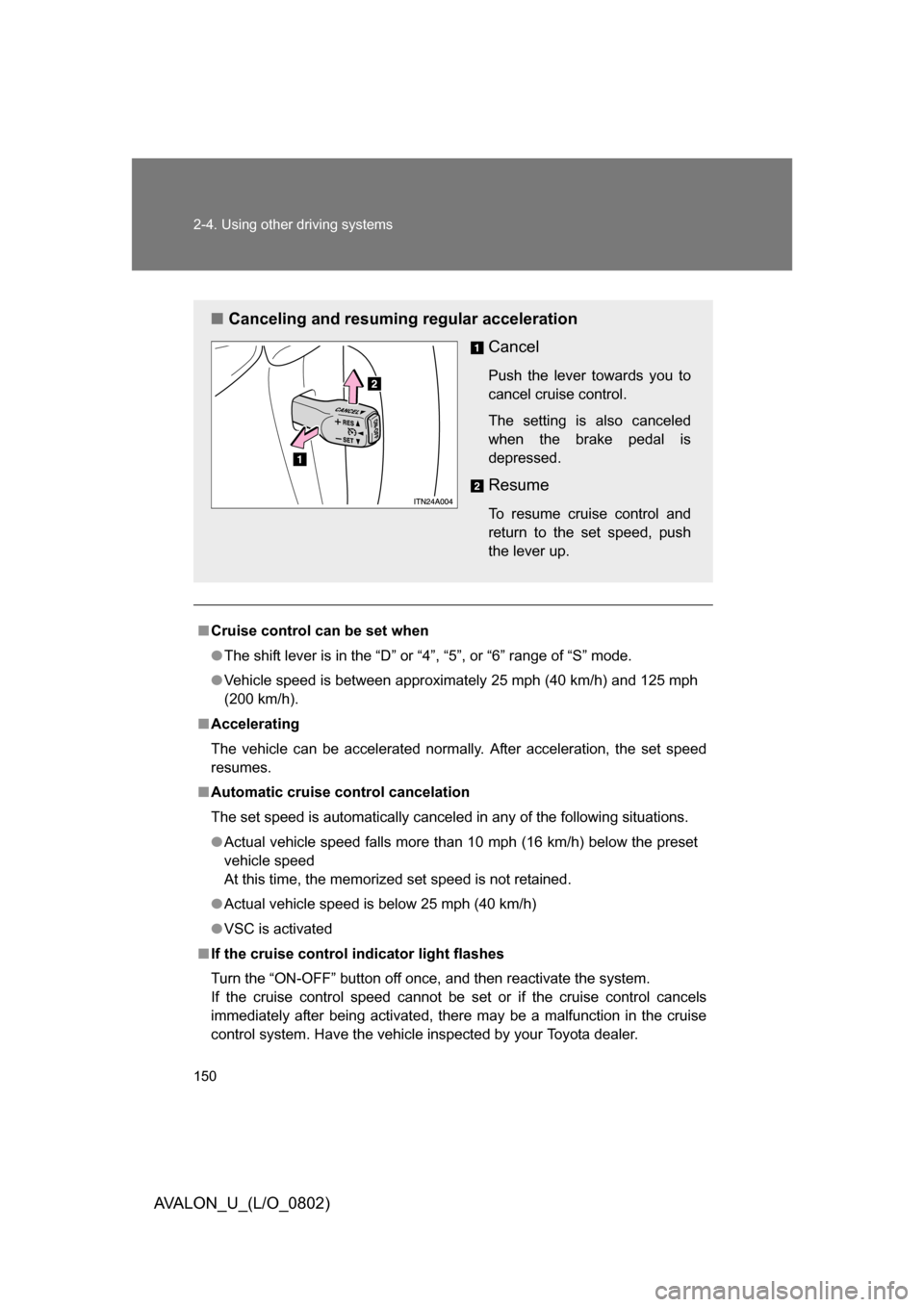
■ Canceling and resuming regular acceleration
Cancel
Push the lever towards you to
cancel cruise control.
The setting is also canceled
when the brake pedal is
depressed.
Resume
To resume cruise control and
return to the set speed, push
the lever up.
Page 151 of 452
151
2-4. Using other
driving systems
2
When driving
AVALON_U_(L/O_0802)
CAUTION
■To avoid operating the cruise control by mistake
Keep the “ON-OFF” button off when not in use.
■ Situations unsuitable for cruise control
Do not use cruise control in any of the following situations.
Doing so may result in control of the vehicle being lost and could cause seri-
ous or fatal accident.
● In heavy traffic
● On roads with sharp bends
● On slippery roads, such as those covered with rain, ice or snow
● On steep hills
Vehicle speed may exceed the set speed when driving down a steep hill.
● On winding roads