engine TOYOTA AVALON 2010 XX30 / 3.G User Guide
[x] Cancel search | Manufacturer: TOYOTA, Model Year: 2010, Model line: AVALON, Model: TOYOTA AVALON 2010 XX30 / 3.GPages: 476, PDF Size: 6.77 MB
Page 32 of 476

32 1-2. Opening, closing and locking the doors and trunk
AVALON_U (OM41437U)
■Alarms and warning indicators
A combination of exterior and interior alarms are used to prevent theft of the
vehicle and unforeseeable accidents resulting from erroneous operation.
Take appropriate measures according to which warning light comes on.
(P. 393)
The following table describes circumstances and correction procedures
when only alarms are sounded.
AlarmSituationCorrection procedure
Exterior alarm
sounds once for
2 seconds Tried to lock the doors
using the entry function
while the electronic key is
still inside the passenger
compartment
Retrieve the elec-
tronic key from the
passenger compart-
ment and lock the
doors again.
Tried to exit the vehicle
with the electronic key and
lock the doors without first
turning the “ENGINE
START STOP” switch OFF Turn the “ENGINE
START STOP” switch
OFF and lock the
doors again.
Closed the trunk while the
electronic key is still inside
and all doors are locked Retrieve the elec-
tronic key from the
trunk and close the
trunk lid.
Exterior alarm
sounds once for
10 seconds Tried to lock the vehicle
using the entry function
while a door is open Close all of the doors
and lock the doors
again.
Interior alarm
sounds once The electronic key battery
is low. Replace the battery.
(
P. 363)
Interior alarm
sounds continu-
ously Tried to open the door and
exit the vehicle without
shifting the shift lever to
“P”
Shift the shift lever to
“P”.
Page 33 of 476

33
1-2. Opening, closing and locking the doors and trunk
1
Before driving
AVALON_U (OM41437U)
■
If the smart key system does not operate properly
● Locking and unlocking the doors: Use the mechanical key. ( P. 418)
● Starting the engine: P. 418
■ When the electronic key battery is fully depleted
P. 363
■ Customization that can be co nfigured at Toyota dealer
Settings (e.g. smart key system) can be changed.
(Customizable features P. 454)
AlarmSituationCorrection procedure
Interior alarm
rings continu-
ously Turned the “ENGINE
START STOP” switch to
ACCESSORY mode while
the driver’s door is open
(Opened the driver’s door
when the “ENGINE START
STOP” switch is in
ACCESSORY mode.)
Turn the “ENGINE
START STOP” switch
OFF and close the
driver’s door.
Turned the “ENGINE
START STOP” switch OFF
while the driver’s door is
open Close the driver’s
door.
Page 41 of 476
41
1-2. Opening, closing and locking the doors and trunk
1
Before driving
AVALON_U (OM41437U)
Locking the front doors from the outside without a key
Move the inside lock button to the lock position.
Close the door.
Vehicles with smart key system
The door cannot be locked if the “ENGINE START STOP” switch is
in the ACCESSORY or IGNITION ON mode, or the electronic key
is left inside the vehicle.
The key may not be detected correctly and the door may be locked.
Vehicles without smart key system
The door cannot be locked if either front door is open and the key
is in the engine switch.
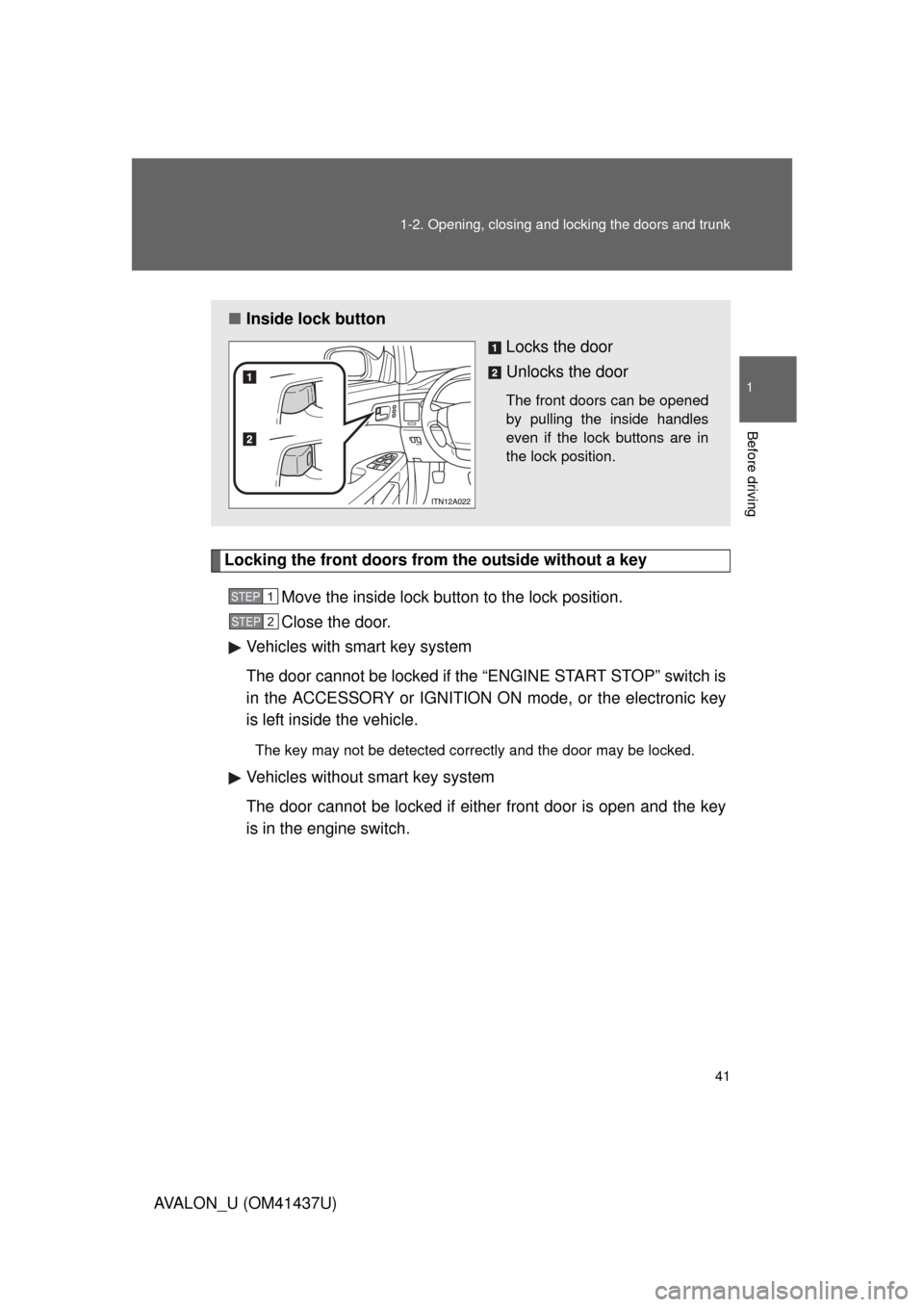
■ Inside lock button
Locks the door
Unlocks the door
The front doors can be opened
by pulling the inside handles
even if the lock buttons are in
the lock position.
STEP1
STEP2
Page 43 of 476

43
1-2. Opening, closing and locking the doors and trunk
1
Before driving
AVALON_U (OM41437U)
■
Setting and canceling the functions
To switch between setting and canceling, follow the procedure
below:
Vehicles with smart key system: Close all the doors and turn
the “ENGINE START STOP” swit ch to IGNITION ON mode.
(Perform within 10 seconds.)
Vehicles without smart key system: Close all the doors and
turn the engine switch to the “ON” position. (Perform
within 10 seconds.)
FunctionOperation
Driver’s door linked door
unlocking function
Vehicles with smart key system
All doors are unlocked when the driver’s door
is opened within 10 seconds after turning the
“ENGINE START STOP” switch OFF.
Vehicles without smart key system
All doors are unlocked when the driver’s door
is opened within 10 seconds after turning the
engine switch to the “LOCK” position.
STEP1
STEP2
STEP2
Page 55 of 476
55
1
1-3. Adjustable components (seats, steering wheel, mirrors)
Before driving
AVALON_U (OM41437U)
Driving position memor y system
: If equipped
Your preferred driving position (the position of the driver’s seat and
outside rear view mirrors) can be entered into the computer’s mem-
ory and recalled with the touch of a button. It is also possible to set
this function to activate automati cally when the doors are unlocked.
Two different driving positions can be entered into memory.
■ Entering a position to memory
Vehicles with smart key system: Turn the “ENGINE START
STOP” switch to IGNITION ON mode.
Vehicles without smart key system: Turn the engine switch
to the “ON” position.
Adjust the driver’s seat and outside rear view mirrors to the
desired positions.
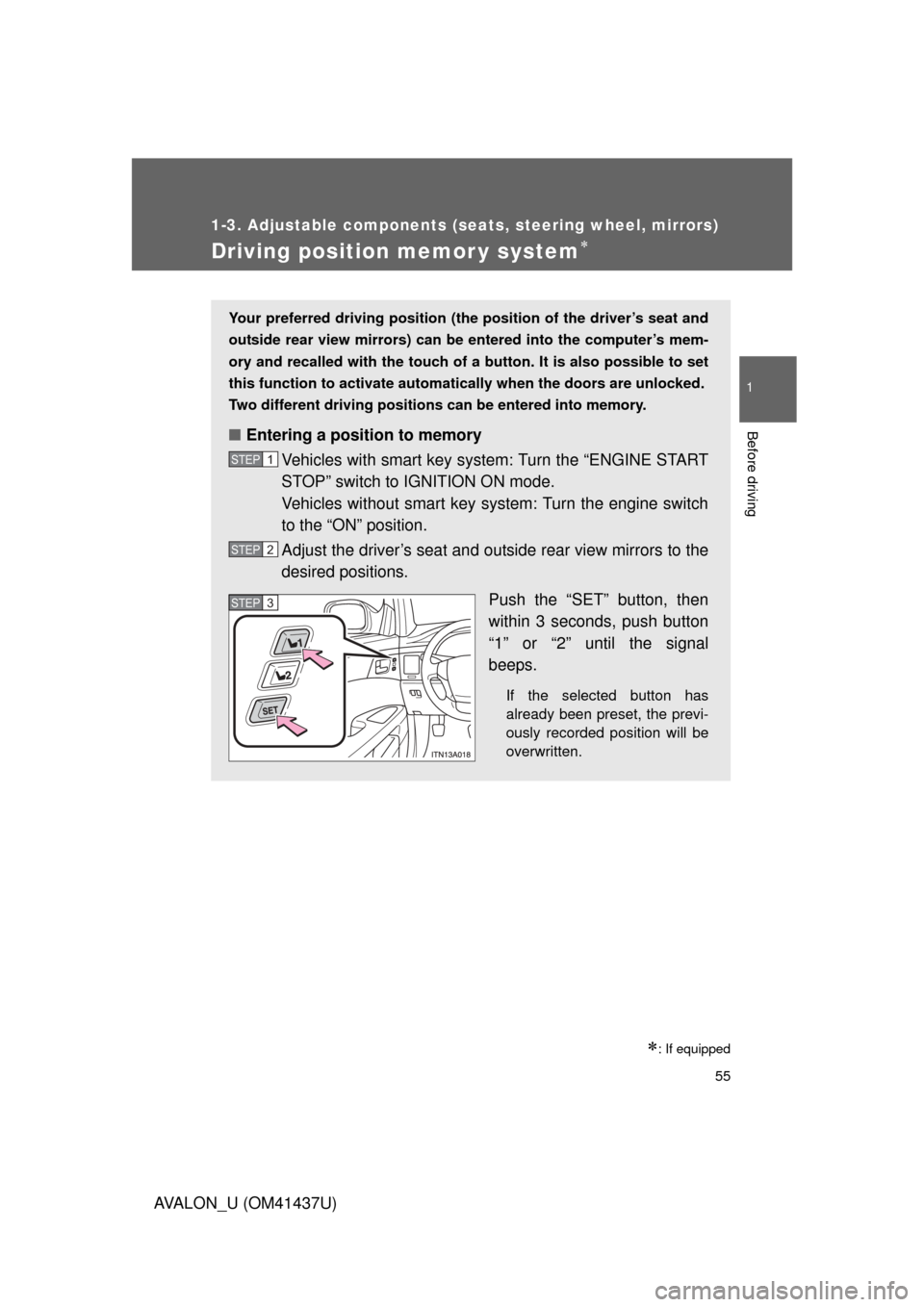
Push the “SET” button, then
within 3 seconds, push button
“1” or “2” until the signal
beeps.
If the selected button has
already been preset, the previ-
ously recorded position will be
overwritten.
STEP1
STEP2
STEP3STEP3
Page 56 of 476
56 1-3. Adjustable components (seats, steering wheel, mirrors)
AVALON_U (OM41437U)
Linking driving position memory with door unlock operation
(vehicles with smart key system)
Memorized driving positions can be recalled when you unlock the
driver’s door using the entry function or wireless remote control and
open the driver’s door.
■ Setting the linked door unlock operation
Set the driving positions into the memory system using the “1”
or “2” buttons. ( P. 5 5 )
Turn the “ENGINE START STOP” switch OFF, then close the
driver’s door.
■ Recalling the memorized position
Vehicles with smart key system: Turn the “ENGINE START
STOP” switch to IGNITION ON mode.
Vehicles without smart key system: Turn the engine switch
to the “ON” position.
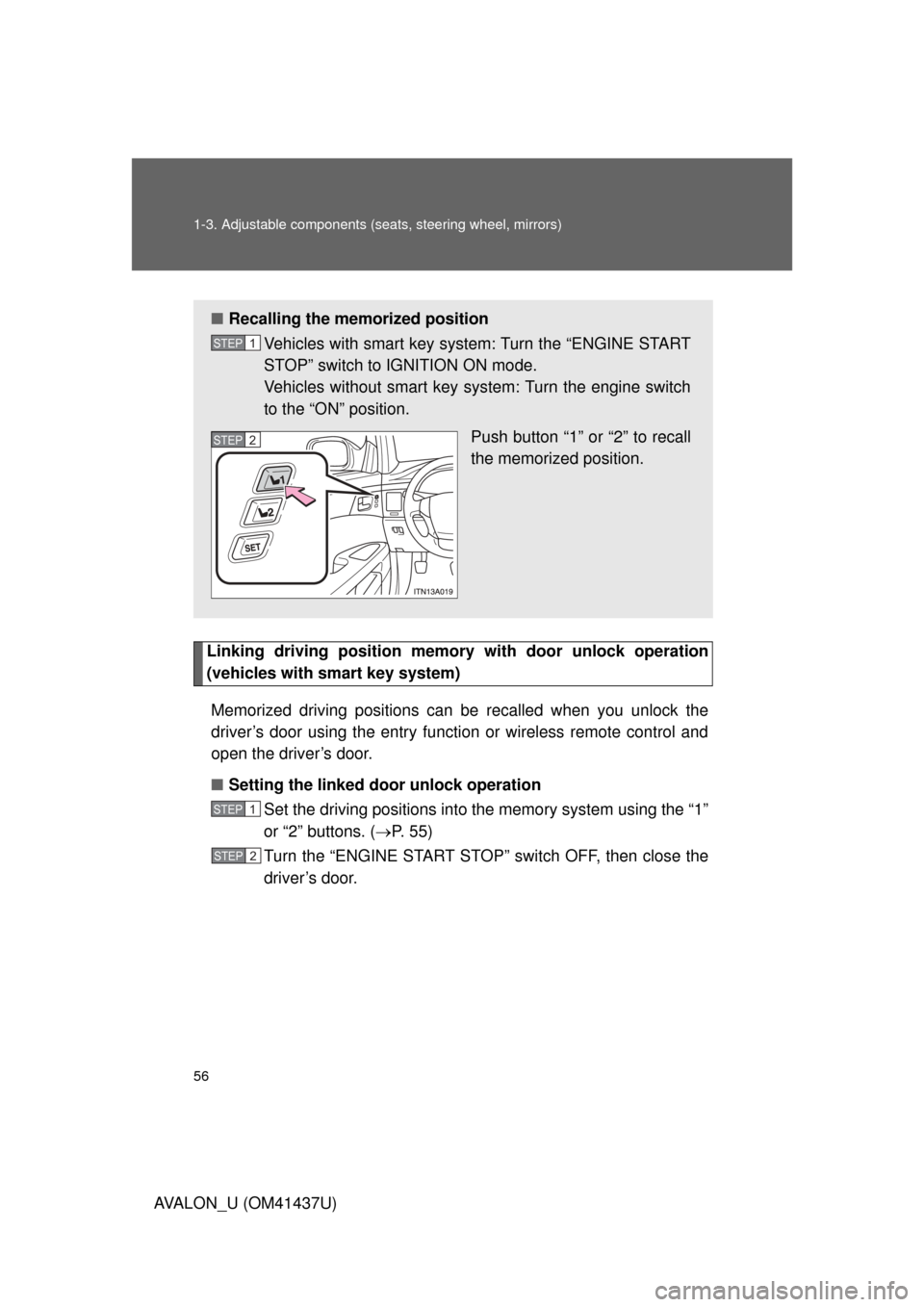
Push button “1” or “2” to recall
the memorized position.
STEP1
STEP2
STEP1
STEP2
Page 57 of 476
57
1-3. Adjustable components (seat
s, steering wheel, mirrors)
1
Before driving
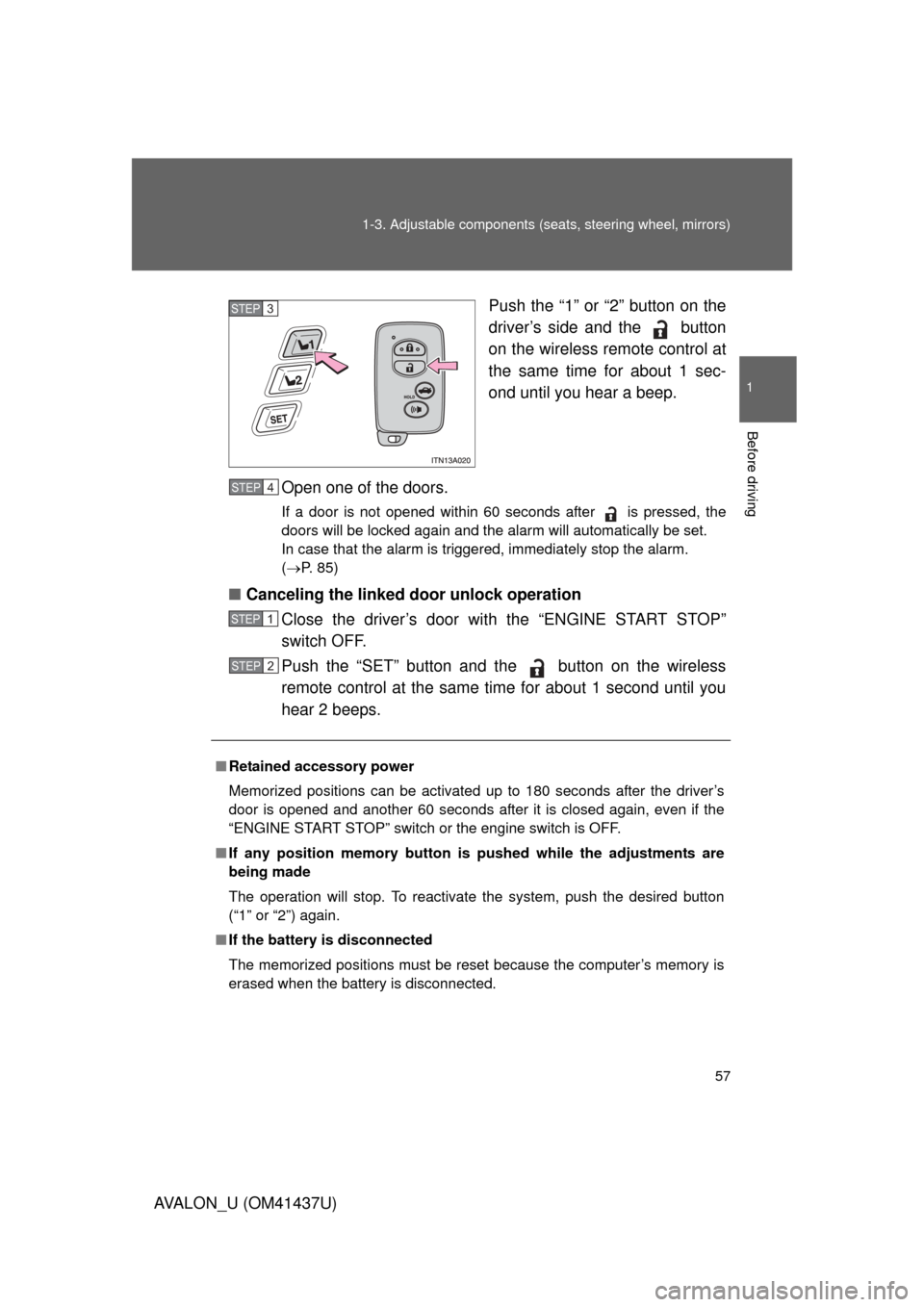
AVALON_U (OM41437U) Push the “1” or “2” button on the
driver’s side and the button
on the wireless remote control at
the same time for about 1 sec-
ond until you hear a beep.
Open one of the doors.
If a door is not opened within 60 seconds after is pressed, the
doors will be locked again and the alarm will automatically be set.
In case that the alarm is triggered, immediately stop the alarm.
( P. 85)
■ Canceling the linked door unlock operation
Close the driver’s door with the “ENGINE START STOP”
switch OFF.
Push the “SET” button and the button on the wireless
remote control at the same time for about 1 second until you
hear 2 beeps.
STEP3
■Retained accessory power
Memorized positions can be activated up to 180 seconds after the driver’s
door is opened and another 60 seconds after it is closed again, even if the
“ENGINE START STOP” switch or the engine switch is OFF.
■ If any position memory button is pushed while the adjustments are
being made
The operation will stop. To reactivate the system, push the desired button
(“1” or “2”) again.
■ If the battery is disconnected
The memorized positions must be reset because the computer’s memory is
erased when the battery is disconnected.
STEP4
STEP1
STEP2
Page 70 of 476
70
1-3. Adjustable components (seats, steering wheel, mirrors)
AVALON_U (OM41437U)
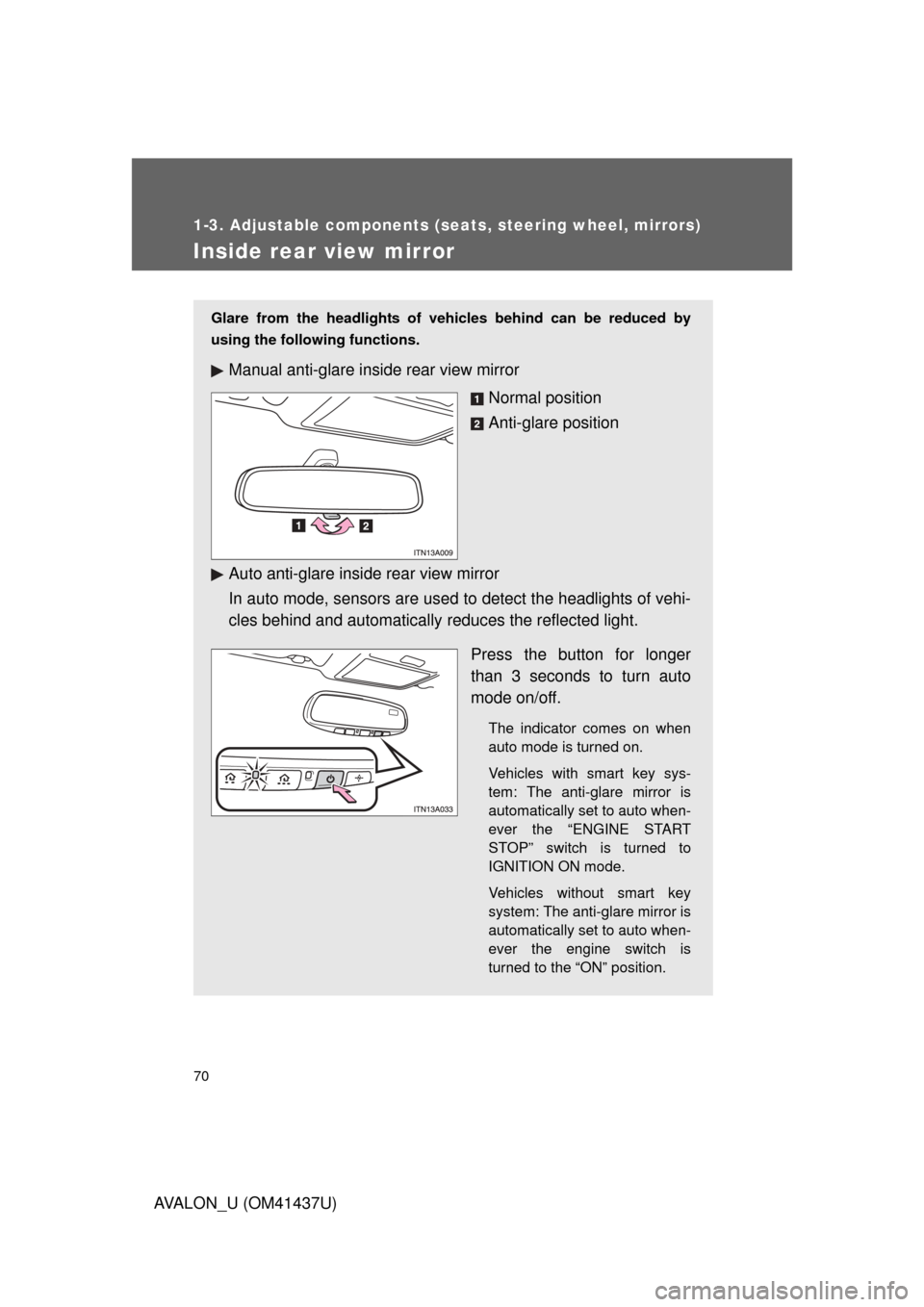
Inside rear view mirror
Glare from the headlights of vehicles behind can be reduced by
using the following functions.
Manual anti-glare inside rear view mirrorNormal position
Anti-glare position
Auto anti-glare inside rear view mirror
In auto mode, sensors are used to detect the headlights of vehi-
cles behind and automatically reduces the reflected light.
Press the button for longer
than 3 seconds to turn auto
mode on/off.
The indicator comes on when
auto mode is turned on.
Vehicles with smart key sys-
tem: The anti-glare mirror is
automatically set to auto when-
ever the “ENGINE START
STOP” switch is turned to
IGNITION ON mode.
Vehicles without smart key
system: The anti-glare mirror is
automatically set to auto when-
ever the engine switch is
turned to the “ON” position.
Page 72 of 476
72
1-3. Adjustable components (seats, steering wheel, mirrors)
AVALON_U (OM41437U)
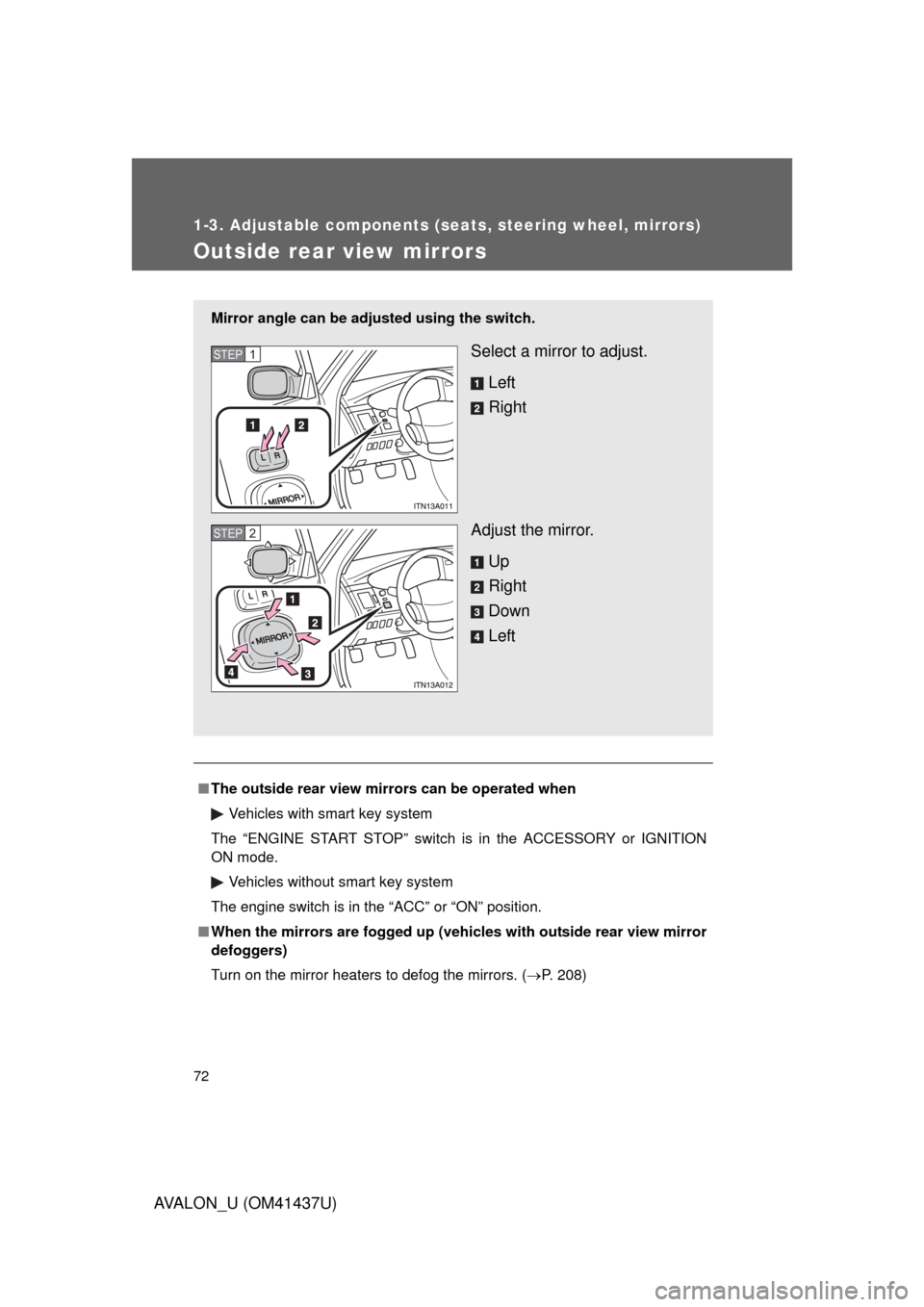
Outside rear view mirrors
■The outside rear view mirr ors can be operated when
Vehicles with smart key system
The “ENGINE START STOP” switch is in the ACCESSORY or IGNITION
ON mode.
Vehicles without smart key system
The engine switch is in the “ACC” or “ON” position.
■ When the mirrors are fogged up (veh icles with outside rear view mirror
defoggers)
Turn on the mirror heaters to defog the mirrors. (P. 208)
Mirror angle can be adju sted using the switch.
Select a mirror to adjust.
Left
Right
Adjust the mirror. Up
Right
Down
LeftSTEP1
STEP2
Page 75 of 476

75
1-4. Opening and closing the windows and moon roof
1
Before driving
AVALON_U (OM41437U)
■
The power windows can be operated when
Vehicles with smart key system
The “ENGINE START STOP” switch is in IGNITION ON mode. Vehicles without smart key system
The engine switch is in the “ON” position.
■ Operating the power windows af ter turning the engine off
Vehicles with smart key system
The power windows can be operated for approximately 45 seconds even
after the “ENGINE START STOP” swit ch is turned to ACCESSORY mode or
turned OFF. They cannot, however, be operated once the driver’s or front
passenger’s door is opened.
Vehicles without smart key system
The power windows can be operated for approximately 45 seconds even
after the engine switch is turned to the “ACC” or “LOCK” position. They can-
not, however, be operated once the driver’s or front passenger’s door is
opened.
■ Jam protection function
If an object becomes caught between the window and the window frame,
window travel is stopped and the window is opened slightly.
■ When the battery is disconnected
The power windows must be initialized in order to ensure proper operation.
(Perform for each window with the switch for each seat.)
Open the window halfway.
Fully close the window by pulling the switch up and continue hold-
ing the switch for 1 second.
The indicator on the switch changes from a flashing pattern to being on
when initial settings are complete.
STEP1
STEP2