CD player TOYOTA AVALON 2010 XX30 / 3.G Owners Manual
[x] Cancel search | Manufacturer: TOYOTA, Model Year: 2010, Model line: AVALON, Model: TOYOTA AVALON 2010 XX30 / 3.GPages: 476, PDF Size: 6.77 MB
Page 3 of 476

1
2
3
4
5
6
7
3
AVALON_U (OM41437U)
2-3. Operating the lights and windshield wipers
Headlight switch .................. 156
Fog light switch ................... 159
Windshield wipers and washer .............................. 160
2-4. Using other driving systems Cruise control ...................... 165
Dynamic laser cruise control ............................... 168
Driving assist systems ........ 181
2-5. Driving information Cargo and luggage ............. 184
Vehicle load limits ............... 188
Winter driving tips ............... 189
Trailer towing ...................... 194
Dinghy towing ..................... 195
3-1. Using the air conditioning system and defogger
Automatic air conditioning system .............................. 198
Using the steering wheel climate control
switches ............................ 206
Rear window and outside rear view mirror
defoggers .......................... 208 3-2. Using the audio system
Audio system type .............. 210
Audio cover ........................ 212
Using the radio ................... 213
Using the CD player ........... 220
Playing MP3 and WMA discs ....................... 228
Optimal use of the audio system .............................. 236
Using the AUX adapter....... 238
Using the steering wheel audio switches.................. 239
3-3. Using the hands-free system (for cellular phone)
Hands-free system (for cellular phone) ........... 242
Using the hands-free system .............................. 246
Making a phone call ........... 254
Setting a cellular phone ...... 259
Security and system setup ................................ 264
Using the phone book ........ 267
3-4. Using the interior lights Interior lights list ................. 275
3-5. Using the storage features List of storage features ....... 278
3Interior features
Page 102 of 476
102 1-7. Safety information
AVALON_U (OM41437U)
CAUTION
■Modification and disposal of SRS airbag system components
Do not dispose of your vehicle or perform any of the following modifications
without consulting your Toyota dealer. The SRS airbag may malfunction or
deploy (inflate) accidentally, causing death or serious injury.
● Installation, removal, disassembly and repair of the SRS airbags
● Repairs, modifications, removal or replacement of the steering wheel,
instrument panel, dashboard, seats or seat upholstery, front, side and rear
pillars or roof side rail
● Repairs or modifications of the front fender, front bumper, or side of the
occupant compartment
● Installation of snow plows, winches, etc. to the front grille (bull bars, kan-
garoo bar etc.)
● Modifications to the vehicle’s suspension system
● Installation of electronic devices such as mobile two-way radios or CD
players
● Modifications to your vehicle for a person with a physical disability
Page 197 of 476
Interior features3
197
AVALON_U (OM41437U)
3-1. Using the air conditioning system and defogger
Automatic air conditioning system ........................... 198
Using the steering wheel climate control
switches ......................... 206
Rear window and outside rear view mirror
defoggers ....................... 208
3-2. Using the audio system Audio system type............ 210
Audio cover ...................... 212
Using the radio ................. 213
Using the CD player ......... 220
Playing MP3 and WMA discs ..................... 228
Optimal use of the audio system ........................... 236
Using the AUX adapter........................... 238
Using the steering wheel audio switches ............... 239
3-3. Using the hands-free system (for cellular phone)
Hands-free system (for cellular phone) ......... 242
Using the hands-free system ........................... 246 Making a phone call ......... 254
Setting a cellular
phone ............................. 259
Security and system setup .............................. 264
Using the phone book ...... 267
3-4. Using the interior lights Interior lights list ............... 275
3-5. Using the storage features List of storage features .......................... 278
3-6. Other interior features Sun visors ........................ 286
Vanity mirrors ................... 287
Clock ................................ 288
Outside temperature display............................ 289
Ashtrays ........................... 290
Power outlets ................... 291
Seat heaters/ventilators ......... 293
Armrest ............................ 295
Rear sunshade................. 296
Floor mats ........................ 298
Trunk features .................. 299
Garage door opener......... 301
Compass .......................... 306
Page 210 of 476
210
AVALON_U (OM41437U)
3-2. Using the audio system
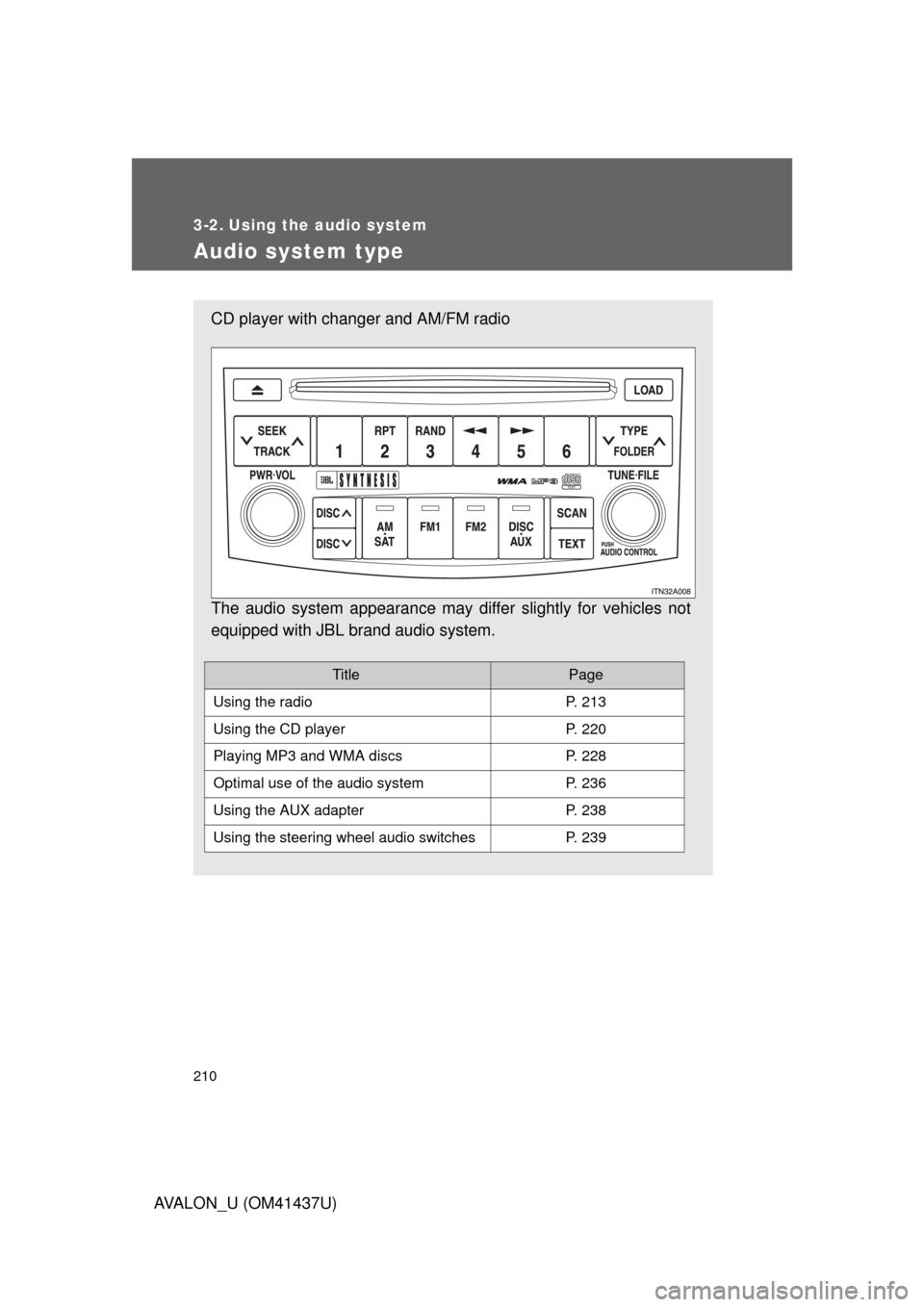
Audio system type
CD player with changer and AM/FM radio
The audio system appearance may differ slightly for vehicles not
equipped with JBL brand audio system.
TitlePage
Using the radioP. 213
Using the CD playerP. 220
Playing MP3 and WMA discsP. 228
Optimal use of the audio systemP. 236
Using the AUX adapterP. 238
Using the steering wheel audio switchesP. 239
Page 211 of 476
211
3-2. Using the audio system
3
Interior features
AVALON_U (OM41437U)
■
Using cellular phones
Interference may be heard through the audio system’s speakers if a cellular
phone is being used inside or close to the vehicle while the audio syste\
m is
operating.
CAUTION
■For vehicles sold in the U.S.A. and Canada
● Part 15 of the FCC Rules
FCC Warning:
Any unauthorized changes or modifications to this equipment will void the
user’s authority to operate this device.
● Laser products
• Do not take this unit apart or attempt to make any changes yourself.
This is an intricate unit that uses a laser pickup to retrieve information
from the surface of compact discs. The laser is carefully shielded so
that its rays remain inside the cabinet. Therefore, never try to disas-
semble the player or alter any of its parts since you may be exposed to
laser rays and dangerous voltages.
• This product utilizes a laser. Use of controls or adjustments or performance of procedures other
than those specified herein may result in hazardous radiation expo-
sure.
NOTICE
■To prevent battery discharge
Do not leave the audio system on longer than necessary with the engine o\
ff.
■ To avoid damaging the audio system
Take care not to spill drinks or other fluids over the audio system.
Page 220 of 476
220
3-2. Using the audio system
AVALON_U (OM41437U)
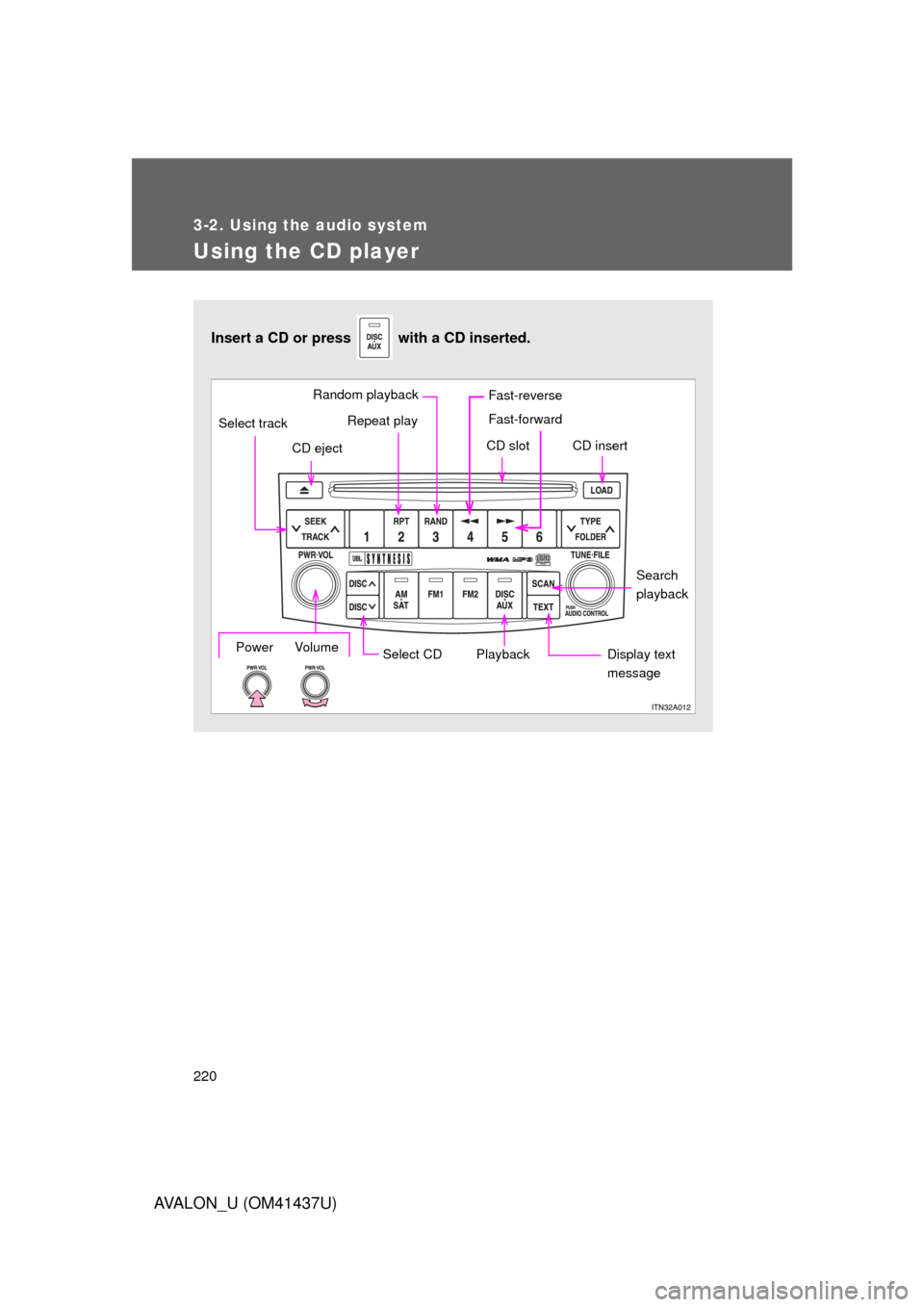
Using the CD player
Insert a CD or press with a CD inserted.
Select CDSearch
playback
Repeat play
CD eject
Playback
Select track
CD slot CD insert
Display text
messagePower Volume
Random playback Fast-reverse
Fast-forward
Page 224 of 476
224 3-2. Using the audio system
AVALON_U (OM41437U)
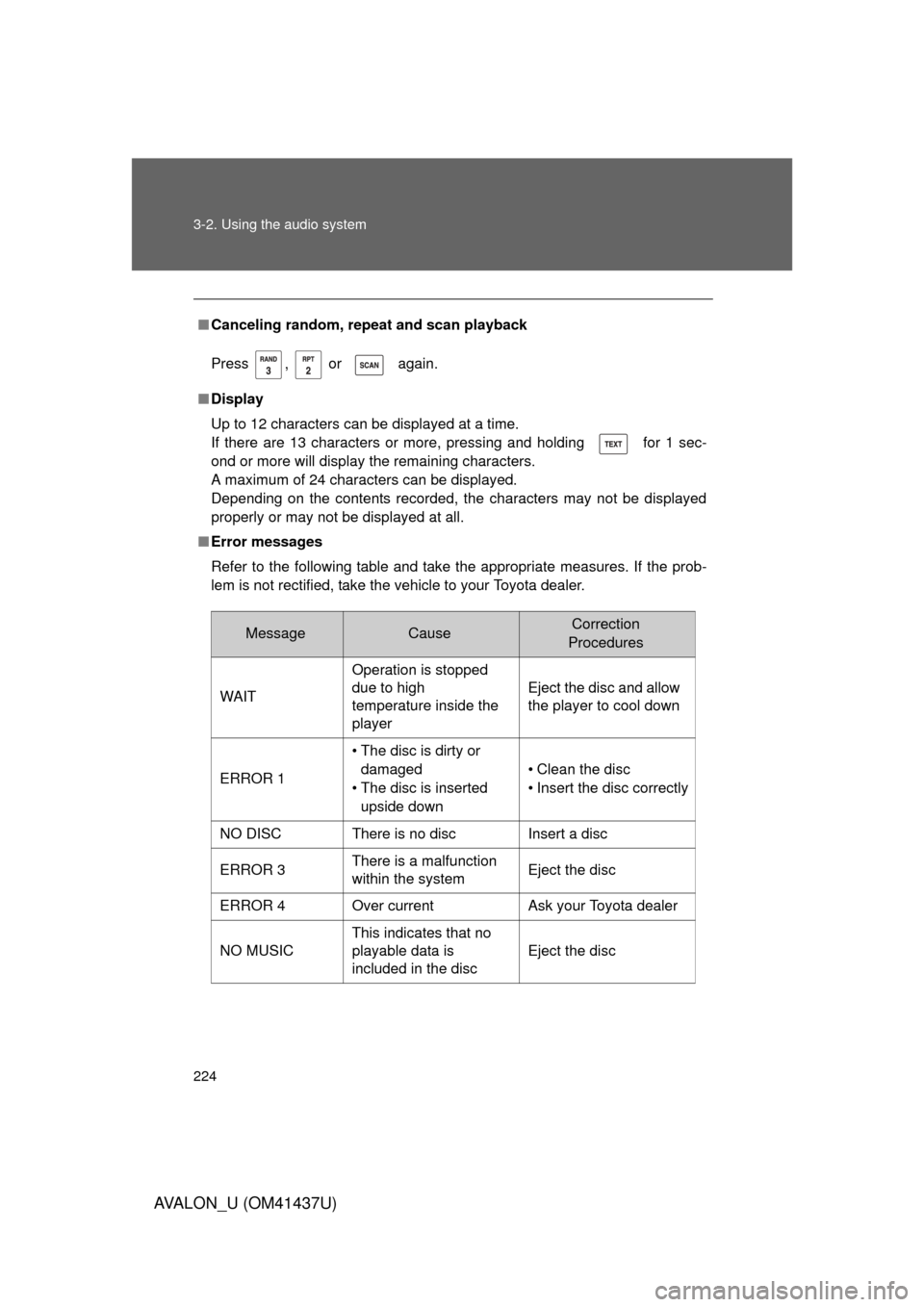
■Canceling random, repeat and scan playback
Press , or again.
■ Display
Up to 12 characters can be displayed at a time.
If there are 13 characters or more, pressing and holding for 1 sec-
ond or more will display the remaining characters.
A maximum of 24 characters can be displayed.
Depending on the contents recorded, the characters may not be displayed
properly or may not be displayed at all.
■ Error messages
Refer to the following table and take the appropriate measures. If the prob-
lem is not rectified, take the vehicle to your Toyota dealer.
MessageCauseCorrection
Procedures
WAIT Operation is stopped
due to high
temperature inside the
player Eject the disc and allow
the player to cool down
ERROR 1 • The disc is dirty or
damaged
• The disc is inserted upside down • Clean the disc
• Insert the disc correctly
NO DISC There is no disc Insert a disc
ERROR 3 There is a malfunction
within the system Eject the disc
ERROR 4 Over current Ask your Toyota dealer
NO MUSIC This indicates that no
playable data is
included in the disc
Eject the disc
Page 225 of 476
225
3-2. Using the audio system
3
Interior features
AVALON_U (OM41437U)
■
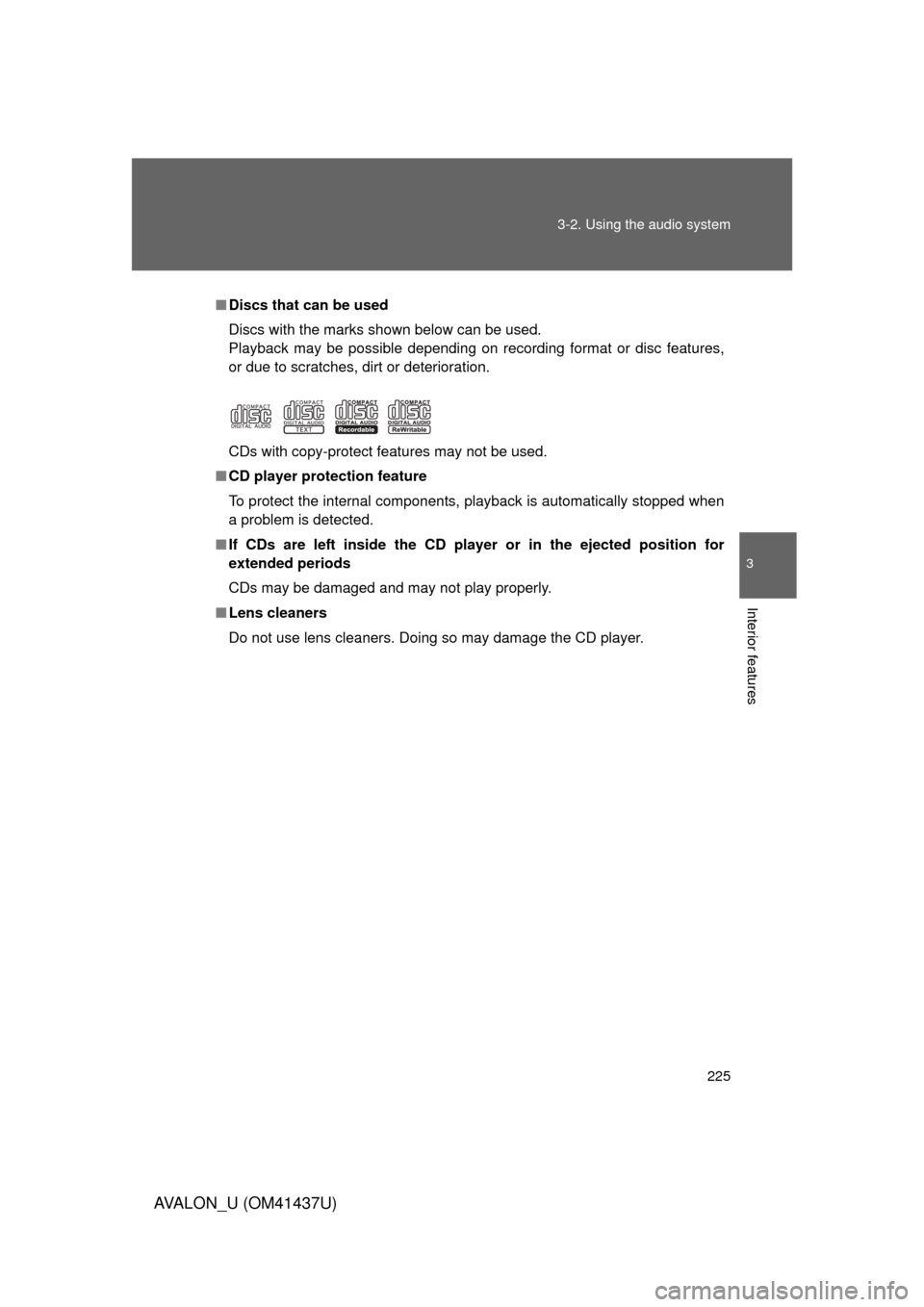
Discs that can be used
Discs with the marks shown below can be used.
Playback may be possible depending on recording format or disc features,
or due to scratches, dirt or deterioration.
CDs with copy-protect features may not be used.
■ CD player protection feature
To protect the internal components, playback is automatically stopped when
a problem is detected.
■ If CDs are left inside the CD pla yer or in the ejected position for
extended periods
CDs may be damaged and may not play properly.
■ Lens cleaners
Do not use lens cleaners. Doing so may damage the CD player.
Page 226 of 476
226 3-2. Using the audio system
AVALON_U (OM41437U)
NOTICE
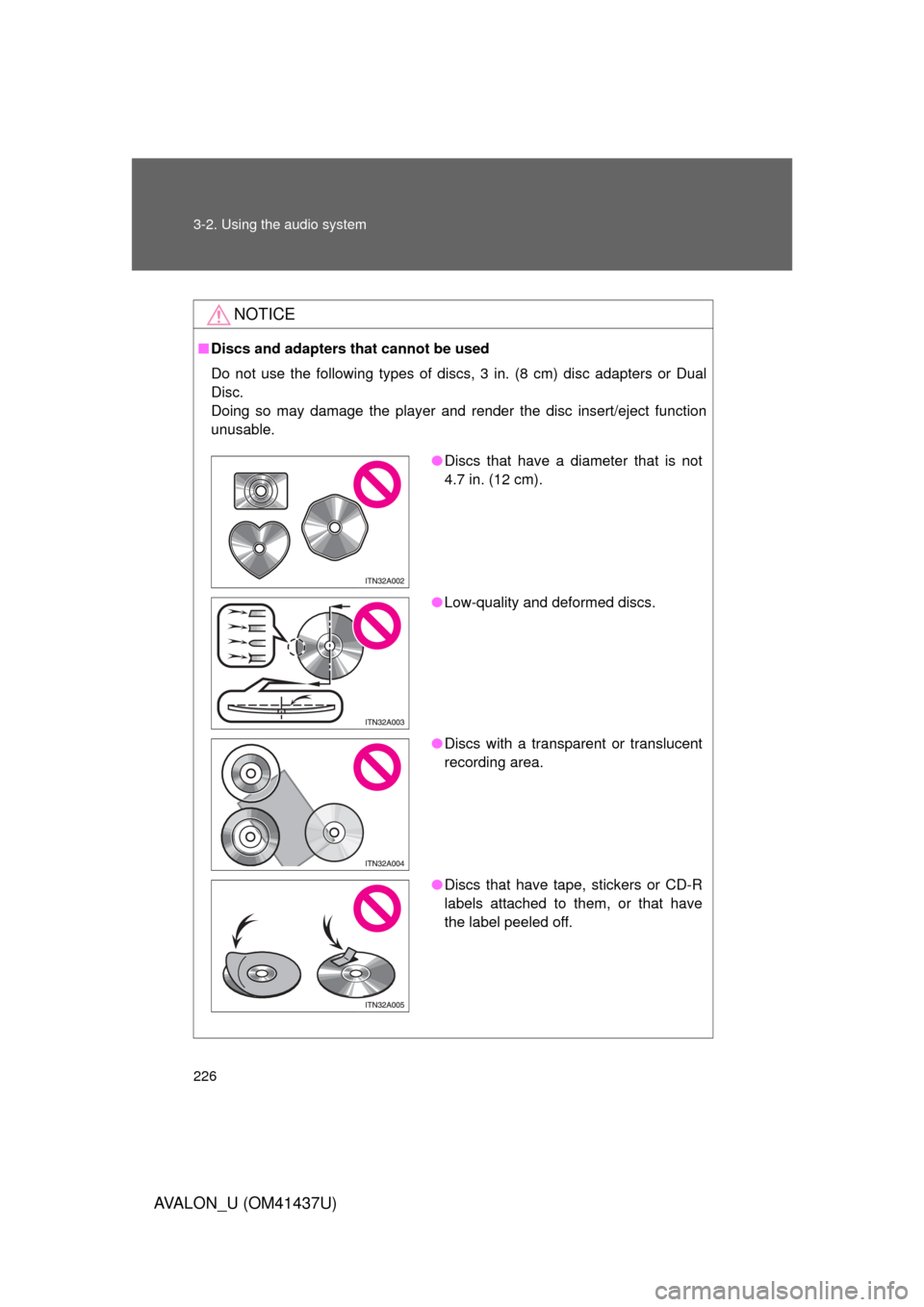
■Discs and adapters that cannot be used
Do not use the following types of discs, 3 in. (8 cm) disc adapters or Dual
Disc.
Doing so may damage the player and render the disc insert/eject function
unusable.
● Discs that have a diameter that is not
4.7 in. (12 cm).
● Low-quality and deformed discs.
● Discs with a transparent or translucent
recording area.
● Discs that have tape, stickers or CD-R
labels attached to them, or that have
the label peeled off.
Page 227 of 476
227
3-2. Using the audio system
3
Interior features
AVALON_U (OM41437U)
NOTICE
■
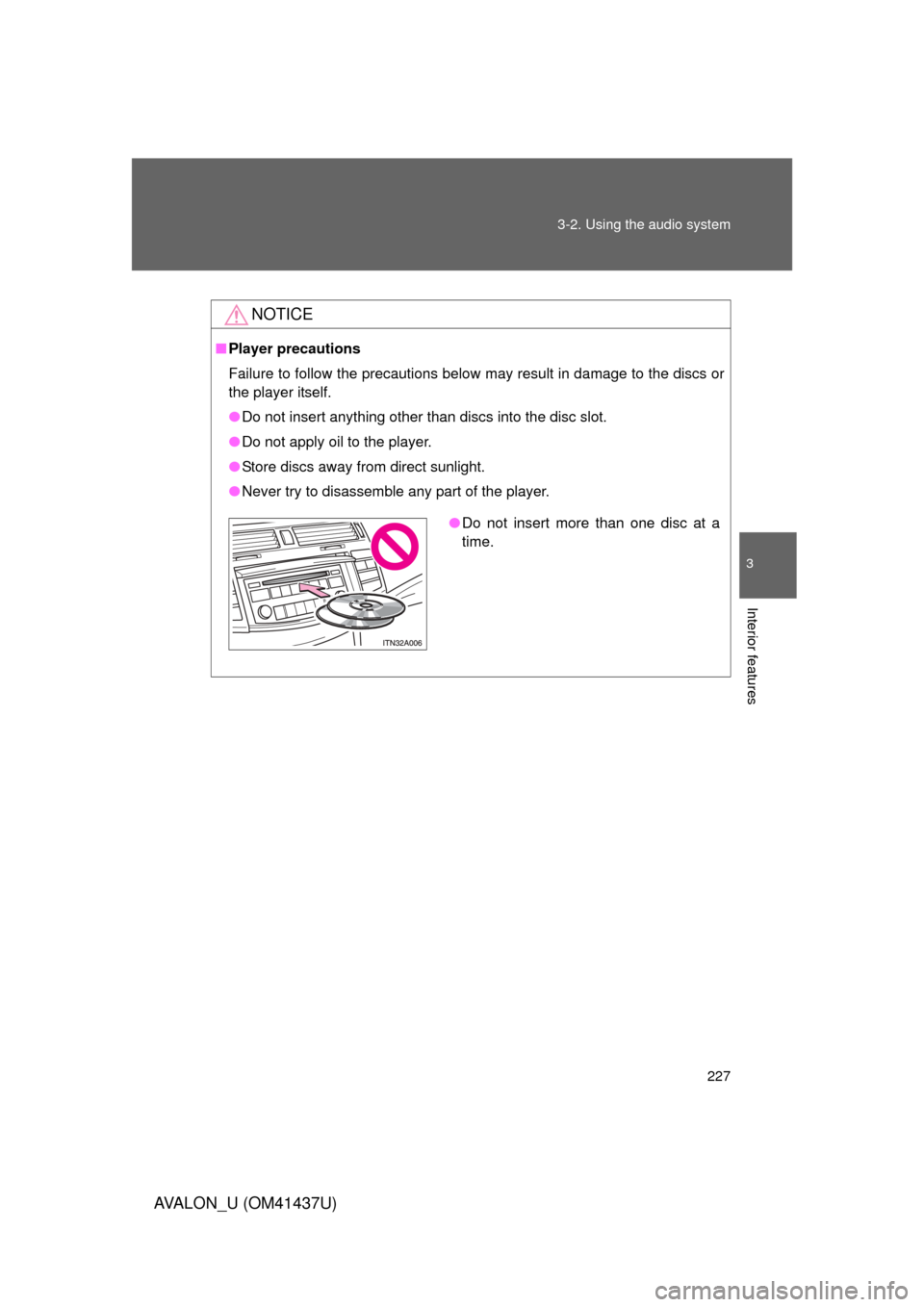
Player precautions
Failure to follow the precautions below may result in damage to the discs or
the player itself.
● Do not insert anything other than discs into the disc slot.
● Do not apply oil to the player.
● Store discs away from direct sunlight.
● Never try to disassemble any part of the player.
●Do not insert more than one disc at a
time.