turn signal TOYOTA AVALON 2010 XX30 / 3.G Owners Manual
[x] Cancel search | Manufacturer: TOYOTA, Model Year: 2010, Model line: AVALON, Model: TOYOTA AVALON 2010 XX30 / 3.GPages: 476, PDF Size: 6.77 MB
Page 2 of 476

TABLE OF CONTENTSIndex
2
AVALON_U (OM41437U)
1-1. Key informationKeys ..................................... 22
1-2. Opening, closing and locking the doors and trunk
Smart key system................. 24
Wireless remote control ....... 36
Doors.................................... 40
Trunk .................................... 46
1-3. Adjustable components (seats, steering wheel,
mirrors)
Front seats ........................... 50
Rear seats ............................ 53
Driving position memory system ................................ 55
Head restraints ..................... 59
Seat belts ............................. 61
Steering wheel ..................... 68
Inside rear view mirror.......... 70
Outside rear view mirrors ..... 72
1-4. Opening and closing the windows and moon roof
Power windows .................... 74
Moon roof ............................. 77
1-5. Refueling Opening the fuel tank cap ..................................... 80 1-6. Theft deterrent system
Engine immobilizer system ................................ 83
Alarm .................................... 85
Theft prevention labels (U.S.A.) ............................... 87
1-7. Safety information Correct driving posture ......... 88
SRS airbags ......................... 90
Front passenger occupant classification system ......... 103
Child restraint systems ....... 109
Installing child restraints ..... 113
2-1. Driving procedures Driving the vehicle .............. 124
Engine (ignition) switch (with smart key
system) ............................. 133
Engine (ignition) switch (without smart key
system) ............................. 137
Automatic transmission ...... 140
Turn signal lever ................. 145
Parking brake ..................... 146
Horn .................................... 147
2-2. Instrument cluster Gauges and meters ............ 148
Indicators and warning lights ................................. 151
Center display..................... 154
1Before driving
2When driving
Page 6 of 476
6
AVALON_U (OM41437U)
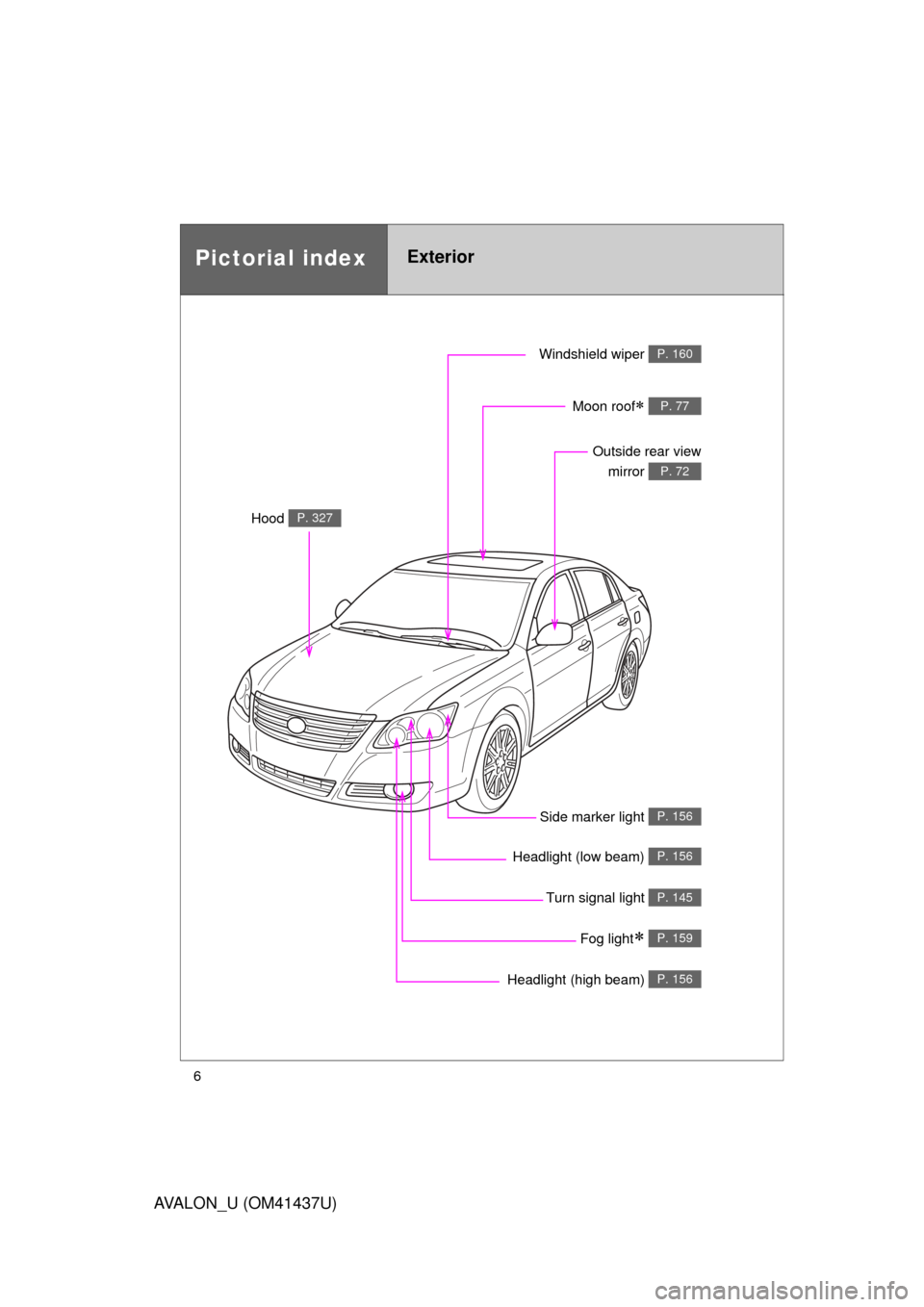
Headlight (high beam) P. 156
Pictorial indexExterior
Turn signal light P. 145
Fog light P. 159
Side marker light P. 156
Headlight (low beam) P. 156
Hood P. 327
Windshield wiper P. 160
Moon roof P. 77
Outside rear viewmirror
P. 72
Page 7 of 476
7
AVALON_U (OM41437U)
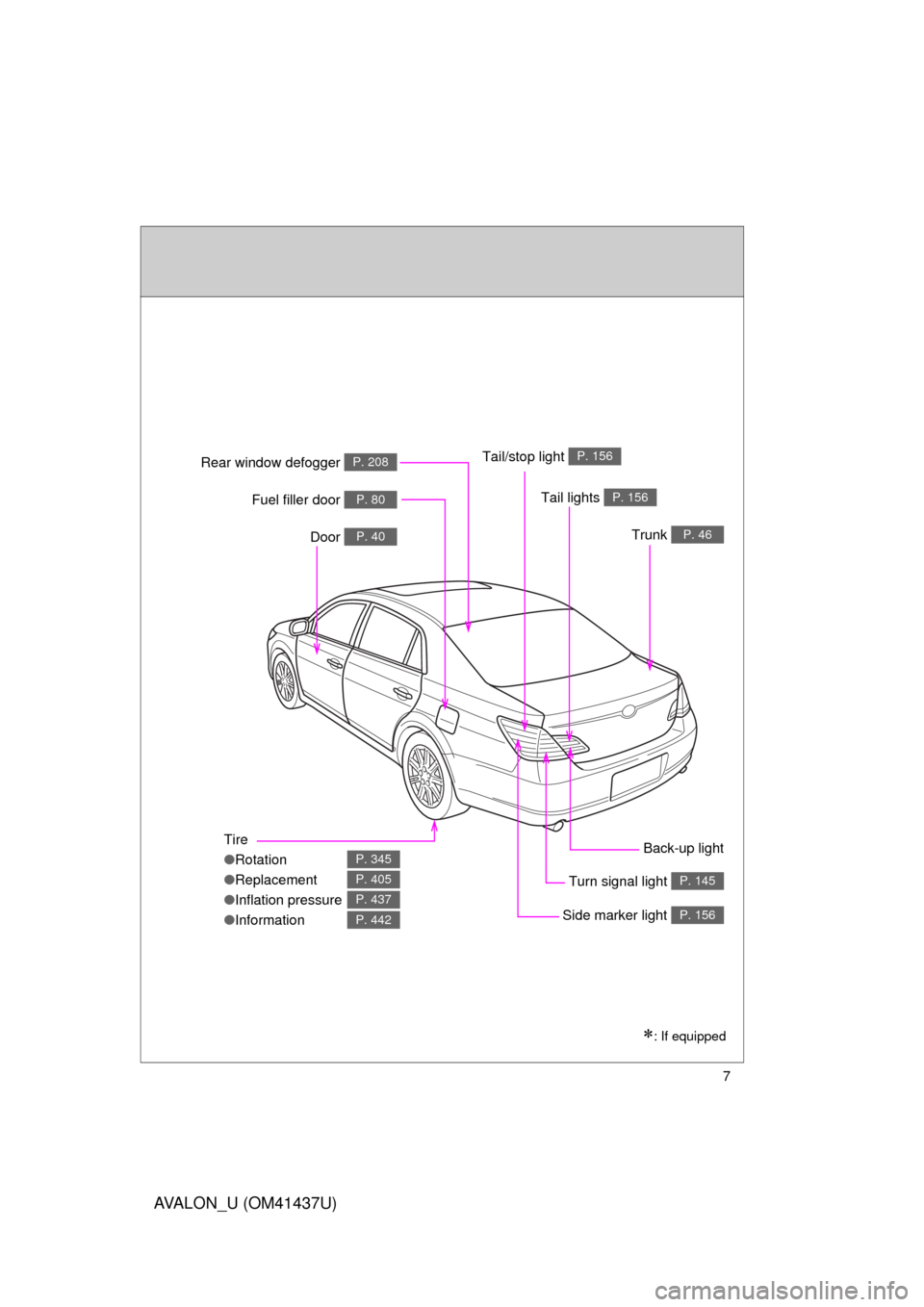
Tire
●Rotation
● Replacement
● Inflation pressure
● Information
P. 345
P. 405
P. 437
P. 442
Tail lights P. 156
Side marker light P. 156
Trunk P. 46
Rear window defogger P. 208
Door P. 40
Fuel filler door P. 80
Turn signal light P. 145
: If equipped
Back-up light
Tail/stop light
P. 156
Page 12 of 476
12
AVALON_U (OM41437U)
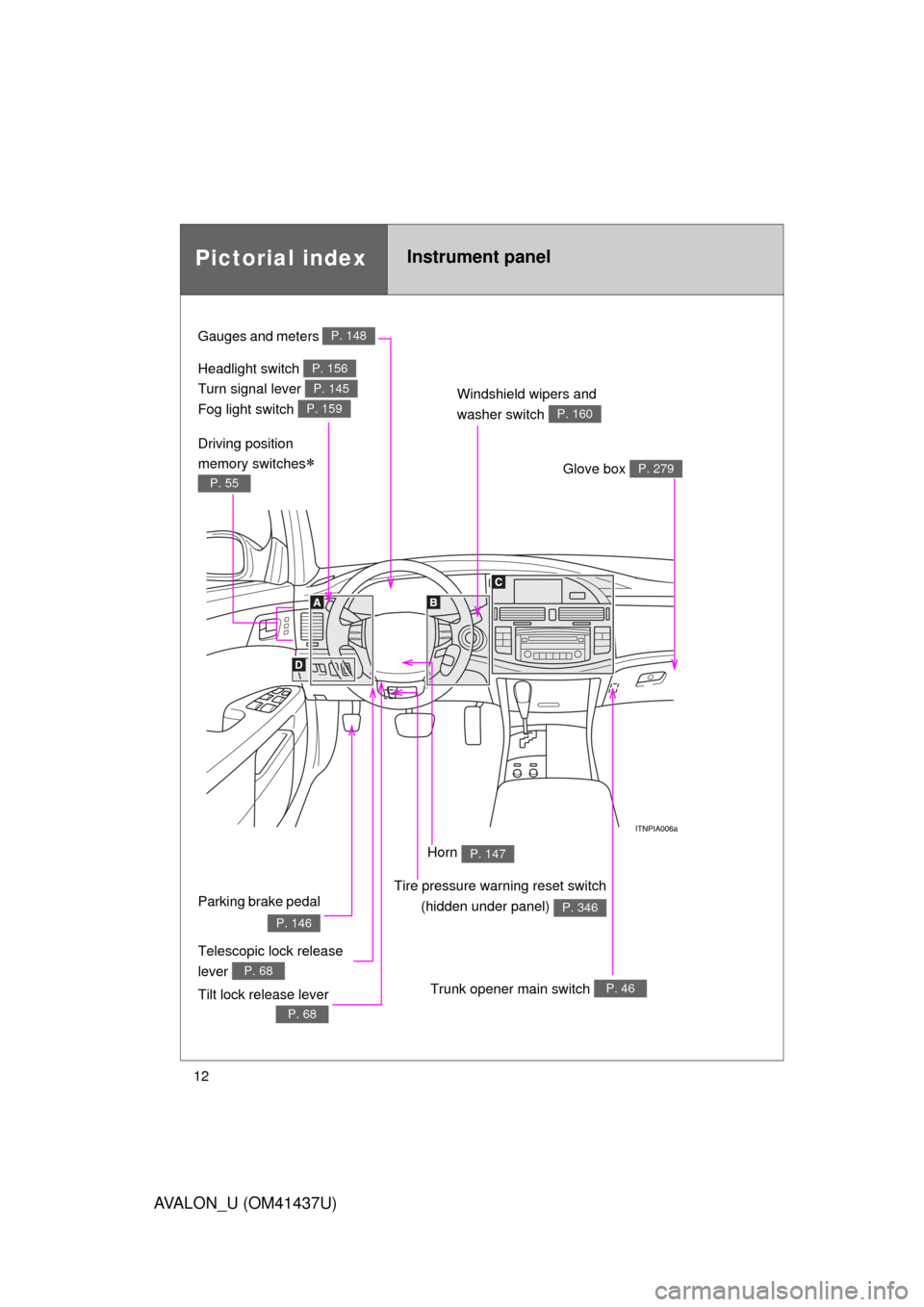
Pictorial indexInstrument panel
Headlight switch
Turn signal lever
Fog light switch P. 156
P. 145
P. 159
Gauges and meters P. 148
Windshield wipers and
washer switch
P. 160
Trunk opener main switch P. 46
Glove box P. 279
Telescopic lock release
lever
P. 68
Parking brake pedal
P. 146
Tilt lock release lever
P. 68
Driving position
memory switches
P. 55
Tire pressure warning reset switch
(hidden under panel)
P. 346
Horn P. 147
Page 55 of 476
55
1
1-3. Adjustable components (seats, steering wheel, mirrors)
Before driving
AVALON_U (OM41437U)
Driving position memor y system
: If equipped
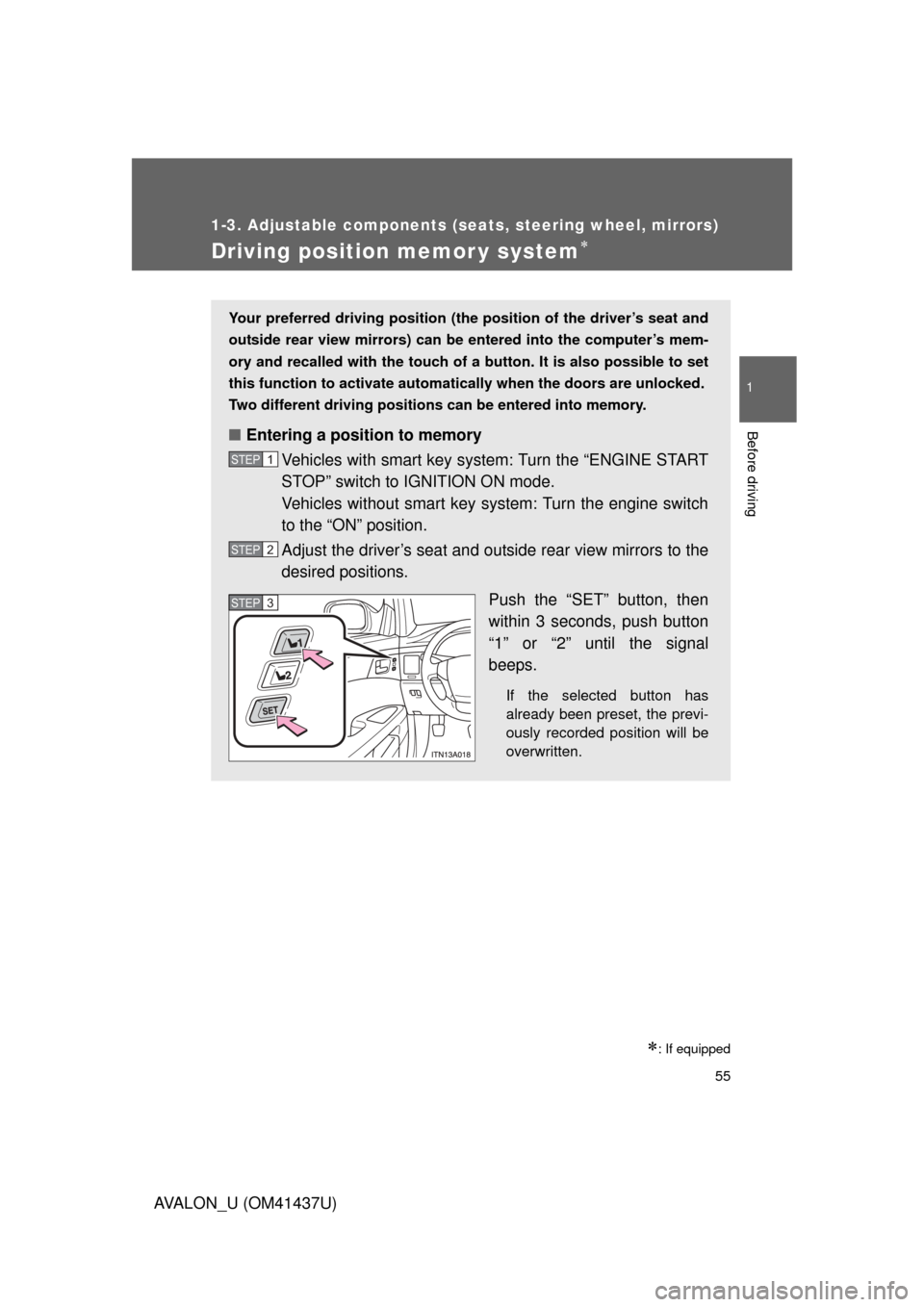
Your preferred driving position (the position of the driver’s seat and
outside rear view mirrors) can be entered into the computer’s mem-
ory and recalled with the touch of a button. It is also possible to set
this function to activate automati cally when the doors are unlocked.
Two different driving positions can be entered into memory.
■ Entering a position to memory
Vehicles with smart key system: Turn the “ENGINE START
STOP” switch to IGNITION ON mode.
Vehicles without smart key system: Turn the engine switch
to the “ON” position.
Adjust the driver’s seat and outside rear view mirrors to the
desired positions.
Push the “SET” button, then
within 3 seconds, push button
“1” or “2” until the signal
beeps.
If the selected button has
already been preset, the previ-
ously recorded position will be
overwritten.
STEP1
STEP2
STEP3STEP3
Page 123 of 476
When driving2
123
AVALON_U (OM41437U)
2-1. Driving proceduresDriving the vehicle............ 124
Engine (ignition) switch (with smart key system).......... 133
Engine (ignition) switch (without smart key system).......... 137
Automatic transmission................... 140
Turn signal lever .............. 145
Parking brake ................... 146
Horn ................................. 147 2-2. Instrument cluster
Gauges and meters ......... 148
Indicators and warning lights .............................. 151
Center display .................. 154
2-3. Operating the lights and windshield wipers
Headlight switch ............... 156
Fog light switch ................ 159
Windshield wipers and washer ........................... 160
2-4. Using other driving systems Cruise control ................... 165
Dynamic laser cruise control ............................ 168
Driving assist systems ..... 181
2-5. Driving information Cargo and luggage .......... 184
Vehicle load limits ............ 188
Winter driving tips ............ 189
Trailer towing ................... 194
Dinghy towing .................. 195
Page 145 of 476
145
2-1. Driving procedures
2
When driving
AVALON_U (OM41437U)
Tur n signal lever
■Turn signals can be operated when
Vehicles with smart key system
The “ENGINE START STOP” switch is in IGNITION ON mode. Vehicles without smart key system
The engine switch is in the “ON” position.
■ If the indicators flash faster than usual
Check that a light bulb in the front or rear turn signal lights has not burned
out.
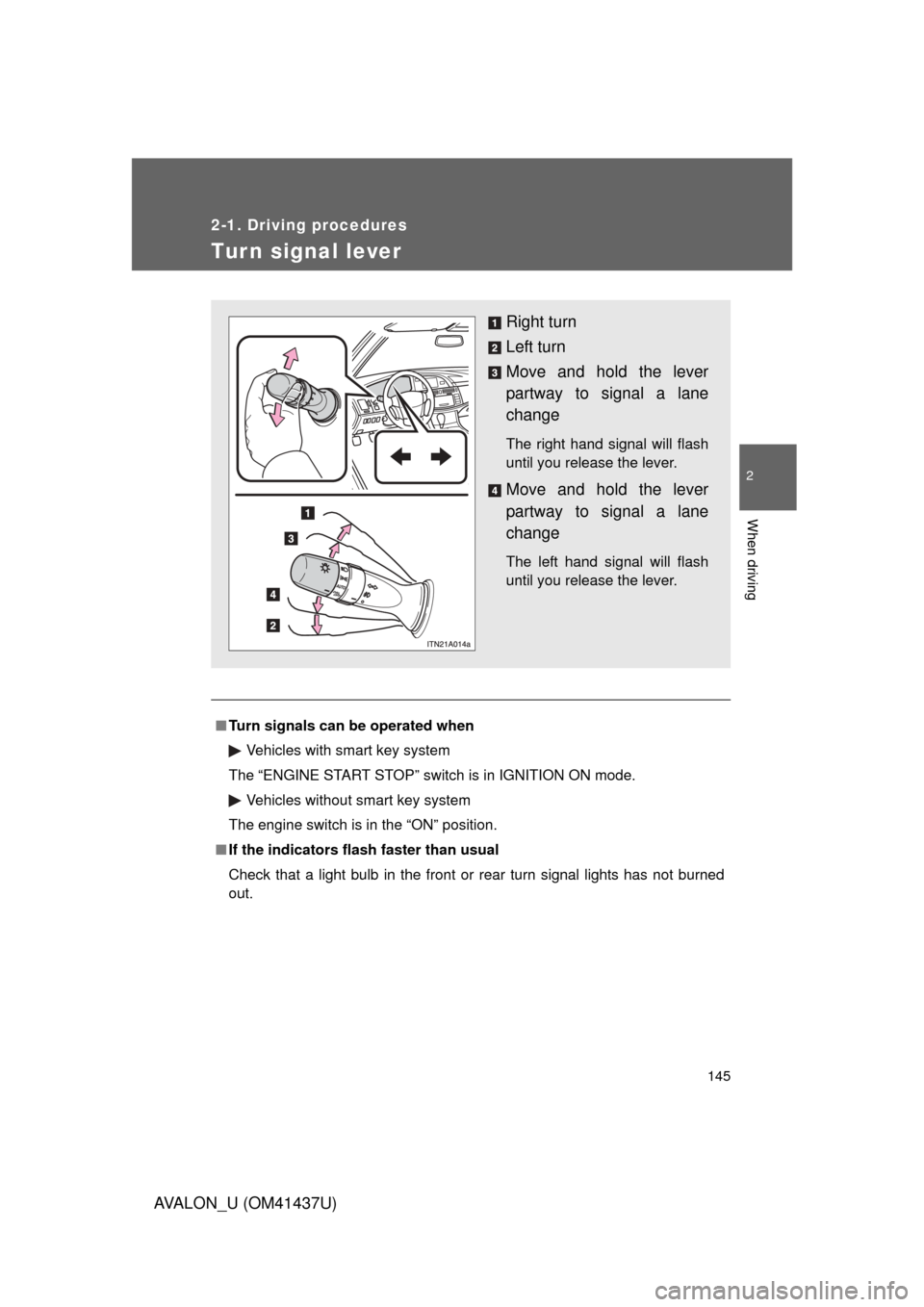
Right turn
Left turn
Move and hold the lever
partway to signal a lane
change
The right hand signal will flash
until you release the lever.
Move and hold the lever
partway to signal a lane
change
The left hand signal will flash
until you release the lever.
Page 152 of 476
152 2-2. Instrument cluster
AVALON_U (OM41437U)
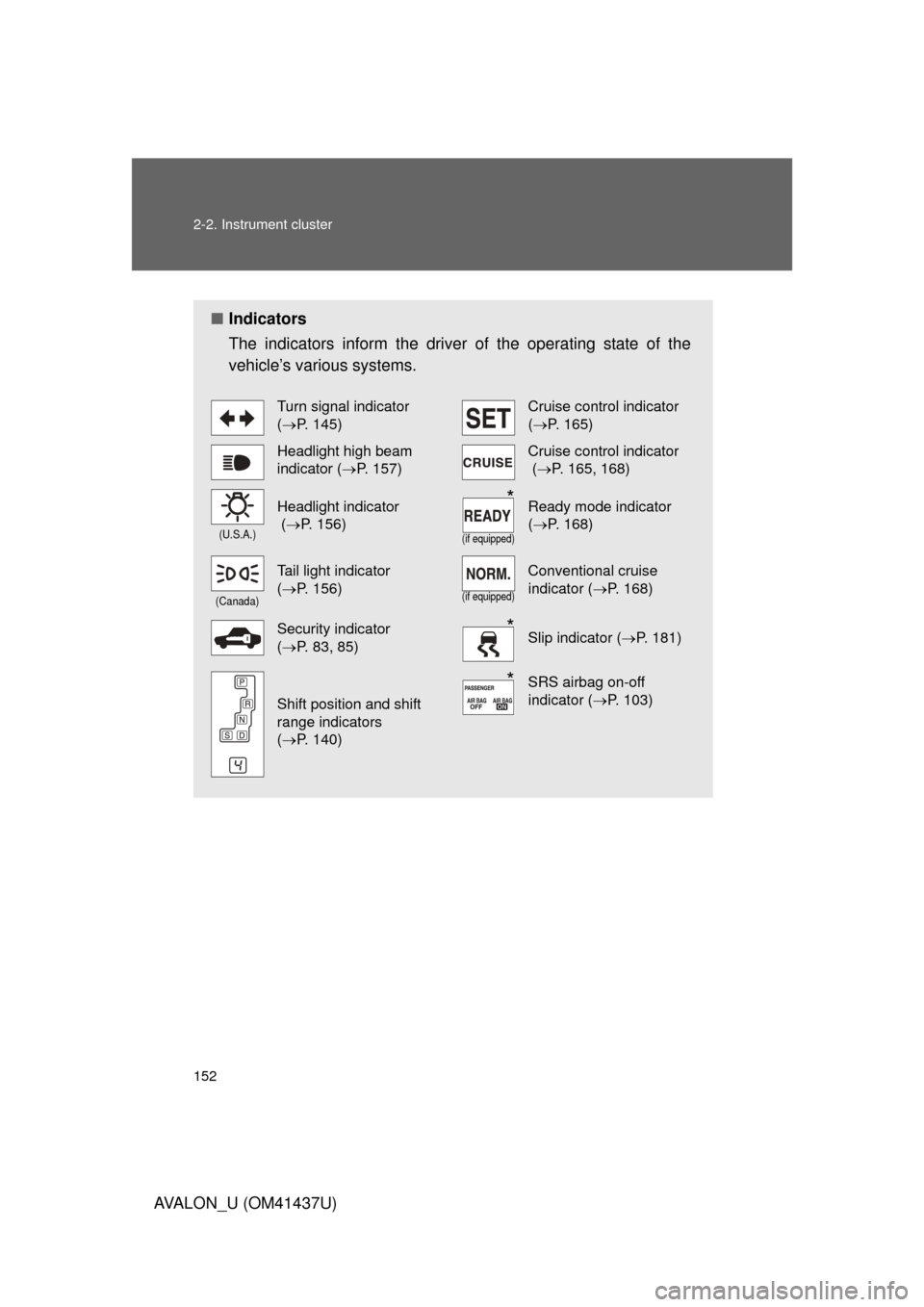
■Indicators
The indicators inform the driver of the operating state of the
vehicle’s various systems.
Turn signal indicator
(P. 145)Cruise control indicator
(P. 165)
Headlight high beam
indicator ( P. 157)Cruise control indicator
(P. 165, 168)
(U.S.A.)
Headlight indicator
(P. 156)
(if equipped)
Ready mode indicator
(P. 168)
(Canada)
Tail light indicator
(P. 156)
(if equipped)
Conventional cruise
indicator ( P. 168)
Security indicator
(P. 83, 85)Slip indicator ( P. 181)
Shift position and shift
range indicators
(P. 140)
SRS airbag on-off
indicator ( P. 103)
*
*
*
Page 218 of 476
218 3-2. Using the audio system
AVALON_U (OM41437U)
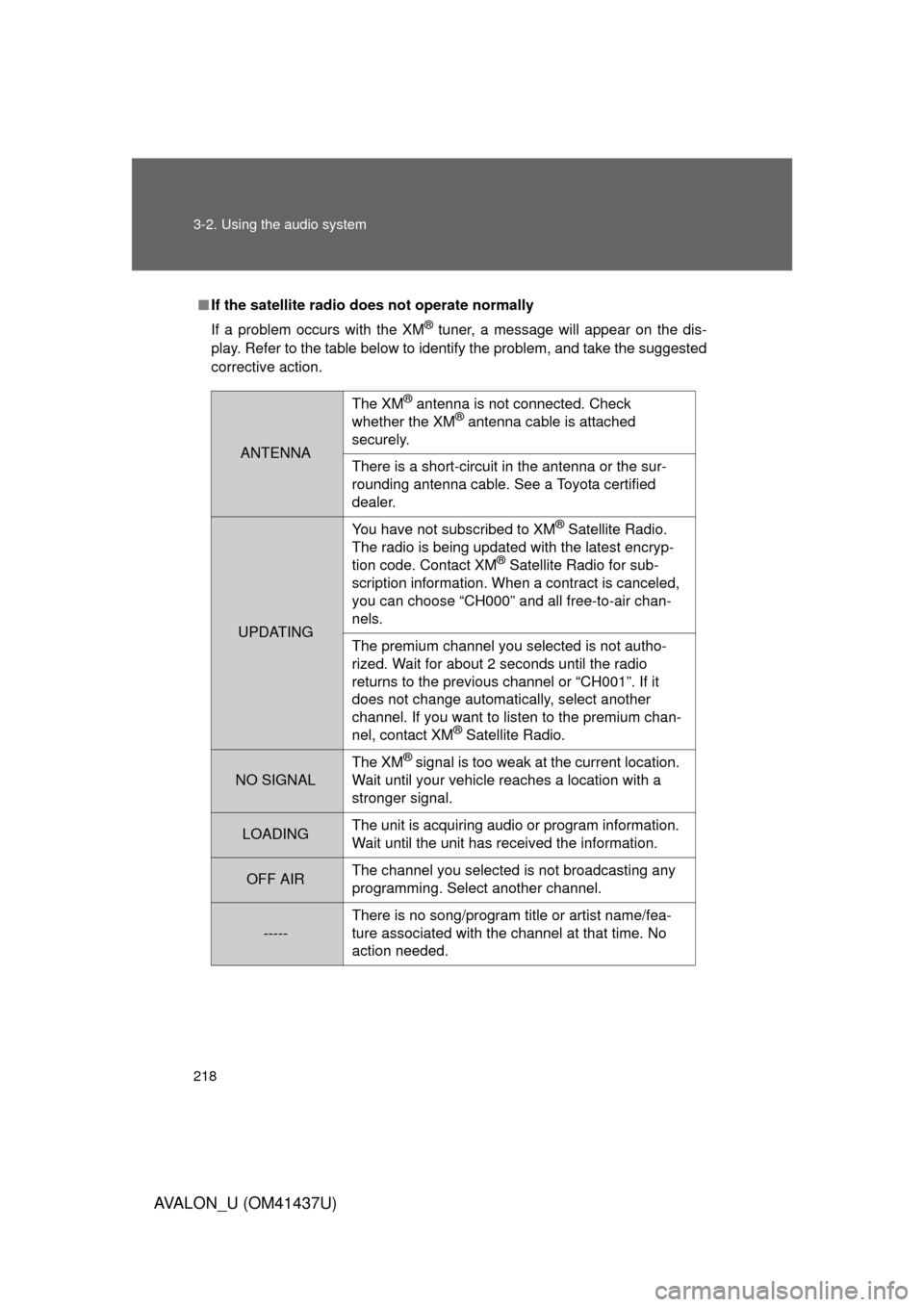
■If the satellite radio does not operate normally
If a problem occurs with the XM
® tuner, a message will appear on the dis-
play. Refer to the table below to identify the problem, and take the suggested
corrective action.
ANTENNA
The XM® antenna is not connected. Check
whether the XM® antenna cable is attached
securely.
There is a short-circuit in the antenna or the sur-
rounding antenna cable. See a Toyota certified
dealer.
UPDATING You have not subscribed to XM
® Satellite Radio.
The radio is being updated with the latest encryp-
tion code. Contact XM
® Satellite Radio for sub-
scription information. When a contract is canceled,
you can choose “CH000” and all free-to-air chan-
nels.
The premium channel you selected is not autho-
rized. Wait for about 2 seconds until the radio
returns to the previous channel or “CH001”. If it
does not change automatically, select another
channel. If you want to listen to the premium chan-
nel, contact XM
® Satellite Radio.
NO SIGNAL The XM
® signal is too weak at the current location.
Wait until your vehicle reaches a location with a
stronger signal.
LOADING The unit is acquiring audio or program information.
Wait until the unit has received the information.
OFF AIRThe channel you selected is not broadcasting any
programming. Select another channel.
-----There is no song/program title or artist name/fea-
ture associated with the channel at that time. No
action needed.
Page 304 of 476
304 3-6. Other interior features
AVALON_U (OM41437U)Test the operation of the HomeLink
by pressing the newly
programmed button. Check to se e if the gate/device operates
correctly.
Repeat the steps above to program another device for each of
the remaining HomeLink
buttons.
■ Programming other devices
To program other devices such as home security systems, home
door locks or lighting, contact your authorized Toyota dealer for
assistance.
■ Reprogramming a button
The individual HomeLink
buttons cannot be erased but can be
reprogrammed. To reprogram a button, follow the “Basic program-
ming” instructions.
Operating the HomeLink
Press the appropriate HomeLink button. The HomeLink indicator
light on the HomeLink transceiver should turn on.
The HomeLink continues to send a signal for up to 20 seconds as long
as the button is pressed.
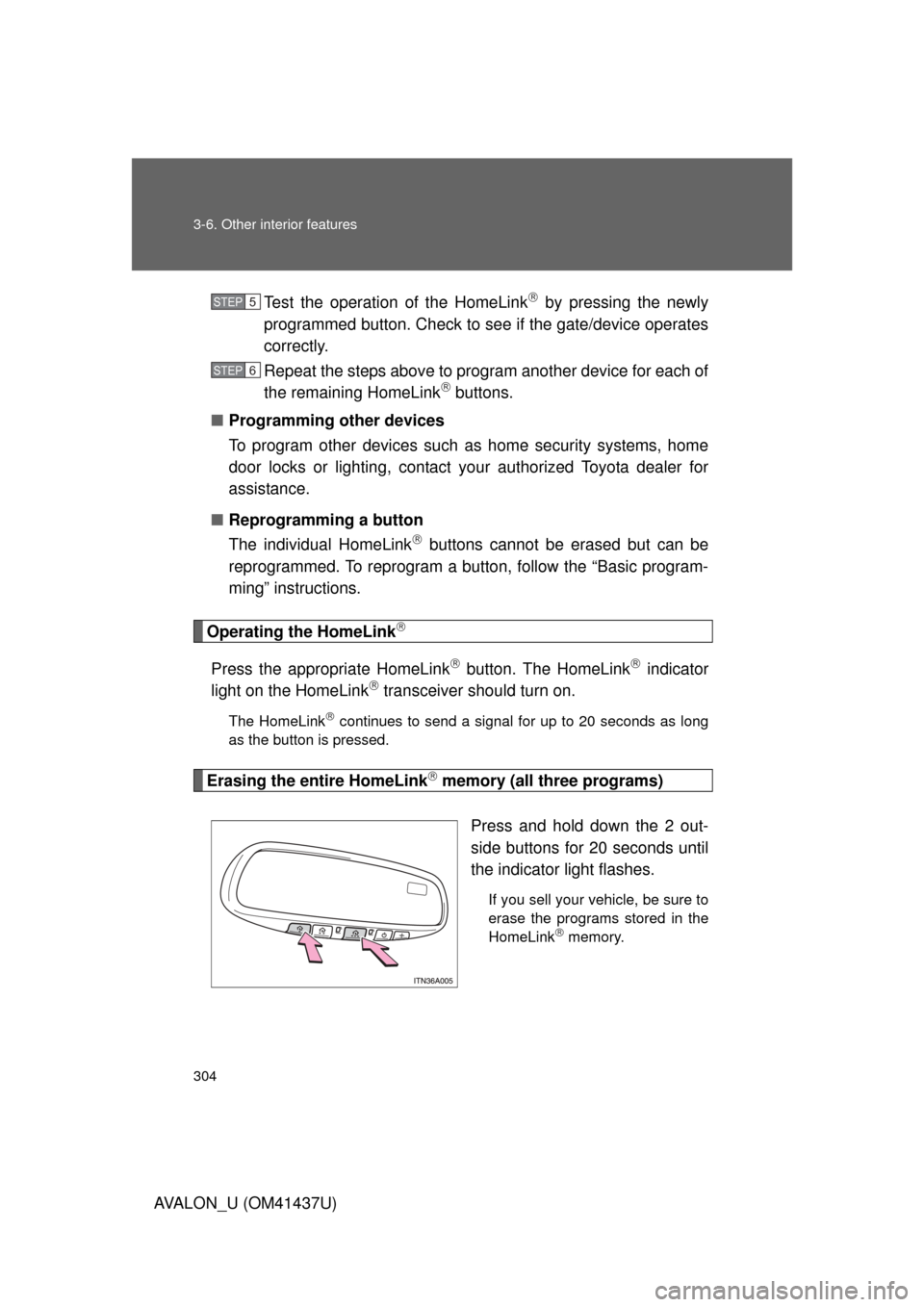
Erasing the entire HomeLink memory (all three programs)
Press and hold down the 2 out-
side buttons for 20 seconds until
the indicator light flashes.
If you sell your vehicle, be sure to
erase the programs stored in the
HomeLink
memory.
STEP5
STEP6