Engine TOYOTA AVALON 2011 XX30 / 3.G User Guide
[x] Cancel search | Manufacturer: TOYOTA, Model Year: 2011, Model line: AVALON, Model: TOYOTA AVALON 2011 XX30 / 3.GPages: 564, PDF Size: 13.17 MB
Page 32 of 564

32 1-2. Opening, closing and locking the doors and trunk
AVALON_U (OM41428U)
■Battery-saving function
In the following circumstances, the entry function is disabled in order to pre-
vent the vehicle and electronic key batteries from discharging.
●When the entry function has not been used for 2 weeks or more
●When the electronic key has been left within approximately 3 ft. (1 m) of
the vehicle for 10 minutes or more
The system will resume operation when...
●The vehicle is locked using the door handle lock switch
●The vehicle is locked/unlocked using the wireless remote control function
(P. 38) or the mechanical key (P. 493)
■Electronic key battery depletion
●The standard battery life is 1 to 2 years. (The battery becomes depleted
even if the electronic key is not used.) If the smart key system or the
wireless remote control function does not operate, or the detection area
becomes smaller, the battery may be depleted. Replace the battery when
necessary. (P. 428)
●If the battery becomes low, an alarm will sound in the cabin when the
engine stops. (P. 34)
●To avoid serious deterioration, do not leave the electronic key within 3 ft.
(1 m) of the following electrical appliances that produce a magnetic field.
•TVs
• Personal computers
• Recharging cellular phones or cordless phones
• Table lamps
■To operate the system properly
Make sure to carry the electronic key when operating the system. Do not get
the electronic key too close to the vehicle when operating the system from
the outside of the vehicle.
Depending on the position and holding condition of the electronic key, the
key may not be detected correctly and the system may not operate properly.
(The alarm may go off accidentally, or the door lock prevention may not func-
tion.)
Page 33 of 564

33 1-2. Opening, closing and locking the doors and trunk
1
Before driving
AVALON_U (OM41428U)
■Note for the smart key system
●Even when the electronic key is within the effective range (detection
areas), the system may not operate properly in the following cases.
• The electronic key is too close to the window or outside door handle,
near the ground, or in a high place when the doors are locked or
unlocked.
• The electronic key is near the ground or in a high place, or too close to
the rear bumper center when the trunk is unlocked.
• The electronic key is on the instrument panel, rear package tray or
floor, or in the glove box when the engine is started or “ENGINE
START STOP” switch modes are changed.
●As long as the electronic key is within the effective range, the doors may
be locked or unlocked by anyone.
●Even if the electronic key is not inside the vehicle, it may be possible to
start the engine if the electronic key is near the window.
●The doors may unlock if a large amount of water splashes on the door
handle, such as in the rain or in a car wash when the electronic key is
within the effective range. (The doors will automatically be locked after
approximately 60 seconds if the doors are not opened and closed.)
●Gripping the door handle when wearing a glove may not unlock the door.
●If the wireless remote control is used to lock the doors when the elec-
tronic key is near the vehicle, there is a possibility that the door may not
be unlocked by the entry function. (Use the wireless remote control to
unlock the doors.)
●A sudden approach to the effective range or door handle operation may
prevent the doors from being unlocked. In this case, return the door han-
dle to the original position and check that the doors unlock before pulling
the door handle again.
■When the vehicle is not driven for extended periods
To prevent theft of the vehicle, do not leave the electronic key within 6 ft. (2
m) of the vehicle.
Page 34 of 564

34 1-2. Opening, closing and locking the doors and trunk
AVALON_U (OM41428U)
■Security feature
If a door is not opened within approximately 60 seconds after the vehicle is
unlocked, the theft deterrent system automatically locks the vehicle again.
■Alarms and warning indicators
A combination of exterior and interior alarms are used to prevent theft of the
vehicle and unforeseeable accidents resulting from erroneous operation.
Take appropriate measures according to which warning light comes on.
(P. 467)
The following table describes circumstances and correction procedures
when only alarms are sounded.
AlarmSituationCorrection procedure
Exterior alarm
sounds once for
2 secondsTried to lock the doors
using the entry function
while the electronic key is
still inside the passenger
compartmentRetrieve the elec-
tronic key from the
passenger compart-
ment and lock the
doors again.
Tried to exit the vehicle
with the electronic key and
lock the doors without first
turning the “ENGINE
START STOP” switch OFFTurn the “ENGINE
START STOP” switch
OFF and lock the
doors again.
Closed the trunk while the
electronic key is still inside
and all doors are lockedRetrieve the elec-
tronic key from the
trunk and close the
trunk lid.
Exterior alarm
sounds once for
10 secondsTried to lock the vehicle
using the entry function
while a door is openClose all of the doors
and lock the doors
again.
Page 35 of 564

35 1-2. Opening, closing and locking the doors and trunk
1
Before driving
AVALON_U (OM41428U)
■If the smart key system does not operate properly
●Locking and unlocking the doors: Use the mechanical key. (P. 493)
●Starting the engine: P. 494
■When the electronic key battery is fully depleted
P. 428
AlarmSituationCorrection procedure
Interior alarm
sounds onceThe electronic key battery
is low.Replace the battery.
(P. 428)
Interior alarm
sounds continu-
ouslyTried to open the door and
exit the vehicle without
shifting the shift lever to
“P”Shift the shift lever to
“P”.
Interior alarm
rings continu-
ouslyTurned the “ENGINE
START STOP” switch to
ACCESSORY mode while
the driver’s door is open
(Opened the driver’s door
when the “ENGINE START
STOP” switch is in
ACCESSORY mode.)Turn the “ENGINE
START STOP” switch
OFF and close the
driver’s door.
Turned the “ENGINE
START STOP” switch OFF
while the driver’s door is
openClose the driver’s
door.
Page 45 of 564
45 1-2. Opening, closing and locking the doors and trunk
1
Before driving
AVALON_U (OM41428U)
Locking the front doors from the outside without a key
Move the inside lock button to the lock position.
Close the door.
Vehicles with smart key system
The door cannot be locked if the “ENGINE START STOP” switch is
in the ACCESSORY or IGNITION ON mode, or the electronic key
is left inside the vehicle.
The key may not be detected correctly and the door may be locked.
Vehicles without smart key system
The door cannot be locked if either front door is open and the key
is in the engine switch.
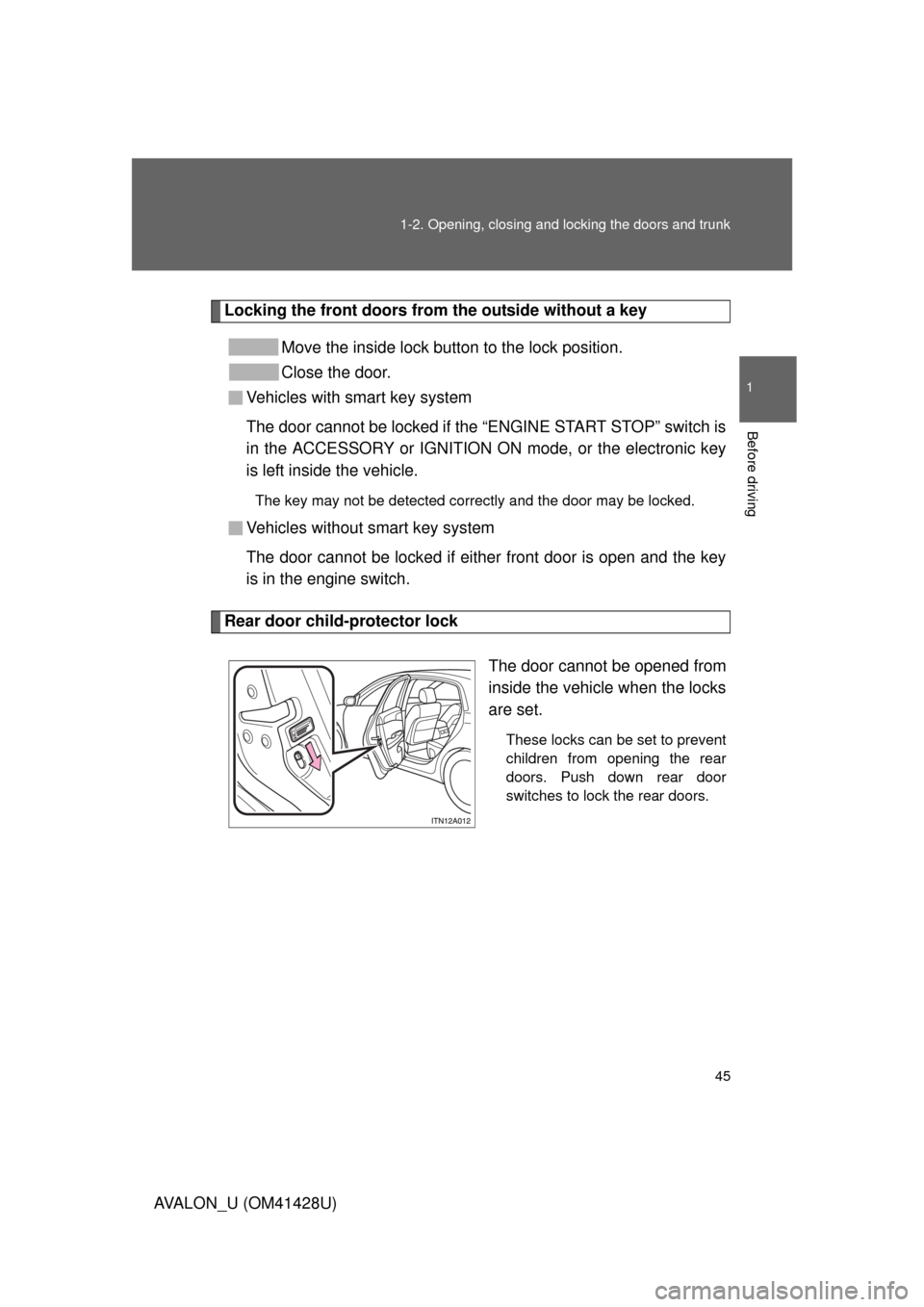
Rear door child-protector lock
The door cannot be opened from
inside the vehicle when the locks
are set.
These locks can be set to prevent
children from opening the rear
doors. Push down rear door
switches to lock the rear doors.
Page 46 of 564
46 1-2. Opening, closing and locking the doors and trunk
AVALON_U (OM41428U)
Automatic door locking and unlocking systems
The following functions can be set or canceled:
FunctionOperation
Shift position linked
door locking functionShifting the shift lever out of “P” locks all
doors.
Shift position linked
door unlocking functionShifting the shift lever to “P” unlocks all
doors.
Speed linked door lock-
ing functionAll doors are locked when the vehicle speed is
approximately 12 mph (20 km/h) or higher.
Driver’s door linked door
unlocking function
Vehicles with smart key system
All doors are unlocked when the driver’s door
is opened within 10 seconds after turning the
“ENGINE START STOP” switch OFF.
Vehicles without smart key system
All doors are unlocked when the driver’s door
is opened within 10 seconds after turning the
engine switch to the “LOCK” position.
Page 47 of 564
47 1-2. Opening, closing and locking the doors and trunk
1
Before driving
AVALON_U (OM41428U)■Setting and canceling the functions
To switch between setting and canceling, follow the procedure
below:
Vehicles with smart key system: Close all the doors and turn
the “ENGINE START STOP” switch to IGNITION ON mode.
(Perform within 10 seconds.)
Vehicles without smart key system: Close all the doors and
turn the engine switch to the “ON” position. (Perform
within 10 seconds.)
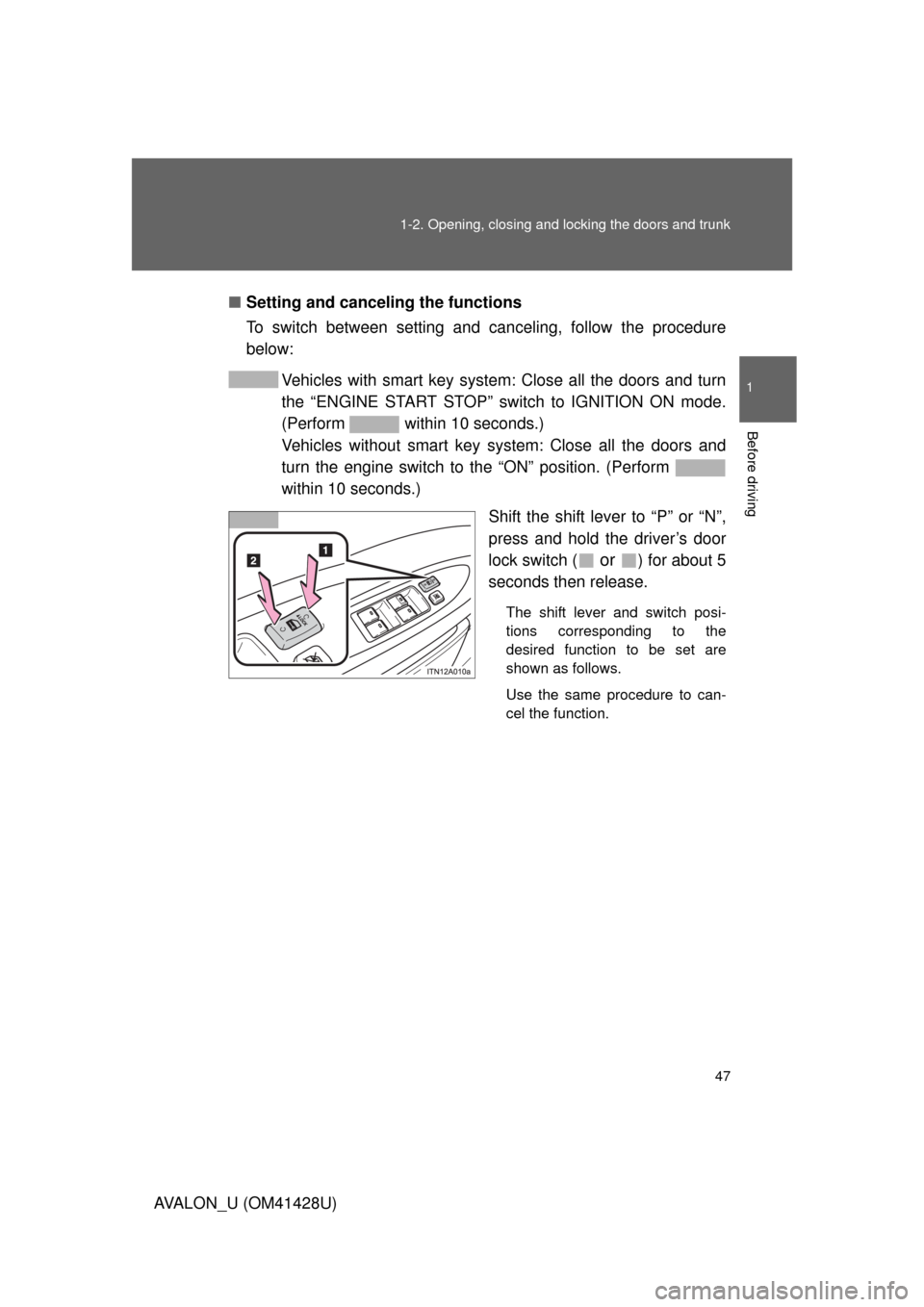
Shift the shift lever to “P” or “N”,
press and hold the driver’s door
lock switch (
or ) for about 5
seconds then release.
The shift lever and switch posi-
tions corresponding to the
desired function to be set are
shown as follows.
Use the same procedure to can-
cel the function.
Page 58 of 564
58
1-3. Adjustable components (seats, steering wheel, mirrors)
AVALON_U (OM41428U)
Driving position memor y system
: If equipped
Your preferred driving position (the position of the driver’s seat and
outside rear view mirrors) can be entered into the computer’s mem-
ory and recalled with the touch of a button. It is also possible to set
this function to activate automatically when the doors are unlocked.
Two different driving positions can be entered into memory.
■Entering a position to memory
Vehicles with smart key system: Turn the “ENGINE START
STOP” switch to IGNITION ON mode.
Vehicles without smart key system: Turn the engine switch
to the “ON” position.
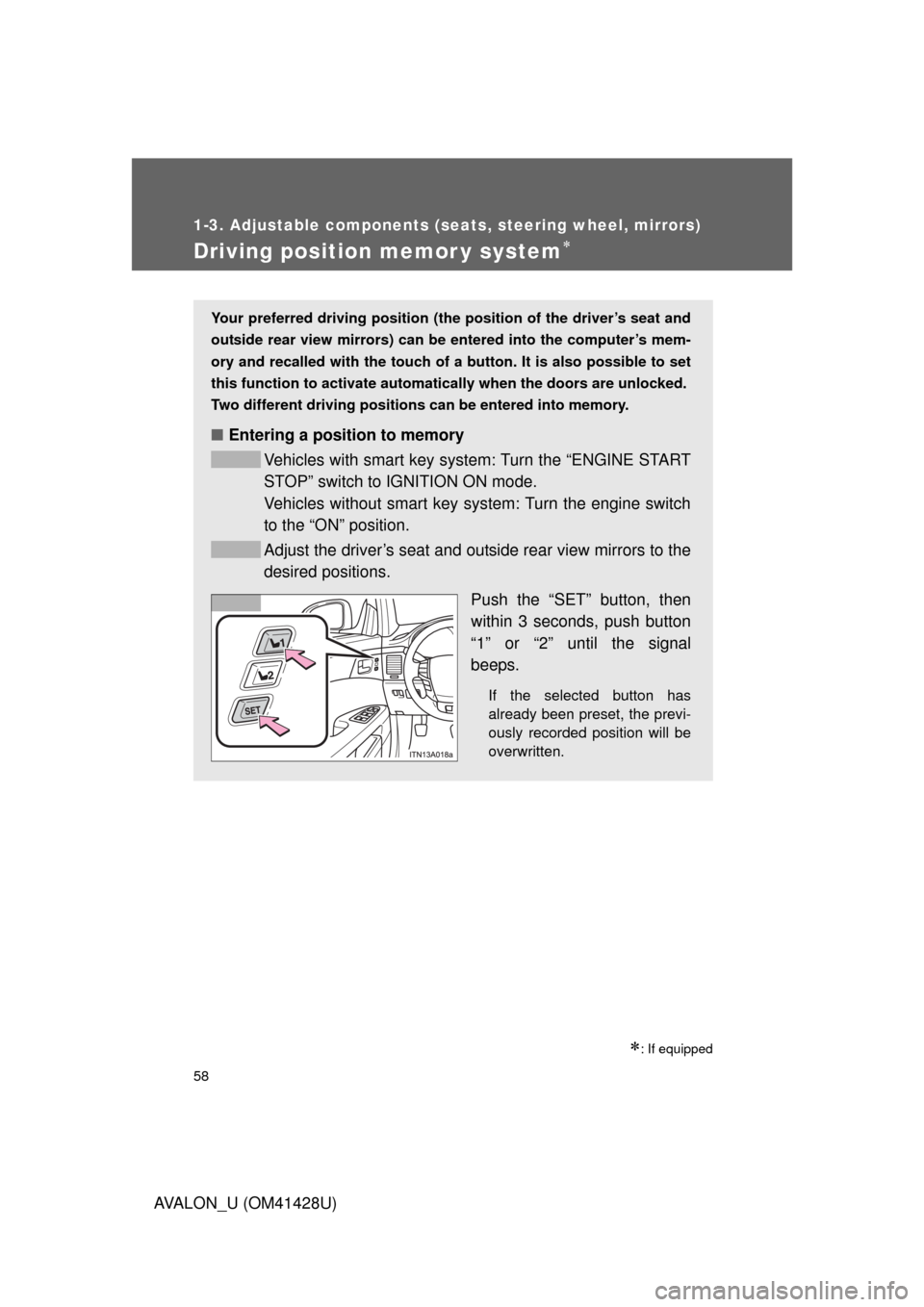
Adjust the driver’s seat and outside rear view mirrors to the
desired positions.
Push the “SET” button, then
within 3 seconds, push button
“1” or “2” until the signal
beeps.
If the selected button has
already been preset, the previ-
ously recorded position will be
overwritten.
Page 59 of 564
59 1-3. Adjustable components (seats, steering wheel, mirrors)
1
Before driving
AVALON_U (OM41428U)
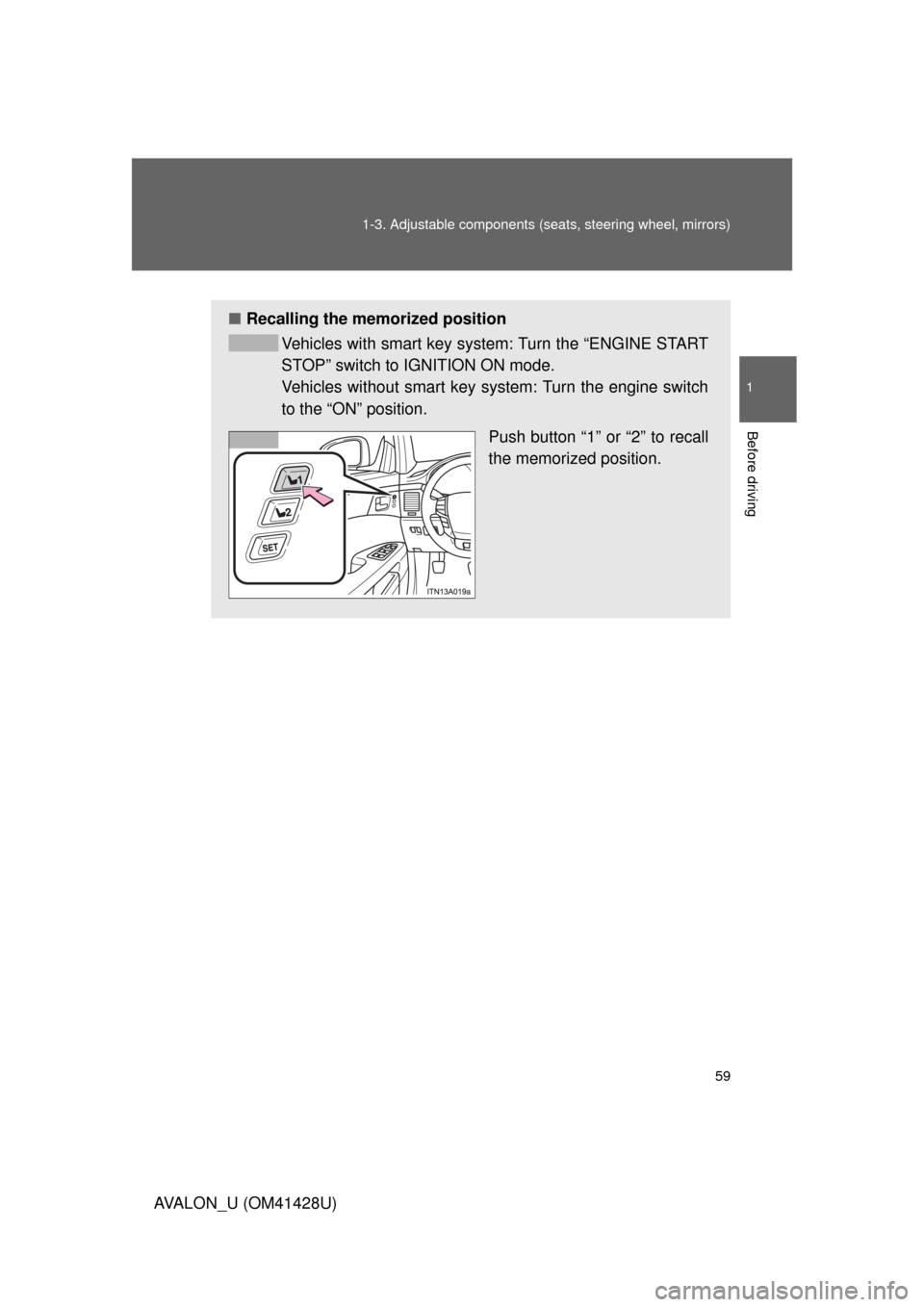
■Recalling the memorized position
Vehicles with smart key system: Turn the “ENGINE START
STOP” switch to IGNITION ON mode.
Vehicles without smart key system: Turn the engine switch
to the “ON” position.
Push button “1” or “2” to recall
the memorized position.
Page 60 of 564
60 1-3. Adjustable components (seats, steering wheel, mirrors)
AVALON_U (OM41428U)
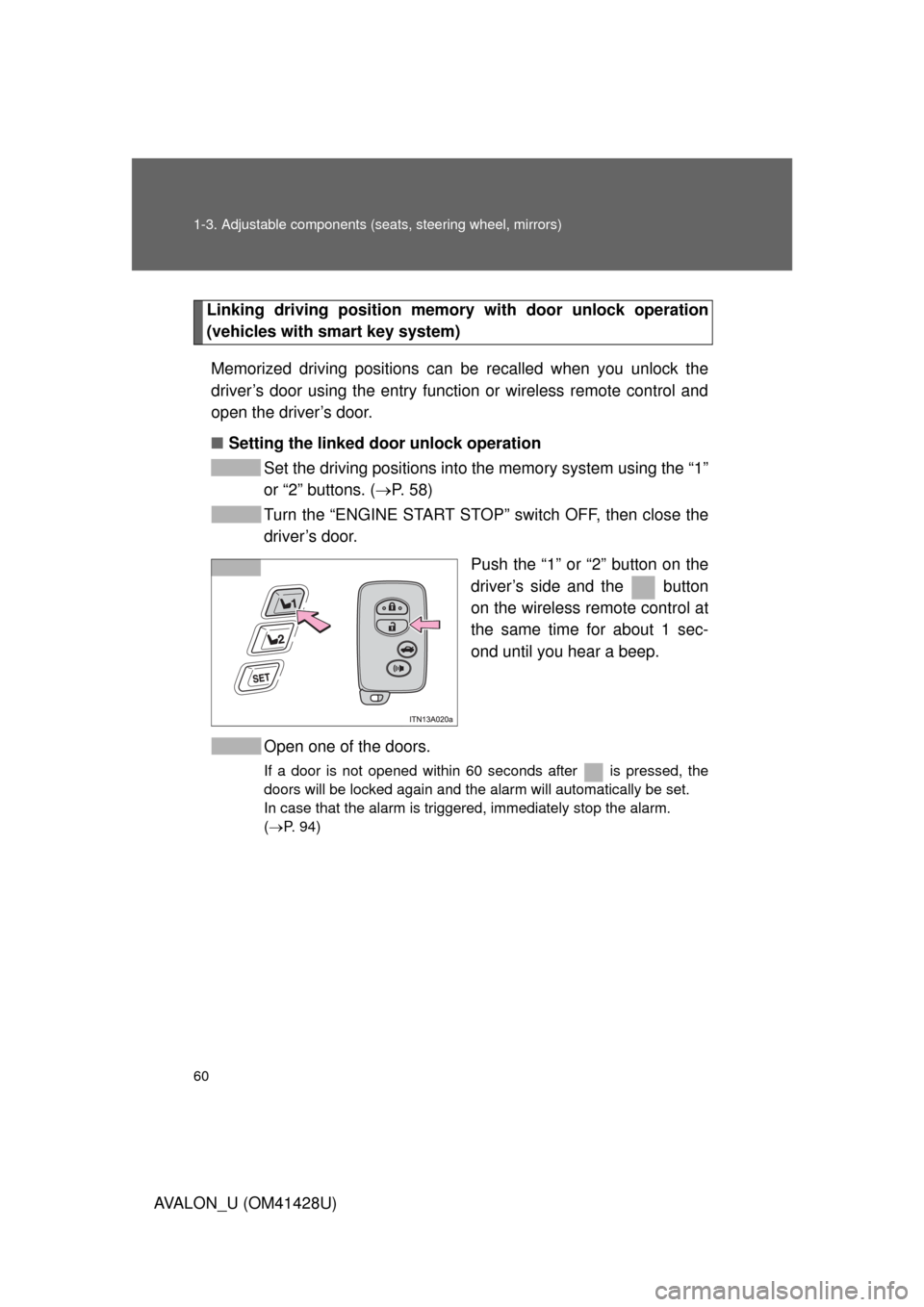
Linking driving position memory with door unlock operation
(vehicles with smart key system)
Memorized driving positions can be recalled when you unlock the
driver’s door using the entry function or wireless remote control and
open the driver’s door.
■Setting the linked door unlock operation
Set the driving positions into the memory system using the “1”
or “2” buttons. (P. 5 8 )
Turn the “ENGINE START STOP” switch OFF, then close the
driver’s door.
Push the “1” or “2” button on the
driver’s side and the button
on the wireless remote control at
the same time for about 1 sec-
ond until you hear a beep.
Open one of the doors.
If a door is not opened within 60 seconds after is pressed, the
doors will be locked again and the alarm will automatically be set.
In case that the alarm is triggered, immediately stop the alarm.
(P. 94)