ECO mode TOYOTA AVALON 2015 XX40 / 4.G Owner's Manual
[x] Cancel search | Manufacturer: TOYOTA, Model Year: 2015, Model line: AVALON, Model: TOYOTA AVALON 2015 XX40 / 4.GPages: 500
Page 163 of 500
1634-2. Driving procedures
4
Driving
AVALON (U)_(OM41456U)■
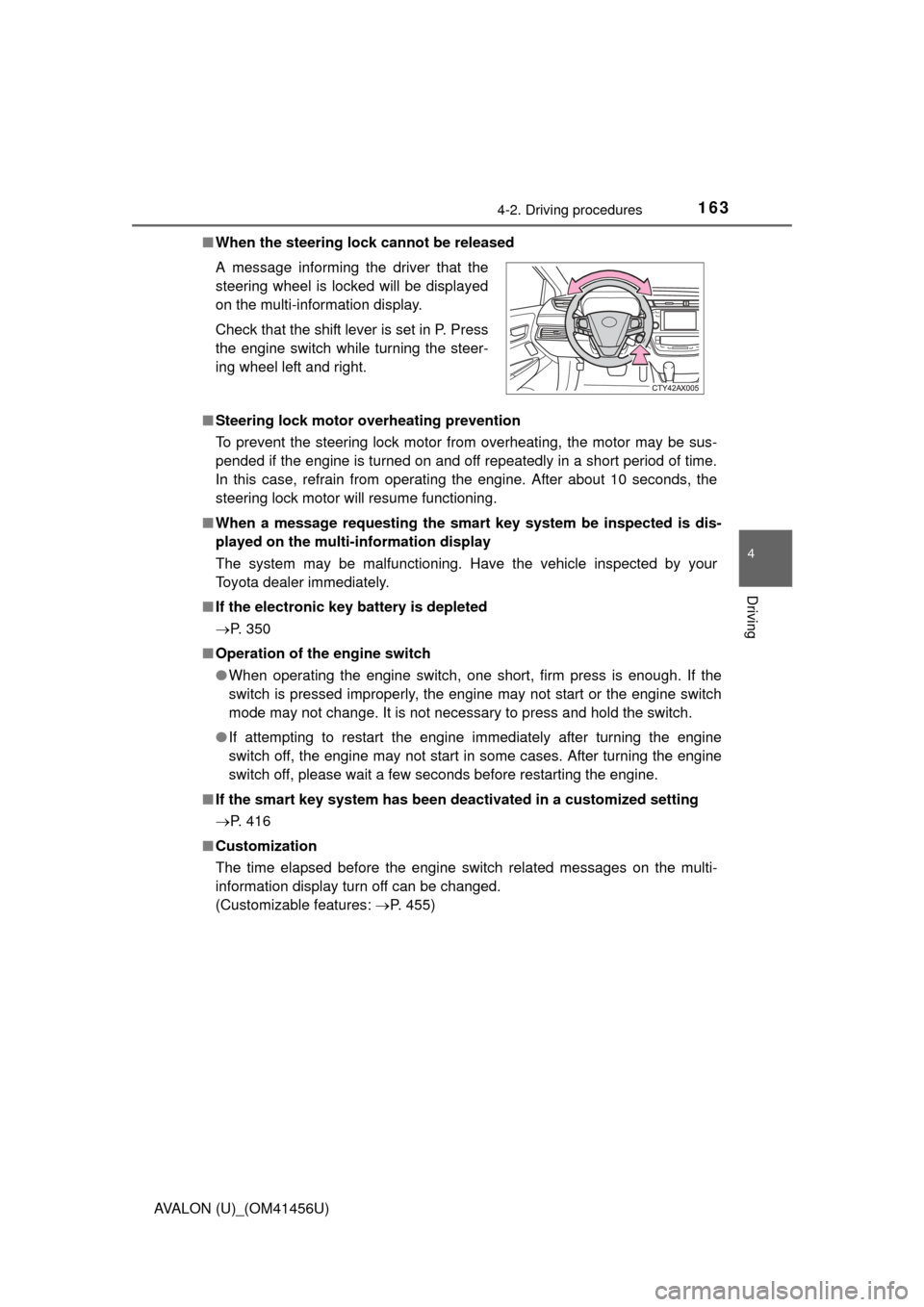
When the steering lock cannot be released
■ Steering lock motor overheating prevention
To prevent the steering lock motor from overheating, the motor may be sus-
pended if the engine is turned on and off repeatedly in a short period of time.
In this case, refrain from operating the engine. After about 10 seconds, the
steering lock motor will resume functioning.
■ When a message requesting the smart key system be inspected is dis-
played on the multi-information display
The system may be malfunctioning. Have the vehicle inspected by your
Toyota dealer immediately.
■ If the electronic key battery is depleted
P. 350
■ Operation of the engine switch
●When operating the engine switch, one short, firm press is enough. If the
switch is pressed improperly, the engine may not start or the engine switch
mode may not change. It is not necessary to press and hold the switch.
● If attempting to restart the engine immediately after turning the engine
switch off, the engine may not start in some cases. After turning the engine
switch off, please wait a few seconds before restarting the engine.
■ If the smart key system has been deactivated in a customized setting
P. 416
■ Customization
The time elapsed before the engine switch related messages on the multi-
information display turn off can be changed.
(Customizable features: P. 455)
A message informing the driver that the
steering wheel is locked will be displayed
on the multi-information display.
Check that the shift lever is set in P. Press
the engine switch while turning the steer-
ing wheel left and right.
Page 164 of 500
1644-2. Driving procedures
AVALON (U)_(OM41456U)
CAUTION
■When starting the engine
Always start the engine while sitting in the driver’s seat. Do not depress the
accelerator pedal while starting the engine under any circumstances.
Doing so may cause an accident resulting in death or serious injury.
■ Caution while driving
If engine failure occurs while the vehicle is moving, do not lock or open the
doors until the vehicle reaches a safe and complete stop. Activation of the
steering lock in this circumstance may lead to an accident, resulting in
death or serious injury.
■ Stopping the engine in an emergency
If you want to stop the engine in an emergency while driving the vehicle,
press and hold the engine switch for more than 2 seconds, or press it briefly
3 times or more in succession. ( P. 381)
However, do not touch the engine switch while driving except in an emer-
gency. Turning the engine off while driving will not cause loss of steering or
braking control, but the power assist to these systems will be lost. This will
make it more difficult to steer and brake, so you should pull over and stop
the vehicle as soon as it is safe to do so.
NOTICE
■ To prevent battery discharge
● Do not leave the engine switch in ACCESSORY or IGNITION ON mode
for long periods of time without the engine running.
● Do not stop the engine when the shift lever is in a position other than P. If
the engine is stopped in another shift lever position, the engine switch will
not be turned off but instead be turned to ACCESSORY mode. If the vehi-
cle is left in ACCESSORY mode, battery discharge may occur.
■ When starting the engine
● Do not race a cold engine.
● If the engine becomes difficult to star t or stalls frequently, have your vehi-
cle checked by your Toyota dealer immediately.
■ Symptoms indicating a malfunction with the engine switch
If the engine switch seems to be operating somewhat differently than usual,
such as the switch sticking slightly, there may be a malfunction. Contact
your Toyota dealer immediately.
Page 174 of 500
1744-3. Operating the lights and wipers
AVALON (U)_(OM41456U)
■Daytime running light system
●Vehicles with halogen headlights: To make your vehicle more visible to other
drivers, the headlight high beam turn on automatically (at a decreased inten-
sity) whenever the engine is started and the parking brake is released. Day-
time running lights are not designed for use at night.
Vehicles with discharge headlights: To make your vehicle more visible to
other drivers, the parking lights turn on automatically (at an increased inten-
sity) whenever the engine is started and the parking brake is released. Day-
time running lights are not designed for use at night.
Type A: Daytime running lights can be turned off by operating the switch.
● Compared to turning on the headlights, the daytime running light system
offers greater durability and consumes less electricity, so it can help improve
fuel economy.
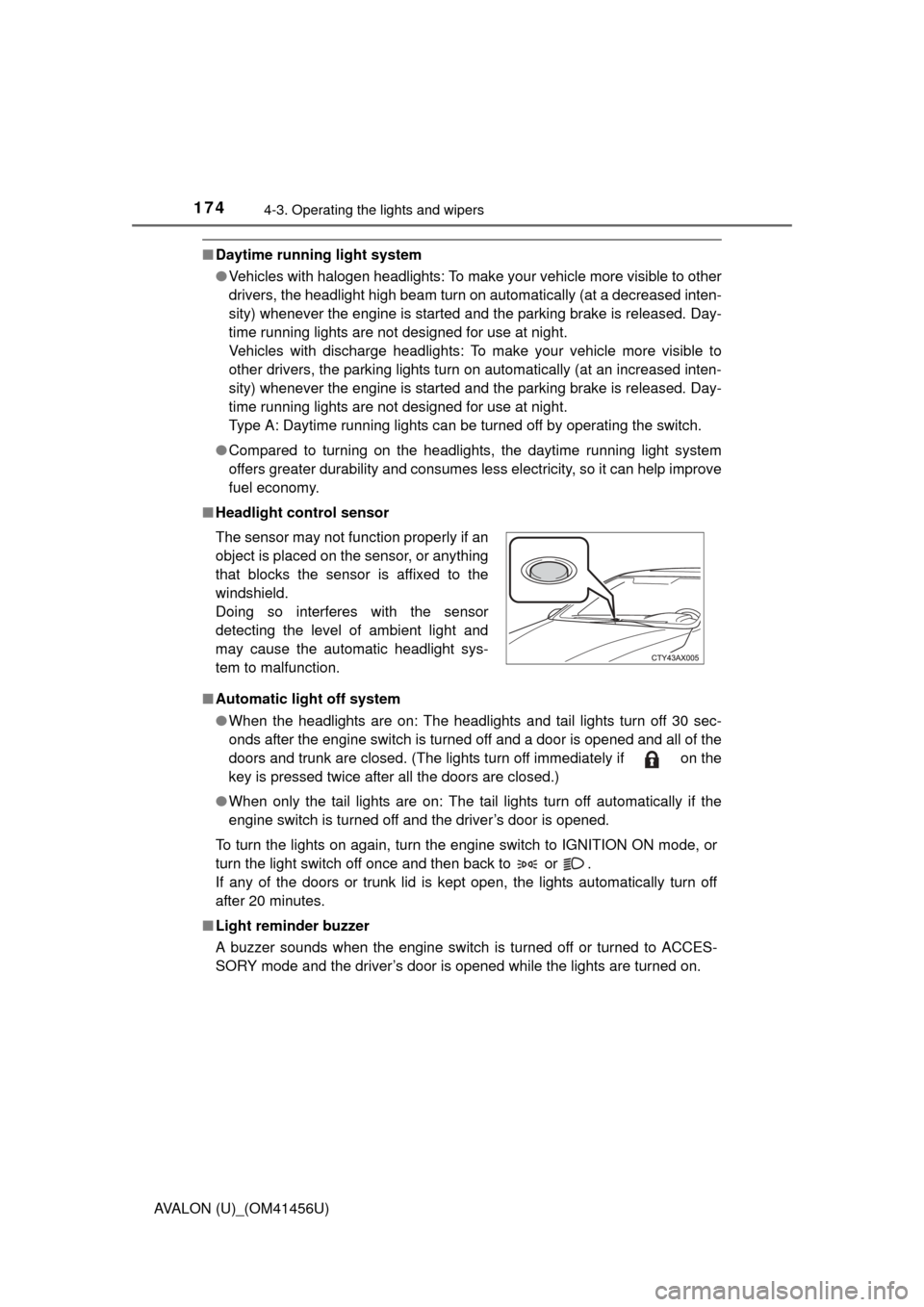
■ Headlight control sensor
■ Automatic light off system
●When the headlights are on: The headlights and tail lights turn off 30 sec-
onds after the engine switch is turned off and a door is opened and all of the
doors and trunk are closed. (The lights turn off immediately if on the
key is pressed twice after all the doors are closed.)
● When only the tail lights are on: The tail lights turn off automatically if the
engine switch is turned off and the driver’s door is opened.
To turn the lights on again, turn the engine switch to IGNITION ON mode, or
turn the light switch off once and then back to or .
If any of the doors or trunk lid is kept open, the lights automatically turn off
after 20 minutes.
■ Light reminder buzzer
A buzzer sounds when the engine switch is turned off or turned to ACCES-
SORY mode and the driver’s door is opened while the lights are turned on. The sensor may not function properly if an
object is placed on the sensor, or anything
that blocks the sensor is affixed to the
windshield.
Doing so interferes with the sensor
detecting the level of ambient light and
may cause the automatic headlight sys-
tem to malfunction.
Page 188 of 500

1884-3. Operating the lights and wipers
AVALON (U)_(OM41456U)
CAUTION
■Caution regarding the use of windsh ield wipers in AUTO mode (vehi-
cles with rain-sensing windshield wipers)
The windshield wipers may operate unexpectedly if the sensor is touched or
the windshield is subject to vibration in AUTO mode. Take care that your fin-
gers or anything else do not become caught in the windshield wipers.
■ Caution regarding the use of washer fluid
When it is cold, do not use the washer fluid until the windshield becomes
warm. The fluid may freeze on the windshield and cause low visibility. This
may lead to an accident, resulting in death or serious injury.
NOTICE
■When the windshield is dry
Do not use the wipers, as they may damage the windshield.
■ When there is no washer fluid spray from the nozzle
Damage to the washer fluid pump may be caused if the lever is pulled
toward you and held continually.
■ When a nozzle becomes blocked
In this case, contact your Toyota dealer.
Do not try to clear it with a pin or other object. The nozzle will be damaged\
.
Page 199 of 500
1994-5. Using the driving support systems
4
Driving
AVALON (U)_(OM41456U)
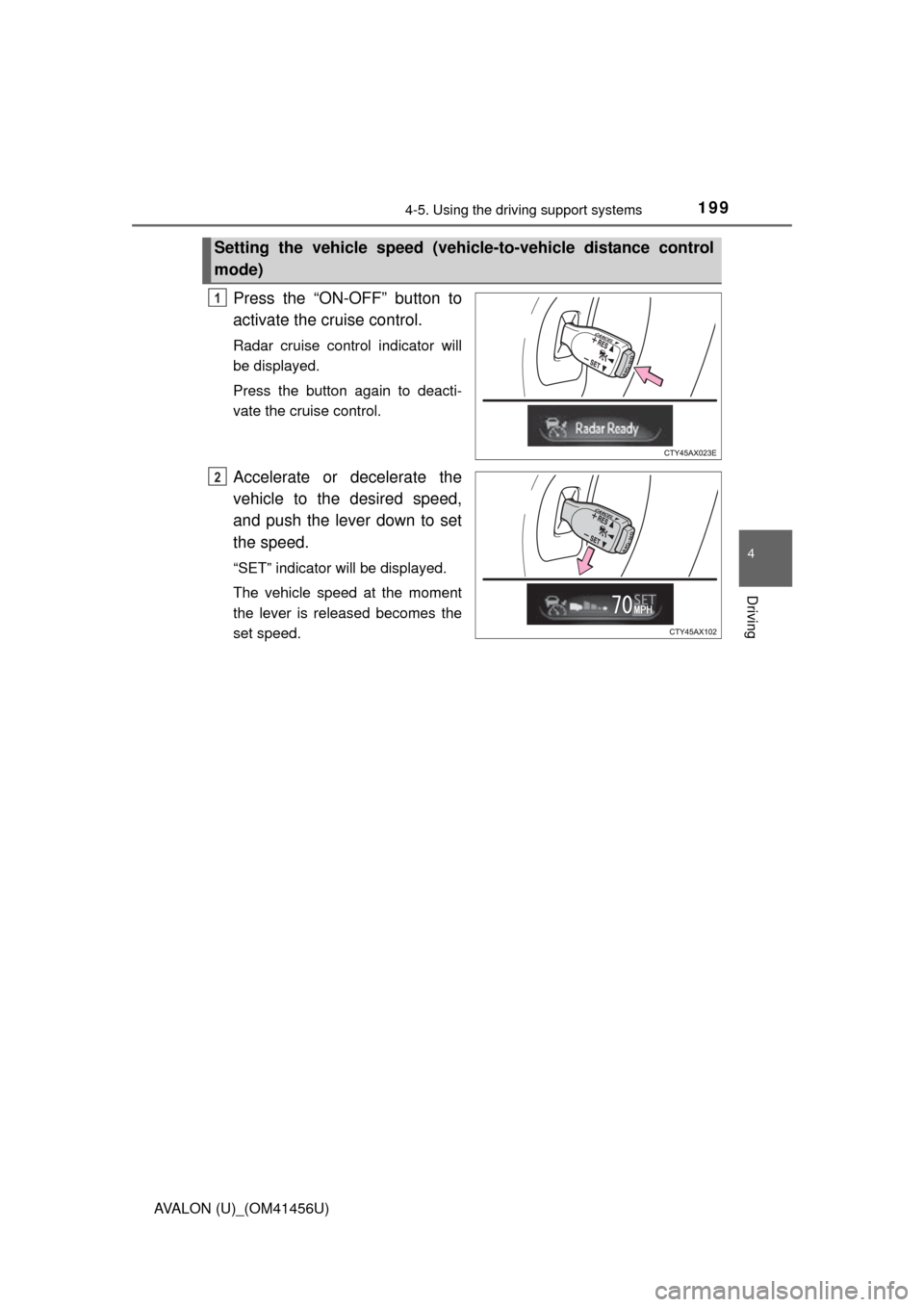
Press the “ON-OFF” button to
activate the cruise control.
Radar cruise control indicator will
be displayed.
Press the button again to deacti-
vate the cruise control.
Accelerate or decelerate the
vehicle to the desired speed,
and push the lever down to set
the speed.
“SET” indicator will be displayed.
The vehicle speed at the moment
the lever is released becomes the
set speed.
Setting the vehicle speed (vehicle-to-vehicle distance control
mode)
1
2
Page 200 of 500
2004-5. Using the driving support systems
AVALON (U)_(OM41456U)
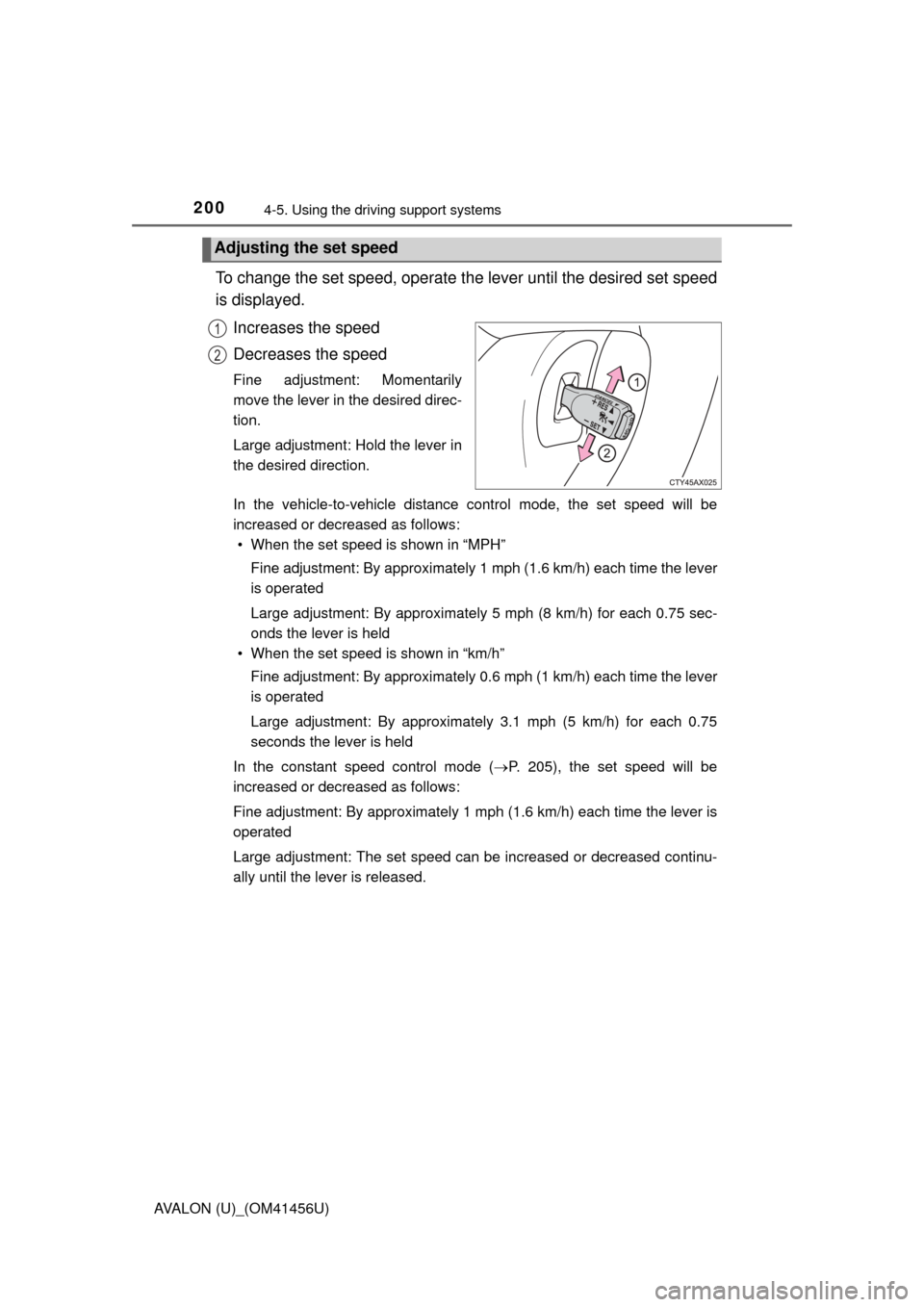
To change the set speed, operate the lever until the desired set speed
is displayed.
Increases the speed
Decreases the speed
Fine adjustment: Momentarily
move the lever in the desired direc-
tion.
Large adjustment: Hold the lever in
the desired direction.
In the vehicle-to-vehicle distance control mode, the set speed will be
increased or decreased as follows:• When the set speed is shown in “MPH”
Fine adjustment: By approximately 1 mph (1.6 km/h) each time the lever
is operated
Large adjustment: By approximately 5 mph (8 km/h) for each 0.75 sec-
onds the lever is held
• When the set speed is shown in “km/h”
Fine adjustment: By approximately 0.6 mph (1 km/h) each time the lever
is operated
Large adjustment: By approximately 3.1 mph (5 km/h) for each 0.75
seconds the lever is held
In the constant speed control mode ( P. 205), the set speed will be
increased or decreased as follows:
Fine adjustment: By approximately 1 mph (1.6 km/h) each time the lever is
operated
Large adjustment: The set speed can be increased or decreased continu-
ally until the lever is released.
Adjusting the set speed
1
2
Page 205 of 500
2054-5. Using the driving support systems
4
Driving
AVALON (U)_(OM41456U)
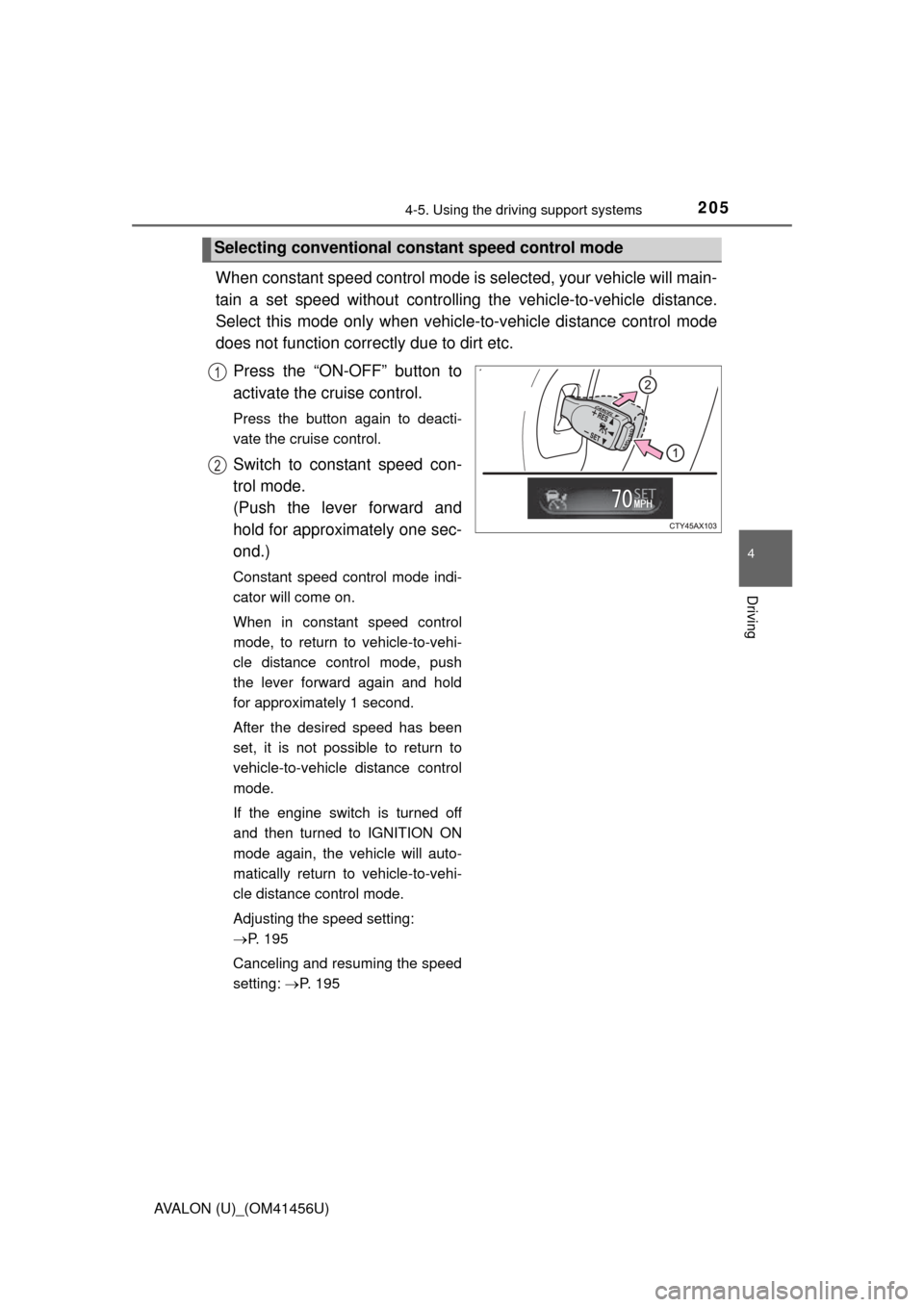
When constant speed control mode is selected, your vehicle will main-
tain a set speed without controlling the vehicle-to-vehicle distance.
Select this mode only when vehicl e-to-vehicle distance control mode
does not function corr ectly due to dirt etc.
Press the “ON-OFF” button to
activate the cruise control.
Press the button again to deacti-
vate the cruise control.
Switch to constant speed con-
trol mode.
(Push the lever forward and
hold for approximately one sec-
ond.)
Constant speed control mode indi-
cator will come on.
When in constant speed control
mode, to return to vehicle-to-vehi-
cle distance control mode, push
the lever forward again and hold
for approximately 1 second.
After the desired speed has been
set, it is not possible to return to
vehicle-to-vehicle distance control
mode.
If the engine switch is turned off
and then turned to IGNITION ON
mode again, the vehicle will auto-
matically return to vehicle-to-vehi-
cle distance control mode.
Adjusting the speed setting:
P. 195
Canceling and resuming the speed
setting: P. 195
Selecting conventional cons tant speed control mode
1
2
Page 213 of 500
2134-5. Using the driving support systems
4
Driving
AVALON (U)_(OM41456U)
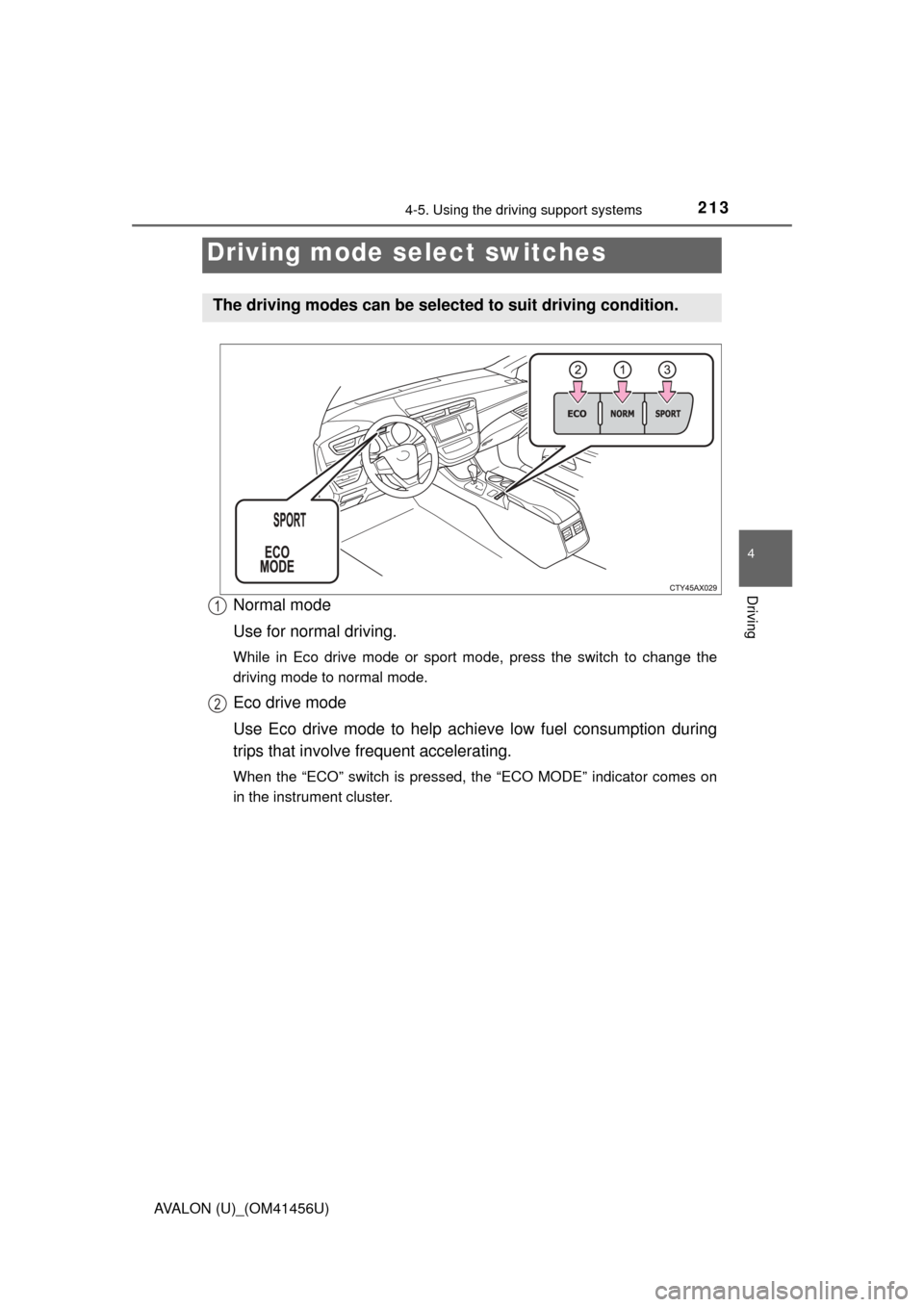
Normal mode
Use for normal driving.
While in Eco drive mode or sport mode, press the switch to change the
driving mode to normal mode.
Eco drive mode
Use Eco drive mode to help achieve low fuel consumption during
trips that involve frequent accelerating.
When the “ECO” switch is pressed, the “ECO MODE” indicator comes on
in the instrument cluster.
Driving mode select switches
The driving modes can be selected to suit driving condition.
1
2
Page 214 of 500

2144-5. Using the driving support systems
AVALON (U)_(OM41456U)
Sport mode
Use sport mode when increased ac celeration response and precise
handling is desired, for example, when driving on mountain roads.
When the “SPORT” switch is pressed, the “SPORT” indicator comes on in
the instrument cluster.
■Operation of the air conditio ning system in Eco drive mode
Eco drive mode controls the heating/cooling operations and fan speed of the
air conditioning system to enhance fuel efficiency ( P. 242). To improve air
conditioning performance, adjust the fan speed or turn off Eco drive mode.
■ Sport mode automatic deactivation
Sport mode is automatically deactivated if the engine switch is turned off after
driving in sport mode.
3
Page 245 of 500
2455-1. Using the air conditioning system and defogger
5
Interior features
AVALON (U)_(OM41456U)■
Changing the rear seat temperature settings (vehicles with a
rear control switch)
Turn clockwise to increase the temperature and turn
counterclockwise to decrease the temperature.
■Confirming automatic operation status
During automatic operation, the operation status of fan speed, air
outlet mode, outside/recirculated air mode and whether the A/C is
on or off can be confirmed on the display by touching .
The display will return to its previous state after a few seconds.
■
Automatic mode indicator
If the fan speed setting or air fl ow modes are operated, the auto-
matic mode indicator goes off. However, automatic mode for func-
tions other than that operated are maintained.
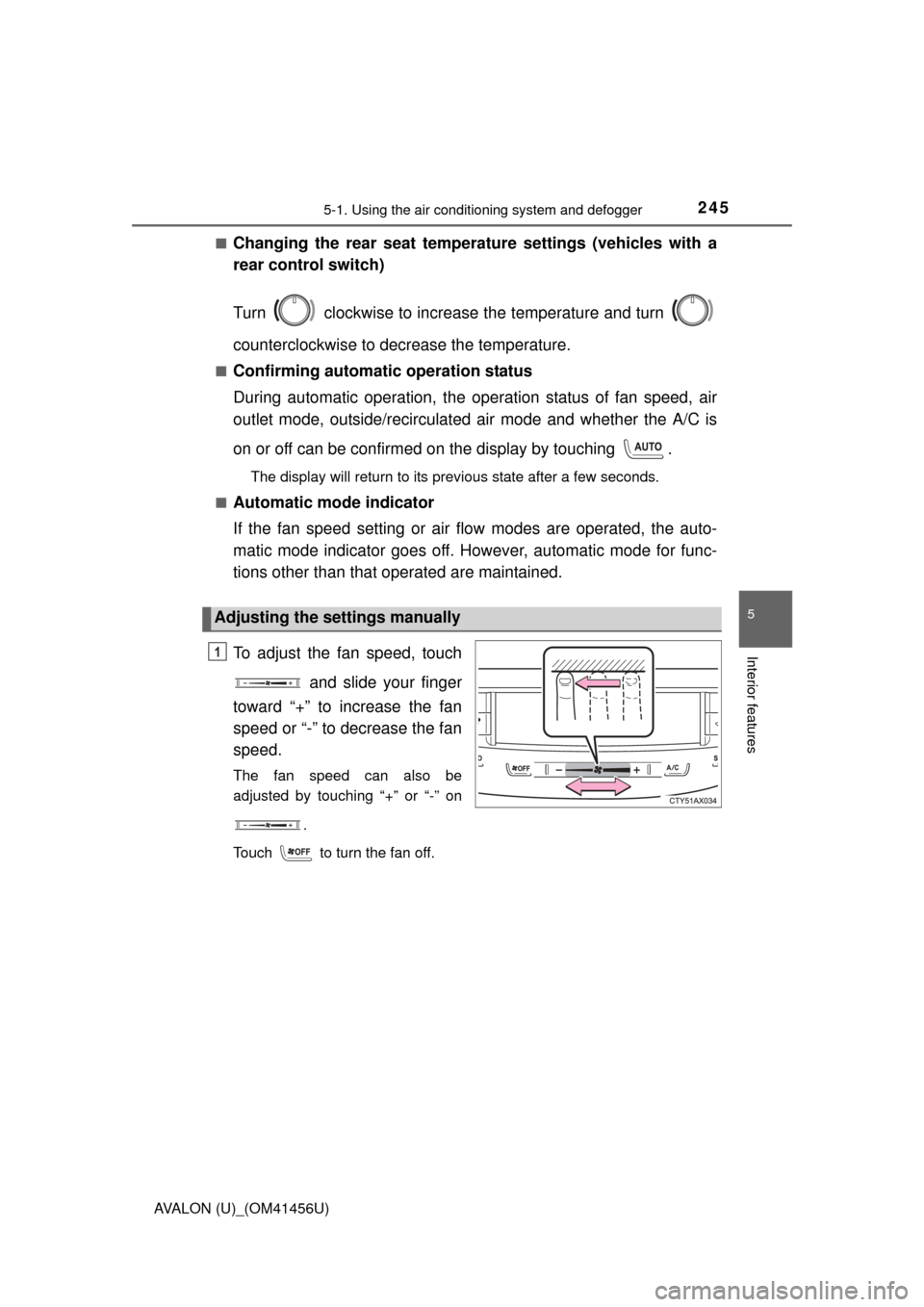
To adjust the fan speed, touch
and slide your finger
toward “+” to increase the fan
speed or “-” to decrease the fan
speed.
The fan speed can also be
adjusted by touching “+” or “-” on
.
Touch to turn the fan off.
Adjusting the settings manually
1