fuel consumption TOYOTA AVALON 2015 XX40 / 4.G Owners Manual
[x] Cancel search | Manufacturer: TOYOTA, Model Year: 2015, Model line: AVALON, Model: TOYOTA AVALON 2015 XX40 / 4.GPages: 500
Page 2 of 500

TABLE OF CONTENTS2
AVALON (U)_(OM41456U)For your information....................... 8
Reading this manual .................... 12
How to search .............................. 13
Pictorial index .............................. 14
1-1. For safe use
Before driving ...................... 24
For safety drive ................... 26
Seat belts ............................ 28
SRS airbags ........................ 34
Front passenger occupant classification system ......... 44
Safety information for children ........................ 50
Child restraint systems ........ 51
Installing child restraints ........................... 55
Exhaust gas precautions ....................... 65
1-2. Theft deterrent system Engine immobilizer system............................... 66
Alarm ................................... 68
Theft prevention labels (U.S.A.) ............................. 70
2. Instrument cluster Warning lights and indicators........................... 72
Gauges and meters............. 77
Multi-information display ............................... 80
Fuel consumption information ........................ 86 3-1. Key information
Keys..................................... 90
3-2. Opening, closing and locking the doors
Smart key system ................ 93
Wireless remote control.............................. 108
Doors ................................. 111
Trunk ................................. 114
3-3. Adjusting the seats Front seats......................... 118
Driving position memory ........................... 120
Head restraints .................. 125
3-4. Adjusting the steering wheel and mirrors
Steering wheel ................... 128
Inside rear view mirror ....... 129
Outside rear view mirrors ............................. 131
3-5. Opening, closing the windows and
moon roof
Power windows.................. 134
Moon roof .......................... 137
1For safety and security
2Instrument cluster
3Operation of
each component
Page 71 of 500

71
Instrument cluster2
AVALON (U)_(OM41456U)2. Instrument cluster
Warning lights and indicators .......................... 72
Gauges and meters ............ 77
Multi-information display ..... 80
Fuel consumption information ........................ 86
Page 81 of 500
812. Instrument cluster
2
Instrument cluster
AVALON (U)_(OM41456U)■
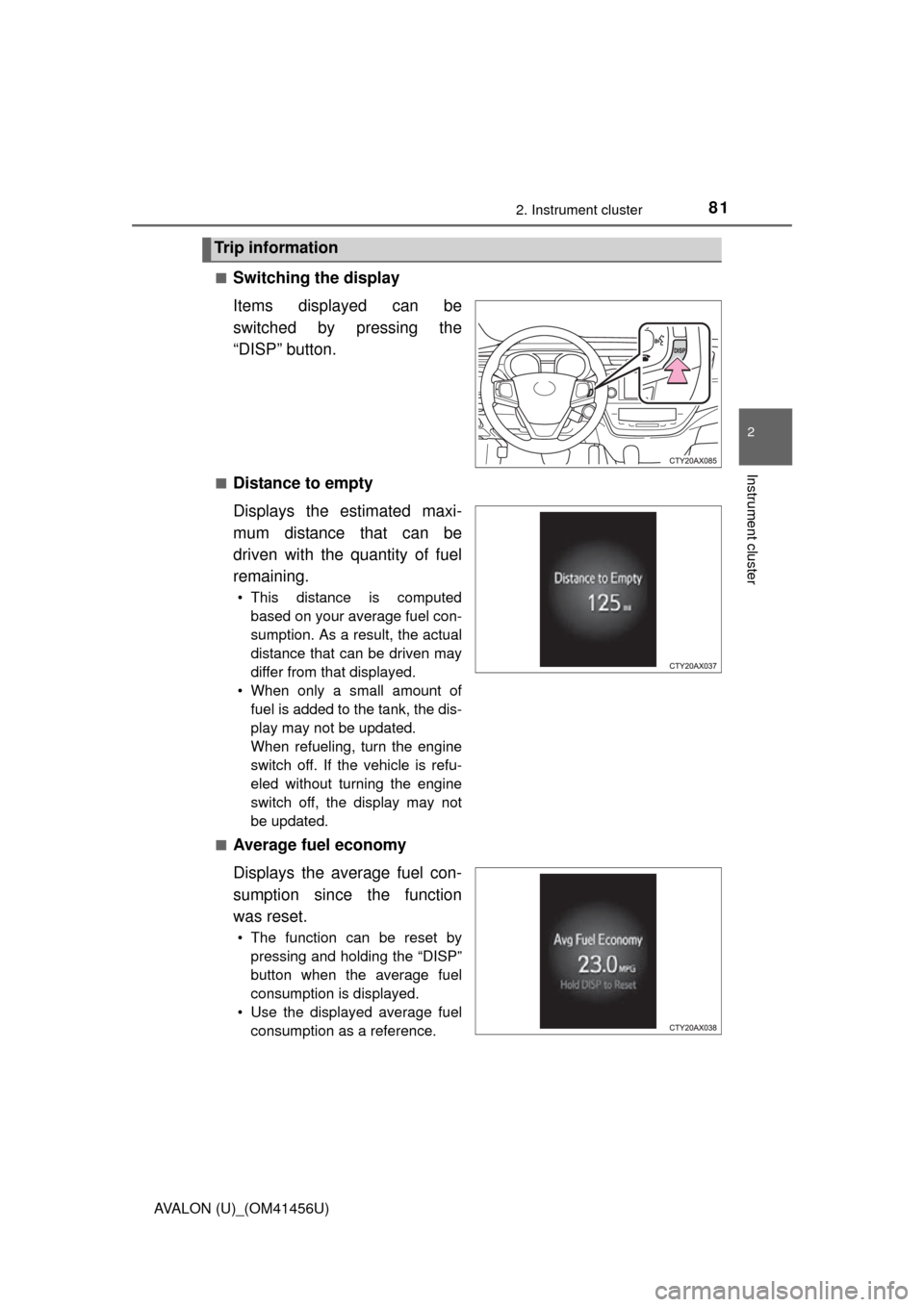
Switching the display
Items displayed can be
switched by pressing the
“DISP” button.
■Distance to empty
Displays the estimated maxi-
mum distance that can be
driven with the quantity of fuel
remaining.
• This distance is computed
based on your average fuel con-
sumption. As a result, the actual
distance that can be driven may
differ from that displayed.
• When only a small amount of fuel is added to the tank, the dis-
play may not be updated.
When refueling, turn the engine
switch off. If the vehicle is refu-
eled without turning the engine
switch off, the display may not
be updated.
■
Average fuel economy
Displays the average fuel con-
sumption since the function
was reset.
• The function can be reset by pressing and holding the “DISP”
button when the average fuel
consumption is displayed.
• Use the displayed average fuel consumption as a reference.
Trip information
Page 82 of 500
822. Instrument cluster
AVALON (U)_(OM41456U)■
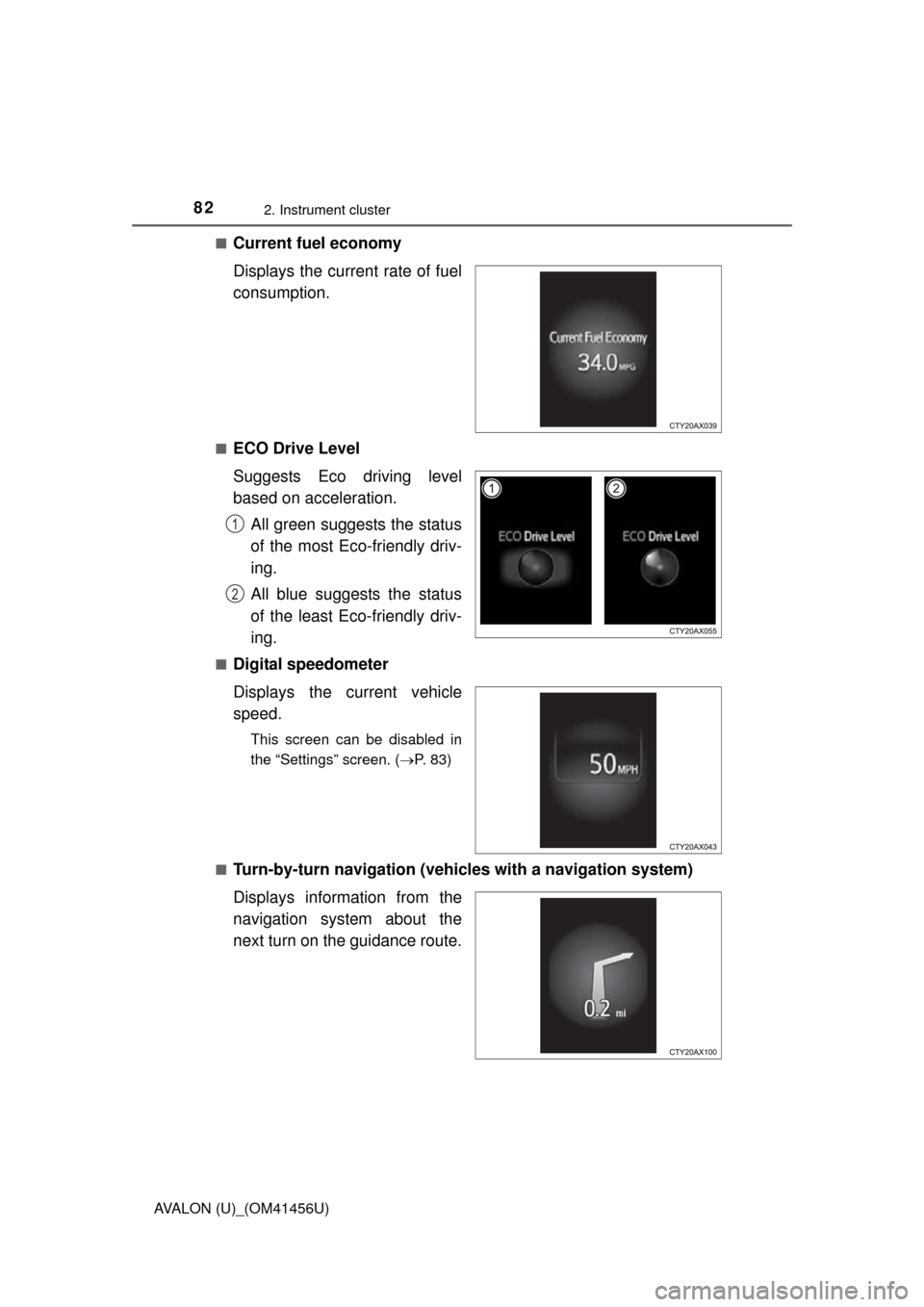
Current fuel economy
Displays the current rate of fuel
consumption.
■ECO Drive Level
Suggests Eco driving level
based on acceleration.
All green suggests the status
of the most Eco-friendly driv-
ing.
All blue suggests the status
of the least Eco-friendly driv-
ing.
■Digital speedometer
Displays the current vehicle
speed.
This screen can be disabled in
the “Settings” screen. ( P. 83)
■
Turn-by-turn navigation (vehicl es with a navigation system)
Displays information from the
navigation system about the
next turn on the guidance route.
1
2
Page 86 of 500
862. Instrument cluster
AVALON (U)_(OM41456U)
Audio system
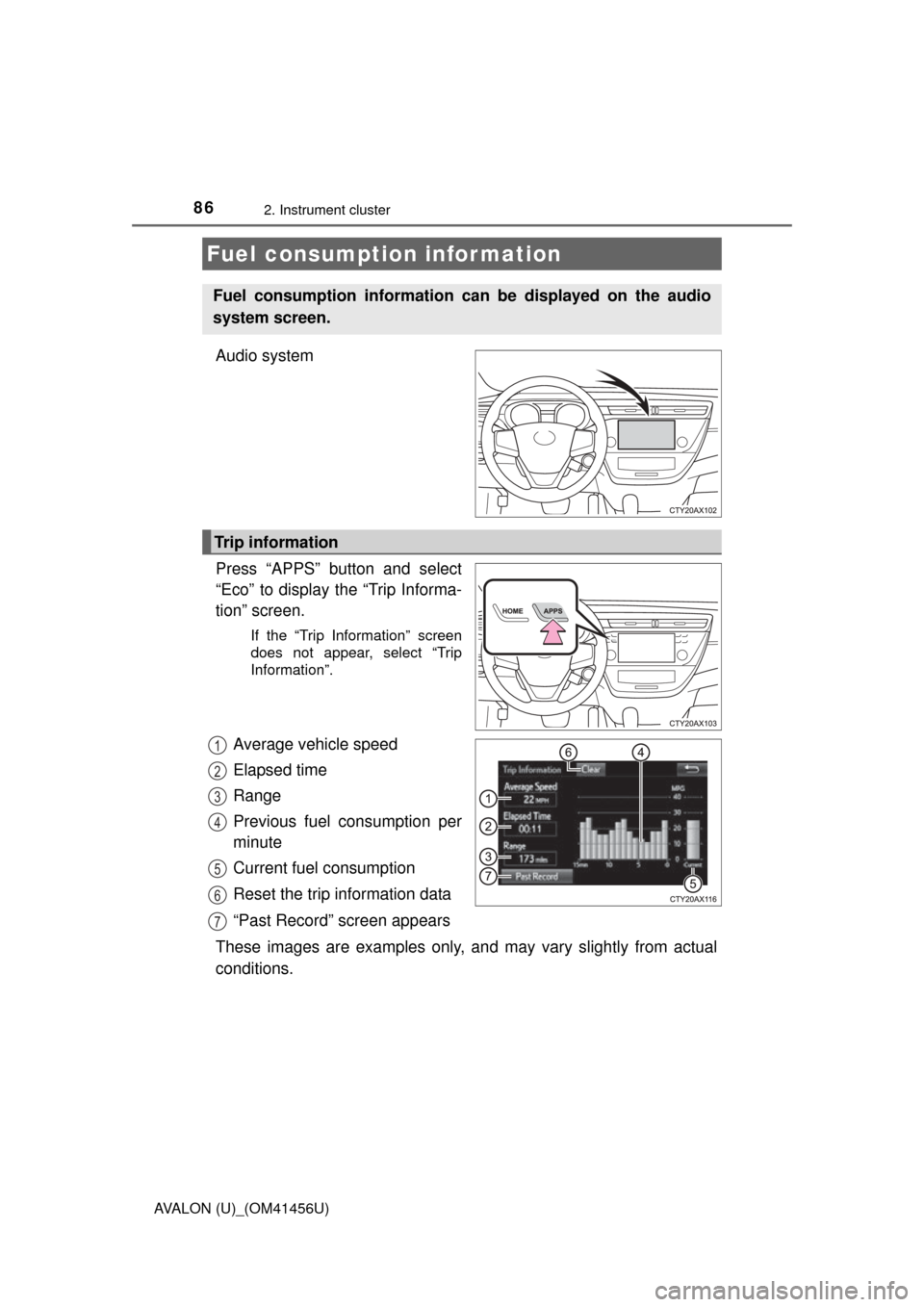
Press “APPS” button and select
“Eco” to display the “Trip Informa-
tion” screen.
If the “Trip Information” screen
does not appear, select “Trip
Information”.
Average vehicle speed
Elapsed time
Range
Previous fuel consumption per
minute
Current fuel consumption
Reset the trip information data
“Past Record” screen appears
These images are examples only, an d may vary slightly from actual
conditions.
Fuel consumption information
Fuel consumption information can be displayed on the audio
system screen.
Trip information
1
2
3
4
5
6
7
Page 87 of 500
872. Instrument cluster
2
Instrument cluster
AVALON (U)_(OM41456U)
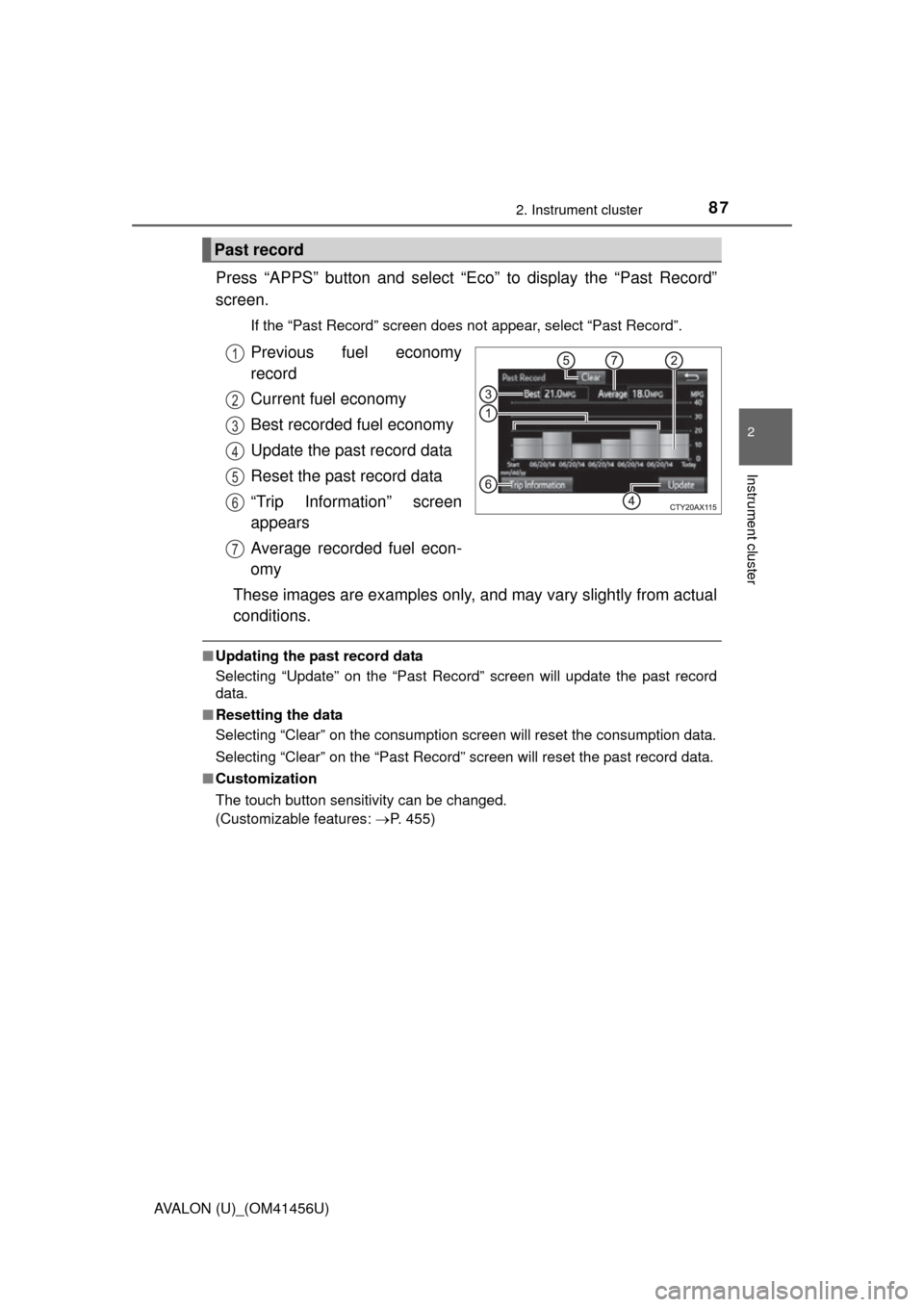
Press “APPS” button and select “Eco” to display the “Past Record”
screen.
If the “Past Record” screen does not appear, select “Past Record”.
Previous fuel economy
record
Current fuel economy
Best recorded fuel economy
Update the past record data
Reset the past record data
“Trip Information” screen
appears
Average recorded fuel econ-
omy
These images are examples only, and may vary slightly from actual
conditions.
■ Updating the past record data
Selecting “Update” on the “Past Record” screen will update t\
he past record
data.
■ Resetting the data
Selecting “Clear” on the consumption screen will reset the consumption data.
Selecting “Clear” on the “Past Record” screen will reset the past record data.
■ Customization
The touch button sensitivity can be changed.
(Customizable features: P. 455)
Past record
1
2
3
4
5
6
7
Page 213 of 500
2134-5. Using the driving support systems
4
Driving
AVALON (U)_(OM41456U)
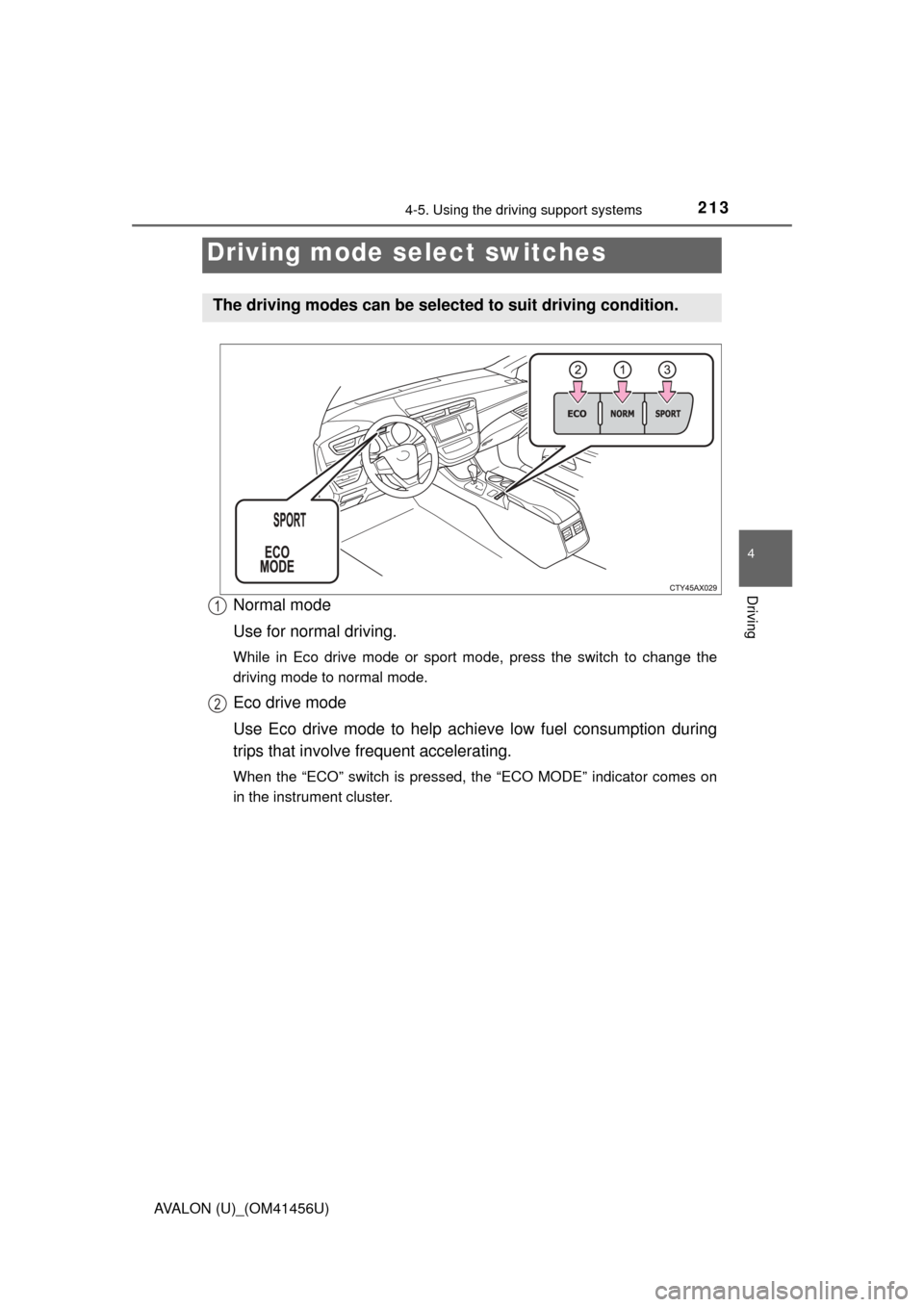
Normal mode
Use for normal driving.
While in Eco drive mode or sport mode, press the switch to change the
driving mode to normal mode.
Eco drive mode
Use Eco drive mode to help achieve low fuel consumption during
trips that involve frequent accelerating.
When the “ECO” switch is pressed, the “ECO MODE” indicator comes on
in the instrument cluster.
Driving mode select switches
The driving modes can be selected to suit driving condition.
1
2
Page 249 of 500
2495-1. Using the air conditioning system and defogger
5
Interior features
AVALON (U)_(OM41456U)
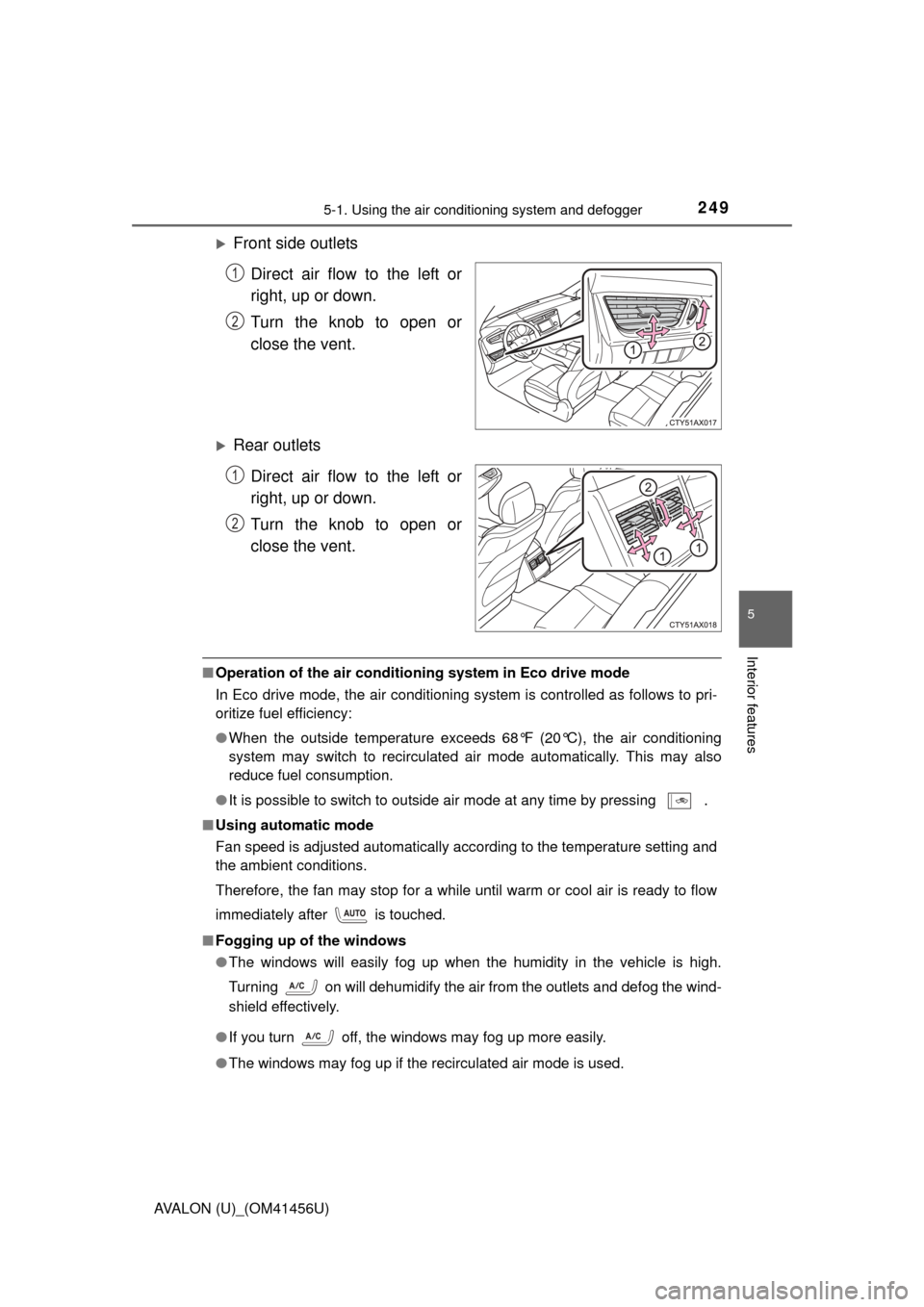
Front side outlets
Direct air flow to the left or
right, up or down.
Turn the knob to open or
close the vent.
Rear outletsDirect air flow to the left or
right, up or down.
Turn the knob to open or
close the vent.
■Operation of the air conditio ning system in Eco drive mode
In Eco drive mode, the air conditioning system is controlled as follows to pri-
oritize fuel efficiency:
● When the outside temperature exceeds 68°F (20°C), the air conditioning
system may switch to recirculated air mode automatically. This may also
reduce fuel consumption.
● It is possible to switch to outside air mode at any time by pressing
.
■Using automatic mode
Fan speed is adjusted automatically according to the temperature setting and
the ambient conditions.
Therefore, the fan may stop for a while until warm or cool air is ready to flow
immediately after is touched.
■ Fogging up of the windows
●The windows will easily fog up when the humidity in the vehicle is high.
Turning on will dehumidify the air from the outlets and defog the wind-
shield effectively.
● If you turn off, the windows may fog up more easily.
● The windows may fog up if the recirculated air mode is used.
1
2
1
2
Page 250 of 500
2505-1. Using the air conditioning system and defogger
AVALON (U)_(OM41456U)■
Outside/recirculated air mode
●When driving on dusty roads such as tunnels or in heavy traffic, set the out-
side/recirculated air mode to the recirculated air mode. This is effective in
preventing outside air from entering the vehicle interior. During cooling oper-
ation, setting the recirculated air mode will also cool the vehicle interior
effectively.
● Outside/recirculated air mode may automatically switch depending on the
temperature setting, outside temperature, pressure, engine coolant temper-
ature or inside temperature.
■ When the outside temperature exceeds 75°F (24°C) and the air condition-
ing system is on (U.S.A. only)
●In order to reduce the air conditioning power consumption, the air condition-
ing system may switch to recirculated air mode automatically. This may also
reduce fuel consumption.
● Recirculated air mode is selected as a default mode when the engine switch
is turned to IGNITION ON mode.
● It is possible to switch to outside air mode at any time by pressing
.
■When the outside temperature falls to nearly 32 F (0 C)
The dehumidification function may not operate even when is touched.
■ Ventilation and air conditioning odors
●To let fresh air in, set the air conditioning system to the outside air mode.
● During use, various odors from inside and outside the vehicle may enter into
and accumulate in the air conditioning system. This may then cause odor to
be emitted from the vents.
● To reduce potential odors from occurring:
• It is recommended that the air conditioning system be set to outside air
mode prior to turning the vehicle off.
• The start timing of the blower may be delayed for a short period of time immediately after the air conditioning system is started in automatic
mode.
■ Air conditioning filter
P. 348