audio TOYOTA AVALON 2016 XX40 / 4.G Navigation Manual
[x] Cancel search | Manufacturer: TOYOTA, Model Year: 2016, Model line: AVALON, Model: TOYOTA AVALON 2016 XX40 / 4.GPages: 304, PDF Size: 4.19 MB
Page 20 of 304
20
2. QUICK REFERENCE
AVA L O N _ N a v i _ U
1. “Setup” SCREEN
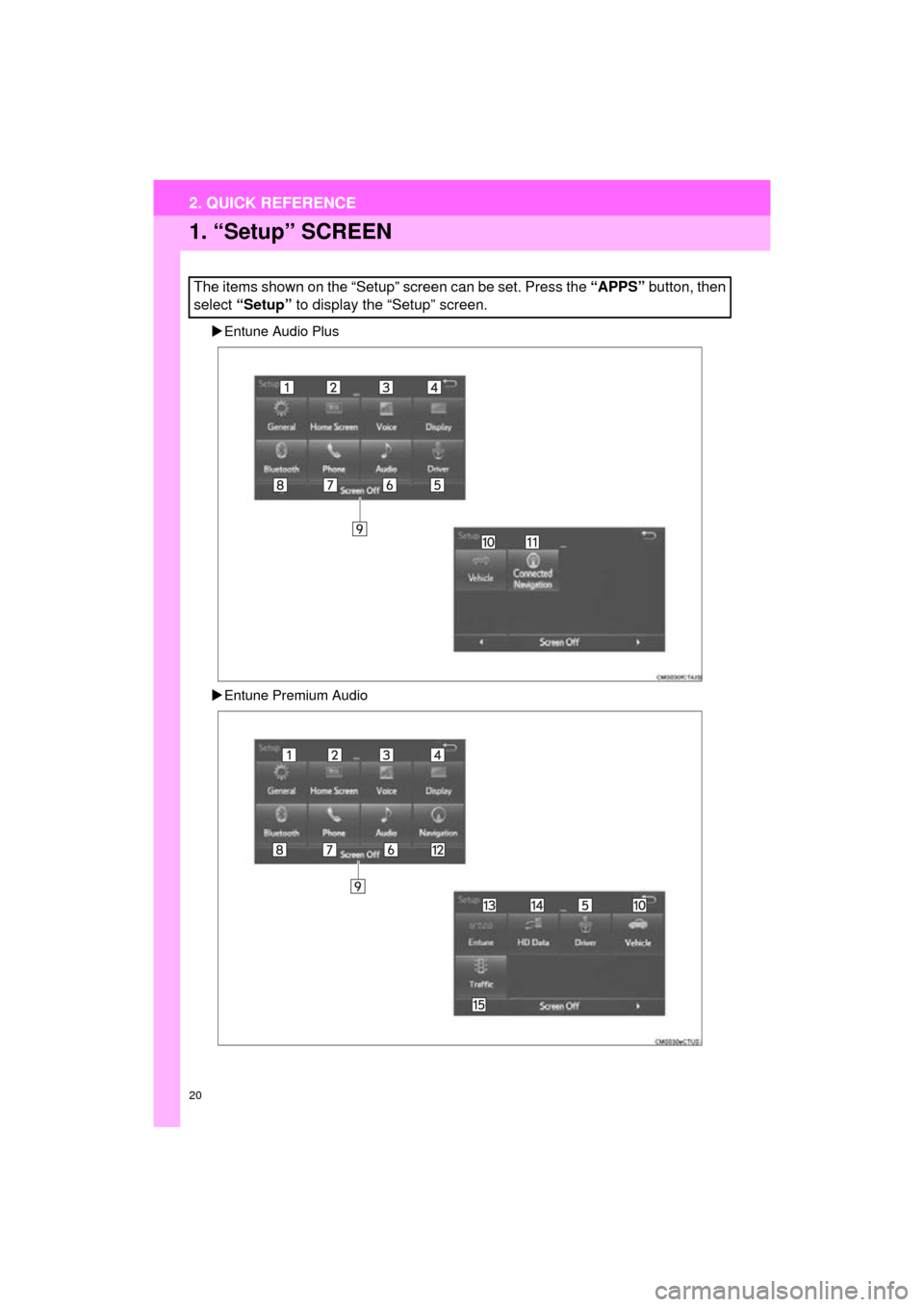
Entune Audio Plus
Entune Premium Audio
The items shown on the “Setup” screen can be set. Press the “APPS” button, then
select “Setup” to display the “Setup” screen.
2. QUICK REFERENCE
Page 21 of 304
21
2. QUICK REFERENCE
QUICK GUIDE
AVA L O N _ N a v i _ U
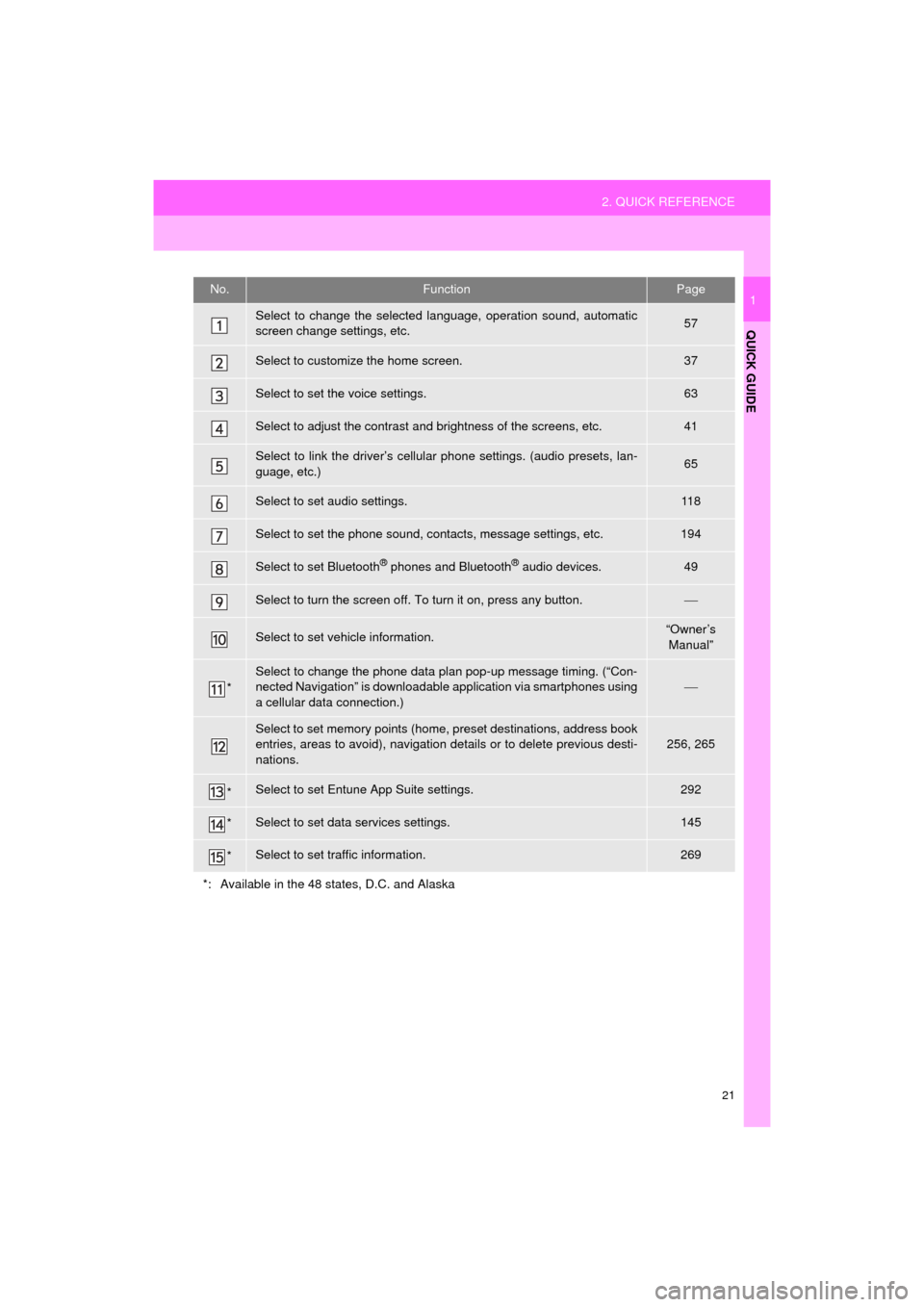
1No.FunctionPage
Select to change the selected language, operation sound, automatic
screen change settings, etc.57
Select to customize the home screen.37
Select to set the voice settings.63
Select to adjust the contrast and brightness of the screens, etc.41
Select to link the driver’s cellular phone settings. (audio presets, lan-
guage, etc.)65
Select to set audio settings.11 8
Select to set the phone sound, contacts, message settings, etc.194
Select to set Bluetooth® phones and Bluetooth® audio devices.49
Select to turn the screen off. To turn it on, press any button.
Select to set vehicle information.“Owner’s
Manual”
*
Select to change the phone data plan pop-up message timing. (“Con-
nected Navigation” is downloadable application via smartphones using
a cellular data connection.)
Select to set memory points (home, preset destinations, address book
entries, areas to avoid), navigation details or to delete previous desti-
nations.256, 265
*Select to set Entune App Suite settings.292
*Select to set data services settings.145
*Select to set traffic information.269
*: Available in the 48 states, D.C. and Alaska
Page 22 of 304
22
3. NAVIGATION OPERATION
AVA L O N _ N a v i _ U
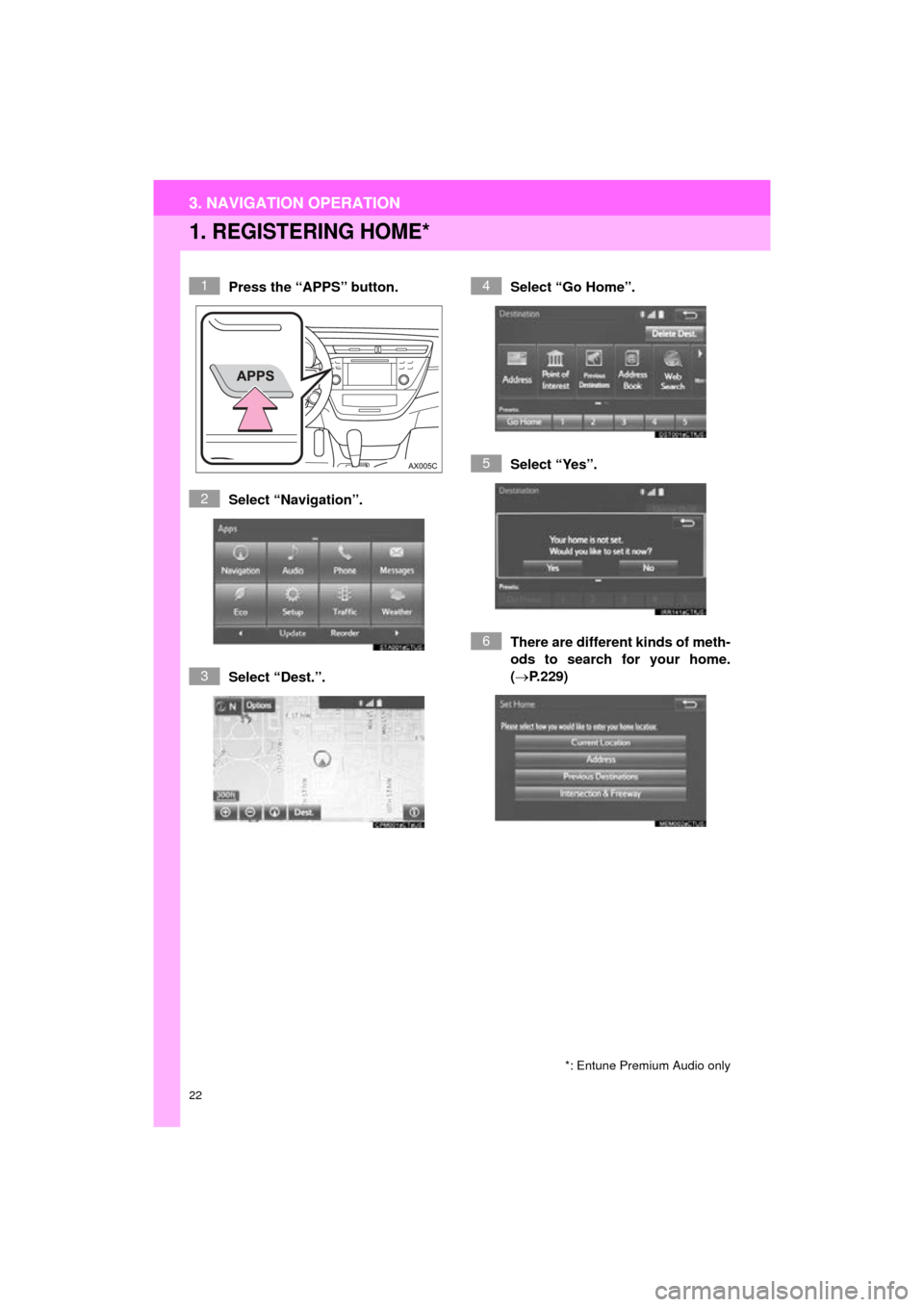
1. REGISTERING HOME*
Press the “APPS” button.
Select “Navigation”.
Select “Dest.”.Select “Go Home”.
Select “Yes”.
There are different kinds of meth-
ods to search for your home.
(P.229)
*: Entune Premium Audio only
1
2
3
4
5
6
3. NAVIGATION OPERATION
Page 24 of 304
24
3. NAVIGATION OPERATION
AVA L O N _ N a v i _ U
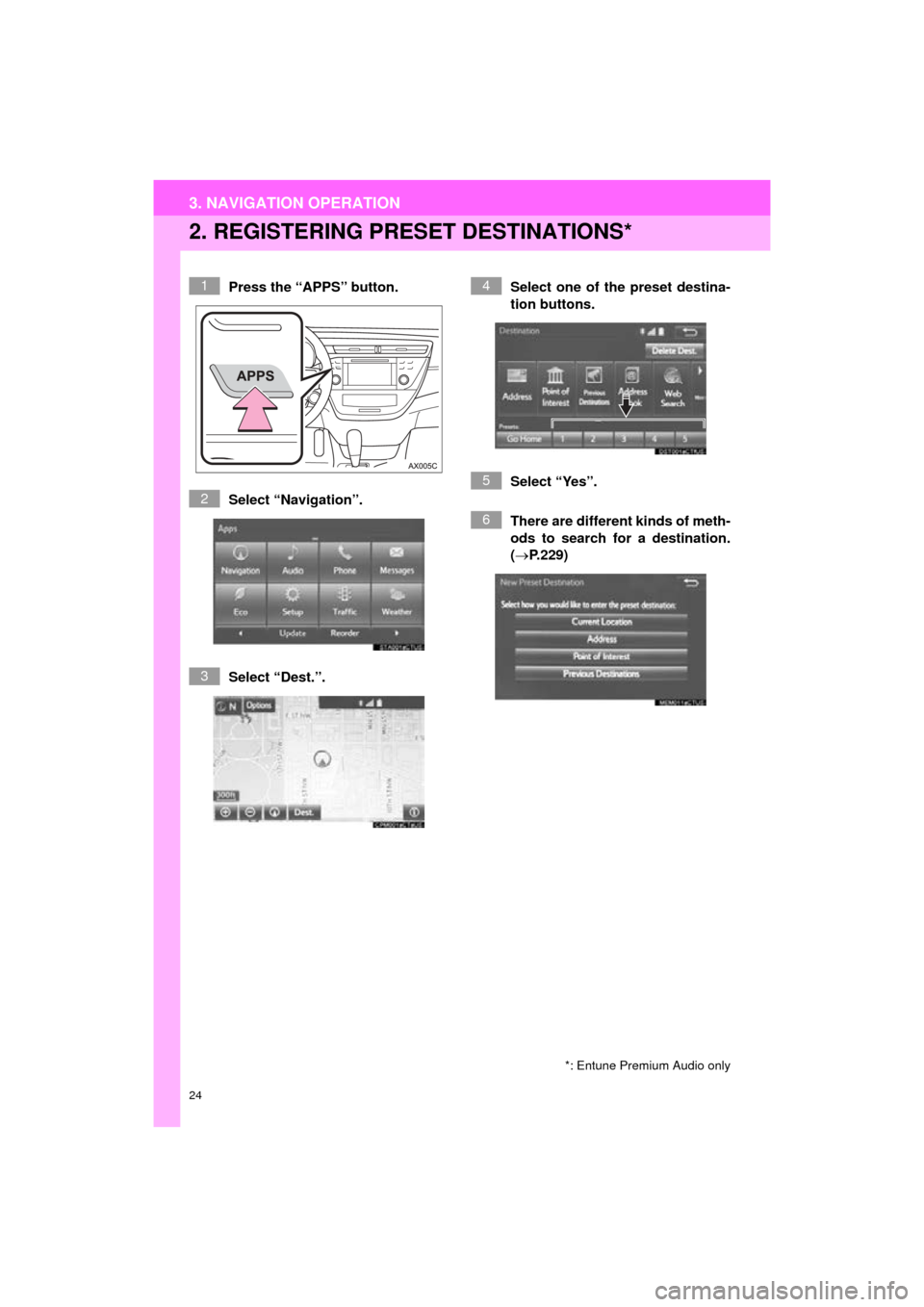
2. REGISTERING PRESET DESTINATIONS*
Press the “APPS” button.
Select “Navigation”.
Select “Dest.”. Select one of the preset destina-
tion buttons.
Select “Yes”.
There are different kinds of meth-
ods to search for a destination.
(P.229)
*: Entune Premium Audio only
1
2
3
4
5
6
Page 26 of 304
26
3. NAVIGATION OPERATION
AVA L O N _ N a v i _ U
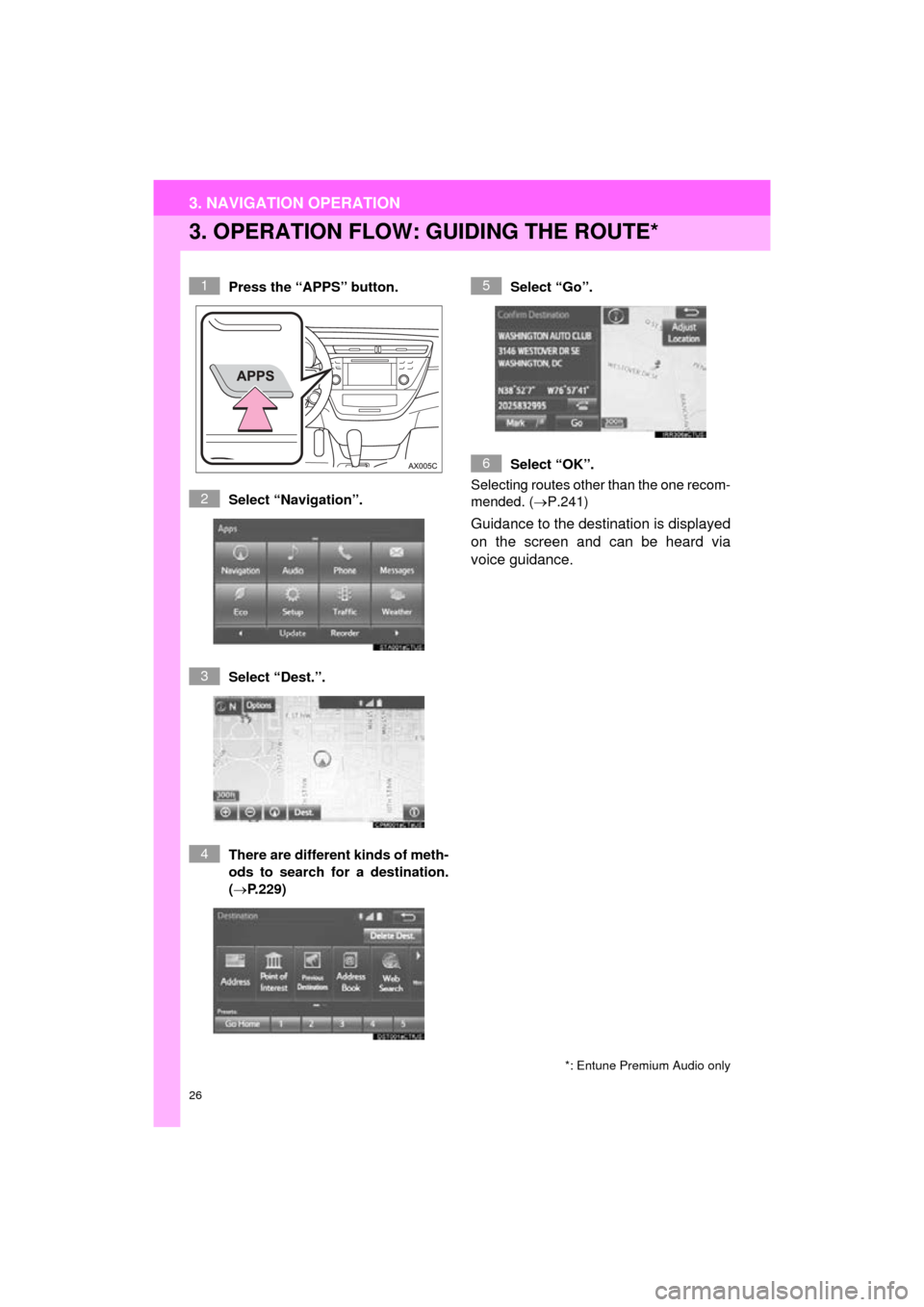
3. OPERATION FLOW: GUIDING THE ROUTE*
Press the “APPS” button.
Select “Navigation”.
Select “Dest.”.
There are different kinds of meth-
ods to search for a destination.
(P.229)Select “Go”.
Select “OK”.
Selecting routes other than the one recom-
mended. ( P.241)
Guidance to the destination is displayed
on the screen and can be heard via
voice guidance.
*: Entune Premium Audio only
1
2
3
4
5
6
Page 27 of 304
27
3. NAVIGATION OPERATION
AVA L O N _ N a v i _ U
QUICK GUIDE
1
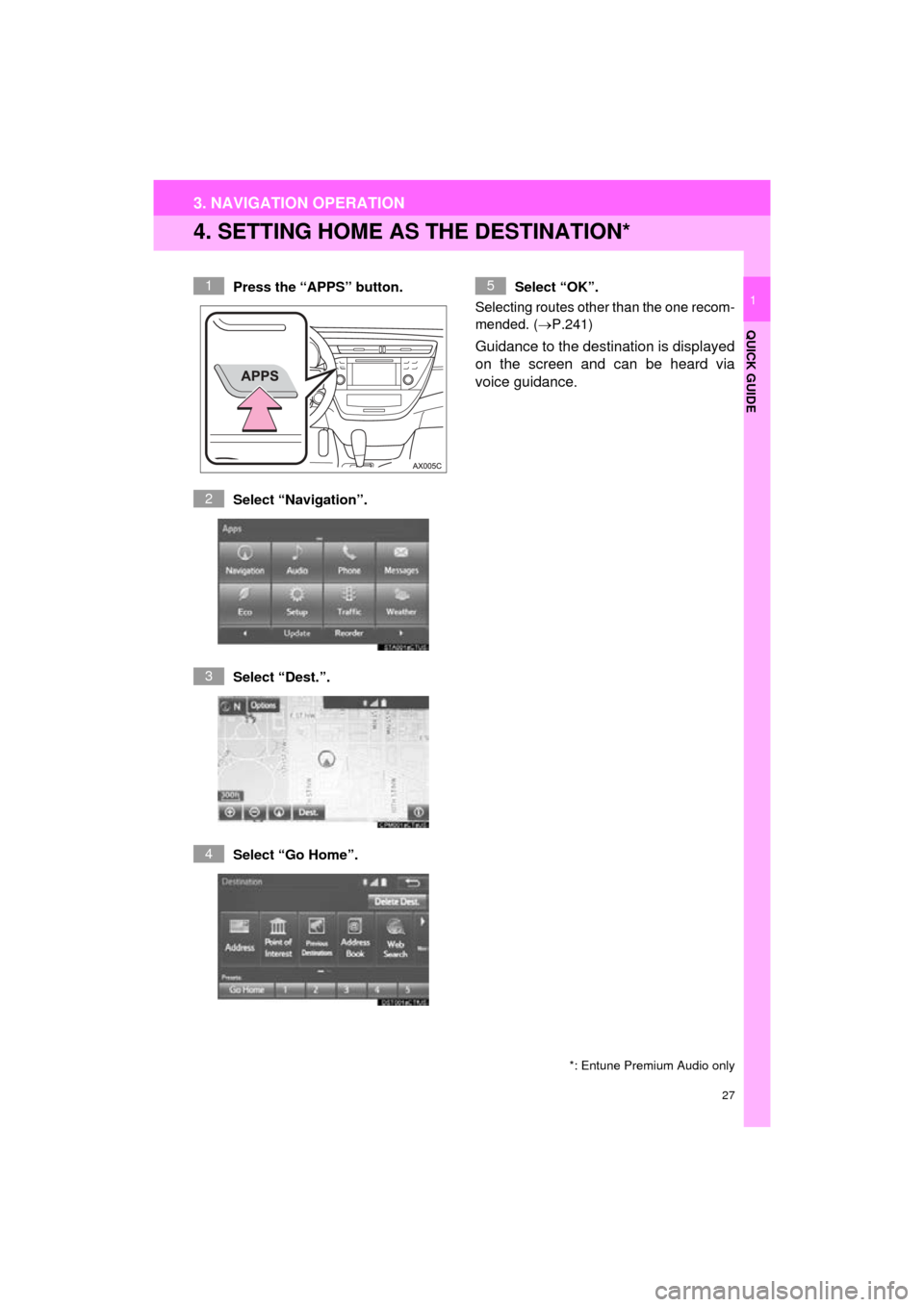
4. SETTING HOME AS THE DESTINATION*
Press the “APPS” button.
Select “Navigation”.
Select “Dest.”.
Select “Go Home”. Select “OK”.
Selecting routes other than the one recom-
mended. ( P.241)
Guidance to the destination is displayed
on the screen and can be heard via
voice guidance.
*: Entune Premium Audio only
1
2
3
4
5
Page 28 of 304
28
AVA L O N _ N a v i _ U
4. FUNCTION INDEX
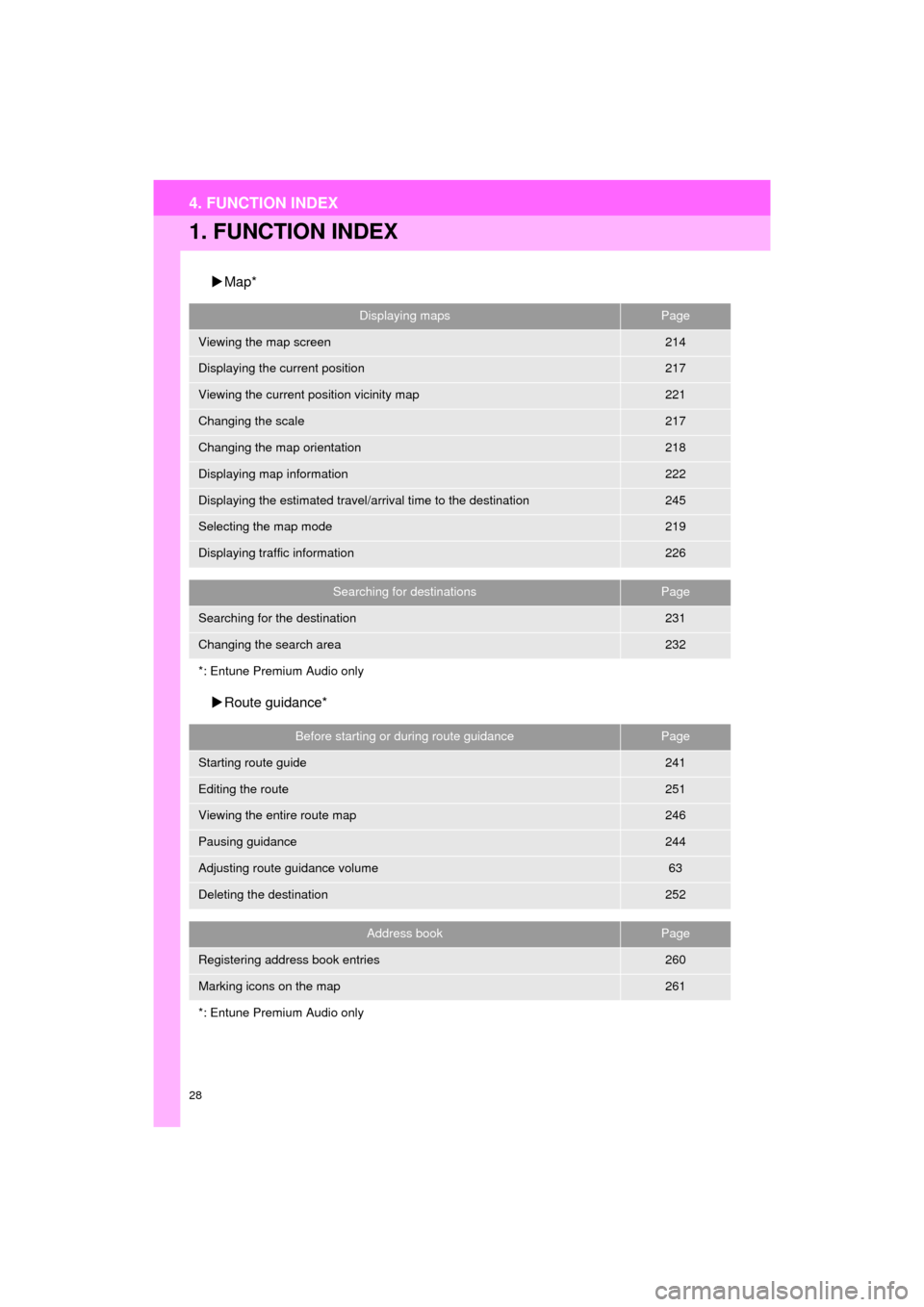
1. FUNCTION INDEX
Map*
Route guidance*
Displaying mapsPage
Viewing the map screen214
Displaying the current position217
Viewing the current position vicinity map221
Changing the scale217
Changing the map orientation218
Displaying map information222
Displaying the estimated travel/arrival time to the destination245
Selecting the map mode219
Displaying traffic information226
Searching for destinationsPage
Searching for the destination231
Changing the search area232
*: Entune Premium Audio only
Before starting or during route guidancePage
Starting route guide241
Editing the route251
Viewing the entire route map246
Pausing guidance244
Adjusting route guidance volume63
Deleting the destination252
Address bookPage
Registering address book entries260
Marking icons on the map261
*: Entune Premium Audio only
Page 29 of 304
29
4. FUNCTION INDEX
QUICK GUIDE
AVA L O N _ N a v i _ U
1
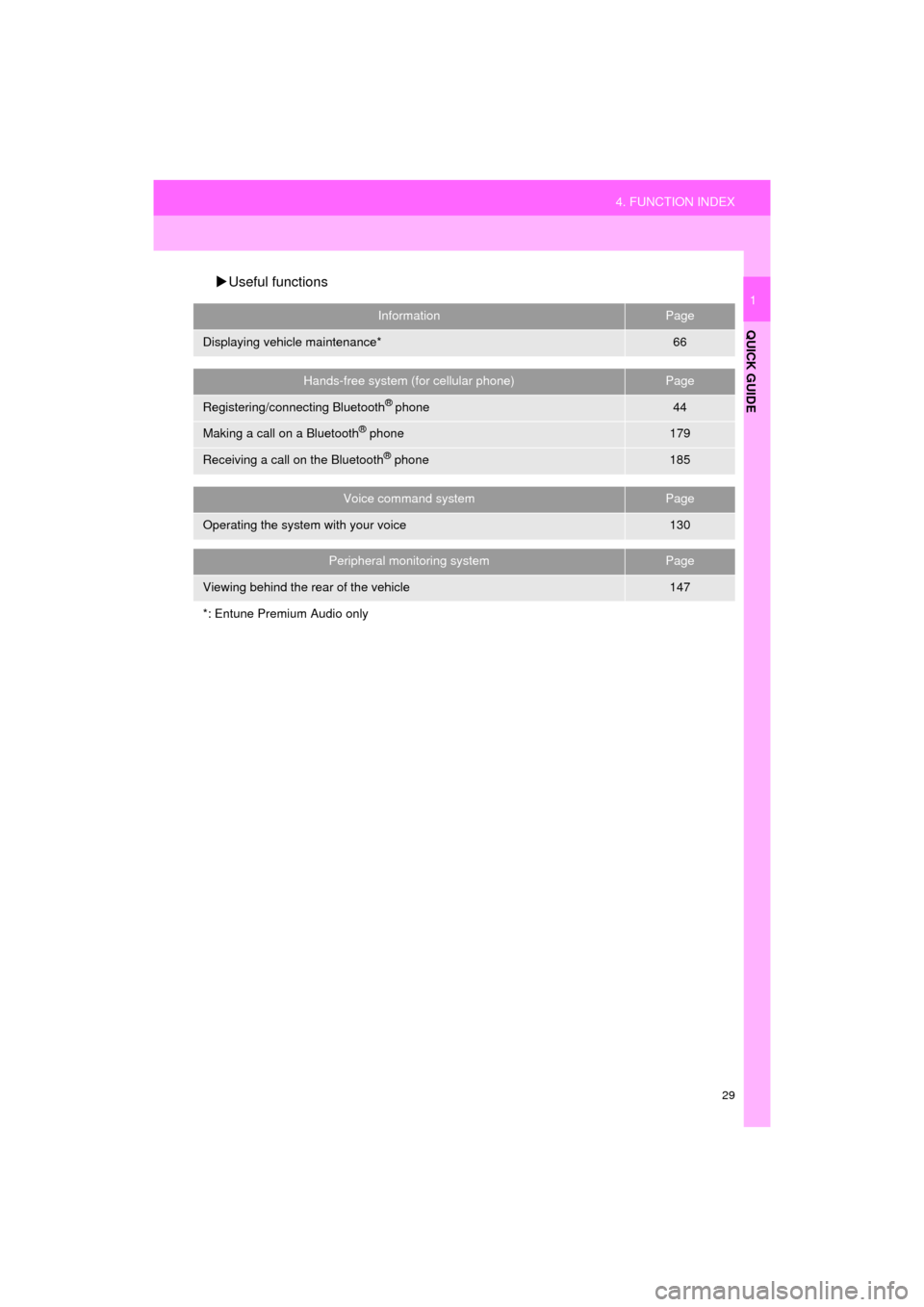
Useful functions
InformationPage
Displaying vehicle maintenance*66
Hands-free system (for cellular phone)Page
Registering/connecting Bluetooth® phone44
Making a call on a Bluetooth® phone179
Receiving a call on the Bluetooth® phone185
Voice command systemPage
Operating the system with your voice130
Peripheral monitoring systemPage
Viewing behind the rear of the vehicle147
*: Entune Premium Audio only
Page 31 of 304
2
31
AVA L O N _ N a v i _ U
3
4
5
6
7
8
9
1
2
1. INITIAL SCREEN ........................... 32
2. TOUCH SWITCH SENSORS ......... 34
3. TOUCH SCREEN GESTURES ...... 35
4. TOUCH SCREEN OPERATION ................................ 36
5. HOME SCREEN OPERATION ...... 37
6. ENTERING LETTERS AND NUMBERS/LIST SCREEN
OPERATION ................................ 38
ENTERING LETTERS AND
NUMBERS .......................................... 38
LIST SCREEN ....................................... 38
7. SCREEN ADJUSTMENT ............... 41
8. LINKING MULTI-INFORMATION DISPLAY AND
THE SYSTEM .... .......................... 43
1. REGISTERING/CONNECTING Bluetooth
® DEVICE .................... 44
REGISTERING A Bluetooth®
PHONE FOR THE FIRST TIME.......... 44
REGISTERING A Bluetooth
®
AUDIO PLAYER FOR
THE FIRST TIME ................................ 45
PROFILES ............................................. 46
CERTIFICATION ................................... 48
2. SETTING Bluetooth®
DETAILS ..................................... 49
“Bluetooth* Setup” SCREEN.................. 49
REGISTERING A Bluetooth®
DEVICE ............................................... 50
DELETING A Bluetooth
® DEVICE ......... 51
CONNECTING A Bluetooth®
DEVICE ............................................... 52
EDITING THE Bluetooth
®
DEVICE INFORMATION ..................... 54
“System Settings” SCREEN................... 55
1. GENERAL SETTINGS .................. 57
GENERAL SETTINGS SCREEN ........... 57
2. VOICE SETTINGS ......................... 63
VOICE SETTINGS SCREEN ................. 63
3. VEHICLE SETTINGS .................... 64
4. DRIVER SETTINGS ...................... 65
MANUALLY SELECT LINKED SETTINGS .......................................... 65
5. MAINTENANCE ............................ 66
1BASIC INFORMATION BEFORE
OPERATION
2Bluetooth® SETTINGS
3OTHER SETTINGS
BASIC FUNCTION
*: Bluetooth is a registered trademark of Bluetooth SIG, Inc.
Page 32 of 304
32
AVA L O N _ N a v i _ U
1. BASIC INFORMATION BEFORE OPERATION
1. INITIAL SCREEN
1When the engine
turned to ACCESSORY or IGNITION
ON
be displayed and the system will begin
operating.
After a few seconds, the “Caution” screen
will be displayed.
After about 5 seconds, the “Caution”
screen automatically switches to the next
screen.
WA R N I N G
●When the vehicle is stopped with the
engine running
for safety.
*: Entune Premium Audio only
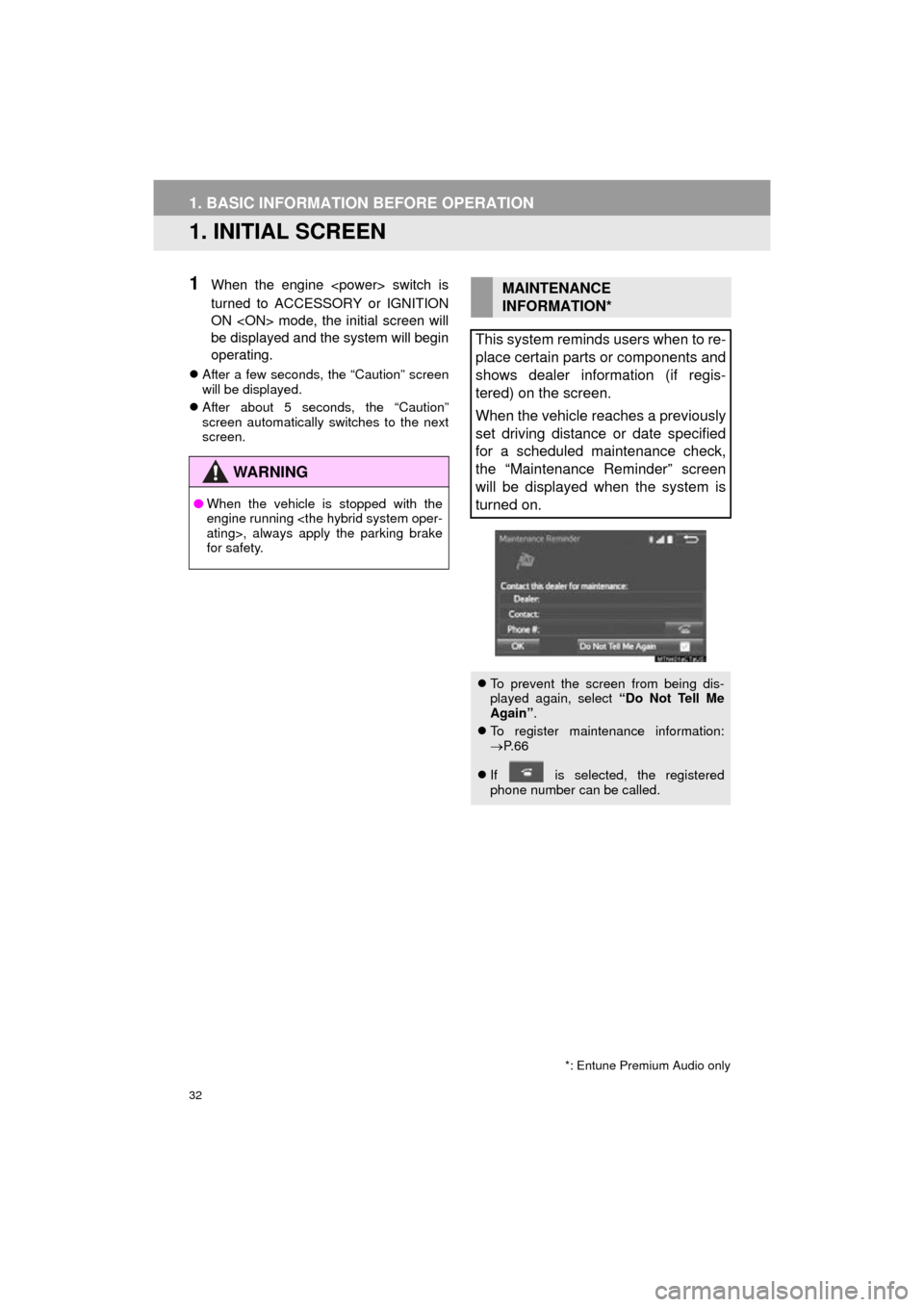
MAINTENANCE
INFORMATION*
This system reminds users when to re-
place certain parts or components and
shows dealer information (if regis-
tered) on the screen.
When the vehicle reaches a previously
set driving distance or date specified
for a scheduled maintenance check,
the “Maintenance Reminder” screen
will be displayed when the system is
turned on.
To prevent the screen from being dis-
played again, select “Do Not Tell Me
Again” .
To register maintenance information:
P. 6 6
If is selected, the registered
phone number can be called.