BSM function TOYOTA AVALON 2016 XX40 / 4.G Owners Manual
[x] Cancel search | Manufacturer: TOYOTA, Model Year: 2016, Model line: AVALON, Model: TOYOTA AVALON 2016 XX40 / 4.GPages: 492, PDF Size: 7.02 MB
Page 3 of 492
3
1
8 7
6
5
4
3
2
9
AVALON (U)_(01999-07001)4-1. Before driving
Driving the vehicle ............. 144
Cargo and luggage............ 154
Vehicle load limits ............. 157
Trailer towing..................... 158
Dinghy towing.................... 159
4-2. Driving procedures Engine (ignition) switch ..... 160
Automatic transmission ..... 165
Turn signal lever................ 169
Parking brake .................... 170
4-3. Operating the lights and wipers
Headlight switch ................ 171
Automatic High Beam ....... 174
Windshield wipers and washer ............................ 178
4-4. Refueling Opening the fuel tank cap .......................... 184 4-5. Using the driving
support systems
Toyota Safety Sense P ...... 188
PCS (Pre-Collision System)..... 196
LDA (Lane Departure Alert with steering control) ....... 209
Dynamic radar cruise control.............................. 220
Cruise control .................... 233
BSM (Blind Spot Monitor)......... 237
• The Blind Spot Monitor
function.......................... 239
• The Rear Cross Traffic Alert function ................. 243
Driving mode select switches........................... 246
Driving assist systems ....... 248
4-6. Driving tips Winter driving tips .............. 253
4Driving
Page 143 of 492
143
Driving4
AVALON (U)_(01999-07001)4-1. Before driving
Driving the vehicle ............. 144
Cargo and luggage ........... 154
Vehicle load limits ............. 157
Trailer towing..................... 158
Dinghy towing ................... 159
4-2. Driving procedures Engine (ignition) switch ..... 160
Automatic transmission ..... 165
Turn signal lever................ 169
Parking brake .................... 170 4-3. Operating the lights
and wipers
Headlight switch ................ 171
Automatic High Beam ....... 174
Windshield wipers and washer ............................ 178
4-4. Refueling Opening the fuel tank cap .................................. 184
4-5. Using the driving support systems
Toyota Safety Sense P ..... 188
PCS (Pre-Collision System) .... 196
LDA (Lane Departure Alert with steering
control) ............................ 209
Dynamic radar cruise control ............................. 220
Cruise control .................... 233
BSM (Blind Spot Monitor) ........ 237
• The Blind Spot Monitor function ......................... 239
• The Rear Cross Traffic Alert function ................. 243
Driving mode select switches .......................... 246
Driving assist systems ...... 248
4-6. Driving tips Winter driving tips ............. 253
Page 237 of 492
2374-5. Using the driving support systems
4
Driving
AVALON (U)_(01999-07001)
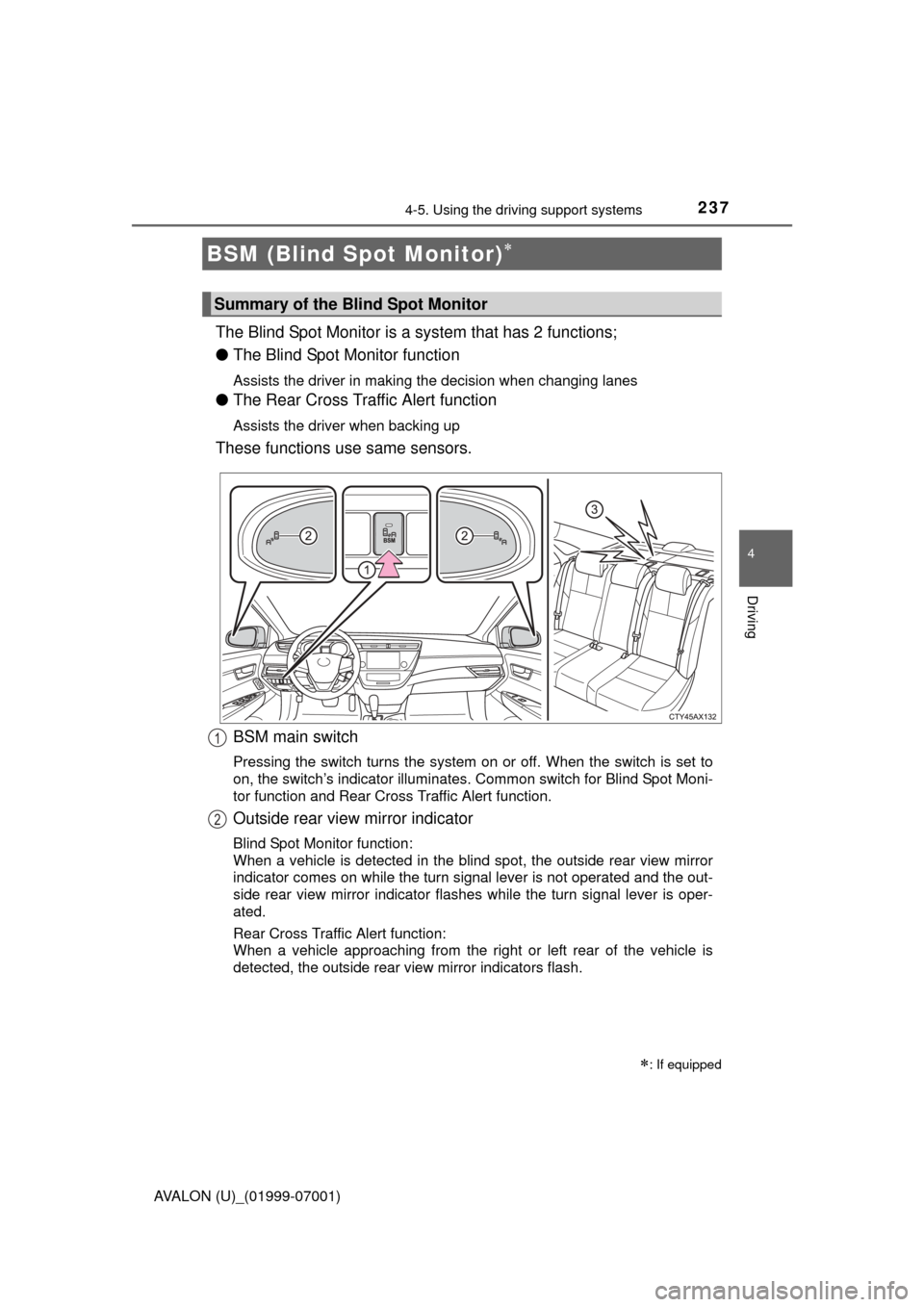
The Blind Spot Monitor is a system that has 2 functions;
● The Blind Spot Monitor function
Assists the driver in making the decision when changing lanes
●The Rear Cross Traffic Alert function
Assists the driver when backing up
These functions use same sensors.
BSM (Blind Spot Monitor)
: If equipped
Summary of the Blind Spot Monitor
BSM main switch
Pressing the switch turns the system on or off. When the switch is set to
on, the switch’s indicator illuminates. Common switch for Blind Spot Moni-
tor function and Rear Cross Traffic Alert function.
Outside rear view mirror indicator
Blind Spot Monitor function:
When a vehicle is detected in the blind spot, the outside rear view mirror
indicator comes on while the turn signal lever is not operated and the out-
side rear view mirror indicator flashes while the turn signal lever is oper-
ated.
Rear Cross Traffic Alert function:
When a vehicle approaching from the right or left rear of the vehicle is
detected, the outside rear view mirror indicators flash.
1
2
Page 241 of 492
2414-5. Using the driving support systems
4
Driving
AVALON (U)_(01999-07001)
■The Blind Spot Monitor function is operational when
●The BSM main switch is set to on
● Vehicle speed is greater than approximately 10 mph (16 km/h).
■ The Blind Spot Monitor function will detect a vehicle when
●A vehicle in an adjacent lane overtakes your vehicle.
● Another vehicle enters the detection area when it changes lanes.
■ Conditions under which the Blind Spot Monitor function will not detect a
vehicle
The Blind Spot Monitor function is not designed to detect the following types
of vehicles and/or objects:
● Small motorcycles, bicycles, pedestrians etc.
*
●Vehicles traveling in the opposite direction
● Guardrails, walls, signs, parked vehicles and similar stationary objects
*
●Following vehicles that are in the same lane*
●Vehicles driving 2 lanes across from your vehicle*
*
: Depending on conditions, detection of a vehicle and/or object may occur.
Page 242 of 492

2424-5. Using the driving support systems
AVALON (U)_(01999-07001)■
Conditions under which the Blind Spot Monitor function may not func-
tion correctly
●The Blind Spot Monitor function may not detect vehicles correctly in the fol-
lowing conditions:
• During bad weather such as heavy rain, fog, snow etc.
• When ice or mud etc. is attached to the rear bumper
• When driving on a road surface that is wet due to rain, standing water etc.
• When there is a significant difference in speed between your vehicle and
the vehicle that enters the detection area
• When a vehicle is in the detection area from a stop and remains in the detection area as your vehicle accelerates
• When driving up or down consecutive steep inclines, such as hills, a dip
in the road etc.
• When multiple vehicles approach with only a small gap between each vehicle
• When vehicle lanes are wide, and the vehicle in the next lane is too far away from your vehicle
• When the vehicle that enters the detection area is traveling at about the
same speed as your vehicle
• When there is a significant difference in height between your vehicle and the vehicle that enters the detection area
• Directly after the BSM main switch is set to on
● Instances of the Blind Spot Monitor function unnecessarily detecting a vehi-
cle and/or object may increase under the following conditions:
• When there is only a short distance between your vehicle and a guardrail,
wall etc.
• When there is only a short distance between your vehicle and a following
vehicle
• When vehicle lanes are narrow and a vehicle driving 2 lanes across from your vehicle enters the detection area
• When items such as a bicycle carrier ar e installed on the rear of the vehi-
cle
Page 244 of 492
2444-5. Using the driving support systems
AVALON (U)_(01999-07001)
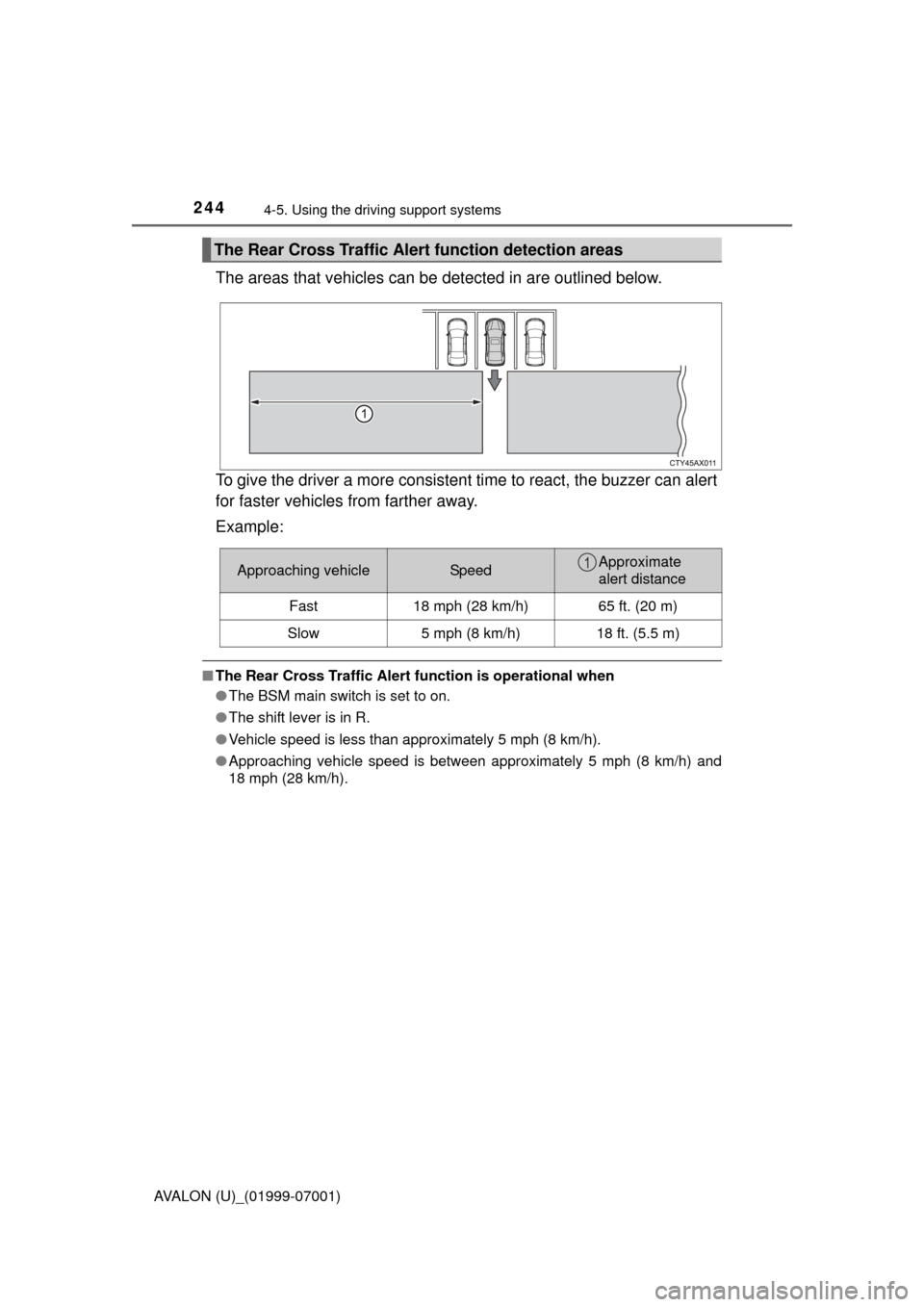
The areas that vehicles can be detected in are outlined below.
To give the driver a more consistent time to react, the buzzer can alert
for faster vehicles from farther away.
Example:
■ The Rear Cross Traffic Alert function is operational when
● The BSM main switch is set to on.
● The shift lever is in R.
● Vehicle speed is less than approximately 5 mph (8 km/h).
● Approaching vehicle speed is between approximately 5 mph (8 km/h) and
18 mph (28 km/h).
The Rear Cross Traffic Alert function detection areas
Approaching vehicleSpeedApproximate
alert distance
Fast 18 mph (28 km/h) 65 ft. (20 m)
Slow 5 mph (8 km/h) 18 ft. (5.5 m)1
Page 245 of 492
2454-5. Using the driving support systems
4
Driving
AVALON (U)_(01999-07001)■
Conditions under which the Rear Cr oss Traffic Alert function will not
detect a vehicle
The Rear Cross Traffic Alert function is not designed to detect the following
types of vehicles and/or objects.
● Small motorcycles, bicycles, pedestrians etc.
*
●Vehicles approaching from directly behind
● Guardrails, walls, signs, parked vehicles and similar stationary objects
*
●Vehicles moving away from your vehicle
● Vehicles approaching from the parking spaces next to your vehicle
*
●Vehicles backing up in the parking space next to your vehicle*
*
: Depending on conditions, detection of a vehicle and/or object may occur.
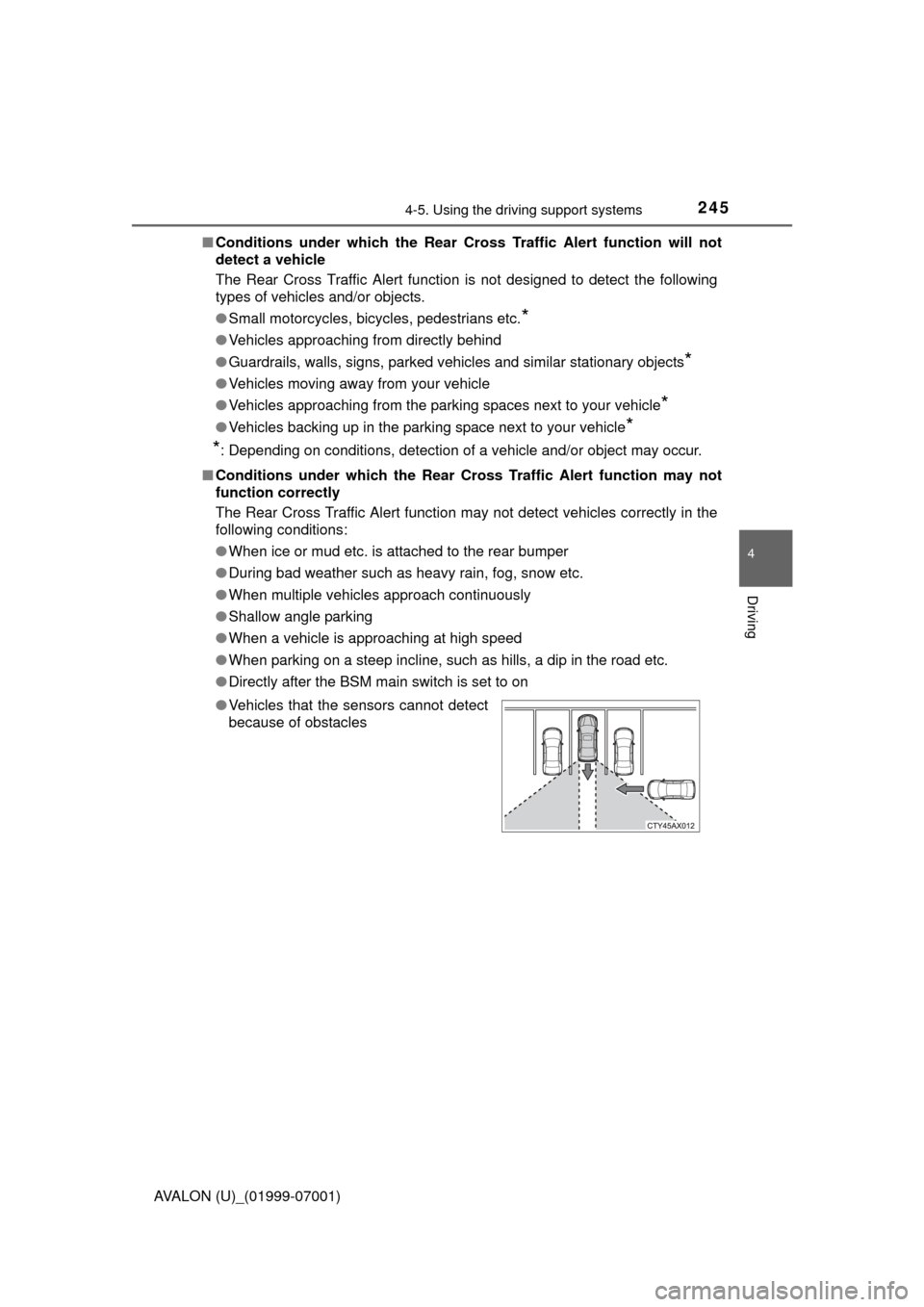
■ Conditions under which the Rear Cross Traffic Alert function may not
function correctly
The Rear Cross Traffic Alert function may not detect vehicles correctly in the
following conditions:
● When ice or mud etc. is attached to the rear bumper
● During bad weather such as heavy rain, fog, snow etc.
● When multiple vehicles approach continuously
● Shallow angle parking
● When a vehicle is approaching at high speed
● When parking on a steep incline, such as hills, a dip in the road etc.
● Directly after the BSM main switch is set to on
● Vehicles that the sensors cannot detect
because of obstacles