change time TOYOTA AVALON 2017 XX40 / 4.G User Guide
[x] Cancel search | Manufacturer: TOYOTA, Model Year: 2017, Model line: AVALON, Model: TOYOTA AVALON 2017 XX40 / 4.GPages: 492, PDF Size: 7.17 MB
Page 227 of 492
2274-5. Using the driving support systems
4
Driving
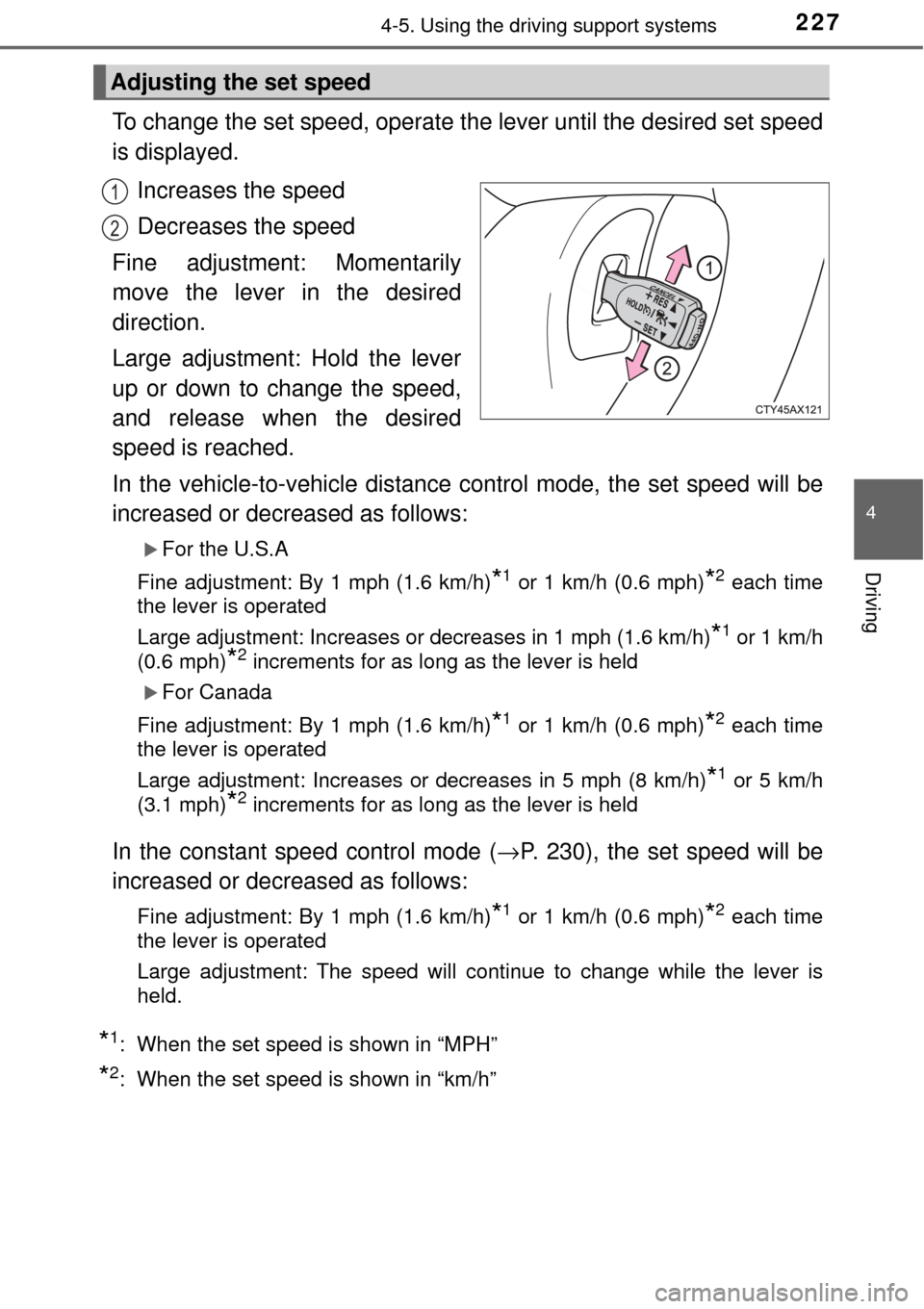
To change the set speed, operate the lever until the desired set speed
is displayed.Increases the speed
Decreases the speed
Fine adjustment: Momentarily
move the lever in the desired
direction.
Large adjustment: Hold the lever
up or down to change the speed,
and release when the desired
speed is reached.
In the vehicle-to-vehicle distance control mode, the set speed will be
increased or decreased as follows:
For the U.S.A
Fine adjustment: By 1 mph (1.6 km/h)
*1 or 1 km/h (0.6 mph)*2 each time
the lever is operated
Large adjustment: Increases or decreases in 1 mph (1.6 km/h)
*1 or 1 km/h
(0.6 mph)
*2 increments for as long as the lever is held
For Canada
Fine adjustment: By 1 mph (1.6 km/h)
*1 or 1 km/h (0.6 mph)*2 each time
the lever is operated
Large adjustment: Increases or decreases in 5 mph (8 km/h)
*1 or 5 km/h
(3.1 mph)
*2 increments for as long as the lever is held
In the constant speed control mode ( →P. 230), the set speed will be
increased or decreased as follows:
Fine adjustment: By 1 mph (1.6 km/h)*1 or 1 km/h (0.6 mph)*2 each time
the lever is operated
Large adjustment: The speed will continue to change while the lever is
held.
*1: When the set speed is shown in “MPH”
*2: When the set speed is shown in “km/h”
Adjusting the set speed
1
2
Page 236 of 492
2364-5. Using the driving support systems
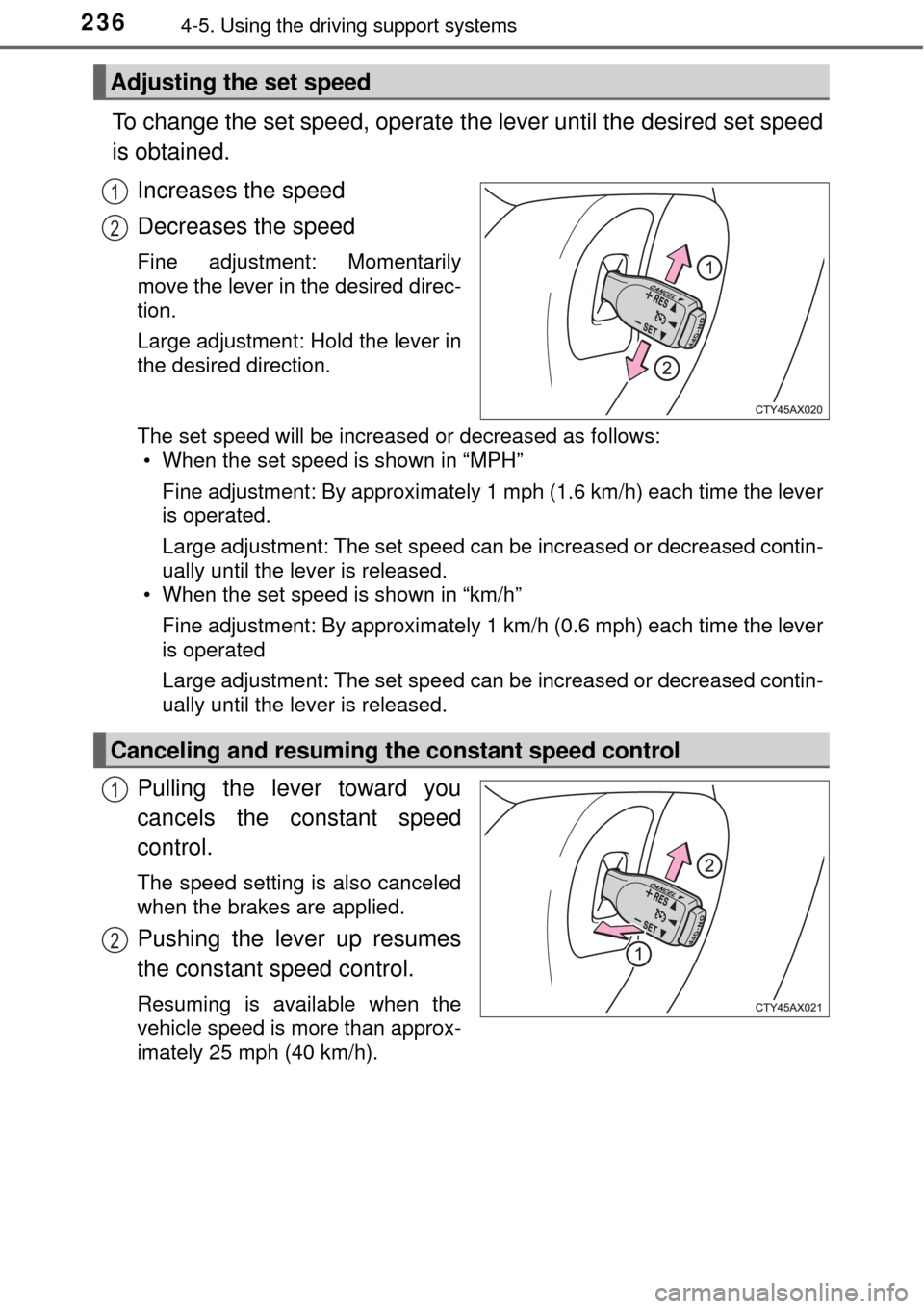
To change the set speed, operate the lever until the desired set speed
is obtained.
Increases the speed
Decreases the speed
Fine adjustment: Momentarily
move the lever in the desired direc-
tion.
Large adjustment: Hold the lever in
the desired direction.
The set speed will be increased or decreased as follows:• When the set speed is shown in “MPH”
Fine adjustment: By approximately 1 mph (1.6 km/h) each time the lever
is operated.
Large adjustment: The set speed can be increased or decreased contin-
ually until the lever is released.
• When the set speed is shown in “km/h”
Fine adjustment: By approximately 1 km/h (0.6 mph) each time the lever
is operated
Large adjustment: The set speed can be increased or decreased contin-
ually until the lever is released.
Pulling the lever toward you
cancels the c onstant speed
control.
The speed setting is also canceled
when the brakes are applied.
Pushing the lever up resumes
the constant speed control.
Resuming is available when the
vehicle speed is more than approx-
imately 25 mph (40 km/h).
Adjusting the set speed
1
2
Canceling and resuming the constant speed control
1
2
Page 262 of 492
2625-1. Using the air conditioning system and defogger
■Fan speed setting
To adjust the fan speed, touch
and slide your finger
toward “+” to increase the fan
speed or “-” to decrease the fan
speed.
The fan speed can also be
adjusted by touching “+” or “-” on
.
Touch to turn the fan off.
■
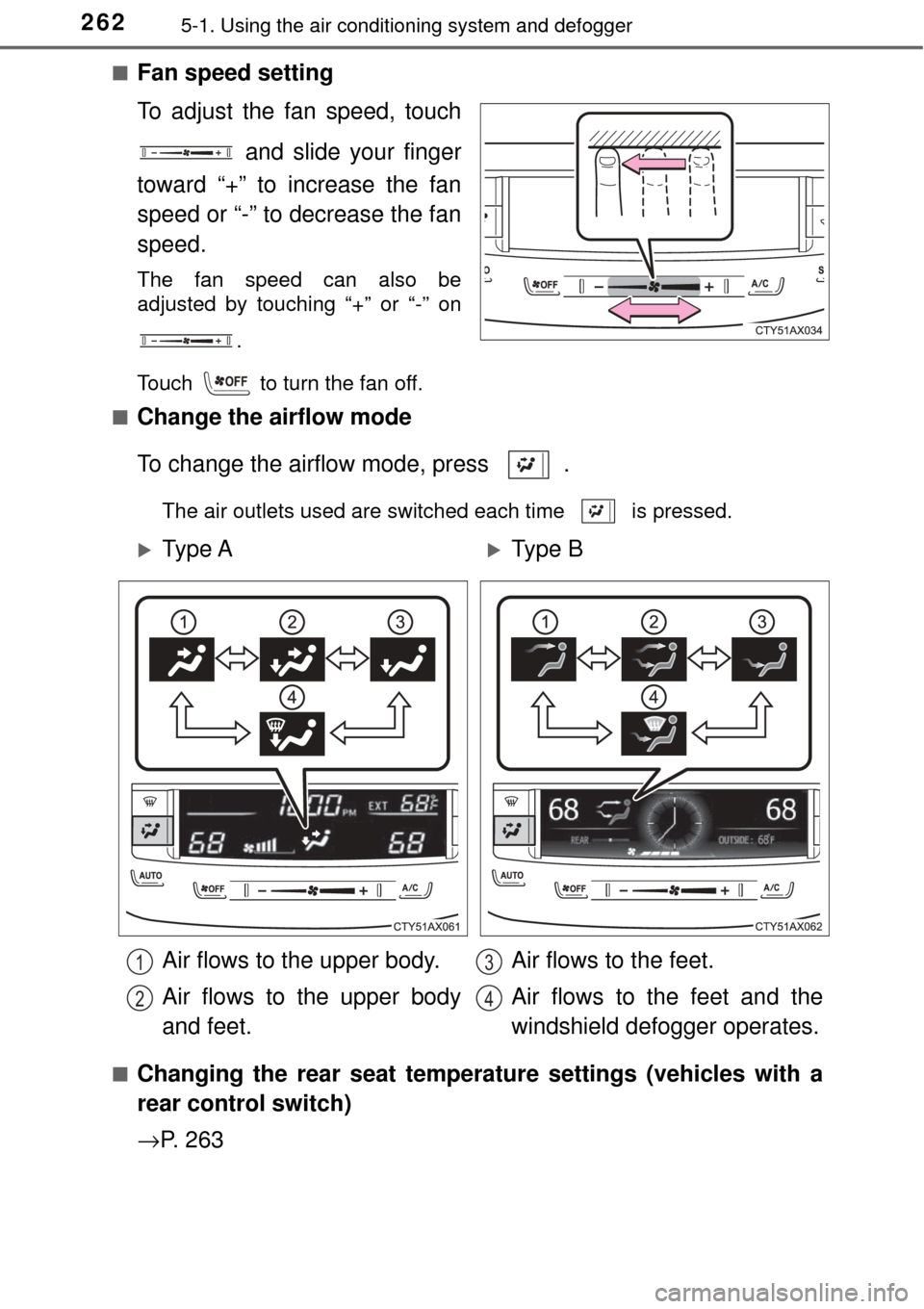
Change the airflow mode
To change the airflow mode, press .
The air outlets used are switched each time is pressed.
■
Changing the rear seat temperature settings (vehicles with a
rear control switch)
→ P. 2 6 3
Ty p e AType B
Air flows to the upper body.
Air flows to the upper body
and feet. Air flows to the feet.
Air flows to the feet and the
windshield defogger operates.
1
2
3
4
Page 267 of 492

2675-1. Using the air conditioning system and defogger
5
Interior features
■Ventilation and air conditioning odors
●To let fresh air in, set the air conditioning system to the outside air m\
ode.
● During use, various odors from inside and outside the vehicle may enter into
and accumulate in the air conditioning system. This may then cause odor to
be emitted from the vents.
● To reduce potential odors from occurring:
• This vehicle is equipped with a deodorizing charcoal air filter. This filter
should be inspected and replaced according to the maintenance sched-
ule. (Air conditioning filter: →P. 358)
• It is recommended that the air conditioning system be set to outside air mode prior to turning the vehicle off.
• The start timing of the blower may be delayed for a short period of time
immediately after the air conditioning system is started in automatic
mode.
■ Air conditioning filter
→P. 358
■ Handling of the air conditioning panel
The operating section of the air conditioning panel uses touch switch sensors.
In the following cases, incorrect operation or non-response may occur.
●If the surface of the touch switch is dirty or has liquid attached to it, incorrect
operation or non-response may occur.
● If the surface of the touch switch receives electromagnetic waves, incorrect
operation or non-response may occur.
● If wearing gloves during operation, non-response may occur.
● If fingernails are used to operate the system, non-response may occur.
● If a touch pen is used to operate the system, non-response may occur.
● If the palm of your hand touches the surface of the touch switch during oper-
ation, incorrect operation may occur.
● If the palm of your hand touches the surface of the touch switch, incorrect
operation may occur.
● If operations are performed quickly, non-response may occur.
■ Customization
Settings (e.g. air conditioning setting, touch switch sensitivity) can be
changed.
(Customizable features →P. 449)
Page 274 of 492
2745-2. Using the interior lights
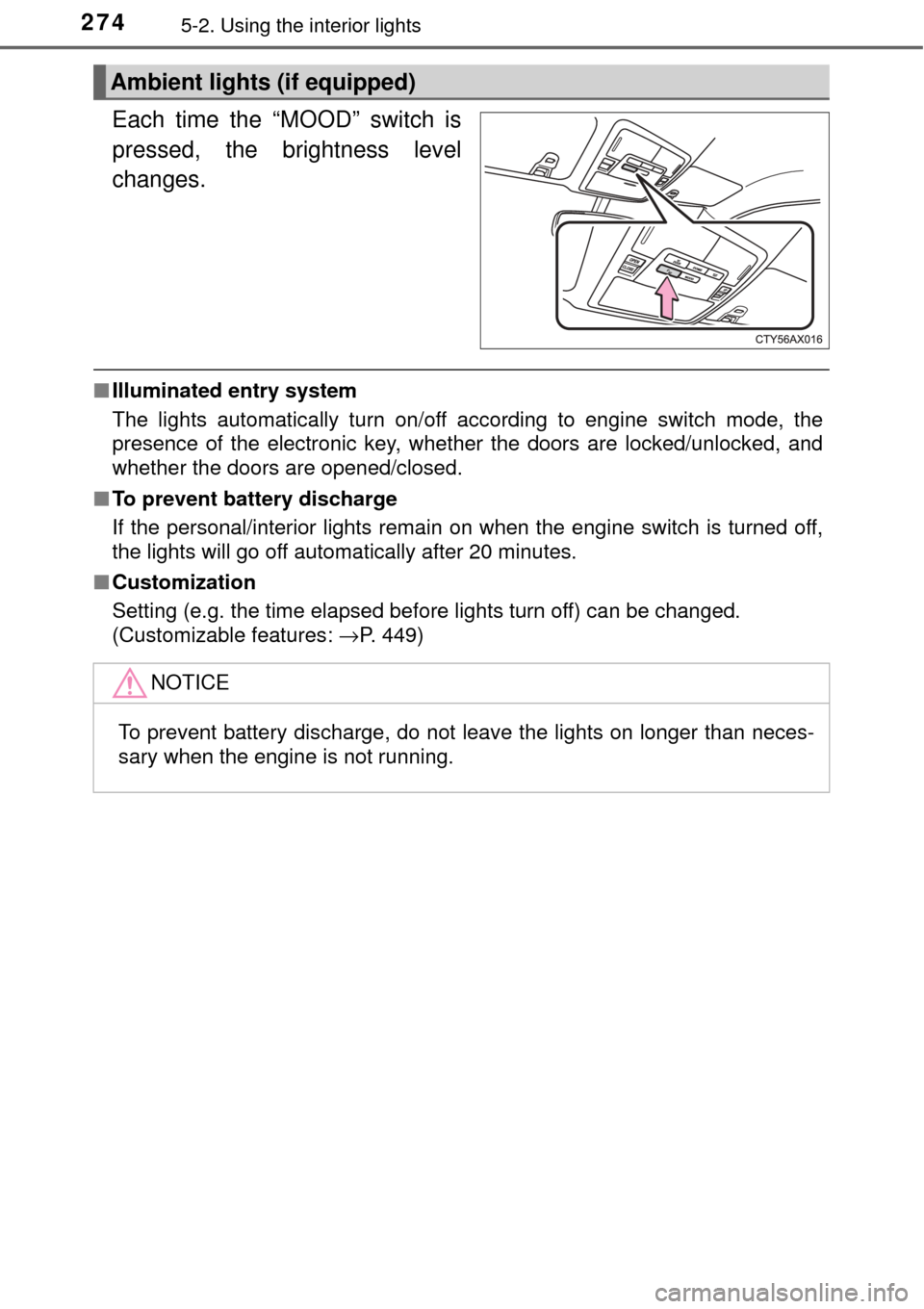
Each time the “MOOD” switch is
pressed, the brightness level
changes.
■Illuminated entry system
The lights automatically turn on/off according to engine switch mode, the
presence of the electronic key, whether the doors are locked/unlocked, and
whether the doors are opened/closed.
■ To prevent battery discharge
If the personal/interior lights remain on when the engine switch is turned off,
the lights will go off automatically after 20 minutes.
■ Customization
Setting (e.g. the time elapsed before lights turn off) can be changed.
(Customizable features: →P. 449)
Ambient lights (if equipped)
NOTICE
To prevent battery discharge, do not leave the lights on longer than neces-
sary when the engine is not running.
Page 286 of 492
2865-4. Other interior features
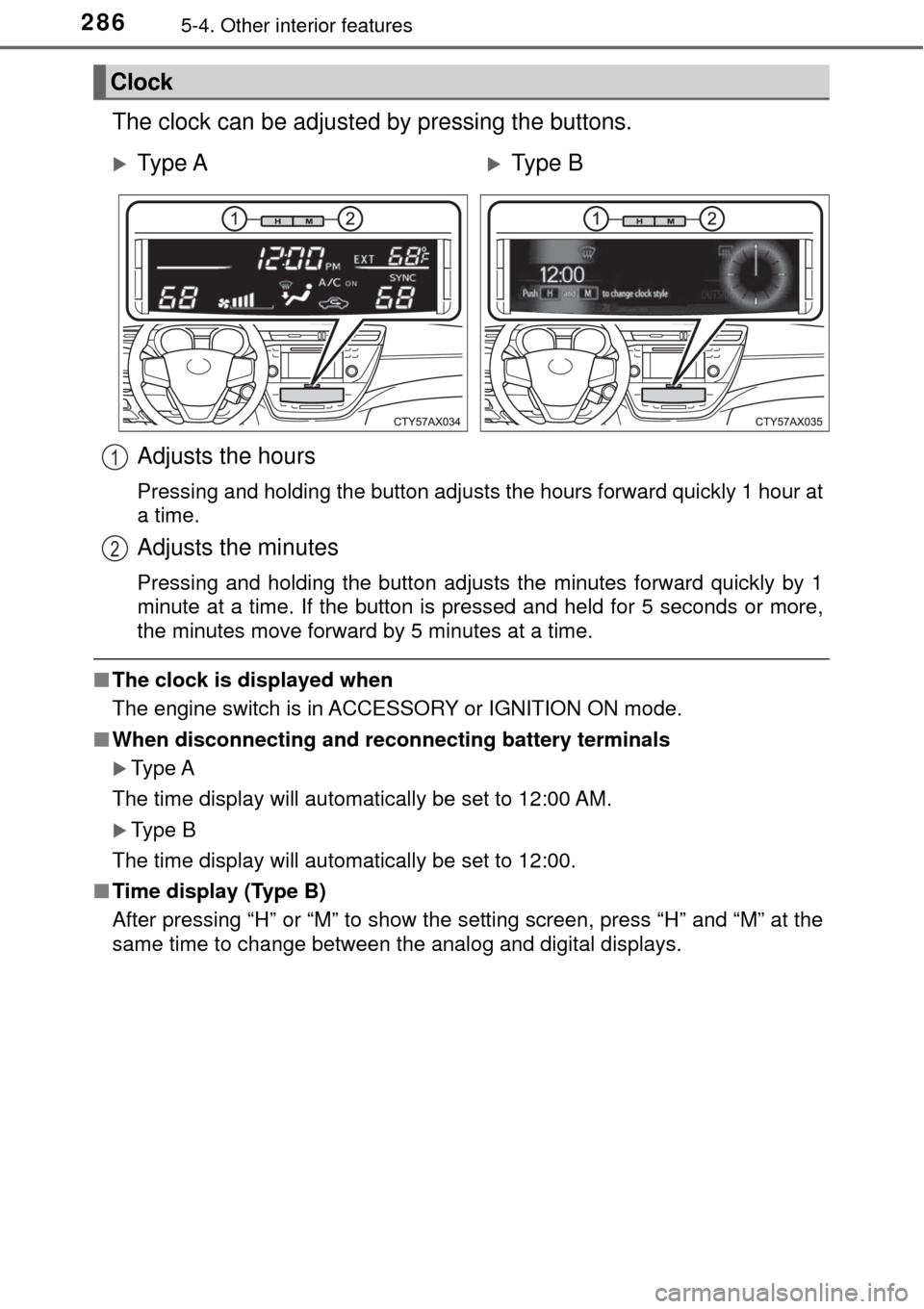
The clock can be adjusted by pressing the buttons.
■The clock is displayed when
The engine switch is in ACCESSORY or IGNITION ON mode.
■ When disconnecting and reco nnecting battery terminals
Type A
The time display will automatically be set to 12:00 AM.
Type B
The time display will automatically be set to 12:00.
■ Time display (Type B)
After pressing “H” or “M” to show the setting screen, press “H” and “M” at the
same time to change between the analog and digital displays.
Clock
Ty p e AType B
Adjusts the hours
Pressing and holding the button adjusts the hours forward quickly 1 hour at
a time.
Adjusts the minutes
Pressing and holding the button adjusts the minutes forward quickly by 1
minute at a time. If the button is pressed and held for 5 seconds or more,
the minutes move forward by 5 minutes at a time.
1
2
Page 291 of 492
2915-4. Other interior features
5
Interior features
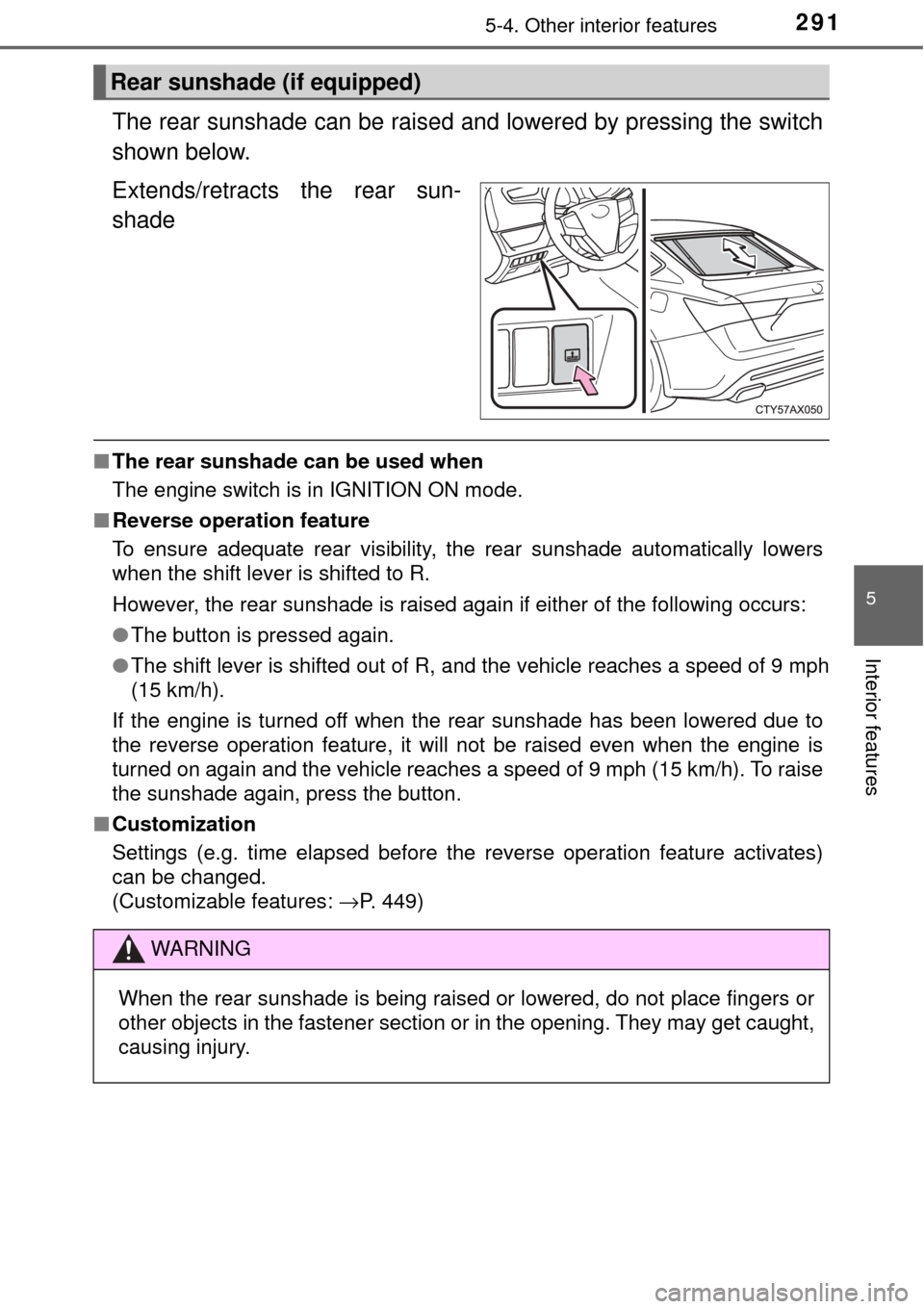
The rear sunshade can be raised and lowered by pressing the switch
shown below.
Extends/retracts the rear sun-
shade
■The rear sunshade can be used when
The engine switch is in IGNITION ON mode.
■ Reverse operation feature
To ensure adequate rear visibility, the rear sunshade automatically lowers
when the shift lever is shifted to R.
However, the rear sunshade is raised again if either of the following occurs:
●The button is pressed again.
● The shift lever is shifted out of R, and the vehicle reaches a speed of 9 mph
(15 km/h).
If the engine is turned off when the rear sunshade has been lowered due to
the reverse operation feature, it will not be raised even when the engine is
turned on again and the vehicle reaches a speed of 9 mph (15 km/h). To raise
the sunshade again, press the button.
■ Customization
Settings (e.g. time elapsed before the reverse operation feature activates)
can be changed.
(Customizable features: →P. 449)
Rear sunshade (if equipped)
WARNING
When the rear sunshade is being raised or lowered, do not place fingers \
or
other objects in the fastener section or in the opening. They may get caught,
causing injury.
Page 348 of 492

3486-3. Do-it-yourself maintenance
■The initialization operation
●Make sure to carry out initialization after adjusting the tire inflation pres-
sure.
Also, make sure the tires are cold be fore carrying out initialization or tire
inflation pressure adjustment.
●If you have accidentally turned the e ngine switch to off during initializa-
tion, it is not necessary to press th e reset switch again as initialization
will restart automatically when the engine switch has been turned to
IGNITION ON mode for the next time.
●If you accidentally press the reset s witch when initialization is not neces-
sary, adjust the tire inflation pressu re to the specified level when the
tires are cold, and conduct initialization again.
●While the position of each tire is being determined and the inflation pres-
sures are not being displayed on the multi-information display, if the
inflation pressure of a ti re drops, the tire pressure warning light will come
on.
■Warning performance of the ti re pressure warning system
The warning of the tire pressure warning system will change in accor-
dance with the conditions under which it was initialized. For this reason,
the system may give a warning even if the tire pressure does not reach a
low enough level, or if the pressure is higher than the pressure that was
adjusted to when the system was initialized.
■When initialization of the tire pr essure warning system has failed
Initialization may take longer to comp lete if the vehicle is driven on an
unpaved road. When performing initialization, drive on a paved road if
possible. Depending on the driving environment and condition of the tires,
initialization will be completed in approx imately 10 minutes. If initialization
is not complete after driving approxima tely 10 minutes, continue driving
for a while.
If the inflation pressure of each tire is not displayed after driving for
approximately 1 hour, perform the following procedure.
●Park the vehicle in a safe place for approximately 20 minutes. Then
drive straight (with occasional left and right turns) at approximately 25
mph (40 km/h) or more for approximately 10 to 20 minutes.
Page 349 of 492

3496-3. Do-it-yourself maintenance
6
Maintenance and care
However, in the following situations, the tire inflation pressure will not be
recorded and the system will not operate properly. Perform initialization
again.
●When operating the tire pressure wa rning reset switch, the tire pressure
warning light does not blink 3 times.
●After performing init ialization, the tire pressure warning light blinks for 1
minute then stays on while driving.
If the inflation pressure of each tire is still not displayed, have the vehicle
inspected by your Toyota dealer.
■Tire pressure warning system certification
FCC ID: HYQ14FBA
FCC ID: HYQ23AAP
FCC ID: HYQ23AAN
FCC ID: HYQ23AAC
FCC ID: PAXPMVC015
FCC ID: PAXPMVC010
For vehicles sold in the U.S.A.
NOTE:
This device complies with part 15 of the FCC Rules. Operation is subject
to the following two conditions: (1) This device may not cause harmful
interference, and (2) this device must accept any interference received,
including interference that may cause undesired operation.
FCC WARNING:
Changes or modifications not expressl y approved by the party responsi-
ble for compliance could void the user ’s authority to operate the equip-
ment.
For vehicles sold in Canada
NOTE:
This device complies with Industry Canada's licence-exempt RSSs.
Operation is subject to the following two conditions:
(1) This device may not cause interference; and
(2) This device must accept any interference, including interference that
may cause undesired operation of the device.
Page 413 of 492

4137-2. Steps to take in an emergency
7
When trouble arises
■Stopping the engine
Shift the shift lever to P and press the engine switch as you normally do when
stopping the engine.
■ Replacing the key battery
As the above procedure is a temporary measure, it is recommended that the
electronic key battery be replaced immediately when the battery is depleted.
(→P. 360)
■ Changing engine switch modes
Release the brake pedal and press the engine switch in step above.
The engine does not start and modes will be changed each time the switch is
pressed.( →P. 161)
■ When the electronic key does not work properly
●Make sure that the smart key system has not been deactivated in the cus-
tomization setting. If it is off, turn the function on.
(Customizable features →P. 449)
● Check if battery-saving mode is set. If it is set, cancel the function.
(→P. 113)
3