cruise control TOYOTA AVALON 2018 Owners Manual (in English)
[x] Cancel search | Manufacturer: TOYOTA, Model Year: 2018, Model line: AVALON, Model: TOYOTA AVALON 2018Pages: 492, PDF Size: 7.19 MB
Page 3 of 492
3
1
8 7
6
5
4
3
2
9
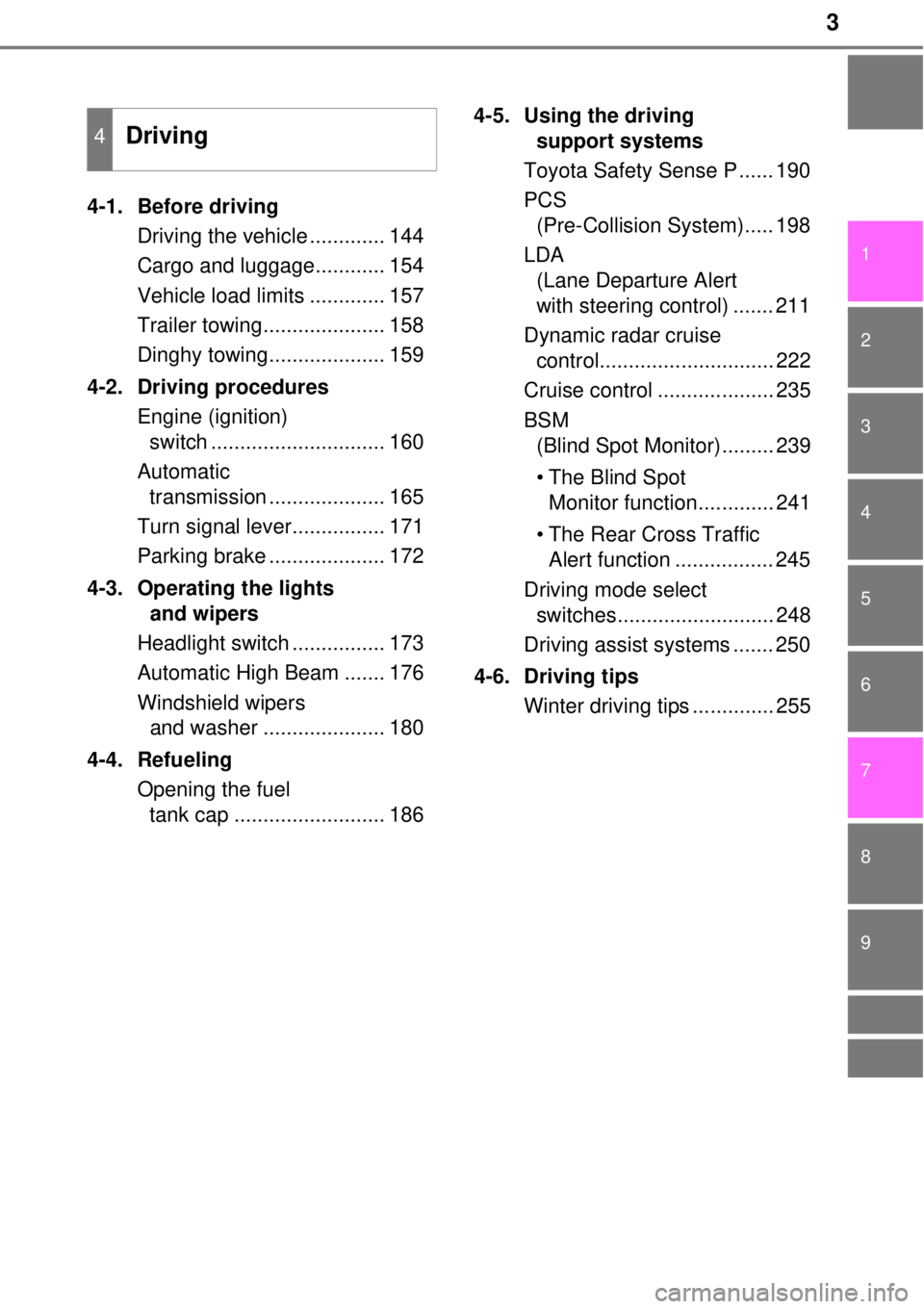
4-1. Before drivingDriving the vehicle ............. 144
Cargo and luggage............ 154
Vehicle load limits ............. 157
Trailer towing..................... 158
Dinghy towing.................... 159
4-2. Driving procedures Engine (ignition) switch .............................. 160
Automatic transmission .................... 165
Turn signal lever................ 171
Parking brake .................... 172
4-3. Operating the lights and wipers
Headlight switch ................ 173
Automatic High Beam ....... 176
Windshield wipers and washer ..................... 180
4-4. Refueling Opening the fuel tank cap .......................... 186 4-5. Using the driving
support systems
Toyota Safety Sense P ...... 190
PCS (Pre-Collision System)..... 198
LDA (Lane Departure Alert
with steering control) ....... 211
Dynamic radar cruise control.............................. 222
Cruise control .................... 235
BSM (Blind Spot Monitor)......... 239
• The Blind Spot Monitor function............. 241
• The Rear Cross Traffic Alert function ................. 245
Driving mode select switches........................... 248
Driving assist systems ....... 250
4-6. Driving tips Winter driving tips .............. 255
4Driving
Page 9 of 492
9
The installation of a mobile two-way radio system in your vehicle could affect
electronic systems such as:
●Multiport fuel injection system/sequential multiport fuel injection system
● Dynamic radar cruise control system (if equipped)
● Cruise control system (if equipped)
● Anti-lock brake system
● SRS airbag system
● Seat belt pretensioner system
Be sure to check with your Toyota dealer for precautionary measures or spe-
cial instructions regarding installation of a mobile two-way radio system.
Your Toyota is equipped with several sophisticated computers that will record
certain data, such as:
• Engine speed
• Accelerator status
• Brake status
• Vehicle speed
• Shift position
The recorded data varies according to the vehicle grade level and options
with which it is equipped. These computers do not record conversations or
sounds, and only record images outside of the vehicle in certain situati\
ons.
●Data Transmission
Your vehicle may transmit the data re corded in these computers to Toyota
without notification to you.
●Data usage
Toyota may use the data recorded in these computers to diagnose malfunc-
tions, conduct research and development, and improve quality.
Toyota will not disclose the recorded data to a third party except:
• With the consent of the vehicle owner or with the consent of the lessee if the vehicle is leased
• In response to an official request by the police, a court of law or a govern-
ment agency
• For use by Toyota in a law suit
• For research purposes where the data is not tied to a specific vehicle or
vehicle owner
●Usage of data collected through Safety Connect (U.S. mainland only)
If your Toyota has Safety Connect and if you have subscribed to those ser-
vices, please refer to the Safety Connect Telematics Subscription Service
Agreement for information on data collected and its usage.
●To learn more about the vehicle data collected, used and shared by Toy-
ota, please visit www.toyota.com/privacyvts/
.
Installation of a mobile two-way radio system
Vehicle data recordings
Page 19 of 492
19Pictorial index
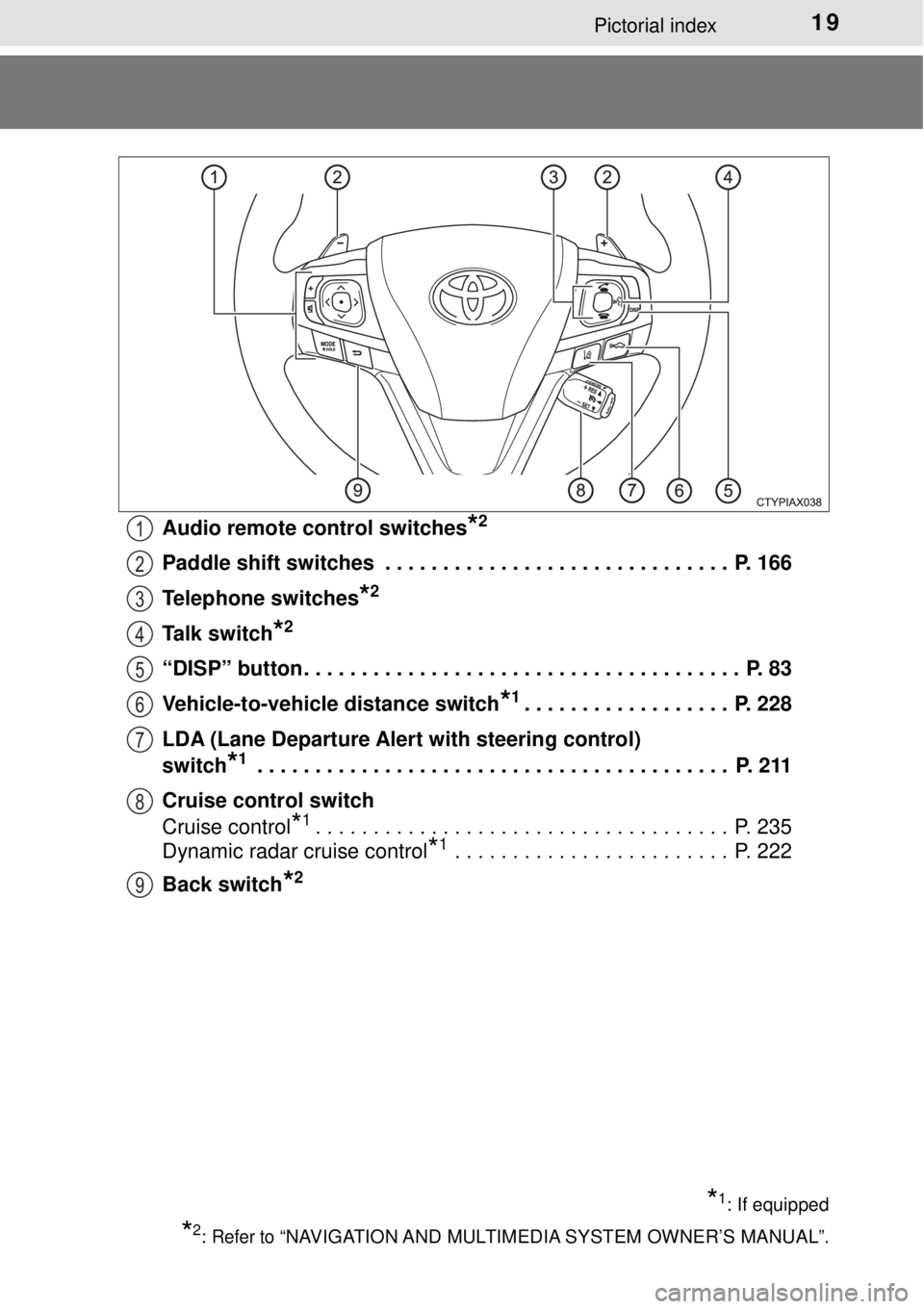
Audio remote control switches*2
Paddle shift switches . . . . . . . . . . . . . . . . . . . . . . . . . . . . . . P. 166
Telephone switches
*2
Talk switch*2
“DISP” button . . . . . . . . . . . . . . . . . . . . . . . . . . . . . . . . . . . . . . P. 83
Vehicle-to-vehicle distance switch
*1. . . . . . . . . . . . . . . . . . P. 228
LDA (Lane Departure Alert with steering control)
switch
*1 . . . . . . . . . . . . . . . . . . . . . . . . . . . . . . . . . . . . . . . . . P. 211
Cruise control switch
Cruise control
*1. . . . . . . . . . . . . . . . . . . . . . . . . . . . . . . . . . . . P. 235
Dynamic radar cruise control
*1 . . . . . . . . . . . . . . . . . . . . . . . . P. 222
Back switch
*2
*1: If equipped
*2: Refer to “NAVIGATION AND MULTIMEDIA SYSTEM OWNER’S MANUAL”.
1
2
3
4
5
6
7
8
9
Page 77 of 492
772. Instrument cluster
2
Instrument cluster
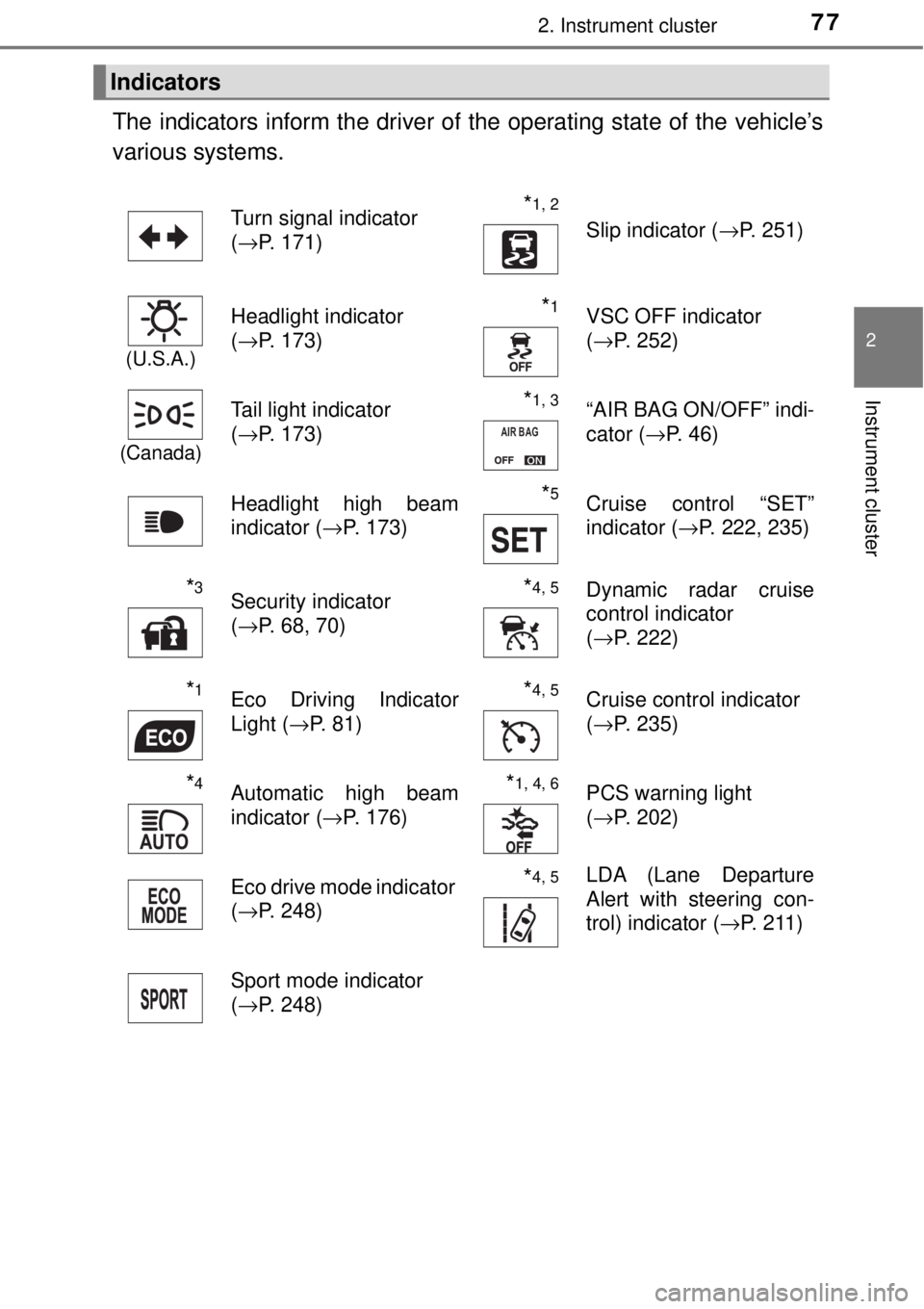
The indicators inform the driver of the operating state of the vehicle’s
various systems.
Indicators
Turn signal indicator
( →P. 171)*1, 2 Slip indicator ( →P. 251)
(U.S.A.)
Headlight indicator
(→P. 173)*1VSC OFF indicator
(→P. 252)
(Canada)
Tail light indicator
(→P. 173) *1, 3“AIR BAG ON/OFF” indi-
cator ( →P. 46)
Headlight high beam
indicator ( →P. 173)
*5Cruise control “SET”
indicator (→P. 222, 235)
*3Security indicator
(→P. 68, 70)*4, 5Dynamic radar cruise
control indicator
(→P. 222)
*1Eco Driving Indicator
Light ( →P. 81)*4, 5Cruise control indicator
(→P. 235)
*4Automatic high beam
indicator ( →P. 176)*1, 4, 6PCS warning light
(→P. 202)
Eco drive mode indicator
( →P. 248)
*4, 5LDA (Lane Departure
Alert with steering con-
trol) indicator ( →P. 211)
Sport mode indicator
( →P. 248)
AIR BAG
Page 82 of 492
822. Instrument cluster
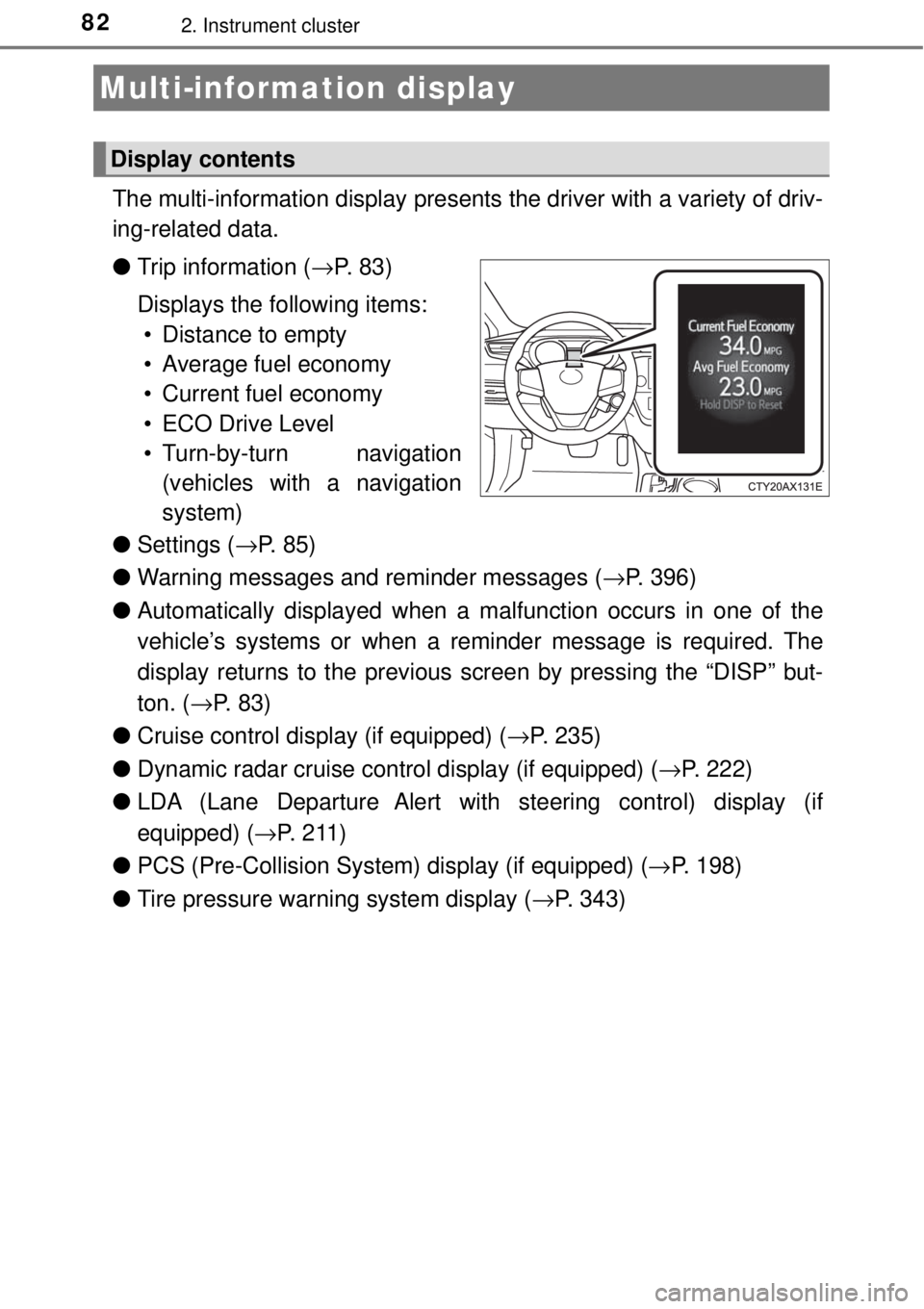
The multi-information display presents the driver with a variety of driv-
ing-related data.
● Trip information ( →P. 8 3 )
Displays the following items: • Distance to empty
• Average fuel economy
• Current fuel economy
• ECO Drive Level
• Turn-by-turn navigation (vehicles with a navigation
system)
● Settings ( →P. 8 5 )
● Warning messages and reminder messages ( →P. 396)
● Automatically displayed when a malfunction occurs in one of the
vehicle’s systems or when a remi nder message is required. The
display returns to the previous screen by pressing the “DISP” but-
ton. ( →P. 8 3 )
● Cruise control display (if equipped) ( →P. 235)
● Dynamic radar cruise control display (if equipped) ( →P. 222)
● LDA (Lane Departure Alert with steering control) display (if
equipped) ( →P. 2 1 1 )
● PCS (Pre-Collision System ) display (if equipped) (→P. 198)
● Tire pressure warning system display ( →P. 343)
Multi-information display
Display contents
Page 143 of 492

143
Driving4
4-1. Before drivingDriving the vehicle ............. 144
Cargo and luggage ........... 154
Vehicle load limits ............. 157
Trailer towing..................... 158
Dinghy towing ................... 159
4-2. Driving procedures Engine (ignition) switch .............................. 160
Automatic transmission .................... 165
Turn signal lever................ 171
Parking brake .................... 172
4-3. Operating the lights and wipers
Headlight switch ................ 173
Automatic High Beam ....... 176
Windshield wipers and washer ............................ 180
4-4. Refueling Opening the fuel tank cap .......................... 186 4-5. Using the driving
support systems
Toyota Safety Sense P ..... 190
PCS (Pre-Collision
System)........................... 198
LDA (Lane Departure Alert
with steering control) ....... 211
Dynamic radar cruise control ............................. 222
Cruise control .................... 235
BSM (Blind Spot Monitor) ........ 239
• The Blind Spot Monitor function ............ 241
• The Rear Cross Traffic Alert
function ......................... 245
Driving mode select switches .......................... 248
Driving assist systems ...... 250
4-6. Driving tips Winter driving tips ............. 255
Page 168 of 492

1684-2. Driving procedures
■S mode
●When the shift range is “4” or lower, holding the shift lever toward “+” sets
the shift range to “6”.
● To prevent the engine from over-re vving, upshifting may automatically
occur.
● To protect the automatic transmission, a function is adopted that automati-
cally shifts to the top range when the temperature is too hot.
■ AI-SHIFT
AI-SHIFT automatically selects the suitable gear according to driver input and
the driving situation.
AI-SHIFT automatically operates when the shift lever is in the D position.
(Shifting the shift lever to the S position or paddle shifting cancels the func-
tion.)
■ When driving with cruise control or radar cruise control activated
When downshifting to 5 or 4 by shifting the shift lever to the S position or pad-
dle shifting, cruise control or radar cruise control will not be cancele\
d.
( →P. 222, 235)
■ Shift lock system
The shift lock system is a system to prevent accidental operation of the shift
lever in starting.
The shift lever can be shifted from P only when the engine switch is in ON
mode and the brake pedal is being depressed.
Page 190 of 492
1904-5. Using the driving support systems
◆PCS (Pre-Collision System)
→P. 1 9 8
◆LDA (Lane Departure Alert with steering control)
→P. 2 1 1
◆Automatic High Beam
→P. 1 7 6
◆Dynamic radar cruise control
→P. 2 2 2
Toyota Safety Sense P∗
∗: If equipped
The Toyota Safety Sense P consists of the following drive assist
systems and contributes to a safe and comfortable driving expe-
rience:
WARNING
■Toyota Safety Sense P
The Toyota Safety Sense P is designed to operate under the assumption
that the driver will drive safely, and is designed to help reduce the impact to
the occupants and the vehicle in the case of a collision or assist the driver in
normal driving conditions.
As there is a limit to the degree of recognition accuracy and control perfor-
mance that this system can provide, do not overly rely on this system. The
driver is always responsible for paying attention to the vehicle's surround-
ings and driving safely.
Page 222 of 492
2224-5. Using the driving support systems
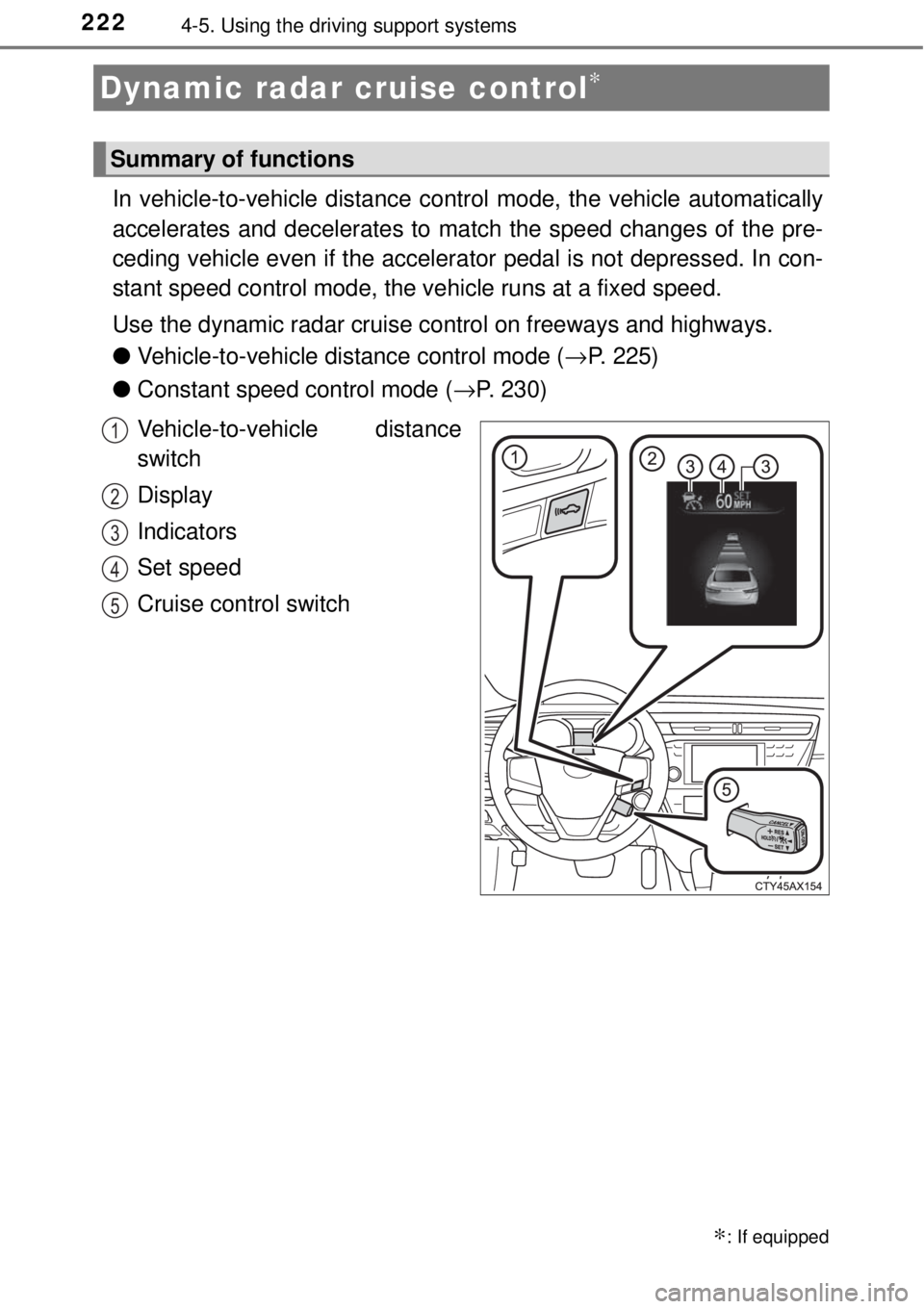
In vehicle-to-vehicle distance co ntrol mode, the vehicle automatically
accelerates and decelerates to ma tch the speed changes of the pre-
ceding vehicle even if the accelera tor pedal is not depressed. In con-
stant speed control mode, the vehicle runs at a fixed speed.
Use the dynamic radar cruise control on freeways and highways.
● Vehicle-to-vehicle distance control mode ( →P. 225)
● Constant speed control mode ( →P. 230)
Vehicle-to-vehicle distance
switch
Display
Indicators
Set speed
Cruise control switch
Dynamic radar cruise control∗
∗: If equipped
Summary of functions
1
2
3
4
5
Page 223 of 492
2234-5. Using the driving support systems
4
Driving
WARNING
■Before using dynamic radar cruise control
Driving safely is the sole responsibility of the driver. Do not rely solely on the
system, and drive safely by always paying careful attention to your sur-
roundings.
The dynamic radar cruise control provides driving assistance to reduce the
driver's burden. However, there are limitations to the assistance provided.
Set the speed appropriately depending on the speed limit, traffic flow, road
conditions, weather conditions, etc. The driver is responsible for checking
the set speed.
Even when the system is functioning normally, the condition of the preced-
ing vehicle as detected by the system may differ from the condition
observed by the driver. Therefore, th e driver must always remain alert,
assess the danger of each situation and drive safely. Relying on this system
or assuming the system ensures safety while driving can lead to an acci-
dent, resulting in death or serious injury.
■ Cautions regarding the driving assist systems
Observe the following precautions, as there are limitations to the assistance
provided by the system.
Failure to do so may cause an accident resulting in death or serious injury.
● Assisting the driver to measure following distance
The dynamic radar cruise control is only intended to help the driver in
determining the following distance between the driver’s own vehicle and a
designated vehicle traveling ahead. It is not a mechanism that allows care-
less or inattentive driving, and it is not a system that can assist the driver in
low-visibility conditions. It is still necessary for driver to pay close attention
to the vehicle’s surroundings.
● Assisting the driver to judge proper following distance
The dynamic radar cruise control determines whether the following dis-
tance between the driver’s own vehicle and a designated vehicle traveling
ahead is within a set range. It is not capable of making any other type of
judgement. Therefore, it is absolutely necessary for the driver to remain
vigilant and to determine whether or not there is a possibility of danger in
any given situation.
● Assisting the driver to operate the vehicle
The dynamic radar cruise control has li mited capability to prevent or avoid
a collision with a vehicle traveling ahead. Therefore, if there is ever any
danger, the driver must take immediate and direct control of the vehicle
and act appropriately in order to ensure the safety of all involved.
■ To avoid inadvertent dynamic radar cruise control activation
Switch the dynamic radar cruise control off using the “ON-OFF” button
when not in use.