radio TOYOTA AVALON 2022 User Guide
[x] Cancel search | Manufacturer: TOYOTA, Model Year: 2022, Model line: AVALON, Model: TOYOTA AVALON 2022Pages: 572, PDF Size: 9.42 MB
Page 238 of 572
2384-5. Using the driving support systems
• When a detectable object approaches very close and then stops before
entering the path of your vehicle
• If the front of your vehicle is raised or lowered, such as whe n on an
uneven or undulating road surface
• When driving on a road surrounded by a structure, such as in a tunnel or
on an iron bridge
• When there is a metal object (manhole cover, steel plate, etc. ), steps, or a
protrusion in front of your vehicle
• When approaching an electric toll gate barrier, parking area b arrier, or
other barrier that opens and closes
• When using an automatic car wash
• When driving through steam or smoke
• When driving near an object that reflects radio waves, such as a large
truck or guardrail
• When driving near a TV tower, broadcasting station, electric power plant, radar equipped vehicles, etc., or other location where strong r adio waves
or electrical noise may be present
• When there are many things which can reflect the radio waves of the radar in the vicinity (tunnels, truss bridges, gravel roads, sn ow covered
road that have tracks, etc.)
• While making a right/left turn, when an oncoming vehicle or a crossing
pedestrian has already exited the path of your vehicle
• While making a right/left turn, closely in front of an oncomin g vehicle or a
crossing pedestrian.
• While making a right/left turn, when an oncoming vehicle or a crossing
pedestrian stops before entering the path of your vehicle
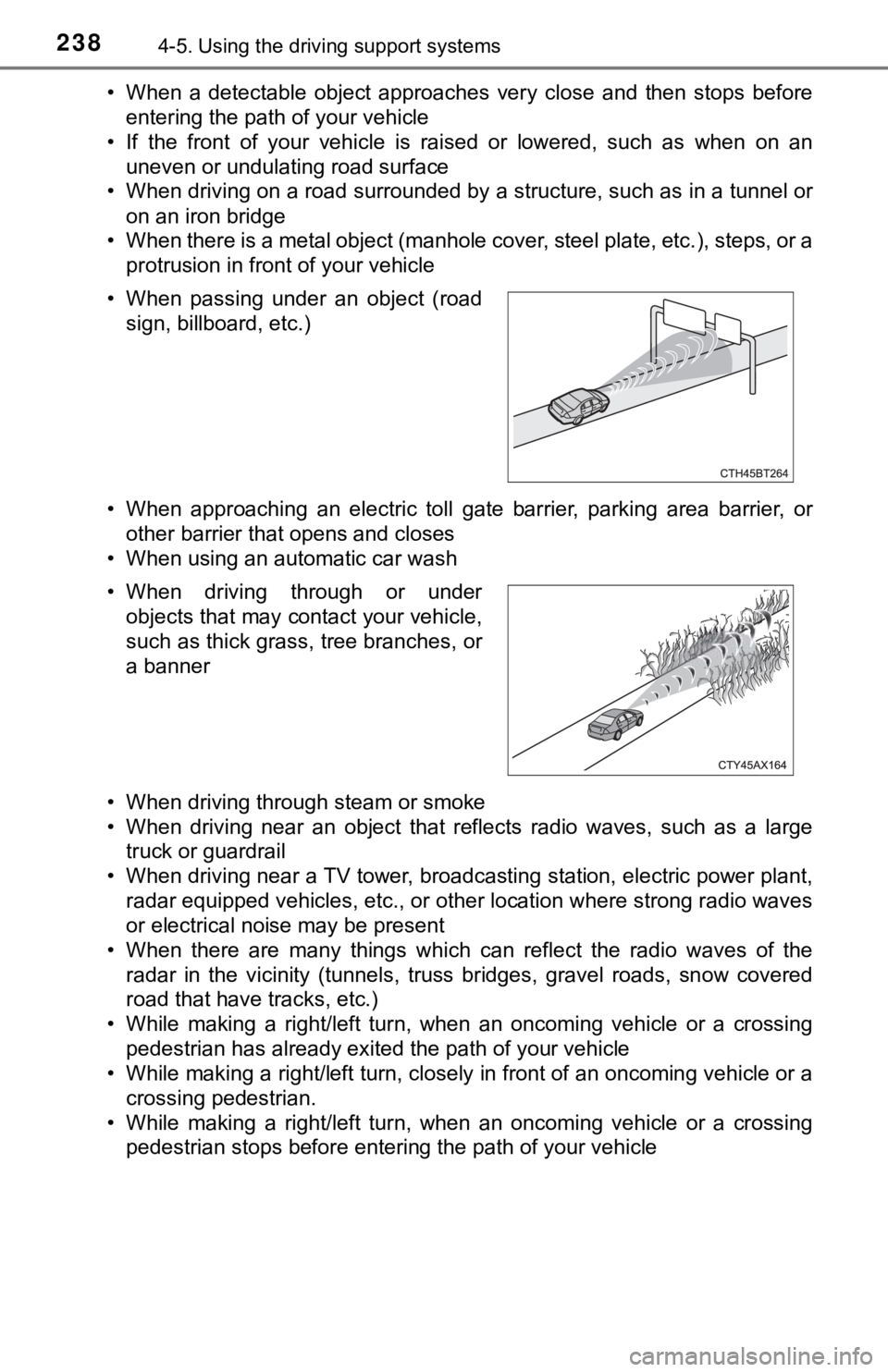
• When passing under an object (road
sign, billboard, etc.)
• When driving through or under objects that may contact your vehicle,
such as thick grass, tree branches, or
a banner
Page 239 of 572
2394-5. Using the driving support systems
4
Driving
• While steering into the direction of oncoming traffic
■ Situations in which the syst em may not operate properly
● In some situations such as the following, an object may not be detected by
the radar sensor and front camera, preventing the system from operating
properly:
• When a detectable object is approaching your vehicle
• When your vehicle or a detectable object is wobbling
• If a detectable object makes an abrupt maneuver (such as sudde n swerv-
ing, acceleration or deceleration)
• When your vehicle approaches a detectable object rapidly
• When a detectable object is near a wall, fence, guardrail, manhole cover,
vehicle, steel plate on the road, etc.
• When a detectable object is under a structure
• When part of a detectable object is hidden by an object, such as large
baggage, an umbrella, or guardrail
• When there are many things which can reflect the radio waves of the radar in the vicinity (tunnels, truss bridges, gravel roads, sn ow covered
road that have tracks, etc.)
• When there is an effect on the radio waves to the radar that i s installed on
another vehicle
• When multiple detectable objects are close together
• If the sun or other light is shining directly on a detectable object
• When a detectable object is a shade of white and looks extremely bright
• When a detectable object appears to be nearly the same color o r bright-
ness as its surroundings
• If a detectable object cuts or suddenly emerges in front of your vehicle
• When the front of your vehicle is hit by water, snow, dust, et c.
• When a very bright light ahead, such as the sun or the headlig hts of
oncoming traffic, shines directly into the front camera
• When approaching the side or front of a vehicle ahead
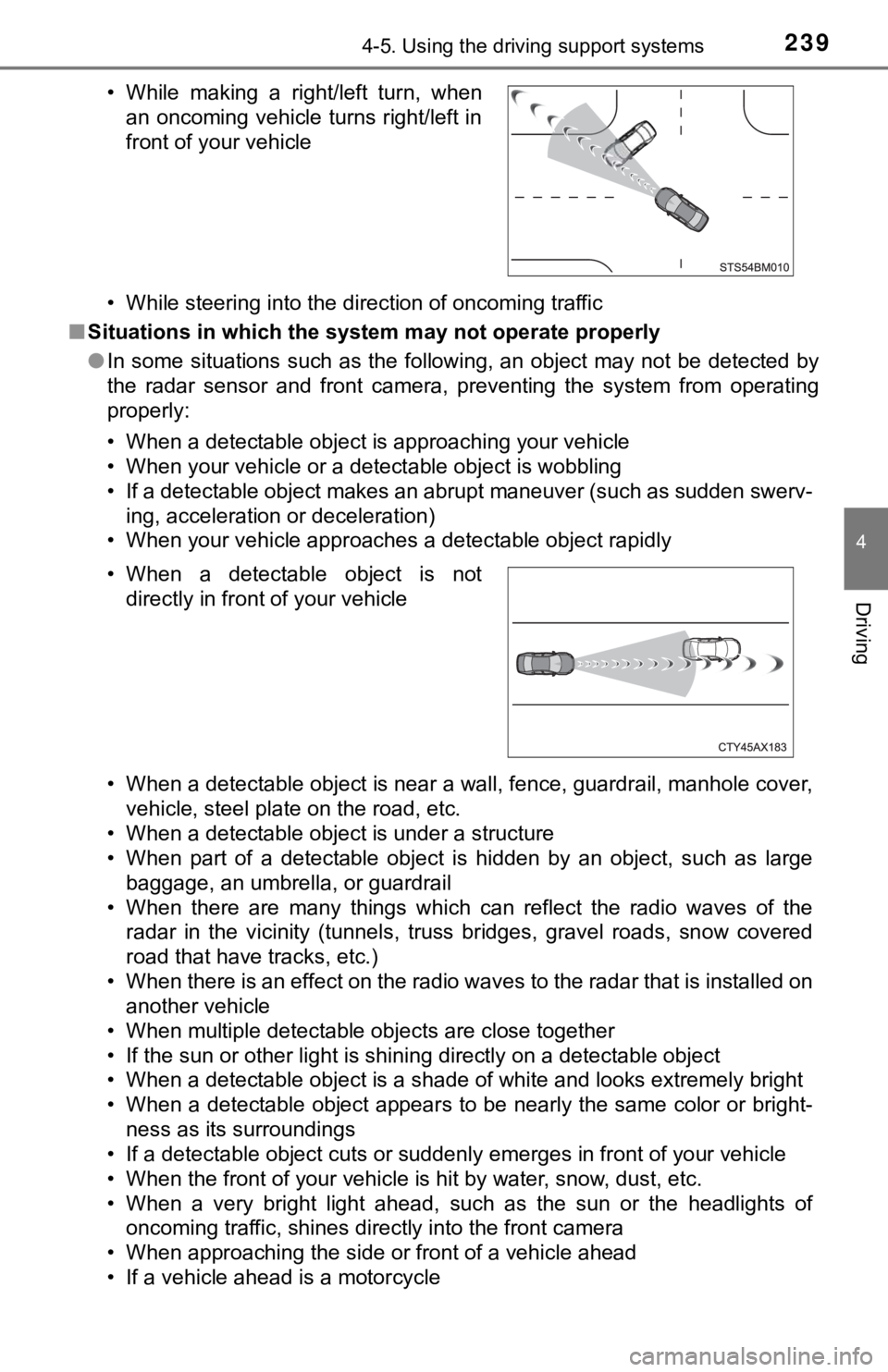
• If a vehicle ahead is a motorcycle • While making a right/left turn, when an oncoming vehicle turns right/left in
front of your vehicle
• When a detectable object is not directly in front of your vehicle
Page 374 of 572

3745-4. Other interior features
NOTICE
■Conditions in which the wireless charger may not operate correctly
In the following situations, the wireless charger may not operate correctly:
● When a portable device is fully charged
● When there is a foreign object between the charging area and portable
device
● When a portable device becomes hot while charging
● When a portable device is placed on the wireless area with its charging
surface facing up
● When a portable device is not centered on the charging area
● When the vehicle is near a TV tower, electric power plant, gas station,
radio station, large display, airport or other facility that ge nerates strong
radio waves or electrical noise
● When the portable device is in contact with, or is covered by a ny of the fol-
lowing metallic objects:
• Cards to which aluminum foil is attached
• Cigarette boxes that have aluminum foil inside
• Metallic wallets or bags
• Coins
• Metal hand warmers
• Media such as CDs and DVDs
● When wireless keys (that emit radio waves) other than those of your vehi-
cle are being used nearby.
If in situations other than above the wireless charger does not operate prop-
erly or the operation indicator light is blinking, the wireless charger may be
malfunctioning. Contact your Toyota dealer.
■ To prevent failure or damage to data
● Do not bring magnetic cards, such as a credit card, or magnetic recording
media, close to the wireless charger while charging. Otherwise, data may
be erased due to the influence of magnetism.
Additionally, do not bring precision instruments such as wrist watches,
close to the wireless charger, as such objects may malfunction.
● Do not leave portable devices in the cabin. The temperature ins ide the
cabin may become high when parked in the sun, and cause damage to the
device.
■ To prevent battery discharge
Do not use the wireless charger for a long period of time with the engine
stopped.
Page 421 of 572

4216-3. Do-it-yourself maintenance
6
Maintenance and care
●Performance may be affected in the following situations.
• When driving near a TV tower, electric power plant, gas station, radio
station, large display, airport or other facilit y that generates strong
radio waves or electrical noise
• When carrying a portable radio, cellular phone, cordless phone or
other wireless communication device
If tire position information is not correctly displayed due to the radio
wave conditions, the display ma y be corrected by changing the l ocation
of the vehicle as the radio wa ve conditions may change.
●When the vehicle is stopped, the time taken for the warning to start or
turn off may be longer.
●When the inflation pressure of a tire drops rapidly, for exampl e when a
tire has burst, the warning may not operate.
■Initialization procedure
●Make sure to perform the initialization procedure after adjusti ng the tire
inflation pressure.
Also, make sure the tires are cold before performing the initia lization
procedure or adjusting the tire inflation pressure.
●If the engine switch is turned off during initialization, it is not necessary
to restart the initialization procedure from the beginning as i t will begin
automatically when the engine switch is turned back to IGNITION ON
mode.
●If initialization has accidentally been started when it is not necessary,
adjust the tire inflation pressu re to the specified level when the tires are
cold and then perform the ini tialization procedure again.
●While the position of each tire is being determined and the inf lation pres-
sures are not being displayed on the multi-information display, if the
inflation pressure of a tire drops, the tire pressure warning l ight will come
on.
■Warning performance of the tire pressure warning system
The warning of the tire pressu re warning system will change in accor-
dance with the conditions under which it was initialized. For t his reason,
the system may give a warning even if the tire pressure does no t reach a
low enough level, or if the pressure is higher than the pressur e that was
adjusted to when the sys tem was initialized.
Page 519 of 572
5198-1. Specifications
8
Vehicle specifications
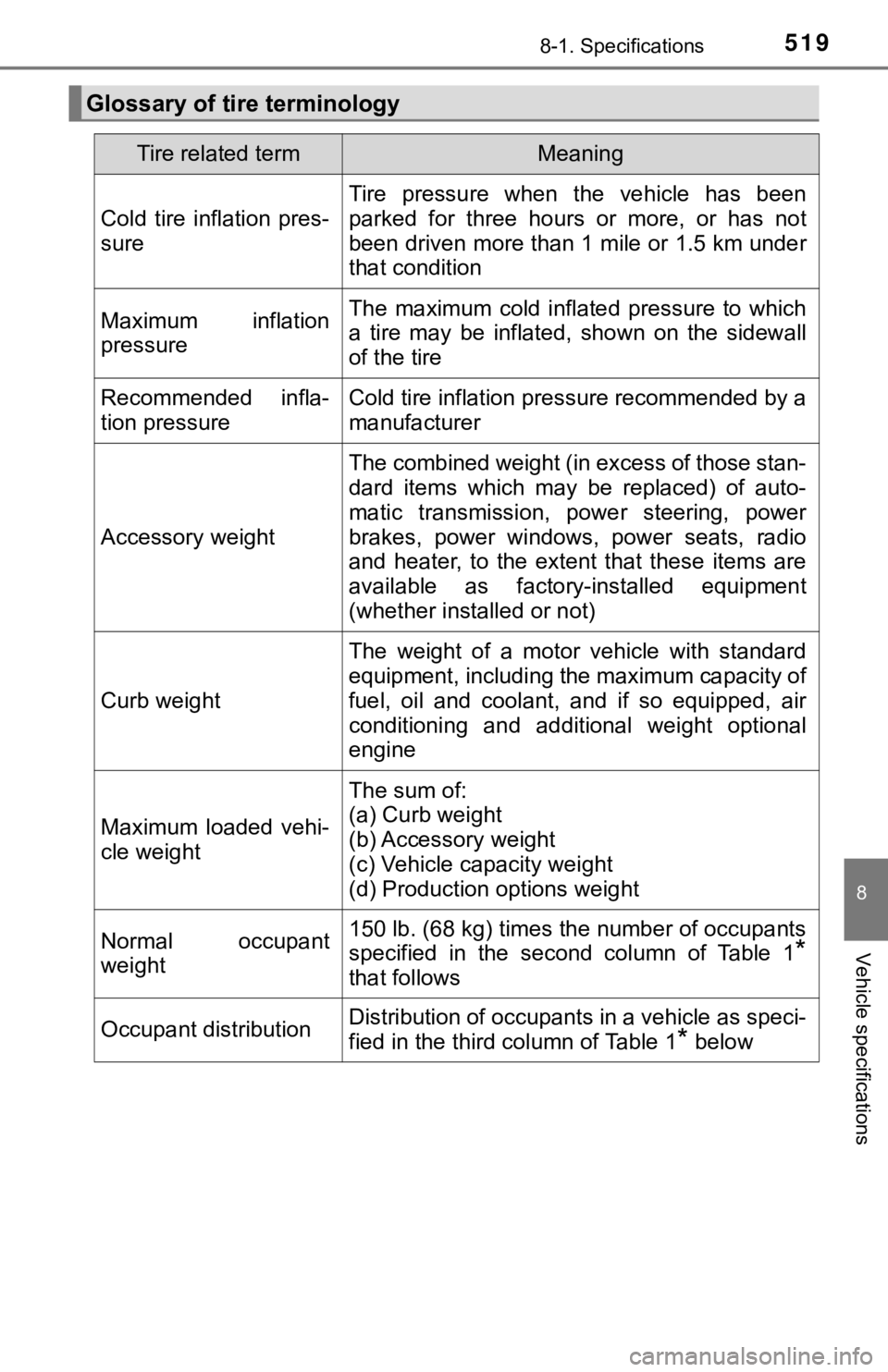
Glossary of tire terminology
Tire related termMeaning
Cold tire inflation pres-
sure
Tire pressure when the vehicle has been
parked for three hours or more, or has not
been driven more than 1 mile or 1.5 km under
that condition
Maximum inflation
pressureThe maximum cold inflated pressure to which
a tire may be inflated, shown on the sidewall
of the tire
Recommended infla-
tion pressureCold tire inflation pressure recommended by a
manufacturer
Accessory weight
The combined weight (in excess of those stan-
dard items which may be replaced) of auto-
matic transmission, power steering, power
brakes, power windows, power seats, radio
and heater, to the extent that these items are
available as factory-installed equipment
(whether installed or not)
Curb weight
The weight of a motor vehicle with standard
equipment, including the maximum capacity of
fuel, oil and coolant, and if so equipped, air
conditioning and additional weight optional
engine
Maximum loaded vehi-
cle weight
The sum of:
(a) Curb weight
(b) Accessory weight
(c) Vehicle capacity weight
(d) Production options weight
Normal occupant
weight150 lb. (68 kg) times the number of occupants
specified in the second column of Table 1
*
that follows
Occupant distributionDistribution of occupants in a vehicle as speci-
fied in the third column of Table 1
* below
Page 549 of 572

549
9
For owners
AVERTISSEMENT
■Modification et mise au rebut des composants du système de cous sins
gonflables SRS
Ne mettez pas votre véhicule au rebut et ne procédez à aucune d es modifi-
cations suivantes sans consulter votre concessionnaire Toyota. Les cous-
sins gonflables SRS peuvent ne pas fonctionner correctement ou se
déployer (se gonfler) accidentellement, provoquant la mort ou d e graves
blessures.
● Installation, dépose, démontage et réparation des coussins gonf lables
SRS
● Réparations, modifications, démontage ou remplacement du volant, du
tableau de bord, de la planche de bord, des sièges ou de leur garnissage,
des montants avant, latéraux et arrière, des rails latéraux de toit, des pan-
neaux de porte avant, des garnitures de porte avant ou des haut-parleurs
de porte avant
● Modifications du panneau de porte avant (par exemple, perçage d 'un trou
dans le panneau)
● Réparations ou modifications des ailes avant, du pare-chocs ava nt ou des
flancs de l'habitacle
● Installation d'un protège-calandre (pare-buffle, pare-kangourou, etc.), de
chasse-neige, de treuils, ou d'un porte-bagages de toit
● Modifications du système de suspension du véhicule
● Installation d'appareils électroniques tels que les émetteurs/r écepteurs
radios mobiles et les lecteurs CD
● Modifications de votre véhicule pour une personne atteinte d'un handicap
physique
Page 552 of 572
552What to do if... (Troubleshooting)
What to do if... (Troubleshooting)
●If you lose your mechanical keys, new genuine mechanical keys can be
made by your Toyota dealer. ( P. 125)
●If you lose your electronic keys, the risk of vehicle theft inc reases signifi-
cantly. Contact your Toyota dealer immediately. ( P. 126)
●Is the key battery weak or depleted? (P. 435)
●Is the engine switch in IGNITION ON mode?
When locking the doors, turn the engine switch off. ( P. 187)
●Is the electronic key left inside the vehicle?
When locking the doors, make sure that you have the electronic key on
your person.
●The function may not operate properly due to the condition of t he radio
wave. ( P. 125, 139)
●Is the child-protector lock set?
The rear door cannot be opened from inside the vehicle when the lock is
set. Open the rear door from outside and then unlock the child-protector
lock. ( P. 130)
●The function to prevent the electronic key from being left insi de the trunk
will operate and you can open the trunk as usual. Take the key out from the
trunk. ( P. 134)
If you have a problem, check the following before contacting
your Toyota dealer.
The doors cannot be locked, unlocked, opened or closed
You lose your keys
The doors cannot be locked or unlocked
The rear door cannot be opened
The trunk lid is closed with the electronic key left inside