steering TOYOTA AVALON 2022 User Guide
[x] Cancel search | Manufacturer: TOYOTA, Model Year: 2022, Model line: AVALON, Model: TOYOTA AVALON 2022Pages: 572, PDF Size: 9.42 MB
Page 48 of 572
481-1. For safe use
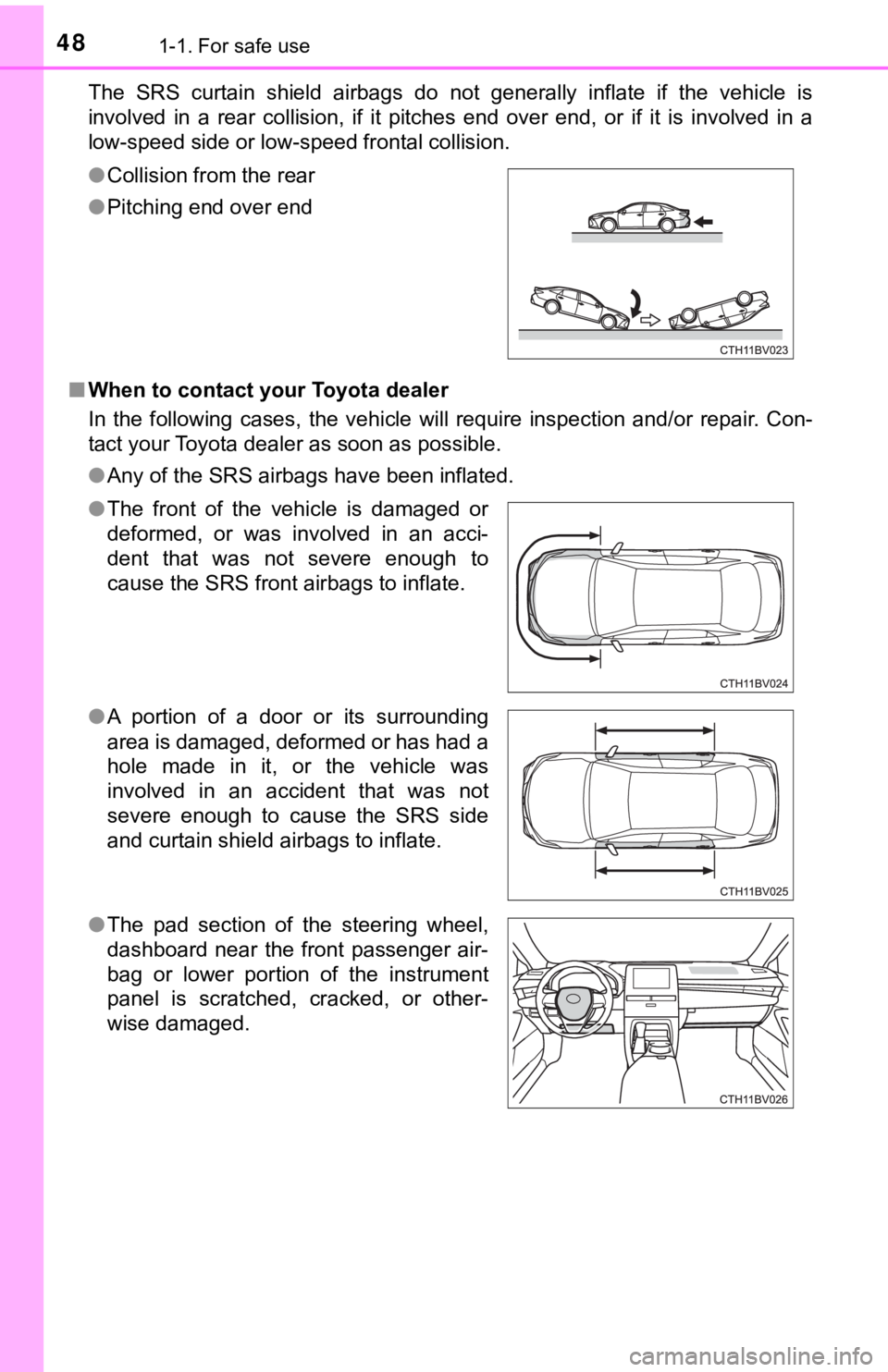
The SRS curtain shield airbags do not generally inflate if the vehicle is
involved in a rear collision, if it pitches end over end, or if it is involved in a
low-speed side or low-speed frontal collision.
■ When to contact your Toyota dealer
In the following cases, the vehicle will require inspection and /or repair. Con-
tact your Toyota dealer as soon as possible.
● Any of the SRS airbags have been inflated.
●
Collision from the rear
● Pitching end over end
● The front of the vehicle is damaged or
deformed, or was involved in an acci-
dent that was not severe enough to
cause the SRS front airbags to inflate.
● A portion of a door or its surrounding
area is damaged, deformed or has had a
hole made in it, or the vehicle was
involved in an accident that was not
severe enough to cause the SRS side
and curtain shield airbags to inflate.
● The pad section of the steering wheel,
dashboard near the front passenger air-
bag or lower portion of the instrument
panel is scratched, cracked, or other-
wise damaged.
Page 85 of 572
852. Instrument cluster
2
Instrument cluster
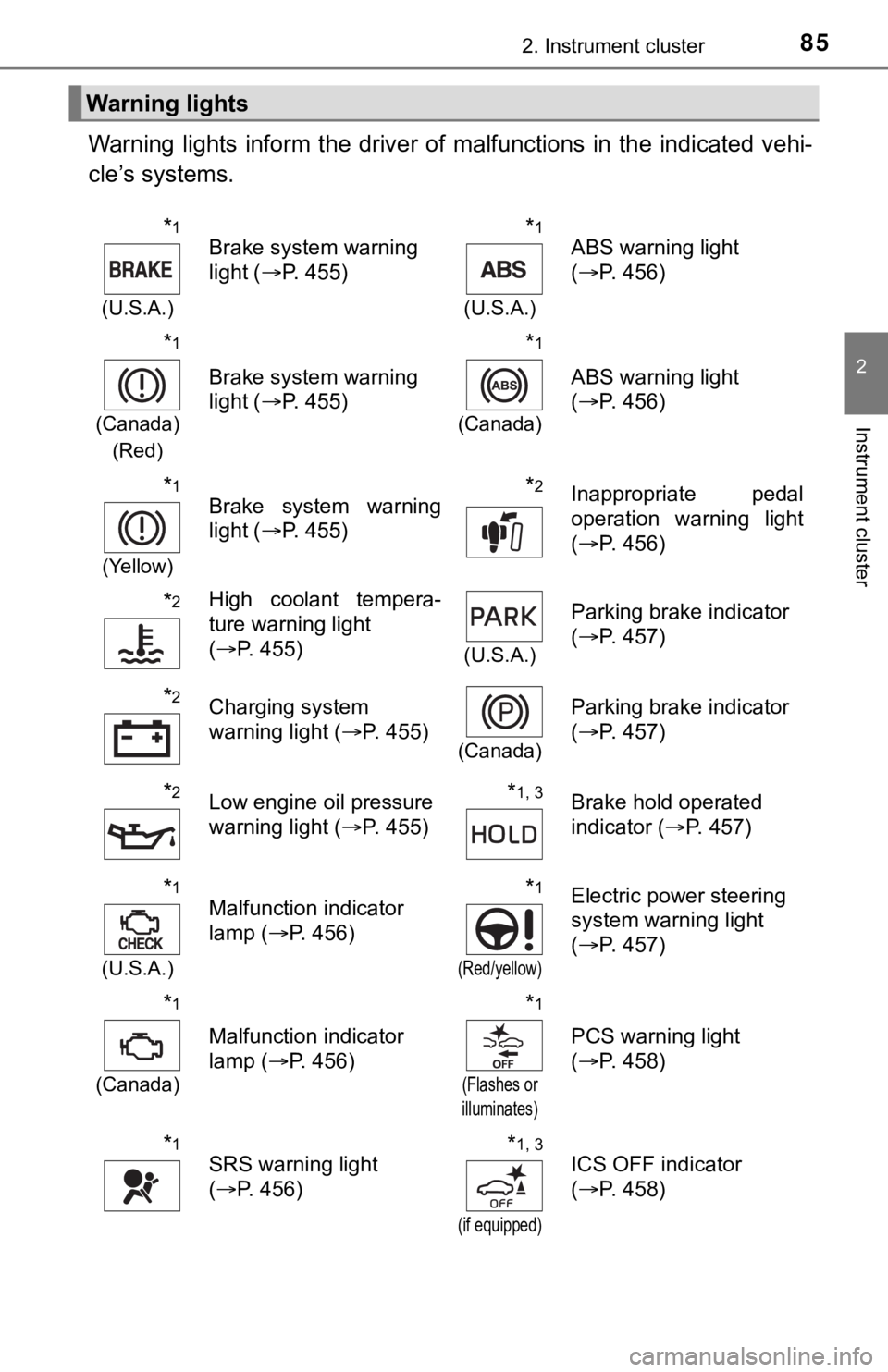
Warning lights inform the driver of malfunctions in the indicated vehi-
cle’s systems.
Warning lights
*1
(U.S.A.)
Brake system warning
light ( P. 455)*1
(U.S.A.)
ABS warning light
(P. 456)
*1
(Canada)
(Red)
Brake system warning
light ( P. 455)
*1
(Canada)
ABS warning light
(P. 456)
*1
(Yellow)
Brake system warning
light ( P. 455)*2Inappropriate pedal
operation warning light
(P. 456)
*2High coolant tempera-
ture warning light
(P. 455)
(U.S.A.)
Parking brake indicator
(P. 457)
*2Charging system
warning light ( P. 455)
(Canada)
Parking brake indicator
(P. 457)
*2Low engine oil pressure
warning light ( P. 455)*1, 3Brake hold operated
indicator ( P. 457)
*1
(U.S.A.)
Malfunction indicator
lamp ( P. 456)*1
(Red/yellow)
Electric power steering
system warning light
(P. 457)
*1
(Canada)
Malfunction indicator
lamp ( P. 456)
*1
(Flashes or
illuminates)
PCS warning light
( P. 458)
*1SRS warning light
(P. 456)*1, 3
(if equipped)
ICS OFF indicator
(P. 458)
Page 100 of 572
1002. Instrument cluster
◆Changing settings
Use the meter control switches on the steering wheel to change
settings.Press or to select .
Operate the switches to select a desired item.
Press or press and hold .
The available settings will differ depending on if is pressed or
pressed and held. Follow the instructions on the display.
◆Setting items
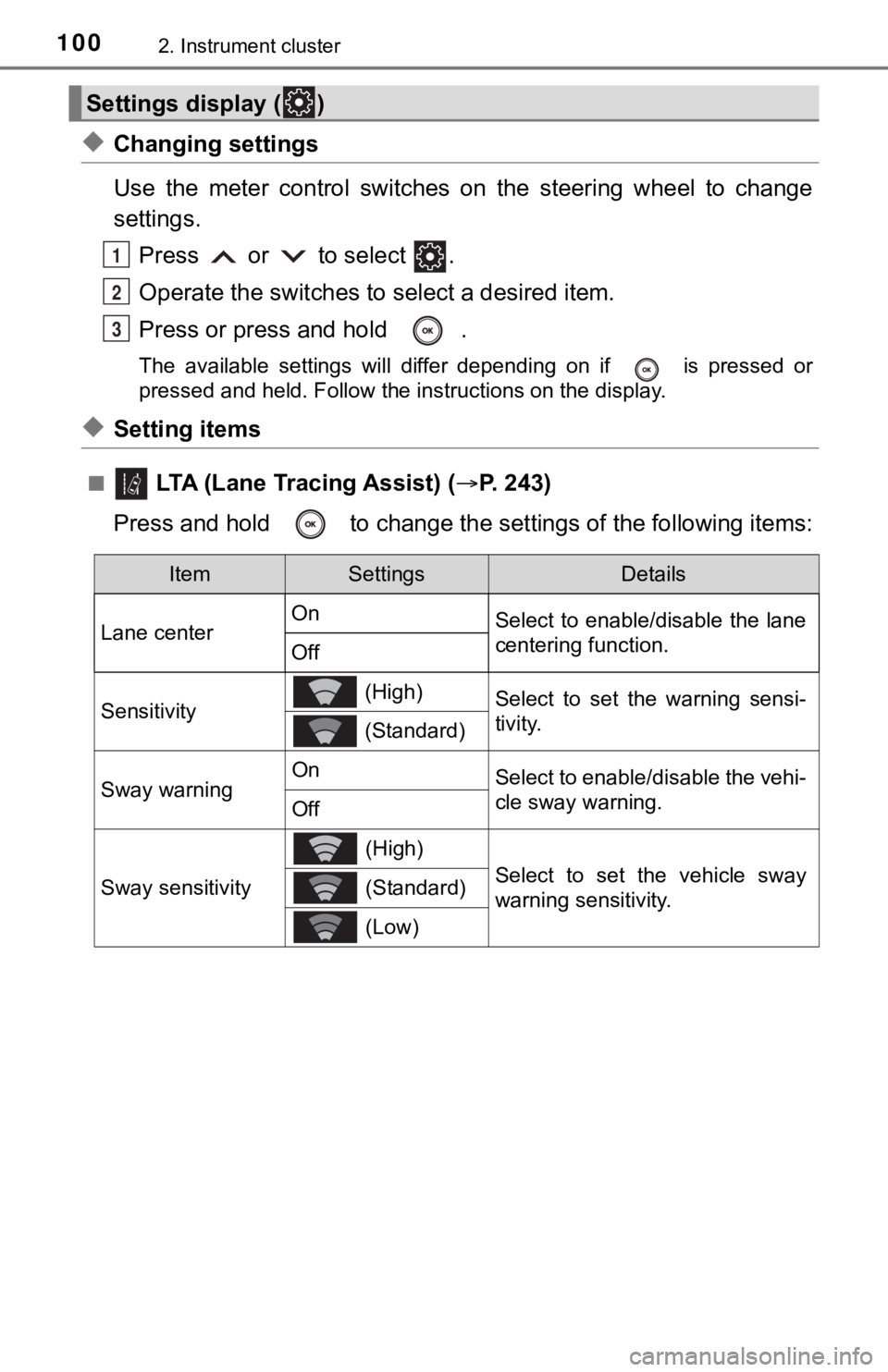
■ LTA (Lane Tracing Assist) ( P. 2 4 3 )
Press and hold to change the se ttings of the following items:
Settings display ( )
1
2
3
ItemSettingsDetails
Lane center On
Select to enable/disable the lane
centering function.
Off
Sensitivity (High)Select to set the warning sensi-
tivity.
(Standard)
Sway warningOnSelect to enable/disable the vehi-
cle sway warning.
Off
Sway sensitivity
(High)
Select to set the vehicle sway
warning sensitivity. (Standard)
(Low)
Page 123 of 572

123
3
Operation of
each component
3-1. Key information
Keys .................................. 124
3-2. Opening, closing and locking the doors
Doors ................................ 127
Trunk ................................. 133
Smart key system ............. 137
3-3. Adjusting the seats Front seats ........................ 144
Rear seats......................... 146
Driving position memory ........................... 148
Head restraints.................. 153
3-4. Adjusting the steering wheel and mirrors
Steering wheel .................. 155
Inside rear view mirror ...... 157
Outside rear view mirrors ............................. 159
3-5. Opening and closing the windows
Power windows ................. 162
Moon roof .......................... 166
Page 144 of 572
1443-3. Adjusting the seats
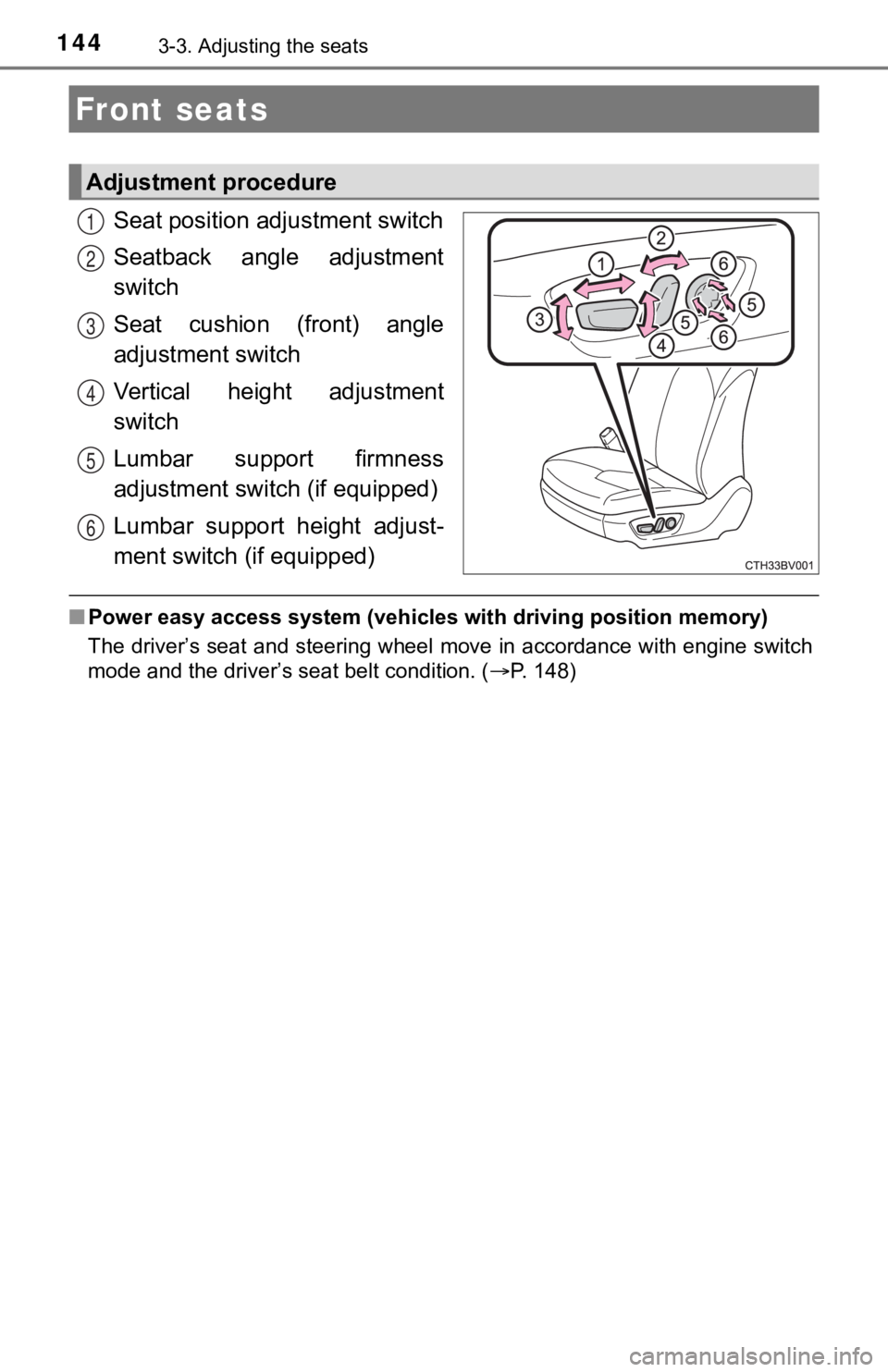
Seat position adjustment switch
Seatback angle adjustment
switch
Seat cushion (front) angle
adjustment switch
Vertical height adjustment
switch
Lumbar support firmness
adjustment switch (if equipped)
Lumbar support height adjust-
ment switch (if equipped)
■ Power easy access system (vehicles with driving position memory )
The driver’s seat and steering wheel move in accordance with en gine switch
mode and the driver’s seat belt condition. ( P. 148)
Front seats
Adjustment procedure
1
2
3
4
5
6
Page 148 of 572
1483-3. Adjusting the seats
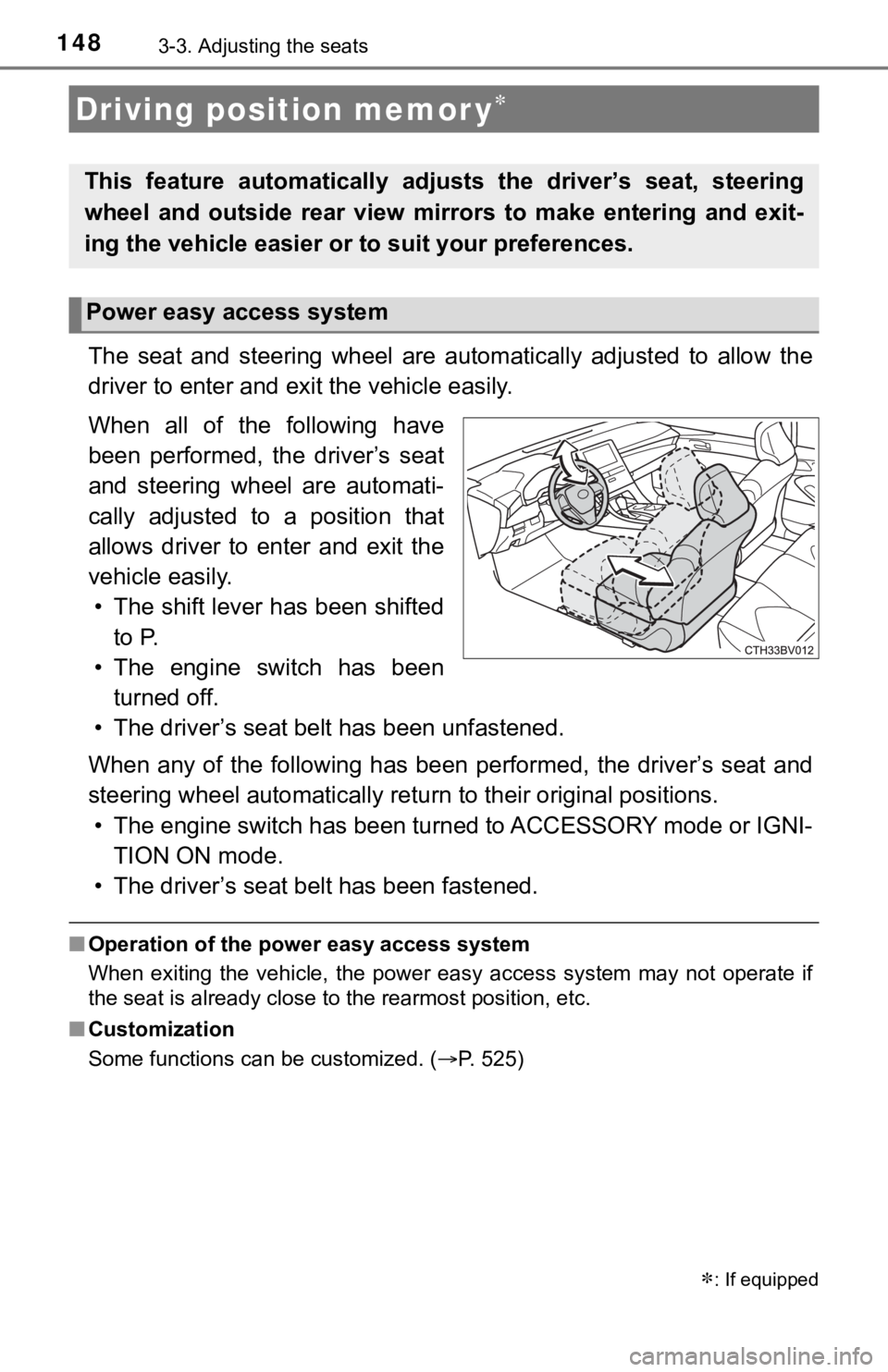
The seat and steering wheel are automatically adjusted to allow the
driver to enter and exi t the vehicle easily.
When all of the following have
been performed, the driver’s seat
and steering wheel are automati-
cally adjusted to a position that
allows driver to enter and exit the
vehicle easily. • The shift lever has been shifted to P.
• The engine switch has been turned off.
• The driver’s seat belt has been unfastened.
When any of the following has be en performed, the driver’s seat and
steering wheel automatically ret urn to their original positions.
• The engine switch has been turned to ACCESSORY mode or IGNI- TION ON mode.
• The driver’s seat belt has been fastened.
■ Operation of the power easy access system
When exiting the vehicle, the power easy access system may not operate if
the seat is already close to the rearmost position, etc.
■ Customization
Some functions can be customized. ( P. 525)
Driving position memor y
This feature automatically adjusts the driver’s seat, steering
wheel and outside rear view mirrors to make entering and exit-
ing the vehicle easier or to suit your preferences.
: If equipped
Power easy access system
Page 150 of 572

1503-3. Adjusting the seats
■To stop the position recall operation part-way through
Perform any of the following operations:
●Press the “SET” button.
● Press button “1” or “2”.
● Operate any of the seat adjustment switches (only cancels seat position
recall).
● Operate the tilt and telescopic steering control switch (only cancels steering
wheel position recall).
■ Seat positions that can be memorized ( P. 144)
The adjusted positions other than the position adjusted by lumb ar support
switch can be recorded.
■ Operating the driving position m emory after turning the engine switch
off
Recorded seat positions can be activated up to 180 seconds after the driver’s
door is opened and another 60 seconds after it is closed again.
■ When the recorded seat pos ition cannot be recalled
The seat position may not be recalled in some situations when t he seat posi-
tion is recorded in a certain range. For details, contact your Toyota dealer.
■ In order to correctly use the dr iving position memory function
If a seat position is already in the furthest possible position and the seat is
operated in the same direction, the recorded position may be sl ightly different
when it is recalled.
Page 151 of 572
1513-3. Adjusting the seats
3
Operation of each component
Each electronic key can be registered to recall your preferred driving
position.
■Registering procedure
Record your driving position to button 1 or 2 before performing the
following:
Carry only the key you want to register, and then close the dri ver’s
door.
If 2 or more keys are in the vehicle, the driving position cann ot be
recorded properly.
Check that the shift lever is in P.
Turn the engine switch to IGNITION ON mode.
Recall the driving position that you want to record.
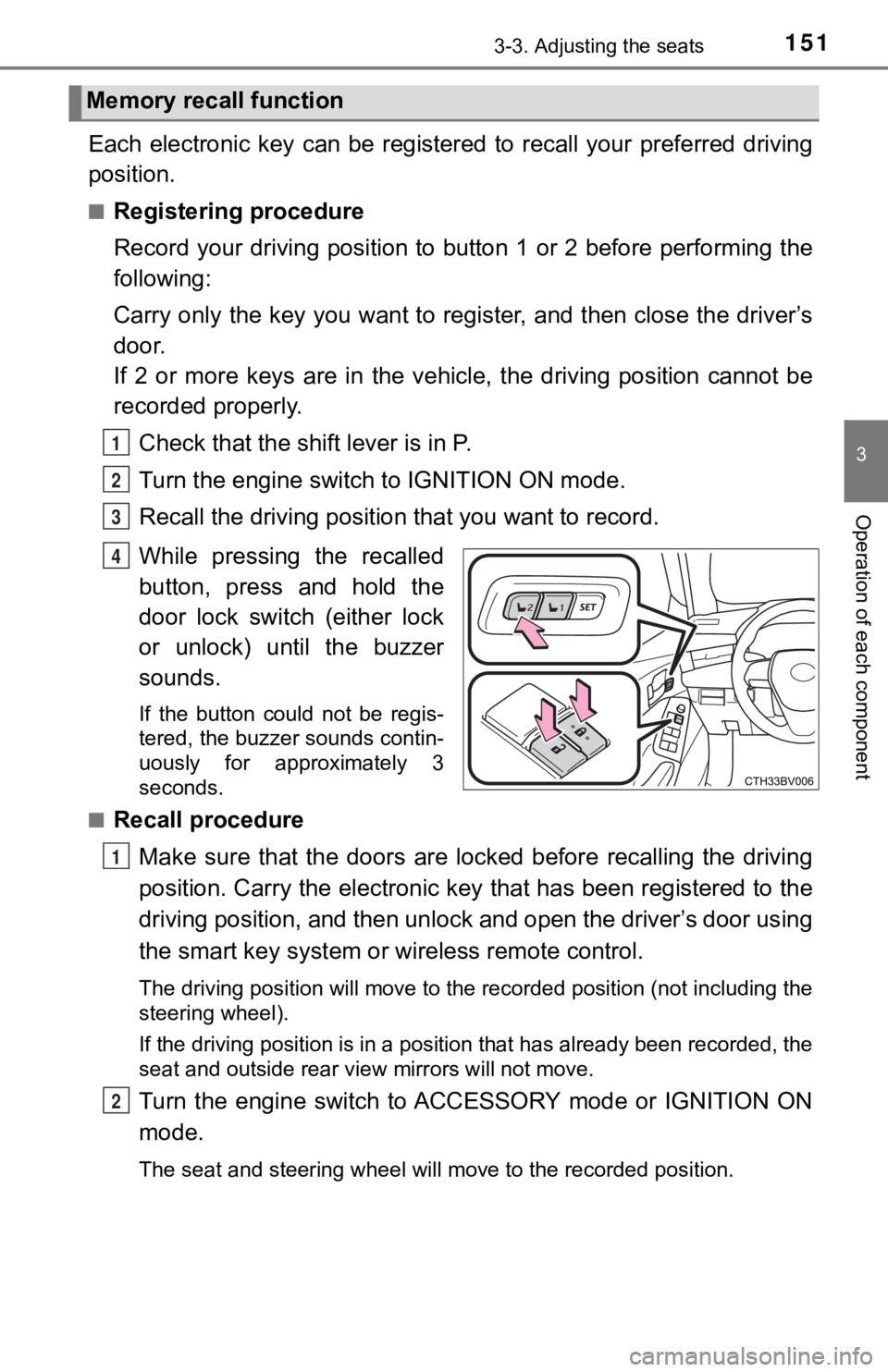
While pressing the recalled
button, press and hold the
door lock switch (either lock
or unlock) until the buzzer
sounds.
If the button could not be regis-
tered, the buzzer sounds contin-
uously for approximately 3
seconds.
■
Recall procedure
Make sure that the doors are locked before recalling the drivin g
position. Carry the electronic ke y that has been registered to the
driving position, and then unlock and open the driver’s door using
the smart key system or wireless remote control.
The driving position will move to the recorded position (not in cluding the
steering wheel).
If the driving position is in a position that has already been recorded, the
seat and outside rear view mirrors will not move.
Turn the engine switch to ACCESSORY mode or IGNITION ON
mode.
The seat and steering wheel will move to the recorded position.
Memory recall function
1
2
3
4
1
2
Page 152 of 572

1523-3. Adjusting the seats
■Cancelation procedure
Carry only the key you want to cancel and then close the driver’s
door.
If 2 or more keys are in the vehicle, the driving position cann ot be
canceled properly.
Turn the engine switch to IGNITION ON mode.
While pressing the “SET” button, press and hold the door lock
switch (either lock or unlock) until the buzzer sounds twice.
If it button could not be canceled, the buzzer sounds continuously for
approximately 3 seconds.
■Recalling the driving position u sing the memory recall function
● Different driving positions can be registered for each electronic key. There-
fore, the driving position that is recalled may be different de pending on the
key being carried.
● If a door other than the driver’s door is unlocked with the smart key system,
the driving position cannot be recalled. In this case, press the driving posi-
tion button which has been set.
■ Customization
Some functions can be customized. ( P. 525)
WARNING
■ Seat adjustment caution
Take care during seat adjustment so that the seat does not stri ke the rear
passenger or squeeze your body against the steering wheel.
1
2
Page 155 of 572
155
3
Operation of each component
3-4. Adjusting the st eering wheel and mirrors
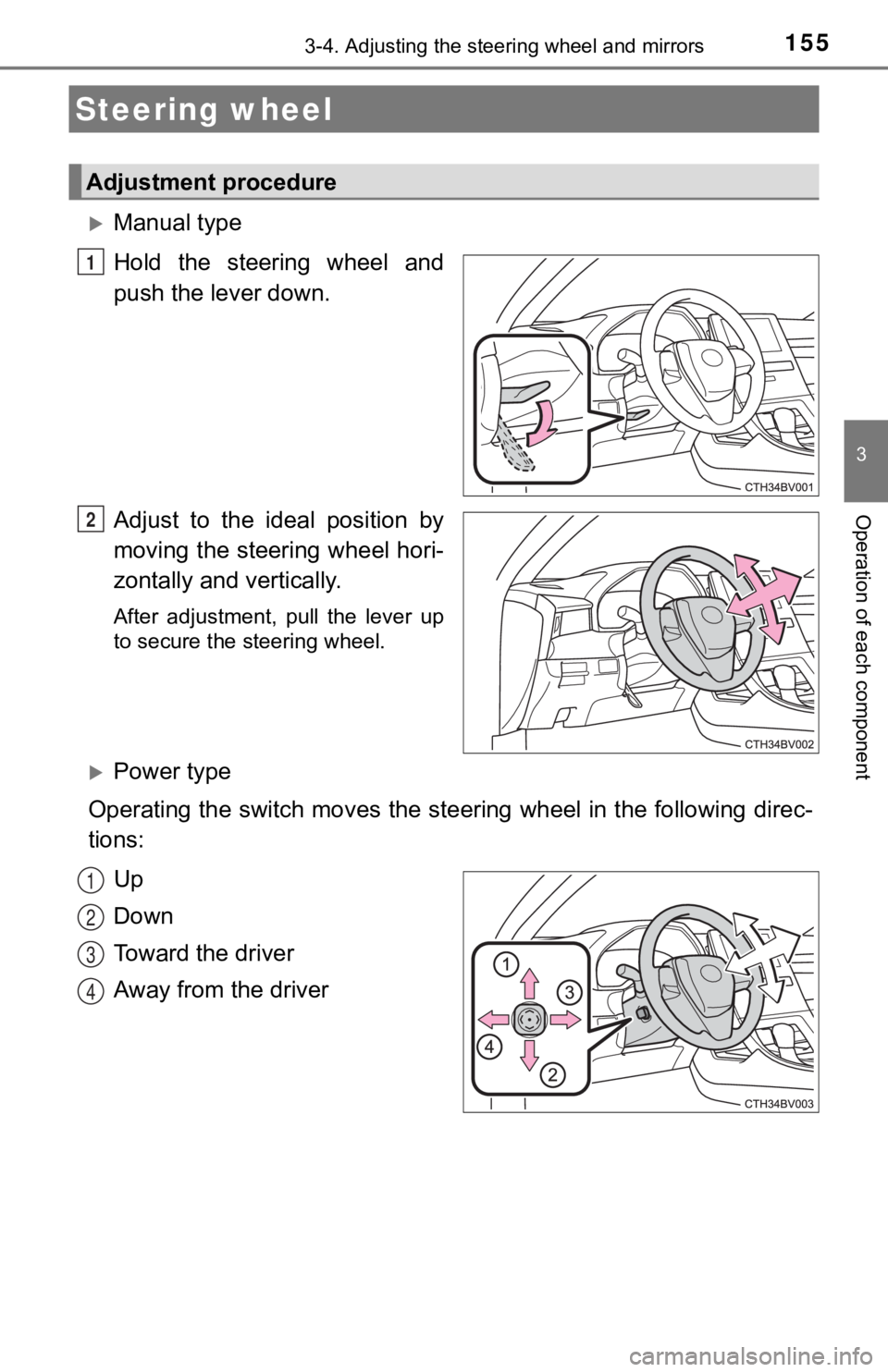
Manual type
Hold the steering wheel and
push the lever down.
Adjust to the ideal position by
moving the steering wheel hori-
zontally and vertically.
After adjustment, pull the lever up
to secure the steering wheel.
Power type
Operating the switch moves the steering wheel in the following direc-
tions:
Up
Down
Toward the driver
Away from the driver
Steering wheel
Adjustment procedure
1
2
1
2
3
4