audio TOYOTA AVALON 2022 Owner's Manual
[x] Cancel search | Manufacturer: TOYOTA, Model Year: 2022, Model line: AVALON, Model: TOYOTA AVALON 2022Pages: 572, PDF Size: 9.42 MB
Page 325 of 572
3254-5. Using the driving support systems
4
Driving
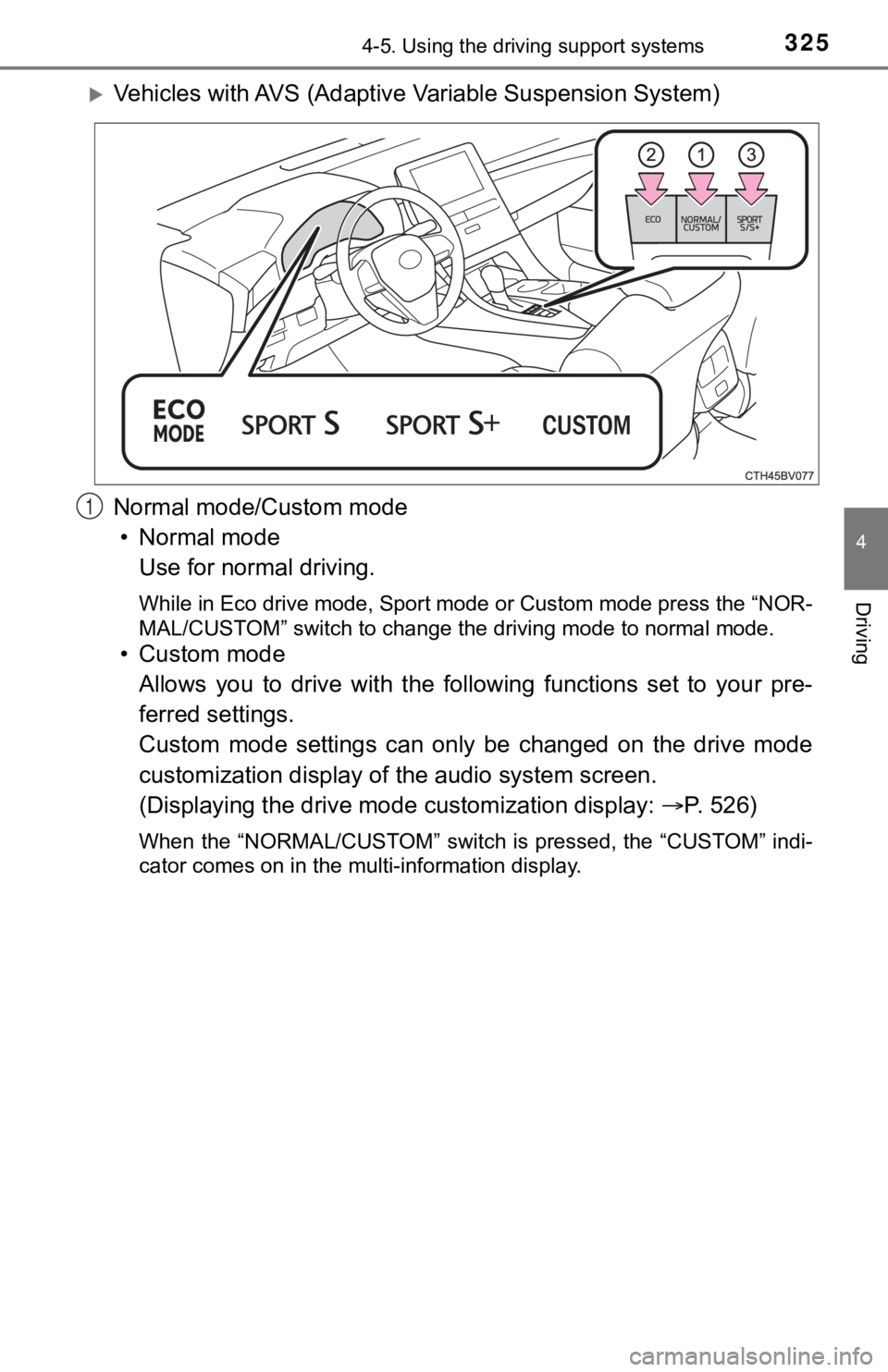
Vehicles with AVS (Adaptive Variable Suspension System)
Normal mode/Custom mode • Normal mode Use for normal driving.
While in Eco drive mode, Sport mode or Custom mode press the “N OR-
MAL/CUSTOM” switch to change the driving mode to normal mode.
• Custom mode
Allows you to drive with the following functions set to your pr e-
ferred settings.
Custom mode settings can only be changed on the drive mode
customization display of the audio system screen.
(Displaying the drive mode customization display: P. 5 2 6 )
When the “NORMAL/CUSTOM” switch is pressed, the “CUSTOM” indi-
cator comes on in the multi-information display.
1
Page 391 of 572
3916-1. Maintenance and care
6
Maintenance and care
NOTICE
■Cleaning detergents
● Do not use the following types of detergent, as they may discolor the vehi-
cle interior or cause streaks or damage to painted surfaces:
• Areas other than the seats and steering wheel: Organic substan ces
such as benzene or gasoline, alkaline or acidic solutions, dye, and
bleach
• Seats: Alkaline or acidic solutions, such as thinner, benzene, and alco-
hol
• Steering wheel: Organic substances, such as thinner, and clean er that
contains alcohol
● Do not use polish wax or polish cleaner. The instrument panel’s or other
interior part’s painted surface may be damaged.
■ Preventing damage to leather surfaces
Observe the following precautions to avoid damage to and deterioration of
leather surfaces:
● Remove any dust or dirt from leather surfaces immediately.
● Do not expose the vehicle to direct sunlight for extended periods of time.
Park the vehicle in the shade, especially during summer.
● Do not place items made of vinyl, plastic, or containing wax on the uphol-
stery, as they may stick to the leather surface if the vehicle interior heats
up significantly.
■ Water on the floor
Do not wash the vehicle floor with water.
Vehicle systems such as the audio system may be damaged if water comes
into contact with electrical components such as the audio system above or
under the floor of the vehicle. Water may also cause the body to rust.
■ When cleaning the inside of the windshield
Do not allow glass cleaner to contact the lens. Also, do not touch the lens.
(P. 221)
■ Cleaning the inside of the rear window
● Do not use glass cleaner to clean the rear window, as this may cause
damage to the rear window defogger heater wires or antenna. Use a cloth
dampened with lukewarm water to gently wipe the window clean. Wipe the
window in strokes running parallel to the heater wires or antenna.
● Be careful not to scratch or damage the heater wires or antenna .
Page 461 of 572

4617-2. Steps to take in an emergency
7
When trouble arises
■When the tire pressure warning light comes on
Inspect the tires to check if a tire is punctured.
If a tire is punctured: P. 470
If none of the tires are punctured:
Turn the engine switch off then turn it to IGNITION ON mode. Ch eck if the
tire pressure warning light comes on or blinks.
If the tire pressure wa rning light comes on
After the temperature of the tires has lowered sufficiently, ch eck the
inflation pressure of each tire and adjust them to the specifie d level.
If the warning light does not turn off even after several minut es have
elapsed, check that the inflation pressure of each tire is at t he specified
level and perform initialization. (P. 4 1 6 )
If the warning light does not tu rn off several minutes after the initialization
has been performed, have the vehi cle inspected by your Toyota dealer
immediately.
If the tire pressure warning light blinks fo r 1 minute then stays on
There may be a malfunction in the tire pressure warning system. Have
the vehicle inspected by you r Toyota dealer immediately.
■The tire pressure warning light may come on due to natural caus es
The tire pressure warning light may come on due to natural caus es such
as natural air leaks and tire inflation pressure changes caused by tem-
perature. In this case, adjusting the tire inflation pressure w ill turn off the
warning light (afte r a few minutes).
■When a tire is replace d with a spare tire
The compact spare tire is not equipped with a tire pressure war ning valve
and transmitter. If a tire goes flat, the tire pressure warning light will not
turn off even though the flat tire has been replaced with the s pare tire.
Replace the spare tire with the repaired tire and adjust the ti re inflation
pressure. The tire pressure war ning light will go off after a few minutes.
■Conditions that the tire pressure warning system may not functi on
properly
P. 4 2 0
■Warning buzzer
In some cases, the buzzer may not be heard because of noisy pla ce or an
audio sound.
1
2
Page 490 of 572

4907-2. Steps to take in an emergency
■Starting the engine when t he battery is discharged
The engine cannot be started by push-starting.
■ To prevent battery discharge
●Turn off the headlights and the audio system while the engine is off.
● Turn off any unnecessary electrical components when the vehicle is running
at a low speed for an extended period, such as in heavy traffic .
■ When the battery is r emoved or discharged
● Information stored in the ECU is cleared. When the battery is d epleted, have
the vehicle inspected at your Toyota dealer.
● Some systems may require initialization. ( P. 533)
■ When removing the battery terminals
When the battery terminals are removed, the information stored in the ECU is
cleared. Before removing the battery terminals, contact your Toyota dealer.
■ Charging the battery
The electricity stored in the battery will discharge gradually even when the
vehicle is not in use, due to natural discharge and the draining effects of cer-
tain electrical appliances. If the vehicle is left for a long t ime, the battery may
discharge, and the engine may be unable to start. (The battery recharges
automatically during driving.)
■ When recharging or replacing the battery
●In some cases, it may not be possible to unlock the doors using the smart
key system when the battery is discharged. Use the wireless rem ote control
or the mechanical key to lock or unlock the doors.
● The engine may not start on the first attempt after the battery has recharged
but will start normally after the second attempt. This is not a malfunction.
● The engine switch mode is memorized by the vehicle. When the ba ttery is
reconnected, the system will return to the mode it was in befor e the battery
was discharged. Before disconnecting the battery, turn the engine switch off.
If you are unsure what mode the engine switch was in before the battery dis-
charged, be especially careful when reconnecting the battery.
■ When replacing the battery
●Use a battery that conforms to European regulations.
● Use a battery that the case size is same as the previous one (L N3), 20 hour
rate capacity (20HR) is equivalent (70Ah) or greater, and perfo rmance rating
(CCA) is equivalent (603A) or greater.
• If the sizes differ, the battery cannot be properly secured.
• If the 20 hour rate capacity is low, even if the time period w here the vehi-
cle is not used is a short time, the battery may discharge and the engine
may not be able to start.
● For details, consult your Toyota dealer.
Page 525 of 572
525
8
Vehicle specifications
8-2. Customization
When customizing vehicle features, ensure that the vehicle is parked
in a safe place with the shift le ver in P and the parking brake set.
■Changing on the audio system screen
Press the “MENU” button.
Select “Setup” on the “Menu” screen.
Select “General” or “Vehicle” on the “Setup” screen.
Various setting can be changed. Refer to the list of settings t hat can
be changed for details.
■Changing using the mult i-information display
P. 1 0 0
Customizable features
Your vehicle includes a variety of electronic features that can be
personalized to suit your preferences. The settings of these fe a-
tures can be changed using the multi-information display, on th e
audio system screen, or at your Toyota dealer.
Customizing vehicle features
1
2
3
Page 526 of 572
5268-2. Customization
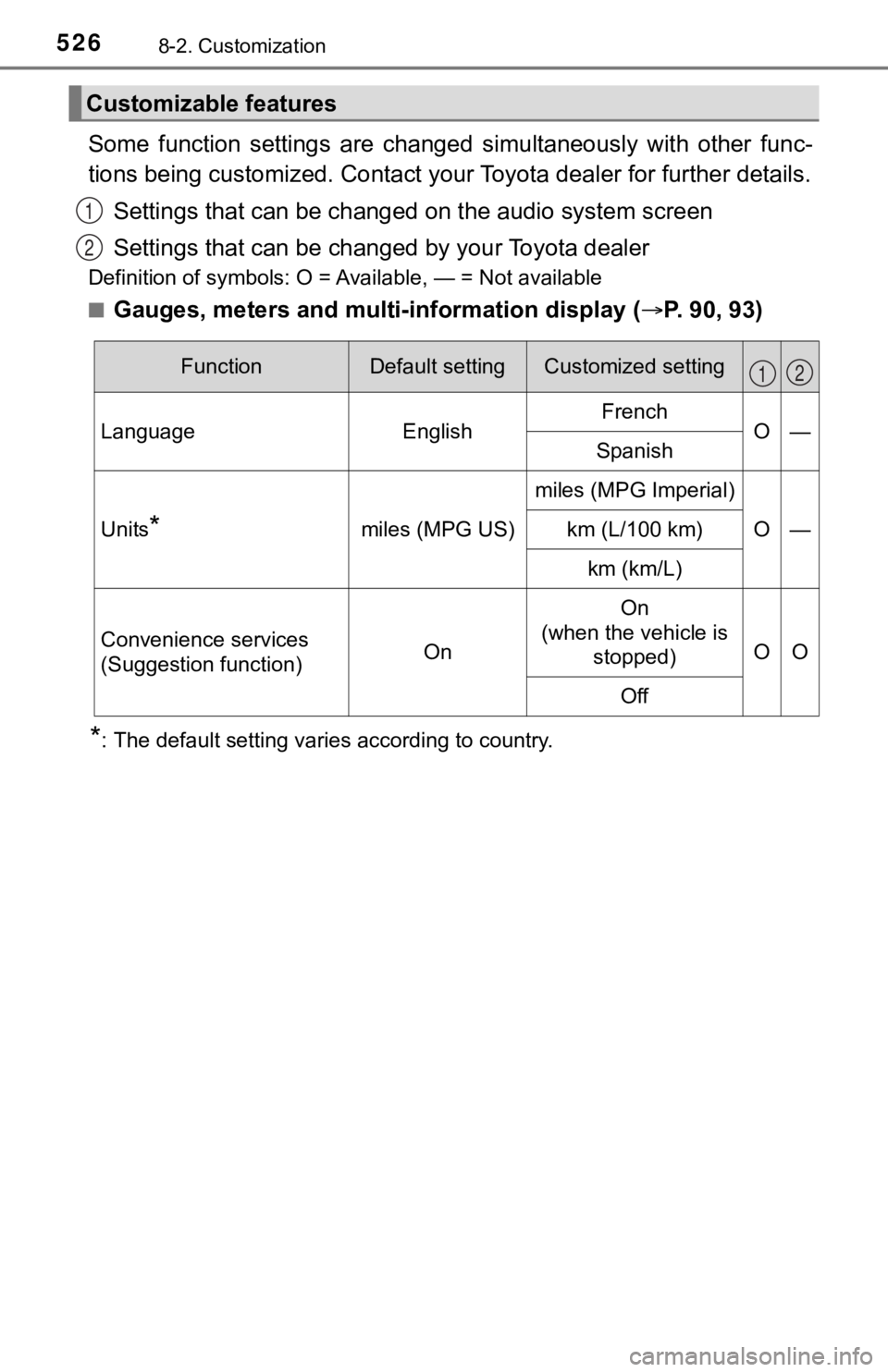
Some function settings are changed simultaneously with other func-
tions being customized. Contact your Toyota dealer for further details.
Settings that can be changed on the audio system screen
Settings that can be chan ged by your Toyota dealer
Definition of symbols: O = Available, — = Not available
■
Gauges, meters and multi-information display ( P. 90, 93)
*: The default setting varies according to country.
Customizable features
1
2
FunctionDefault settingCustomized setting
LanguageEnglishFrenchO—Spanish
Units*miles (MPG US)
miles (MPG Imperial)
O—km (L/100 km)
km (km/L)
Convenience services
(Suggestion function)On
On
(when the vehicle is stopped)
OO
Off
12
Page 551 of 572

551
Index
What to do if... (Troubleshooting) .................... 552
Alphabetical index ..................... 555
For information regarding the equipment listed below, refer to “NAV-
IGATION AND MULTIMEDIA SYSTEM OWNER’S MANUAL”.
• Navigation system
• Audio/visual system
• Toyota parking assist monitor
• Panoramic view monitor
• Connected Services
Page 555 of 572
555Alphabetical index
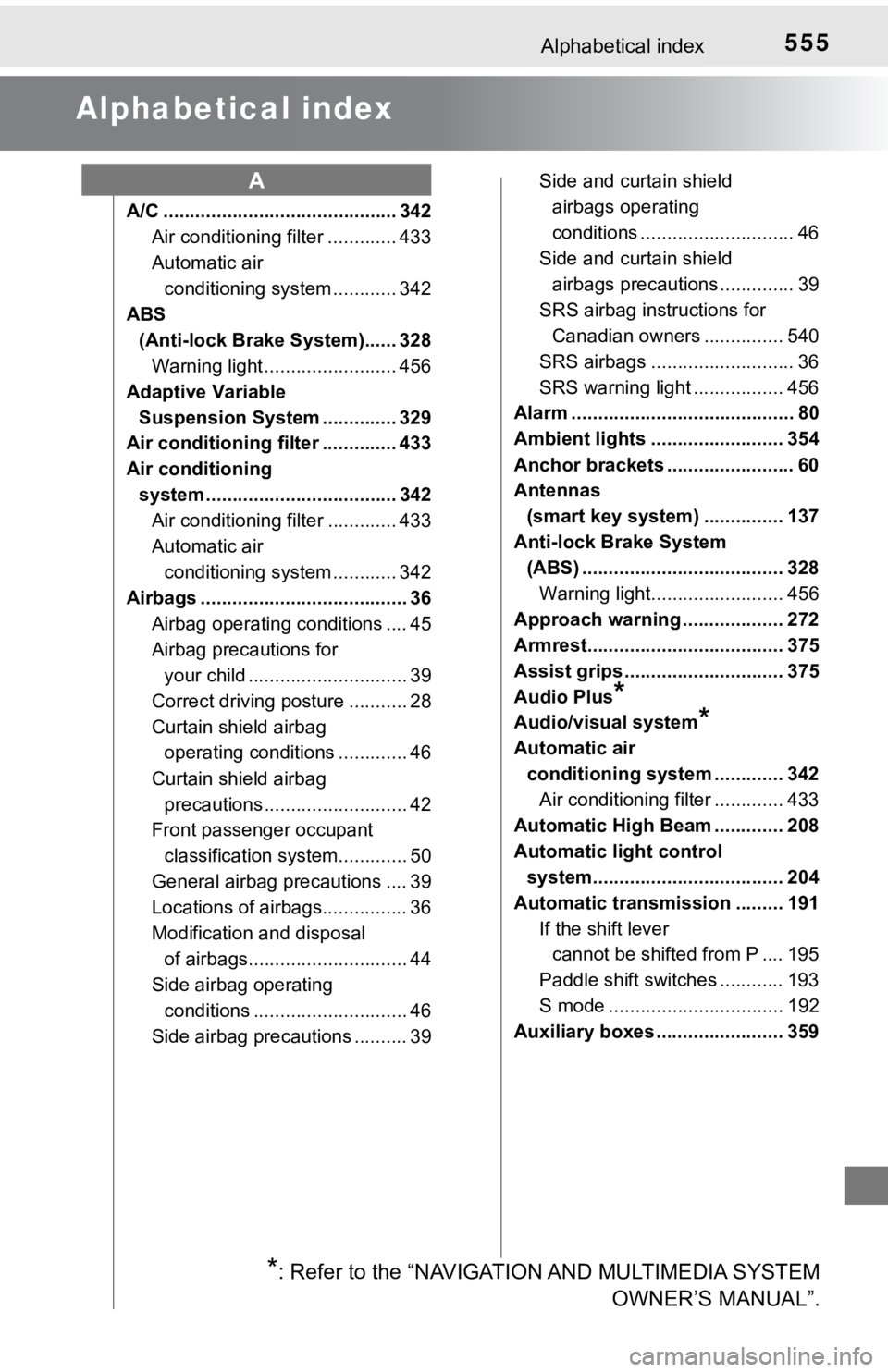
Alphabetical index
A/C ............................................ 342Air conditioning filter ............. 433
Automatic air conditioning system ............ 342
ABS (Anti-lock Brake System)...... 328
Warning light ......................... 456
Adaptive Variable Suspension System .............. 329
Air conditioning filter .............. 433
Air conditioning
system .................................... 342 Air conditioning filter ............. 433
Automatic air
conditioning system ............ 342
Airbags ....................................... 36
Airbag operating conditions .... 45
Airbag preca utions for
your child .............................. 39
Correct driving posture ........... 28
Curtain shield airbag operating conditions ............. 46
Curtain shield airbag precautions ........................... 42
Front passenger occupant
classification syst em............. 50
General airbag precautions .... 39
Locations of airbags................ 36
Modification and disposal of airbags.............................. 44
Side airbag operating
conditions ............................. 46
Side airbag precautions .......... 39 Side and curtain shield
airbags operating
conditions ............................. 46
Side and curtain shield airbags precautions .............. 39
SRS airbag instructions for Canadian owners ............... 540
SRS airbags ........................... 36
SRS warning light ................. 456
Alarm .......................................... 80
Ambient lights ......................... 354
Anchor brackets ........................ 60
Antennas
(smart key system) ............... 137
Anti-lock Brake System (ABS) ...................................... 328
Warning light......................... 456
Approach warning ................... 272
Armrest..................................... 375
Assist grips .............................. 375
Audio Plus
*
Audio/visual system*
Automatic air conditioning system ............. 342 Air conditioning filter ............. 433
Automatic High Beam ............. 208
Automatic light control system.................................... 204
Automatic transmission ......... 191 If the shift lever cannot be shifted from P .... 195
Paddle shift switches ............ 193
S mode ................................. 192
Auxiliary boxes ........................ 359
A
*: Refer to the “NAVIGATION AND MULTIMEDIA SYSTEM OWNER’S MANUAL”.
Page 564 of 572

564Alphabetical index
Odometer.................................... 90
OilEngine oil .............................. 501
Opener
Fuel filler door ....................... 218
Hood ..................................... 401
Trunk..................................... 133
Outside rear view mirrors ....... 159 Adjusting and folding ............ 159
Blind spot monitor (BSM) ...... 279
Linked mirror function when reversing ................... 160
Mirror position memory ......... 148
Outside rear view mirror
defoggers ........................... 344
Outside temperature
display ...................................... 90
Overheating.............................. 492 Paddle shift switches .............. 193
Panic mode .............................. 125
Panoramic view monitor
*
Parking brake........................... 198
Parking brake engaged warning buzzer/
message............................. 201
Warning light......................... 457
Parking lights........................... 204 Light switch ........................... 204
Replacing light bulbs ............ 441
PCS (Pre-Collision System).......... 228
Warning light......................... 458
Personal lights......................... 353
Power outlet ............................. 363
Power steering (Electric power steering
system) .................................. 329 Warning light......................... 457
Power windows ....................... 162 Door lock linked window
operation ............................ 164
Jam protection function ........ 162
Operation .............................. 162
Window lock switch .............. 162
Pre-Collision System (PCS) ...................................... 228
Warning light......................... 458
Premium Audio
*
OP