remote control TOYOTA AVALON 2022 Owner's Manual
[x] Cancel search | Manufacturer: TOYOTA, Model Year: 2022, Model line: AVALON, Model: TOYOTA AVALON 2022Pages: 572, PDF Size: 9.42 MB
Page 207 of 572
2074-3. Operating the lights and wipers
4
Driving
■Automatic light off system
●When the headlights are on: The headlights and tail lights turn off 30 sec-
onds after the engine switch is turned to ACCESSORY mode or turned off
and a door is opened and closed. (The lights turn off immediately if
on the key is pressed twice after all the doors are closed.)
● When only the tail lights are on: The tail lights turn off automatically if the
engine switch is turned to ACCESSORY mode or turned off and the driver’s
door is opened.
To turn the lights on again, turn the engine switch to IGNITION ON mode, or
turn the light switch off once and then back to or .
If any of the doors or trunk lid is kept open, the lights automatically turn off
after 20 minutes.
■ Light reminder buzzer (except when the light switch is in )
A buzzer sounds when the engine switch is turned off or turned to ACCES-
SORY mode and the driver's door is opened while the lights are turned on.
■ Windshield wiper linked headlight illumination
When driving during daytime with the headlight switch turned to , if the
windshield wipers are used, the headlights will turn on automatically after
several seconds to help enhance the visibility of your vehicle.
■ Battery-saving function
In the following conditions, the remaining lights will go off automatically after
20 minutes in order to prevent the vehicle battery from being discharged:
●The headlights and/or tail lights are on.
● The engine switch is in ACCESSORY mode or turned off.
This function will be canceled in any of the following situations:
● When the engine switch is turned to IGNITION ON mode.
● When the light switch is operated
● When a door or the trunk is opened or closed
■ Welcome lighting
If the headlight switch is turned to and the surrounding area is dark,
unlocking the doors using the smart key system or wireless remote control
will turn the parking lights and tail lights on automatically.
■ Customization
Some functions can be customized. ( P. 525)
NOTICE
■To prevent battery discharge
Do not leave the lights on longer than necessary when the engin e is not
running.
Page 378 of 572
3785-4. Other interior features
■Before programming the HomeLink®
●During programming, it is possible that garage doors, gates, or
other devices may operate. For this reason, make sure that peo-
ple and objects are clear of the garage door or other devices t o
prevent injury or other potential harm.
● It is recommended that a new battery be placed in the remote
control transmitter for mo re accurate programming.
● Garage door opener motors manufactured after 1995 may be
equipped with rolling code pro tection. If this is the case, you may
need a stepladder or other sturdy, safe device to reach the
“Learn” or “Smart” button on the garage door opener motor.
■Programming the HomeLink®
Steps through must be perfo rmed within 60 seconds, other-
wise the indicator light will st op flashing and programming wil l not
be able to be completed.
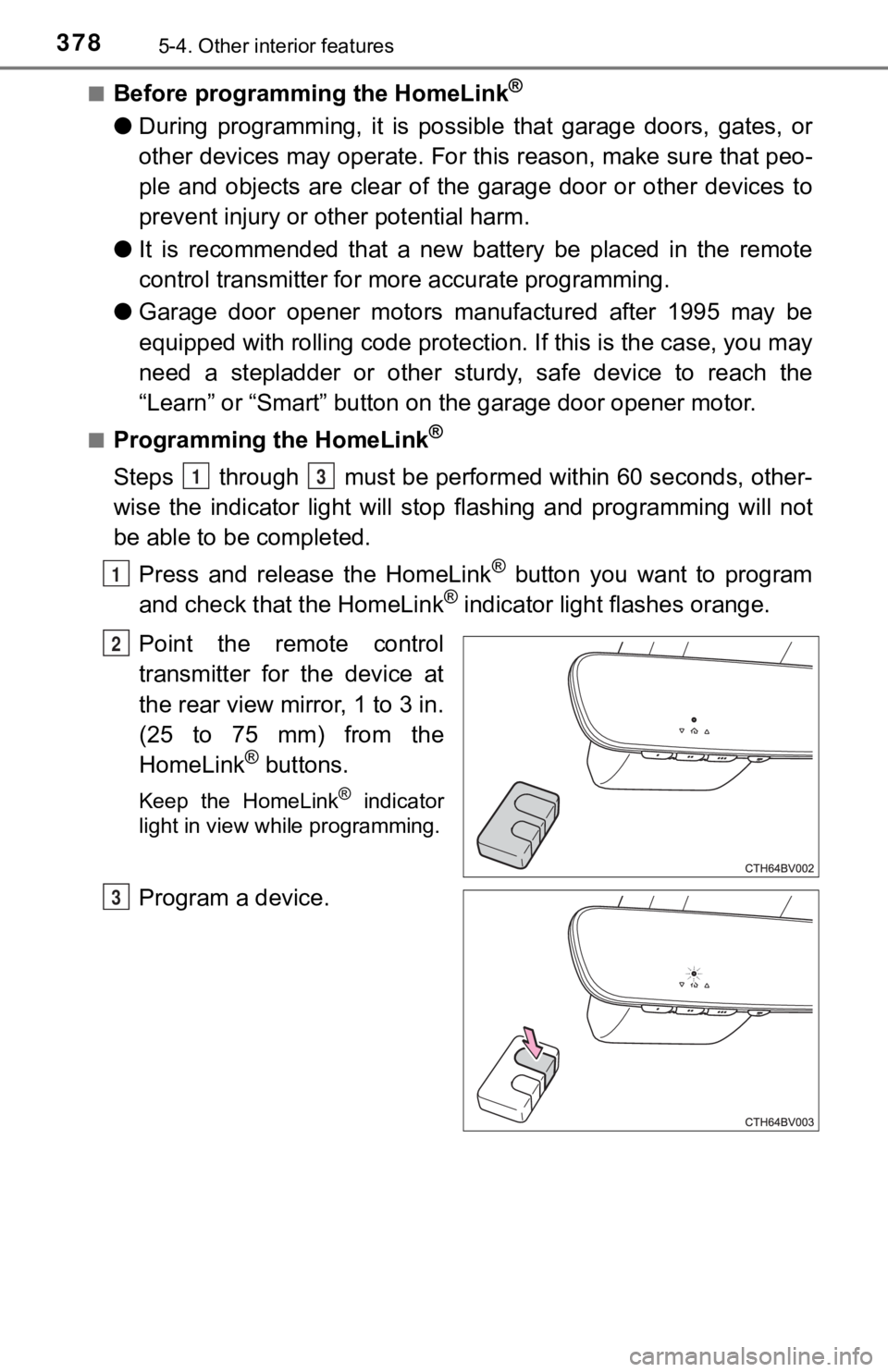
Press and release the HomeLink
® button you want to program
and check that the HomeLink® indicator light flashes orange.
Point the remote control
transmitter for the device at
the rear view mirror, 1 to 3 in.
(25 to 75 mm) from the
HomeLink
® buttons.
Keep the HomeLink® indicator
light in view while programming.
Program a device.
13
1
2
3
Page 379 of 572

3795-4. Other interior features
5
Interior features
Programming a device other than an entry gate (for U.S.A.
owners)
Press and hold the remote control transmitter button until the
HomeLink
® indicator light changes from slowly flashing orange to
rapidly flashing gre en (rolling code) or continuously lit green
(fixed code), then release the button.
Programming an entry gate (for U.S.A. owners)/Programming
a device in the Canadian market
Press and release the remote con trol transmitter button at 2 sec-
ond intervals, repeatedly, until the HomeLink
® indicator light
changes from slowly flashing orange to rapidly flashing green
(rolling code) or continuous ly lit green (fixed code).
Test the HomeLink
® operation by pressing the newly pro-
grammed button and observi ng the indicator light:
● Indicator light illuminates: Progr amming of a fixed code device
has completed. The garage door or other device should operate
when a HomeLink
® button is pressed and released.
● Indicator light flashes rapidly: The garage door opener motor o r
other device is equipped with a rolling code. To complete pro-
gramming, firmly press and hold the HomeLink
® button for 2 sec-
onds then release it.
● If the garage door or other device does not operate, proceed to
“Programming a rol ling code system”.
Repeat the steps above to program another device for any of the
remaining HomeLink
® buttons.
4
5
Page 384 of 572
3845-4. Other interior features
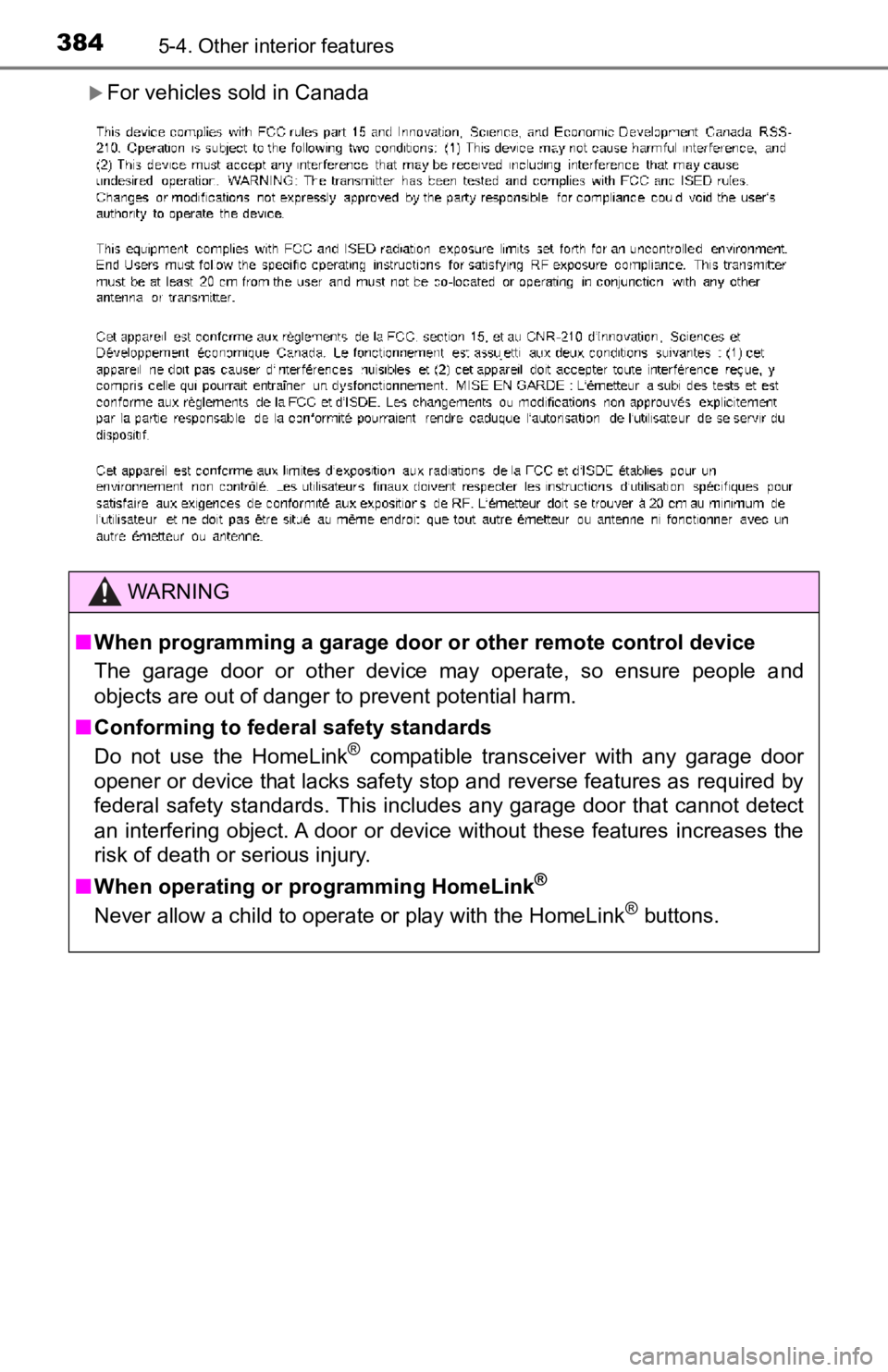
For vehicles sold in Canada
WARNING
■When programming a garage door or other remote control device
The garage door or other device may operate, so ensure people a nd
objects are out of danger to prevent potential harm.
■ Conforming to federal safety standards
Do not use the HomeLink
® compatible transceiver with any garage door
opener or device that lacks safety stop and reverse features as required by
federal safety standards. This includes any garage door that cannot detect
an interfering object. A door or device without these features increases the
risk of death or serious injury.
■ When operating or programming HomeLink
®
Never allow a child to operate or play with the HomeLink® buttons.
Page 411 of 572
4116-3. Do-it-yourself maintenance
6
Maintenance and care
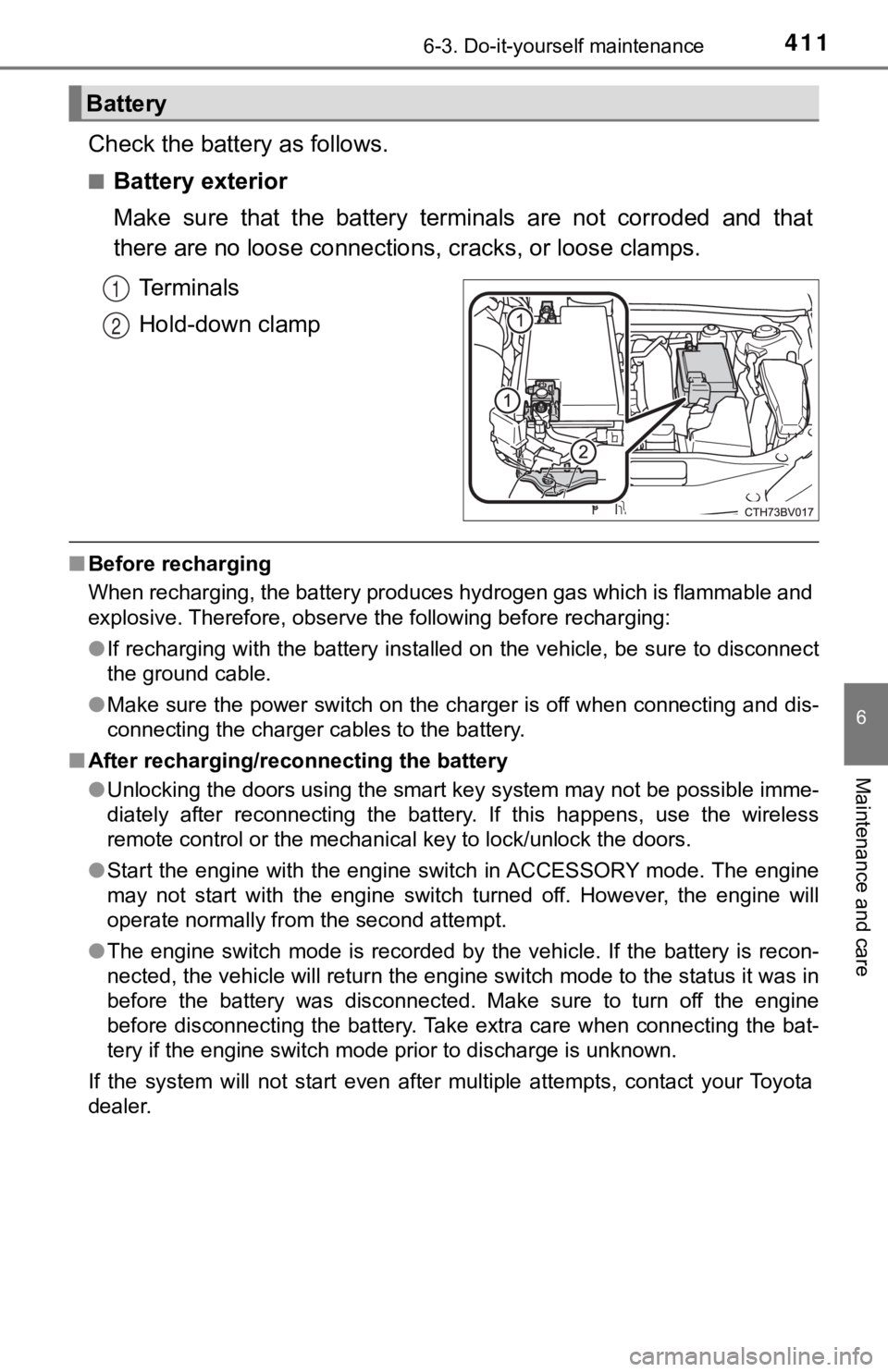
Check the battery as follows.
■Battery exterior
Make sure that the battery terminals are not corroded and that
there are no loose connections, cracks, or loose clamps.
Terminals
Hold-down clamp
■ Before recharging
When recharging, the battery produces hydrogen gas which is flammable and
explosive. Therefore, observe the following before recharging:
●If recharging with the battery installed on the vehicle, be sur e to disconnect
the ground cable.
● Make sure the power switch on the charger is off when connectin g and dis-
connecting the charger cables to the battery.
■ After recharging/reconnecting the battery
●Unlocking the doors using the smart key system may not be possi ble imme-
diately after reconnecting the battery. If this happens, use the wireless
remote control or the mechanical key to lock/unlock the doors.
● Start the engine with the engine switch in ACCESSORY mode. The engine
may not start with the engine switch turned off. However, the e ngine will
operate normally from the second attempt.
● The engine switch mode is recorded by the vehicle. If the batte ry is recon-
nected, the vehicle will return the engine switch mode to the s tatus it was in
before the battery was disconnected. Make sure to turn off the engine
before disconnecting the battery. Take extra care when connecti ng the bat-
tery if the engine switch mode prior to discharge is unknown.
If the system will not start even after multiple attempts, contact your Toyota
dealer.
Battery
1
2
Page 436 of 572
4366-3. Do-it-yourself maintenance
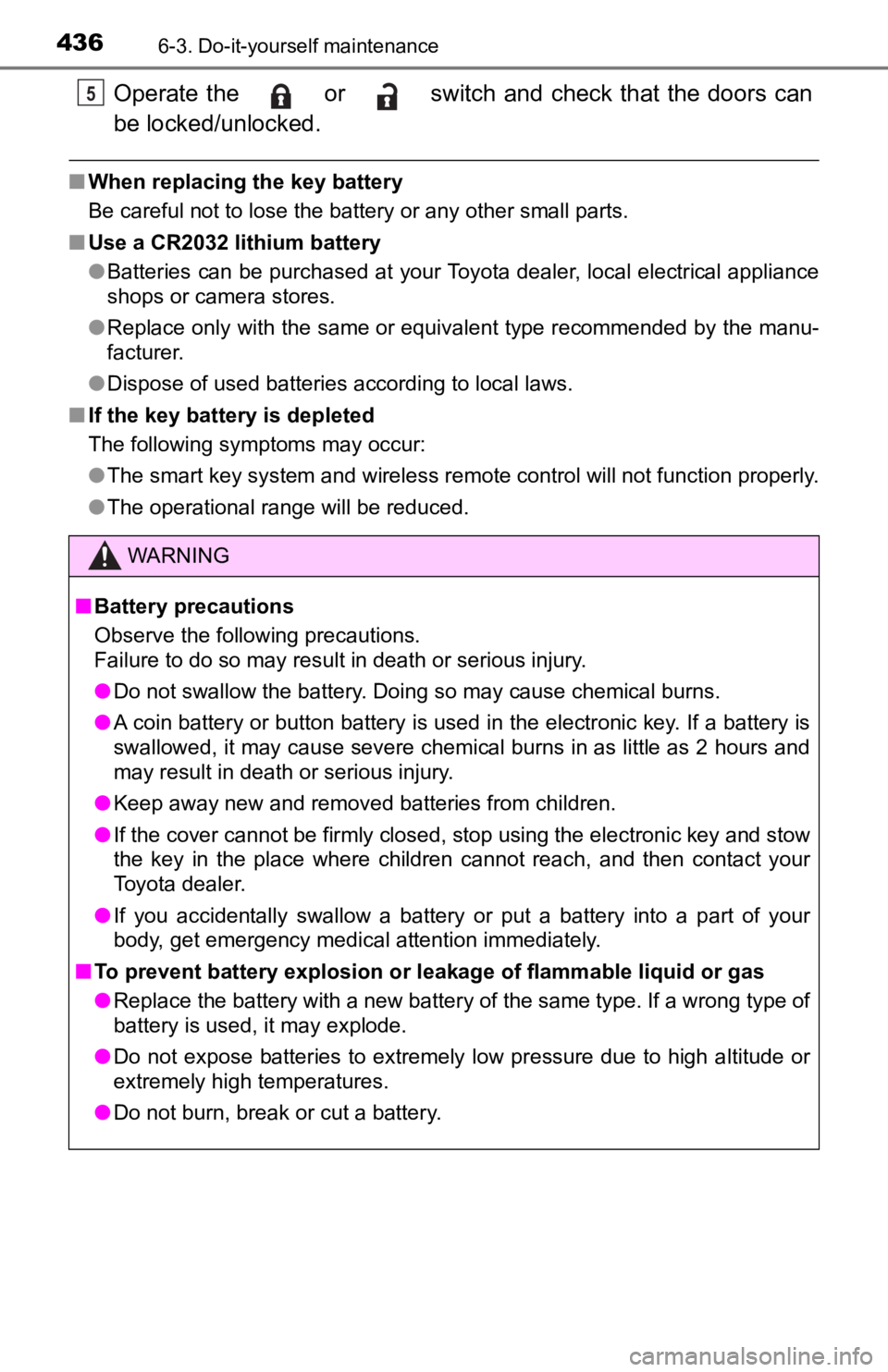
Operate the or switch and check that the doors can
be locked/unlocked.
■When replacing the key battery
Be careful not to lose the battery or any other small parts.
■ Use a CR2032 lithium battery
●Batteries can be purchased at your Toyota dealer, local electrical appliance
shops or camera stores.
● Replace only with the same or equivalent type recommended by the manu-
facturer.
● Dispose of used batteries according to local laws.
■ If the key battery is depleted
The following symptoms may occur:
●The smart key system and wireless remote control will not funct ion properly.
● The operational range will be reduced.
WARNING
■ Battery precautions
Observe the following precautions.
Failure to do so may result in death or serious injury.
● Do not swallow the battery. Doing so may cause chemical burns.
● A coin battery or button battery is used in the electronic key. If a battery is
swallowed, it may cause severe chemical burns in as little as 2 hours and
may result in death or serious injury.
● Keep away new and removed batteries from children.
● If the cover cannot be firmly closed, stop using the electronic key and stow
the key in the place where children cannot reach, and then contact your
Toyota dealer.
● If you accidentally swallow a battery or put a battery into a part of your
body, get emergency medical attention immediately.
■ To prevent battery explosion or leakage of flammable liquid or gas
● Replace the battery with a new battery of the same type. If a w rong type of
battery is used, it may explode.
● Do not expose batteries to extremely low pressure due to high altitude or
extremely high temperatures.
● Do not burn, break or cut a battery.
5
Page 484 of 572
4847-2. Steps to take in an emergency
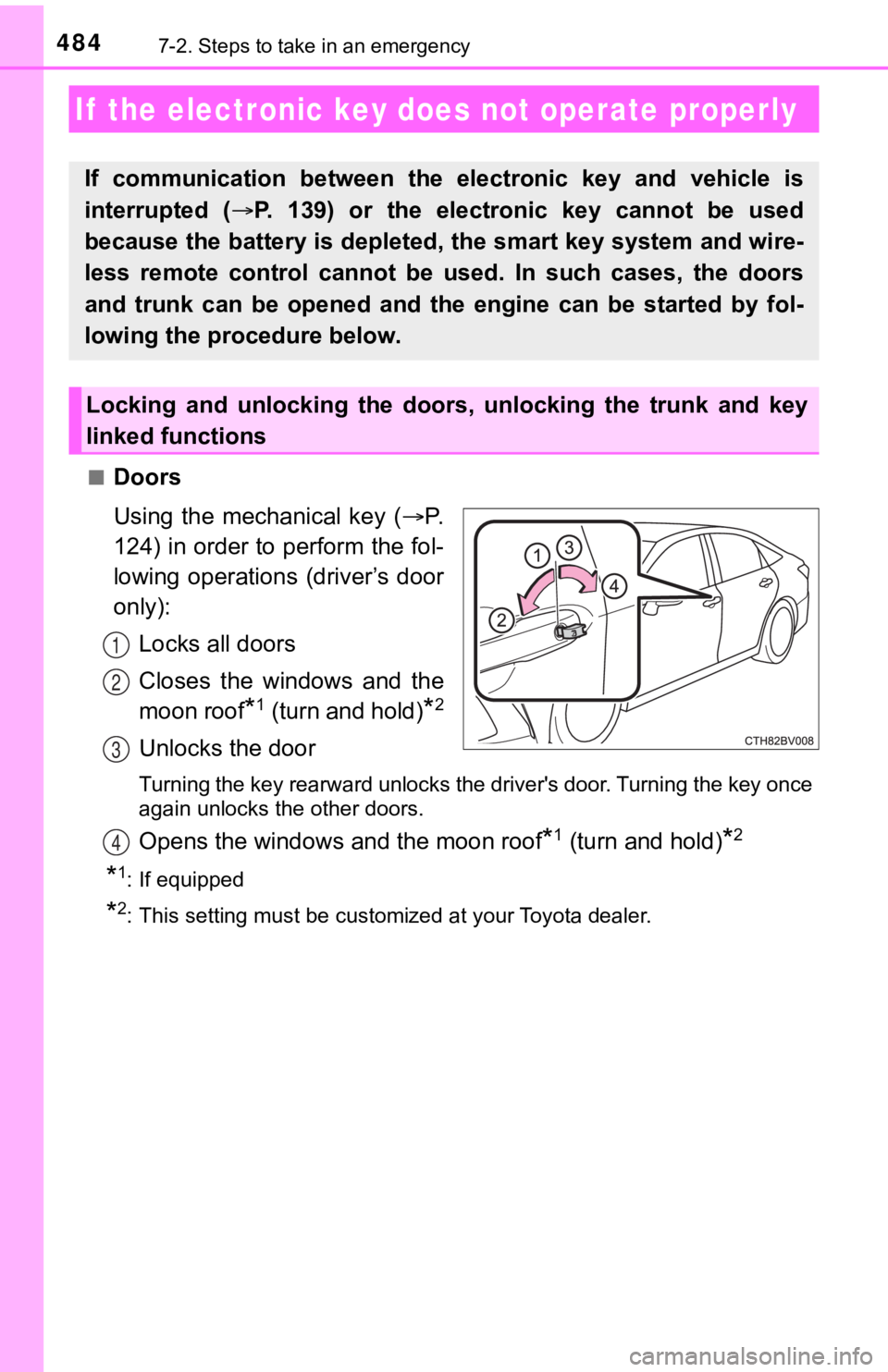
■Doors
Using the mechanical key (P.
124) in order to perform the fol-
lowing operations (driver’s door
only):
Locks all doors
Closes the windows and the
moon roof
*1 (turn and hold)*2
Unlocks the door
Turning the key rearward unlocks the driver's door. Turning the key once
again unlocks the other doors.
Opens the windows and the moon roof*1 (turn and hold)*2
*1: If equipped
*2: This setting must be customized at your Toyota dealer.
If the electronic key does not operate properly
If communication between the electronic key and vehicle is
interrupted (P. 139) or the electronic key cannot be used
because the battery is depleted, the smart key system and wire-
less remote control cannot be used. In such cases, the doors
and trunk can be opened and the engine can be started by fol-
lowing the procedure below.
Locking and unlocking the doors, unlocking the trunk and key
linked functions
1
2
3
4
Page 527 of 572
5278-2. Customization
8
Vehicle specifications
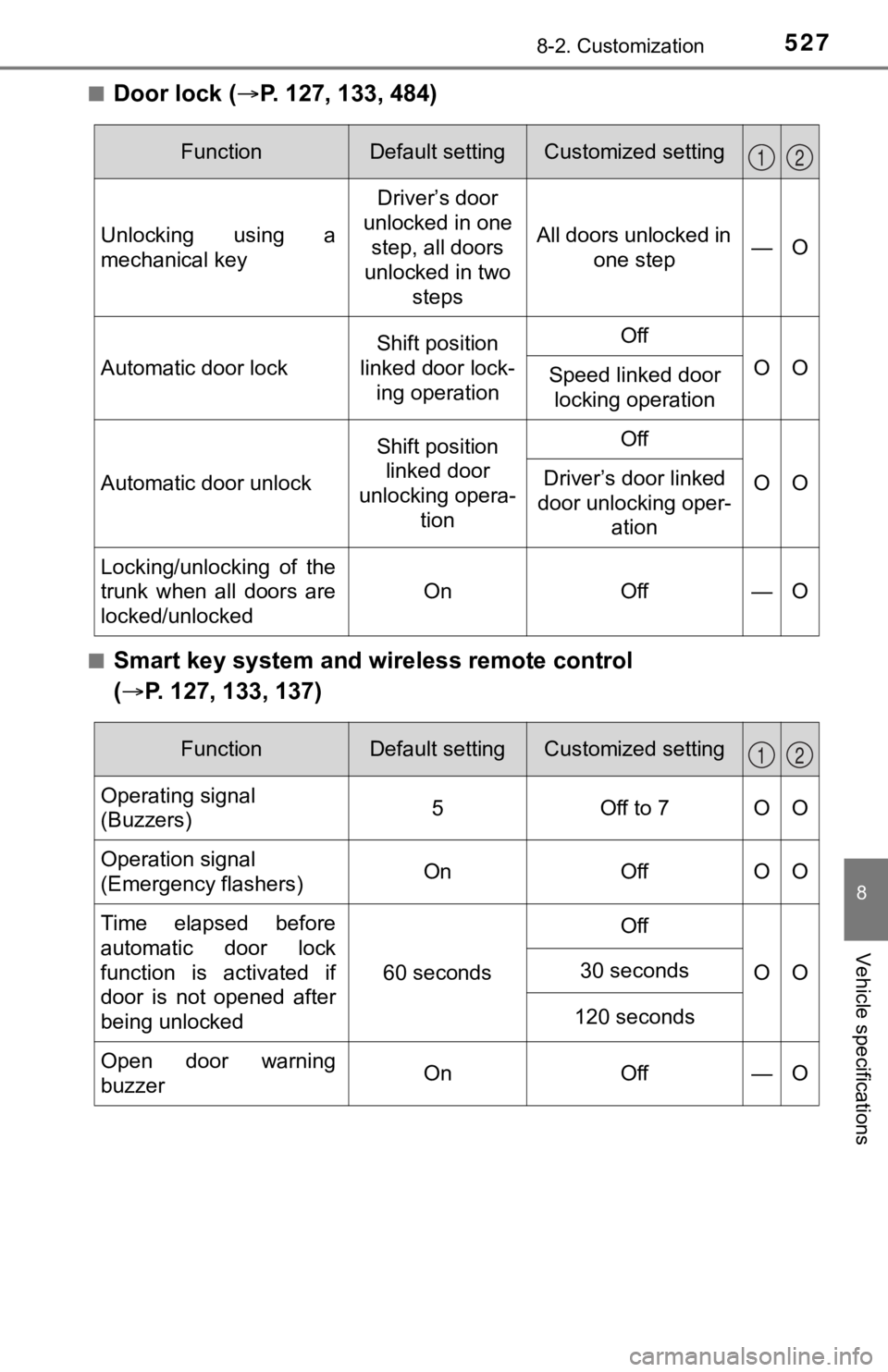
■Door lock (P. 127, 133, 484)
■Smart key system and wireless remote control
( P. 127, 133, 137)
FunctionDefault settingCustomized setting
Unlocking using a
mechanical key Driver’s door
unlocked in one step, all doors
unlocked in two
steps All doors unlocked in
one step —O
Automatic door lock
Shift position
linked door lock- ing operationOff
OOSpeed linked door locking operation
Automatic door unlock
Shift position linked door
unlocking opera- tionOff
OODriver’s door linked
door unlocking oper- ation
Locking/unlocking of the
trunk when all doors are
locked/unlocked
OnOff—O
12
FunctionDefault settingCustomized setting
Operating signal
(Buzzers)5Off to 7OO
Operation signal
(Emergency flashers) On Off O O
Time elapsed before
automatic door lock
function is activated if
door is not opened after
being unlocked 60 seconds
Off
OO
30 seconds
120 seconds
Open door warning
buzzerOnOff —O
12
Page 528 of 572
5288-2. Customization
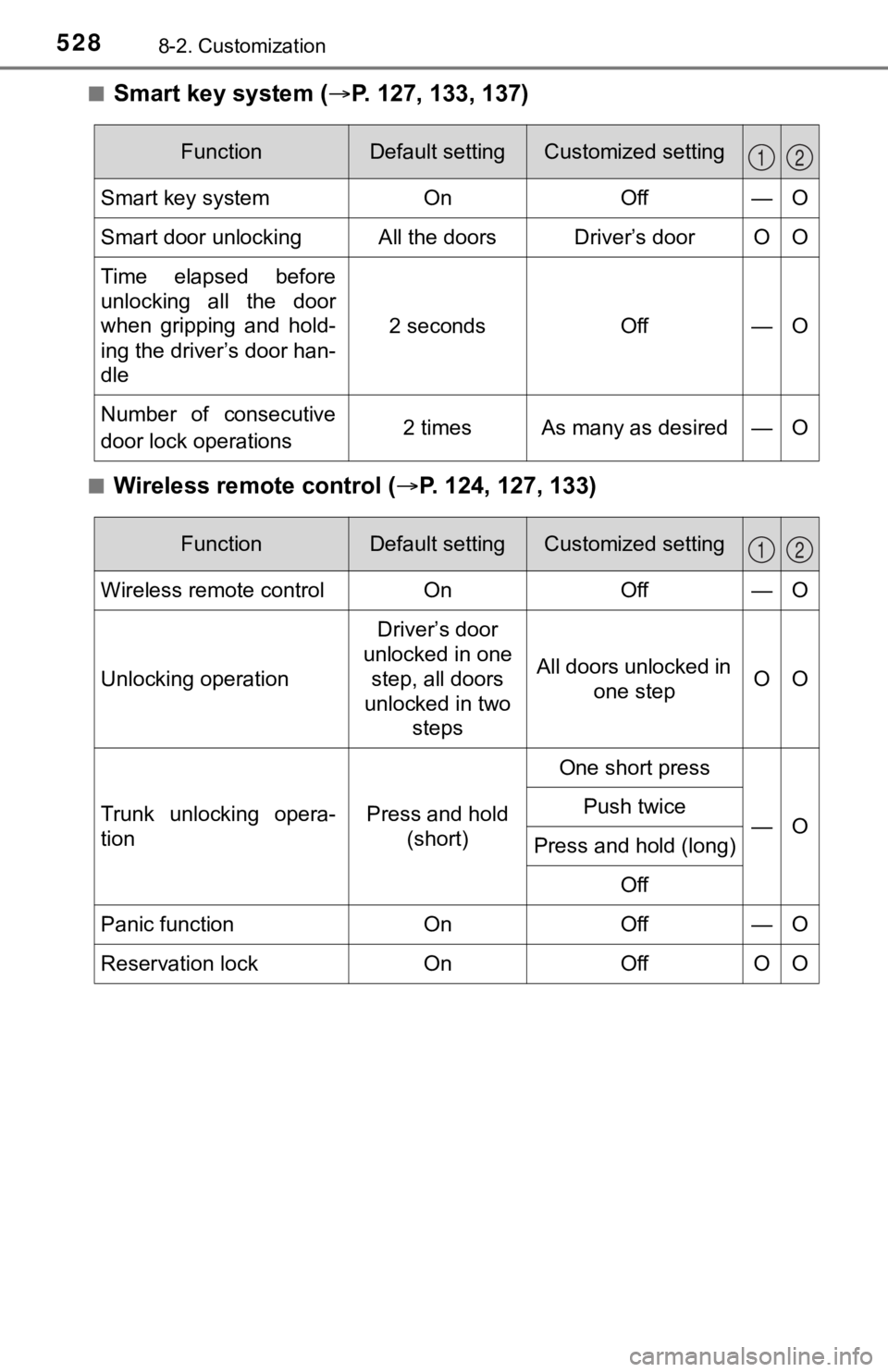
■Smart key system (P. 127, 133, 137)
■Wireless remote control ( P. 124, 127, 133)
FunctionDefault settingCustomized setting
Smart key systemOnOff—O
Smart door unlockingAll the doorsDriver’s door O O
Time elapsed before
unlocking all the door
when gripping and hold-
ing the driver’s door han-
dle
2 secondsOff—O
Number of consecutive
door lock operations 2 times As many as desired — O
12
FunctionDefault settingCustomized setting
Wireless remote controlOnOff—O
Unlocking operation
Driver’s door
unlocked in one step, all doors
unlocked in two steps
All doors unlocked in one stepOO
Trunk unlocking opera-
tionPress and hold (short)
One short press
—OPush twice
Press and hold (long)
Off
Panic functionOnOff—O
Reservation lockOnOffOO
12
Page 529 of 572
5298-2. Customization
8
Vehicle specifications
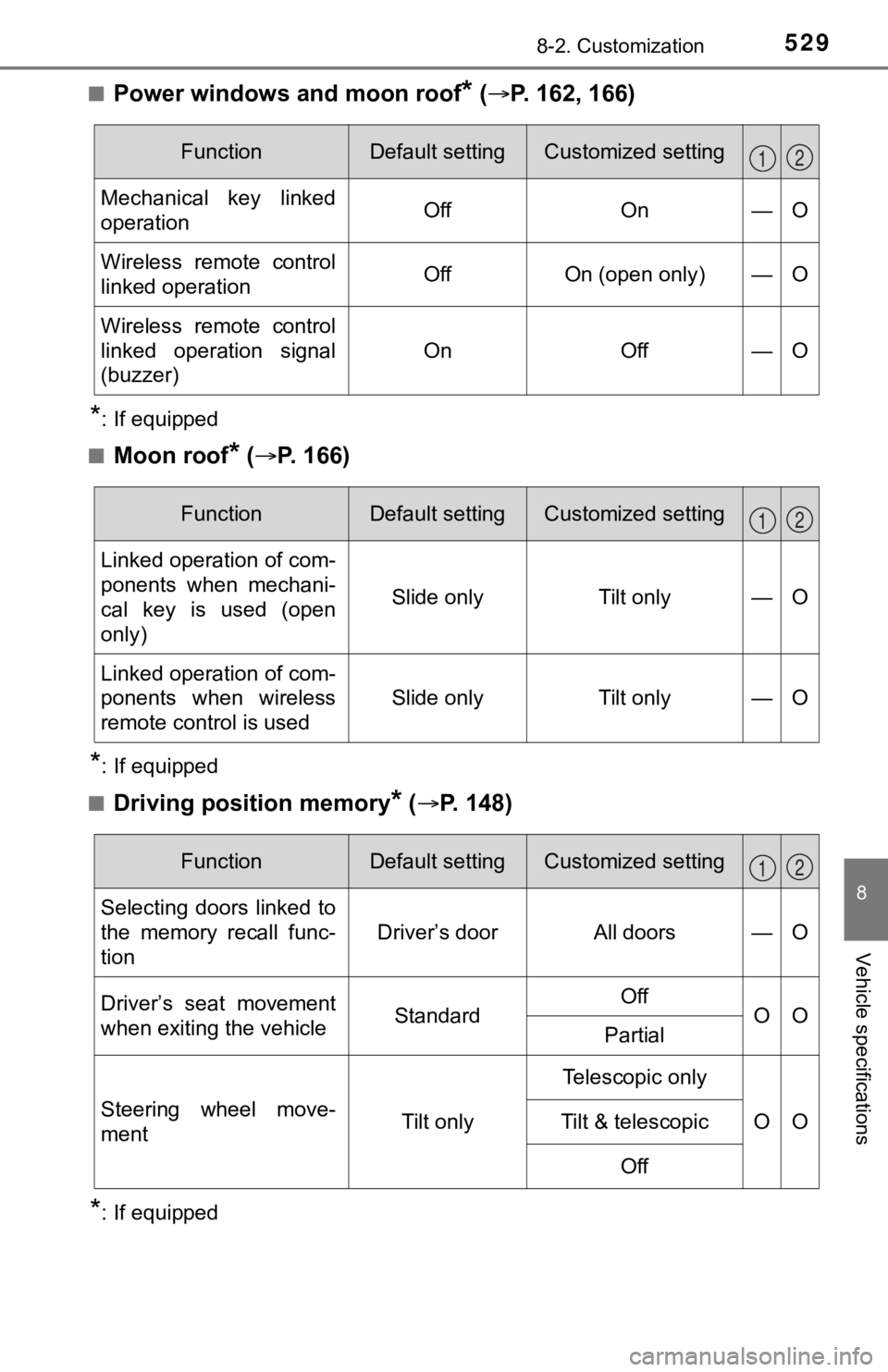
■Power windows and moon roof* ( P. 162, 166)
*: If equipped
■
Moon roof* ( P. 166)
*: If equipped
■
Driving position memory* ( P. 148)
*: If equipped
FunctionDefault settingCustomized setting
Mechanical key linked
operationOffOn—O
Wireless remote control
linked operationOffOn (open only)—O
Wireless remote control
linked operation signal
(buzzer)
OnOff—O
12
FunctionDefault settingCustomized setting
Linked operation of com-
ponents when mechani-
cal key is used (open
only)
Slide onlyTilt only—O
Linked operation of com-
ponents when wireless
remote control is used
Slide onlyTilt only—O
12
FunctionDefault settingCustomized setting
Selecting doors linked to
the memory recall func-
tion
Driver’s doorAll doors—O
Driver’s seat movement
when exiting the vehicleStandardOffOOPartial
Steering wheel move-
ment Tilt onlyTelescopic only
OO
Tilt & telescopic
Off
12