brake TOYOTA AVALON 2022 Owner's Guide
[x] Cancel search | Manufacturer: TOYOTA, Model Year: 2022, Model line: AVALON, Model: TOYOTA AVALON 2022Pages: 572, PDF Size: 9.42 MB
Page 206 of 572
2064-3. Operating the lights and wipers
■Daytime running light system
●Type A:
The daytime running lights illuminate using the same lights as the low beam
headlights and illuminate dimmer than the low beam headlights.
Type B:
The daytime running lights illuminate using the same lights as the parking
lights and illuminate brighter than the parking lights.
● To make your vehicle more visible to other drivers during dayti me driving,
the daytime running lights turn on automatically when all of the following
conditions are met. (The daytime running lights are not designe d for use at
night.)
• The engine is running
• The parking brake is released
• The headlight switch is in the or
* position
*: When the surroundings are bright
The daytime running lights remain on after they illuminate, even if the parking
brake is set again.
● For U.S.A.: Daytime running lights can be turned off by operati ng the switch.
● Compared to turning on the headlights, the daytime running ligh t system
offers greater durability and consumes less electricity, so it can help improve
fuel economy.
■ Cornering lights (if equipped)
When the cornering lights are on for more than 30 minutes, they will turn off
automatically.
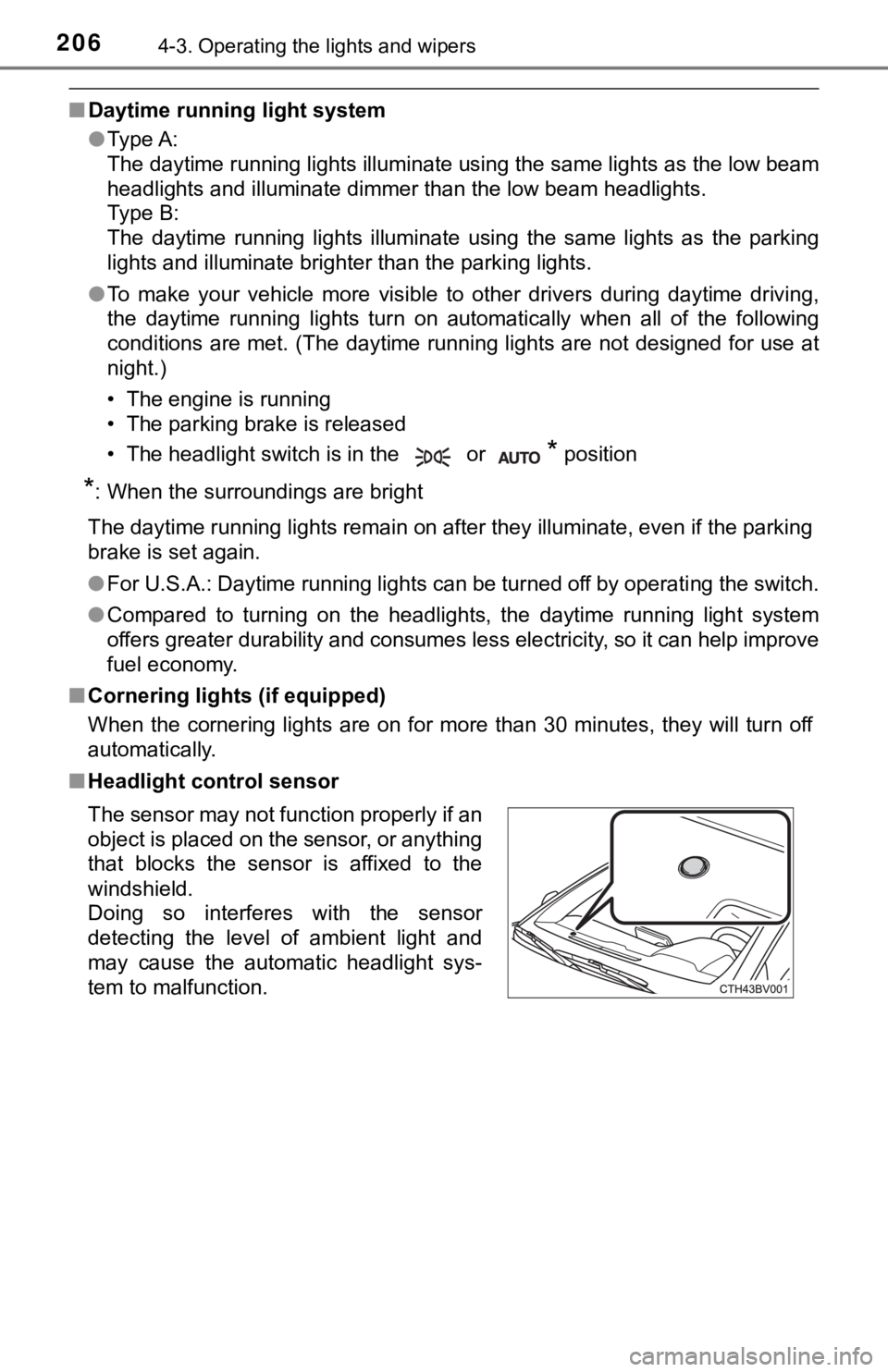
■ Headlight control sensor
The sensor may not function properly if an
object is placed on the sensor, or anything
that blocks the sensor is affixed to the
windshield.
Doing so interferes with the sensor
detecting the level of ambient light and
may cause the automatic headlight sys-
tem to malfunction.
Page 228 of 572
2284-5. Using the driving support systems
The system can detect the following (The detectable objects dif fers
depending on the function.):
● Vehicles
● Bicyclists
● Pedestrians
■Pre-collision warning
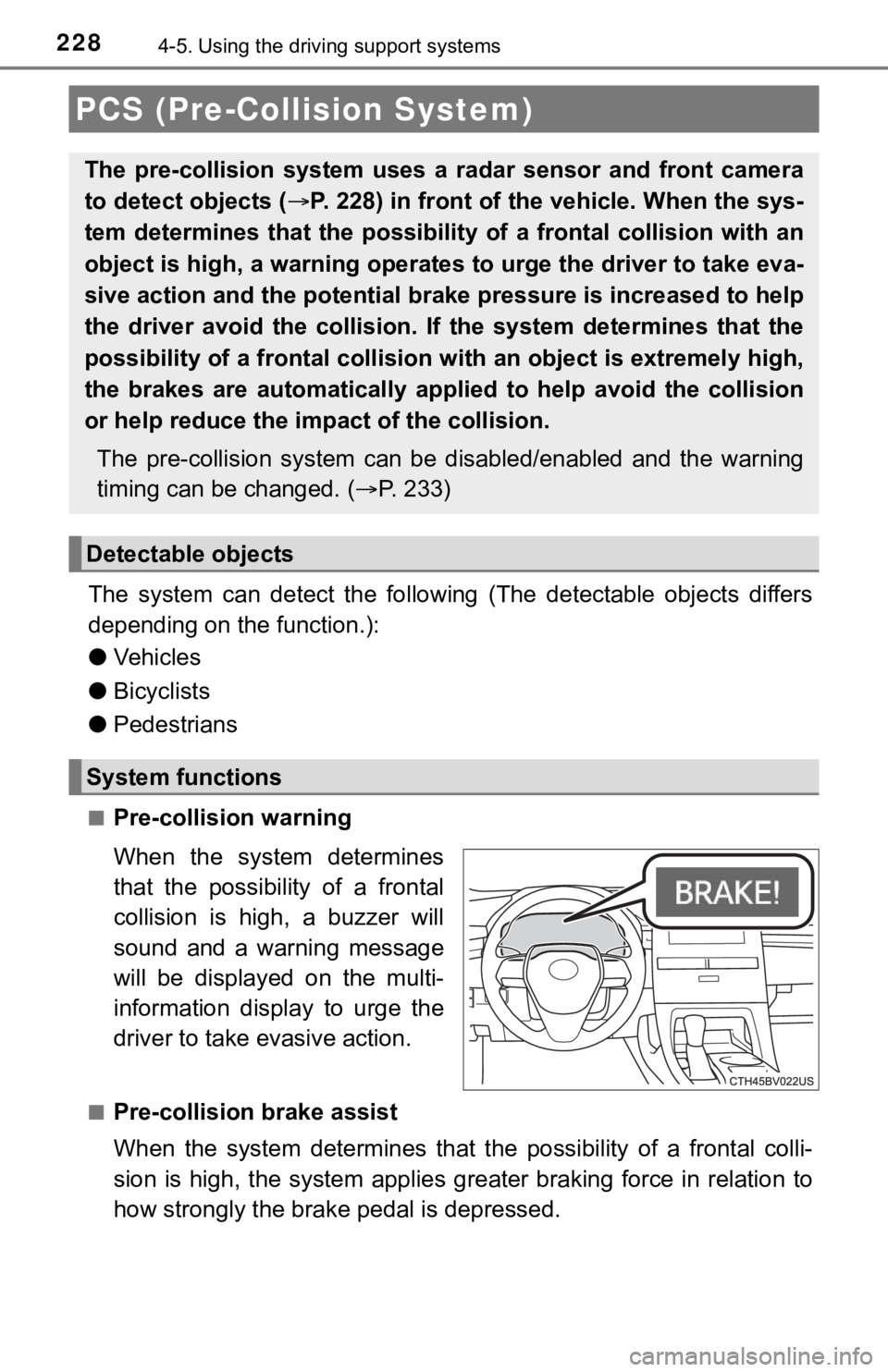
When the system determines
that the possibility of a frontal
collision is high, a buzzer will
sound and a warning message
will be displayed on the multi-
information display to urge the
driver to take evasive action.
■Pre-collision brake assist
When the system determines that the possibility of a frontal colli-
sion is high, the system applies greater braking force in relat ion to
how strongly the brake pedal is depressed.
PCS (Pre-Collision System)
The pre-collision system uses a radar sensor and front camera
to detect objects ( P. 228) in front of the vehicle. When the sys-
tem determines that the possibility of a frontal collision with an
object is high, a warning operates to urge the driver to take e va-
sive action and the potential brake pressure is increased to he lp
the driver avoid the collision. If the system determines that t he
possibility of a frontal collision with an object is extremely high,
the brakes are automatically applied to help avoid the collisio n
or help reduce the impa ct of the collision.
The pre-collision system can b e disabled/enabled and the warnin g
timing can be changed. ( P. 2 3 3 )
Detectable objects
System functions
Page 229 of 572
2294-5. Using the driving support systems
4
Driving
■Pre-collision braking
If the system determines that the possibility of a frontal collision is
extremely high, the brakes are automatically applied to help avoid
the collision or reduce th e impact of the collision.
■Emergency steering assist
If the system determines that the possibility of a frontal collision is
high and that there is sufficient space for the vehicle to be s teered
into within its lane, and the dr iver has begun evasive maneuver or
steering, emergency steering assist will assist the steering move-
ments to help enhance the vehicle stability and for lane depart ure
prevention.
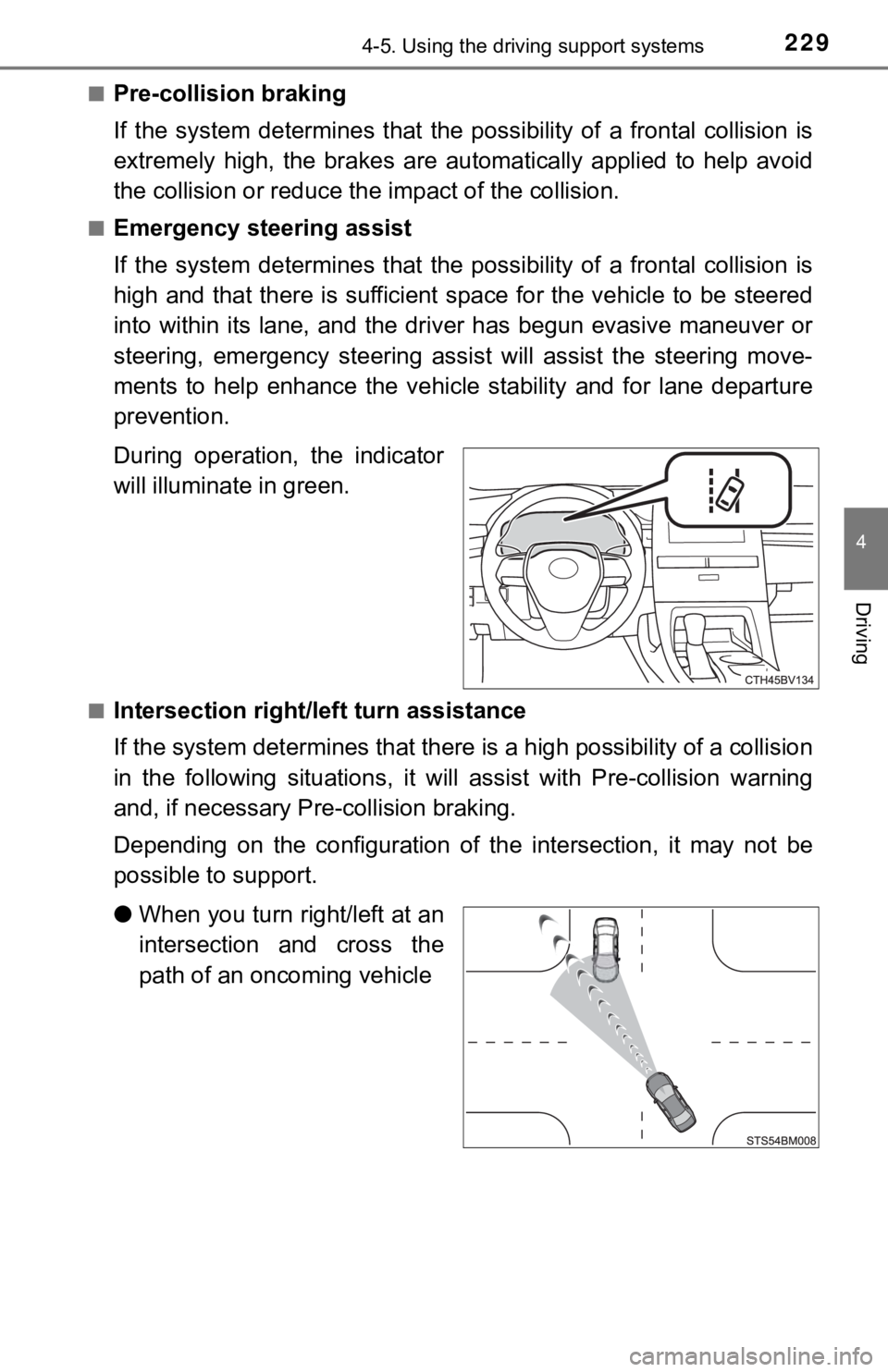
During operation, the indicator
will illuminate in green.
■Intersection right/left turn assistance
If the system determines that t here is a high possibility of a collision
in the following situations, it will assist with Pre-collision warning
and, if necessary Pre-collision braking.
Depending on the configuration of the intersection, it may not be
possible to support.
● When you turn right/left at an
intersection and cross the
path of an oncoming vehicle
Page 231 of 572
2314-5. Using the driving support systems
4
Driving
WARNING
■Pre-collision braking
● When the pre-collision braking function is operating, a large a mount of
braking force will be applied.
● If the vehicle is stopped by the operation of the pre-collision braking func-
tion, the pre-collision braking function operation will be canceled after
approximately 2 seconds. Depress the brake pedal as necessary.
● The pre-collision braking function may not operate if certain operations are
performed by the driver. If the accelerator pedal is being depressed
strongly or the steering wheel is being turned, the system may determine
that the driver is taking evasive action and possibly prevent the pre-colli-
sion braking function from operating.
● In some situations, while the pre-collision braking function is operating,
operation of the function may be canceled if the accelerator pedal is
depressed strongly or the steering wheel is turned and the syst em deter-
mines that the driver is taking evasive action.
● If the brake pedal is being depressed, the system may determine that the
driver is taking evasive action and possibly delay the operation timing of
the pre-collision braking function.
■ Emergency steering assist
● As emergency steering assist operation will be canceled when th e system
determines that lane departure prevention function has been completed.
● Emergency steering assist may not operate or may be cancel in the follow-
ing cases as the system may determine the driver is taking acti ons.
• If the accelerator pedal is being depressed strongly, the steering wheel is being operated sharply, the brake pedal is being depressed o r the
turn signal lever is being operated. In this case, the system m ay deter-
mine that the driver is taking evasive action and the emergency steering
assist may not operate.
• In some situations, while the emergency steering assist is ope rating,
operation of the function may be canceled if the accelerator pe dal is
depressed strongly, the steeri ng wheel is operated sharply or t he brake
pedal is being depressed and the system determines that the dri ver is
taking evasive action.
• When the emergency steering assist is operating, if the steering wheel
is held firmly or is operated in the opposite direction to that which the
system is generating torque, the function may be canceled.
Page 234 of 572
2344-5. Using the driving support systems
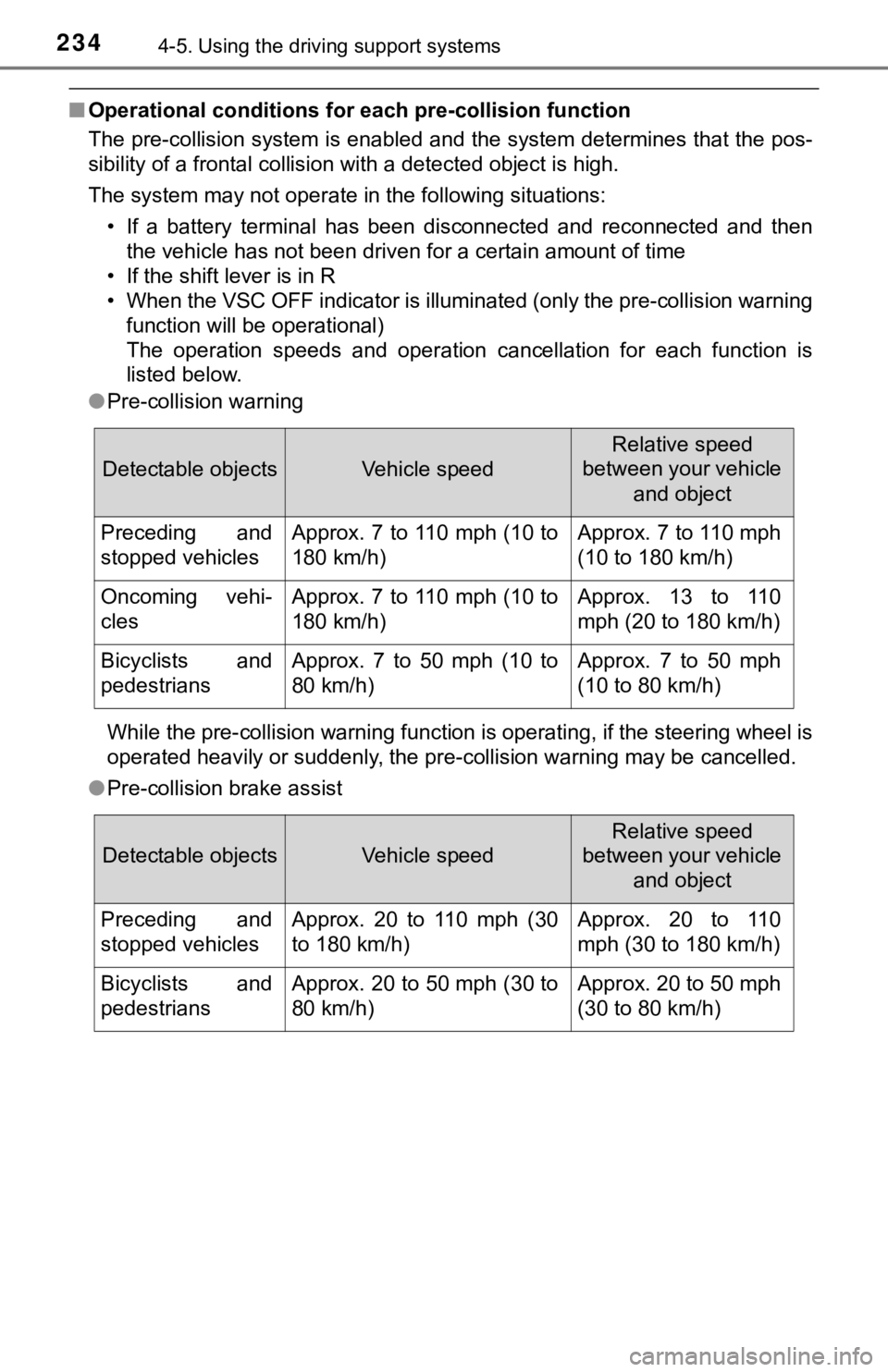
■Operational conditions for each pre-collision function
The pre-collision system is enabled and the system determines that the pos-
sibility of a frontal collision with a detected object is high.
The system may not operate in the following situations:
• If a battery terminal has been disconnected and reconnected an d then
the vehicle has not been driven for a certain amount of time
• If the shift lever is in R
• When the VSC OFF indicator is illuminated (only the pre-collis ion warning
function will be operational)
The operation speeds and operation cancellation for each functi on is
listed below.
● Pre-collision warning
While the pre-collision warning function is operating, if the s teering wheel is
operated heavily or suddenly, the pre-collision warning may be cancelled.
● Pre-collision brake assist
Detectable objectsVehicle speed
Relative speed
between your vehicle
and object
Preceding and
stopped vehiclesApprox. 7 to 110 mph (10 to
180 km/h)Approx. 7 to 110 mph
(10 to 180 km/h)
Oncoming vehi-
clesApprox. 7 to 110 mph (10 to
180 km/h)Approx. 13 to 110
mph (20 to 180 km/h)
Bicyclists and
pedestriansApprox. 7 to 50 mph (10 to
80 km/h)Approx. 7 to 50 mph
(10 to 80 km/h)
Detectable objectsVehicle speed
Relative speed
between your vehicle
and object
Preceding and
stopped vehiclesApprox. 20 to 110 mph (30
to 180 km/h)Approx. 20 to 110
mph (30 to 180 km/h)
Bicyclists and
pedestriansApprox. 20 to 50 mph (30 to
80 km/h)Approx. 20 to 50 mph
(30 to 80 km/h)
Page 235 of 572
2354-5. Using the driving support systems
4
Driving
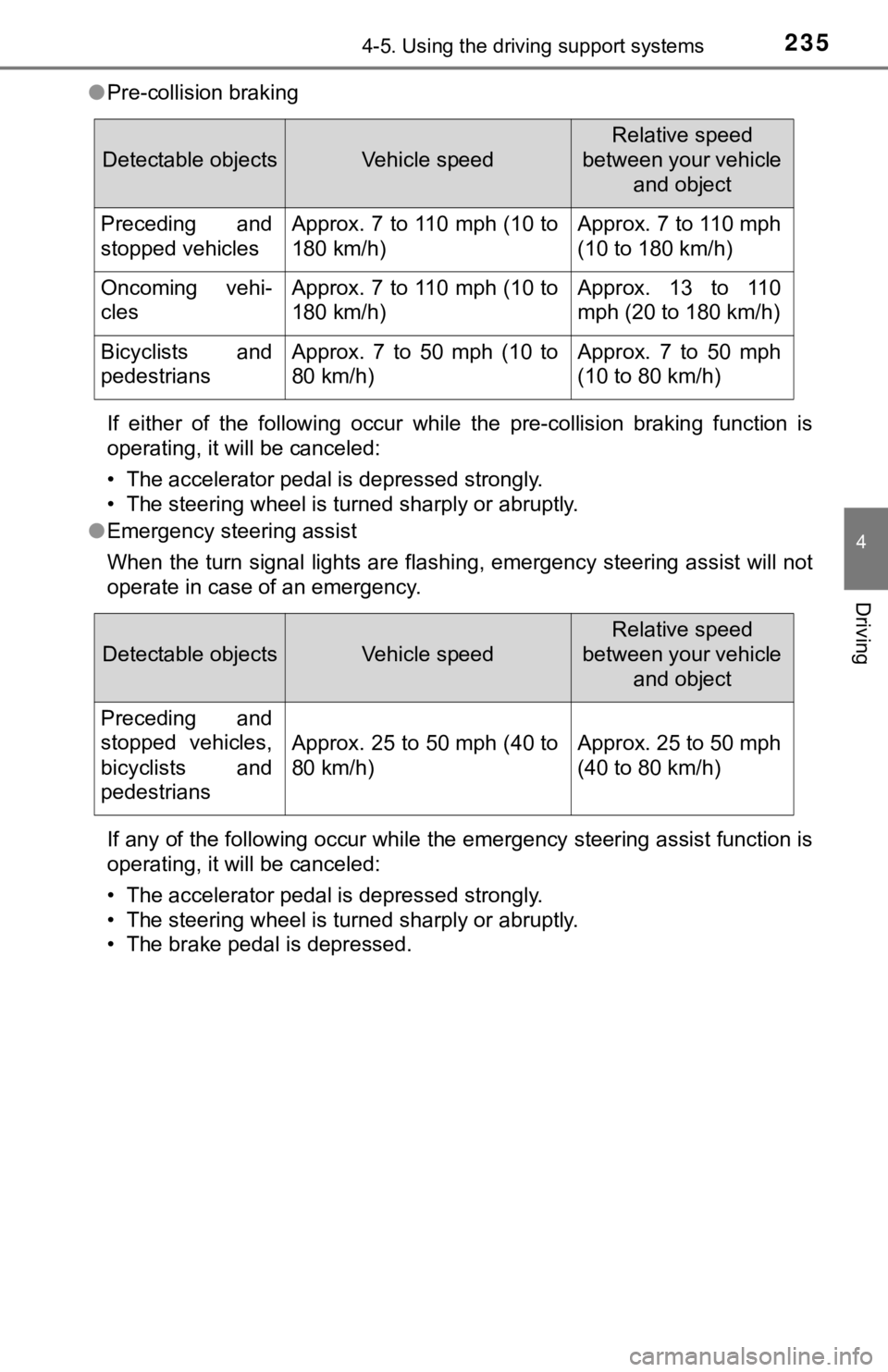
●Pre-collision braking
If either of the following occur while the pre-collision brakin g function is
operating, it will be canceled:
• The accelerator pedal is depressed strongly.
• The steering wheel is turned sharply or abruptly.
● Emergency steering assist
When the turn signal lights are flashing, emergency steering as sist will not
operate in case of an emergency.
If any of the following occur while the emergency steering assi st function is
operating, it will be canceled:
• The accelerator pedal is depressed strongly.
• The steering wheel is turned sharply or abruptly.
• The brake pedal is depressed.
Detectable objectsVehicle speed
Relative speed
between your vehicle and object
Preceding and
stopped vehiclesApprox. 7 to 110 mph (10 to
180 km/h)Approx. 7 to 110 mph
(10 to 180 km/h)
Oncoming vehi-
clesApprox. 7 to 110 mph (10 to
180 km/h)Approx. 13 to 110
mph (20 to 180 km/h)
Bicyclists and
pedestriansApprox. 7 to 50 mph (10 to
80 km/h)Approx. 7 to 50 mph
(10 to 80 km/h)
Detectable objectsVehicle speed
Relative speed
between your vehicle and object
Preceding and
stopped vehicles,
bicyclists and
pedestrians
Approx. 25 to 50 mph (40 to
80 km/h)Approx. 25 to 50 mph
(40 to 80 km/h)
Page 242 of 572

2424-5. Using the driving support systems
●In some situations such as the following, sufficient braking force or steering
force may not be obtained, preventing the system from performin g properly:
• If the braking functions cannot operate to their full extent, such as when
the brake parts are extremely cold, extremely hot, or wet
• If the vehicle is not properly maintained (brakes or tires are excessively
worn, improper tire inflation pressure, etc.)
• When the vehicle is being driven on a gravel road or other sli ppery sur-
face
• When the road surface has deep wheel tracks
• When driving on a hill road
• When driving on a road that has inclines to the left or right
■ If VSC is disabled
●If VSC is disabled ( P. 330), the pre-collision brake assist and pre-collision
braking functions are also disabled.
● The PCS warning light will turn on and “VSC Turned Off Pre-Coll ision Brake
System Unavailable” will be displayed on the multi-information display.
Page 267 of 572
2674-5. Using the driving support systems
4
Driving
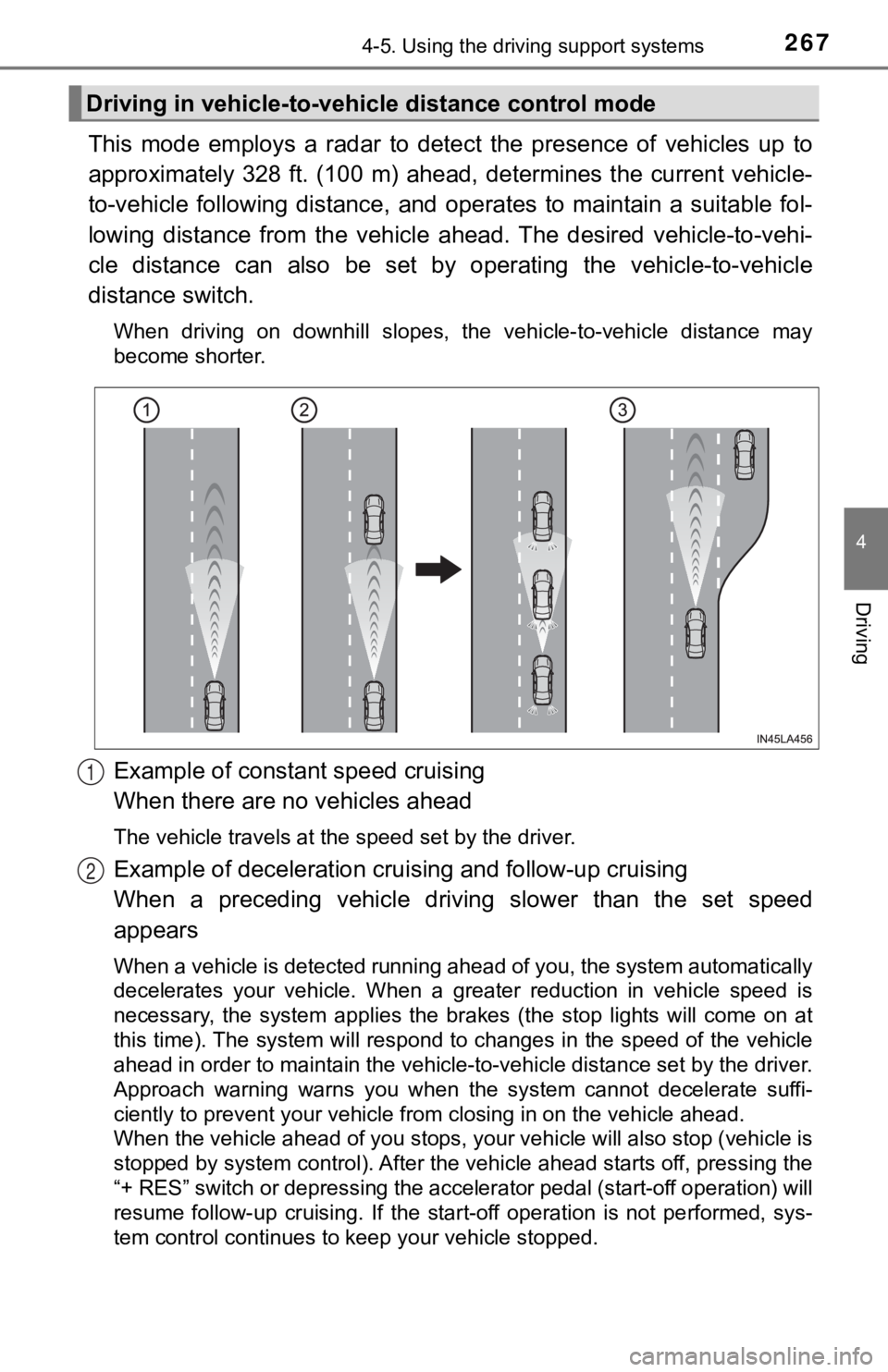
This mode employs a radar to detect the presence of vehicles up to
approximately 328 ft. (100 m) ahead, determines the current veh icle-
to-vehicle following distance, and operates to maintain a suita ble fol-
lowing distance from the vehicle ahead. The desired vehicle-to- vehi-
cle distance can also be set by operating the vehicle-to-vehicl e
distance switch.
When driving on downhill slopes, the vehicle-to-vehicle distance may
become shorter.
Example of constant speed cruising
When there are no vehicles ahead
The vehicle travels at the speed set by the driver.
Example of deceleration crui sing and follow-up cruising
When a preceding vehicle driving slower than the set speed
appears
When a vehicle is detected running ahead of you, the system automatically
decelerates your vehicle. When a greater reduction in vehicle s peed is
necessary, the system applies the brakes (the stop lights will come on at
this time). The system will respond to changes in the speed of the vehicle
ahead in order to maintain the vehicle-to-vehicle distance set by the driver.
Approach warning warns you when the system cannot decelerate su ffi-
ciently to prevent your vehicle from closing in on the vehicle ahead.
When the vehicle ahead of you stops, your vehicle will also stop (vehicle is
stopped by system control). After the vehicle ahead starts off, pressing the
“+ RES” switch or depressing the accelerator pedal (start-off o peration) will
resume follow-up cruising. If the start-off operation is not pe rformed, sys-
tem control continues to keep your vehicle stopped.
Driving in vehicle-to-vehi cle distance control mode
1
2
Page 271 of 572
2714-5. Using the driving support systems
4
Driving
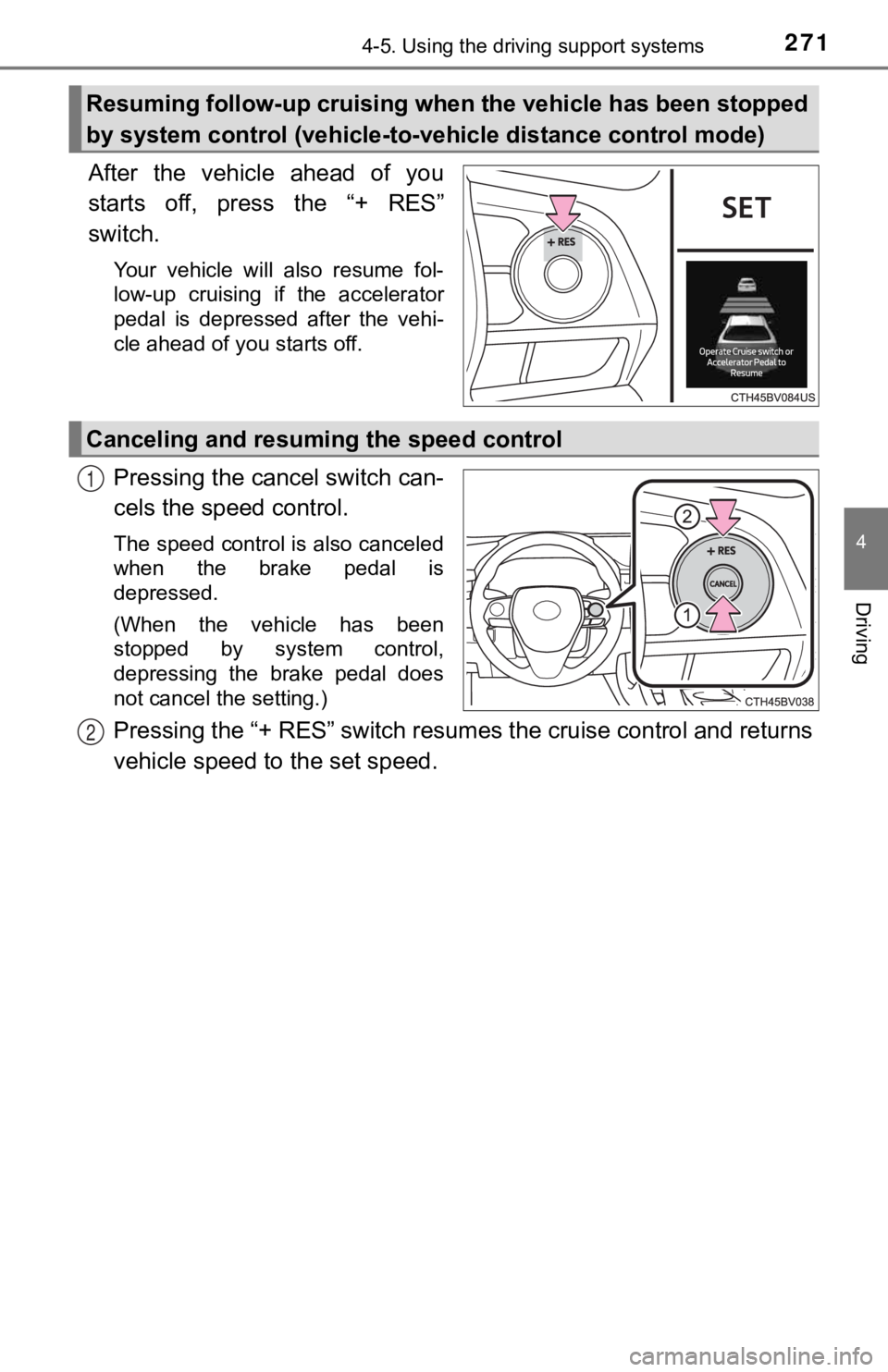
After the vehicle ahead of you
starts off, press the “+ RES”
switch.
Your vehicle will also resume fol-
low-up cruising if the accelerator
pedal is depressed after the vehi-
cle ahead of you starts off.
Pressing the cancel switch can-
cels the speed control.
The speed control is also canceled
when the brake pedal is
depressed.
(When the vehicle has been
stopped by system control,
depressing the brake pedal does
not cancel the setting.)
Pressing the “+ RES” switch resumes the cruise control and returns
vehicle speed to the set speed.
Resuming follow-up cruising when the vehicle has been stopped
by system control (vehicle-to- vehicle distance control mode)
Canceling and resuming the speed control
1
2
Page 272 of 572
2724-5. Using the driving support systems
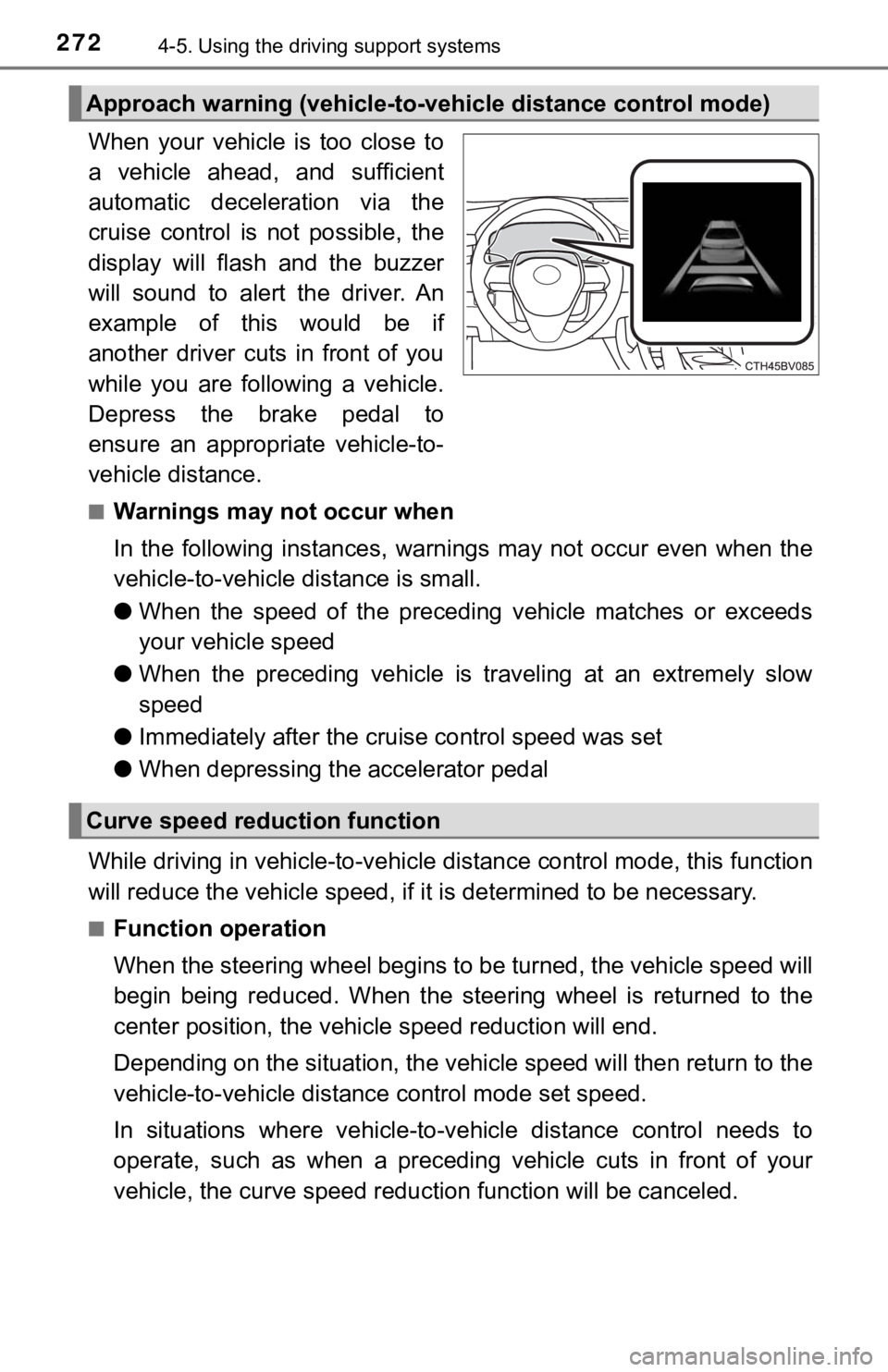
When your vehicle is too close to
a vehicle ahead, and sufficient
automatic deceleration via the
cruise control is not possible, the
display will flash and the buzzer
will sound to alert the driver. An
example of this would be if
another driver cuts in front of you
while you are following a vehicle.
Depress the brake pedal to
ensure an appropriate vehicle-to-
vehicle distance.
■Warnings may not occur when
In the following instances, war nings may not occur even when th e
vehicle-to-vehicle distance is small.
● When the speed of the preceding vehicle matches or exceeds
your vehicle speed
● When the preceding vehicle is traveling at an extremely slow
speed
● Immediately after the cruise control speed was set
● When depressing the accelerator pedal
While driving in vehicle-to-vehi cle distance control mode, this function
will reduce the vehicl e speed, if it is determined to be necess ary.
■Function operation
When the steering wheel begins to be turned, the vehicle speed will
begin being reduced. When the steering wheel is returned to the
center position, the vehicl e speed reduction will end.
Depending on the situat ion, the vehicle speed will then return to the
vehicle-to-vehicle distanc e control mode set speed.
In situations where vehicle-to-v ehicle distance control needs to
operate, such as when a preceding vehicle cuts in front of your
vehicle, the curve speed reduction function will be canceled.
Approach warning (vehicle-to-v ehicle distance control mode)
Curve speed reduction function