lock TOYOTA AVALON 2022 Repair Manual
[x] Cancel search | Manufacturer: TOYOTA, Model Year: 2022, Model line: AVALON, Model: TOYOTA AVALON 2022Pages: 572, PDF Size: 9.42 MB
Page 207 of 572
2074-3. Operating the lights and wipers
4
Driving
■Automatic light off system
●When the headlights are on: The headlights and tail lights turn off 30 sec-
onds after the engine switch is turned to ACCESSORY mode or turned off
and a door is opened and closed. (The lights turn off immediately if
on the key is pressed twice after all the doors are closed.)
● When only the tail lights are on: The tail lights turn off automatically if the
engine switch is turned to ACCESSORY mode or turned off and the driver’s
door is opened.
To turn the lights on again, turn the engine switch to IGNITION ON mode, or
turn the light switch off once and then back to or .
If any of the doors or trunk lid is kept open, the lights automatically turn off
after 20 minutes.
■ Light reminder buzzer (except when the light switch is in )
A buzzer sounds when the engine switch is turned off or turned to ACCES-
SORY mode and the driver's door is opened while the lights are turned on.
■ Windshield wiper linked headlight illumination
When driving during daytime with the headlight switch turned to , if the
windshield wipers are used, the headlights will turn on automatically after
several seconds to help enhance the visibility of your vehicle.
■ Battery-saving function
In the following conditions, the remaining lights will go off automatically after
20 minutes in order to prevent the vehicle battery from being discharged:
●The headlights and/or tail lights are on.
● The engine switch is in ACCESSORY mode or turned off.
This function will be canceled in any of the following situations:
● When the engine switch is turned to IGNITION ON mode.
● When the light switch is operated
● When a door or the trunk is opened or closed
■ Welcome lighting
If the headlight switch is turned to and the surrounding area is dark,
unlocking the doors using the smart key system or wireless remote control
will turn the parking lights and tail lights on automatically.
■ Customization
Some functions can be customized. ( P. 525)
NOTICE
■To prevent battery discharge
Do not leave the lights on longer than necessary when the engin e is not
running.
Page 213 of 572
2134-3. Operating the lights and wipers
4
Driving
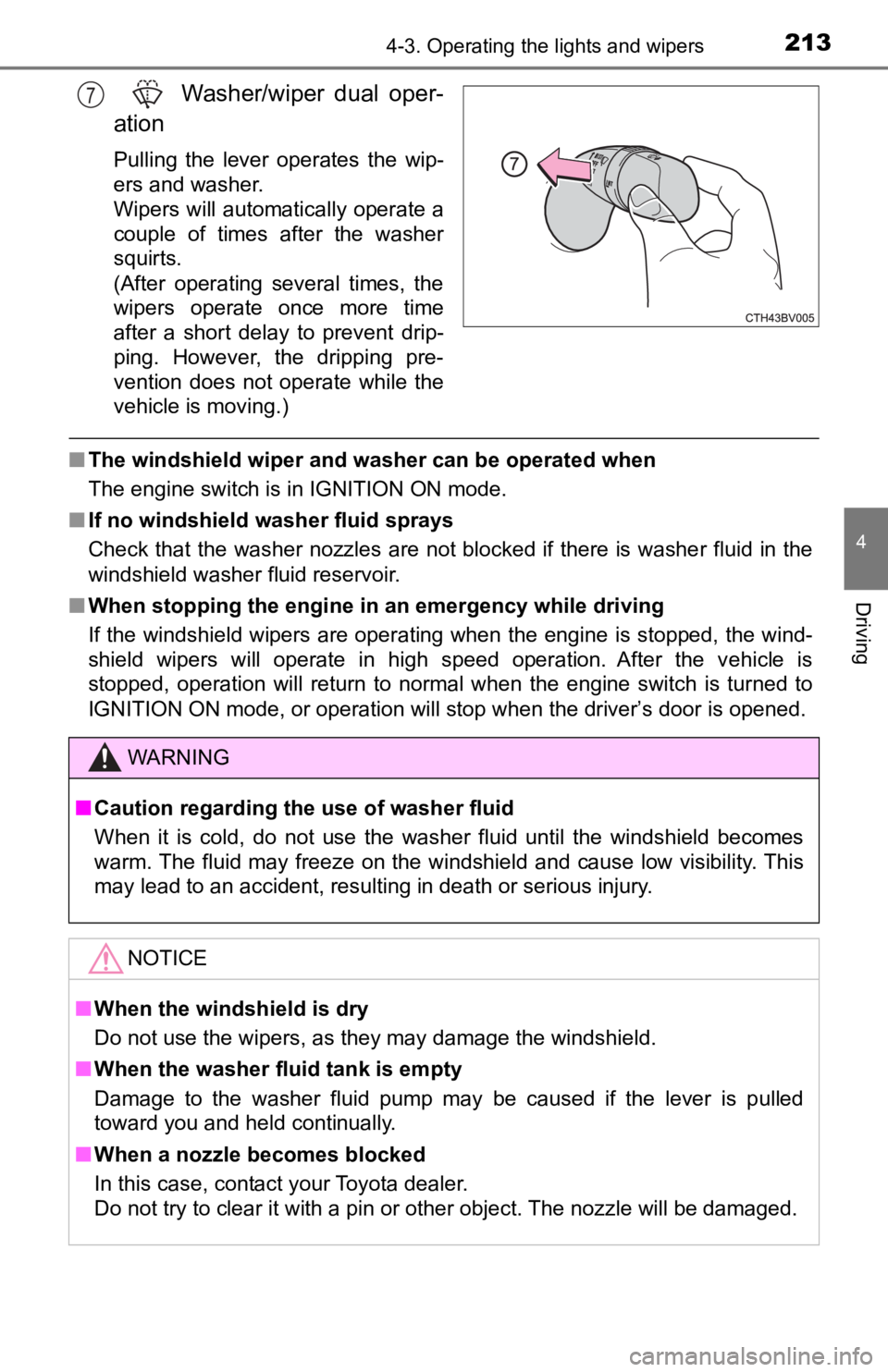
Washer/wiper dual oper-
ation
Pulling the lever operates the wip-
ers and washer.
Wipers will automatically operate a
couple of times after the washer
squirts.
(After operating several times, the
wipers operate once more time
after a short delay to prevent drip-
ping. However, the dripping pre-
vention does not operate while the
vehicle is moving.)
■ The windshield wiper and washer can be operated when
The engine switch is in IGNITION ON mode.
■ If no windshield washer fluid sprays
Check that the washer nozzles are not blocked if there is washe r fluid in the
windshield washer fluid reservoir.
■ When stopping the engine in an emergency while driving
If the windshield wipers are operating when the engine is stopped, the wind-
shield wipers will operate in high speed operation. After the v ehicle is
stopped, operation will return to normal when the engine switch is turned to
IGNITION ON mode, or operation will stop when the driver’s door is opened.
7
WARNING
■ Caution regarding the use of washer fluid
When it is cold, do not use the washer fluid until the windshie ld becomes
warm. The fluid may freeze on the windshield and cause low visi bility. This
may lead to an accident, resulting in death or serious injury.
NOTICE
■ When the windshield is dry
Do not use the wipers, as they may damage the windshield.
■ When the washer fluid tank is empty
Damage to the washer fluid pump may be caused if the lever is p ulled
toward you and held continually.
■ When a nozzle becomes blocked
In this case, contact your Toyota dealer.
Do not try to clear it with a pin or other object. The nozzle will be damaged.
Page 241 of 572
2414-5. Using the driving support systems
4
Driving
• If the wheels are misaligned
• If a wiper blade is blocking the front camera
• The vehicle is being driven at extremely high speeds
• When driving on a hill
• If the radar sensor or front camera is misaligned
• When driving in a traffic lane separated by more than one lane where
oncoming vehicles are driving while making a right/left turn
● In addition to the above, in some situations, such as the follo wing, the emer-
gency steering assist may not operate.
• When the white (yellow) lane lines are difficult to see, such as when they
are faint, diverging/merging, or a shadow is cast upon them
• When the lane is wider or narrower than normal
• When there is a light and dark pattern on the road surface, su ch as due to
road repairs
• When the target is too close
• When there is insufficient safe or unobstructed space for the vehicle to be
steered into
• If oncoming vehicle is present
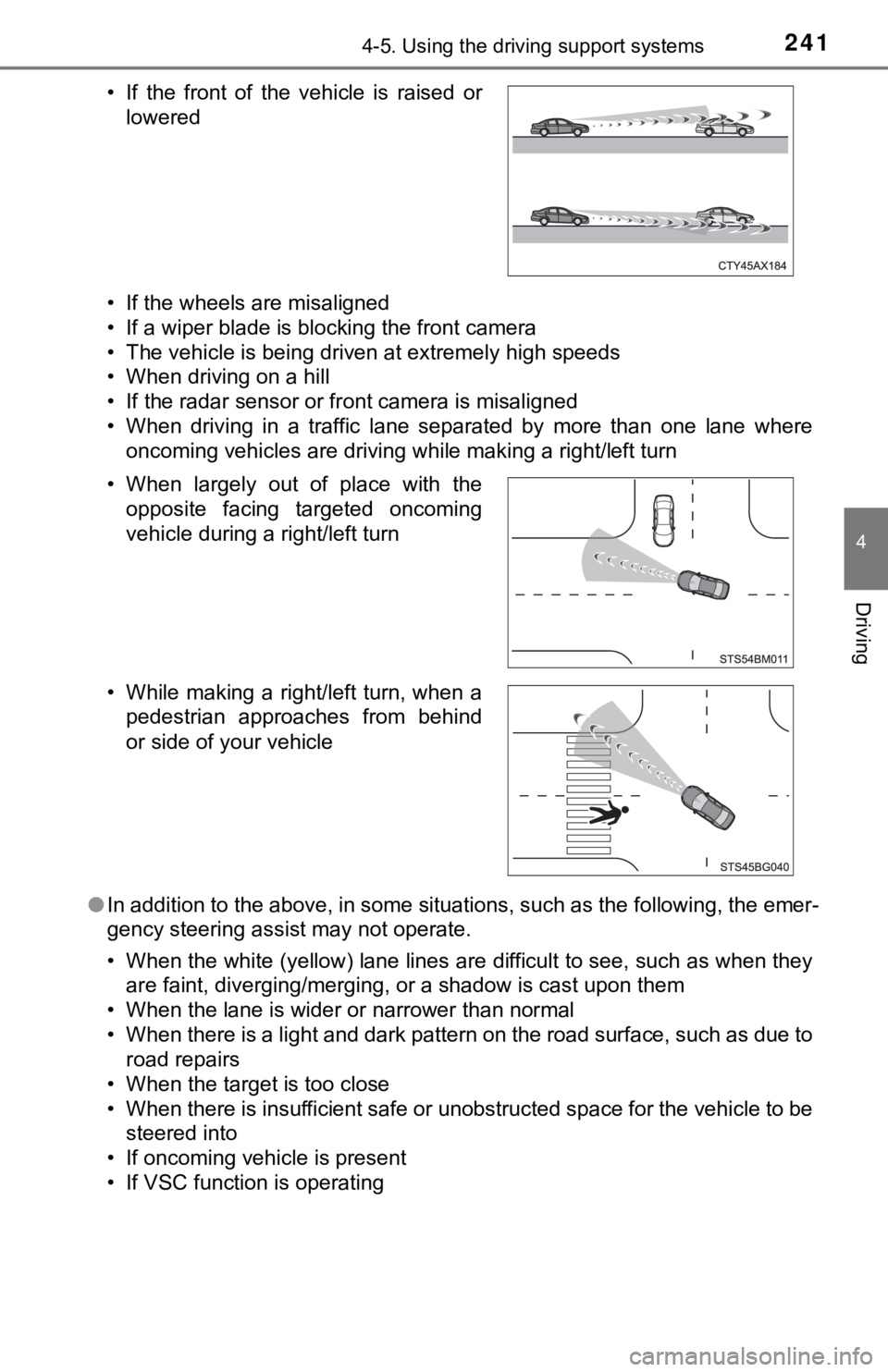
• If VSC function is operating • If the front of the vehicle is raised or lowered
• When largely out of place with the opposite facing targeted oncoming
vehicle during a right/left turn
• While making a right/left turn, when a pedestrian approaches from behind
or side of your vehicle
Page 328 of 572
3284-5. Using the driving support systems
◆ABS (Anti-lock Brake System)
Helps to prevent wheel lock when the brakes are applied suddenl y,
or if the brakes are applied while driving on a slippery road surface
◆Brake assist
Generates an increased level of braking force after the brake p edal
is depressed when the system de tects a panic stop situation
◆VSC (Vehicle Stability Control)
Helps the driver to control skidding when swerving suddenly or
turning on slippery road surfaces.
◆Enhanced VSC (Enhanced Vehicle Stability Control)
Provides cooperative control of the ABS, TRAC, VSC and EPS.
Helps to maintain directional stability when swerving on slippe ry
road surfaces by controlling steering performance.
◆TRAC (Traction Control)
Helps to maintain drive power and prevent the drive wheels from
spinning when starting the vehicl e or accelerating on slippery roads
◆Active Cornering Assist (ACA) (if equipped)
Helps to prevent the vehicle from sliding to the outer side by per-
forming inner wheel brake control when attempting to accelerate
while turning
◆Hill-start assist control
Helps to reduce the backward movement of the vehicle when start -
ing on an uphill
Driving assist systems
To keep driving safety and perf ormance, the following systems
operate automatically in respon se to various driving situations.
Be aware, however, that these systems are supplementary and
should not be relied upon too heav ily when operating the vehi-
cle.
Page 337 of 572
3374-6. Driving tips
4
Driving
Accelerate the vehicle slowly, keep a safe distance between you and
the vehicle ahead, and drive at a reduced speed suitable to roa d con-
ditions.
● Park the vehicle and move the shift lever to P without setting the
parking brake. The parking brake may freeze up, preventing it from
being released. If the vehicle is parked without setting the pa rking
brake, make sure t o block the wheels.
Failure to do so may be dangerou s because it may cause the vehi-
cle to move unexpectedly, pos sibly leading to an accident.
● If the vehicle is parked without setting the parking brake, confirm
that the shift lever c annot be moved out of P
*.
*: The shift lever will be locked if it is attempted to be shifte d from P to any
other position without depressing the brake pedal. If the shift lever can be
shifted from P, there may be a problem with the shift lock syst em. Have the
vehicle inspected by your Toyota dealer immediately.
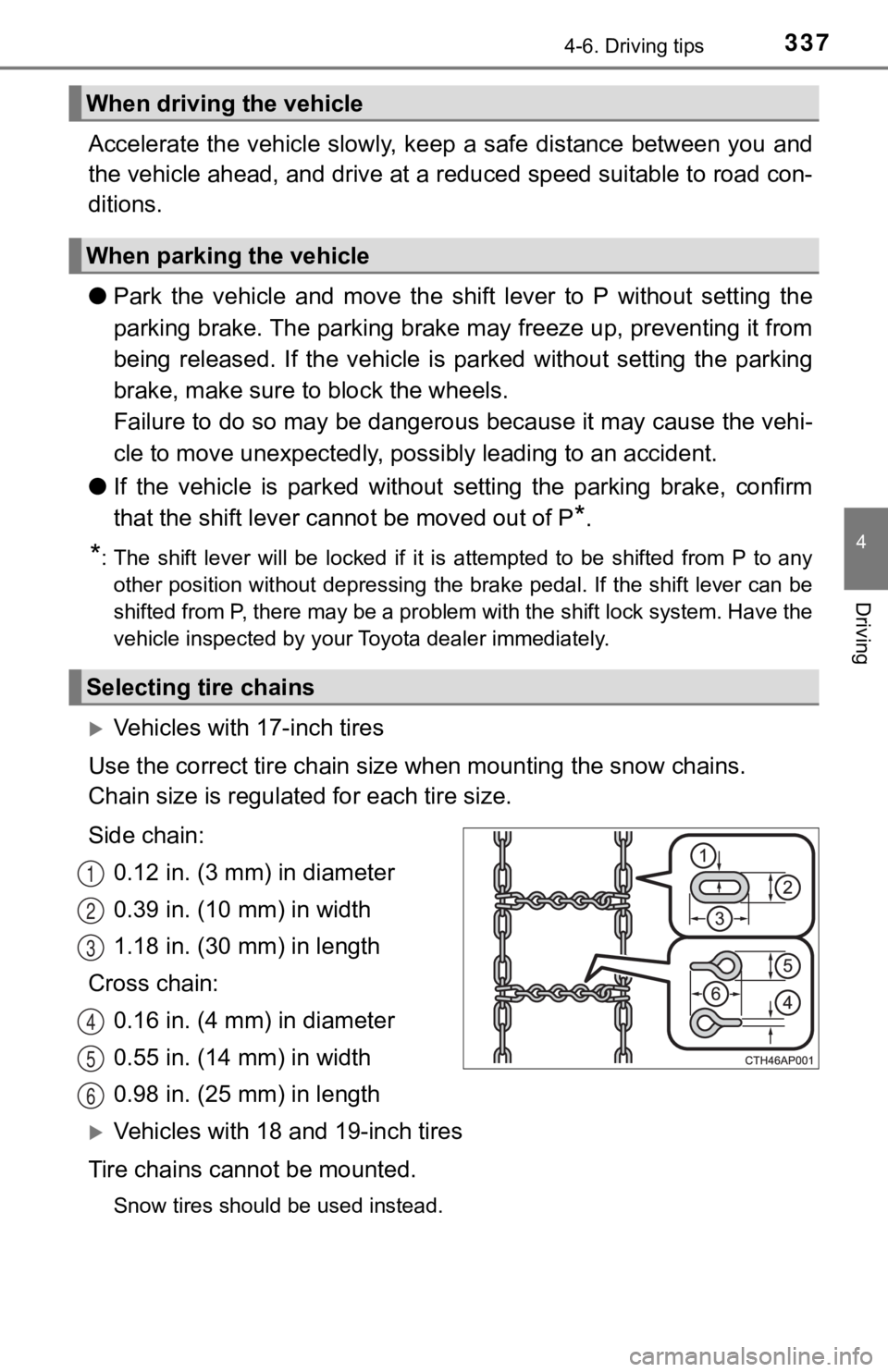
Vehicles with 17-inch tires
Use the correct tire ch ain size when mounting the snow chains.
Chain size is regulate d for each tire size.
Side chain: 0.12 in. (3 mm) in diameter
0.39 in. (10 mm) in width
1.18 in. (30 mm) in length
Cross chain: 0.16 in. (4 mm) in diameter
0.55 in. (14 mm) in width
0.98 in. (25 mm) in length
Vehicles with 18 and 19-inch tires
Tire chains cannot be mounted.
Snow tires should be used instead.
When driving the vehicle
When parking the vehicle
Selecting tire chains
1
2
3
4
5
6
Page 348 of 572
3485-1. Using the air conditioning system and defogger
WARNING
■To prevent the windshield from fogging up
● Do not use during cool air operation in extremely humid weathe r.
The difference between the temperature of the outside air and that of the
windshield can cause the outer surface of the windshield to fog up, block-
ing your vision.
■ To prevent burns
Do not touch the rear view mirror surfaces when the outside rea r view mirror
defoggers are on.
NOTICE
■ To prevent battery discharge
Do not leave the air conditioning system on longer than necessa ry when the
engine is stopped.
■ When repairing/replacing parts of the air conditioning system
Have repair/replacement performed by your Toyota dealer.
When a part of the air conditioning system, such as the evapora tor, is to be
replaced, it must be replaced with a new one.
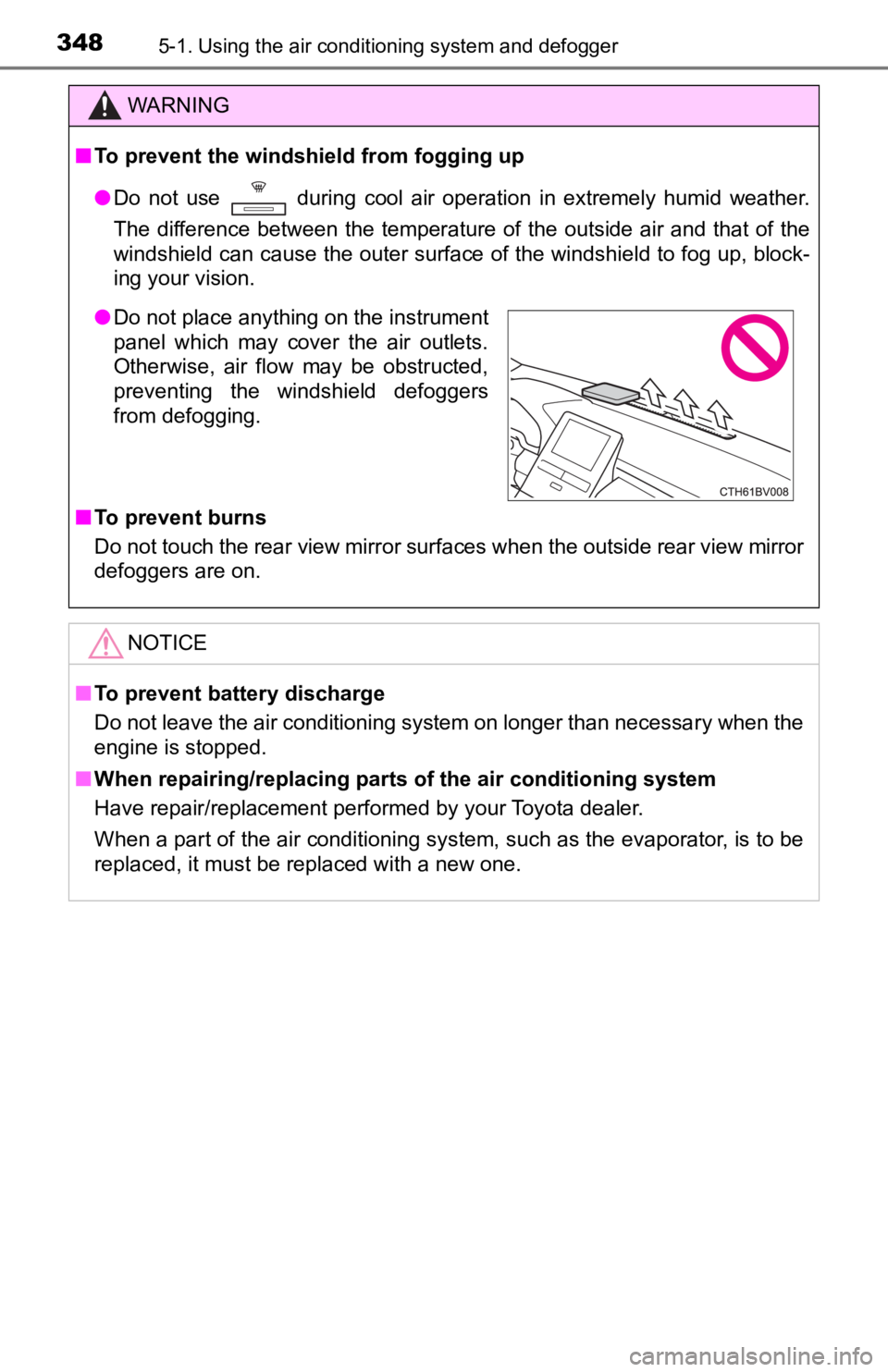
● Do not place anything on the instrument
panel which may cover the air outlets.
Otherwise, air flow may be obstructed,
preventing the windshield defoggers
from defogging.
Page 354 of 572
3545-2. Using the interior lights
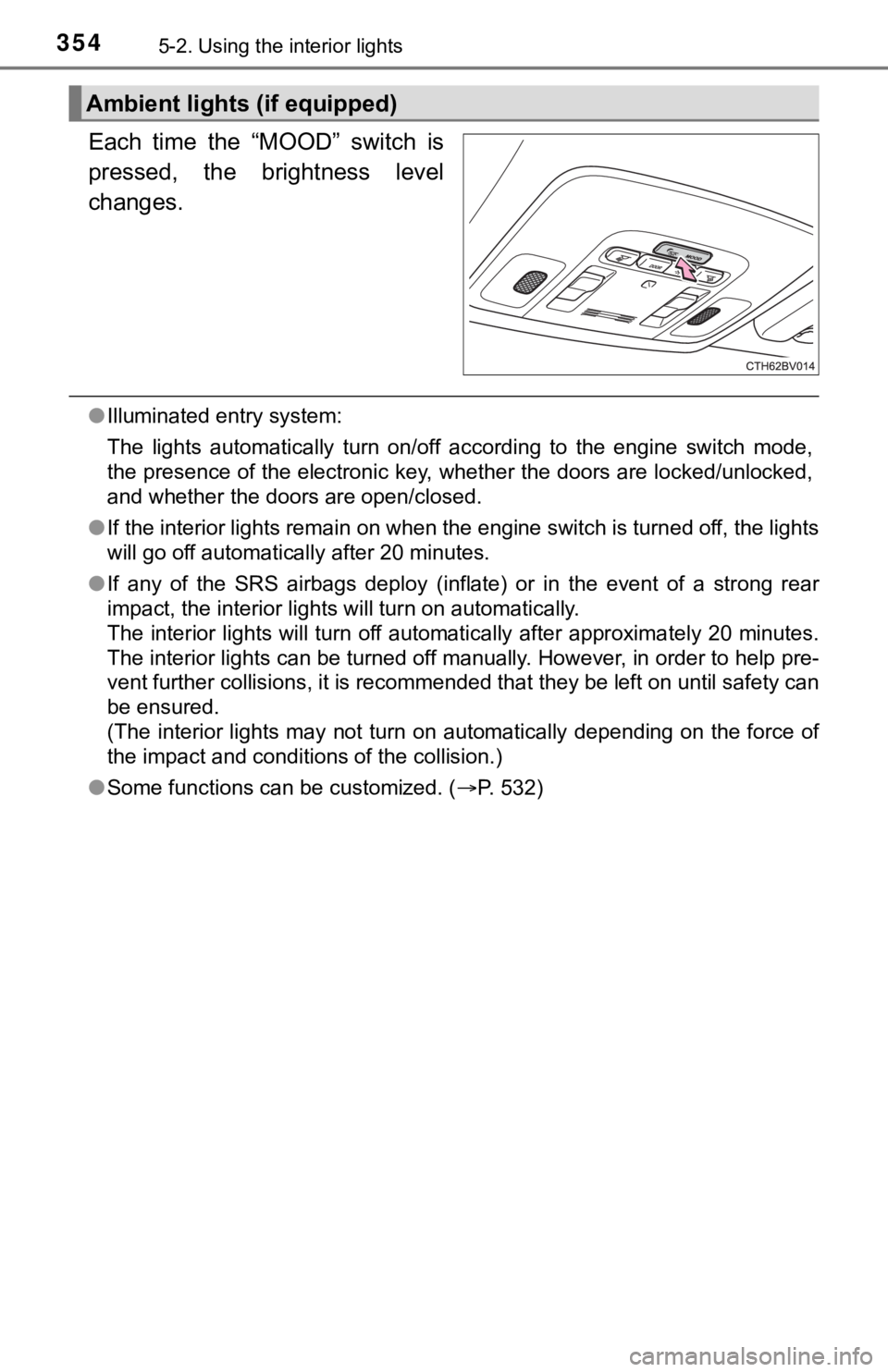
Each time the “MOOD” switch is
pressed, the brightness level
changes.
●Illuminated entry system:
The lights automatically turn on/off according to the engine switch mode,
the presence of the electronic key, whether the doors are locke d/unlocked,
and whether the doors are open/closed.
● If the interior lights remain on when the engine switch is turned off, the lights
will go off automatically after 20 minutes.
● If any of the SRS airbags deploy (inflate) or in the event of a strong rear
impact, the interior lights will turn on automatically.
The interior lights will turn off automatically after approxima tely 20 minutes.
The interior lights can be turned off manually. However, in ord er to help pre-
vent further collisions, it is recommended that they be left on until safety can
be ensured.
(The interior lights may not turn on automatically depending on the force of
the impact and conditions of the collision.)
● Some functions can be customized. ( P. 532)
Ambient lights (if equipped)
Page 359 of 572
3595-3. Using the storage features
5
Interior features
■When small items are placed on top of the tray (type C)
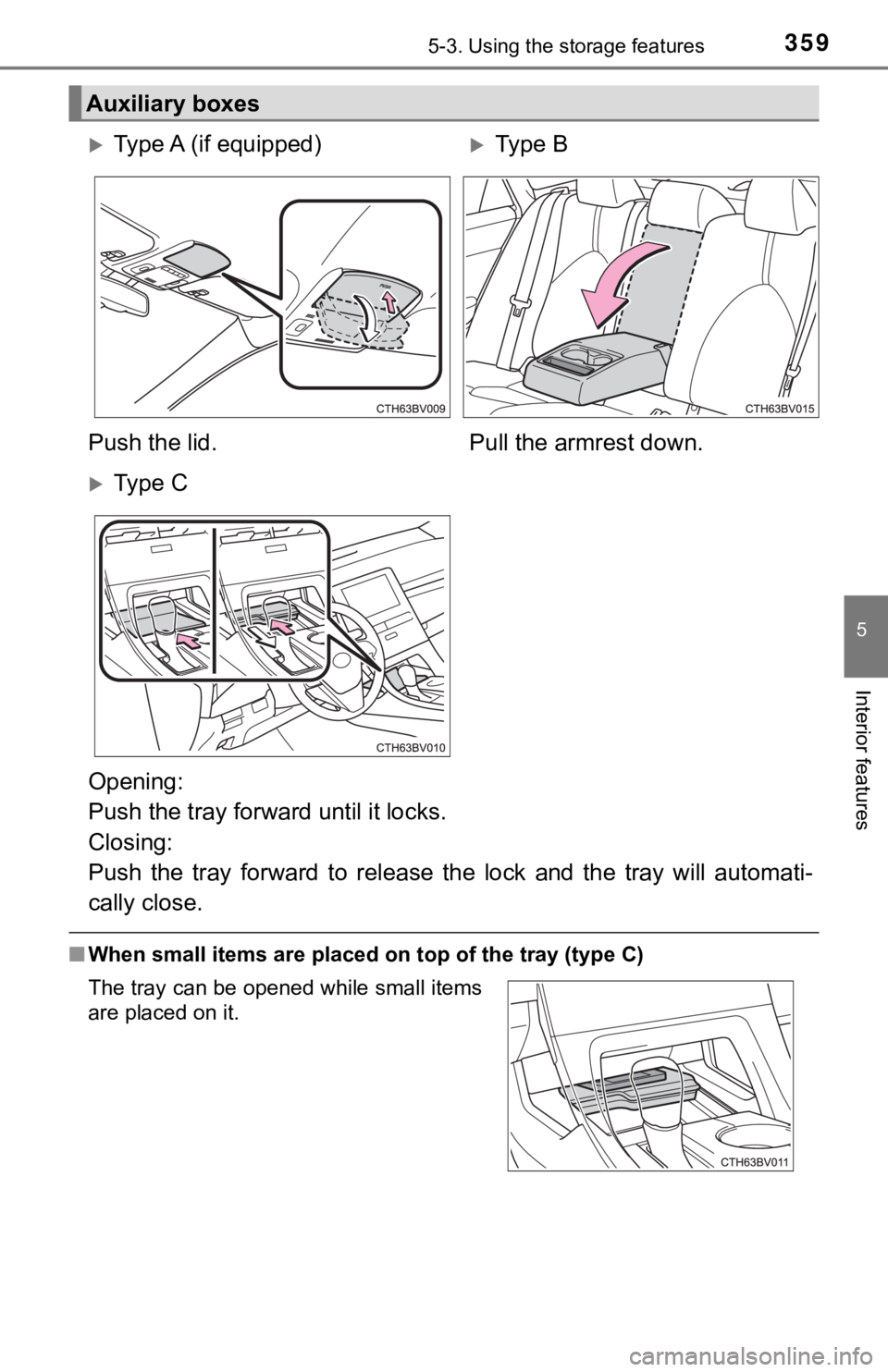
Auxiliary boxes
Type A (if equipped)Type B
Push the lid. Pull the armrest down.
Ty p e C
Opening:
Push the tray forward until it locks.
Closing:
Push the tray forward to relea se the lock and the tray will aut omati-
cally close.
The tray can be opened while small items
are placed on it.
Page 360 of 572
3605-3. Using the storage features
■When using wireless charger (if equipped)
P. 366
WARNING
■Items unsuitable for storing (type A)
Do not store items heavier than 0.4 lb. (0.2 kg).
Doing so may cause the auxiliary box to open and the items inside may fall
out, resulting in an accident.
NOTICE
■When opening or closing the tray (type C)
● To prevent damaging small items, when opening the tray while sm all items
are placed on it, make sure the items will not get caught.
● To prevent damaging the tray, do not pull the tray to close it. Doing so may
damage the tray.
● When on a steep downward incline, the tray may be slow to close auto-
matically. In this case, the tray can be pulled closed after pushing it to
release the lock.
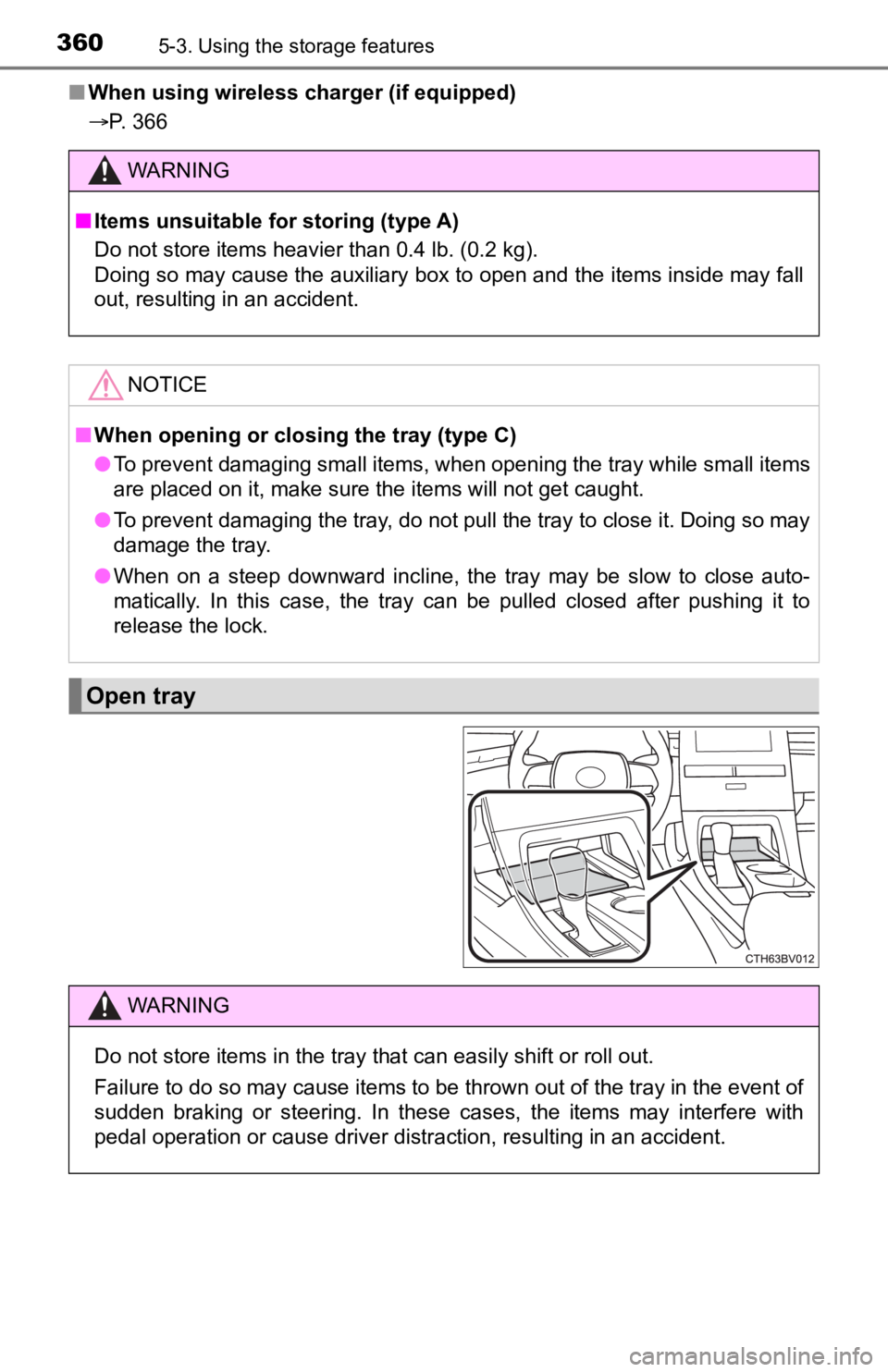
Open tray
WARNING
Do not store items in the tray that can easily shift or roll out.
Failure to do so may cause items to be thrown out of the tray in the event of
sudden braking or steering. In these cases, the items may interfere with
pedal operation or cause driver distraction, resulting in an accident.
Page 367 of 572
3675-4. Other interior features
5
Interior features
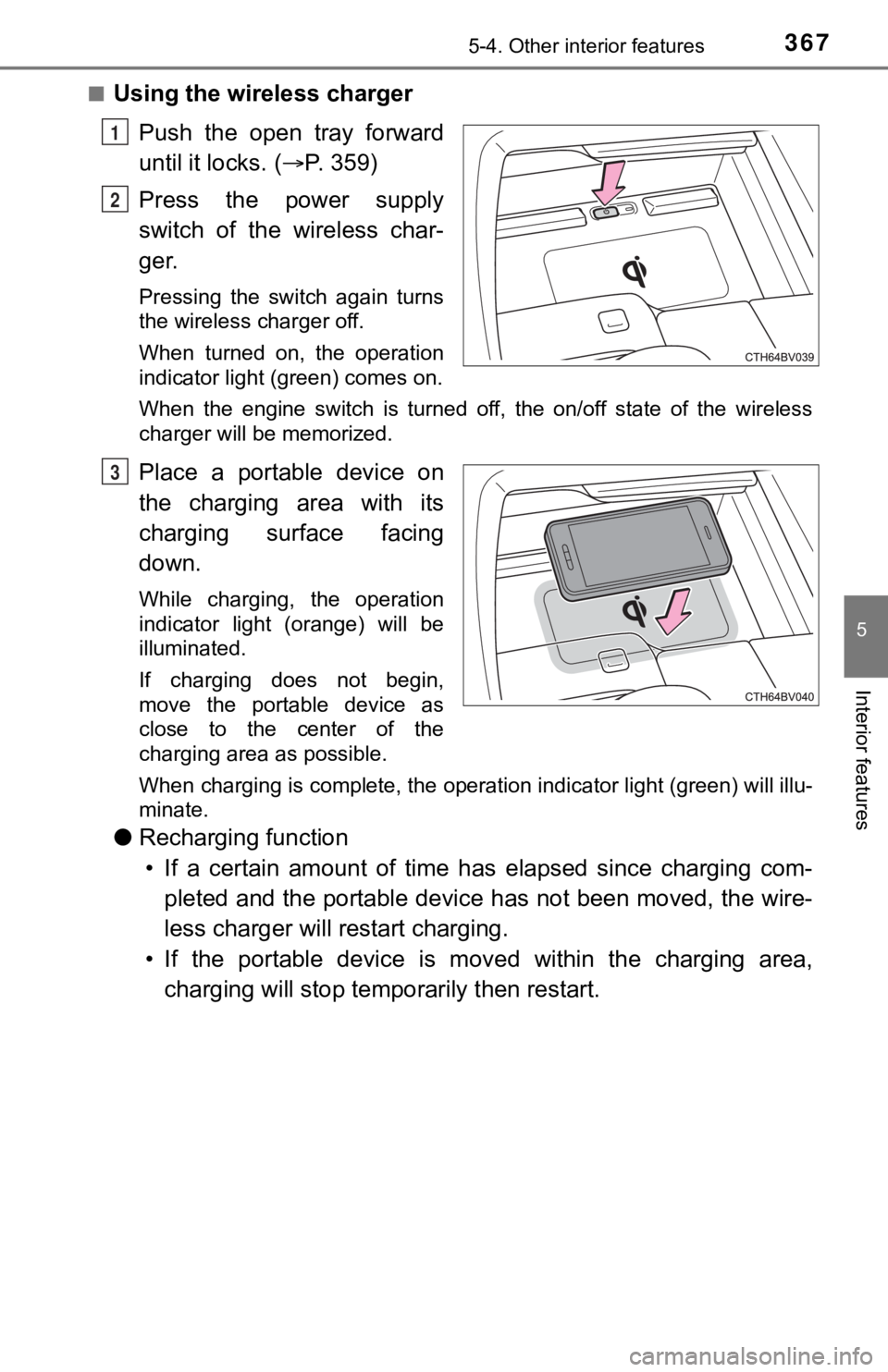
■Using the wireless charger
Push the open tray forward
until it locks. ( P. 3 5 9 )
Press the power supply
switch of the wireless char-
ger.
Pressing the switch again turns
the wireless charger off.
When turned on, the operation
indicator light (green) comes on.
When the engine switch is turned off, the on/off state of the wireless
charger will be memorized.
Place a portable device on
the charging area with its
charging surface facing
down.
While charging, the operation
indicator light (orange) will be
illuminated.
If charging does not begin,
move the portable device as
close to the center of the
charging area as possible.
When charging is complete, the operation indicator light (green ) will illu-
minate.
● Recharging function
• If a certain amount of time has elapsed since charging com- pleted and the portable device has not been moved, the wire-
less charger will restart charging.
• If the portable device is mov ed within the charging area,
charging will stop tempo rarily then restart.
1
2
3