air condition TOYOTA AVALON 2022 Owners Manual
[x] Cancel search | Manufacturer: TOYOTA, Model Year: 2022, Model line: AVALON, Model: TOYOTA AVALON 2022Pages: 572, PDF Size: 9.42 MB
Page 4 of 572

TABLE OF CONTENTS4
4-5. Using the driving support systems
Toyota Safety Sense 2.5+ ...................... 220
PCS (Pre-Collision System) ........................... 228
LTA (Lane Tracing Assist) ............................. 243
RSA (Road Sign Assist) .... 258
Dynamic radar cruise control with full-speed
range ............................... 263
BSM (Blind Spot Monitor) ........................... 279
• BSM function ................ 283
• RCTA function .............. 286
Rear Camera Detection function (vehicles with
panoramic view
monitor) ........................... 291
Intuitive parking assist ....... 295
Intelligent Clearance Sonar (ICS) ..................... 303
Driving mode select switches .......................... 324
Driving assist systems....... 328
4-6. Driving tips Winter driving tips.............. 336 5-1. Using the air conditioning
system and defogger
Automatic air conditioning system ............................. 342
Heated steering wheel/ seat heaters/
seat ventilators ................ 349
5-2. Using the interior lights Interior lights list................. 352
• Interior light ................... 353
• Personal lights............... 353
• Ambient lights................ 354
5-3. Using the storage features
List of storage features ...... 355
• Glove box ...................... 356
• Console box .................. 356
• Bottle holders ................ 357
• Cup holders ................... 358
• Auxiliary boxes .............. 359
• Open tray ...................... 360
Trunk features ................... 361
5-4. Other interior features Other interior features........ 362
• Sun visors ..................... 362
• Vanity mirrors ................ 362
• Power outlet .................. 363
• USB charging ports ....... 364
• Wireless charger ........... 366
• Armrest.......................... 375
• Assist grips .................... 375
• Coat hooks .................... 376
Garage door opener .......... 3775Interior features
Page 5 of 572

5
1
8 7 5 4
3
2
9
6
6-1. Maintenance and careCleaning and protecting the vehicle exterior .......... 386
Cleaning and protecting the vehicle interior ........... 389
6-2. Maintenance Maintenance requirements ................... 392
General maintenance ........ 394
Emission inspection and maintenance (I/M)
programs ......................... 398
6-3. Do-it-yourself maintenance
Do-it-yourself service precautions ..................... 399
Hood.................................. 401
Positioning a floor jack ...... 402
Engine compartment ......... 403
Tires .................................. 414
Tire inflation pressure........ 428
Wheels .............................. 431
Air conditioning filter .......... 433
Electronic key battery ........ 435
Checking and replacing fuses ............................... 438
Light bulbs ......................... 441 7-1. Essential information
Emergency flashers ........... 444
If your vehicle has to be stopped in
an emergency.................. 445
If the vehicle is submerged or water on the road is
rising ................................ 446
7-2. Steps to take in an emergency
If your vehicle needs to be towed ...................... 448
If you think something is wrong ........................... 453
Fuel pump shut off system ............................. 454
If a warning light turns on or a warning
buzzer sounds ................. 455
If a warning message is displayed...................... 465
If you have a flat tire .......... 470
If the engine will not start ................................. 482
If the electronic key does not operate properly ........ 484
If the vehicle battery is discharged ................... 487
If your vehicle overheats......................... 492
If the vehicle becomes stuck ................................ 495
6Maintenance and care7When trouble arises
Page 19 of 572

19Pictorial index
Parking brake switch . . . . . . . . . . . . . . . . . . . . . . . . . . . . . . . P. 198
Applying/releasing . . . . . . . . . . . . . . . . . . . . . . . . . . . . . . P. 198, 199
Precautions for winter season . . . . . . . . . . . . . . . . . . . . . . . . . P. 337
Warning light/warning buzzer/
warning message . . . . . . . . . . . . . . . . . . . . . . . . . . . . . . . P. 201, 455
Turn signal lever . . . . . . . . . . . . . . . . . . . . . . . . . . . . . . . . . . P. 197
Headlight switch . . . . . . . . . . . . . . . . . . . . . . . . . . . . . . . . . . P. 204
Headlights/side marker lights/parking lights/tail lights/
license plate lights/daytime running lights . . . . . . . . . . . . . . . . P. 204
Windshield wiper and washer switch . . . . . . . . . . . . . . . . . P. 212
Usage . . . . . . . . . . . . . . . . . . . . . . . . . . . . . . . . . . . . . . . . . . . P. 212
Adding washer fluid . . . . . . . . . . . . . . . . . . . . . . . . . . . . . . . . . P. 413
Emergency flasher switch . . . . . . . . . . . . . . . . . . . . . . . . . . P. 444
Hood lock release lever. . . . . . . . . . . . . . . . . . . . . . . . . . . . . P. 401
Tilt and telescopic steering lock release lever
*1 . . . . . . . . P. 155
Tilt and telescopic steering control switch
*1 . . . . . . . . . . . P. 155
Adjustment . . . . . . . . . . . . . . . . . . . . . . . . . . . . . . . . . . . . . . . . P. 155
Driving position memory . . . . . . . . . . . . . . . . . . . . . . . . . . . . . P. 148
Air conditioning system . . . . . . . . . . . . . . . . . . . . . . . . . . . . P. 342
Usage . . . . . . . . . . . . . . . . . . . . . . . . . . . . . . . . . . . . . . . . . . . P. 342
Rear window defogger . . . . . . . . . . . . . . . . . . . . . . . . . . . . . . . P. 344
Audio Plus
*1, 2
Premium Audio*1, 2
*1: If equipped
*2: Refer to “NAVIGATION AND MULT IMEDIA SYSTEM OWNER’S MANUAL”.
4
5
6
7
8
9
10
11
12
Page 46 of 572
461-1. For safe use
■SRS airbag deployment conditions (SRS side and curtain shield a irbags)
● The SRS side and curtain shield airbags will deploy in the even t of an
impact that exceeds the set threshold level (the level of force corresponding
to the impact force produced by an approximately 3300 lb. [1500 kg] vehicle
colliding with the vehicle cabin from a direction perpendicular to the vehicle
orientation at an approximate speed of 12 - 18 mph [20 - 30 km/ h]).
● Both SRS curtain shield airbags may deploy in the event of a severe side
collision.
● Both SRS curtain shield airbags will deploy in the event of veh icle rollover.
● Both SRS curtain shield airbags may also deploy in the event of a severe
frontal collision.
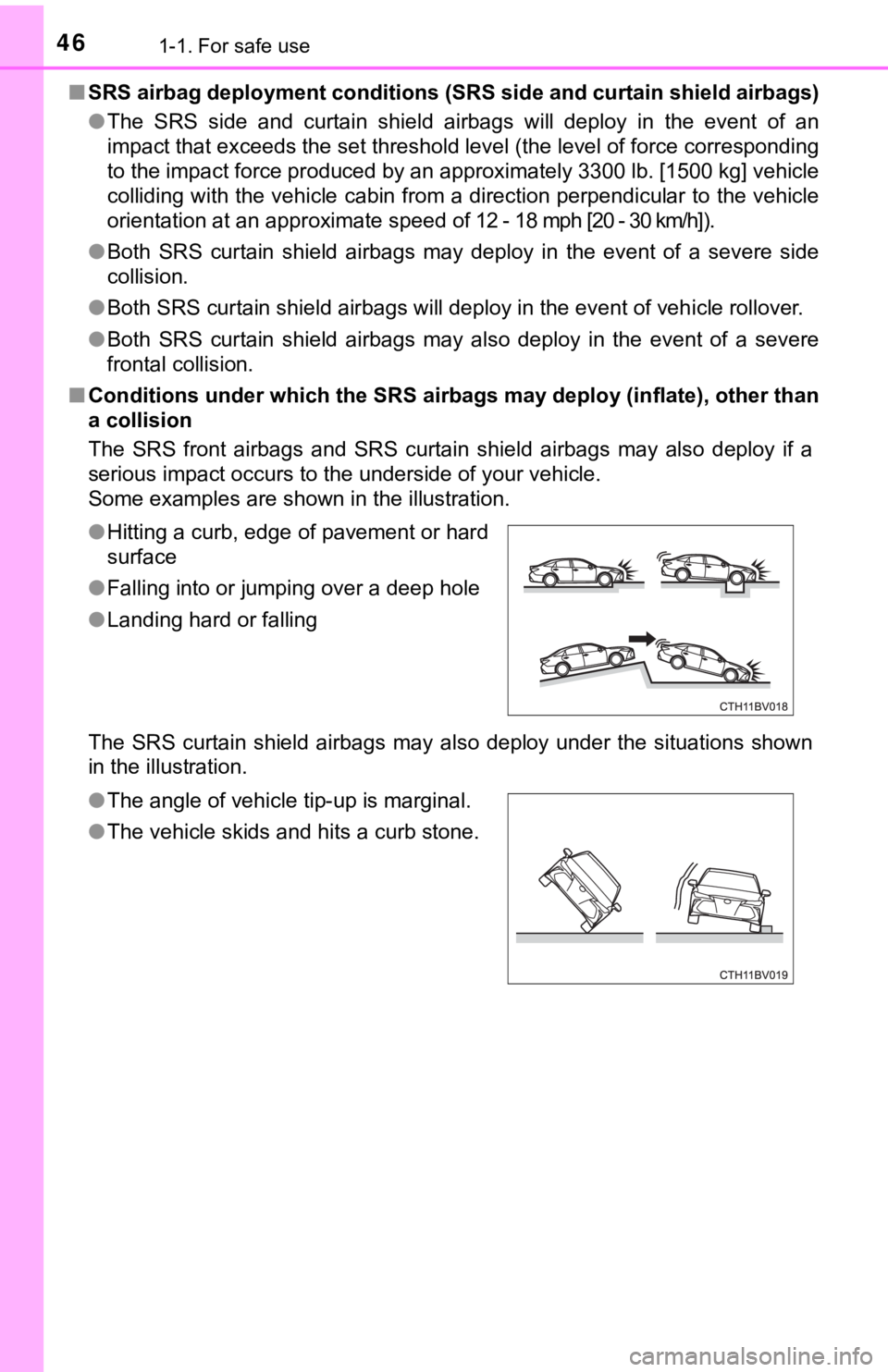
■ Conditions under which the SRS ai rbags may deploy (inflate), other than
a collision
The SRS front airbags and SRS curtain shield airbags may also d eploy if a
serious impact occurs to the underside of your vehicle.
Some examples are shown in the illustration.
The SRS curtain shield airbags may also deploy under the situat ions shown
in the illustration. ● Hitting a curb, edge of pavement or hard
surface
● Falling into or jumping over a deep hole
● Landing hard or falling
● The angle of vehicle tip-up is marginal.
● The vehicle skids and hits a curb stone.
Page 50 of 572
501-1. For safe use
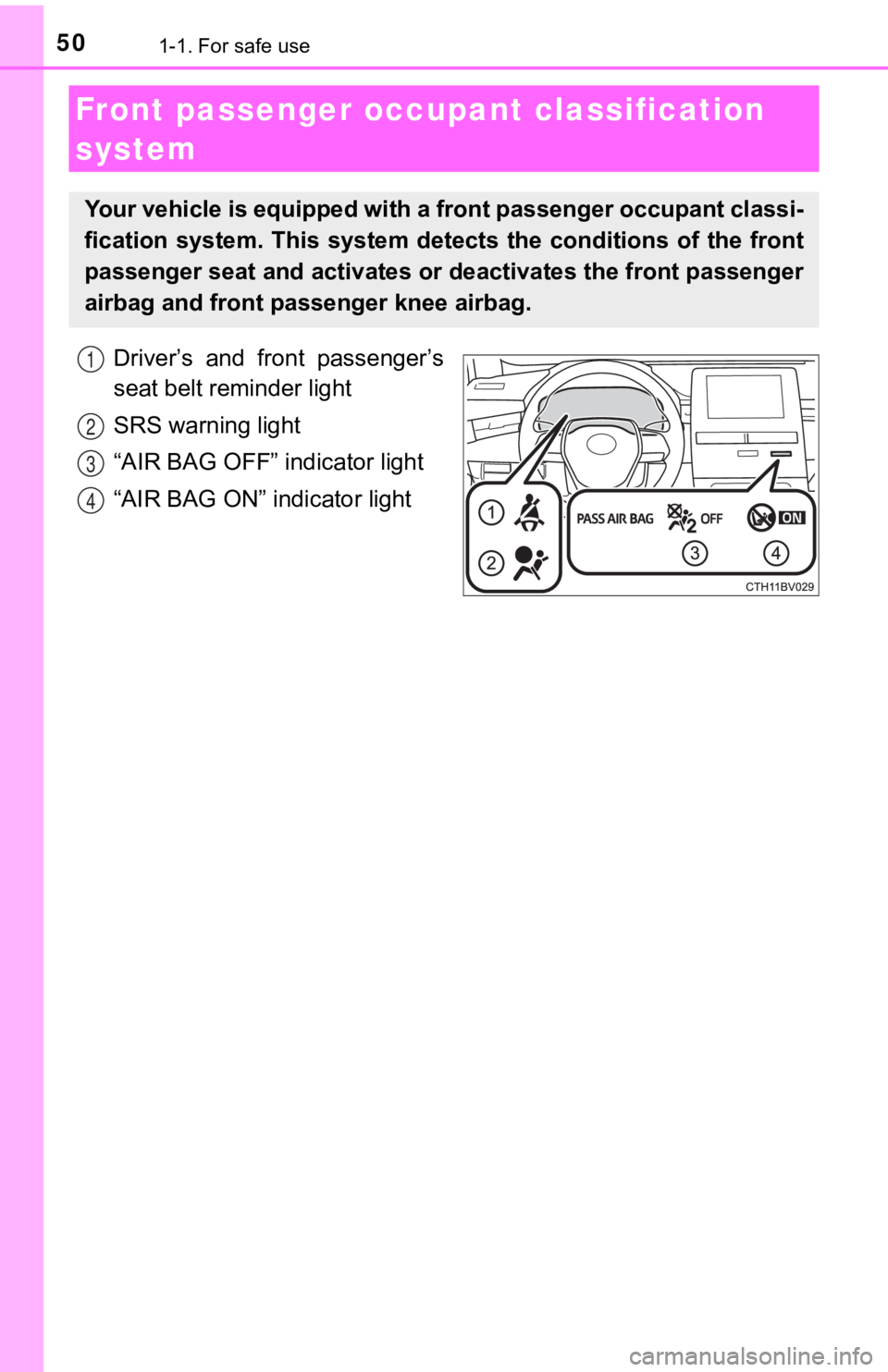
Driver’s and front passenger’s
seat belt reminder light
SRS warning light
“AIR BAG OFF” indicator light
“AIR BAG ON” indicator light
Front passenger occupant classification
system
Your vehicle is equipped with a front passenger occupant classi -
fication system. This system det ects the conditions of the front
passenger seat and activates or deactivates the front passenger
airbag and front passenger knee airbag.
1
2
3
4
Page 51 of 572
511-1. For safe use
1
For safety and security
■Adult*1
■Child*4
■Child restraint system with infant*5
Condition and operation in the front passenger occupant classi-
fication system
Indicator/
warning light
“AIR BAG ON” and “AIR BAG OFF” indicator lights“AIR BAG ON”
SRS warning lightOff
Driver’s and front passenger’s seat belt
reminder lightOff*2 or
flashing
*3
DevicesFront passenger airbagActivatedFront passenger knee airbag
Indicator/
warning light
“AIR BAG ON” and “AIR BAG OFF” indicator lights“AIR BAG
OFF” or
“AIR BAG ON”
*4
SRS warning lightOff
Driver’s and front passenger’s seat belt
reminder lightOff*2 or
flashing
*3
DevicesFront passenger airbagDeactivated or activated
*4Front passenger knee airbag
Indicator/
warning light
“AIR BAG ON” and “AIR BAG OFF”
indicator lights“AIR BAG OFF”
*6
SRS warning lightOff
Driver’s and front passenger’s seat belt reminder lightOff*2 or
flashing
*3
DevicesFront passenger airbagDeactivatedFront passenger knee airbag
Page 125 of 572
1253-1. Key information
3
Operation of each component
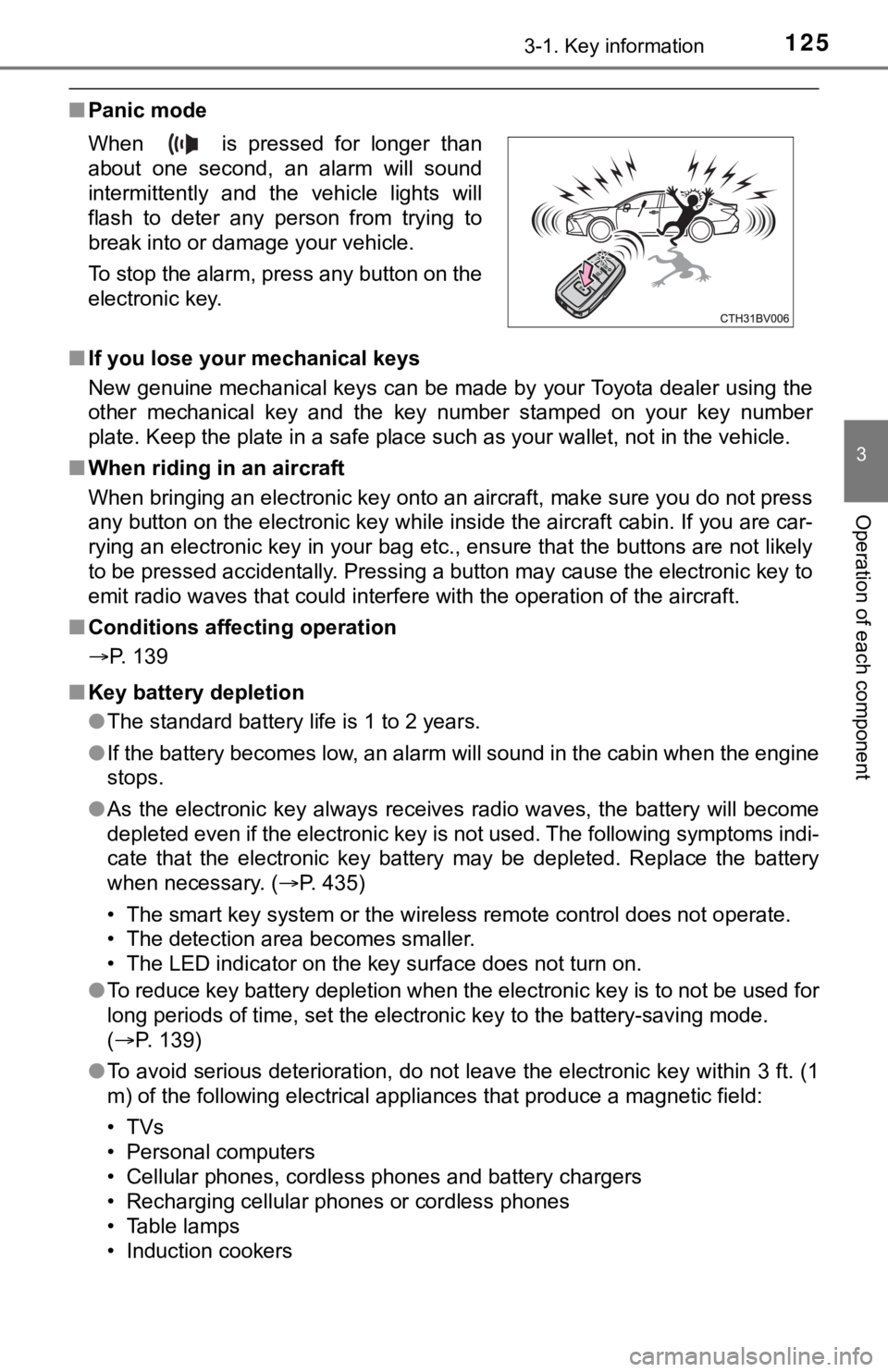
■Panic mode
■ If you lose your mechanical keys
New genuine mechanical keys can be made by your Toyota dealer u sing the
other mechanical key and the key number stamped on your key num ber
plate. Keep the plate in a safe place such as your wallet, not in the vehicle.
■ When riding in an aircraft
When bringing an electronic key onto an aircraft, make sure you do not press
any button on the electronic key while inside the aircraft cabi n. If you are car-
rying an electronic key in your bag etc., ensure that the butto ns are not likely
to be pressed accidentally. Pressing a button may cause the electronic key to
emit radio waves that could interfere with the operation of the aircraft.
■ Conditions affecting operation
P. 139
■ Key battery depletion
●The standard battery life is 1 to 2 years.
● If the battery becomes low, an alarm will sound in the cabin wh en the engine
stops.
● As the electronic key always receives radio waves, the battery will become
depleted even if the electronic key is not used. The following symptoms indi-
cate that the electronic key battery may be depleted. Replace the battery
when necessary. ( P. 435)
• The smart key system or the wireless remote control does not o perate.
• The detection area becomes smaller.
• The LED indicator on the key surface does not turn on.
● To reduce key battery depletion when the electronic key is to not be used for
long periods of time, set the electronic key to the battery-sav ing mode.
( P. 139)
● To avoid serious deterioration, do not leave the electronic key within 3 ft. (1
m) of the following electrical appliances that produce a magnet ic field:
•TVs
• Personal computers
• Cellular phones, cordless phones and battery chargers
• Recharging cellular phones or cordless phones
• Table lamps
• Induction cookers
When is pressed for longer than
about one second, an alarm will sound
intermittently and the vehicle lights will
flash to deter any person from trying to
break into or damage your vehicle.
To stop the alarm, press any button on the
electronic key.
Page 139 of 572
1393-2. Opening, closing and locking the doors
3
Operation of each component
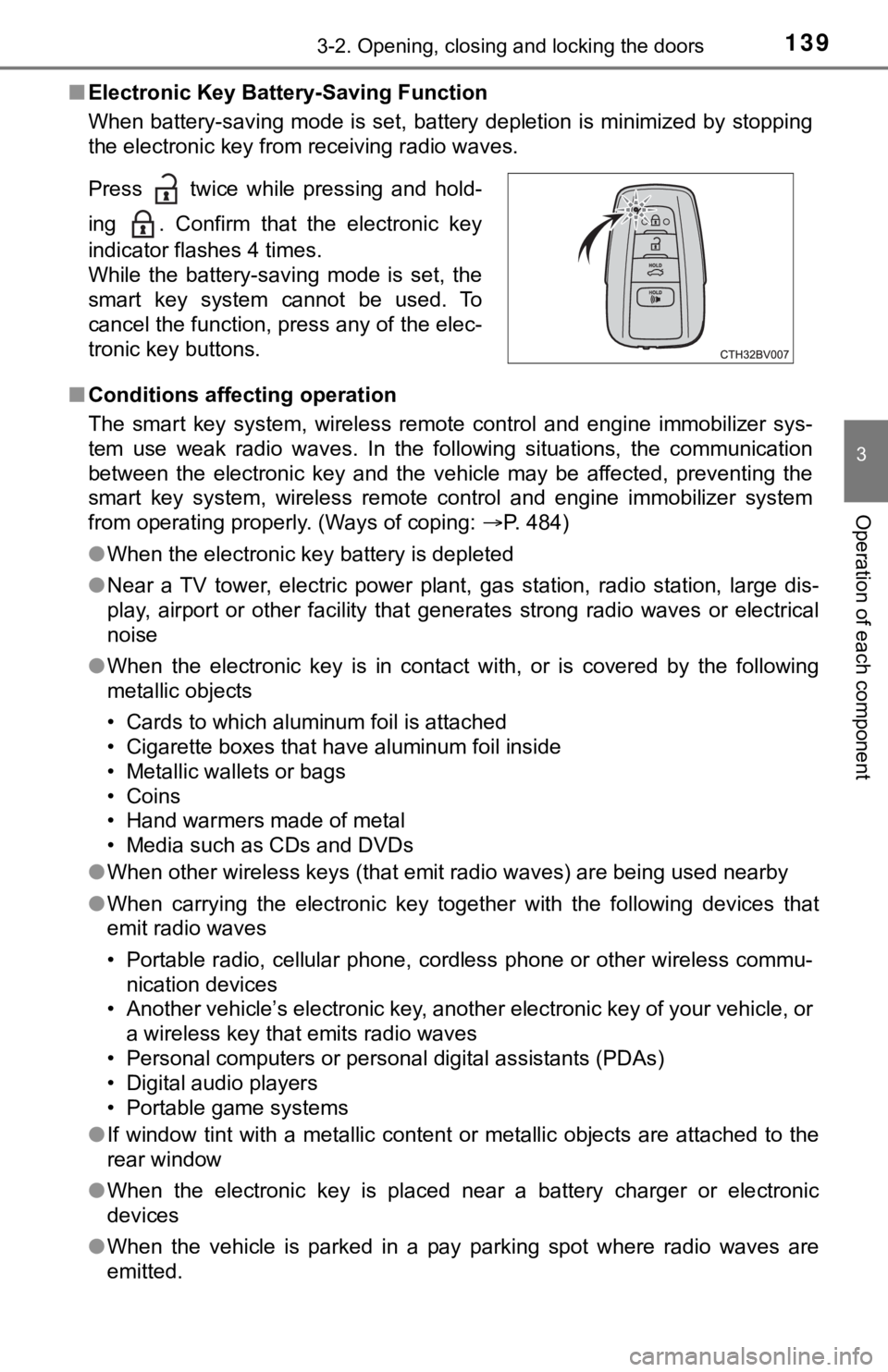
■Electronic Key Battery-Saving Function
When battery-saving mode is set, battery depletion is minimized by stopping
the electronic key from receiving radio waves.
■ Conditions affecting operation
The smart key system, wireless remote control and engine immobi lizer sys-
tem use weak radio waves. In the following situations, the communication
between the electronic key and the vehicle may be affected, pre venting the
smart key system, wireless remote control and engine immobilizer system
from operating properly. (Ways of coping: P. 484)
● When the electronic key battery is depleted
● Near a TV tower, electric power plant, gas station, radio stati on, large dis-
play, airport or other facility that generates strong radio wav es or electrical
noise
● When the electronic key is in contact with, or is covered by th e following
metallic objects
• Cards to which aluminum foil is attached
• Cigarette boxes that have aluminum foil inside
• Metallic wallets or bags
• Coins
• Hand warmers made of metal
• Media such as CDs and DVDs
● When other wireless keys (that emit radio waves) are being used nearby
● When carrying the electronic key together with the following devices that
emit radio waves
• Portable radio, cellular phone, cordless phone or other wirele ss commu-
nication devices
• Another vehicle’s electronic key, another electronic key of yo ur vehicle, or
a wireless key that emits radio waves
• Personal computers or personal digital assistants (PDAs)
• Digital audio players
• Portable game systems
● If window tint with a metallic content or metallic objects are attached to the
rear window
● When the electronic key is placed near a battery charger or ele ctronic
devices
● When the vehicle is parked in a pay parking spot where radio wa ves are
emitted.
Press twice while pressing and hold-
ing . Confirm that the electronic key
indicator flashes 4 times.
While the battery-saving mode is set, the
smart key system cannot be used. To
cancel the function, press any of the elec-
tronic key buttons.
Page 226 of 572
2264-5. Using the driving support systems
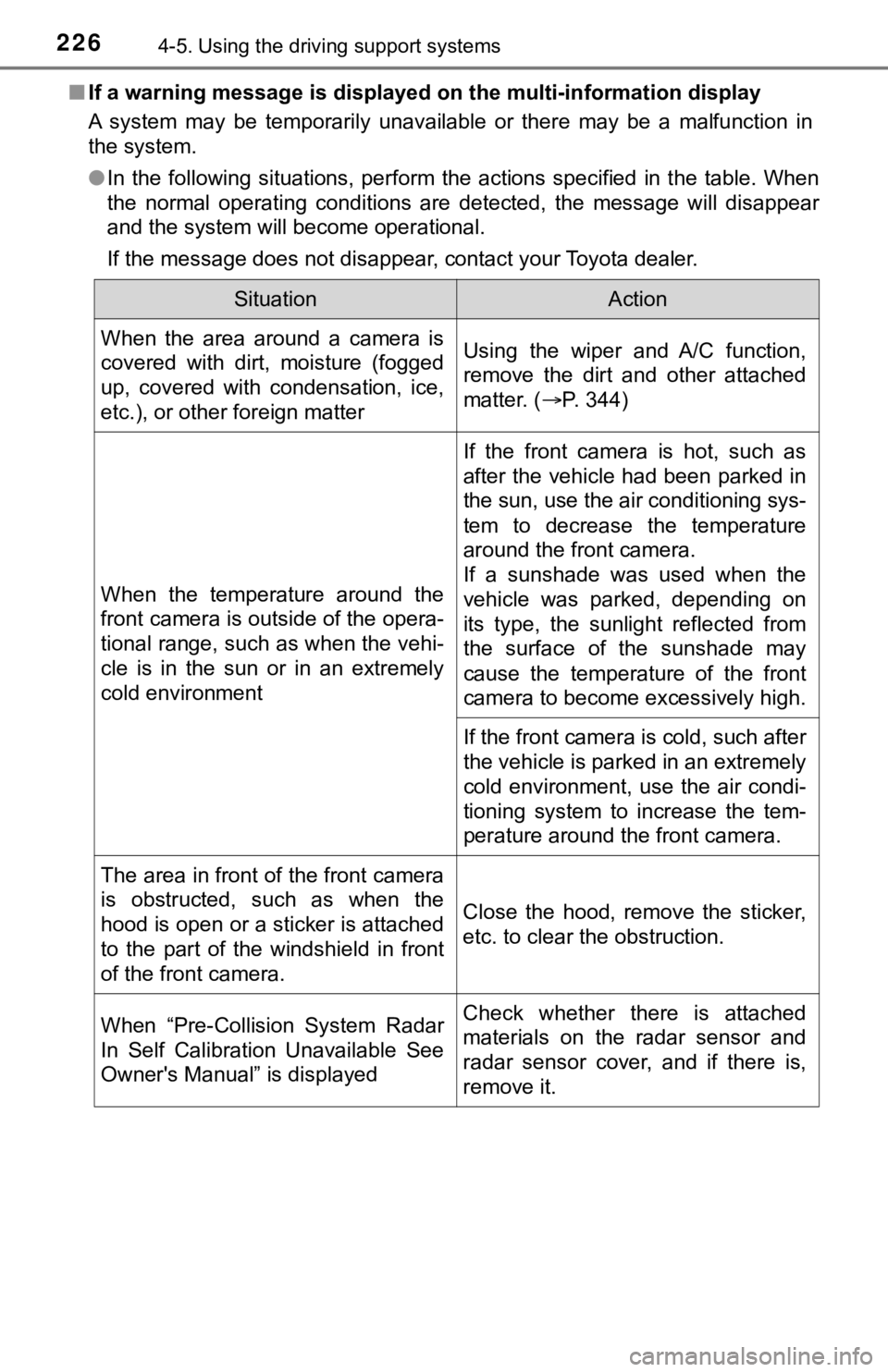
■If a warning message is displayed on the multi-information display
A system may be temporarily unavailable or there may be a malfu nction in
the system.
● In the following situations, perform the actions specified in t he table. When
the normal operating conditions are detected, the message will disappear
and the system will become operational.
If the message does not disappear, contact your Toyota dealer.
SituationAction
When the area around a camera is
covered with dirt, moisture (fogged
up, covered with condensation, ice,
etc.), or other foreign matterUsing the wiper and A/C function,
remove the dirt and other attached
matter. ( P. 344)
When the temperature around the
front camera is outside of the opera-
tional range, such as when the vehi-
cle is in the sun or in an extremely
cold environment
If the front camera is hot, such as
after the vehicle had been parked in
the sun, use the air conditioning sys-
tem to decrease the temperature
around the front camera.
If a sunshade was used when the
vehicle was parked, depending on
its type, the sunlight reflected from
the surface of the sunshade may
cause the temperature of the front
camera to become excessively high.
If the front camera is cold, such after
the vehicle is parked in an extremely
cold environment, use the air condi-
tioning system to increase the tem-
perature around the front camera.
The area in front of the front camera
is obstructed, such as when the
hood is open or a sticker is attached
to the part of the windshield in front
of the front camera. Close the hood, remove the sticker,
etc. to clear the obstruction.
When “Pre-Collision System Radar
In Self Calibration Unavailable See
Owner's Manual” is displayedCheck whether there is attached
materials on the radar sensor and
radar sensor cover, and if there is,
remove it.
Page 290 of 572

2904-5. Using the driving support systems
●Instances of the RCTA function unnecessarily detecting a vehicl e and/or
object may increase in the following situations:
• When a vehicle passes by the side of your vehicle
• When the distance between your vehicle and metal objects, such as a
guardrail, wall, sign, or parked vehicle, which may reflect electrical waves
toward the rear of the vehicle, is short
● When there are spinning objects near your vehicle such as the f an of an air
conditioning unit
■ Customization
Some functions can be customized. ( P. 100, 526)
• When the parking space faces a
street and vehicles are being driven
on the street