change TOYOTA AVALON 2022 Owners Manual
[x] Cancel search | Manufacturer: TOYOTA, Model Year: 2022, Model line: AVALON, Model: TOYOTA AVALON 2022Pages: 572, PDF Size: 9.42 MB
Page 8 of 572
8
Please note that this manual applies to all models and explains all equipment,
including options. Therefore, you may find explanations for equ ipment not
installed on your vehicle and the illustrations used may differ from your vehi-
cle.
All specifications provided in this manual are current at the t ime of printing.
Over time, your vehicle may receive updates that modify the veh icle and
make material in this manual incomplete and/or inaccurate. Beca use of Toy-
ota's interest in continual product improvement, Toyota reserves the right to
make changes to this manual at any time without notice.
If Toyota chooses to update the manual, updated versions can be viewed by
selecting your vehicle by model and year at the following URL o r on your
mobile device if you have access to the Toyota app.
www.toyota.com/owners
Approximately five hours after the engine is turned off, you ma y hear sound
coming from under the vehicle for several minutes. This is the sound of a fuel
evaporation leakage check and, it does not indicate a malfunction.
A wide variety of non-genuine spare parts and accessories for T oyota vehi-
cles are currently available in the market. You should know tha t Toyota does
not warrant these products and is not responsible for their per formance,
repair, or replacement, or for any damage they may cause to, or adverse
effect they may have on, your Toyota vehicle.
This vehicle should not be modified with non-genuine Toyota pro ducts. Modi-
fication with non-genuine Toyota products could affect its perf ormance, safety
or durability, and may even violate governmental regulations. In addition,
damage or performance problems resulting from the modification may not be
covered under warranty.
Also, remodeling like this will have an effect on advanced safe ty equipment
such as Toyota Safety Sense 2.5 + and there is a danger that it will not work
properly or the danger that it may work in situations where it should not be
working.
For your infor mation
Main Owner’s Manual
Noise from under vehicle afte r turning off the engine
Accessories, spare parts and m odification of your Toyota
Page 39 of 572

391-1. For safe use
1
For safety and security
WARNING
■SRS airbag precautions
Observe the following precautions regarding the SRS airbags.
Failure to do so may cause death or serious injury.
● The driver and all passengers in the vehicle must wear their se at belts
properly.
The SRS airbags are supplemental devices to be used with the se at belts.
● The SRS driver airbag deploys with considerable force, and can cause
death or serious injury especially if the driver is very close to the airbag.
The National Highway Traffic Safety Administration (NHTSA) advi ses:
Since the risk zone for the driver’s airbag is the first 2 - 3 in. (50 - 75 mm)
of inflation, placing yourself 10 in. (250 mm) from your driver airbag pro-
vides you with a clear margin of safety. This distance is measured from
the center of the steering wheel to your breastbone. If you sit less than 10
in. (250 mm) away now, you can change your driving position in several
ways:
• Move your seat to the rear as far as you can while still reach ing the ped-
als comfortably.
• Slightly recline the back of the seat. Although vehicle designs vary, many drivers can achieve the 10 in. (250
mm) distance, even with the driver seat all the way forward, simply by
reclining the back of the seat somewhat. If reclining the back of your
seat makes it hard to see the road, raise yourself by using a firm, non-
slippery cushion, or raise the seat if your vehicle has that feature.
• If your steering wheel is adjustable, tilt it downward. This points the air- bag toward your chest instead of your head and neck.
The seat should be adjusted as recommended by NHTSA above, while
still maintaining control of the foot pedals, steering wheel, and your view
of the instrument panel controls.
Page 79 of 572

791-3. Theft deterrent system
1
For safety and security
WARNING
■Certifications for the engine immobilizer system
Changes or modifications not expressly approved by the party re sponsible
for compliance could void the user’s authority to operate the e quipment.
NOTICE
■To ensure the system operates correctly
Do not modify or remove the system. If modified or removed, the proper
operation of the system cannot be guaranteed.
Page 80 of 572
801-3. Theft deterrent system
The alarm uses light and sound to give an alert when an intrusion is
detected.
The alarm is triggered in the following situations when the ala rm is
set:
● A locked door is unlocked or opened in any way other than using
the entry function, wireless remote control or mechanical key. (The
doors will lock aga in automatically.)
● The trunk is opened in any way other than using the entry funct ion
or wireless remote control.
● The hood is opened.
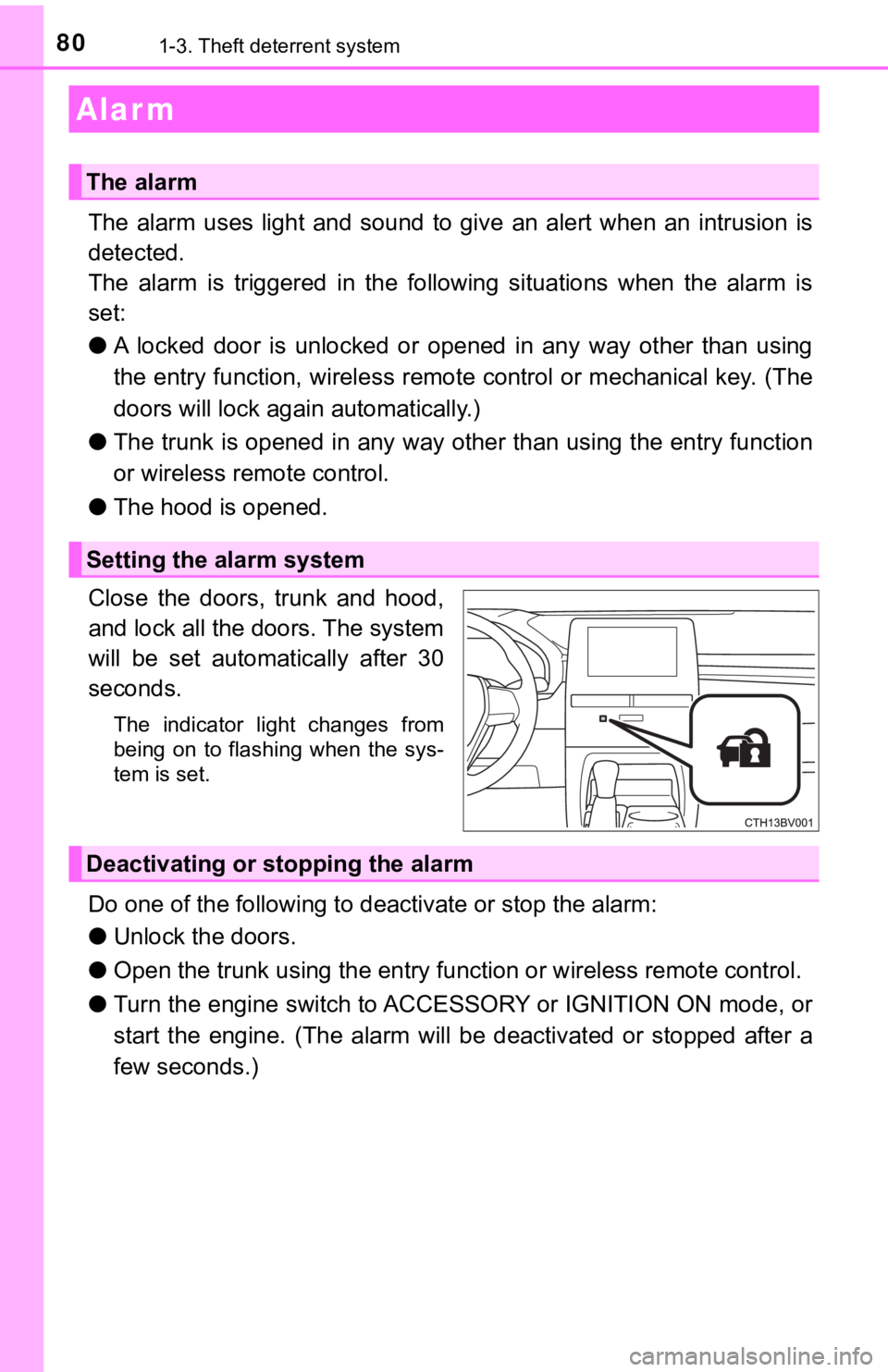
Close the doors, trunk and hood,
and lock all the doors. The system
will be set automatically after 30
seconds.
The indicator light changes from
being on to flashing when the sys-
tem is set.
Do one of the following to d eactivate or stop the alarm:
● Unlock the doors.
● Open the trunk using the entry function or w ireless remote control.
● Turn the engine switch to ACCESSORY or IGNITION ON mode, or
start the engine. (The alarm will be deactivated or stopped after a
few seconds.)
Alar m
The alarm
Setting the alarm system
Deactivating or stopping the alarm
Page 89 of 572
892. Instrument cluster
2
Instrument cluster
*1: These lights turn on when the engine switch is turned to IGNITION ON
mode to indicate that a system check is being performed. They will turn off
after the engine is started, or after a few seconds. There may be a mal-
function in a system if a light does not come on, or turn off. Have the vehi-
cle inspected by your Toyota dealer.
*2: This light illuminates on the multi-information display.
*3: This light does not turn on when the system is disabled.
*4: This light turns on when the system is off.
*5: Depending on the operating condition, the color and illuminating/flashing state of the light change.
*6: This light flashes to indicate that the system is operating.
*7: These indicators will illuminate in the following situations to indicate thatthe system initial check is being performed:
• When the BSM function or RCTA function is enabled and the engi ne
switch is turned to IGNITION ON mode.
• When the engine switch is in IGNITION ON mode and the BSM function is enabled.
• When the engine switch is in IGNITION ON mode and the RCTA fun c-
tion is enabled. (At this time, a buzzer will also sound.)
The indicators will turn off after a few seconds. If the indicators do not
illuminate or turn off, or if a buzzer does not sound when the RCTA func-
tion is enabled, the system may be malfunctioning. Have the vehicle
inspected by your Toyota dealer.
*8: This light illuminates on the outside rear view mirrors.
*9: This light illuminates on the center panel.
*10: When the outside temperature is approximately 37°F (3°C) or lo wer, this
indicator will flash for approximately 10 seconds, then stay on .
WARNING
■If a safety system warning light does not come on
Should a safety system light such as the ABS and SRS warning lights not
come on when you start the engine, this could mean that these s ystems are
not available to help protect you in an accident, which could result in death
or serious injury. Have the vehicle inspected by your Toyota dealer immedi-
ately if this occurs.
Page 91 of 572
912. Instrument cluster
2
Instrument cluster
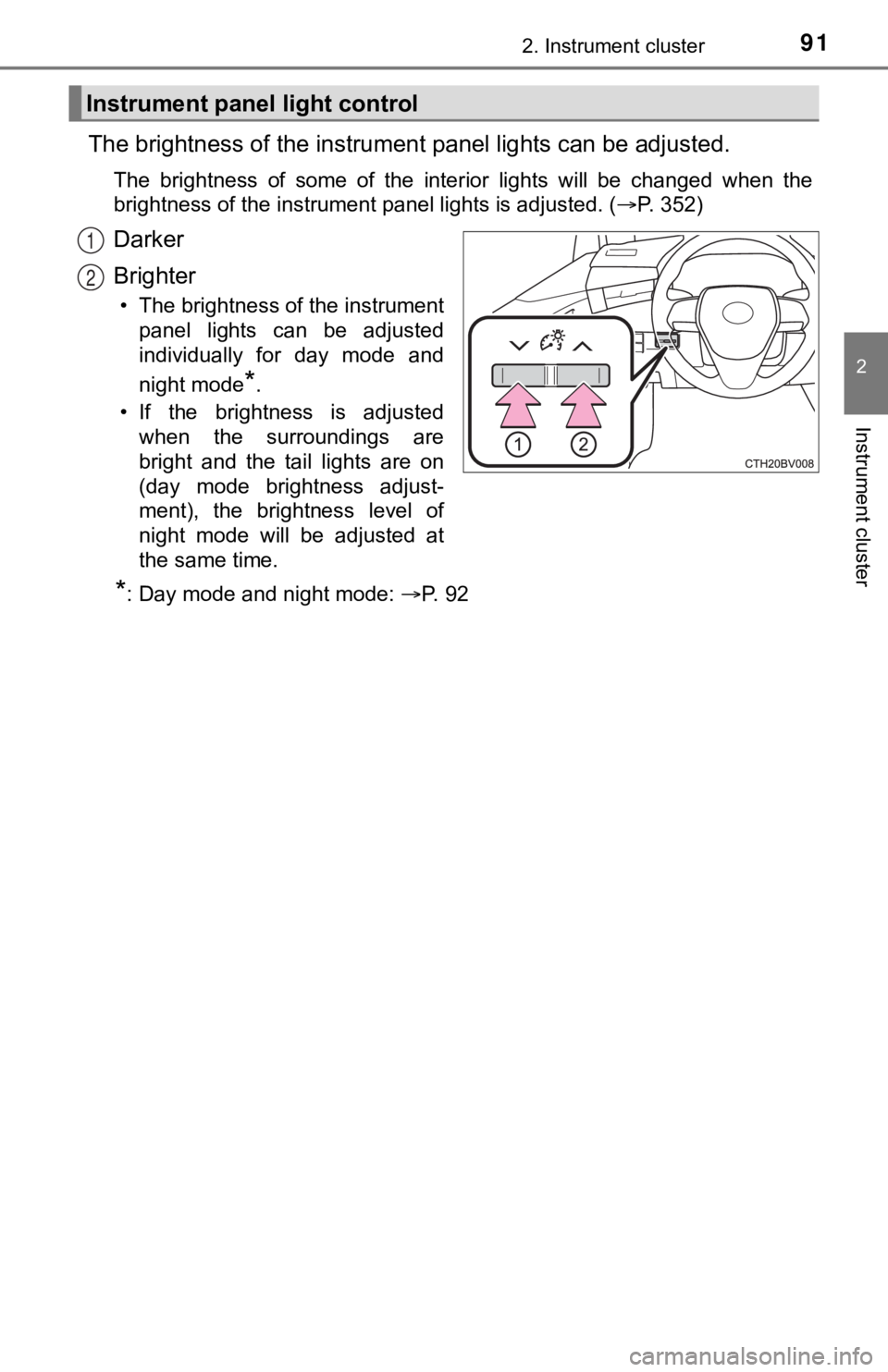
The brightness of the instrument panel lights can be adjusted.
The brightness of some of the interior lights will be changed w hen the
brightness of the instrument panel lights is adjusted. ( P. 352)
Darker
Brighter
• The brightness of the instrument
panel lights can be adjusted
individually for day mode and
night mode
*.
• If the brightness is adjusted when the surroundings are
bright and the tail lights are on
(day mode brightness adjust-
ment), the brightness level of
night mode will be adjusted at
the same time.
*: Day mode and night mode: P. 9 2
Instrument panel light control
1
2
Page 92 of 572
922. Instrument cluster
■The meters and display illuminate when
The engine switch is in IGNITION ON mode.
■ Brightness of the meters (day mode and night mode)
●The brightness of the meters is changed between day mode and ni ght
mode.
• Day mode: When the tail lights are off or when the tail lights are on but
the surrounding area is bright
• Night mode: When the tail lights are on and the surrounding area is dark
● When in night mode, the brightness will be reduced slightly unless the
meters are set to the maximum brightness level.
■ Outside temperature display
In the following situations, the correct outside temperature may not be dis-
played, or the display may take longer than normal to change:
●When stopped, or driving at low speeds (less than 16 mph [25 km/h])
● When the outside temperature has changed suddenly (at the entrance/exit
of a garage, tunnel, etc.)
● When “ ” or “E” is displayed, the system may be malfunctioning.
Take your vehicle to your Toyota dealer.
NOTICE
■To prevent damage to the engine and its components
● Do not let the indicator needle of the tachometer enter the red zone, which
indicates the maximum engine speed.
● The engine may be overheating if the engine coolant temperature gauge is
in the red zone (H). In this case, immediately stop the vehicle in a safe
place, and check the engine after it has cooled completely. ( P. 492)
Page 93 of 572
932. Instrument cluster
2
Instrument cluster
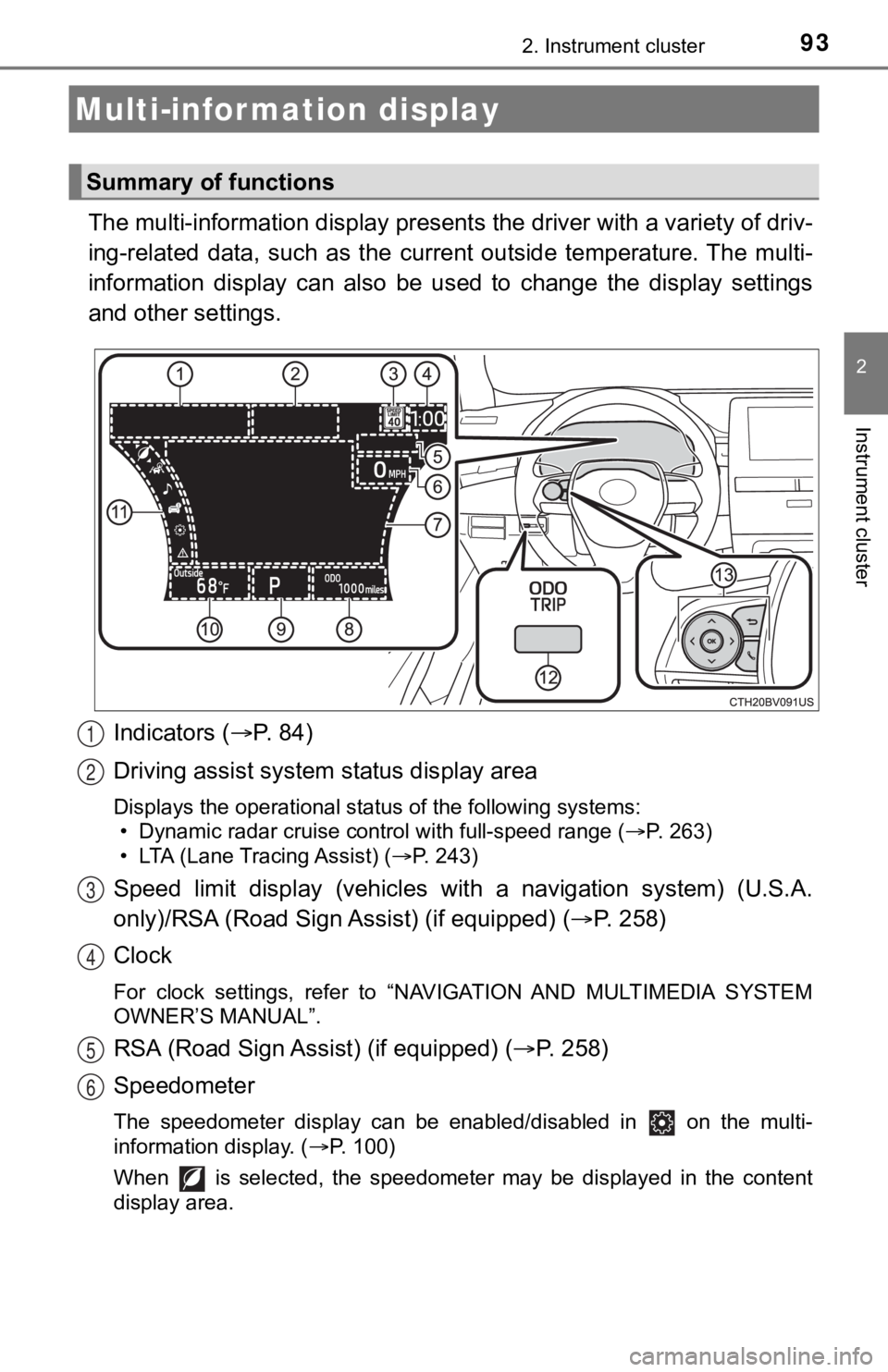
The multi-information display presents the driver with a variety of driv-
ing-related data, such as the cur rent outside temperature. The multi-
information display can also be used to change the display sett ings
and other settings.
Indicators ( P. 84)
Driving assist system status display area
Displays the operational status of the following systems:
• Dynamic radar cruise control with full-speed range ( P. 263)
• LTA (Lane Tracing Assist) ( P. 243)
Speed limit display (vehicles wit h a navigation system) (U.S.A.
only)/RSA (Road Sign Assist) (if equipped) ( P. 2 5 8 )
Clock
For clock settings, refer to “NAVIGATION AND MULTIMEDIA SYSTEM
OWNER’S MANUAL”.
RSA (Road Sign Assist) (if equipped) ( P. 258)
Speedometer
The speedometer display can be enabled/disabled in on the mult i-
information display. ( P. 100)
When is selected, the speedometer may be displayed in the content
display area.
Multi-infor mation display
Summary of functions
1
2
3
4
5
6
Page 94 of 572
942. Instrument cluster
Content display area
A variety of information can be displayed by selecting a menu icon. Addi-
tionally, warning or suggestion/advice pop-up displays will be displayed in
some situations. • Menu icon content ( P. 96)
• Suggestion function ( P. 108)
• Warning message ( P. 465)
Odometer/trip meter ( P. 108)
Shift position ( P. 1 9 1 )
Outside temperature ( P. 9 0 )
Menu icons ( P. 96)
“ODO/TRIP” switch ( P. 9 5 )
Meter control switches ( P. 94)
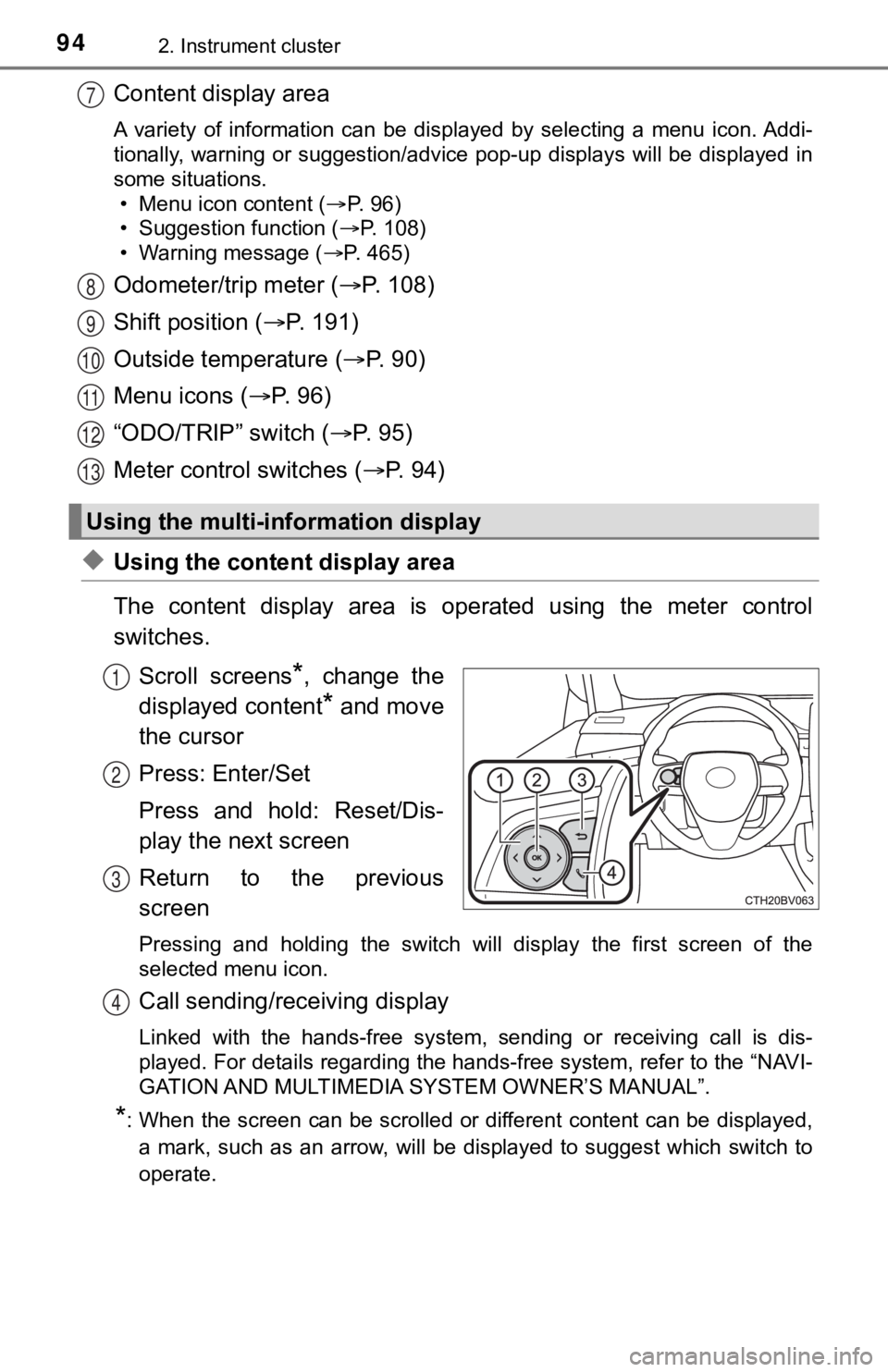
◆Using the content display area
The content display area is operated using the meter control
switches.
Scroll screens
*, change the
displayed content
* and move
the cursor
Press: Enter/Set
Press and hold: Reset/Dis-
play the next screen
Return to the previous
screen
Pressing and holding the switch will display the first screen o f the
selected menu icon.
Call sending/receiving display
Linked with the hands-free system, sending or receiving call is dis-
played. For details regarding the hands-free system, refer to t he “NAVI-
GATION AND MULTIMEDIA S YSTEM OWNER’S MANUAL”.
*: When the screen can be scrolled or different content can be di splayed,
a mark, such as an arrow, will be displayed to suggest which sw itch to
operate.
Using the multi-information display
7
8
9
10
11
12
13
1
2
3
4
Page 95 of 572
952. Instrument cluster
2
Instrument cluster
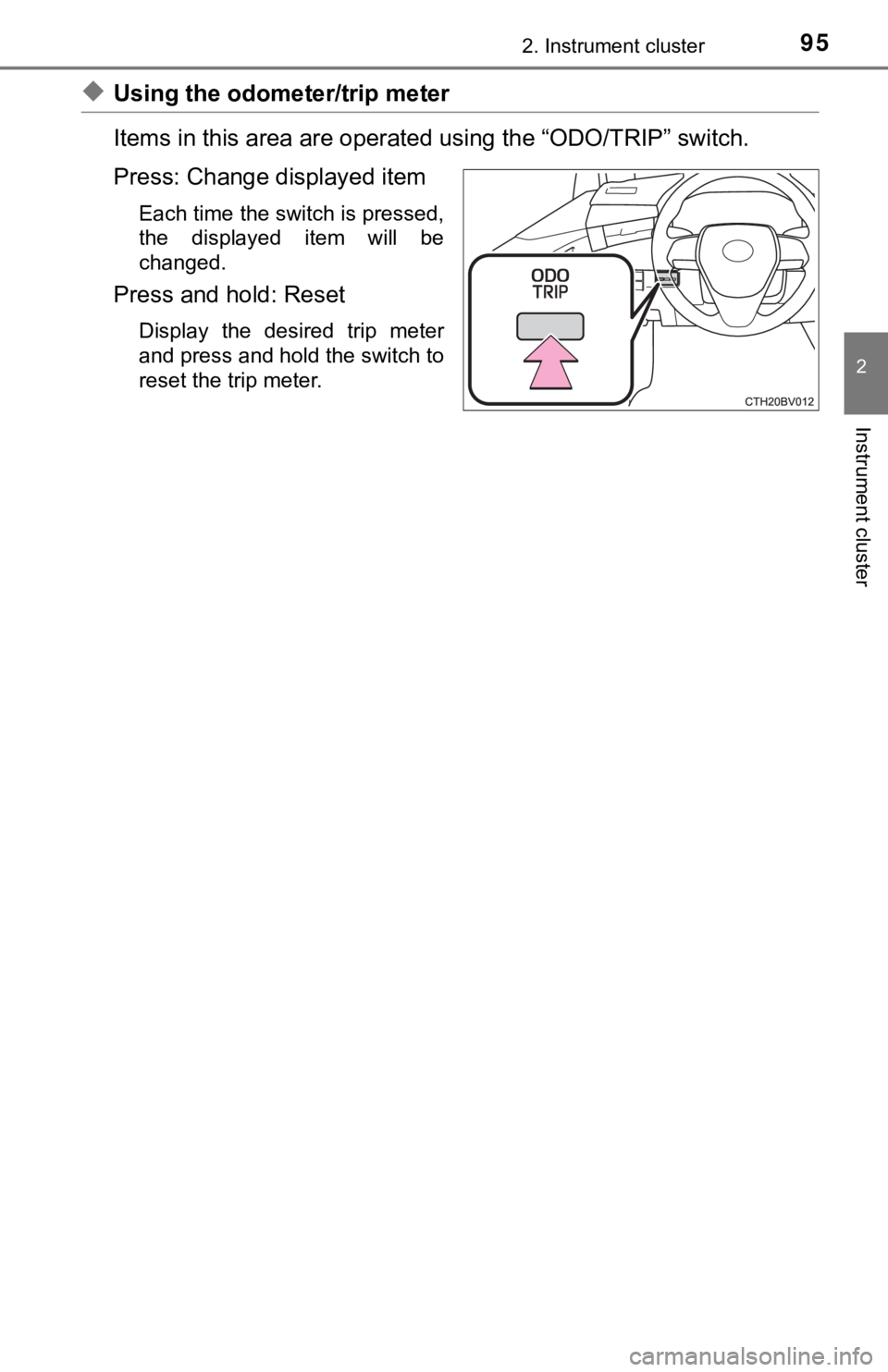
◆Using the odometer/trip meter
Items in this area are operated using the “ODO/TRIP” switch.
Press: Change displayed item
Each time the switch is pressed,
the displayed item will be
changed.
Press and hold: Reset
Display the desired trip meter
and press and hold the switch to
reset the trip meter.