high beam TOYOTA AVALON 2022 Owners Manual
[x] Cancel search | Manufacturer: TOYOTA, Model Year: 2022, Model line: AVALON, Model: TOYOTA AVALON 2022Pages: 572, PDF Size: 9.42 MB
Page 3 of 572
3
1
8 7 5 4
3
2
9
6
3-1. Key informationKeys .................................. 124
3-2. Opening, closing and locking the doors
Doors................................. 127
Trunk ................................. 133
Smart key system.............. 137
3-3. Adjusting the seats Front seats ........................ 144
Rear seats ......................... 146
Driving position memory ........................... 148
Head restraints .................. 153
3-4. Adjusting the steering wheel and mirrors
Steering wheel .................. 155
Inside rear view mirror....... 157
Outside rear view mirrors ............................. 159
3-5. Opening and closing the windows
Power windows ................. 162
Moon roof .......................... 166 4-1. Before driving
Driving the vehicle ............. 172
Cargo and luggage ............ 180
Vehicle load limits .............. 183
Trailer towing ..................... 184
Dinghy towing .................... 185
4-2. Driving procedures Engine (ignition) switch...... 186
Automatic transmission ..... 191
Turn signal lever ................ 197
Parking brake .................... 198
Brake Hold ......................... 202
4-3. Operating the lights and wipers
Headlight switch ................ 204
AHB (Automatic High Beam) .............................. 208
Windshield wipers and washer ............................. 212
4-4. Refueling Opening the fuel tank cap................................... 216
3Operation of each
component4Driving
Page 20 of 572
20Pictorial index
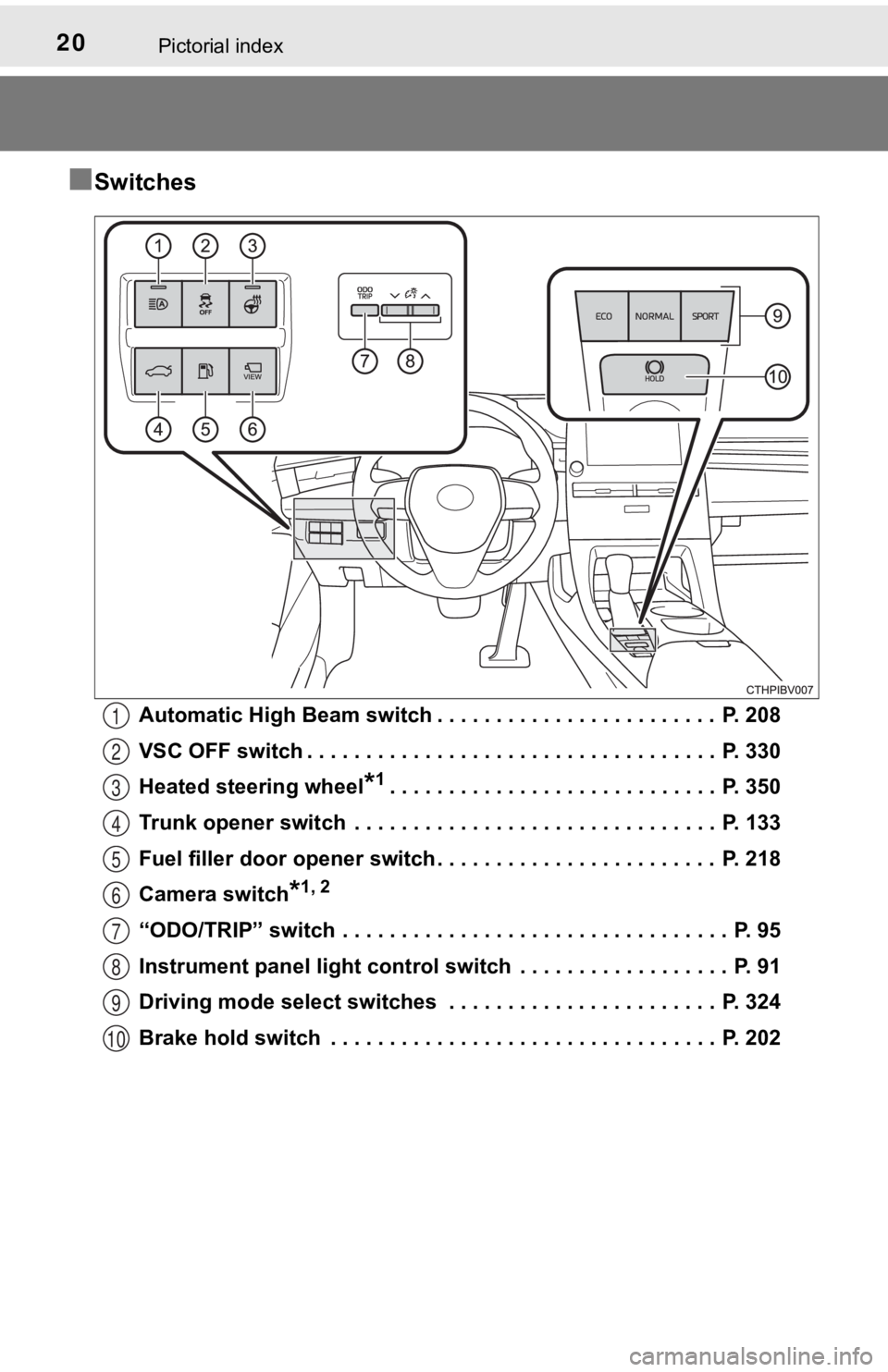
■Switches
Automatic High Beam switch . . . . . . . . . . . . . . . . . . . . . . . . P. 208
VSC OFF switch . . . . . . . . . . . . . . . . . . . . . . . . . . . . . . . . . . . P. 330
Heated steering wheel
*1. . . . . . . . . . . . . . . . . . . . . . . . . . . . P. 350
Trunk opener switch . . . . . . . . . . . . . . . . . . . . . . . . . . . . . . . P. 133
Fuel filler door opener switch . . . . . . . . . . . . . . . . . . . . . . . . P. 218
Camera switch
*1, 2
“ODO/TRIP” switch . . . . . . . . . . . . . . . . . . . . . . . . . . . . . . . . . P. 95
Instrument panel light control s witch . . . . . . . . . . . . . . . . . . P. 91
Driving mode select switches . . . . . . . . . . . . . . . . . . . . . . . P. 324
Brake hold switch . . . . . . . . . . . . . . . . . . . . . . . . . . . . . . . . . P. 202
1
2
3
4
5
6
7
8
9
10
Page 87 of 572
872. Instrument cluster
2
Instrument cluster
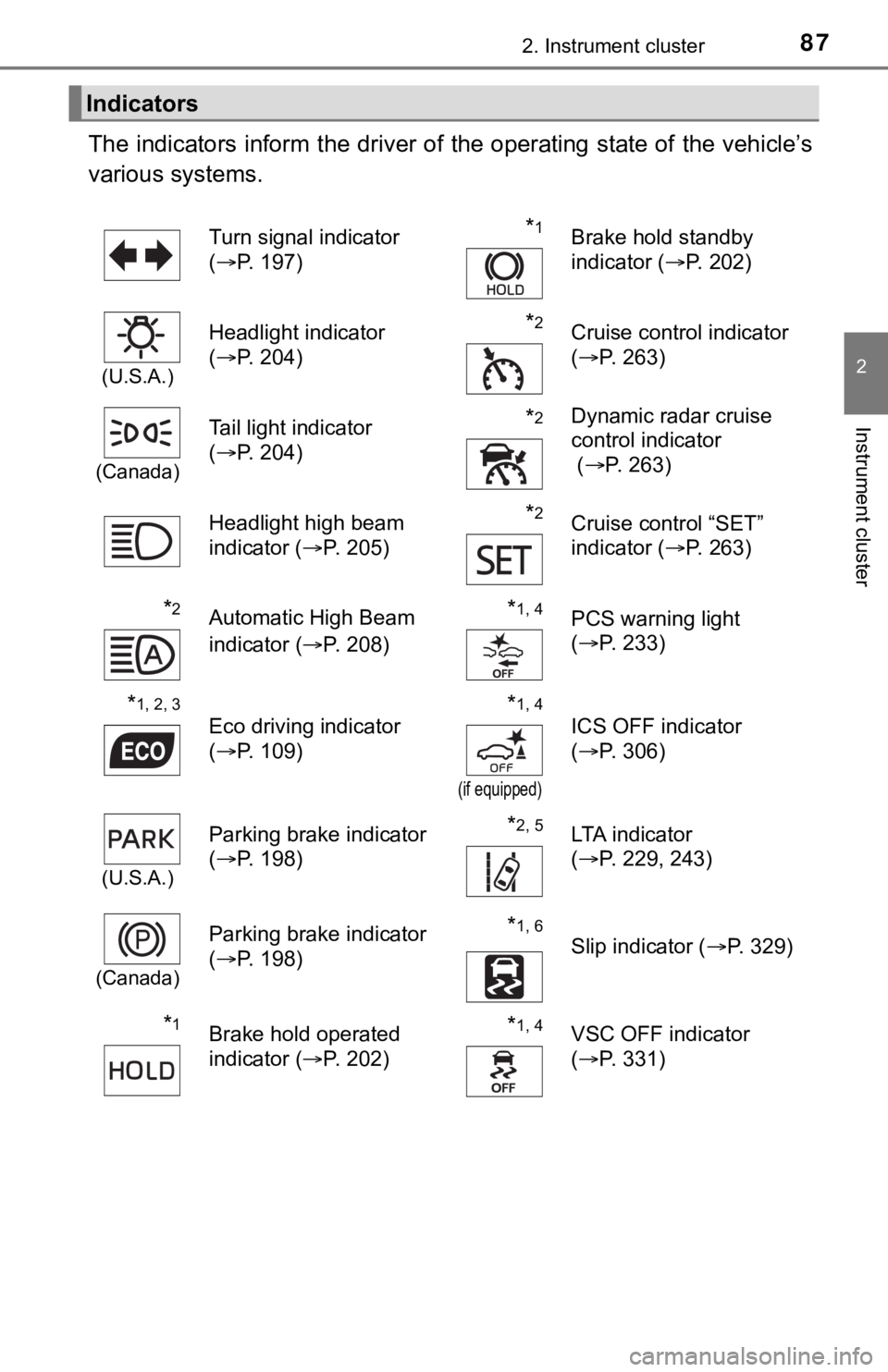
The indicators inform the driver of the operating state of the vehicle’s
various systems.
Indicators
Turn signal indicator
( P. 197)*1Brake hold standby
indicator ( P. 202)
(U.S.A.)
Headlight indicator
(P. 204)*2Cruise control indicator
(P. 263)
(Canada)
Tail light indicator
(P. 204) *2Dynamic radar cruise
control indicator
( P. 263)
Headlight high beam
indicator ( P. 205)
*2Cruise control “SET”
indicator (P. 263)
*2Automatic High Beam
indicator ( P. 208)*1, 4PCS warning light
(P. 233)
*1, 2, 3
Eco driving indicator
(P. 109)*1, 4
(if equipped)
ICS OFF indicator
(P. 306)
(U.S.A.)
Parking brake indicator
(P. 198)*2, 5LTA indicator
(P. 229, 243)
(Canada)
Parking brake indicator
(P. 198)*1, 6
Slip indicator ( P. 329)
*1Brake hold operated
indicator (P. 202)*1, 4VSC OFF indicator
(P. 331)
Page 171 of 572

171
4Driving
4-1. Before drivingDriving the vehicle ............. 172
Cargo and luggage ........... 180
Vehicle load limits ............. 183
Trailer towing..................... 184
Dinghy towing ................... 185
4-2. Driving procedures Engine (ignition) switch ..... 186
Automatic transmission ..... 191
Turn signal lever................ 197
Parking brake .................... 198
Brake Hold ........................ 202
4-3. Operating the lights and wipers
Headlight switch ................ 204
AHB (Automatic High Beam) ............................. 208
Windshield wipers and washer ............................ 212
4-4. Refueling Opening the fuel tank cap .................................. 216 4-5. Using the driving
support systems
Toyota Safety Sense 2.5+...................... 220
PCS (Pre-Collision System)........................... 228
LTA (Lane Tracing Assist) ............................. 243
RSA (Road Sign Assist) .... 258
Dynamic radar cruise control with full-speed
range............................... 263
BSM (Blind Spot Monitor)........................... 279
• BSM function ................ 283
• RCTA function .............. 286
Rear Camera Detection function (vehicles with
panoramic view
monitor)........................... 291
Intuitive parking assist....... 295
Intelligent Clearance Sonar (ICS) ..................... 303
Driving mode select switches .......................... 324
Driving assist systems ...... 328
4-6. Driving tips Winter driving tips ............. 336
Page 205 of 572
2054-3. Operating the lights and wipers
4
Driving
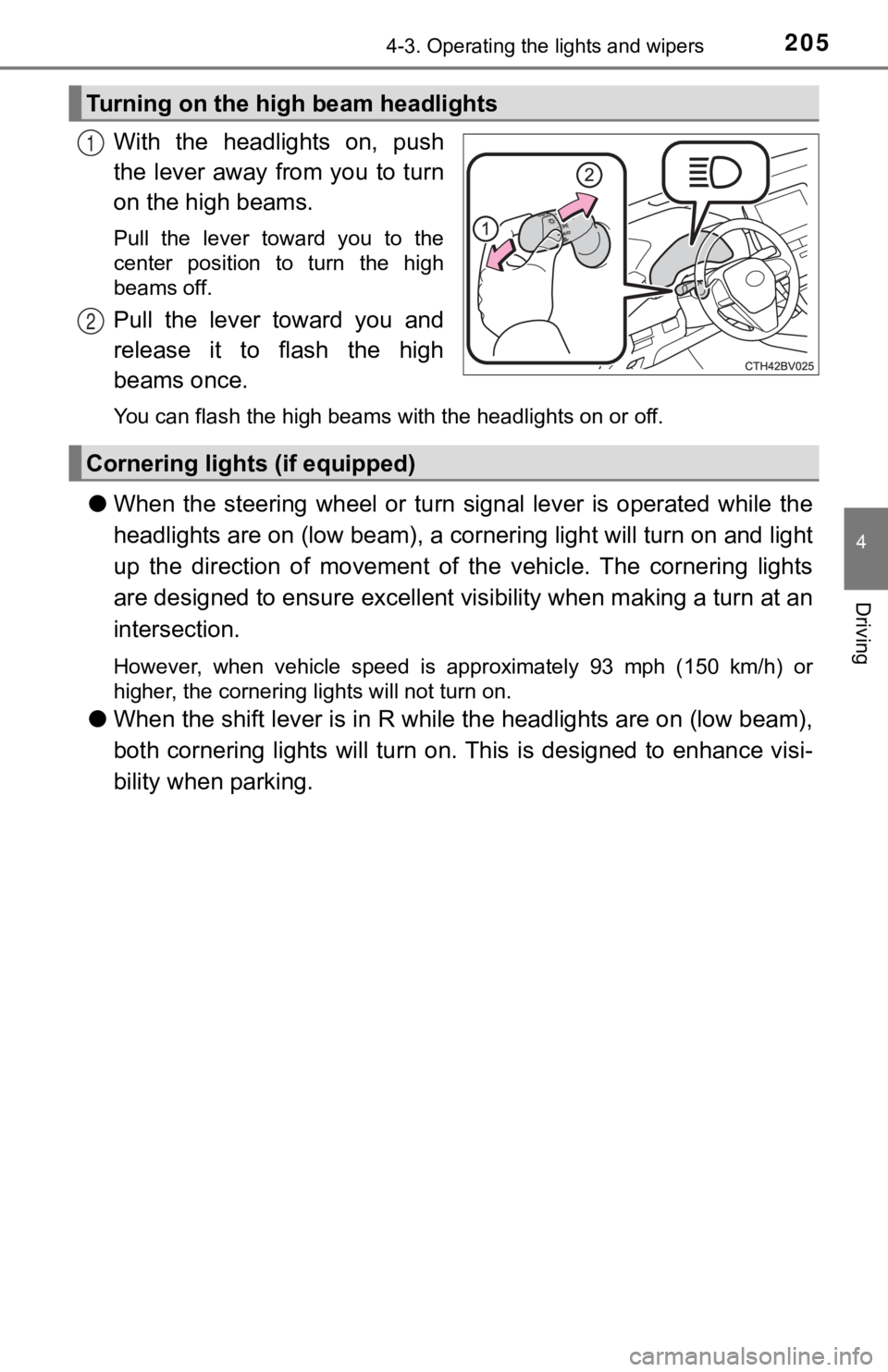
With the headlights on, push
the lever away from you to turn
on the high beams.
Pull the lever toward you to the
center position to turn the high
beams off.
Pull the lever toward you and
release it to flash the high
beams once.
You can flash the high beams with the headlights on or off.
●When the steering wheel or turn signal lever is operated while the
headlights are on (lo w beam), a cornering light will turn on and light
up the direction of movement of the vehicle. The cornering ligh ts
are designed to ensur e excellent visibility when making a turn at an
intersection.
However, when vehicle speed is approximately 93 mph (150 km/h) or
higher, the cornering lights will not turn on.
● When the shift lever is in R while the headlights are on (low b eam),
both cornering lights will turn on. This is designed to enhance visi-
bility when parking.
Turning on the high beam headlights
1
2
Cornering light s (if equipped)
Page 208 of 572
2084-3. Operating the lights and wipers
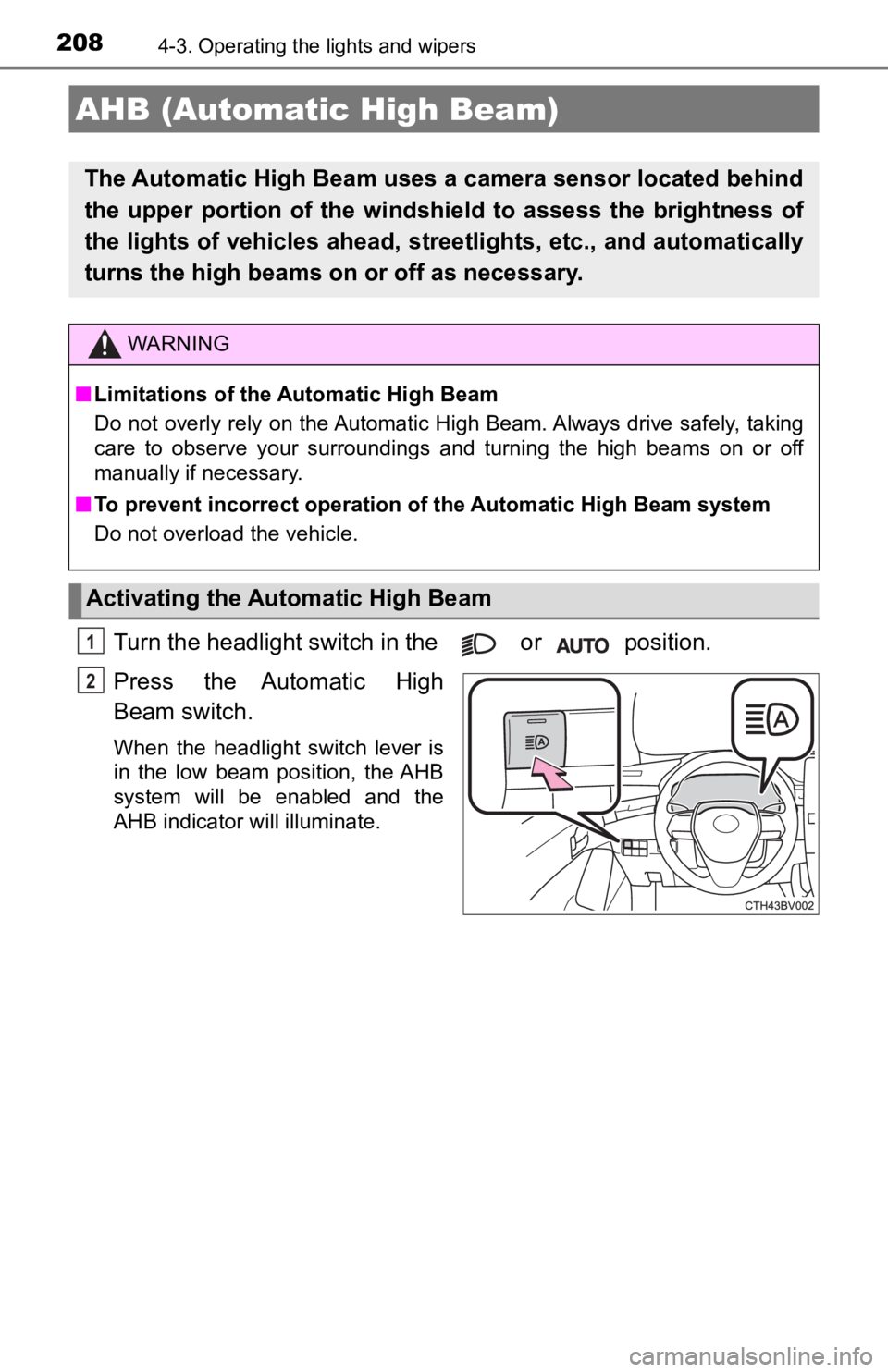
Turn the headlight switch in the or position.
Press the Automatic High
Beam switch.
When the headlight switch lever is
in the low beam position, the AHB
system will be enabled and the
AHB indicator will illuminate.
AHB (Automatic High Beam)
The Automatic High Beam uses a camera sensor located behind
the upper portion of the windshield to assess the brightness of
the lights of vehicles ahead, streetlights, etc., and automatically
turns the high beams on or off as necessary.
WARNING
■Limitations of the Automatic High Beam
Do not overly rely on the Automatic High Beam. Always drive safely, taking
care to observe your surroundings and turning the high beams on or off
manually if necessary.
■ To prevent incorrect operation of the Automatic High Beam syste m
Do not overload the vehicle.
Activating the Automatic High Beam
1
2
Page 209 of 572
2094-3. Operating the lights and wipers
4
Driving
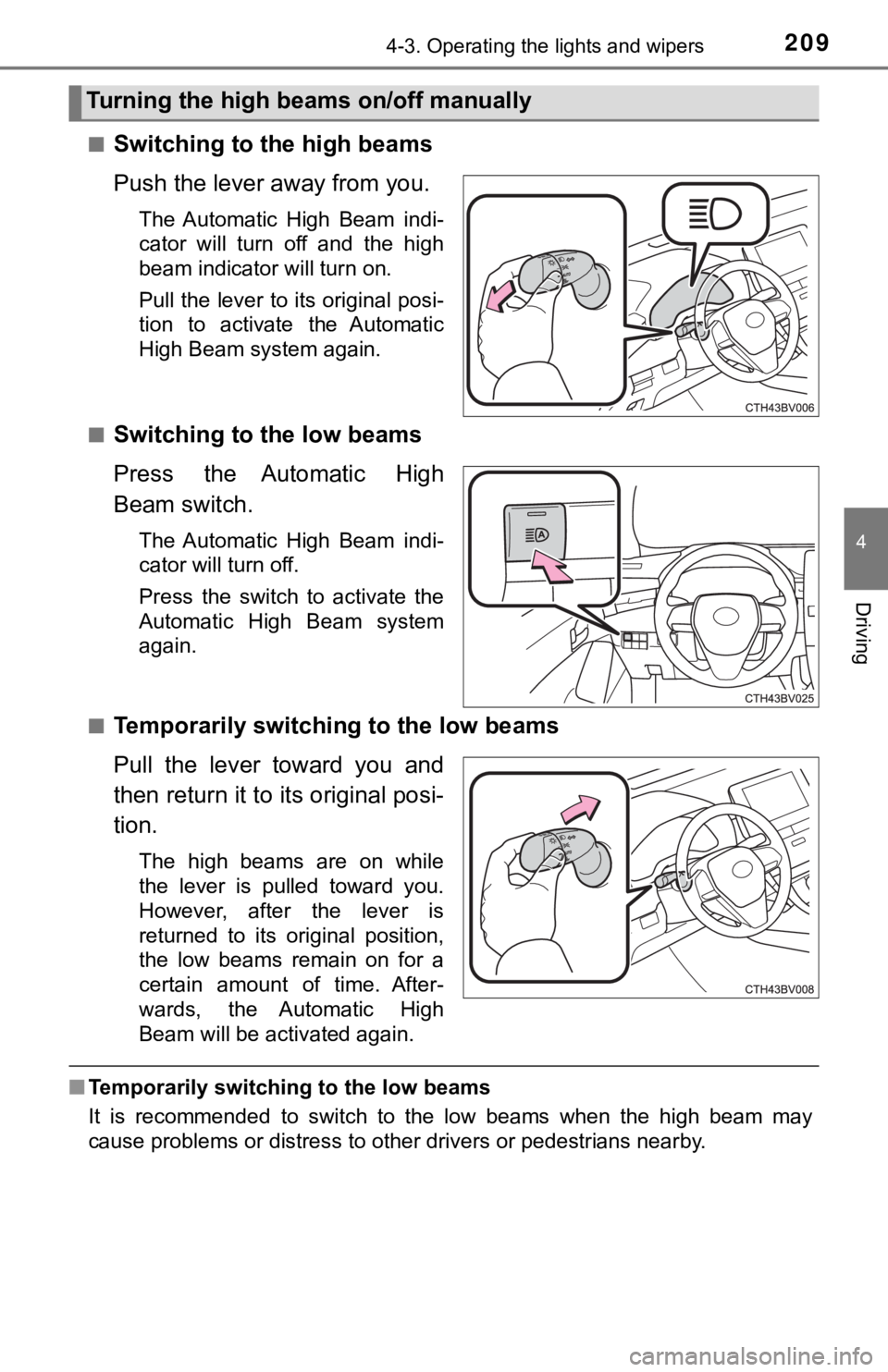
■Switching to the high beams
Push the lever away from you.
The Automatic High Beam indi-
cator will turn off and the high
beam indicator will turn on.
Pull the lever to its original posi-
tion to activate the Automatic
High Beam system again.
■
Switching to the low beams
Press the Automatic High
Beam switch.
The Automatic High Beam indi-
cator will turn off.
Press the switch to activate the
Automatic High Beam system
again.
■
Temporarily switching to the low beams
Pull the lever toward you and
then return it to its original posi-
tion.
The high beams are on while
the lever is pulled toward you.
However, after the lever is
returned to its original position,
the low beams remain on for a
certain amount of time. After-
wards, the Automatic High
Beam will be activated again.
■ Temporarily switchi ng to the low beams
It is recommended to switch to the low beams when the high beam may
cause problems or distress to other drivers or pedestrians near by.
Turning the high beams on/off manually
Page 210 of 572

2104-3. Operating the lights and wipers
■Conditions to turn the high beams on/off automatically
●When all of the following conditions are met, the high beams will be turned
on automatically (after approximately 1 second):
• The vehicle speed is approximately 21 mph (34 km/h) or more.
• The area ahead of the vehicle is dark.
• There are no vehicles ahead with headlights or tail lights turned on.
• There are few streetlights on the road ahead.
● If any of the following conditions is met, the high beams will turn off automat-
ically:
• The vehicle speed is below approximately 17 mph (27 km/h).
• The area ahead of the vehicle is not dark.
• Vehicles ahead have their headlights or tail lights turned on.
• There are many streetlights on the road ahead.
■ Camera sensor detection information
●The high beams may not be automatically turned off in the following situa-
tions:
• When a vehicle suddenly appears from around a curve
• When the vehicle is cut in front of by another vehicle
• When vehicles ahead cannot be detected due to repeated curves, road
dividers or roadside trees
• When vehicles ahead appear in a faraway lane on a wide road
• When the lights of vehicles ahead are not on
● The high beams may be turned off if a vehicle ahead that is usi ng fog lights
without its headlights turned on is detected.
● House lights, street lights, traffic signals, and illuminated billboards or signs
and other reflective objects may cause the high beams to change to the low
beams, or the low beams to remain on.
● The following factors may affect the amount of time taken for t he high
beams to turn on or off:
• The brightness of the headlights, fog lights, and tail lights of vehicles
ahead
• The movement and direction of vehicles ahead
• When a vehicle ahead only has operational lights on one side
• When a vehicle ahead is a two-wheeled vehicle
• The condition of the road (gradient, curve, condition of the r oad surface,
etc.)
• The number of passengers and amount of luggage in the vehicle
● The high beams may turn on or off unexpectedly.
● Bicycles or similar vehicles may not be detected.
● In the following situations the system may not be able to correctly detect the
surrounding brightness level. This may cause the low beams to r emain on
or the high beams to flash or dazzle pedestrians or vehicles ah ead. In such
a case, it is necessary to manually switch between the high and low beams.
• When driving in inclement weather (heavy rain, snow, fog, sand storms,
etc.)
Page 211 of 572
2114-3. Operating the lights and wipers
4
Driving
• When the windshield is obscured by fog, mist, ice, dirt, etc.
• When the windshield is cracked or damaged
• When the camera sensor is deformed or dirty
• When the temperature of the camera sensor is extremely high
• When the surrounding brightness level is equal to that of head lights, tail
lights or fog lights
• When headlights or tail lights of vehicles ahead are turned off, dirty, changing color, or not aimed properly
• When the vehicle is hit by water, snow, dust, etc. from a prec eding vehi-
cle
• When driving through an area of intermittently changing brightness and
darkness
• When frequently and repeatedly driving ascending/descending roads, or roads with rough, bumpy or uneven surfaces (such as stone-paved
roads, gravel roads, etc.)
• When frequently and repeatedly taking curves or driving on a w inding
road
• When there is a highly reflective object ahead of the vehicle, such as a sign or mirror
• When the back of a preceding vehicle is highly reflective, such as a con-
tainer on a truck
• When the vehicle's headlights are damaged or dirty, or are not aimed
properly
• When the vehicle is listing or titling due to a flat tire, a trailer being towed, etc.
• When the headlights are changed between the high beams and low
beams repeatedly in an abnormal manner
• When the driver believes that the high beams may be flashing or dazzling pedestrians or other drivers
■ Temporarily lowering sensor sensitivity
The sensitivity of the sensor can be temporarily lowered.
Turn the engine switch off while the following conditions are m et.
• The headlight switch is in the or position.
• The headlight switch lever is in the original position.
• Automatic High Beam switch is on.
Turn the engine switch to the IGNITION ON mode.
Within 60 seconds after , repeat pushing the headlight switch lever to the
high beam position then pulling it to the original position qui ckly 10 times,
then leave the lever in the original position.
If the sensitivity is changed, the Automatic High Beam indicato r is turn on
and off 3 times.
1
2
32
4
Page 220 of 572
2204-5. Using the driving support systems
◆PCS (Pre-Collision System)
P. 2 2 8
◆LTA (Lane Tracing Assist)
P. 2 4 3
◆AHB (Automatic High Beam)
P. 2 0 8
◆RSA (Road Sign Assi st) (if equipped)
P. 2 5 8
◆Dynamic radar cruise control with full-speed range
P. 2 6 3
Toyota Safety Sense 2.5+
The Toyota Safety Sense 2.5+ c onsists of the following drive
assist systems and contributes t o a safe and comfortable driv-
ing experience:
Driving assist system
WARNING
■ Toyota Safety Sense 2.5+
The Toyota Safety Sense 2.5+ is designed to operate under the assumption
that the driver will drive safely, and is designed to help reduce the impact to
the occupants and the vehicle in the case of a collision or assist the driver in
normal driving conditions.
As there is a limit to the degree of recognition accuracy and control perfor-
mance that this system can provide, do not overly rely on this system. The
driver is always responsible for paying attention to the vehicle's surround-
ings and driving safely.