turn signal TOYOTA AVALON 2022 Owners Manual
[x] Cancel search | Manufacturer: TOYOTA, Model Year: 2022, Model line: AVALON, Model: TOYOTA AVALON 2022Pages: 572, PDF Size: 9.42 MB
Page 3 of 572
3
1
8 7 5 4
3
2
9
6
3-1. Key informationKeys .................................. 124
3-2. Opening, closing and locking the doors
Doors................................. 127
Trunk ................................. 133
Smart key system.............. 137
3-3. Adjusting the seats Front seats ........................ 144
Rear seats ......................... 146
Driving position memory ........................... 148
Head restraints .................. 153
3-4. Adjusting the steering wheel and mirrors
Steering wheel .................. 155
Inside rear view mirror....... 157
Outside rear view mirrors ............................. 159
3-5. Opening and closing the windows
Power windows ................. 162
Moon roof .......................... 166 4-1. Before driving
Driving the vehicle ............. 172
Cargo and luggage ............ 180
Vehicle load limits .............. 183
Trailer towing ..................... 184
Dinghy towing .................... 185
4-2. Driving procedures Engine (ignition) switch...... 186
Automatic transmission ..... 191
Turn signal lever ................ 197
Parking brake .................... 198
Brake Hold ......................... 202
4-3. Operating the lights and wipers
Headlight switch ................ 204
AHB (Automatic High Beam) .............................. 208
Windshield wipers and washer ............................. 212
4-4. Refueling Opening the fuel tank cap................................... 216
3Operation of each
component4Driving
Page 17 of 572
17Pictorial index
Windshield wipers . . . . . . . . . . . . . . . . . . . . . . . . . . . . . . . . . P. 212
Precautions for winter season . . . . . . . . . . . . . . . . . . . . . . . . . P. 336
Fuel filler door . . . . . . . . . . . . . . . . . . . . . . . . . . . . . . . . . . . . P. 216
Refueling method . . . . . . . . . . . . . . . . . . . . . . . . . . . . . . . . . . . P. 216
Fuel type/fuel tank capacity . . . . . . . . . . . . . . . . . . . . . . . . . . . P. 500
Tires . . . . . . . . . . . . . . . . . . . . . . . . . . . . . . . . . . . . . . . . . . P. 414
Tire size/inflation pressure . . . . . . . . . . . . . . . . . . . . . . . . . P. 506
Winter tires/tire chains . . . . . . . . . . . . . . . . . . . . . . . . . . . . P. 336
Checking/rotation/tire pressur e warning system . . . . . . . . .P. 414
Coping with flat tires . . . . . . . . . . . . . . . . . . . . . . . . . . . . . . P. 470
Hood . . . . . . . . . . . . . . . . . . . . . . . . . . . . . . . . . . . . . . . . . . . . P. 401
Opening . . . . . . . . . . . . . . . . . . . . . . . . . . . . . . . . . . . . . . . . . . P. 401
Engine oil . . . . . . . . . . . . . . . . . . . . . . . . . . . . . . . . . . . . . . . . . P. 501
Coping with overheat . . . . . . . . . . . . . . . . . . . . . . . . . . . . . . . . P. 492
Front turn signal lights/parking lights . . . . . . . . . . . . . P. 197, 204
Headlights/daytime running lights . . . . . . . . . . . . . . . . . . . . P. 204
Front side marker lights . . . . . . . . . . . . . . . . . . . . . . . . . . . . P. 204
Headlights . . . . . . . . . . . . . . . . . . . . . . . . . . . . . . . . . . . . . . . P. 204
Front turn signal lights . . . . . . . . . . . . . . . . . . . . . . . . . . . . . P. 197
Daytime running lights/parking lights . . . . . . . . . . . . . . . . . P. 204
Front turn signal lights/cornering lights . . . . . . . . . . . P. 197, 204
Side turn signal lights . . . . . . . . . . . . . . . . . . . . . . . . . . . . . . P. 197
Rear turn signal lights/r ear side marker lights/
tail lights/stoplights . . . . . . . . . . . . . . . . . . . . . . . . . . . . P. 197, 204
Back-up lights
Shifting the shift lever to R . . . . . . . . . . . . . . . . . . . . . . . . . . . . P. 191
License plate lights . . . . . . . . . . . . . . . . . . . . . . . . . . . . . . . . P. 204
4
5
6
7
Light bulbs of the exter ior lights for driving
(Replacing method: P. 441, Watts: P. 508)
*: If equipped
8
9
10
11
12
13
14
15
16
17
Page 19 of 572
19Pictorial index
Parking brake switch . . . . . . . . . . . . . . . . . . . . . . . . . . . . . . . P. 198
Applying/releasing . . . . . . . . . . . . . . . . . . . . . . . . . . . . . . P. 198, 199
Precautions for winter season . . . . . . . . . . . . . . . . . . . . . . . . . P. 337
Warning light/warning buzzer/
warning message . . . . . . . . . . . . . . . . . . . . . . . . . . . . . . . P. 201, 455
Turn signal lever . . . . . . . . . . . . . . . . . . . . . . . . . . . . . . . . . . P. 197
Headlight switch . . . . . . . . . . . . . . . . . . . . . . . . . . . . . . . . . . P. 204
Headlights/side marker lights/parking lights/tail lights/
license plate lights/daytime running lights . . . . . . . . . . . . . . . . P. 204
Windshield wiper and washer switch . . . . . . . . . . . . . . . . . P. 212
Usage . . . . . . . . . . . . . . . . . . . . . . . . . . . . . . . . . . . . . . . . . . . P. 212
Adding washer fluid . . . . . . . . . . . . . . . . . . . . . . . . . . . . . . . . . P. 413
Emergency flasher switch . . . . . . . . . . . . . . . . . . . . . . . . . . P. 444
Hood lock release lever. . . . . . . . . . . . . . . . . . . . . . . . . . . . . P. 401
Tilt and telescopic steering lock release lever
*1 . . . . . . . . P. 155
Tilt and telescopic steering control switch
*1 . . . . . . . . . . . P. 155
Adjustment . . . . . . . . . . . . . . . . . . . . . . . . . . . . . . . . . . . . . . . . P. 155
Driving position memory . . . . . . . . . . . . . . . . . . . . . . . . . . . . . P. 148
Air conditioning system . . . . . . . . . . . . . . . . . . . . . . . . . . . . P. 342
Usage . . . . . . . . . . . . . . . . . . . . . . . . . . . . . . . . . . . . . . . . . . . P. 342
Rear window defogger . . . . . . . . . . . . . . . . . . . . . . . . . . . . . . . P. 344
Audio Plus
*1, 2
Premium Audio*1, 2
*1: If equipped
*2: Refer to “NAVIGATION AND MULT IMEDIA SYSTEM OWNER’S MANUAL”.
4
5
6
7
8
9
10
11
12
Page 73 of 572
731-2. Emergency assistance
1
For safety and security
■Safety Connect Services Information
●Phone calls using the vehicle’s Bluetooth® technology will not be possible
when Safety Connect is active and in use.
● Safety Connect is available beginning Fall 2009 on select Toyot a models (in
the contiguous United States only). Contact with the Safety Con nect
response center is dependent upon the telematics device being i n operative
condition, cellular connection availability, and GPS satellite signal reception,
which can limit the ability to reach the response center or rec eive emer-
gency service support. Enrollment and Telematics Subscription S ervice
Agreement are required. A variety of subscription terms are ava ilable;
charges vary by subscription term selected and location.
● Automatic Collision Notification, Emergency Assistance and Stolen Vehicle
Location are available in the United States, including Hawaii a nd Alaska,
Puerto Rico and Canada, and Enhanced Roadside Assistance are av ailable
in the United States, Puerto Rico and Canada.
● Automatic Collision Notification, Emergency Assistance, Stolen Vehicle and
Enhanced Road Assistance are not available in the U.S. Virgin I slands.
For vehicles first sold in the U.S. Virgin Islands, no Safety C onnect services
will function in or outside the U.S. Virgin Islands.
● Safety Connect services are not subject to section 255 of the T elecommuni-
cations Act and the device is not TTY compatible.
■ Languages
The Safety Connect response center will offer support in multip le languages.
The Safety Connect system will offer voice prompts in English, Spanish, and
French. Please indicate your language of choice when enrolling.
■ When contacting the response center
You may be unable to contact the response center if the network is busy.
When the engine switch is turned to IGNITION ON mode, the red i ndi-
cator light comes on for 2 seconds then turns off. Afterward, t he green
indicator light comes on, indicat ing that the service is active.
The following indicator light patterns indicate specific system usage
conditions:
● Green indicator light on = Active service
● Green indicator light flashing = Safety Connect call in process
● Red indicator light (except at vehicle start-up) = System malfunction
(contact your Toyota dealer)
● No indicator light (off) = Saf ety Connect service not active
Safety Connect LED light Indicators
Page 87 of 572
872. Instrument cluster
2
Instrument cluster
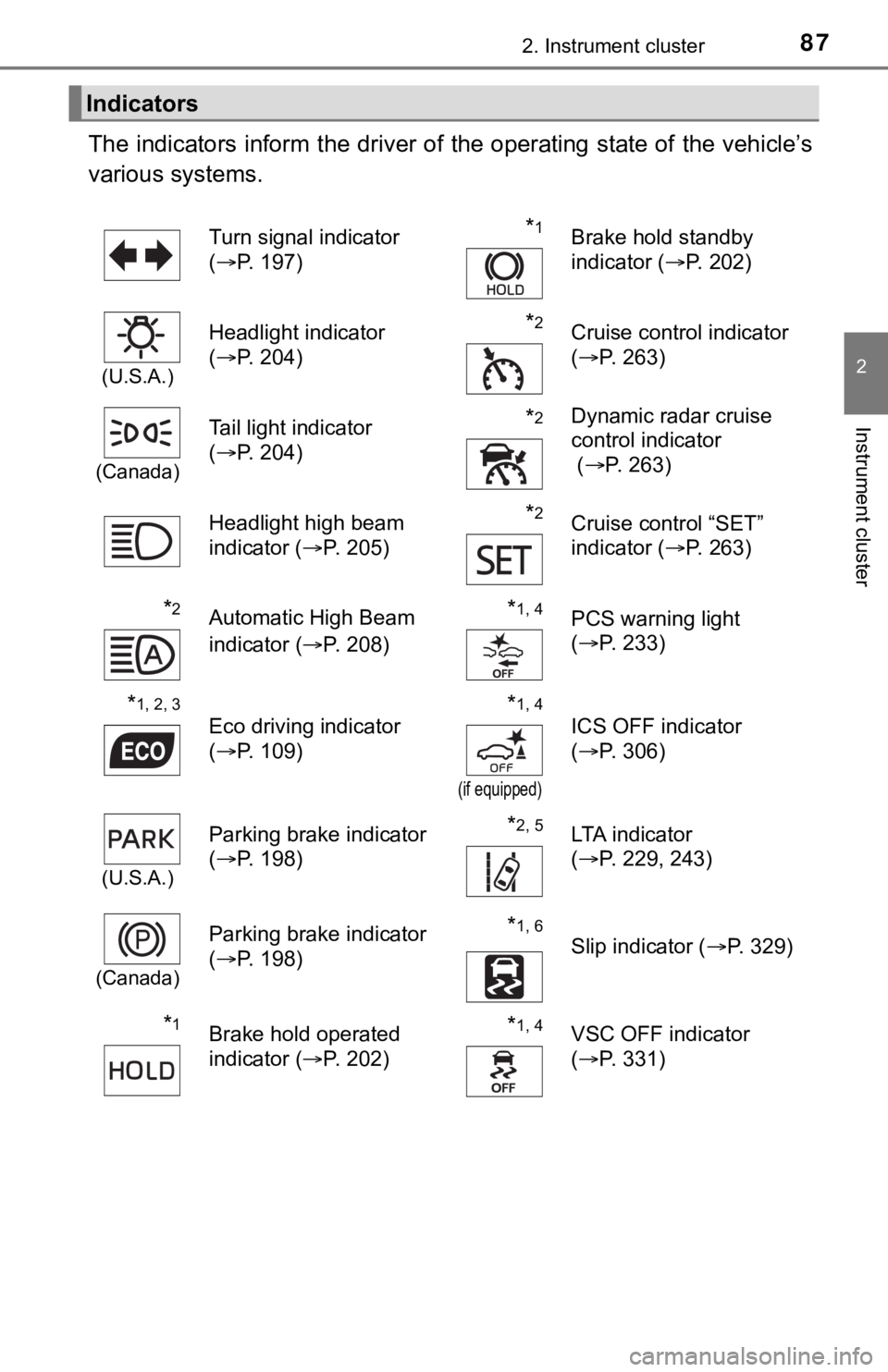
The indicators inform the driver of the operating state of the vehicle’s
various systems.
Indicators
Turn signal indicator
( P. 197)*1Brake hold standby
indicator ( P. 202)
(U.S.A.)
Headlight indicator
(P. 204)*2Cruise control indicator
(P. 263)
(Canada)
Tail light indicator
(P. 204) *2Dynamic radar cruise
control indicator
( P. 263)
Headlight high beam
indicator ( P. 205)
*2Cruise control “SET”
indicator (P. 263)
*2Automatic High Beam
indicator ( P. 208)*1, 4PCS warning light
(P. 233)
*1, 2, 3
Eco driving indicator
(P. 109)*1, 4
(if equipped)
ICS OFF indicator
(P. 306)
(U.S.A.)
Parking brake indicator
(P. 198)*2, 5LTA indicator
(P. 229, 243)
(Canada)
Parking brake indicator
(P. 198)*1, 6
Slip indicator ( P. 329)
*1Brake hold operated
indicator (P. 202)*1, 4VSC OFF indicator
(P. 331)
Page 140 of 572

1403-2. Opening, closing and locking the doors
■Note for the entry function
●Even when the electronic key is within the effective range (detection areas),
the system may not operate properly in the following cases:
• The electronic key is too close to the window or outside door handle, near
the ground, or in a high place when the doors are locked or unl ocked.
• The electronic key is near the ground or in a high place, or t oo close to
the rear bumper center when the trunk is opened.
• The electronic key is on the instrument panel, rear package tray or floor, or in the door pockets or glove box when the engine is started or engine
switch modes are changed.
● Do not leave the electronic key on top of the instrument panel or near the
door pockets when exiting the vehicle. Depending on the radio w ave recep-
tion conditions, it may be detected by the antenna outside the cabin and the
door will become lockable from the outside, possibly trapping the electronic
key inside the vehicle.
● As long as the electronic key is within the effective range, th e doors may be
locked or unlocked by anyone. However, only the doors detecting the elec-
tronic key can be used to unlock the vehicle.
● Even if the electronic key is not inside the vehicle, it may be possible to start
the engine if the electronic key is near the window.
● The doors may unlock or lock if a large amount of water splashes on the
door handle, such as in the rain or in a car wash, when the electronic key is
within the effective range. (The doors will automatically be lo cked after
approximately 60 seconds if the doors are not opened and closed.)
● If the wireless remote control is used to lock the doors when t he electronic
key is near the vehicle, there is a possibility that the door m ay not be
unlocked by the entry function. (Use the wireless remote contro l to unlock
the doors.)
● Touching the door lock sensor while wearing gloves may delay or prevent
lock operation. Remove the gloves and touch the lock sensor aga in.
● When the lock operation is performed using the lock sensor, rec ognition sig-
nals will be shown up to two consecutive times. After this, no recognition
signals will be given.
*
● If the door handle becomes wet while the electronic key is with in the effec-
tive range, the door may lock and unlock repeatedly. In this case, follow the
following correction procedures to wash the vehicle:
• Place the electronic key in a location 6 ft. (2 m) or more awa y from the
vehicle. (Take care to ensure that the key is not stolen.)
• Set the electronic key to battery-saving mode to disable the s mart key
system. ( P. 139)
● If the electronic key is inside the vehicle and a door handle b ecomes wet
during a car wash, a message may be shown on the multi-informat ion dis-
play and a buzzer will sound outside the vehicle. To turn off t he alarm, lock
all the doors.
Page 171 of 572

171
4Driving
4-1. Before drivingDriving the vehicle ............. 172
Cargo and luggage ........... 180
Vehicle load limits ............. 183
Trailer towing..................... 184
Dinghy towing ................... 185
4-2. Driving procedures Engine (ignition) switch ..... 186
Automatic transmission ..... 191
Turn signal lever................ 197
Parking brake .................... 198
Brake Hold ........................ 202
4-3. Operating the lights and wipers
Headlight switch ................ 204
AHB (Automatic High Beam) ............................. 208
Windshield wipers and washer ............................ 212
4-4. Refueling Opening the fuel tank cap .................................. 216 4-5. Using the driving
support systems
Toyota Safety Sense 2.5+...................... 220
PCS (Pre-Collision System)........................... 228
LTA (Lane Tracing Assist) ............................. 243
RSA (Road Sign Assist) .... 258
Dynamic radar cruise control with full-speed
range............................... 263
BSM (Blind Spot Monitor)........................... 279
• BSM function ................ 283
• RCTA function .............. 286
Rear Camera Detection function (vehicles with
panoramic view
monitor)........................... 291
Intuitive parking assist....... 295
Intelligent Clearance Sonar (ICS) ..................... 303
Driving mode select switches .......................... 324
Driving assist systems ...... 328
4-6. Driving tips Winter driving tips ............. 336
Page 197 of 572
1974-2. Driving procedures
4
Driving
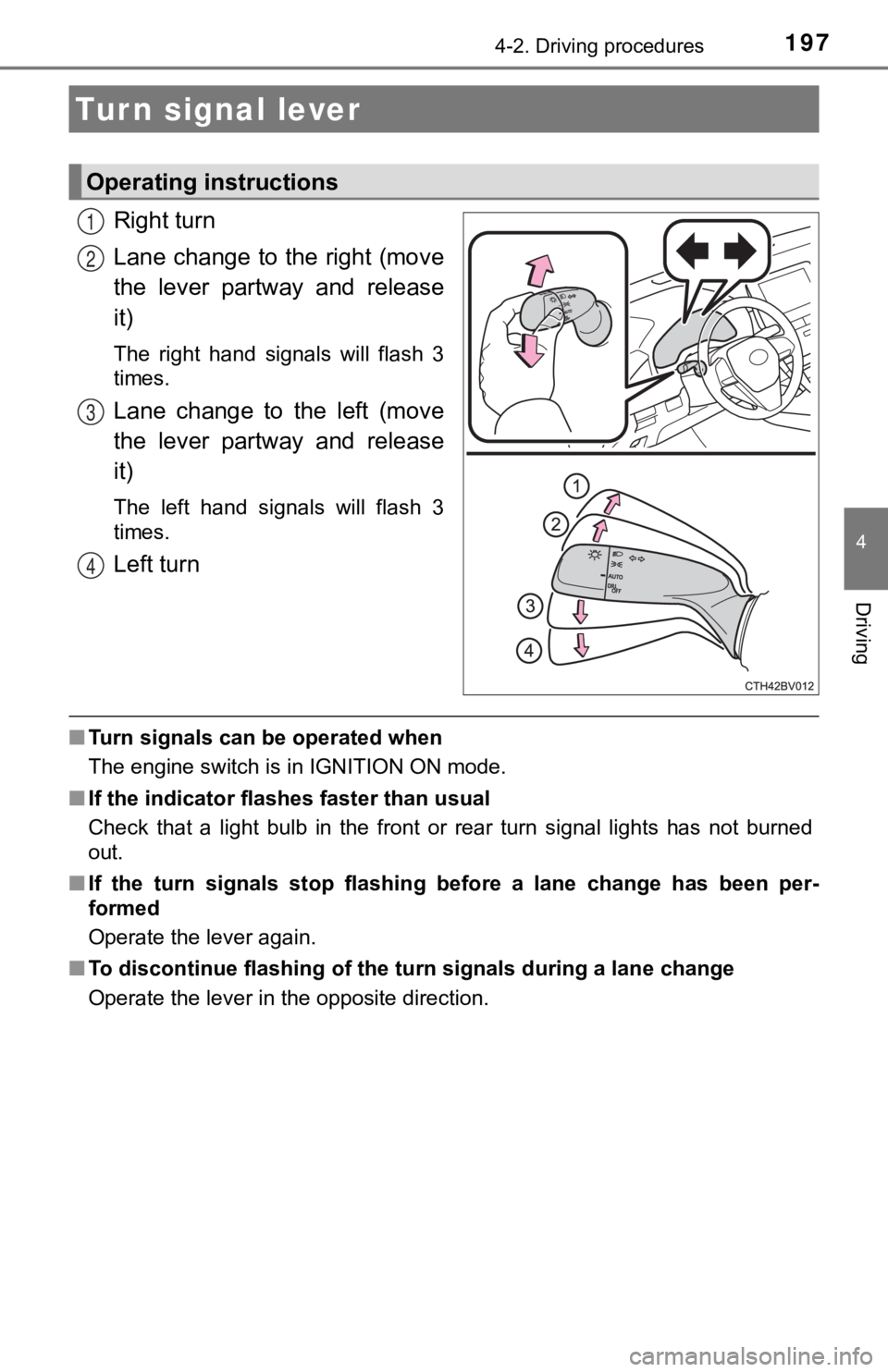
Right turn
Lane change to the right (move
the lever partway and release
it)
The right hand signals will flash 3
times.
Lane change to the left (move
the lever partway and release
it)
The left hand signals will flash 3
times.
Left turn
■Turn signals can be operated when
The engine switch is in IGNITION ON mode.
■ If the indicator flashes faster than usual
Check that a light bulb in the front or rear turn signal lights has not burned
out.
■ If the turn signals stop flashing before a lane change has been per-
formed
Operate the lever again.
■ To discontinue flashing of the turn signals during a lane chang e
Operate the lever in the opposite direction.
Turn signal lever
Operating instructions
1
2
3
4
Page 205 of 572
2054-3. Operating the lights and wipers
4
Driving
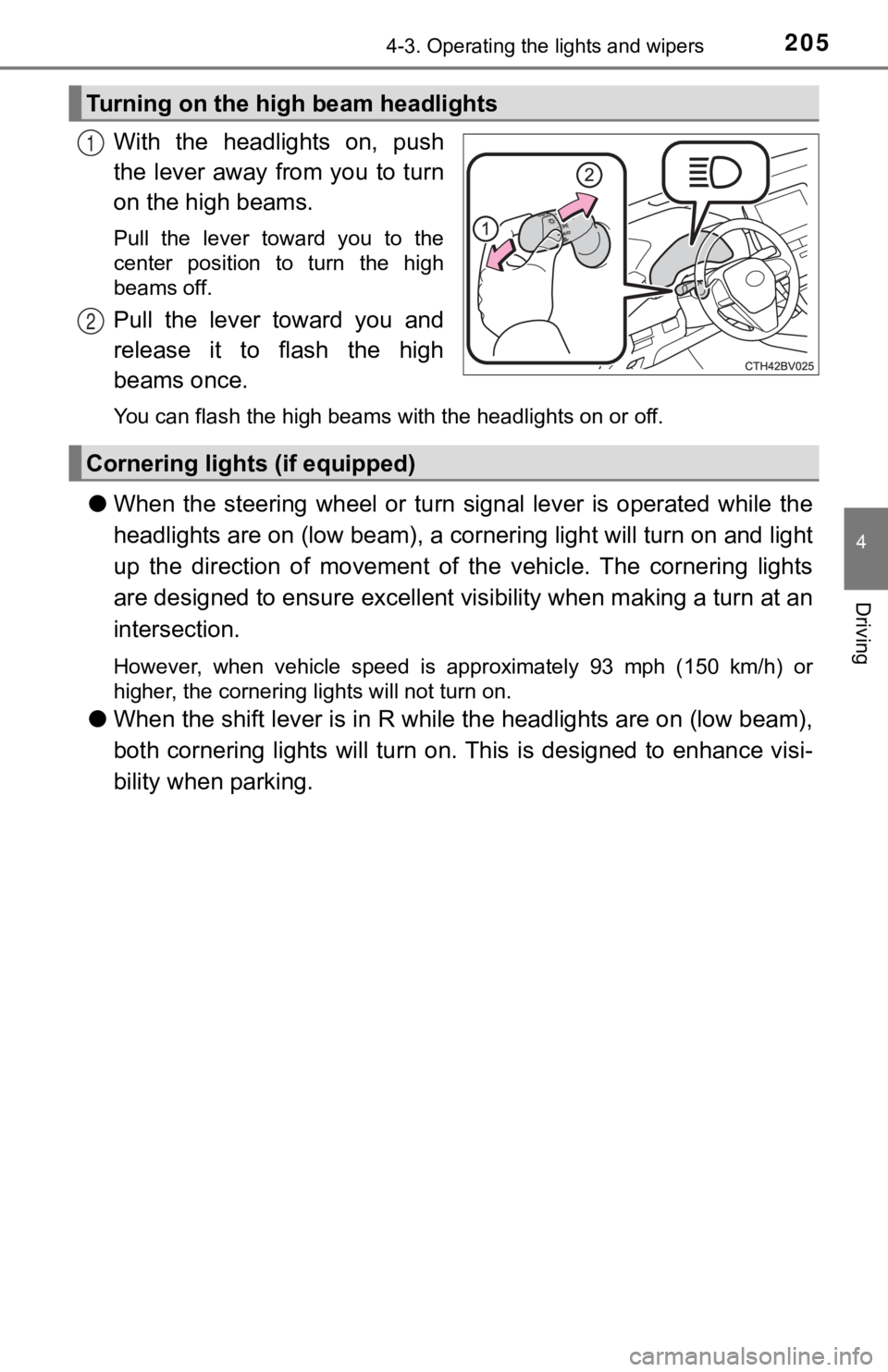
With the headlights on, push
the lever away from you to turn
on the high beams.
Pull the lever toward you to the
center position to turn the high
beams off.
Pull the lever toward you and
release it to flash the high
beams once.
You can flash the high beams with the headlights on or off.
●When the steering wheel or turn signal lever is operated while the
headlights are on (lo w beam), a cornering light will turn on and light
up the direction of movement of the vehicle. The cornering ligh ts
are designed to ensur e excellent visibility when making a turn at an
intersection.
However, when vehicle speed is approximately 93 mph (150 km/h) or
higher, the cornering lights will not turn on.
● When the shift lever is in R while the headlights are on (low b eam),
both cornering lights will turn on. This is designed to enhance visi-
bility when parking.
Turning on the high beam headlights
1
2
Cornering light s (if equipped)
Page 210 of 572

2104-3. Operating the lights and wipers
■Conditions to turn the high beams on/off automatically
●When all of the following conditions are met, the high beams will be turned
on automatically (after approximately 1 second):
• The vehicle speed is approximately 21 mph (34 km/h) or more.
• The area ahead of the vehicle is dark.
• There are no vehicles ahead with headlights or tail lights turned on.
• There are few streetlights on the road ahead.
● If any of the following conditions is met, the high beams will turn off automat-
ically:
• The vehicle speed is below approximately 17 mph (27 km/h).
• The area ahead of the vehicle is not dark.
• Vehicles ahead have their headlights or tail lights turned on.
• There are many streetlights on the road ahead.
■ Camera sensor detection information
●The high beams may not be automatically turned off in the following situa-
tions:
• When a vehicle suddenly appears from around a curve
• When the vehicle is cut in front of by another vehicle
• When vehicles ahead cannot be detected due to repeated curves, road
dividers or roadside trees
• When vehicles ahead appear in a faraway lane on a wide road
• When the lights of vehicles ahead are not on
● The high beams may be turned off if a vehicle ahead that is usi ng fog lights
without its headlights turned on is detected.
● House lights, street lights, traffic signals, and illuminated billboards or signs
and other reflective objects may cause the high beams to change to the low
beams, or the low beams to remain on.
● The following factors may affect the amount of time taken for t he high
beams to turn on or off:
• The brightness of the headlights, fog lights, and tail lights of vehicles
ahead
• The movement and direction of vehicles ahead
• When a vehicle ahead only has operational lights on one side
• When a vehicle ahead is a two-wheeled vehicle
• The condition of the road (gradient, curve, condition of the r oad surface,
etc.)
• The number of passengers and amount of luggage in the vehicle
● The high beams may turn on or off unexpectedly.
● Bicycles or similar vehicles may not be detected.
● In the following situations the system may not be able to correctly detect the
surrounding brightness level. This may cause the low beams to r emain on
or the high beams to flash or dazzle pedestrians or vehicles ah ead. In such
a case, it is necessary to manually switch between the high and low beams.
• When driving in inclement weather (heavy rain, snow, fog, sand storms,
etc.)