cruise control TOYOTA AVALON HYBRID 2014 XX40 / 4.G User Guide
[x] Cancel search | Manufacturer: TOYOTA, Model Year: 2014, Model line: AVALON HYBRID, Model: TOYOTA AVALON HYBRID 2014 XX40 / 4.GPages: 512, PDF Size: 6.95 MB
Page 221 of 512
2214-5. Using the driving support systems
4
Driving
AVALON_HV_U (OM41451U)
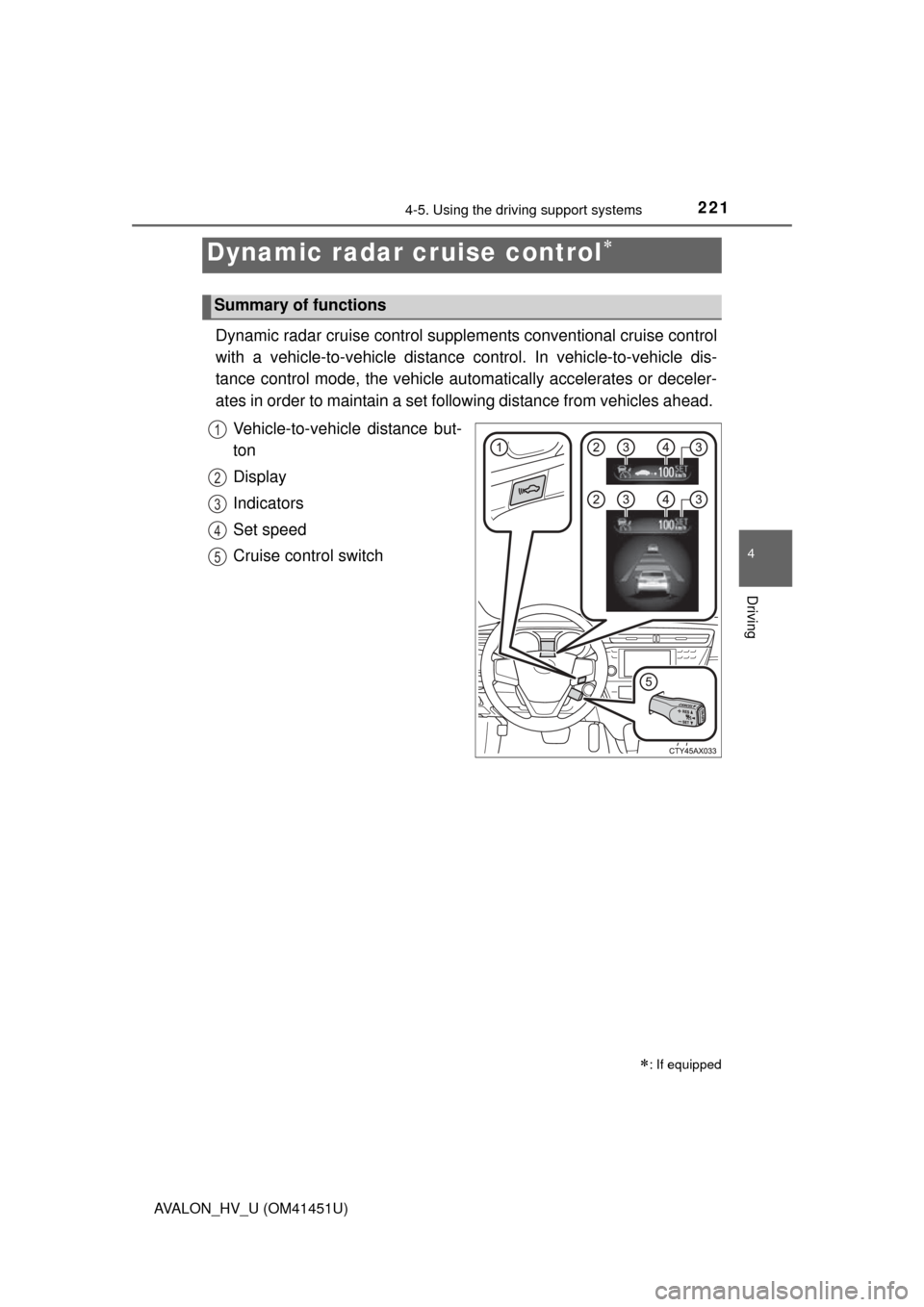
Dynamic radar cruise control supplements conventional cruise control
with a vehicle-to-vehicle distance control. In vehicle-to-vehicle dis-
tance control mode, the vehicle automatically accelerates or deceler-
ates in order to maintain a set fo llowing distance from vehicles ahead.
Vehicle-to-vehicle distance but-
ton
Display
Indicators
Set speed
Cruise control switch
Dynamic radar cruise control
: If equipped
Summary of functions
1
2
3
4
5
Page 222 of 512
2224-5. Using the driving support systems
AVALON_HV_U (OM41451U)
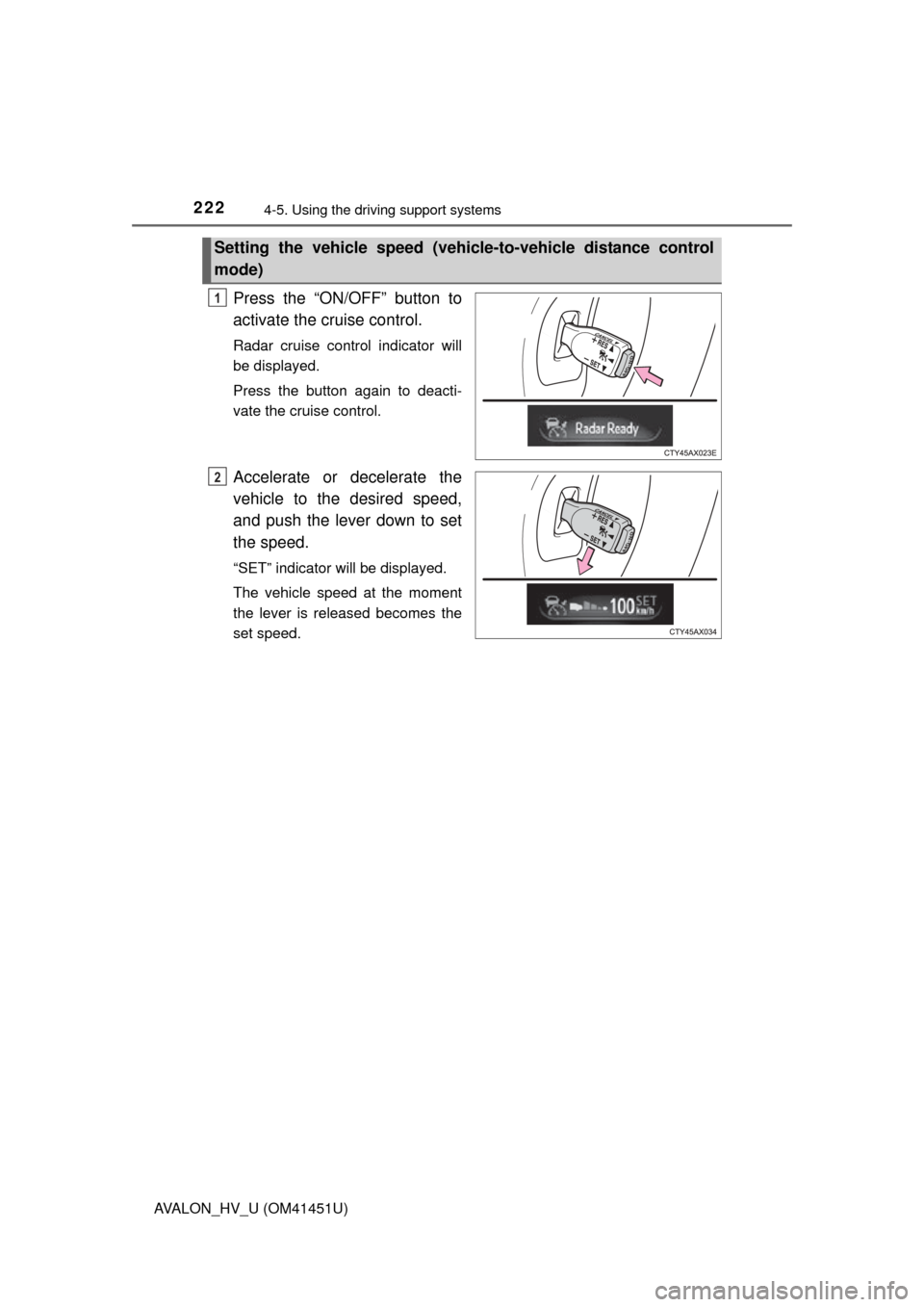
Press the “ON/OFF” button to
activate the cruise control.
Radar cruise control indicator will
be displayed.
Press the button again to deacti-
vate the cruise control.
Accelerate or decelerate the
vehicle to the desired speed,
and push the lever down to set
the speed.
“SET” indicator will be displayed.
The vehicle speed at the moment
the lever is released becomes the
set speed.
Setting the vehicle speed (vehicle-to-vehicle distance control
mode)
1
2
Page 225 of 512
2254-5. Using the driving support systems
4
Driving
AVALON_HV_U (OM41451U)
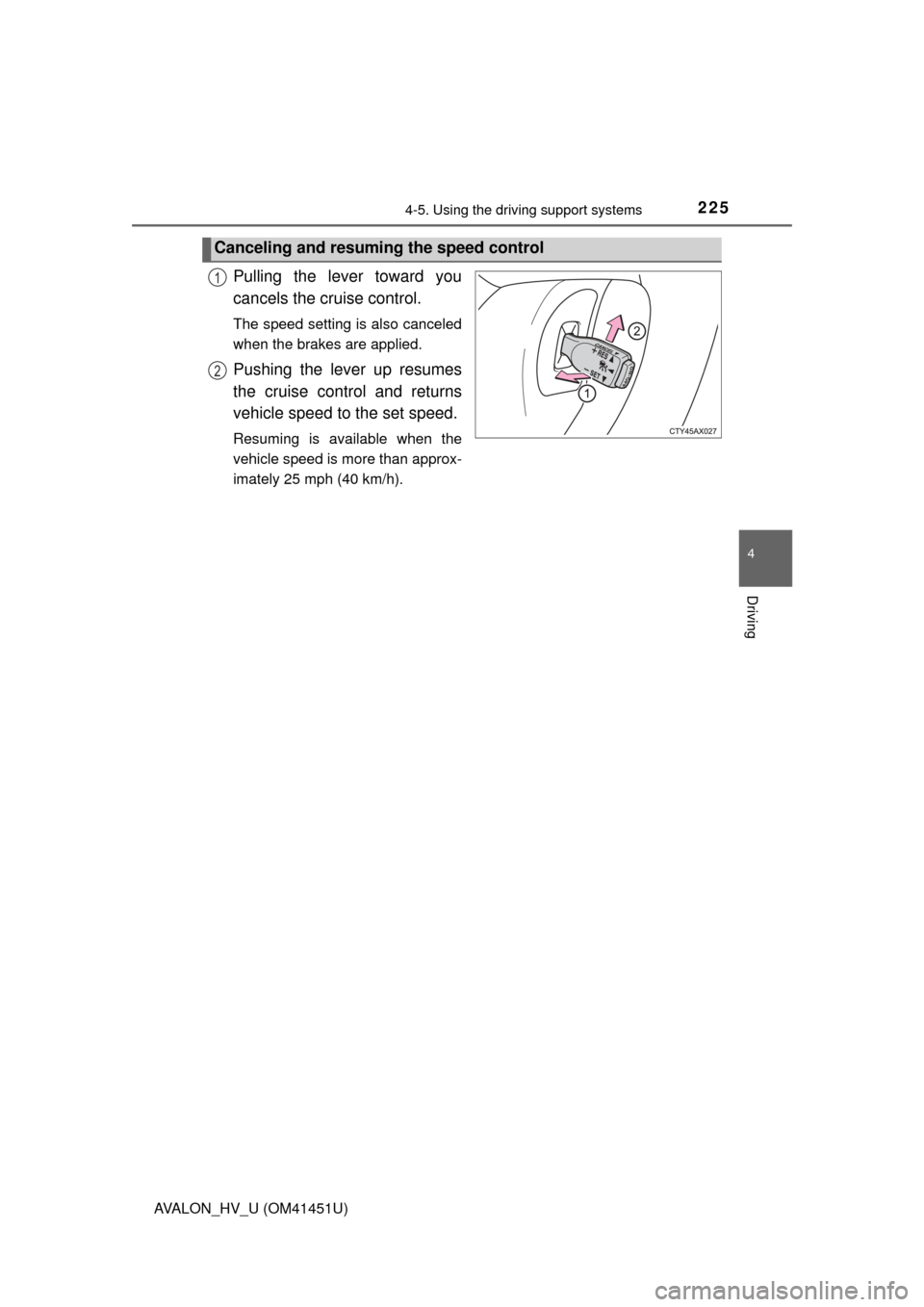
Pulling the lever toward you
cancels the cruise control.
The speed setting is also canceled
when the brakes are applied.
Pushing the lever up resumes
the cruise control and returns
vehicle speed to the set speed.
Resuming is available when the
vehicle speed is more than approx-
imately 25 mph (40 km/h).
Canceling and resuming the speed control
1
2
Page 227 of 512
2274-5. Using the driving support systems
4
Driving
AVALON_HV_U (OM41451U)
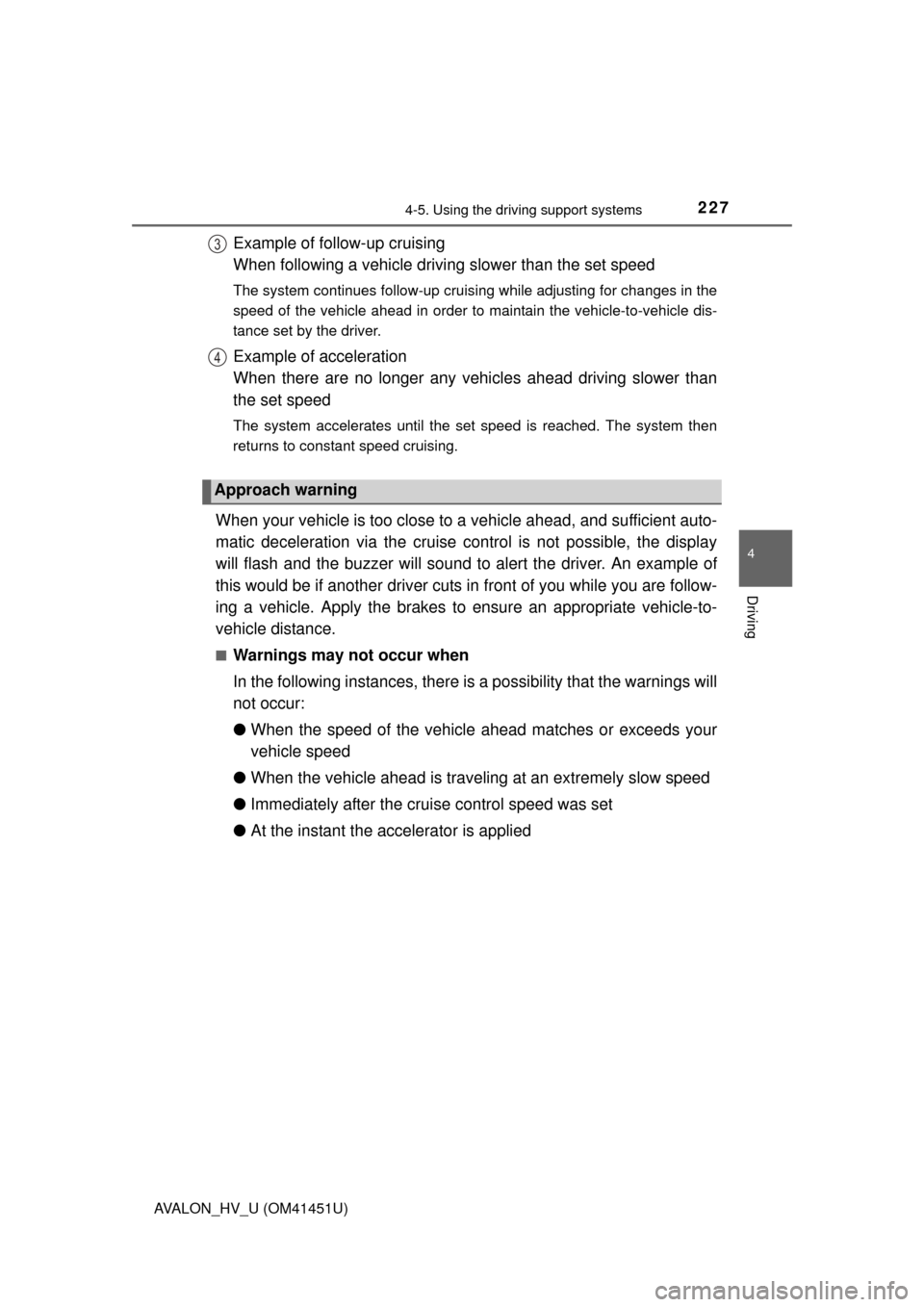
Example of follow-up cruising
When following a vehicle driving slower than the set speed
The system continues follow-up cruising while adjusting for changes in the
speed of the vehicle ahead in order to maintain the vehicle-to-vehicle dis-
tance set by the driver.
Example of acceleration
When there are no longer any vehicles ahead driving slower than
the set speed
The system accelerates until the set speed is reached. The system then
returns to constant speed cruising.
When your vehicle is too close to a vehicle ahead, and sufficient auto-
matic deceleration via the cruise control is not possible, the display
will flash and the buzzer will sound to alert the driver. An example of
this would be if another driver cuts in front of you while you are follow-
ing a vehicle. Apply the brakes to ensure an appropriate vehicle-to-
vehicle distance.
■Warnings may not occur when
In the following instances, there is a possibility that the warnings will
not occur:
● When the speed of the vehicle ahead matches or exceeds your
vehicle speed
● When the vehicle ahead is traveling at an extremely slow speed
● Immediately after the crui se control speed was set
● At the instant the accelerator is applied
Approach warning
3
4
Page 228 of 512
2284-5. Using the driving support systems
AVALON_HV_U (OM41451U)
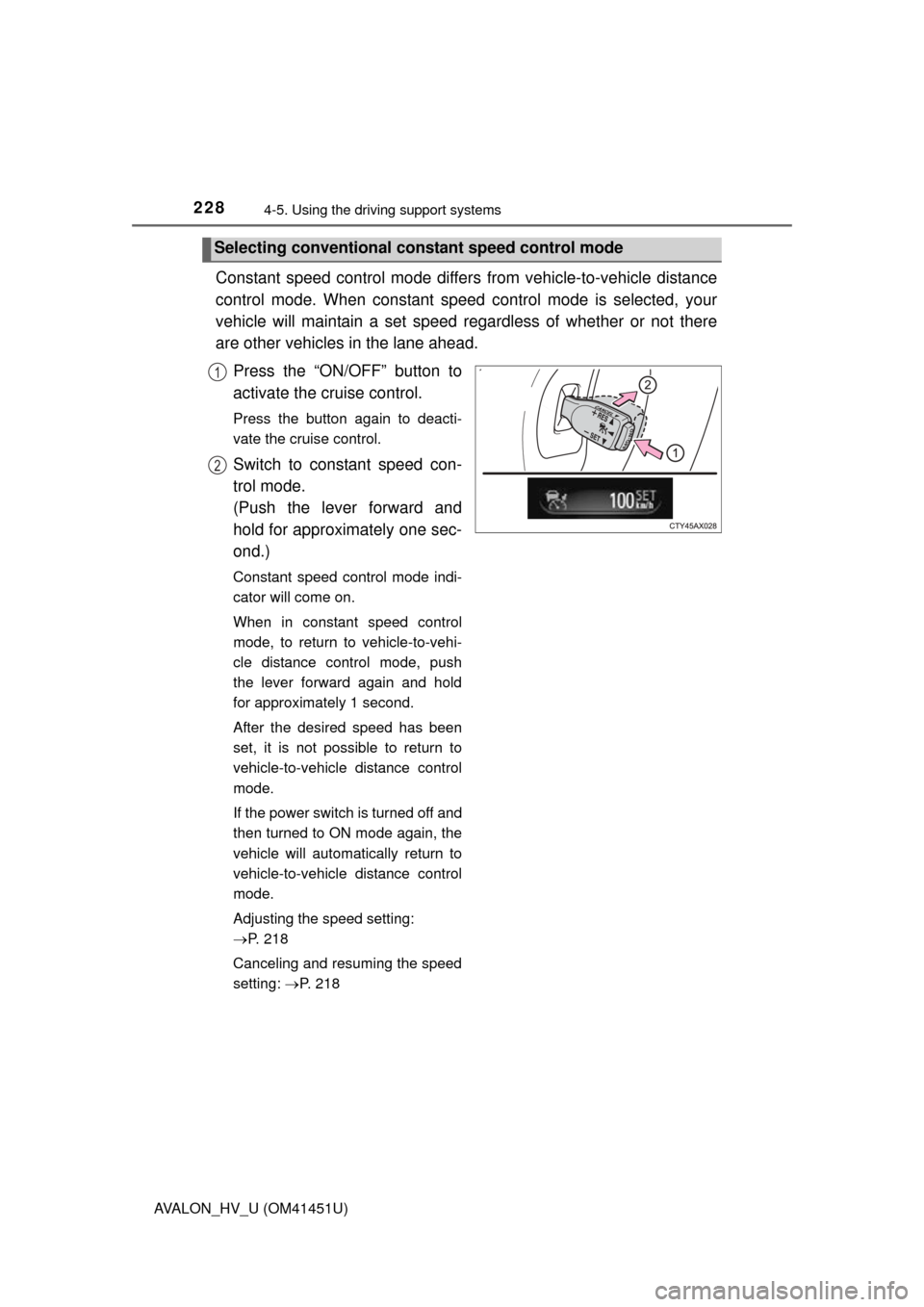
Constant speed control mode differs from vehicle-to-vehicle distance
control mode. When cons tant speed control mode is selected, your
vehicle will maintain a set speed re gardless of whether or not there
are other vehicles in the lane ahead.
Press the “ON/OFF” button to
activate the cruise control.
Press the button again to deacti-
vate the cruise control.
Switch to constant speed con-
trol mode.
(Push the lever forward and
hold for approximately one sec-
ond.)
Constant speed control mode indi-
cator will come on.
When in constant speed control
mode, to return to vehicle-to-vehi-
cle distance control mode, push
the lever forward again and hold
for approximately 1 second.
After the desired speed has been
set, it is not possible to return to
vehicle-to-vehicle distance control
mode.
If the power switch is turned off and
then turned to ON mode again, the
vehicle will automatically return to
vehicle-to-vehicle distance control
mode.
Adjusting the speed setting:
P. 218
Canceling and resuming the speed
setting: P. 218
Selecting conventional cons tant speed control mode
1
2
Page 229 of 512
2294-5. Using the driving support systems
4
Driving
AVALON_HV_U (OM41451U)
■Dynamic radar cruise control can be set when
●The shift lever is in D or range 4 or higher of S has been selected.
● Vehicle speed is above approximately 30 mph (50 km/h).
■ Accelerating after setting the vehicle speed
The vehicle can accelerate normally. After acceleration, the set speed
resumes. However, during vehicle-to-vehicle distance control mode, the vehi-
cle speed may decrease below the set speed in order to maintain the dis-
tance to the vehicle ahead.
■ Automatic cancelation of vehic le-to-vehicle distance control
Vehicle-to-vehicle distance control driving is automatically canceled in the fol-
lowing situations:
● Actual vehicle speed falls below approximately 25 mph (40 km/h).
● VSC is activated.
● The sensor cannot operate correctly because it is covered in some way.
● The windshield wipers are operating at high speed (when the wipers are in
AUTO mode [rain-sensing windshield wipers] or the high speed wiper oper-
ation).
If vehicle-to-vehicle distance control driving is automatically canceled for any
other reason, there may be a malfunction in the system. Contact your Toyota
dealer.
Page 230 of 512
2304-5. Using the driving support systems
AVALON_HV_U (OM41451U)■
Automatic cancelation of constant speed control
The cruise control will stop maintaining the vehicle speed in the following situ-
ations:
● Actual vehicle speed is more than approximately 10 mph (16 km/h) below
the set vehicle speed.
At this time, the memorized set speed is not retained.
● Vehicle speed falls below approximately 25 mph (40 km/h).
● VSC is activated.
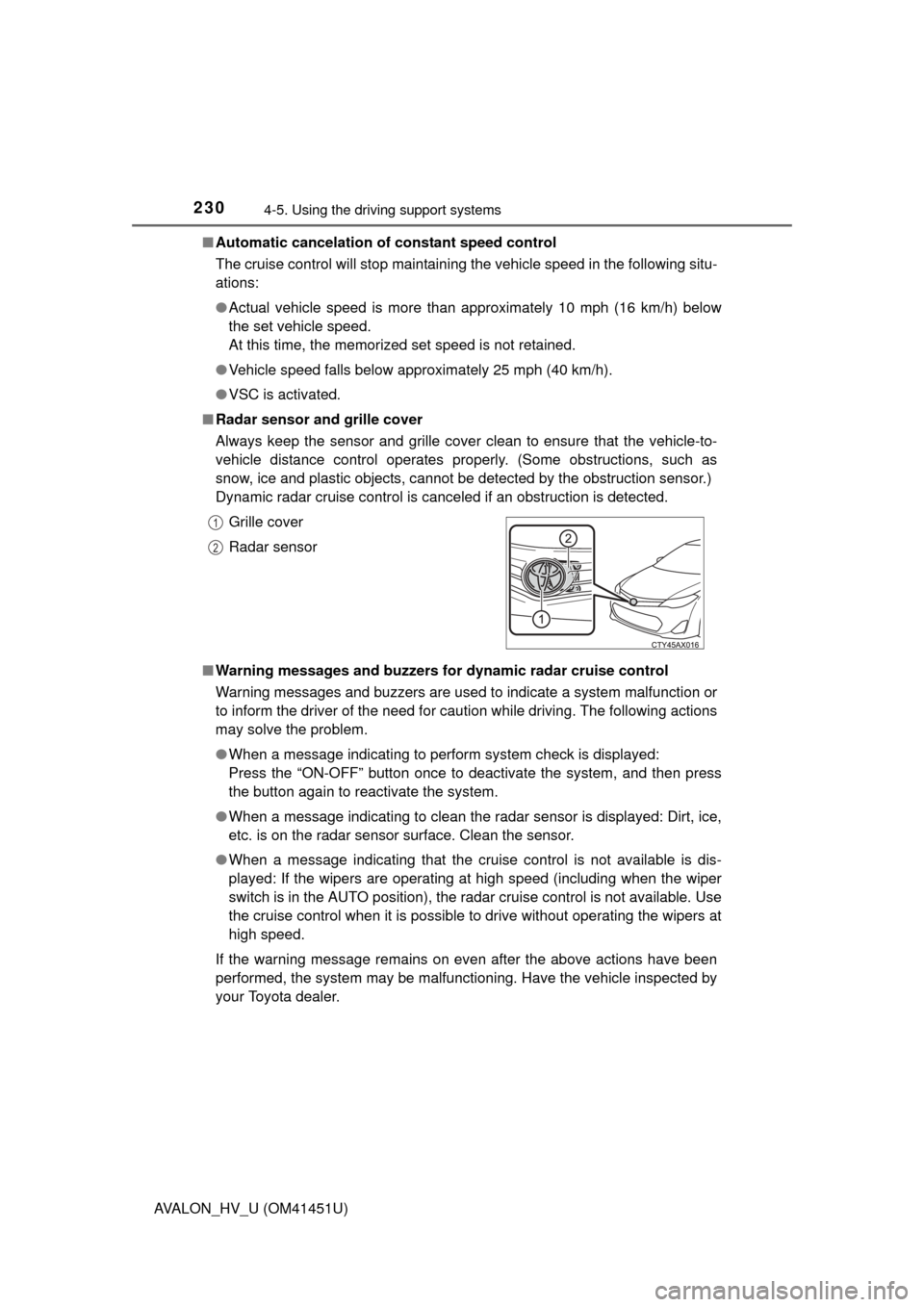
■ Radar sensor and grille cover
Always keep the sensor and grille cover clean to ensure that the vehicle-to-
vehicle distance control operates properly. (Some obstructions, such as
snow, ice and plastic objects, cannot be detected by the obstruction sensor.)
Dynamic radar cruise control is canceled if an obstruction is detected.
■ Warning messages and buzzers for dynamic radar cruise control
Warning messages and buzzers are used to indicate a system malfunction or
to inform the driver of the need for caution while driving. The following actions
may solve the problem.
●When a message indicating to perform system check is displayed:
Press the “ON-OFF” button once to deactivate the system, and then press
the button again to reactivate the system.
● When a message indicating to clean the radar sensor is displayed: Dirt, ice,
etc. is on the radar sensor surface. Clean the sensor.
● When a message indicating that the cruise control is not available is dis-
played: If the wipers are operating at high speed (including when the wiper
switch is in the AUTO position), the radar cruise control is not available. Use
the cruise control when it is possible to drive without operating the wipers at
high speed.
If the warning message remains on even after the above actions have been
performed, the system may be malfunctioning. Have the vehicle inspected by
your Toyota dealer. Grille cover
Radar sensor
1
2
Page 232 of 512
2324-5. Using the driving support systems
AVALON_HV_U (OM41451U)
CAUTION
■Before using dynamic radar cruise control
Do not overly rely on vehicle-to-vehicle distance control.
Be aware of the set speed. If automatic deceleration/acceleration is not
appropriate, adjust the vehicle speed, as well as the distance between your
vehicle and vehicles ahead by applying the brakes etc.
■ Cautions regarding the driving assist systems
Observe the following precautions.
Failure to do so may cause an accident resulting in death or serious injury.
● Assisting the driver to measure following distance
The dynamic radar cruise control is only intended to help the driver in
determining the following distance between the driver’s own vehicle and a
designated vehicle traveling ahead. It is not a mechanism that allows care-
less or inattentive driving, and it is not a system that can assist the driver in
low-visibility conditions. It is still necessary for driver to pay close attention
to the vehicle’s surroundings.
● Assisting the driver to judge proper following distance
The dynamic radar cruise control determines whether the following dis-
tance between the driver’s own vehicle and a designated vehicle traveling
ahead is appropriate or not. It is not capable of making any other type of
judgement. Therefore, it is absolutely necessary for the driver to remain
vigilant and to determine whether or not there is a possibility of danger in
any given situation.
● Assisting the driver to operate the vehicle
The dynamic radar cruise control has no capability to prevent or avoid a
collision with a vehicle traveling ahead. Therefore, if there is ever any dan-
ger, the driver must take immediate and direct control of the vehicle and
act appropriately in order to ensure the safety of all involved.
Page 233 of 512
2334-5. Using the driving support systems
4
Driving
AVALON_HV_U (OM41451U)
CAUTION
■To avoid inadvertent cr uise control activation
Switch the cruise control off using the “ON/OFF” button when not in use.
■ Situations unsuitable for dynamic radar cruise control
Do not use dynamic radar cruise control in any of the following situations.
Doing so may result in inappropriate speed control and could cause an acci-
dent resulting in death or serious injury.
● In heavy traffic
● On roads with sharp bends
● On winding roads
● On slippery roads, such as those covered with rain, ice or snow
● On steep downhills, or where there are sudden changes between sharp up
and down gradients
Vehicle speed may exceed the set speed when driving down a steep hill.
● At entrances to expressways
● When weather conditions are bad enough that they may prevent the sen-
sors from functioning correctly (fog, snow, sandstorm, heavy rain, etc.)
● When an approach warning buzzer is heard often
Page 235 of 512
2354-5. Using the driving support systems
4
Driving
AVALON_HV_U (OM41451U)
CAUTION
■Handling the radar sensor
Observe the following to ensure the cruise control system can function
effectively.
Otherwise, the system may not function correctly and could result in an
accident.
● Keep the sensor and grille cover clean at all times.
Clean the sensor and grille cover with a soft cloth so you do not mark or
damage them.
● Do not subject the sensor or surrounding area to a strong impact.
If the sensor moves even slightly off position, the system may malfunction.
If the sensor or surrounding area is subject to a strong impact, always
have the area inspected and adjusted by a Toyota dealer.
● Do not disassemble the sensor.
● Do not attach accessories or stickers to the sensor, grille cover or sur-
rounding area.
● Do not modify or paint the sensor and grille cover.
● Do not replace them with non-genuine parts.