lock TOYOTA AVALON HYBRID 2014 XX40 / 4.G Owner's Manual
[x] Cancel search | Manufacturer: TOYOTA, Model Year: 2014, Model line: AVALON HYBRID, Model: TOYOTA AVALON HYBRID 2014 XX40 / 4.GPages: 512, PDF Size: 6.95 MB
Page 94 of 512
942. Instrument cluster
AVALON_HV_U (OM41451U)
■The meters and display illuminate when
The power switch is in ON mode.
■ The brightness of the in strument panel lights
● When the headlight switch is turned to on, the brightness will be reduced
slightly unless the control knob is turned fully clockwise.
● When the knob is turned fully clockwise, the display audio/navigation sys-
tem screen will always be in day mode regardless of the headlight switch
position.
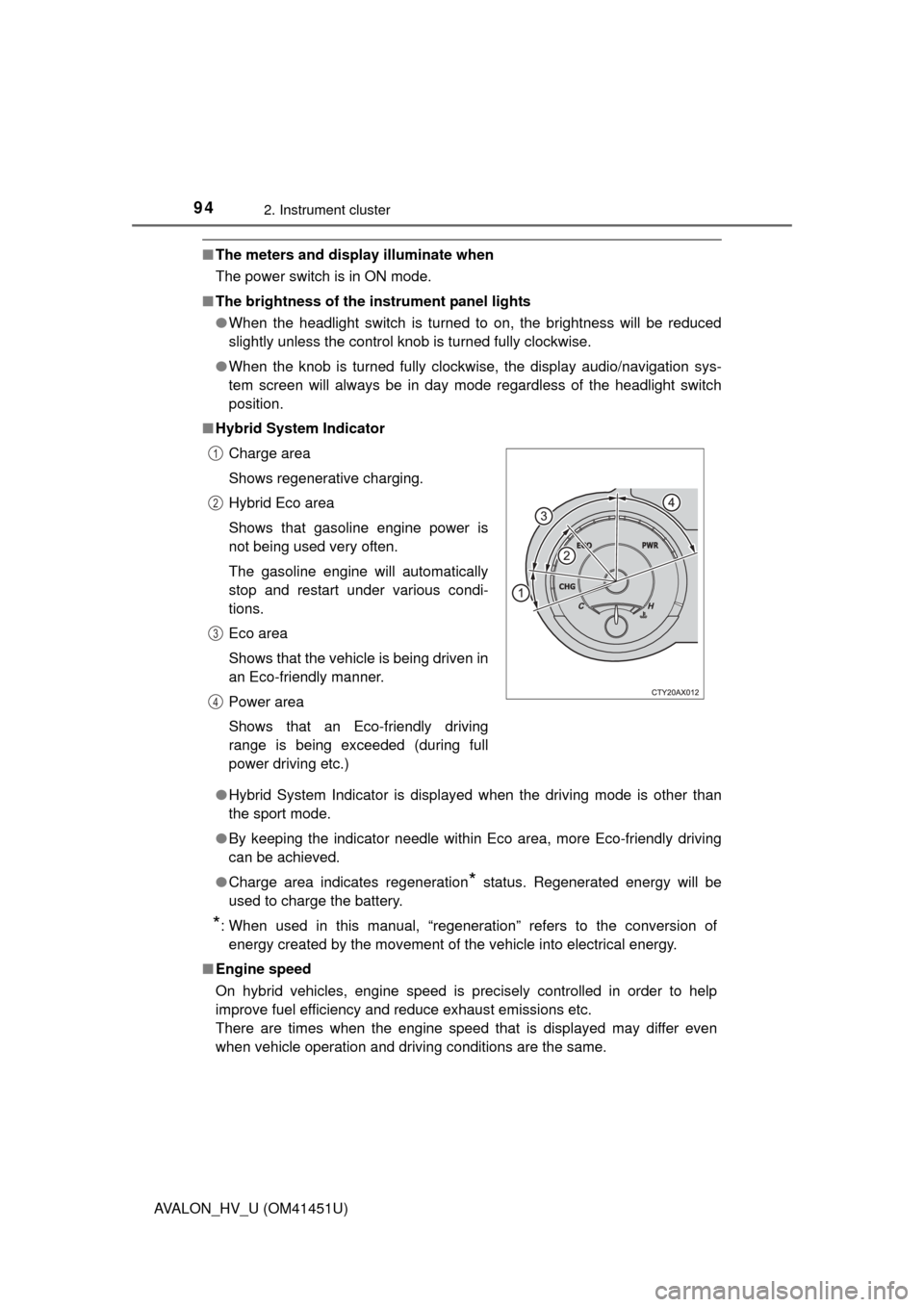
■ Hybrid System Indicator
●Hybrid System Indicator is displayed when the driving mode is other than
the sport mode.
● By keeping the indicator needle within Eco area, more Eco-friendly driving
can be achieved.
● Charge area indicates regeneration
* status. Regenerated energy will be
used to charge the battery.
*: When used in this manual, “regeneration” refers to the conversion of energy created by the movement of the vehicle into electrical energy.
■ Engine speed
On hybrid vehicles, engine speed is precisely controlled in order to help
improve fuel efficiency and reduce exhaust emissions etc.
There are times when the engine speed that is displayed may differ even
when vehicle operation and driving conditions are the same.Charge area
Shows regenerative charging.
Hybrid Eco area
Shows that gasoline engine power is
not being used very often.
The gasoline engine will automatically
stop and restart under various condi-
tions.
Eco area
Shows that the vehicle is being driven in
an Eco-friendly manner.
Power area
Shows that an Eco-friendly driving
range is being exceeded (during full
power driving etc.)
1
2
3
4
Page 113 of 512
113
3
Operation of
each component
AVALON_HV_U (OM41451U) 3-1. Key information
Keys .................................. 114
3-2. Opening, closing and locking the doors and
trunk
Smart key system ............. 117
Wireless remote control .... 132
Doors ................................ 135
Trunk ................................. 138
3-3. Adjusting the seats Front seats ........................ 142
Driving position memory ........................... 144
Head restraints.................. 148
3-4. Adjusting the steering wheel and mirrors
Steering wheel .................. 151
Inside rear view mirror ...... 152
Outside rear view mirrors ............................. 154
3-5. Opening, closing the windows and moon roof
Power windows ................. 157
Moon roof .......................... 160
Page 114 of 512
114
AVALON_HV_U (OM41451U)
3-1. Key information
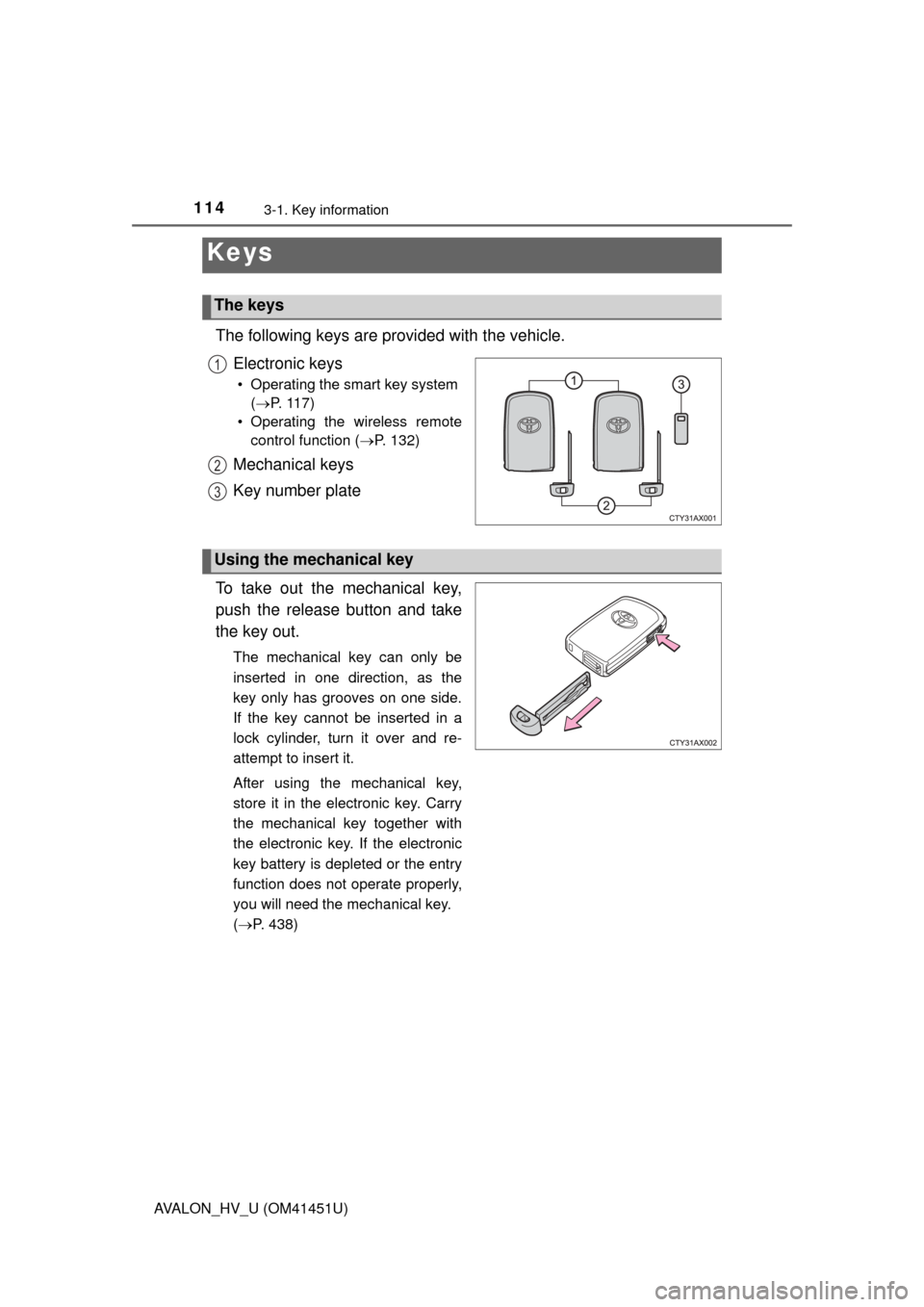
The following keys are provided with the vehicle.Electronic keys
• Operating the smart key system (P. 117)
• Operating the wireless remote control function ( P. 132)
Mechanical keys
Key number plate
To take out the mechanical key,
push the release button and take
the key out.
The mechanical key can only be
inserted in one direction, as the
key only has grooves on one side.
If the key cannot be inserted in a
lock cylinder, turn it over and re-
attempt to insert it.
After using the mechanical key,
store it in the electronic key. Carry
the mechanical key together with
the electronic key. If the electronic
key battery is depleted or the entry
function does not operate properly,
you will need the mechanical key.
( P. 438)
Keys
The keys
1
2
3
Using the mechanical key
Page 115 of 512

1153-1. Key information
3
Operation of each component
AVALON_HV_U (OM41451U)
■When required to leave the vehicle’s key with a parking attendant
Turn the trunk opener main switch off and lock the glove box as circum-
stances demand. ( P. 139, 288)
Remove the mechanical key for your own use and provide the attendant with
the electronic key only.
■ If you lose your mechanical keys
New genuine mechanical keys can be made by your Toyota dealer using the
other mechanical key and the key number stamped on your key number
plate. Keep the plate in a safe place such as your wallet, not in the vehicle.
■ When riding in an aircraft
When bringing an electronic key onto an aircraft, make sure you do not press
any buttons on the electronic key while inside the aircraft cabin. If you are
carrying an electronic key in your bag etc., ensure that the buttons are not
likely to be pressed accidentally. Pressing a button may cause the electronic
key to emit radio waves that could interfere with the operation of the aircraft.
Page 117 of 512
117
3
Operation of each component
AVALON_HV_U (OM41451U)
3-2. Opening, closing and locking the doors and trunk
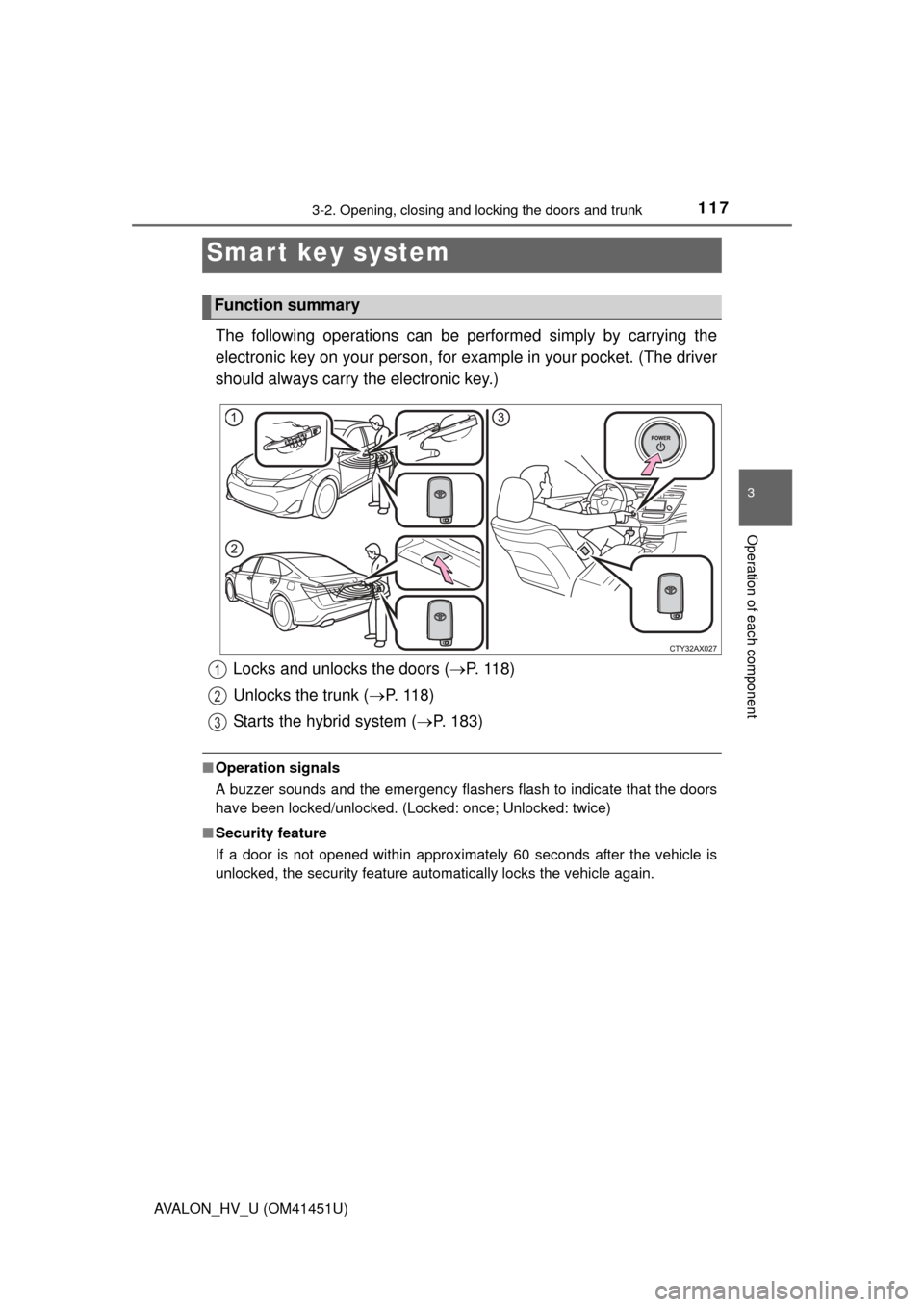
The following operations can be performed simply by carrying the
electronic key on your person, for example in your pocket. (The driver
should always carry the electronic key.)
■ Operation signals
A buzzer sounds and the emergency flashers flash to indicate that the doors
have been locked/unlocked. (Locked: once; Unlocked: twice)
■ Security feature
If a door is not opened within approximately 60 seconds after the vehicle is
unlocked, the security feature automatically locks the vehicle again.
Smar t key system
Function summary
Locks and unlocks the doors ( P. 1 1 8 )
Unlocks the trunk ( P. 11 8 )
Starts the hybrid system ( P. 183)1
2
3
Page 118 of 512
1183-2. Opening, closing and locking the doors and trunk
AVALON_HV_U (OM41451U)
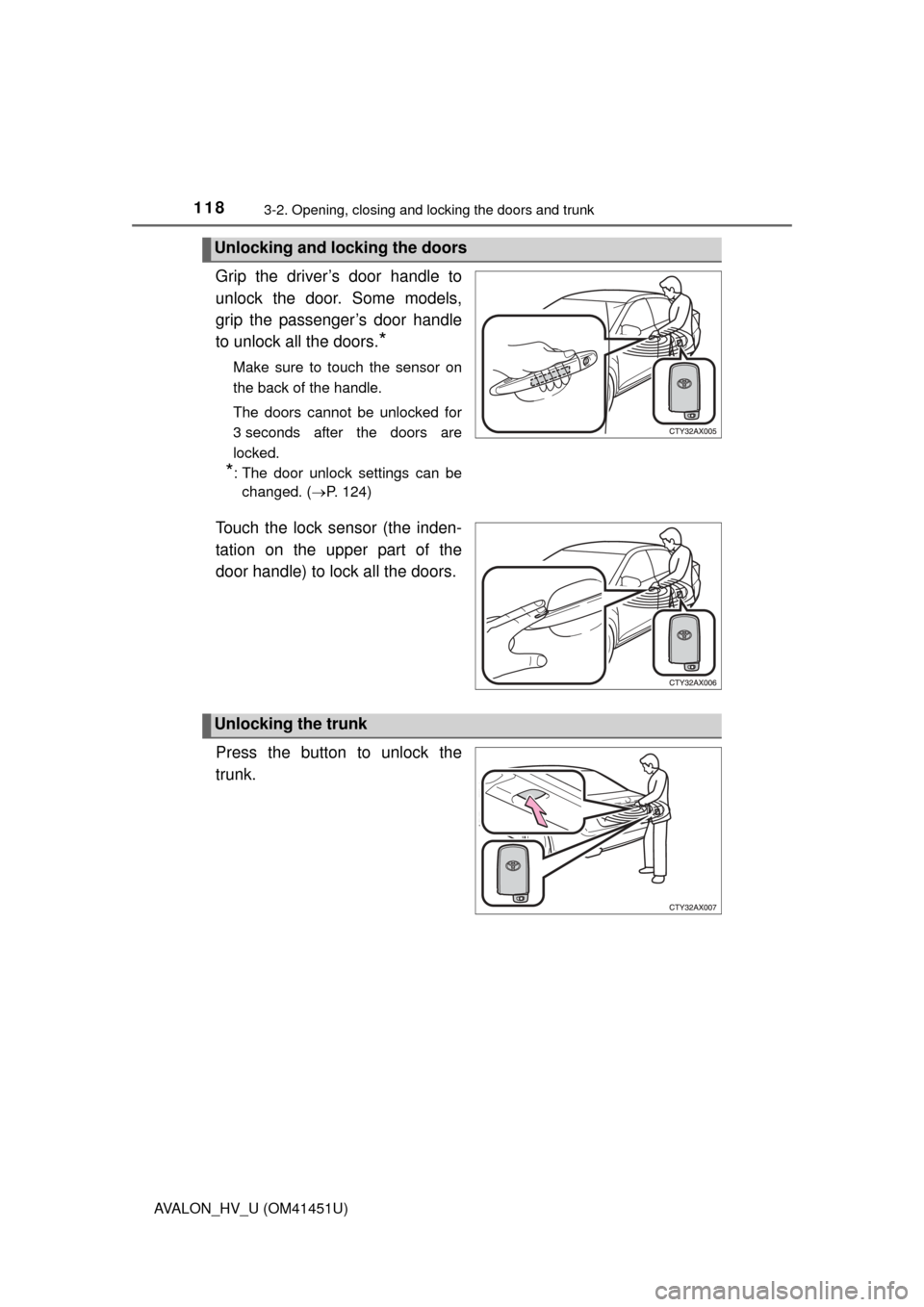
Grip the driver’s door handle to
unlock the door. Some models,
grip the passenger’s door handle
to unlock all the doors.
*
Make sure to touch the sensor on
the back of the handle.
The doors cannot be unlocked for
3 seconds after the doors are
locked.
*: The door unlock settings can bechanged. ( P. 124)
Touch the lock sensor (the inden-
tation on the upper part of the
door handle) to lock all the doors.
Press the button to unlock the
trunk.
Unlocking and locking the doors
Unlocking the trunk
Page 119 of 512
1193-2. Opening, closing and locking the doors and trunk
3
Operation of each component
AVALON_HV_U (OM41451U)■
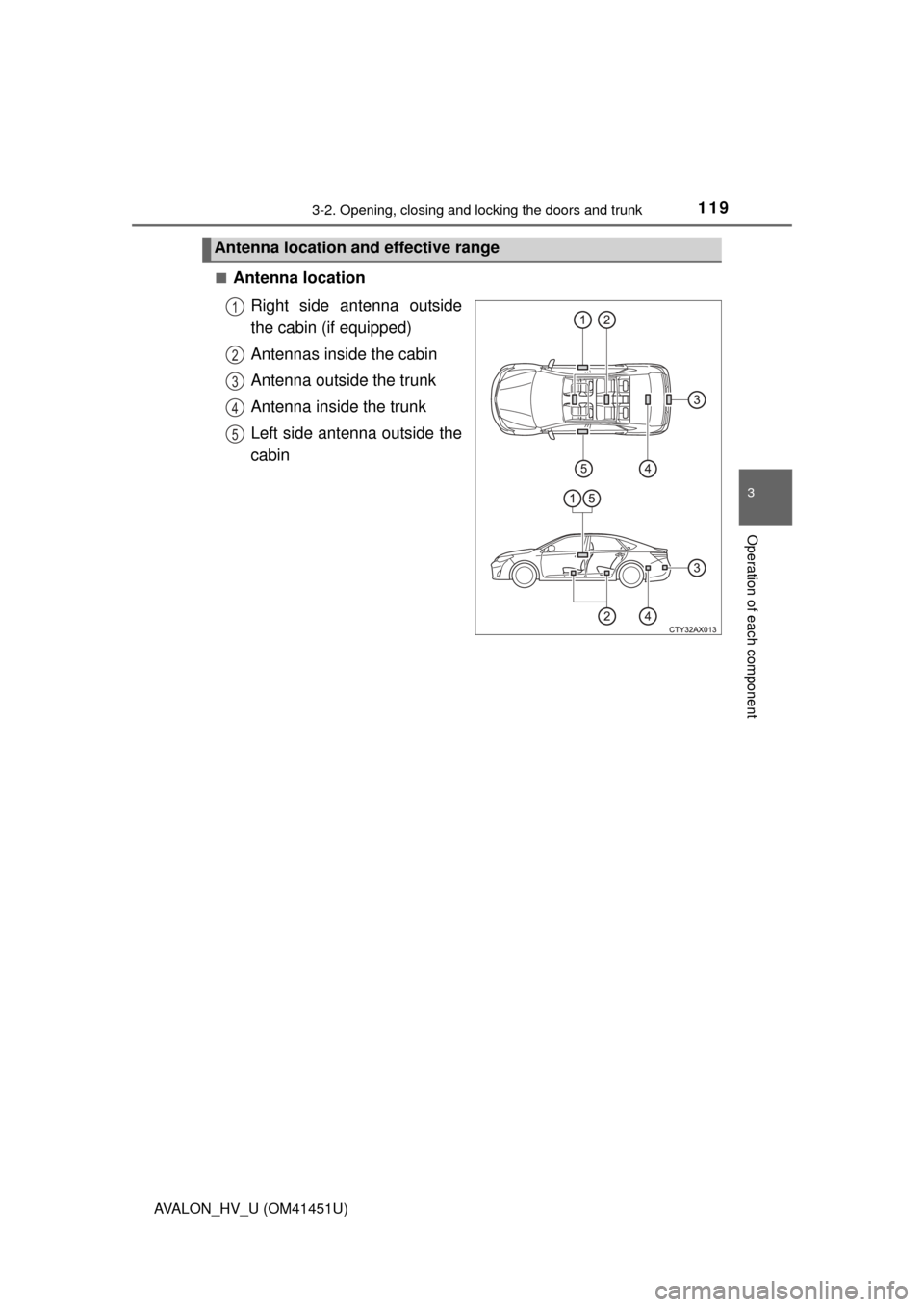
Antenna location
Right side antenna outside
the cabin (if equipped)
Antennas inside the cabin
Antenna outside the trunk
Antenna inside the trunk
Left side antenna outside the
cabin
Antenna location and effective range
1
2
3
34
35
Page 120 of 512
1203-2. Opening, closing and locking the doors and trunk
AVALON_HV_U (OM41451U)■
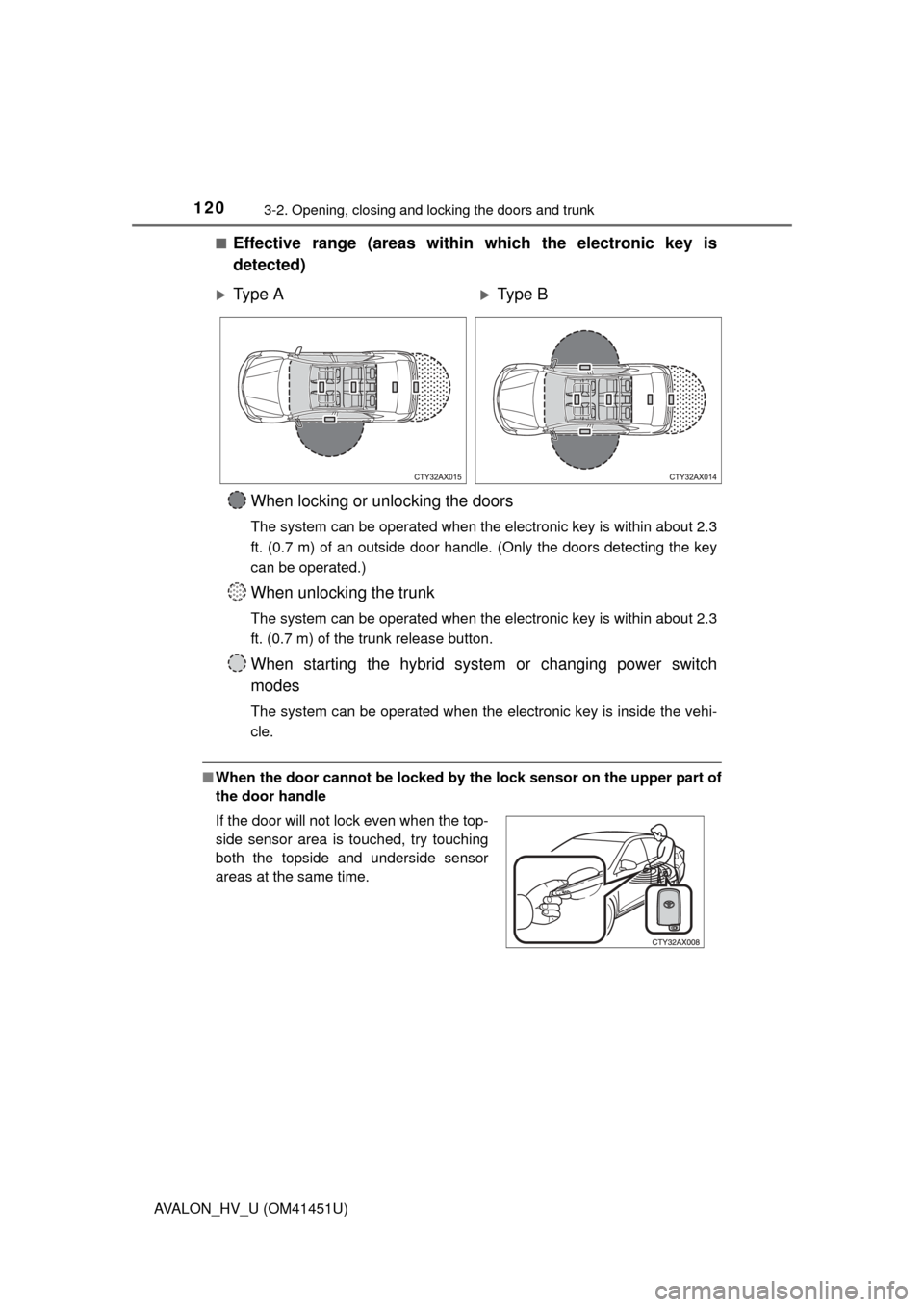
Effective range (areas within which the electronic key is
detected)
■
When the door cannot be locked by the lock sensor on the upper part of
the door handle
Ty p e AType B
When locking or unlocking the doors
The system can be operated when the electronic key is within about 2.3
ft. (0.7 m) of an outside door handle. (Only the doors detecting the key
can be operated.)
When unlocking the trunk
The system can be operated when the electronic key is within about 2.3
ft. (0.7 m) of the trunk release button.
When starting the hybrid system or changing power switch
modes
The system can be operated when the electronic key is inside the vehi-
cle.
If the door will not lock even when the top-
side sensor area is touched, try touching
both the topside and underside sensor
areas at the same time.
Page 121 of 512
1213-2. Opening, closing and locking the doors and trunk
3
Operation of each component
AVALON_HV_U (OM41451U)■
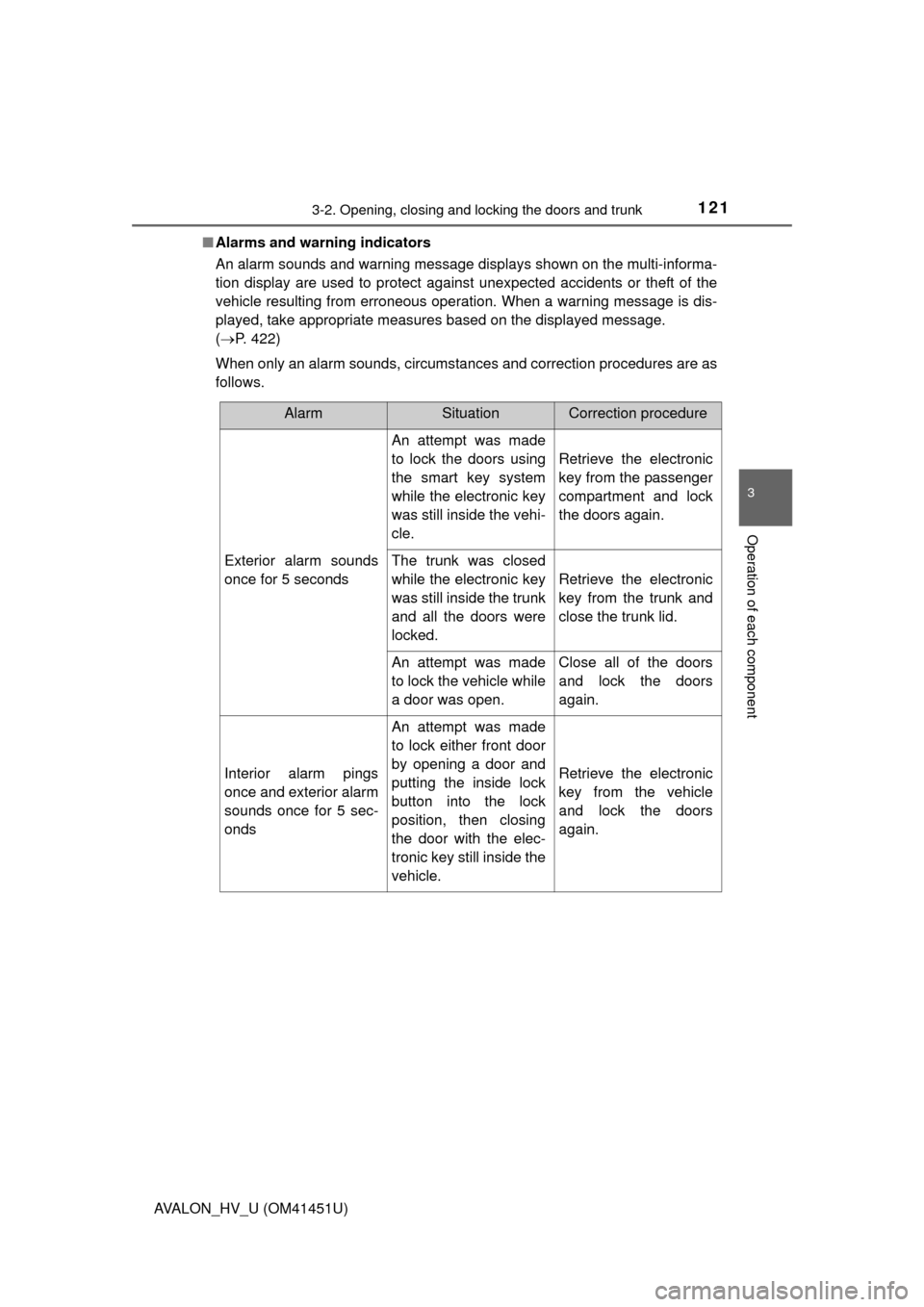
Alarms and warning indicators
An alarm sounds and warning message displays shown on the multi-informa-
tion display are used to protect against unexpected accidents or theft of the
vehicle resulting from erroneous operation. When a warning message is dis-
played, take appropriate measures based on the displayed message.
(P. 422)
When only an alarm sounds, circumstances and correction procedures are as
follows.
AlarmSituationCorrection procedure
Exterior alarm sounds
once for 5 seconds
An attempt was made
to lock the doors using
the smart key system
while the electronic key
was still inside the vehi-
cle.
Retrieve the electronic
key from the passenger
compartment and lock
the doors again.
The trunk was closed
while the electronic key
was still inside the trunk
and all the doors were
locked.
Retrieve the electronic
key from the trunk and
close the trunk lid.
An attempt was made
to lock the vehicle while
a door was open.Close all of the doors
and lock the doors
again.
Interior alarm pings
once and exterior alarm
sounds once for 5 sec-
onds
An attempt was made
to lock either front door
by opening a door and
putting the inside lock
button into the lock
position, then closing
the door with the elec-
tronic key still inside the
vehicle.
Retrieve the electronic
key from the vehicle
and lock the doors
again.
Page 122 of 512
1223-2. Opening, closing and locking the doors and trunk
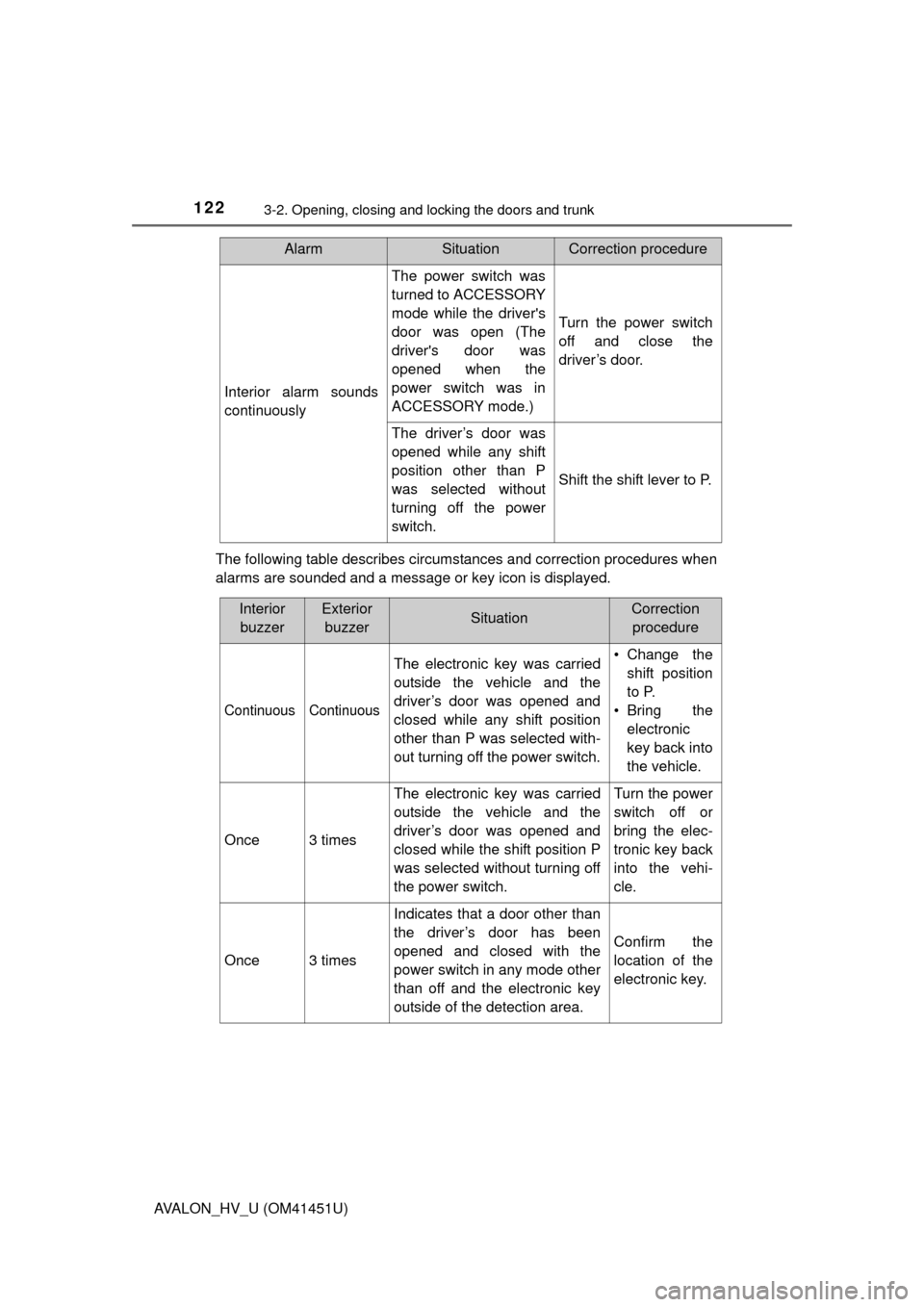
AVALON_HV_U (OM41451U)The following table describes circumstances and correction procedures when
alarms are sounded and a message or key icon is displayed.
Interior alarm sounds
continuously
The power switch was
turned to ACCESSORY
mode while the driver's
door was open (The
driver's door was
opened when the
power switch was in
ACCESSORY mode.)
Turn the power switch
off and close the
driver’s door.
The driver’s door was
opened while any shift
position other than P
was selected without
turning off the power
switch.
Shift the shift lever to P.
AlarmSituationCorrection procedure
Interior
buzzerExterior buzzerSituationCorrection procedure
Continuous Continuous
The electronic key was carried
outside the vehicle and the
driver’s door was opened and
closed while any shift position
other than P was selected with-
out turning off the power switch. • Change the
shift position
to P.
• Bring the electronic
key back into
the vehicle.
Once3 times
The electronic key was carried
outside the vehicle and the
driver’s door was opened and
closed while the shift position P
was selected without turning off
the power switch.Turn the power
switch off or
bring the elec-
tronic key back
into the vehi-
cle.
Once3 times
Indicates that a door other than
the driver’s door has been
opened and closed with the
power switch in any mode other
than off and the electronic key
outside of the detection area.
Confirm the
location of the
electronic key.