from the rear bumper TOYOTA AVALON HYBRID 2016 XX40 / 4.G Owners Manual
[x] Cancel search | Manufacturer: TOYOTA, Model Year: 2016, Model line: AVALON HYBRID, Model: TOYOTA AVALON HYBRID 2016 XX40 / 4.GPages: 492, PDF Size: 7.16 MB
Page 43 of 492
431-1. For safe use
1
For safety and security
AVALON_HV_U (01999-07002)
■If the SRS airbags deploy (inflate)
●Slight abrasions, burns, bruising etc., may be sustained from SRS airbags,
due to the extremely high speed deployment (inflation) by hot gases.
● A loud noise and white powder will be emitted.
● Parts of the airbag module (steering wheel hub, airbag cover and inflator) as
well as the seats, parts of the front and rear pillars, and roof side rails may
be hot for several minutes. The airbag itself may also be hot.
● The windshield may crack.
● For Safety Connect subscribers, if the SRS airbags deploy or in the event of
a severe rear-end collision, the system is designed to send an emergency
call to the response center, notifying them of the vehicle’s location (without
needing to push the “SOS” button) and an agent will attempt to speak with
the occupants to ascertain the level of emergency and assistance required.
If the occupants are unable to communicate, the agent automatically treats
the call as an emergency and helps to dispatch the necessary emergency
services. ( P. 312)
WARNING
■Modification and disposal of SRS airbag system components
Do not dispose of your vehicle or per form any of the following modifications
without consulting your Toyota dealer. The SRS airbags may malfunction or
deploy (inflate) accidentally, causing death or serious injury.
● Installation, removal, disassembly and repair of the SRS airbags
● Repairs, modifications, removal or replacement of the steering wheel,
instrument panel, dashboard, seats or seat upholstery, front, side and rear
pillars or roof side rails
● Repairs or modifications of the front fender, front bumper, or side of the
occupant compartment
● Installation of a grille guard (bull bars, kangaroo bar, etc.), snow plows,
winches, or roof luggage carrier
● Modifications to the vehicle’s suspension system
● Installation of electronic devices such as mobile two-way radios and CD
players
● Modifications to your vehicle for a person with a physical disability
Page 127 of 492

1273-2. Opening, closing and locking the doors and trunk
3
Operation of each component
AVALON_HV_U (01999-07002)■
Note for the entry function
●Even when the electronic key is within the effective range (detection areas),
the system may not operate properly in the following cases:
• The electronic key is too close to the window or outside door handle, near
the ground, or in a high place when the doors are locked or unlocked.
• The electronic key is near the ground or in a high place, or too close to
the rear bumper center when the trunk is opened.
• The electronic key is on the instrument panel, rear package tray or floor, or in the door pockets or glove box when the hybrid system is started or
power switch modes are changed.
● Do not leave the electronic key on top of the instrument panel or near the
door pockets when exiting the vehicle. Depending on the radio wave recep-
tion conditions, it may be detected by the antenna outside the cabin and the
door will become lockable from the outside, possibly trapping the electronic
key inside the vehicle.
● As long as the electronic key is within the effective range, the doors may be
locked or unlocked by anyone. However, only the doors detecting the elec-
tronic key can be used to unlock the vehicle.
● Even if the electronic key is not inside the vehicle, it may be possible to start
the hybrid system if the electronic key is near the window.
● The doors may unlock or lock if a large amount of water splashes on the
door handle, such as in the rain or in a car wash when the electronic key is
within the effective range. (The doors will automatically be locked after
approximately 60 seconds if the doors are not opened and closed.)
● If the wireless remote control is used to lock the doors when the electronic
key is near the vehicle, there is a possibility that the door may not be
unlocked by the entry function. (Use the wireless remote control to unlock
the doors.)
Page 218 of 492
2184-5. Using the driving support systems
AVALON_HV_U (01999-07002)• If a vehicle ahead is carrying a load which protrudes past its rear bumper
• If a vehicle ahead is irregularly shaped, such as a tractor or side car
• If the sun or other light is shining directly on a vehicle ahead
• If a vehicle cuts in front of your v
ehicle or emerges from beside a vehicle
• If a vehicle ahead makes an abrupt maneuver (such as sudden swerving, acceleration or deceleration)
• When suddenly cutting behind a preceding vehicle
• When driving in inclement weather such as heavy rain, fog, snow or a sandstorm
• When the vehicle is hit by water, snow, dust, etc. from a vehicle ahead
• When driving through steam or smoke
• When driving in a place where the surrounding brightness changes sud-
denly, such as at the entrance or exit of a tunnel
• When a very bright light, such as the sun or the headlights of oncoming traffic, shines directly into the camera sensor
• When the surrounding area is dim, such as at dawn or dusk, or while at night or in a tunnel
• After the hybrid system has started the vehicle has not been driven for a
certain amount of time
• While making a left/right turn and for a few seconds after making a left/ right turn
• While driving on a curve and for a few seconds after driving on a curve
• If your vehicle is skidding
• If the front of the vehicle is raised or lowered, such as when the road sur- face is uneven or undulating
• If the wheels are misaligned
• If a wiper blade is blocking the camera sensor
• The vehicle is wobbling.
• The vehicle is being driven at extremely high speeds.
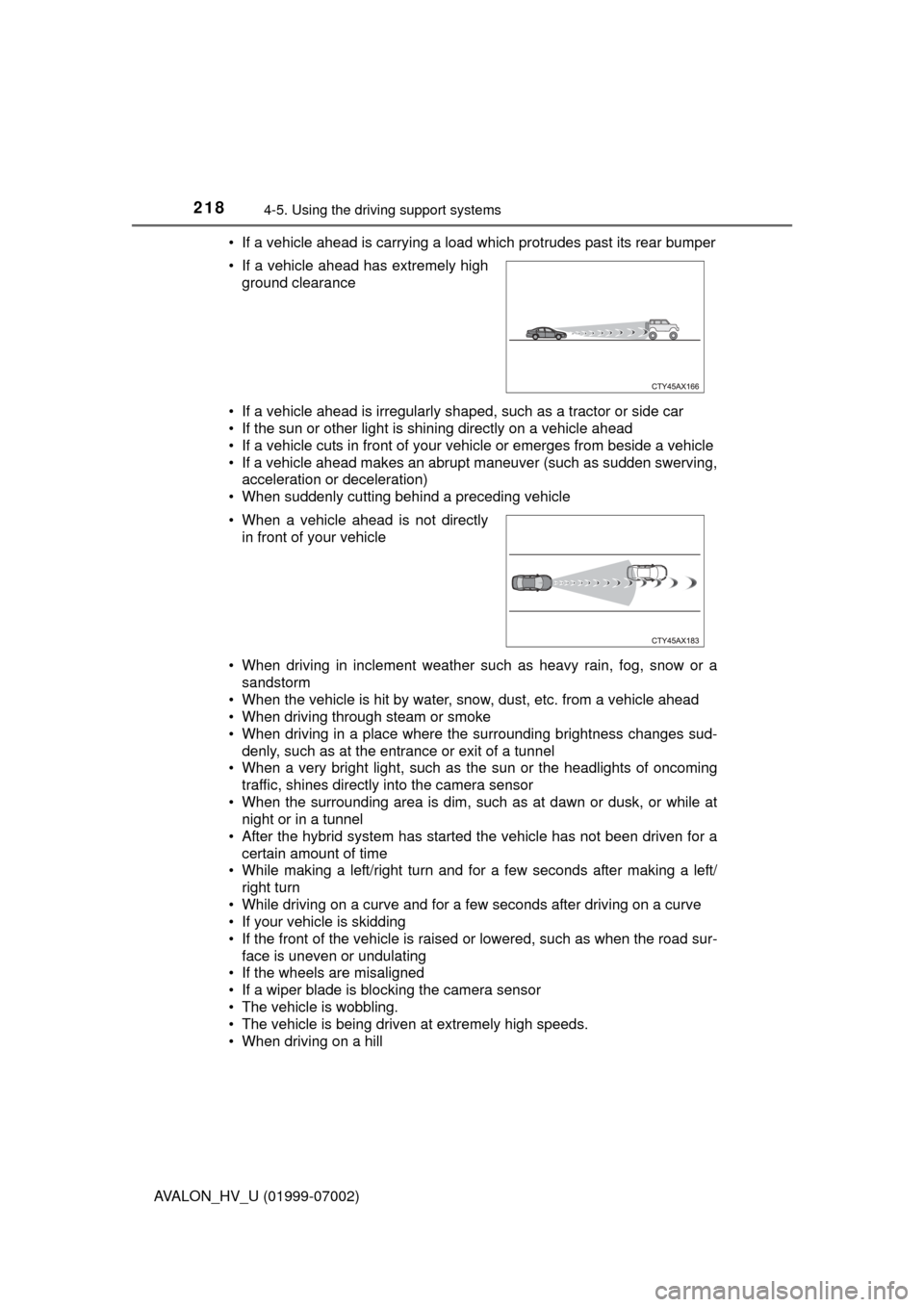
• When driving on a hill • If a vehicle ahead has extremely high
ground clearance
• When a vehicle ahead is not directly in front of your vehicle
Page 250 of 492

2504-5. Using the driving support systems
AVALON_HV_U (01999-07002)
■The outside rear view mirror indicators visibility
When under strong sunlight, the outside rear view mirror indicator may be dif-
ficult to see.
■ Rear Cross Traffic Alert buzzer hearing
Rear Cross Traffic Alert function may be difficult to hear over loud noises
such as high audio volume.
■ When there is a malfunction in the Blind Spot Monitor system
If a system malfunction is detected due to any of the following reasons,\
warn-
ing messages will be displayed:
● There is a malfunction with the sensors
● The sensors have become dirty
Clean the sensor and its surrounding area on the bumper.
● The outside temperature is extremely high or low
● The sensor voltage has become abnormal
If a message continues to be displayed, have the vehicle inspected by your
Toyota dealer.
■ Certification for the B lind Spot Monitor system
FCC ID: OAYSRR2A
This device complies with part 15 of the FCC Rules. Operation is subject to
the following two conditions:
(1)This device may not cause harmful interference, and
(2)this device must accept any interference received, including interference that may cause undesired operation.
FCC WARNING
Changes or modifications not expressly approved by the party responsible for
compliance could void the user’s authority to operate the equipment.
Rear Cross Traffic Alert buzzer (Rear Cross Traffic Alert function
only)
When a vehicle approaching from the right or left rear of the vehicle is
detected, a buzzer sounds from behind the rear seat.
3
Page 252 of 492
2524-5. Using the driving support systems
AVALON_HV_U (01999-07002)
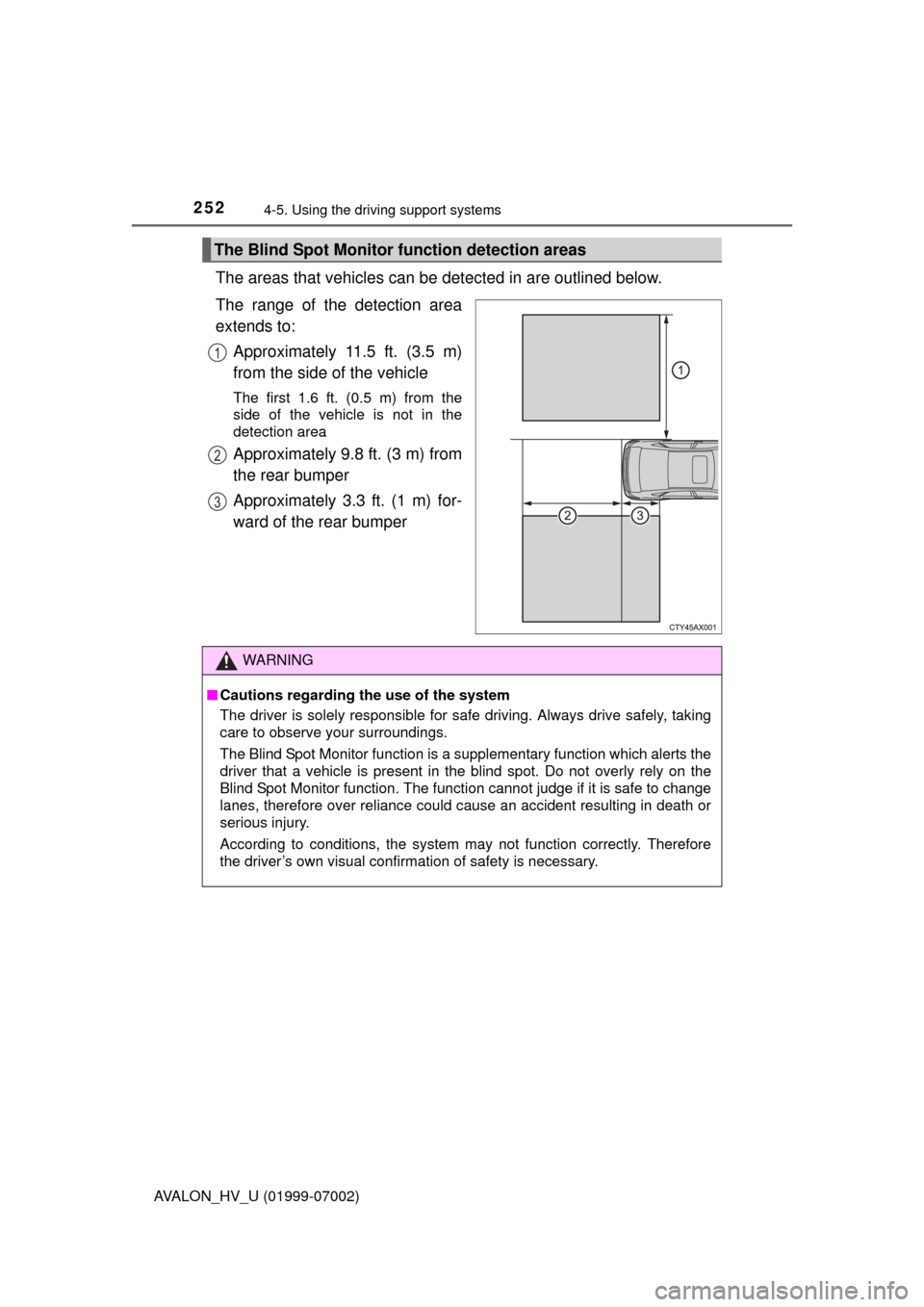
The areas that vehicles can be detected in are outlined below.
The range of the detection area
extends to: Approximately 11.5 ft. (3.5 m)
from the side of the vehicle
The first 1.6 ft. (0.5 m) from the
side of the vehicle is not in the
detection area
Approximately 9.8 ft. (3 m) from
the rear bumper
Approximately 3.3 ft. (1 m) for-
ward of the rear bumper
The Blind Spot Monitor function detection areas
1
2
3
WARNING
■Cautions regarding the use of the system
The driver is solely responsible for safe driving. Always drive safely, taking
care to observe your surroundings.
The Blind Spot Monitor function is a supplementary function which alerts the
driver that a vehicle is present in the blind spot. Do not overly rely on the
Blind Spot Monitor function. The function cannot judge if it is safe to change
lanes, therefore over reliance could cause an accident resulting in death or
serious injury.
According to conditions, the system may not function correctly. Therefore
the driver’s own visual confirmation of safety is necessary.
Page 254 of 492

2544-5. Using the driving support systems
AVALON_HV_U (01999-07002)■
Conditions under which the Blind Spot Monitor function may not func-
tion correctly
●The Blind Spot Monitor function may not detect vehicles correctly in the fol-
lowing conditions:
• During bad weather such as heavy rain, fog, snow etc.
• When ice or mud etc. is attached to the rear bumper
• When driving on a road surface that is wet due to rain, standing water etc.
• When there is a significant difference in speed between your vehicle and
the vehicle that enters the detection area
• When a vehicle is in the detection area from a stop and remains in the detection area as your vehicle accelerates
• When driving up or down consecutive steep inclines, such as hills, a dip
in the road etc.
• When multiple vehicles approach with only a small gap between each vehicle
• When vehicle lanes are wide, and the vehicle in the next lane is too far away from your vehicle
• When the vehicle that enters the detection area is traveling at about the
same speed as your vehicle
• When there is a significant difference in height between your vehicle and the vehicle that enters the detection area
• Directly after the BSM main switch is set to on
● Instances of the Blind Spot Monitor function unnecessarily detecting a vehi-
cle and/or object may increase under the following conditions:
• When there is only a short distance between your vehicle and a guardrail,
wall etc.
• When there is only a short distance between your vehicle and a following
vehicle
• When vehicle lanes are narrow and a vehicle driving 2 lanes across from your vehicle enters the detection area
• When items such as a bicycle carrier ar e installed on the rear of the vehi-
cle
Page 257 of 492
2574-5. Using the driving support systems
4
Driving
AVALON_HV_U (01999-07002)■
Conditions under which the Rear Cr oss Traffic Alert function will not
detect a vehicle
The Rear Cross Traffic Alert function is not designed to detect the following
types of vehicles and/or objects.
● Small motorcycles, bicycles, pedestrians etc.
*
●Vehicles approaching from directly behind
● Guardrails, walls, signs, parked vehicles and similar stationary objects
*
●Vehicles moving away from your vehicle
● Vehicles approaching from the parking spaces next to your vehicle
*
●Vehicles backing up in the parking space next to your vehicle*
*
: Depending on conditions, detection of a vehicle and/or object may occur.
■ Conditions under which the Rear Cross Traffic Alert function may not
function correctly
The Rear Cross Traffic Alert function may not detect vehicles correctly in the
following conditions:
● When ice or mud etc. is attached to the rear bumper
● During bad weather such as heavy rain, fog, snow etc.
● When ice or mud etc. is attached to the rear bumper
● When multiple vehicles approach continuously
● Shallow angle parking
● When a vehicle is approaching at high speed
● When parking on a steep incline, such as hills, a dip in the road etc.
● Directly after the BSM main switch is set to on
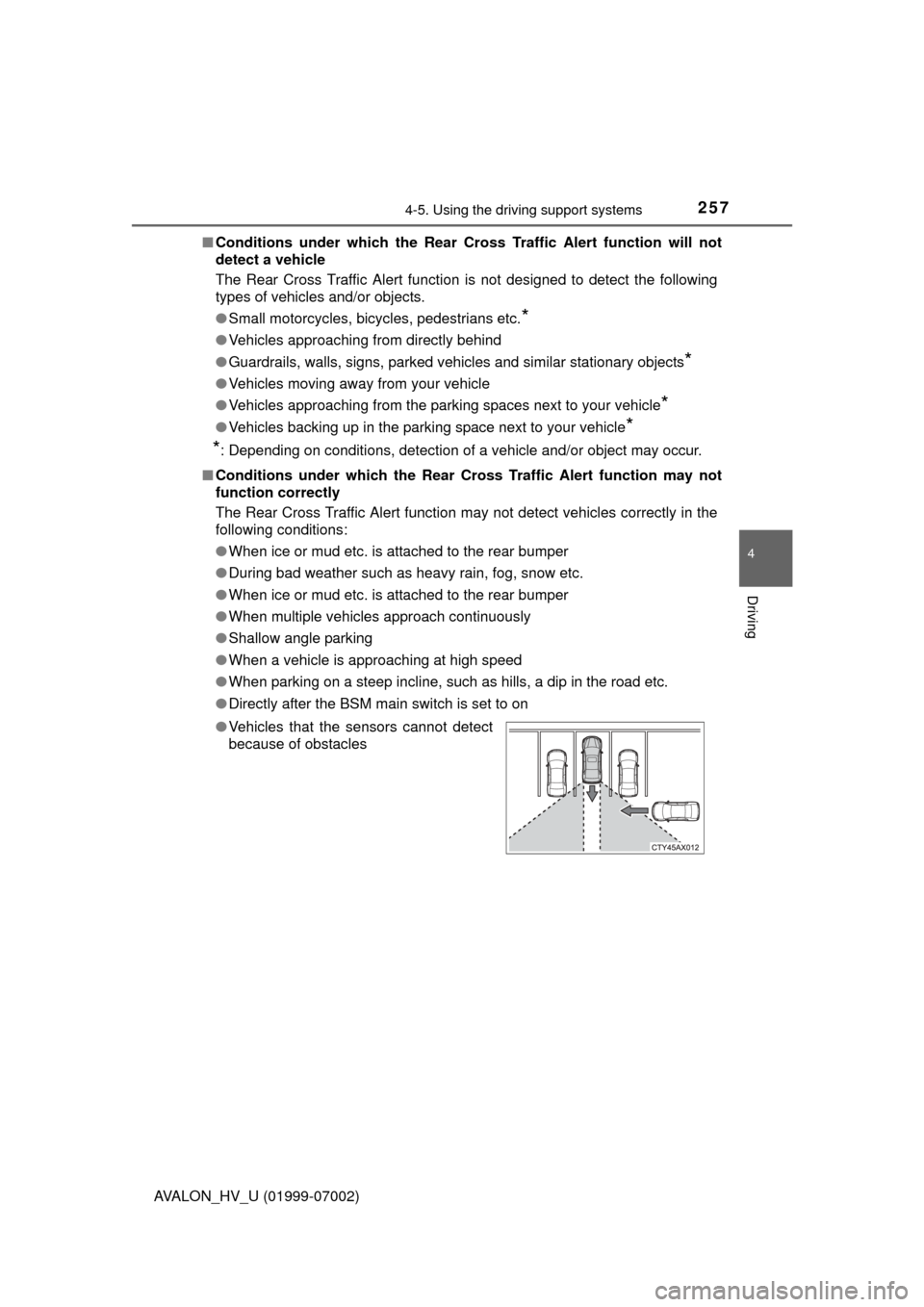
● Vehicles that the sensors cannot detect
because of obstacles
Page 325 of 492
3256-1. Maintenance and care
6
Maintenance and care
AVALON_HV_U (01999-07002)■
Aluminum wheels
●Remove any dirt immediately by using a neutral detergent. Do not use hard
brushes or abrasive cleaners. Do not use strong or harsh chemical clean-
ers.
Use the same mild detergent and wax as used on the paint.
● Do not use detergent on the wheels when they are hot, for example after
driving for long distance in the hot weather.
● Wash detergent from the wheels immediately after use.
■ Bumpers
Do not scrub with abrasive cleaners.
WARNING
■When washing the vehicle
Do not apply water to the inside of the engine compartment. Doing so may
cause the electrical components etc. to catch fire.
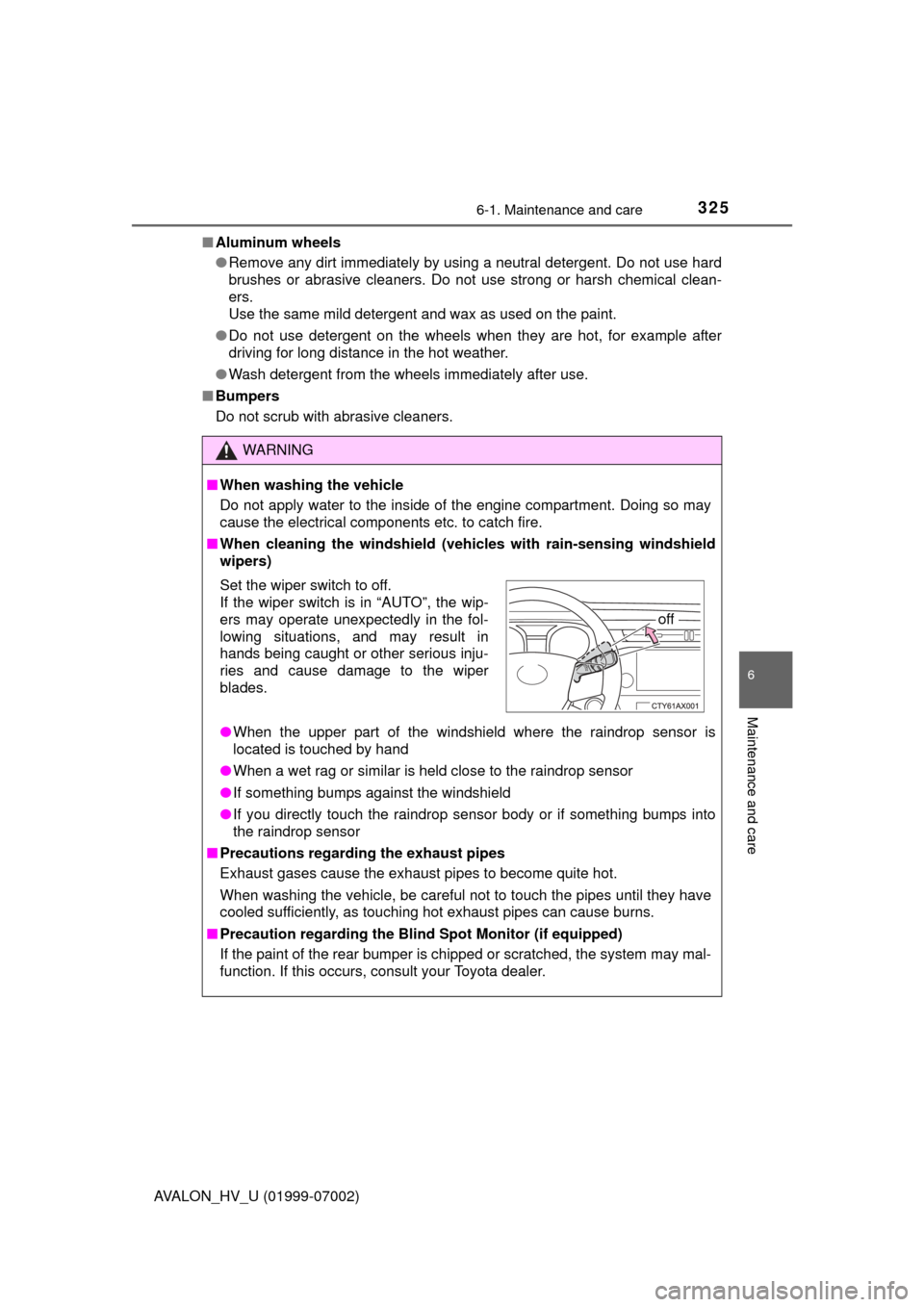
■ When cleaning the windshield (veh icles with rain-sensing windshield
wipers)
● When the upper part of the windshi eld where the raindrop sensor is
located is touched by hand
● When a wet rag or similar is held close to the raindrop sensor
● If something bumps against the windshield
● If you directly touch the raindrop sensor body or if something bumps into
the raindrop sensor
■ Precautions regarding the exhaust pipes
Exhaust gases cause the exhaust pipes to become quite hot.
When washing the vehicle, be careful not to touch the pipes until they have
cooled sufficiently, as touching hot exhaust pipes can cause burns.
■ Precaution regarding the Blind Spot Monitor (if equipped)
If the paint of the rear bumper is chipped or scratched, the system may mal-
function. If this occurs, consult your Toyota dealer.
Set the wiper switch to off.
If the wiper switch is in “AUTO”, the wip-
ers may operate unexpectedly in the fol-
lowing situations, and may result in
hands being caught or other serious inju-
ries and cause damage to the wiper
blades.
off