air condition TOYOTA AVALON HYBRID 2017 XX40 / 4.G User Guide
[x] Cancel search | Manufacturer: TOYOTA, Model Year: 2017, Model line: AVALON HYBRID, Model: TOYOTA AVALON HYBRID 2017 XX40 / 4.GPages: 492, PDF Size: 7.28 MB
Page 126 of 492

1263-2. Opening, closing and locking the doors and trunk
■Conditions affecting operation
The smart key system uses weak radio waves. In the following situations, the
communication between the electronic key and the vehicle may be affected,
preventing the smart key system, wireless remote control and immobilizer
system from operating properly. (Ways of coping: →P. 422)
● When the electronic key battery is depleted
● Near a TV tower, electric power plant, gas station, radio station, large dis-
play, airport or other facility that generates strong radio waves or electrical
noise
● When carrying a portable radio, cellular phone, cordless phone or other
wireless communication device
● When the electronic key is in contact with, or is covered by the following
metallic objects
• Cards to which aluminum foil is attached
• Cigarette boxes that have aluminum foil inside
• Metallic wallets or bags
• Coins
• Hand warmers made of metal
• Media such as CDs and DVDs
● When other wireless keys (that emit radio waves) are being used nearby
● When carrying the electronic key together with the following devices that
emit radio waves
• Another vehicle’s electronic key or a wireless key that emits radio waves
• Personal computers or personal digital assistants (PDAs)
• Digital audio players
• Portable game systems
● If window tint with a metallic content or metallic objects are attached to the
rear window
Page 260 of 492

2604-5. Using the driving support systems
■Operation of the air conditio ning system in Eco drive mode
Eco drive mode controls the heating/cooling operations and fan speed of the
air conditioning system to enhance fuel efficiency ( →P. 274). To improve air
conditioning performance, adjust the fan speed or turn off Eco drive mode.
■ Sport mode automatic deactivation
Sport mode is automatically deactivated if the power switch is turned off after
driving in sport mode.
Page 266 of 492
2664-6. Driving tips
◆Using Eco drive mode
When using Eco drive mode, the torque corresponding to the accel-
erator pedal depression amount can be generated more smoothly
than it is in normal conditions. In addition, the operation of the air
conditioning system (h eating/cooling) will be minimized, improving
the fuel economy. ( →P. 259)
◆Use of Hybrid System Indicator
The Eco-friendly driving is possible by keeping the Hybrid System
Indicator within Eco area. ( →P. 92)
◆Shift lever operation
Shift the shift lever to D when stopped at a traffic light, or driving in
heavy traffic etc. Shift the shift le ver to P when parking. When using
the N, there is no positive effect on fuel consumption. In the N, the
gasoline engine operates but elec tricity cannot be generated. Also,
when using the air conditioning s ystem, etc., the hybrid battery
(traction battery) power is consumed.
◆Accelerator pedal/brake pedal operation
● Drive your vehicle smoothly. Avoid abrupt acceleration and
deceleration. Gradual accelerati on and deceleration will make
more effective use of the electric motor (traction motor) without
having to use gasoline engine power.
● Avoid repeated acceleration. Repeated acceleration consumes
hybrid battery (traction battery) power, resulting in poor fuel con-
sumption. Battery power can be restored by driving with the
accelerator pedal slightly released.
Hybrid vehicle driving tips
For economical and ecological driv ing, pay attention to the fol-
lowing points:
Page 267 of 492

2674-6. Driving tips
4
Driving
◆When braking
Make sure to operate the brakes gently and in a timely manner. A
greater amount of electrical energy can be regenerated when slow-
ing down.
◆Delays
Repeated acceleration and deceleration, as well as long waits at
traffic lights, will lead to bad fuel economy. Check traffic reports
before leaving and avoid delays as much as possible. When driving
in a traffic jam, gently release the brake pedal to allow the vehicle to
move forward slightly while avoi ding overuse of the accelerator
pedal. Doing so can help control excessive gasoline consumption.
◆Highway driving
Control and maintain the vehicle at a constant speed. Before stop-
ping at a toll booth or similar, allow plenty of time to release the
accelerator and gently apply the br akes. A greater amount of elec-
trical energy can be regenerated when slowing down.
◆Air conditioning
Use the air conditioning only when necessary. Doing so can help
reduce excessive gasoline consumption.
In summer: When the ambient temperature is high, use the recircu-
lated air mode. Doing so will help to reduce the burden on the air
conditioning system and reduce fuel consumption as well.
In winter: Because the gasoline eng ine will not automatically cut out
until it and the interior of the vehi cle are warm, it will consume fuel.
Also, fuel consumption can be improved by avoiding overuse of the
heater.
◆Checking tire inflation pressure
Make sure to check the tire infl ation pressure frequently. Improper
tire inflation pressure can cause poor fuel economy.
Also, as snow tires can cause larg e amounts of friction, their use on
dry roads can lead to poor fuel economy. Use tires that are appro-
priate for the season.
Page 269 of 492
2694-6. Driving tips
4
Driving
●Use fluids that are appropriate to the prevailing outside tempera-
tures. • Engine oil
• Engine/power control unit coolant
• Washer fluid
● Have a service technician inspec t the condition of the 12-volt bat-
tery.
● Have the vehicle fitted with four snow tires or purchase a set of tire
chains for the front tires.
Ensure that all tires are the specified size and brand, and that chains
match the size of the tires.
Perform the following accordin g to the driving conditions:
● Do not try to forcibly open a window or move a wiper that is frozen.
Pour warm water over the frozen area to melt the ice. Wipe away
the water immediately to prevent it from freezing.
● To ensure proper operation of the climate control system fan,
remove any snow that has accumulated on the air inlet vents in
front of the windshield.
● Check for and remove any excess ice or snow that may have accu-
mulated on the exterior lights, vehicle’s roof, chassis, around the
tires or on the brakes.
● Remove any snow or mud from the bottom of your shoes before
getting in the vehicle.
Winter driving tips
Carry out the necessary preparations and inspections before
driving the vehicle in winter. Al ways drive the vehicle in a man-
ner appropriate to the prevailing weather conditions.
Preparation for winter
Before driving the vehicle
Page 273 of 492

273
Interior features5
5-1. Using the air conditioning system
and defogger
Automatic air conditioning system............................. 274
Seat heaters/seat ventilators........................ 283
5-2. Using the interior lights Interior lights list ................ 286
• Personal/interior light main switch ................... 287
• Personal/interior lights ............................. 287
• Ambient lights ............... 288
5-3. Using the storage features
List of storage features ..... 289
• Glove box...................... 290
• Console box .................. 291
• Cup holders .................. 292
• Auxiliary boxes.............. 293
Trunk features ................... 297 5-4. Other interior features
Other interior features ....... 299
• Sun visors ..................... 299
• Vanity mirrors................ 299
• Clock ............................. 300
• Outside temperature display........................... 301
• Power outlets ................ 302
• Armrest ......................... 304
• Rear sunshade ............. 304
• Coat hooks.................... 306
• Assist grips ................... 306
Garage door opener.......... 307
Safety Connect ................. 314
Compass ........................... 320
Page 274 of 492
2745-1. Using the air conditioning system and defogger
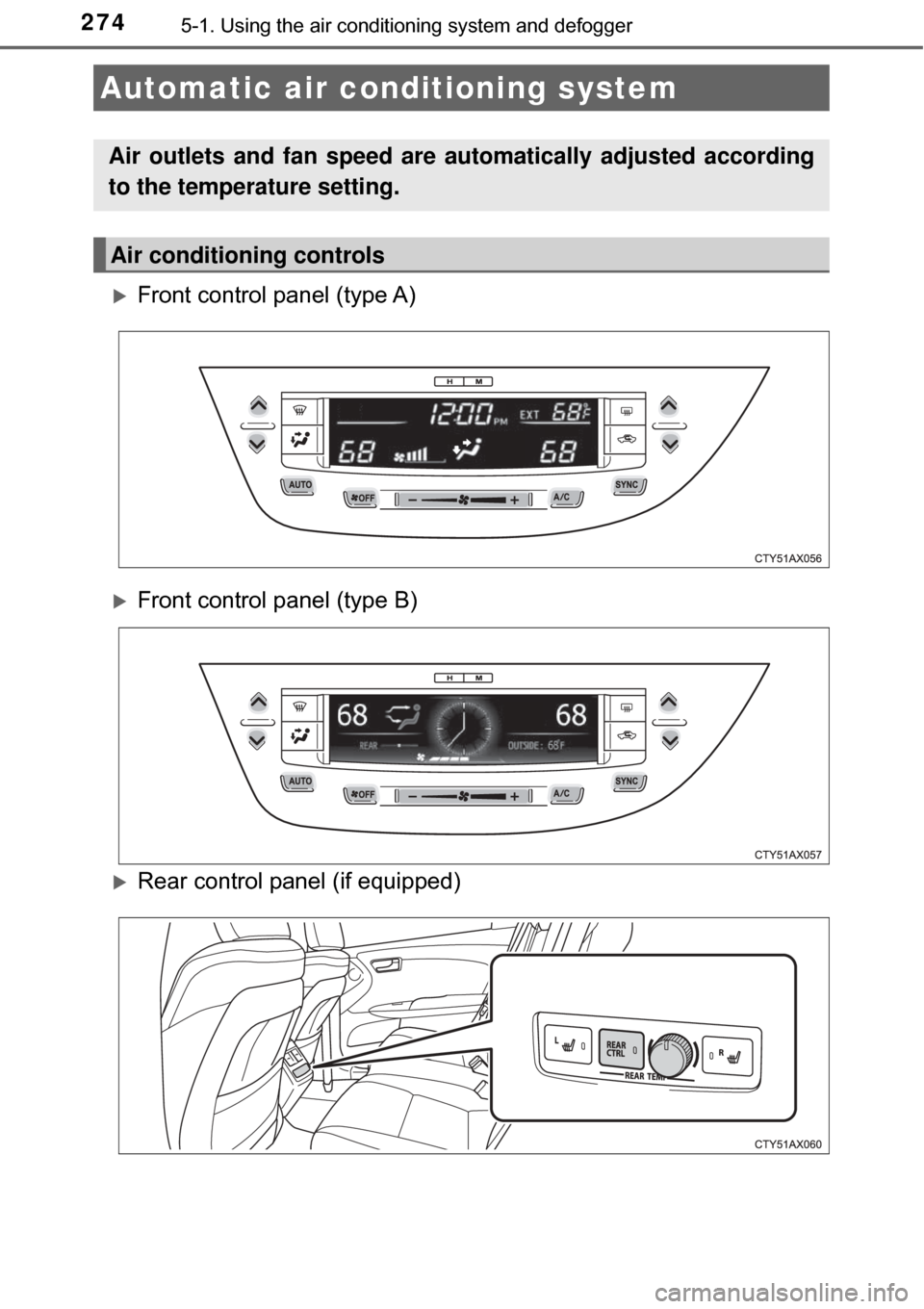
Front control panel (type A)
Front control panel (type B)
Rear control panel (if equipped)
Automatic air conditioning system
Air outlets and fan speed are automatically adjusted according
to the temperature setting.
Air conditioning controls
Page 275 of 492
2755-1. Using the air conditioning system and defogger
5
Interior features
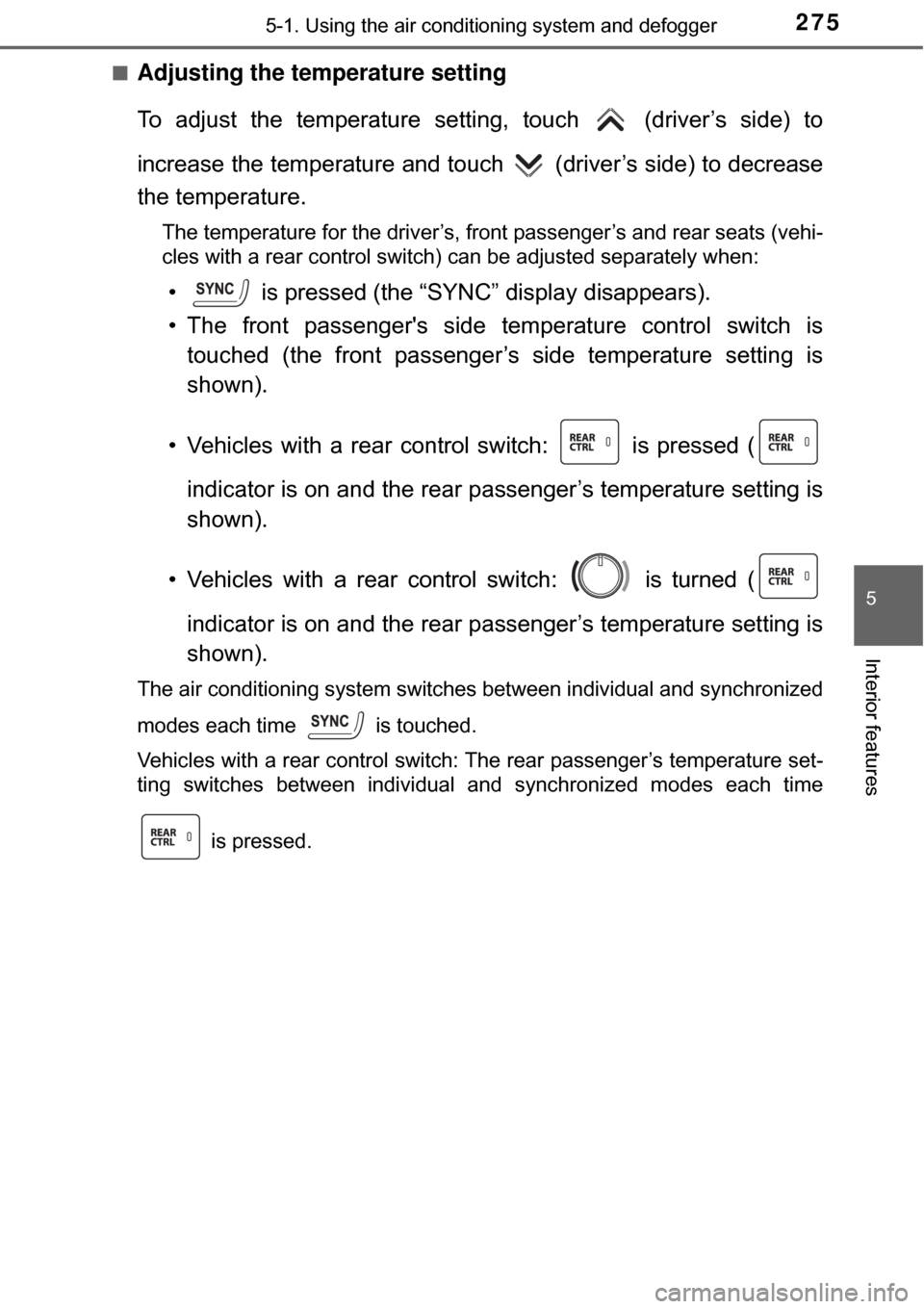
■Adjusting the temperature setting
To adjust the temperature setti ng, touch (driver’s side) to
increase the temperature and touch (driver’s side) to decrease
the temperature.
The temperature for the driver’s, front passenger’s and rear seats (vehi-
cles with a rear control switch) can be adjusted separately when:
• is pressed (the “SYNC” display disappears).
• The front passenger's side temperature control switch is touched (the front passenger’s side temperature setting is
shown).
• Vehicles with a rear control switch: is pressed ( indicator is on and the rear passenger’s temperature setting is
shown).
• Vehicles with a rear control switch: is turned ( indicator is on and the rear passenger’s temperature setting is
shown).
The air conditioning system switches between individual and synchronized
modes each time is touched.
Vehicles with a rear control switch: The rear passenger’s temperature set-
ting switches between individual and synchronized modes each time
is pressed.
Page 276 of 492
2765-1. Using the air conditioning system and defogger
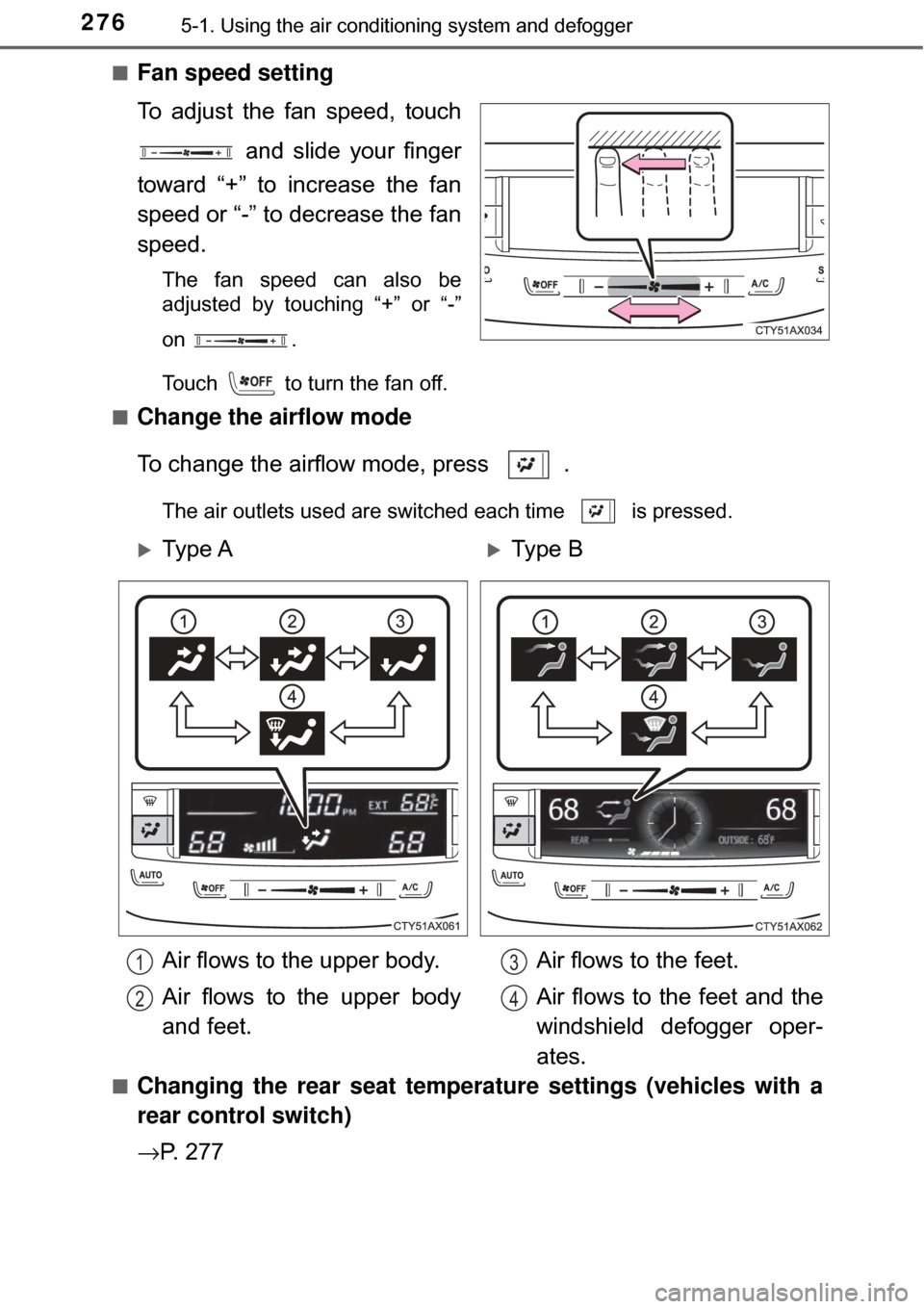
■Fan speed setting
To adjust the fan speed, touch
and slide your finger
toward “+” to increase the fan
speed or “-” to decrease the fan
speed.
The fan speed can also be
adjusted by touching “+” or “-”
on
.
Touch to turn the fan off.
■
Change the airflow mode
To change the airflow mode, press .
The air outlets used are switched each time is pressed.
■
Changing the rear seat temperature settings (vehicles with a
rear control switch)
→ P. 2 7 7
Ty p e AType B
Air flows to the upper body.
Air flows to the upper body
and feet. Air flows to the feet.
Air flows to the feet and the
windshield defogger oper-
ates.
1
2
3
4
Page 277 of 492
2775-1. Using the air conditioning system and defogger
5
Interior features
■Using automatic operation
Touch .
The air conditioning system begins to operate. Air outlets and fan speed
are automatically adjusted according to the temperature setting.
Adjust the temperature setting.
To stop the operation, touch .
■Changing the rear seat temperature settings (vehicles with a
rear control switch)
Turn clockwise to increase the temperature and turn
counterclockwise to decrease the temperature.
■Confirming automatic operation status
During automatic operati on, the operation status of fan speed, air
outlet mode, outside/recirculated air mode and whether the A/C is
on or off can be confirmed on the display by touching .
The display will return to its previous state after a few seconds.
■
Automatic mode indicator
If the fan speed setting or air fl ow modes are operated, the auto-
matic mode indicator goes off. However, automatic mode for func-
tions other than that operated is maintained.
Using the automatic air conditioning system
1
2
3OFF